

Microsoft is pushing Copilot deeper into the everyday Word experience, and the move to Word on iPhone is strategically bigger than it may first appear. The new feature lets users co-create drafts with AI inside the app, but it arrives with clear boundaries: it requires a Microsoft 365 Copilot license, it is not full document automation, and it still leaves important collaboration features imperfect or incomplete. That combination makes the update feel less like a flashy mobile demo and more like a careful step in Microsoft’s broader effort to make AI feel native to Office rather than bolted on.
Microsoft’s Copilot strategy has evolved fast enough that even regular Office users can lose track of where the assistant actually lives. What started as a chat-first layer across Microsoft 365 has become a much broader productivity model, with Copilot now embedded into document creation, editing, summarization, and workflow support across the suite. Word has always been the clearest place to showcase that promise because writing is immediate, visible, and easy to measure in terms of time saved and friction removed.
The iPhone piece matters because mobile work is no longer secondary work. People draft emails between meetings, shape notes during transit, and refine documents in short bursts before returning to a desktop later. Microsoft appears to be betting that the blank-page problem is just as real on a phone as it is on a laptop, and that AI assistance is most valuable when it shows up at the exact moment the user starts typing.
That strategic shift also explains the language Microsoft is using. The company is describing the experience as co-creation, not full automation. That distinction is important because it tells users that Copilot is there to accelerate drafting, refine text, and help structure ideas, but not replace authorship or claim total control over the final document. In a mobile context, that framing is both more realistic and more politically palatable inside an enterprise environment.
The update also fits Microsoft’s broader pattern of staged AI rollouts. Rather than shipping a giant everything-at-once feature, the company tends to release a useful core and then expand it over time as telemetry, licensing, and UX constraints settle down. That approach has been visible in earlier Copilot updates for Word, including changes that made direct document editing more prominent and pushed the assistant closer to the actual writing surface.
From a platform perspective, this is exactly where Microsoft wants the story to go. The company has spent two years making Copilot feel less like a separate app and more like an embedded productivity layer. Word on iPhone is not the most dramatic part of that transition, but it is a telling one: if Microsoft can make AI feel useful on a small screen, it can make the whole Microsoft 365 experience feel more continuous across devices.
The key difference is that Microsoft is not asking users to leave the document and jump to a separate chatbot just to get a first pass. That reduction in friction is the entire point. On iPhone, where attention is fragmented and screen space is limited, a feature that trims away steps can be more valuable than one that merely adds capability.
The app also supports prompt-driven refinement. Users can reference other parts of the document using the “/” command, update existing content with clearer instructions, and undo changes if the output is not helpful. Those features matter because they turn Copilot from a one-shot generator into a more iterative editing partner, which is a much better fit for real writing workflows.
A few practical details stand out:
For enterprise customers, licensing changes the adoption calculus. If AI drafting is available only to paying users, IT departments may need to think harder about seat allocation, policy controls, and whether mobile drafting belongs in the same package as desktop productivity. That makes the feature feel more strategic than casual, because once AI is attached to licensing, it becomes part of procurement and governance, not just UX.
Microsoft seems to understand that the first draft is often the hardest part. A mobile Copilot feature is not trying to replace a polished desktop editing session; it is trying to get users past the moment of hesitation when they are staring at a blank page. That is a very different value proposition, and one that fits how people actually use phones during the day.
That is why Microsoft’s careful framing around co-creation makes sense. It lowers the expectation that the phone should be a full publishing machine and instead suggests that the phone is a place where users can start the process. That is a much more defensible design choice than pretending the mobile version of Word should suddenly behave like a desktop authoring suite.
The mobile-first logic also strengthens Microsoft’s subscription pitch. If Copilot makes mobile Word useful enough to become habitual, then Microsoft 365 becomes harder to leave. It is not just a desktop productivity bundle anymore; it becomes an AI-enabled writing environment that follows the user around.
Microsoft seems to be making a quiet but important bet: the best AI feature on mobile is not the most ambitious one. It is the one that feels like a fast path to useful text without overwhelming the screen. That is why the company’s restraint here is more interesting than the feature list itself.
Those limitations matter because mobile users are unforgiving when an AI tool feels half-finished. If the experience is too partial, too gated, or too hard to discover, the feature can be dismissed as a teaser rather than a useful addition. That risk is real, especially in a product family where Microsoft has been promising a lot of AI value.
That means the feature is more compelling for people who need to move quickly from idea to draft than for those whose work lives in redlines and structured approvals. For enterprise buyers, that distinction is crucial. A mobile AI tool that helps an employee start a memo is useful; a tool that helps a team manage a regulated document workflow is a different class of product entirely.
The lack of image insertion support also keeps the feature in its lane. Microsoft appears to be choosing text-first assistance over richer document assembly, which again reinforces the idea that this release is about writing acceleration, not end-to-end document production. That restraint may frustrate some users, but it also reduces the chance of messy output on a cramped screen.
That also fits Microsoft’s broader AI philosophy. Across its Copilot messaging, the company has repeatedly emphasized that AI should assist users, not replace judgment. In a writing app, that means keeping the human in the loop, leaving space for revisions, and avoiding the kind of overconfident automation that leads to trust problems later.
That strategy is important because Microsoft’s biggest advantage is not novelty. It is distribution. The company owns the productivity workflow in a way few rivals can match, and it can bring AI into the places where users already work rather than asking them to learn a new environment. In that sense, Word on iPhone is a quiet reinforcement of Microsoft’s strongest moat.
That is a smarter long-term positioning play because embedded tools are harder to replace. Once users associate AI assistance with the actual act of writing inside Word, the switching cost rises. A standalone chatbot may be useful, but it does not own the workflow in the same way a native feature does.
Microsoft’s recent Copilot updates also suggest an increasingly managed enterprise posture, with more admin controls, adoption reporting, and readiness support. That matters because it shows the company is treating Copilot not as a gimmick but as something that must be governed, measured, and deployed at scale. The iPhone feature belongs to that same operating model.
For subscribers, the promise is simple: Microsoft 365 should feel more useful on every screen. That kind of continuity is hard to argue with, particularly for users who already live inside the Microsoft ecosystem. The more places Copilot appears, the more Microsoft can frame AI as part of the core Office experience rather than a separate experiment.
That gives Microsoft a structural advantage on iPhone, even though Apple owns the device and the operating system. Microsoft owns the file formats, the document workflows, and a large share of the enterprise productivity stack. A useful Copilot feature in Word makes it less likely that users will drift to third-party writing apps or generic chat tools for the same task.
The update also helps Microsoft make Office look current without requiring a dramatic interface redesign. That is not trivial. One of the biggest challenges for mature software platforms is appearing modern while preserving the workflows that made them dominant in the first place. Copilot on iPhone helps Microsoft thread that needle.
A few competitive advantages stand out:
Google is a different kind of competitor, because it can lean on Workspace and its own AI efforts. But Microsoft’s advantage remains the same: it has more document gravity. In productivity software, the app that owns the document often owns the workflow, and that is exactly what Microsoft is trying to preserve.
The biggest UX challenge is clarity. Users need to know what Copilot is doing, what it has changed, and how to undo those changes without losing momentum. That sounds basic, but in AI products it is the difference between a tool that feels trustworthy and a tool that feels risky.
That legibility is especially important because users on mobile have less patience for experimentation. On a desktop, a confusing AI prompt may be annoying but tolerable. On a phone, the same confusion can feel like a waste of attention. Microsoft seems aware of that, which is why the current rollout appears tightly constrained.
The design priorities are straightforward:
If the output is inconsistent, the feature becomes a liability. If the experience is controlled and predictable, it becomes a time-saver. That is the narrow line Microsoft has to walk, especially on a device where every gesture competes with the pace of real life.
For enterprises, the picture is more complicated. Licensing, policy controls, data governance, and collaboration behavior all matter more than the novelty of AI drafting. A tool that is useful for individual writing may still be too incomplete for teams that rely on redlines, comments, and detailed review processes.
Enterprises will focus on how the feature behaves in managed environments and whether it aligns with existing workflows. If mobile Copilot cannot participate cleanly in comments, Track Changes, or image-heavy documents, many business users will still prefer desktop Word for serious work. That does not make the mobile feature irrelevant, but it does define its ceiling.
The enterprise upside is still meaningful. Mobile drafting can improve responsiveness, reduce bottlenecks, and help teams move faster between meetings. But that benefit will be strongest when the mobile app is treated as a starting point, not a replacement for formal document review.
In other words, the mobile feature is not just a product update; it is another test of whether Microsoft can make AI feel safe enough for enterprise adoption while still being compelling enough for individual users. That balancing act is now central to Copilot’s future.
A final concern is trust. Microsoft has been careful to note that AI can be wrong, but every new feature still has to earn confidence on its own. On mobile, where users expect speed and simplicity, even a small trust failure can feel bigger than it does on desktop.
The more interesting long-term question is whether this is a stepping stone toward broader mobile co-creation across Microsoft 365. Word is the most obvious place to begin, but the same logic could easily extend to email drafting, notes, presentations, and other short-form content tasks. That would turn Copilot from a helper into a more continuous layer across the mobile productivity stack.
Microsoft’s challenge now is not simply to add more AI to Word. It is to make AI feel normal inside Word, across devices, across user types, and across the narrow, impatient conditions of mobile work. If it succeeds, this could be one of those small releases that quietly reshapes expectations for what a productivity app should do.
Source: Windows Report https://windowsreport.com/microsoft-brings-ai-document-generation-to-word-on-ios/
 Background
Microsoft’s Copilot strategy has evolved fast enough that even regular Office users can lose track of where the assistant actually lives. What started as a chat-first layer across Microsoft 365 has become a much broader productivity model, with Copilot now embedded into document creation, editing, summarization, and workflow support across the suite. Word has always been the clearest place to showcase that promise because writing is immediate, visible, and easy to measure in terms of time saved and friction removed.The iPhone piece matters because mobile work is no longer secondary work. People draft emails between meetings, shape notes during transit, and refine documents in short bursts before returning to a desktop later. Microsoft appears to be betting that the blank-page problem is just as real on a phone as it is on a laptop, and that AI assistance is most valuable when it shows up at the exact moment the user starts typing.
That strategic shift also explains the language Microsoft is using. The company is describing the experience as co-creation, not full automation. That distinction is important because it tells users that Copilot is there to accelerate drafting, refine text, and help structure ideas, but not replace authorship or claim total control over the final document. In a mobile context, that framing is both more realistic and more politically palatable inside an enterprise environment.
The update also fits Microsoft’s broader pattern of staged AI rollouts. Rather than shipping a giant everything-at-once feature, the company tends to release a useful core and then expand it over time as telemetry, licensing, and UX constraints settle down. That approach has been visible in earlier Copilot updates for Word, including changes that made direct document editing more prominent and pushed the assistant closer to the actual writing surface.
From a platform perspective, this is exactly where Microsoft wants the story to go. The company has spent two years making Copilot feel less like a separate app and more like an embedded productivity layer. Word on iPhone is not the most dramatic part of that transition, but it is a telling one: if Microsoft can make AI feel useful on a small screen, it can make the whole Microsoft 365 experience feel more continuous across devices.
What Microsoft Changed
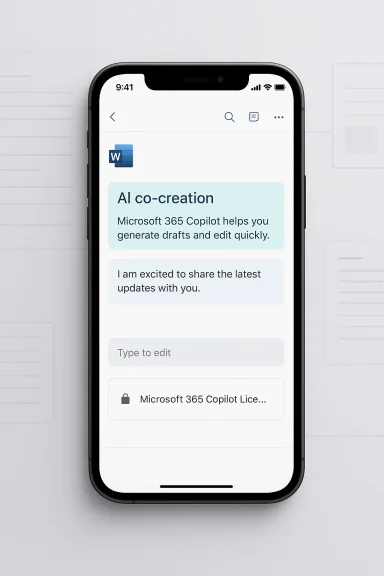
At the simplest level, Microsoft has given Word on iPhone a new way to draft and refine content with Copilot directly inside a document. Users can invoke the AI from within Word, enter a prompt, and receive a generated draft or rewrite that they can then edit manually. That makes the mobile experience feel much closer to the desktop Copilot workflow, even though the implementation is still far more constrained.The key difference is that Microsoft is not asking users to leave the document and jump to a separate chatbot just to get a first pass. That reduction in friction is the entire point. On iPhone, where attention is fragmented and screen space is limited, a feature that trims away steps can be more valuable than one that merely adds capability.
The mobile workflow
Microsoft’s approach is intentionally narrow. The feature is designed to help users co-create inside an existing file rather than generate an entirely new document from scratch in one go. That may sound like a limitation, but it is also a usability choice. Small-screen software works best when it compresses the number of decisions the user has to make, not when it adds layers of options that are hard to navigate with a thumb.The app also supports prompt-driven refinement. Users can reference other parts of the document using the “/” command, update existing content with clearer instructions, and undo changes if the output is not helpful. Those features matter because they turn Copilot from a one-shot generator into a more iterative editing partner, which is a much better fit for real writing workflows.
A few practical details stand out:
- Users start from inside Word on iPhone, not a separate app.
- Copilot can draft from prompts and revise existing text.
- The experience is tied to a Microsoft 365 Copilot license.
- The workflow is iterative, not fully automatic.
- Users retain direct control over the document.
Why the license matters
The Microsoft 365 Copilot license requirement is not a minor footnote. It turns the feature into a premium capability, which means Microsoft is not just broadening access to AI; it is also reinforcing Copilot’s role as a monetization layer. That is consistent with how Microsoft has positioned AI across Microsoft 365 more generally.For enterprise customers, licensing changes the adoption calculus. If AI drafting is available only to paying users, IT departments may need to think harder about seat allocation, policy controls, and whether mobile drafting belongs in the same package as desktop productivity. That makes the feature feel more strategic than casual, because once AI is attached to licensing, it becomes part of procurement and governance, not just UX.
Why Mobile Matters
Mobile productivity has become one of the most interesting battlegrounds in software, precisely because it is so easy to underestimate. Many people still think of phones as places where work is consumed rather than created, but that is no longer true. The phone is often where a thought starts, where a first sentence appears, or where a rough outline gets built before the “real” work happens later on a larger screen.Microsoft seems to understand that the first draft is often the hardest part. A mobile Copilot feature is not trying to replace a polished desktop editing session; it is trying to get users past the moment of hesitation when they are staring at a blank page. That is a very different value proposition, and one that fits how people actually use phones during the day.
The blank-page problem
The blank-page problem is especially acute on mobile because the device itself makes drafting feel more effortful. Typing is slower, context is more fragmented, and the interface leaves less room for inspiration to turn into structure. A feature that can generate a credible starting point in that environment has real practical value, even if it cannot finish the job.That is why Microsoft’s careful framing around co-creation makes sense. It lowers the expectation that the phone should be a full publishing machine and instead suggests that the phone is a place where users can start the process. That is a much more defensible design choice than pretending the mobile version of Word should suddenly behave like a desktop authoring suite.
The mobile-first logic also strengthens Microsoft’s subscription pitch. If Copilot makes mobile Word useful enough to become habitual, then Microsoft 365 becomes harder to leave. It is not just a desktop productivity bundle anymore; it becomes an AI-enabled writing environment that follows the user around.
Short bursts, real gains
A limited mobile feature set can actually be a strength. Users are often drafting in short bursts, and those bursts are exactly where speed matters more than feature density. If Copilot can help with the first paragraph, a tricky rewrite, or a quick respecification of tone, that may be enough to change behavior.Microsoft seems to be making a quiet but important bet: the best AI feature on mobile is not the most ambitious one. It is the one that feels like a fast path to useful text without overwhelming the screen. That is why the company’s restraint here is more interesting than the feature list itself.
The Feature Limits
The limits are as important as the release itself. Users cannot create entirely new documents automatically, Copilot does not support inserting images directly, and collaborative features are still incomplete. That means this is not a full mobile replacement for desktop Word, and Microsoft does not seem to be pretending otherwise.Those limitations matter because mobile users are unforgiving when an AI tool feels half-finished. If the experience is too partial, too gated, or too hard to discover, the feature can be dismissed as a teaser rather than a useful addition. That risk is real, especially in a product family where Microsoft has been promising a lot of AI value.
Collaboration gaps
The biggest holes are in the collaborative workflow. Microsoft has not fully solved the problem of comments and Track Changes on iPhone in the context of AI drafting, and that is notable because those are precisely the tools that make Word useful in team settings. Without them, Copilot on iPhone is better suited to individual drafting than to serious review cycles.That means the feature is more compelling for people who need to move quickly from idea to draft than for those whose work lives in redlines and structured approvals. For enterprise buyers, that distinction is crucial. A mobile AI tool that helps an employee start a memo is useful; a tool that helps a team manage a regulated document workflow is a different class of product entirely.
The lack of image insertion support also keeps the feature in its lane. Microsoft appears to be choosing text-first assistance over richer document assembly, which again reinforces the idea that this release is about writing acceleration, not end-to-end document production. That restraint may frustrate some users, but it also reduces the chance of messy output on a cramped screen.
Why the limits may be deliberate
There is a strong argument that the limitations are not bugs in the story but guardrails around it. Microsoft is trying to make Copilot useful enough to be worth paying for, while keeping the experience simple enough that it does not collapse under its own ambition. On iPhone, simplicity is not a luxury; it is the product.That also fits Microsoft’s broader AI philosophy. Across its Copilot messaging, the company has repeatedly emphasized that AI should assist users, not replace judgment. In a writing app, that means keeping the human in the loop, leaving space for revisions, and avoiding the kind of overconfident automation that leads to trust problems later.
How This Fits Microsoft’s Copilot Strategy
This update is best understood as another step in Microsoft’s effort to make Copilot feel like an operating layer across Microsoft 365. The company no longer wants Copilot to be perceived as a separate assistant sitting beside Word; it wants it to be part of the writing surface itself. That shift has been visible in Word on desktop, on the web, and now on iPhone.That strategy is important because Microsoft’s biggest advantage is not novelty. It is distribution. The company owns the productivity workflow in a way few rivals can match, and it can bring AI into the places where users already work rather than asking them to learn a new environment. In that sense, Word on iPhone is a quiet reinforcement of Microsoft’s strongest moat.
Embedded workflow, not sidecar AI
The more interesting part of the strategy is how Microsoft is changing the meaning of “Copilot.” Early messaging focused on summaries, chat, and drafting help. The newer version is more embedded and operational: Copilot should be right there in the document, not off to the side as a separate destination.That is a smarter long-term positioning play because embedded tools are harder to replace. Once users associate AI assistance with the actual act of writing inside Word, the switching cost rises. A standalone chatbot may be useful, but it does not own the workflow in the same way a native feature does.
Microsoft’s recent Copilot updates also suggest an increasingly managed enterprise posture, with more admin controls, adoption reporting, and readiness support. That matters because it shows the company is treating Copilot not as a gimmick but as something that must be governed, measured, and deployed at scale. The iPhone feature belongs to that same operating model.
The subscription story
The monetization angle is impossible to ignore. By tying the feature to a Copilot license, Microsoft reinforces the idea that AI is not simply a free add-on to Office; it is a premium capability with value attached. That is a powerful commercial signal, especially if the mobile experience becomes a daily habit rather than a novelty.For subscribers, the promise is simple: Microsoft 365 should feel more useful on every screen. That kind of continuity is hard to argue with, particularly for users who already live inside the Microsoft ecosystem. The more places Copilot appears, the more Microsoft can frame AI as part of the core Office experience rather than a separate experiment.
Competitive Positioning
Microsoft is not just competing with other office suites here. It is also competing with standalone AI writing tools, mobile assistants, and the broader intelligence layers from Apple and Google. The real contest is not who can generate text at all; it is who can generate text in the place where the work already happens.That gives Microsoft a structural advantage on iPhone, even though Apple owns the device and the operating system. Microsoft owns the file formats, the document workflows, and a large share of the enterprise productivity stack. A useful Copilot feature in Word makes it less likely that users will drift to third-party writing apps or generic chat tools for the same task.
Ecosystem gravity
This is where ecosystem gravity matters more than feature parity. Rivals can copy the idea of prompt-based drafting, but they cannot easily copy the combination of file compatibility, user trust, and cross-device continuity that Microsoft has spent decades building. That is why even a limited mobile rollout can have strategic weight.The update also helps Microsoft make Office look current without requiring a dramatic interface redesign. That is not trivial. One of the biggest challenges for mature software platforms is appearing modern while preserving the workflows that made them dominant in the first place. Copilot on iPhone helps Microsoft thread that needle.
A few competitive advantages stand out:
- Stronger Microsoft 365 stickiness.
- Less incentive to use a separate writing app.
- Better AI continuity across devices.
- More visible value for paid subscribers.
- A stronger story for business users on Apple hardware.
Apple and Google in the frame
The Apple angle is subtle but real. Microsoft is not trying to outdesign Apple on the phone; it is trying to make Microsoft services feel indispensable on Apple hardware. That is a much more achievable objective, and one Microsoft has been pursuing for years through apps that feel native enough to be accepted, even if they never become platform-defining in the Apple sense.Google is a different kind of competitor, because it can lean on Workspace and its own AI efforts. But Microsoft’s advantage remains the same: it has more document gravity. In productivity software, the app that owns the document often owns the workflow, and that is exactly what Microsoft is trying to preserve.
User Experience and Design Tradeoffs
Mobile AI is unforgiving. If a feature is difficult to discover, too slow to respond, or too messy to interpret, users abandon it quickly. That means Microsoft has to fit AI into an interface that was originally designed for text entry, formatting, and navigation, all without making Word on iPhone feel crowded or confusing.The biggest UX challenge is clarity. Users need to know what Copilot is doing, what it has changed, and how to undo those changes without losing momentum. That sounds basic, but in AI products it is the difference between a tool that feels trustworthy and a tool that feels risky.
Making AI legible
A good mobile AI feature should be almost boring in the best sense. It should save time without demanding much thought. If Copilot can stay legible—showing users what is generated, what remains editable, and what still belongs to the human author—then it has a chance to become habitual rather than merely impressive.That legibility is especially important because users on mobile have less patience for experimentation. On a desktop, a confusing AI prompt may be annoying but tolerable. On a phone, the same confusion can feel like a waste of attention. Microsoft seems aware of that, which is why the current rollout appears tightly constrained.
The design priorities are straightforward:
- Keep the AI entry point obvious.
- Keep the number of taps low.
- Keep output easy to review.
- Keep undo simple.
- Keep the experience fast and predictable.
Trust as a design requirement
Trust is part of the interface now. Users need confidence not just in what Copilot can do, but in what it will not do. Microsoft has been careful in its Copilot materials to frame the assistant as helpful but not authoritative, and that caution should be read as a design requirement rather than a disclaimer.If the output is inconsistent, the feature becomes a liability. If the experience is controlled and predictable, it becomes a time-saver. That is the narrow line Microsoft has to walk, especially on a device where every gesture competes with the pace of real life.
Enterprise vs Consumer Impact
For consumers, the value proposition is simple: Word on iPhone may now be a more useful place to start writing. If someone wants to draft a note, outline, or short document on the go, Copilot can make that first step much easier. That is the kind of feature people may not talk about much, but eventually use all the time.For enterprises, the picture is more complicated. Licensing, policy controls, data governance, and collaboration behavior all matter more than the novelty of AI drafting. A tool that is useful for individual writing may still be too incomplete for teams that rely on redlines, comments, and detailed review processes.
Consumer simplicity, enterprise caution
Consumers tend to evaluate AI on convenience. Does it save time? Does it help me get unstuck? Does it feel fun or at least useful? That is a much lower bar than the one enterprises impose, which is why the same feature can be a consumer win and an IT headache at the same time.Enterprises will focus on how the feature behaves in managed environments and whether it aligns with existing workflows. If mobile Copilot cannot participate cleanly in comments, Track Changes, or image-heavy documents, many business users will still prefer desktop Word for serious work. That does not make the mobile feature irrelevant, but it does define its ceiling.
The enterprise upside is still meaningful. Mobile drafting can improve responsiveness, reduce bottlenecks, and help teams move faster between meetings. But that benefit will be strongest when the mobile app is treated as a starting point, not a replacement for formal document review.
Governance remains the hard part
The more AI moves into Word, the more governance matters. Microsoft can ship all the drafting help it wants, but organizations will still need to decide what kinds of content can be generated, who can use the feature, and how much reliance is acceptable in sensitive workflows. That is especially true in regulated or high-stakes environments.In other words, the mobile feature is not just a product update; it is another test of whether Microsoft can make AI feel safe enough for enterprise adoption while still being compelling enough for individual users. That balancing act is now central to Copilot’s future.
Strengths and Opportunities
The update has clear strengths, and they are not all about raw AI capability. The real opportunity is to make Word on iPhone feel like a more natural place to start writing, while using the same Copilot branding and licensing model that Microsoft has been extending across the Microsoft 365 stack. If that works, the feature could improve user habit formation and strengthen Microsoft’s subscription value story.- Better first-draft speed on a device people already carry.
- Stronger Microsoft 365 stickiness across phone and desktop.
- Clearer AI value for paid subscribers.
- A more coherent Copilot experience across platforms.
- Lower friction than bouncing out to a separate chatbot.
- More natural alignment with mobile drafting workflows.
- A chance to deepen trust in Word as an AI-enabled editor.
Risks and Concerns
The biggest risk is that the limitations dominate the conversation. If users see the feature as too partial, too gated, or too awkward to use in collaborative settings, they may conclude that Copilot on iPhone is more of a teaser than a meaningful workflow tool. That would be an unfortunate outcome for a release that is trying to show practical progress.- Partial functionality may frustrate power users.
- Collaboration gaps may limit team adoption.
- AI output quality may vary depending on the prompt.
- Mobile screens can amplify UI clutter.
- Licensing can confuse casual users.
- Brand inconsistency across Copilot surfaces may persist.
- Overpromising could erode trust.
A final concern is trust. Microsoft has been careful to note that AI can be wrong, but every new feature still has to earn confidence on its own. On mobile, where users expect speed and simplicity, even a small trust failure can feel bigger than it does on desktop.
Looking Ahead
What happens next will depend on how quickly Microsoft widens the feature set and how clearly it communicates the boundaries. If the company can keep the interaction fast, obvious, and genuinely useful, Word for iPhone could become one of those quiet updates that changes habits more than headlines. If not, it risks becoming just another AI label attached to a familiar app.The more interesting long-term question is whether this is a stepping stone toward broader mobile co-creation across Microsoft 365. Word is the most obvious place to begin, but the same logic could easily extend to email drafting, notes, presentations, and other short-form content tasks. That would turn Copilot from a helper into a more continuous layer across the mobile productivity stack.
What to watch next
- Whether Microsoft expands mobile Copilot beyond the current Word limits.
- Whether comments, Track Changes, and richer collaboration arrive later.
- Whether licensing and pricing get clearer for iPhone users.
- Whether Microsoft brings the same co-creation model to other Office apps.
- Whether user adoption grows or remains shallow.
Microsoft’s challenge now is not simply to add more AI to Word. It is to make AI feel normal inside Word, across devices, across user types, and across the narrow, impatient conditions of mobile work. If it succeeds, this could be one of those small releases that quietly reshapes expectations for what a productivity app should do.
Source: Windows Report https://windowsreport.com/microsoft-brings-ai-document-generation-to-word-on-ios/
Last edited:
