

Microsoft’s Copilot Connectors promise to end years of frantic context‑switching by letting Copilot read, index, and reason over data that lives outside the Microsoft 365 bubble, and they do it while keeping access tied to the tenant’s identity and permissions model.
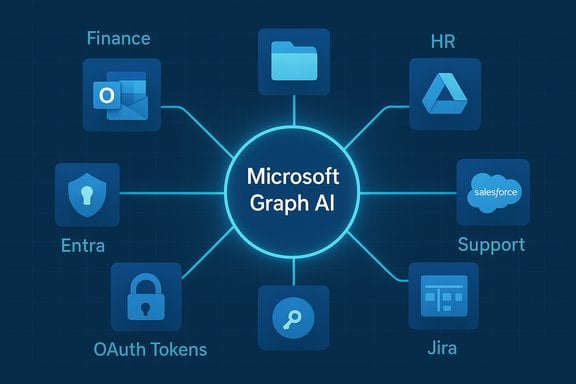
Copilot was built to help people get work done inside Microsoft 365, but most organizations keep essential business data in multiple other systems — CRMs, help desks, file clouds, wikis and bespoke line‑of‑business apps. Copilot Connectors provide the plumbing to bring those external sources into the same retrieval surface Copilot already uses: Microsoft Graph. The result is a single natural‑language query that can return grounded results from SharePoint, Outlook and third‑party systems such as Salesforce, ServiceNow or Google Drive.
At a high level, Connectors do three things:
Practical examples of what Copilot can read once a connector is authorized:
But the rollout requires discipline. Connector architecture, token management, DLP integration and retention policies are not implementation details — they determine whether Connectors become a productivity multiplier or a compliance headache. A measured pilot, strict least‑privilege controls, and explicit user education will deliver the benefit while keeping risk in check.
For organizations that take those steps, Copilot Connectors can finally let the assistant see the full picture of work — across clouds and apps — while preserving the identity and governance boundaries that enterprises depend on.
Source: Petri IT Knowledgebase Introducing Microsoft 365 Copilot Connectors
 Background / Overview
Copilot was built to help people get work done inside Microsoft 365, but most organizations keep essential business data in multiple other systems — CRMs, help desks, file clouds, wikis and bespoke line‑of‑business apps. Copilot Connectors provide the plumbing to bring those external sources into the same retrieval surface Copilot already uses: Microsoft Graph. The result is a single natural‑language query that can return grounded results from SharePoint, Outlook and third‑party systems such as Salesforce, ServiceNow or Google Drive.At a high level, Connectors do three things:
- Ingest or surface external content so it can be discovered by Microsoft Search and Copilot.
- Add semantic structure so Copilot understands meaning — not just keywords.
- Respect identity and access policies handled through Microsoft Entra, so users only see what they’re allowed to see.
How Copilot Connectors Work
Two integration models: indexing vs live read
Connectors typically operate in one of two ways: they either index external content into Microsoft Graph (so Graph search and Copilot can query it directly), or they perform live reads on demand via the provider’s APIs. Indexing makes content searchable and speeds retrieval; live reads reduce broad data copies but can be slower and rely on provider API availability. Both approaches are used depending on the connector and the scenario.The Graph as the unifying layer
When content is indexed via a Copilot connector it is mapped to Graph’s schema so Microsoft Search and Copilot treat it alongside native content (OneDrive, SharePoint, Outlook). That mapping is what lets a single Copilot prompt return consolidated results from different systems without manual copying or app switching. Copilot also surfaces inline references — the source and a preview — so users can trace an answer back to the original document.Semantic indexing: understanding meaning, not just words
A core difference between simple search and Copilot’s responses is semantic indexing. Rather than only capturing exact keywords, semantic indexing associates meaning with content so Copilot can answer queries that are vague or paraphrased. For example, a search for “blackberry dessert” should return recipes where the exact phrase doesn’t appear; semantic indexing makes that possible by understanding topical relationships and lexical similarity. This is central to delivering natural‑language answers that actually solve user problems.Semantic labels: lightweight topical tagging
On top of indexing, connectors and administrators can apply semantic labels — tags that mark documents with topic or purpose metadata. These labels improve topic-based searches and help Copilot choose the most contextually relevant material when multiple candidate documents exist. Labels are most valuable for content discovery and topic-focused queries; they are less useful when queries are strictly metadata-driven (for example, “all projects assigned to user X”).What types of connectors are available
Prebuilt gallery and examples
Microsoft maintains a gallery of prebuilt connectors covering common enterprise systems and cloud services. The gallery includes connectors for productivity and storage (Google Drive, Box), CRM (Salesforce), ITSM (ServiceNow), collaboration platforms (MediaWiki, Jira) and native Microsoft sources (Azure, SharePoint). This catalog simplifies adoption for common scenarios so organizations don’t need to build everything from scratch.Practical examples of what Copilot can read once a connector is authorized:
- File metadata and file contents (from OneDrive, Google Drive, Box).
- Email bodies, subjects and attachments (Outlook, Gmail).
- Calendar events and contact entries (Outlook, Google Calendar/Contacts).
Custom connectors and SDK
If a prebuilt connector doesn’t exist, organizations can build custom connectors using the provided APIs and SDKs. Microsoft exposes an API/SDK and a gRPC‑based connector agent so DevOps pipelines can produce, test and deploy connectors just like any other internal component. Some teams have integrated connector development into CI/CD so that connectors roll out with code and infrastructure changes. For non‑developers, many ISVs and community contributors publish ready‑made connectors and examples on places such as GitHub.Permissions and governance: Admins stay in charge
Identity first: Entra controls the gates
All accesses made through Copilot Connectors are governed by Microsoft Entra (formerly Azure AD). Connectors require admin registration and tenant‑level configuration; user access follows standard Entra authentication flows so Copilot cannot escalate permissions or expose content a user does not already have rights to view. This delegated access model means connectors operate under the same identity and compliance fencing as other Microsoft 365 services.OAuth, tokens and revocation
Third‑party connectors use standard OAuth consent flows. When a user or admin grants permission, the provider issues scoped tokens that Copilot uses for search and retrieval. Tokens can and should be revoked when a connection is no longer needed; organizations must monitor token lifetime and refresh behavior to avoid stale or risky long‑lived access.Administrative controls and pilot strategies
Microsoft has designed the rollout to be admin‑centric:- Tenant admins register connectors and scope which sources are available.
- Admins can pilot connectors with a subset of users or pilot tenants before broad enablement.
- Enterprise deployment should be paired with DLP, sensitivity labels, retention and eDiscovery policies.
Security, privacy and compliance considerations
What Copilot can and cannot do with your data
Copilot is designed to surface content as grounded results — that is, responses are accompanied by references so users can verify the source. Microsoft’s enterprise design treats connector access as read‑only for retrieval tasks in many scenarios; writing or modifying external systems is explicitly gated. However, operational topologies vary: some connectors or third‑party integrations may process queries outside Microsoft’s operational boundary, which has contractual and compliance implications that organizations must evaluate before enabling broad access.Data residency, retention and training claims
Microsoft’s public guidance distinguishes between consumer and enterprise accounts: tenant‑scoped enterprise data is subject to Microsoft’s commercial protections, but the exact processing and residency details can differ by connector provider and topology. Any claim that “Copilot never stores or uses your data for training” should be validated with current contractual language and product documentation — these specifics can change and often depend on the account type and the connector architecture. Treat such claims with caution and request firm contractual terms if needed.Risk areas that IT must mitigate
- Cross‑tenant leakage in shared group sessions or Memories if policies aren’t configured correctly.
- Token sprawl from problematic OAuth consent; enforce least privilege and periodic review.
- Agentic Actions (browser-based automations) that can act on behalf of the user — these raise automation and fraud risks and should be restricted until tested.
- Long‑term memory and persistent artifacts that may accidentally persist sensitive information across sessions. Treat Memory as a potential compliance surface for regulated industries.
Practical rollout checklist for IT teams
- Inventory and classification: Identify which third‑party systems hold regulated or sensitive data. Label content and decide what should be available to Copilot.
- Pilot with least privilege: Enable connectors in a test tenant or for a limited pilot group. Validate token behavior, audit logs and search results.
- Configure DLP and sensitivity labels: Ensure Copilot queries respect existing DLP rules and sensitivity labels. Map label behaviors to connector indexing policies.
- Require admin approval for custom connectors: Treat connector code as infrastructure — code review, secure secrets, and a CI/CD pipeline.
- Train users: Teach staff how to authorize connectors safely and how to interpret Copilot citations and previews. Encourage verification for high‑impact outputs.
- Monitor and revoke: Regularly review connected apps, token lifetimes, and usage logs; have a process to revoke or reconfigure connectors quickly.
End‑user experience and what changes for knowledge workers
Reduced context switching and faster synthesis
For end users, the immediate benefit is practical: one natural‑language prompt can pull together relevant emails, files and ticket records from multiple systems. Rather than searching each app, users receive consolidated answers and a list of references so they can confirm the source. That reduces friction and speeds everyday tasks like invoicing checks, client summaries, and meeting recaps.Exports, artifacts and follow‑up actions
Copilot now includes convenient export options: long responses can be converted into editable Word (.docx), Excel (.xlsx), PowerPoint (.pptx) or PDF files, and Copilot can generate working artifacts from chat outputs. This makes it easy to turn an AI‑drafted synthesis into a shareable deliverable without copy‑paste gymnastics.Usability caveats
- Account matching matters: For Microsoft stores, Copilot must be signed in with the same account that owns OneDrive/Outlook content. If accounts don’t match, retrieval will fail.
- Expect staged rollouts: Many connector capabilities were introduced via Insider previews and may be regionally gated or limited by subscription level. Test on representative user devices before broad enablement.
Strengths — what Connectors do well
- Centralized retrieval: Copilot reduces the cognitive load of hunting across siloed systems.
- Semantic understanding: Indexing and semantic labels let Copilot answer natural‑language questions rather than only returning lists of matching keywords.
- Admin‑centric model: The design integrates with Entra and Microsoft 365 governance, letting IT retain control over what is indexed and who can query it.
- Extensibility: Prebuilt connectors speed deployment, while SDKs and APIs let teams extend Copilot to internal systems.
Risks and gaps — where to be careful
- Over‑trust in outputs: Language models still hallucinate. Copilot mitigates this with citations, but users must verify critical facts by opening the referenced sources.
- Operational topology matters: Some connector implementations route queries through third‑party clouds; legal and procurement teams must validate processing locations and contractual protections.
- Policy erosion through convenience: The easier it is to synthesize and export data, the greater the temptation to bypass governance. Strong tenant defaults and user training are required.
- Compliance ambiguity: Retention policies, memory storage, and eDiscovery integration must be validated in the tenant configuration and legal agreements. Don’t assume default settings meet regulatory needs.
Recommendations — practical steps to get value and limit risk
- Start small and measurable: run a two‑month pilot with a single connector (for example, ServiceNow or Salesforce) and define success criteria such as reduction in time‑to‑answer, accuracy of Copilot citations, and any governance incidents.
- Harden consent flows: require admin approval for tenant‑level connectors and avoid using high‑privilege accounts for routine tests. Rotate service credentials and shorten token lifetimes where possible.
- Map connectors to classification: only allow indexing of non‑sensitive zones, or enforce automatic labeling during ingestion to preserve DLP protections.
- Audit and log everything: ensure connector queries and Copilot accesses are captured in tenant logs so security teams can investigate unusual patterns.
Conclusion
Microsoft 365 Copilot Connectors are a practical, governance‑aware way to unlock value from decentralised enterprise data. By mapping external content into Microsoft Graph and layering semantic indexing, Copilot can give users the kind of natural‑language search and synthesis that used to require bespoke integrations or manual data wrangling. The upside is clear: faster insights, fewer tool switches and easier artifact generation.But the rollout requires discipline. Connector architecture, token management, DLP integration and retention policies are not implementation details — they determine whether Connectors become a productivity multiplier or a compliance headache. A measured pilot, strict least‑privilege controls, and explicit user education will deliver the benefit while keeping risk in check.
For organizations that take those steps, Copilot Connectors can finally let the assistant see the full picture of work — across clouds and apps — while preserving the identity and governance boundaries that enterprises depend on.
Source: Petri IT Knowledgebase Introducing Microsoft 365 Copilot Connectors
