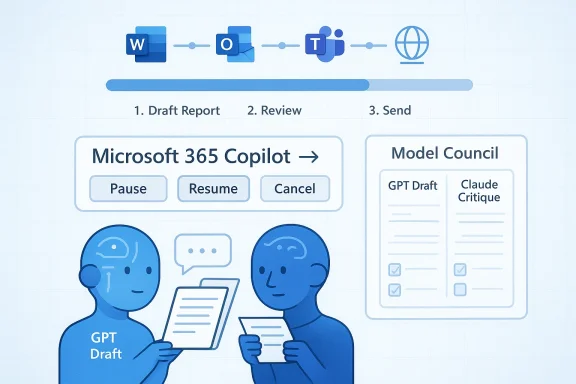
Microsoft’s Copilot Researcher story is no longer just about faster answers. It is about a more layered research workflow, more model choice, and a clearer push toward agentic behavior inside Microsoft 365. The latest materials suggest that Microsoft has been steadily expanding what Copilot can retrieve, ground, and orchestrate, while the specific label “Critique Multi-Model AI” remains unconfirmed in the public record. What is confirmed is more interesting in some ways: Microsoft is moving Copilot Researcher toward multi-step research, richer grounding, and tighter enterprise control.
Microsoft’s Copilot Researcher started as a reasoning agent inside Microsoft 365 Copilot, designed to do more than chat. It combines web search, Microsoft 365 data, and orchestration into something closer to a research assistant than a conventional prompt box. The idea was always to turn raw information into structured output that users could reuse in reports, briefings, and business workflows.
That broader mission matters because the product is being judged by a higher standard than consumer chatbots. Enterprise users do not just want a plausible answer. They want something that is grounded, auditable, and useful enough to become a first draft rather than a fresh pile of cleanup work. Microsoft appears to understand that the next competitive frontier is not just generation, but verification and workflow quality.
The uploaded materials also show how quickly the narrative has shifted from a single-model story to a multi-model one. Microsoft has reportedly broadened model choice across Microsoft 365 Copilot surfaces, including Researcher, while making room for Anthropic models alongside OpenAI-based capabilities. That creates a strategic opening for features that look like “critique,” even if the company has not publicly confirmed a product by that exact name.
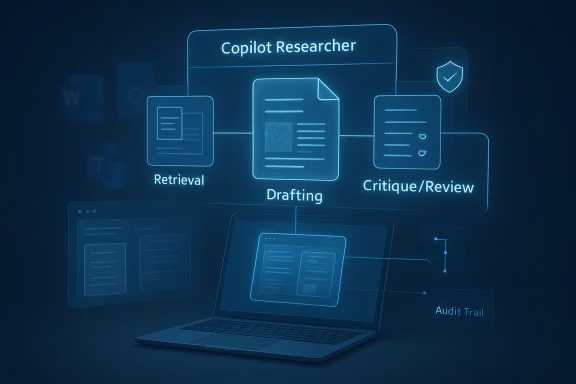
In other words, the useful question is not whether Microsoft has stamped a new marketing label on Researcher. It is whether the product has acquired the ingredients of a critique system: a drafting pass, a review pass, stronger grounding, and enough orchestration to turn research into a repeatable workflow. The evidence says yes on the architecture, but no on the exact branded feature claim.
Microsoft’s answer has been to keep moving the product closer to actual knowledge work. The Researcher agent was introduced as a more serious reasoning layer, one that could combine web material and workplace content into structured findings. The public messaging has consistently framed this as a shift from casual assistance to work-grade synthesis. That distinction is important because it explains why Microsoft keeps investing in grounding, retrieval, and workflow control rather than simply making the prose smoother.
The latest file set makes clear that Microsoft is no longer betting on one model to do everything. The story now includes model diversity, orchestration, and review. That is a meaningful change in product philosophy. A single model can draft an answer, but a multi-model pipeline can draft, cross-check, and refine, which is exactly the kind of behavior enterprises want when the cost of a mistake is measured in reputation, compliance, or wasted labor.
There is also an unmistakable governance story underneath the product story. Microsoft is not merely trying to make Copilot more powerful; it is trying to make it more controllable. Frontier-style early access, session-level model switching, and enterprise admin controls all point in the same direction: more capability, but inside a framework that IT can understand and manage. That matters because the best AI features are often the ones security teams can tolerate.
Another documented improvement is enhanced grounding on SharePoint lists and sites. That matters because SharePoint often holds the most current and operationally relevant information in an organization: project trackers, team documentation, status tables, and local knowledge bases. Grounding Researcher in those assets should reduce generic outputs and make responses feel more aligned with what the business actually knows.
Integrated Copilot Search and Chat is another important change. Rather than treating search results as an endpoint, Microsoft is blending discovery and interaction so the user can investigate, refine, and ask follow-up questions in one place. That may sound like a small UX shift, but it is part of a larger trend: search becomes a guided workflow instead of a list of blue links.
The multi-model approach also helps Microsoft defend against the “one model to rule them all” mindset that dominated earlier AI marketing. By emphasizing choice and orchestration, Microsoft can argue that the best system is not the biggest model, but the best chain. That is a more credible enterprise pitch because business buyers usually want fit, control, and reliability more than benchmark theater.
Another limitation is source quality. If the underlying retrieval is weak or biased, the critique layer may merely tidy up a flawed input set. That is why grounding matters so much. Good critique depends on good evidence, and good evidence depends on access, retrieval quality, and document coverage.
What to watch next is less about one headline feature and more about the pattern of releases. The product will be judged by whether it consistently reduces manual cleanup, improves citation quality, and helps users move from search to synthesis to action without leaving the Microsoft ecosystem. If Microsoft gets that right, the “critique” idea may become less a feature name and more the operating principle of the whole Copilot stack.
Source: Blockchain Council Copilot Researcher Updates: What Microsoft Added
 Overview
Microsoft’s Copilot Researcher started as a reasoning agent inside Microsoft 365 Copilot, designed to do more than chat. It combines web search, Microsoft 365 data, and orchestration into something closer to a research assistant than a conventional prompt box. The idea was always to turn raw information into structured output that users could reuse in reports, briefings, and business workflows.That broader mission matters because the product is being judged by a higher standard than consumer chatbots. Enterprise users do not just want a plausible answer. They want something that is grounded, auditable, and useful enough to become a first draft rather than a fresh pile of cleanup work. Microsoft appears to understand that the next competitive frontier is not just generation, but verification and workflow quality.
The uploaded materials also show how quickly the narrative has shifted from a single-model story to a multi-model one. Microsoft has reportedly broadened model choice across Microsoft 365 Copilot surfaces, including Researcher, while making room for Anthropic models alongside OpenAI-based capabilities. That creates a strategic opening for features that look like “critique,” even if the company has not publicly confirmed a product by that exact name.
In other words, the useful question is not whether Microsoft has stamped a new marketing label on Researcher. It is whether the product has acquired the ingredients of a critique system: a drafting pass, a review pass, stronger grounding, and enough orchestration to turn research into a repeatable workflow. The evidence says yes on the architecture, but no on the exact branded feature claim.
Background
Copilot Researcher fits into the larger history of Microsoft 365 Copilot, which began as a productivity layer for drafting, summarizing, and responding across Word, Outlook, Teams, and related apps. That first wave proved the concept, but it also exposed the limits of generic AI assistance. Users could get text quickly, yet they still had to verify accuracy, fill in missing context, and decide whether the output was truly fit for business use.Microsoft’s answer has been to keep moving the product closer to actual knowledge work. The Researcher agent was introduced as a more serious reasoning layer, one that could combine web material and workplace content into structured findings. The public messaging has consistently framed this as a shift from casual assistance to work-grade synthesis. That distinction is important because it explains why Microsoft keeps investing in grounding, retrieval, and workflow control rather than simply making the prose smoother.
The latest file set makes clear that Microsoft is no longer betting on one model to do everything. The story now includes model diversity, orchestration, and review. That is a meaningful change in product philosophy. A single model can draft an answer, but a multi-model pipeline can draft, cross-check, and refine, which is exactly the kind of behavior enterprises want when the cost of a mistake is measured in reputation, compliance, or wasted labor.
There is also an unmistakable governance story underneath the product story. Microsoft is not merely trying to make Copilot more powerful; it is trying to make it more controllable. Frontier-style early access, session-level model switching, and enterprise admin controls all point in the same direction: more capability, but inside a framework that IT can understand and manage. That matters because the best AI features are often the ones security teams can tolerate.
What Microsoft Has Actually Confirmed
The clearest confirmed upgrade is Researcher with Computer Use, introduced in October 2025. That capability allows Researcher to interact with public, gated, and dynamic web content through a secure virtual computer, which is a big deal because a surprising amount of valuable information lives behind forms, logins, and page states that ordinary web retrieval misses. This pushes Copilot Researcher closer to a real investigation tool rather than a passive summarizer.Why computer use matters
Computer use changes the shape of research. Instead of relying only on indexed pages and static retrieval, Researcher can act on web interfaces, which improves coverage for live portals, interactive databases, and content that requires navigation. For enterprise users, that means fewer dead ends and more complete evidence gathering. It also signals that Copilot is becoming more agent-like, because the system is no longer only interpreting language; it is executing steps.Another documented improvement is enhanced grounding on SharePoint lists and sites. That matters because SharePoint often holds the most current and operationally relevant information in an organization: project trackers, team documentation, status tables, and local knowledge bases. Grounding Researcher in those assets should reduce generic outputs and make responses feel more aligned with what the business actually knows.
- Better grounding reduces generic, surface-level answers.
- SharePoint lists add structured enterprise context.
- Project and operational data become easier to reference.
- Responses are more likely to reflect the current state of internal work.
Why document support matters
This is one of the most practical updates in the entire stack. Many AI demos assume pristine, text-rich documents, but enterprise reality is messier. Companies still rely on scans, PDFs, and image-heavy files for everything from legal archives to operational records. Supporting those sources makes Copilot less fragile and more relevant to actual workplace conditions.Integrated Copilot Search and Chat is another important change. Rather than treating search results as an endpoint, Microsoft is blending discovery and interaction so the user can investigate, refine, and ask follow-up questions in one place. That may sound like a small UX shift, but it is part of a larger trend: search becomes a guided workflow instead of a list of blue links.
- Search becomes more conversational.
- Follow-up exploration is faster.
- Users can stay inside the Copilot flow longer.
- The system can shape the research path, not just answer the query.
The Multi-Model Direction
The “critique” conversation makes the most sense when viewed against Microsoft’s broader multi-model strategy. The file set repeatedly suggests that Microsoft is moving away from the idea that one flagship model should handle every task. Instead, it is assembling a portfolio in which different models or agents perform different roles within a workflow. That is a major philosophical shift, not just a feature update.From single model to layered workflow
The clearest analogy is a human research team. One person collects sources, another drafts a summary, and a third checks evidence and flags weak spots. Microsoft appears to be encoding that division of labor into Copilot through orchestration, session-level model choice, and critique-like review behaviors. The attraction is obvious: specialization can produce better outputs than one model trying to do everything at once.- One model can specialize in retrieval-heavy synthesis.
- Another can specialize in long-context review.
- A third can polish presentation and tone.
- The workflow can be more reliable than a single-pass response.
Why enterprises care
Enterprises care about the chain of responsibility. If a response is generated, reviewed, and grounded by different parts of the system, administrators have a better chance of understanding where an answer came from and where it might fail. That does not eliminate risk, but it makes risk more legible. In workplace AI, legibility is a competitive advantage.The multi-model approach also helps Microsoft defend against the “one model to rule them all” mindset that dominated earlier AI marketing. By emphasizing choice and orchestration, Microsoft can argue that the best system is not the biggest model, but the best chain. That is a more credible enterprise pitch because business buyers usually want fit, control, and reliability more than benchmark theater.
What a Critique Layer Would Actually Do
A critique layer would most likely focus on validation, not creativity. In practical terms, that means checking whether a draft is supported by the evidence available to the system, whether important counterpoints are missing, and whether the final output aligns with policy or audience expectations. The uploaded materials describe exactly this kind of logic, even while cautioning that the specific name “Critique Multi-Model AI” is unverified.Likely critique functions
If Microsoft were to formalize such a capability, the workflow would probably include several review behaviors. It might flag unsupported claims, distinguish strong sources from weak ones, generate limitations, and suggest rewrites for clarity or compliance. Those are the kinds of improvements enterprise users actually feel day to day, because they reduce the amount of manual cleanup after AI does the first pass.- Claim checking against available sources.
- Evidence-strength assessment.
- Counterpoint generation.
- Policy or compliance alignment.
- Rewrite suggestions for clarity and audience fit.
The limits of critique
Still, critique is not magic. A second model can miss things, misread context, or reinforce the first model’s errors. The danger is that users may assume a review layer guarantees correctness when it only improves the odds. That makes human judgment more important, not less, especially for legal, financial, or policy-sensitive work.Another limitation is source quality. If the underlying retrieval is weak or biased, the critique layer may merely tidy up a flawed input set. That is why grounding matters so much. Good critique depends on good evidence, and good evidence depends on access, retrieval quality, and document coverage.
Enterprise vs Consumer Impact
For consumers, Copilot Researcher’s upgrades mainly translate into convenience. Search feels smarter, research feels more guided, and the output becomes easier to turn into a usable draft. That is valuable, but it is still mostly a productivity story. The real strategic weight lies in the enterprise side, where Microsoft can sell trust, governance, and workflow integration as premium features.Why enterprises matter more here
Enterprise customers are the ones who care about permissioning, session boundaries, source control, and model governance. They also care about whether Copilot can safely reach the right internal content without crossing policy lines. That is why SharePoint grounding, scanned PDF support, and controlled model choice are so important: they speak directly to the problems corporate IT teams actually have to solve.- Internal knowledge needs to be current.
- Access controls must remain intact.
- Output needs to be auditable.
- Admins need predictable model behavior.
Consumer expectations will still rise
The downside is that consumer expectations will rise too. Once users see a Researcher that can browse more deeply and synthesize more cleanly, they will expect the same level of quality everywhere else in Copilot. That puts pressure on Microsoft to make the experience feel consistent across surfaces, models, and account types. If the results vary too much, trust erodes quickly.Competitive Implications
Microsoft’s move is best understood as a response to the broader race in deep research and agentic AI. OpenAI, Google, Perplexity, and Anthropic all want to own the moment when AI stops being a chat toy and becomes a serious knowledge-work interface. Microsoft’s advantage is distribution: it already sits inside the productivity environment where much of that work happens.Why Microsoft’s route is different
Rather than selling a standalone research product, Microsoft is embedding research inside Microsoft 365. That matters because the workflow stays close to the documents, meetings, and shared assets that define enterprise work. It also means Microsoft can argue that research, synthesis, and execution belong in one managed ecosystem rather than across disconnected tools.- Research sits beside productivity apps.
- The workflow benefits from organizational context.
- IT governance is part of the bundle.
- Users spend less time copying between tools.
The risk for rivals
For competitors, the challenge is that Microsoft can bundle model diversity with the rest of the productivity stack. A rival may have a stronger stand-alone model, but Microsoft can offer the model plus the document graph, the collaboration layer, and the administrative controls. That combination is hard to beat in an enterprise sale because it reduces integration friction.Why Grounding Is the Real Story
If there is one theme that ties the entire update together, it is grounding. Microsoft keeps expanding the kinds of content Copilot can trust: SharePoint lists, SharePoint sites, PDFs, scanned documents, and interactive web sources through computer use. That is not random product sprawl. It is a deliberate attempt to make Copilot answers less generic and more faithful to the real world of work.Grounding as trust infrastructure
Grounding is the difference between a plausible answer and a defensible one. In enterprise settings, that difference matters because users need to know whether the model is reflecting current facts, stale documents, or shallow inference. By improving grounding, Microsoft is trying to move Copilot closer to something administrators can actually trust in production.- Better grounding supports better citations.
- Better citations support faster review.
- Faster review supports adoption.
- Adoption supports the business case for Copilot.
Why this matters for everyday users
The practical result is a better chance of receiving answers that feel tied to your actual organization rather than a generic internet summary. That is the kind of improvement users notice quickly. It can turn Copilot from “interesting” into “habit-forming,” and habit is what makes enterprise software valuable.The Governance Layer
Microsoft’s Copilot updates also make a governance statement. By using controlled access, session boundaries, and enterprise-friendly document handling, Microsoft is signaling that advanced AI must be administratively manageable. That is especially important in multi-model systems, where the more moving parts you add, the more important it becomes to know which model did what and why.Control matters as much as capability
This is the less glamorous side of AI progress, but it is the side enterprises pay for. A powerful tool that cannot be governed is a liability. Microsoft’s approach suggests it understands that model diversity only becomes a strength when access, auditability, and policy enforcement are built in from the start.- Admins need access controls.
- Workflows need traceability.
- Sensitive sources need careful handling.
- Session-based behavior reduces operational ambiguity.
The human factor
There is still a human factor that software cannot erase. Users need to know when to trust the output and when to verify it manually. Microsoft can reduce friction, but it cannot eliminate judgment, especially in high-stakes use cases. The most realistic expectation is not perfect automation, but better-prepared human decision-making.Strengths and Opportunities
Microsoft’s current direction gives Copilot Researcher several advantages that are easy to miss if you focus only on a rumored feature name. The real opportunity is that Microsoft is building a research stack that combines web access, enterprise grounding, multi-model flexibility, and workflow control into one environment. That is a strong position, especially in organizations that already live in Microsoft 365.- Deeper research workflows can turn Copilot into a first-draft engine for real business work.
- Computer use broadens the range of sources Copilot can reach.
- SharePoint grounding keeps outputs closer to enterprise reality.
- PDF and scanned document support unlocks legacy content that matters to companies.
- Multi-model orchestration improves specialization and flexibility.
- Session-based model choice makes governance easier for IT teams.
- Integrated search and chat creates a smoother investigation flow.
Risks and Concerns
The most important risk is overclaiming. The public evidence does not confirm a Microsoft feature explicitly called “Critique Multi-Model AI,” so any article or sales pitch that states that as fact is skating ahead of verification. That kind of ambiguity can damage trust, especially when the product already asks users to trust machine-generated synthesis.- Unverified branding can confuse buyers and damage credibility.
- Second-pass review is not the same as human judgment.
- Weak source retrieval can still produce polished but flawed output.
- More models mean more governance complexity.
- Enterprise trust can erode fast if users see confident errors.
- Feature sprawl could make Copilot feel busy rather than useful.
- Admins may resist if controls do not stay simple and transparent.
Looking Ahead
The next phase of Copilot Researcher will likely be defined by how Microsoft connects these pieces. If the company can keep improving grounding, expand usable source types, and make multi-model review feel dependable rather than experimental, then Researcher could become one of the most important enterprise AI workflows in Microsoft 365. The challenge is to make the system powerful enough to matter while keeping it controlled enough to trust.What to watch next is less about one headline feature and more about the pattern of releases. The product will be judged by whether it consistently reduces manual cleanup, improves citation quality, and helps users move from search to synthesis to action without leaving the Microsoft ecosystem. If Microsoft gets that right, the “critique” idea may become less a feature name and more the operating principle of the whole Copilot stack.
- Whether Microsoft formally names a critique or review capability.
- Whether model choice expands beyond limited session-based use.
- Whether grounding continues to broaden across internal content types.
- Whether output quality becomes measurably more reliable for enterprises.
- Whether Copilot Researcher feels more like a workflow platform than a chatbot.
Source: Blockchain Council Copilot Researcher Updates: What Microsoft Added
Last edited: