

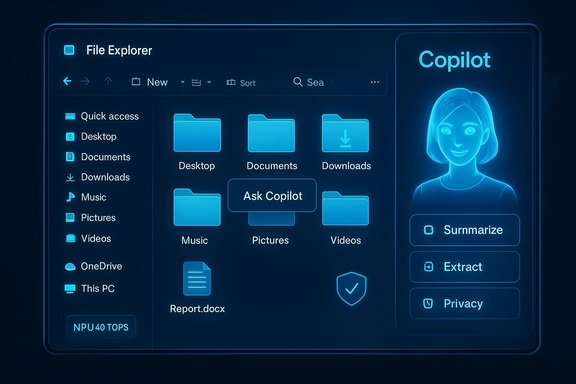
Microsoft’s latest insider previews make one thing clear: Copilot is no longer an optional sidebar novelty — Microsoft is actively testing embedding the Copilot AI directly inside Windows 11’s File Explorer, a move that promises powerful productivity gains while reigniting long-standing privacy and control debates.
Microsoft’s Copilot began as a taskbar and sidebar helper and has steadily evolved into a system-level assistant that can see, hear, and act across Windows surfaces. Over the last two years the company has expanded Copilot from a simple chat interface to a multimodal platform with voice, vision, and agentic capabilities — features designed to execute multi-step workflows on behalf of the user. These changes are being staged through Windows Insider preview builds and targeted feature gating.
What’s different today is the depth of integration: File Explorer — the most frequently opened app on Windows for many users — is being readied as an explicit Copilot surface. That transition changes the nature of file management from a passive task (open, move, rename) to a potentially proactive, AI-driven experience where the assistant suggests, summarizes, and even edits content without leaving the Explorer window.
Microsoft has publicly emphasized user consent, session boundaries, and opt‑in models after past controversies (notably the Recall preview that captured screen snapshots for context), but the safeguards described in preview notes are not a panacea. Enterprises must assume new DLP, audit, and policy work if these features ship broadly.
This strategy can pay dividends: reduced context switching and tight Office integration are strong selling points for enterprise customers. But it also invites regulatory and reputational risk if privacy controls and transparency aren’t crystal clear.
For users and IT teams the prudent path is cautious experimentation: pilot Copilot features where they promise clear benefit, insist on auditability and DLP integration, and avoid broad enablement until the administrative controls and performance characteristics are proven in your environment. The next few Insider flights will be telling: they will determine whether Copilot’s place inside File Explorer is a welcomed productivity ally or another contested battleground in the OS‑level AI wars.
Source: WebProNews Microsoft Adds Copilot AI to Windows 11 File Explorer Amid Privacy Debates
 Background / Overview
Microsoft’s Copilot began as a taskbar and sidebar helper and has steadily evolved into a system-level assistant that can see, hear, and act across Windows surfaces. Over the last two years the company has expanded Copilot from a simple chat interface to a multimodal platform with voice, vision, and agentic capabilities — features designed to execute multi-step workflows on behalf of the user. These changes are being staged through Windows Insider preview builds and targeted feature gating.What’s different today is the depth of integration: File Explorer — the most frequently opened app on Windows for many users — is being readied as an explicit Copilot surface. That transition changes the nature of file management from a passive task (open, move, rename) to a potentially proactive, AI-driven experience where the assistant suggests, summarizes, and even edits content without leaving the Explorer window.
What the preview builds reveal
Evidence from Insider builds
Artifacts uncovered in recent Insider build packages (notably the 26220.x family) include UI strings and resource keys that reference a “Chat with Copilot” affordance inside File Explorer and options to “Detach Copilot,” suggesting a docked sidebar and a detachable chat pane. These elements appeared as inert placeholders in current preview builds but align with Microsoft’s habit of shipping UI strings and binaries before server-side activation.Feature surface being tested
- In-Explorer chat: A docked chat pane or details pane where users can ask follow-ups about selected files and receive summaries or instructions without opening the file itself.
- AI Actions and context menus: Right‑click options and Home‑tab buttons that trigger tasks like “Summarize,” “Extract key points,” or quick image edits routed through Photos/Paint or Microsoft 365 Copilot.
- Hover and recommended actions: Hover states on recent or recommended files that surface “Ask Microsoft 365 Copilot” buttons for quick file insights.
Technical underpinnings and gating
Copilot+ PCs and NPUs
Microsoft is positioning Copilot+ PCs — systems equipped with dedicated Neural Processing Units (NPUs) — as the premium hardware tier for on‑device AI. The company and industry partners reference a practical baseline of roughly 40+ TOPS (trillions of operations per second) for the NPU to deliver low-latency local inference for certain Copilot experiences. On-device processing reduces latency and can limit cloud telemetry, but it also produces a two‑tiered experience between modern hardware and legacy machines.Local vs cloud processing
- Lightweight summarization or UI affordances may run locally or in hybrid modes.
- Complex generative tasks (large language model reasoning, image generation) will often require cloud resources unless the device meets Copilot+ on‑device capabilities.
- Microsoft’s staged rollout means behavior can vary by build, device, and account settings; administrators and power users should expect variance in where processing happens.
Developer and API changes
Microsoft has also opened or adjusted shell APIs and StorageProvider hooks so cloud storage vendors and third‑party apps can surface signals into File Explorer Home and recommended feeds. That allows deeper third‑party integration but also expands the attack surface administratively and technically.Privacy, governance, and the Recall-era shadow
Why File Explorer integration amplifies privacy concerns
File Explorer is where personal and corporate documents live. A Copilot that can read, summarize, and act on folder contents dramatically expands the contexts where sensitive data could be processed. Even when promises are made about opt‑in behavior and session‑bound vision, the placement of Copilot inside Explorer increases the risk of accidental sharing or misunderstood consent — for example, hover affordances or hidden buttons that users might activate unintentionally.Microsoft has publicly emphasized user consent, session boundaries, and opt‑in models after past controversies (notably the Recall preview that captured screen snapshots for context), but the safeguards described in preview notes are not a panacea. Enterprises must assume new DLP, audit, and policy work if these features ship broadly.
Administrative controls and removal options
Microsoft has been iterating management controls: admins can toggle or block certain Copilot components, and policies—like RemoveMicrosoftCopilotApp or MDM-based controls—have been discussed for enterprise rollouts. That said, community reporting shows removal or hard-disabling can be difficult on consumer devices, and third‑party removal tools have already surfaced in response to preview artifacts. The presence of uninstall policies does not eliminate practical friction for organizations and individual power users who want stronger guarantees.User and community reactions
Mixed reception
Early reactions across social feeds and tech forums are split. Some users welcome the idea of instant summaries and contextual actions inside File Explorer; others brand the move as intrusive bloatware that replaces a clean and ultra‑fast file manager with an attention-hungry assistant. This split mirrors broader debates about AI in operating systems: productivity gains vs. user control.The rise of removal tools and tweaks
Utilities that remove or neuter Copilot (distribution names vary) have gained traction among privacy‑minded users and power users. Their popularity signals a real risk: if many users feel forced into an AI-first shell, the ecosystem will respond with removal utilities, registry tweaks, and third‑party scripts—complicating support and security for both Microsoft and enterprise IT.Practical benefits and real-world use cases
Embeded Copilot in File Explorer could add measurable day-to-day value for many workflows:- Faster triage: Summarize long reports, slide decks, or PDF attachments without opening heavyweight apps.
- Batch content actions: Run “AI Actions” to extract tables from multiple PDFs, rename files based on content, or generate metadata and alt text for large image sets.
- Creative workflows: Generate thumbnails, auto‑suggest tags, or run rudimentary photo edits before opening a full editor.
- Developer & admin productivity: Quick code snippet searches inside project folders or export selected logs into structured reports.
Technical and operational risks
Performance and responsiveness
Embedding a chat and real‑time AI into Explorer increases resource demands. On Copilot+ PCs performance may be smooth due to NPU offload; on older machines cloud‑backed calls could introduce latency, increased network usage, and a perceived slowdown in Explorer responsiveness. Real‑world telemetry from previews will determine whether Explorer remains snappy under heavy use.Data leakage and audit trails
Automated summarization and agentic actions that access multiple files can create an audit trail risk: if Copilot is permitted to scan folders or upload data for cloud processing, logs and telemetry may capture content. Enterprises must require logging, DLP integration, and retention policies that explicitly cover Copilot interactions. Microsoft’s preview notes recommend such integration, but implementation detail remains uneven.Licensing and vendor lock‑in
Deep Hand‑offs to Microsoft 365 Copilot or Copilot Pro will create differential experiences for licensed vs. unlicensed users. That raises operational questions in mixed environments and creates a potential upsell path that could be seen as coercive if critical functionality is gated behind paid entitlements.Recommendations: What users and IT should do now
For individual users (practical checklist)
- Test on non‑critical devices: Install preview builds only on machines you can afford to image or roll back.
- Review privacy defaults: Check Copilot settings for Vision, voice activation, and file access permissions. Disable any automatic sharing affordances if you prefer manual control.
- Validate outputs: Treat AI summaries as first drafts — always open the original file for critical decisions.
For IT administrators and security teams
- Pilot with governance: Run small pilots, document data flows when Copilot acts on OneDrive/SharePoint content, and map interactions to existing DLP policies.
- Set policy guardrails: Use MDM, AppLocker, and the RemoveMicrosoftCopilotApp policy where appropriate; verify uninstall and disable behavior across update cycles.
- Audit and monitor: Ensure Copilot actions produce auditable logs and integrate with SIEM for anomalous or bulk summarization activity.
Strategic motivations and market context
Microsoft’s push fits a larger industry pattern: employers and consumers now expect AI assistance at the OS level. By embedding Copilot into core surfaces like File Explorer, Microsoft both increases daily reliance on its AI stack and creates incentives for hardware refresh cycles (the Copilot+ NPU story) and subscription uptake (Microsoft 365 Copilot, Copilot Pro). Competitors are pursuing similar paths, but Microsoft’s multi-surface, multi‑tenant approach is unusually aggressive in scope.This strategy can pay dividends: reduced context switching and tight Office integration are strong selling points for enterprise customers. But it also invites regulatory and reputational risk if privacy controls and transparency aren’t crystal clear.
What to watch next
- Rollout mechanics: Will the docked Copilot be an opt‑in add‑on, or will Microsoft enable it by default for Insiders before a broad release? Early previews suggest opt‑in behavior in many cases, but UI placement could increase accidental usage.
- Admin tooling maturity: Are policy and DLP integrations robust enough for regulated industries? Microsoft’s preview docs promise admin controls, but enterprises should validate them in pilots.
- Performance telemetry: How do non‑Copilot+ devices respond under real loads when Explorer invokes cloud-backed Copilot flows? Expect vendors and independent testers to publish benchmarks once previews widen.
Conclusion
The prospect of a Copilot embedded inside Windows 11 File Explorer is a consequential shift: it could materially improve everyday productivity and make AI assistance a seamless part of file workflows. At the same time, it amplifies long‑standing concerns about privacy, performance, and user control. Microsoft’s preview artifacts and public guidance show the company understands these tensions — offering opt‑in modes, session boundaries, and admin controls — but the devil is in the details: how defaults are configured, how transparently data flows are documented, and how easy it is to opt out in practice.For users and IT teams the prudent path is cautious experimentation: pilot Copilot features where they promise clear benefit, insist on auditability and DLP integration, and avoid broad enablement until the administrative controls and performance characteristics are proven in your environment. The next few Insider flights will be telling: they will determine whether Copilot’s place inside File Explorer is a welcomed productivity ally or another contested battleground in the OS‑level AI wars.
Source: WebProNews Microsoft Adds Copilot AI to Windows 11 File Explorer Amid Privacy Debates
