

Microsoft’s Copilot platform just received a sweeping Fall update that stitches generative AI into Windows, Edge, and Microsoft 365 more tightly than ever — introducing twelve headline features (including a new expressive assistant called Mico), deeper enterprise-facing connectors and memory, shared “Groups” sessions for up to 32 participants, and a new stack of Microsoft-built MAI models intended to reduce reliance on third-party LLMs while enabling tighter multimodal workflows.
Microsoft’s Copilot has evolved from a feature in Microsoft 365 to a cross‑surface AI infrastructure that spans the Windows desktop, the Edge browser, mobile apps, and cloud services. The Fall release refocuses Copilot from a single-user productivity tool to a contextual assistant and collaboration layer designed to sit inside enterprise identity and compliance boundaries. The update arrives as Microsoft emphasizes its own MAI family of models (text, voice, and vision) and expands functionality that organizations can use to orchestrate knowledge work, creative workflows, and operational tasks.
This release was presented as a practical step away from hype toward utility: the pitch is that Copilot should reduce friction across everyday workflows — drafting, research, repetitive tasks, and multi-person collaboration — while giving users control over memory, consent, and data residency.
Microsoft frames Mico as a way to:
For IT leaders the decision will come down to three questions:
Microsoft’s message is ambitious and pragmatic: AI should elevate human work, not replace judgment. The Fall release gives enterprises a richer set of tools to pursue that promise, but it also raises the practical governance work that must be done to ensure Copilot helps organizations securely and reliably.
The update is available now in key markets with staged rollouts for some features; organizations should inventory capabilities, run pilots, and coordinate governance before enabling Copilot broadly in production environments.
Source: gamenexus.com.br Microsoft Copilot gets 12 big updates for fall, including new AI assistant character Mico - GameNexus
 Background
Microsoft’s Copilot has evolved from a feature in Microsoft 365 to a cross‑surface AI infrastructure that spans the Windows desktop, the Edge browser, mobile apps, and cloud services. The Fall release refocuses Copilot from a single-user productivity tool to a contextual assistant and collaboration layer designed to sit inside enterprise identity and compliance boundaries. The update arrives as Microsoft emphasizes its own MAI family of models (text, voice, and vision) and expands functionality that organizations can use to orchestrate knowledge work, creative workflows, and operational tasks.This release was presented as a practical step away from hype toward utility: the pitch is that Copilot should reduce friction across everyday workflows — drafting, research, repetitive tasks, and multi-person collaboration — while giving users control over memory, consent, and data residency.
Overview of the 12 headline features
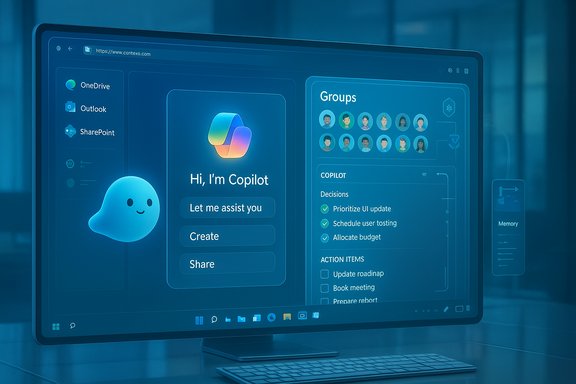
Microsoft consolidated the Fall release around a dozen capabilities that are intended to work together across surfaces. The new set includes feature-level changes for both consumers and enterprises and introduces modalities that extend beyond typed prompts.- Groups – Shared Copilot sessions for up to 32 participants to brainstorm, co-author, and plan together while Copilot summarizes decisions and tracks action items.
- Imagine – A collaborative hub for creating and remixing AI-generated visual content and other creative artifacts.
- Mico – An optional, animated assistant character that provides expressive feedback, tone-aware reactions, and a friendly visual presence for voice and conversational sessions.
- Real Talk – A conversational style that intentionally pushes back and challenges assumptions, designed to reduce flattering or sycophantic responses.
- Memory & Personalization – Long-term, editable memory that lets users instruct Copilot to remember and recall personal or project details.
- Connectors – Natural‑language connectors to OneDrive, Outlook, Google Drive, Gmail, and calendar services for cross-account search and retrieval.
- Proactive Actions (Preview) – Context-derived suggestions and next-step prompts based on recent activity; gated to Microsoft 365 Personal, Family, or Premium plans in preview.
- Copilot for Health – Health-focused workflows that claim to ground answers in trusted medical sources and help locate providers (U.S.-first availability for certain tools).
- Learn Live – Socratic, voice-driven tutoring with visuals and whiteboard-style interaction for study and coaching.
- Copilot Mode in Edge – An “AI browser” surface that summarizes open tabs, compares content, and can perform web actions by voice.
- Copilot on Windows – Deep integration into Windows 11 with “Hey Copilot” wake‑word activation, Copilot Vision guidance, and quick access to files and apps.
- Copilot Pages and Copilot Search – A collaborative canvas for multi-file work and a unified search that blends AI-generated answers with traditional web results.
What’s new for enterprises and IT teams
Deep integration under enterprise identity and governance
The Fall update deliberately positions Copilot inside the Microsoft 365 and Entra ID (formerly Azure AD) security perimeter. That means:- Copilot sessions and Groups can be managed under the same consent and compliance policies that govern Outlook, Teams, and SharePoint.
- Connectors use enterprise identity to authorize cross-account search and retrieval, reducing the need for separate data pipelines.
- Administrators keep toggles for Copilot features and memory, allowing organizations to opt in/opt out at the tenant or user level.
Search, retrieval, and knowledge orchestration
Connectors and Copilot Search are meaningful because they simplify natural-language retrieval across repositories. For knowledge-management projects, that means:- Fewer bespoke retrieval APIs — Copilot can pull context directly from OneDrive and SharePoint.
- Faster assembly of multi-document contexts for RFPs, audits, or legal reviews via Copilot Pages (which supports simultaneous uploads for cross-document analysis).
- A potential drop in integration development costs for enterprise search and internal help desks.
Practical development and automation benefits
Copilot Mode in Edge plus Copilot’s cross-document reasoning enables new automation patterns:- Browsing Journeys and Edge actions can be used to automate repetitive web tasks such as extracting supplier terms or populating procurement forms.
- Copilot Vision helps troubleshoot UI issues by reading error messages, suggesting fixes, and generating support tickets with contextual screenshots.
- With Microsoft’s MAI models underpinning voice, text, and vision, Microsoft claims lower integration overhead for multimodal app builders.
The Mico interface: nostalgia meets modern AI
What Mico is and why Microsoft resurrected a character
Mico is an animated, shapeshifting blob that provides tone, expression, and a visual companion during voice and conversational sessions. It is optional and appears primarily in voice-enabled experiences and Study Mode. The design intentionally echoes Microsoft’s earlier experiments with character-based assistants (for example, Clippy and Cortana) but aims to avoid previous pitfalls by making Mico less intrusive and more expressive.Microsoft frames Mico as a way to:
- Convey conversational context visually (tone, emphasis, sympathy).
- Make voice interactions feel more natural and humane, especially in assisted learning or conversation-heavy sessions.
- Offer a consistent UX layer across devices.
UX trade-offs and risks
- Signal vs. distraction: A well-designed animated assistant can add helpful cues (e.g., signaling when Copilot is thinking), but it risks becoming an annoyance if it appears too often or in inappropriate contexts.
- Accessibility: The visual layer must not replace or impede text/voice-only access; Microsoft says Mico is optional, which mitigates this risk if the option is easy to find.
- Nostalgia landmines: Clippy’s reputation was not just charm; it highlighted the problems with unsolicited help. Mico must be carefully bounded to avoid repeating that history.
Safety, privacy, and compliance: what’s solid — and what needs scrutiny
Strengths in Microsoft’s approach
- Enterprise governance: By operating under Entra ID and Microsoft 365 policies, Copilot benefits from existing consent and compliance frameworks that many enterprises already trust.
- Editable memory: Memory & Personalization is designed to be user-controlled and editable. This empowers users to remove or correct stored items, addressing a common privacy concern.
- On/off toggles: Administrators and users can disable specific features or connectors, allowing more granular control over what Copilot can access.
- Model ownership: Microsoft’s push to MAI models signals a desire to consolidate model stewardship within Azure — potentially simplifying compliance and contractual controls for enterprise customers.
Areas that demand caution
- Long-term memory risks: Persistent memory is powerful but also a liability. Organizations must define retention policies, audit trails, and deletion workflows to avoid data leakage or accidental retention of sensitive information.
- Health and legal advice: Copilot for Health is presented as grounded in credible sources, but AI-driven health assistants are not substitutes for professional medical care. The tool should be used as a signposting and comparison aid, not as a diagnostic replacement.
- Model provenance and mixing providers: While Microsoft highlights MAI models, Copilot historically integrated models from external partners. Enterprises must verify which underlying model is used for high-stakes tasks and ensure contractual clarity for model risk and liability.
- Regulatory exposure: Features like Proactive Actions and memory can trigger privacy or consumer‑protection obligations in certain jurisdictions. Legal teams should benchmark deployments against local laws.
The MAI model strategy: intent and reality
Microsoft’s Fall release foregrounds proprietary MAI models — MAI‑Voice‑1, MAI‑1‑Preview, MAI‑Vision‑1, and more recently MAI‑Image‑1 for generative images — positioning them as the in-house backbone for Copilot’s multimodal experiences.What this changes technically
- Unified multimodal stack: Owning text, voice, and vision models reduces the need for stitching separate ASR and vision services together. Microsoft claims this yields more consistent reasoning across modalities.
- Faster product iteration: With models and the Copilot product under one roof, updates to model capabilities can be propagated more quickly across Copilot experiences.
- Azure-hosted governance: In-house models make it simpler for customers to pursue enterprise certifications and compliance since the hosting and controls are all under Microsoft’s Azure umbrella.
Caveats and verification
- Promises about lower latency, improved hallucination resistance, or enterprise-grade performance are plausible benefits of an integrated stack, but real-world results depend on deployment specifics, model tuning, and workload patterns. These operational characteristics still require independent verification inside each customer environment.
- Microsoft’s move away from a single provider does not mean OpenAI or Anthropic are removed from the equation entirely; Copilot has previously used mixed providers and may continue to route certain tasks to external models based on performance or cost.
Collaboration reimagined: Groups, Pages, and shared sessions
How Groups works and why it matters
Groups lets up to 32 people join a shared Copilot session where participants can:- Brainstorm and co-author in real time.
- Share files and let Copilot synthesize content across contributors.
- Have Copilot summarize discussion threads, tally votes, and create action lists.
Practical uses
- Cross‑functional workshops where the AI keeps track of decisions.
- Distributed product teams using Copilot to generate user stories and split tasks.
- Education and classroom settings for collaborative problem solving.
Governance note
Shared spaces that include AI-produced artifacts should be governed like other shared company assets. Admins must set clear data classification and retention rules for Groups sessions.Copilot everywhere: Edge, Windows, mobile, and the browser as an AI surface
Copilot Mode in Edge
- Converts the browser into an intelligent assistant that can summarize open tabs, compare content side-by-side, extract structured data, and execute web actions.
- Voice navigation and Journeys (narrative session history) aim to make research and long-form browsing more manageable.
Copilot on Windows
- "Hey Copilot" wake word and OS-level access to files, apps, and system context bring Copilot closer to being a native OS assistant rather than a web app.
- Copilot Vision allows users to capture screen regions and request contextual help, which can speed troubleshooting and support.
Industry and competitive context
Microsoft’s Fall release is also a strategic move in a fast-shifting AI ecosystem. By delivering built-in collaboration features and surface-level integrations, Microsoft both competes with and differentiates from other platform providers.- The Groups construct follows the broader trend toward shared AI workspaces being developed by other LLM providers, but Microsoft integrates the concept deeper into enterprise identity and productivity tools.
- The pivot to MAI signals a diversification of the model supply chain: Microsoft wants to offer first-party models while still allowing access to partner models when appropriate.
- The Mico interface is a consumer-friendly play that also opens possibilities for brand identity and emotional design in AI assistants.
Practical checklist: How IT, security, and product teams should prepare
- Inventory: Map which Copilot features will have access to corporate content (Connectors, Copilot on Windows, Copilot Pages).
- Policy alignment: Update data classification, retention, and consent policies to include Copilot memory and Groups artifacts.
- Pilot: Start with a contained pilot (one business unit) to observe real-world behavior for memory, summarization accuracy, and feature rollouts.
- Training: Provide user guidance for editable memory — how to add, edit, and purge stored items — and clear rules for medical or legal queries.
- Monitoring: Define telemetry for Copilot usage and error rates; capture examples of hallucinations or policy violations for escalation.
- Vendor strategy: Decide whether to rely on Microsoft’s MAI stack exclusively or retain multi-provider fallbacks for specific workloads.
- Accessibility audit: Ensure Mico and other visual elements have accessible alternatives and do not degrade assistive tech workflows.
Strengths, weaknesses, and the bottom line
Strengths
- Tight enterprise integration across identity and compliance is a major practical win for large organizations.
- Multimodal unification via MAI models simplifies the development and deployment of voice, vision, and text use cases.
- Collaboration features like Groups and Copilot Pages reduce friction in shared work and make AI part of group workflows rather than an isolated assistant.
- Optional visual personality (Mico) can humanize interactions in low‑risk scenarios and improve engagement during voice-driven learning.
Weaknesses and risks
- Privacy and retention issues remain the top operational concern — long-term memory is powerful but must be governed and audited.
- Hallucination risk still exists; AI-generated summaries and action items should be treated as first drafts, not as authoritative outputs, especially for sensitive domains.
- Regulatory exposure in healthcare, finance, and consumer protection jurisdictions requires legal review before broad deployment.
- User experience trade-offs with character-based UI need careful A/B testing to avoid creating friction or annoyance.
Final analysis: Practical evolution, not a gimmick
This Fall update represents a clear step in Copilot’s maturation from an add-on productivity helper to a platform-level AI fabric for both people and organizations. Microsoft’s strategy of folding Copilot into Windows, Edge, and Microsoft 365 — while deploying its own MAI model family — aims to reduce engineering friction and present enterprises with a single governed assistant layer.For IT leaders the decision will come down to three questions:
- Can you trust Copilot’s governance and data controls to meet your compliance obligations?
- Does the integrated MAI model stack deliver the performance and accuracy your workflows require?
- Can your organization operationalize Copilot’s memory and collaboration features without exposing sensitive data?
Microsoft’s message is ambitious and pragmatic: AI should elevate human work, not replace judgment. The Fall release gives enterprises a richer set of tools to pursue that promise, but it also raises the practical governance work that must be done to ensure Copilot helps organizations securely and reliably.
The update is available now in key markets with staged rollouts for some features; organizations should inventory capabilities, run pilots, and coordinate governance before enabling Copilot broadly in production environments.
Source: gamenexus.com.br Microsoft Copilot gets 12 big updates for fall, including new AI assistant character Mico - GameNexus
