

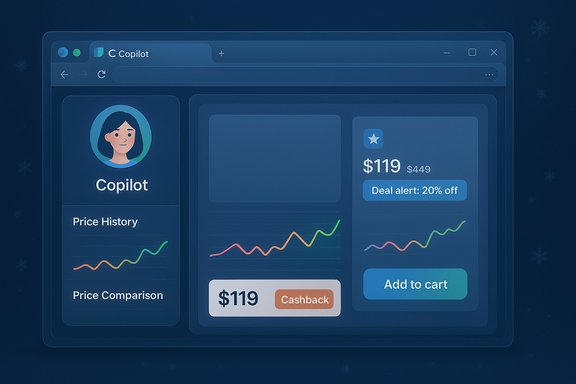
Microsoft has folded a familiar set of browser shopping tools into Copilot in Edge, turning the assistant into an active, AI-powered personal shopper that can compare prices, show price history, set alerts, surface cashback opportunities, and — in some cases — nudge you toward a lower-priced alternative elsewhere on the web. The move centralizes features that were previously scattered in Edge’s UI into the Copilot sidebar and Copilot Mode, and Microsoft says the new shopping experience is rolling out to US users first as part of its holiday-season push.
Microsoft has been repositioning Copilot from a task-focused assistant into a broader consumer platform tightly integrated with Edge and Windows. The company’s recent product strategy emphasizes three things: keep users inside Microsoft surfaces, make AI perform multi-step browsing tasks (what Microsoft calls “Actions” and “Journeys”), and stitch together personal data (order history, saved preferences) with web-wide signals to deliver context-aware recommendations. That strategy is the foundation for the shopping features being added to Copilot in Edge.
Independent coverage and Microsoft’s own blog and support pages confirm the concrete features being moved into Copilot: Cashback, Price Comparison, Price History, Product Insights, and Price Tracking — plus proactive notifications when Copilot detects a better deal elsewhere. Microsoft’s product blog and support documentation make the availability and UI changes explicit: the shopping tag and earlier flyouts are being deprecated in favor of a unified Copilot entry point in the sidebar, and most shopping features now surface inside Copilot in Edge.
But success depends on execution. Two scenarios illustrate divergent outcomes:
But convenience comes with trade-offs. The central questions are transparency and control: will the assistant clearly show the data and sources behind its recommendations? Will users retain straightforward controls to delete or limit order history and personalization? Will merchants and users be able to trust that Copilot’s prioritized deals are objective?
Treat Copilot Shopping as a useful new tool in your browser toolbox — one to test and evaluate, not to rely on blindly. Keep privacy settings checked, validate prices before you buy, and use price alerts and review summaries as accelerants to your own due diligence rather than substitutes for it.
Source: The Verge Yet another AI personal shopper: Microsoft Copilot.
 Background: why this matters now
Microsoft has been repositioning Copilot from a task-focused assistant into a broader consumer platform tightly integrated with Edge and Windows. The company’s recent product strategy emphasizes three things: keep users inside Microsoft surfaces, make AI perform multi-step browsing tasks (what Microsoft calls “Actions” and “Journeys”), and stitch together personal data (order history, saved preferences) with web-wide signals to deliver context-aware recommendations. That strategy is the foundation for the shopping features being added to Copilot in Edge.Independent coverage and Microsoft’s own blog and support pages confirm the concrete features being moved into Copilot: Cashback, Price Comparison, Price History, Product Insights, and Price Tracking — plus proactive notifications when Copilot detects a better deal elsewhere. Microsoft’s product blog and support documentation make the availability and UI changes explicit: the shopping tag and earlier flyouts are being deprecated in favor of a unified Copilot entry point in the sidebar, and most shopping features now surface inside Copilot in Edge.
What’s new: feature-by-feature breakdown
Cashback
- Copilot will highlight when a product is cashback-eligible and, in supported cases, guide the user to activate cashback. Microsoft describes this as a proactive signal in Copilot Mode in Edge.
Price Comparison
- When visiting a product page, Copilot can pull together prices from other retailers and present a comparison card inside the sidebar. That card aims to save you the tab-hopping normally required to compare offers. Microsoft frames this as an extension of existing Edge shopping tools, now accessible conversationally.
Price History & Price Tracking
- Copilot shows historical price charts for many product listings and allows users to set price alerts (price goals). If a tracked item reaches the target, Copilot can notify you. Microsoft explicitly documents how to set and manage these alerts in the Edge/Copilot UI.
Product Insights (review summaries and signal aggregation)
- Copilot summarizes user reviews into concise pros/cons, extracts representative comments, and surfaces aggregated sentiment. This is the “Review Insights” or “Product Insights” layer Microsoft is rolling into Copilot, intended to reduce noise from long, unstructured review feeds.
Proactive Deal Detection
- In Copilot Mode, Microsoft says Copilot will now proactively tell you if it finds a lower price elsewhere and will highlight cashback opportunities in the address bar and Copilot pane. The proactive element — the assistant telling you there’s a better deal without a user prompt — is what turns Copilot from a reactive tool into an active shopping agent.
How this compares with other AI shopping efforts
This is not Microsoft inventing shopping AI; it’s catching up and consolidating its existing shopping toolkit into Copilot while leaning heavily on the distribution advantage of Edge and Windows. Google, OpenAI and smaller players have also pushed shopping-oriented AI features: Google’s Shopping and Gemini integrations give search-level summaries and comparison, while OpenAI and Perplexity are experimenting with chat-first shopping assistants. Microsoft’s differentiator is the ability to surface shopping inside the browser and to combine that with Windows-level integrations and enterprise retail tooling (Dynamics 365, Cloud for Retail) — effectively a path to richer merchant partnerships and deeper checkout integration.Strengths: why many users will like Copilot Shopping
- Convenience and friction reduction. Consolidating price history, comparisons, cashback and review summaries in a single Copilot pane removes repetitive tab-switching and manual price-tracking chores.
- Conversational follow-ups. Because Copilot is conversational, you can ask follow-up questions about alternatives, specifications, compatibility, or return policies without reconfiguring searches.
- Integrated price alerts. Built-in tracking and goal-setting means users don’t have to install third-party trackers or extensions to be notified when prices drop.
- Native checkout potential. Early coverage and leaked previews indicate Copilot aims to support native checkout flows that could shorten the path to purchase; if implemented well, that’s a clear UX win for routine buys.
- Ecosystem leverage. Windows and Edge distribution gives Microsoft a large, built-in audience and the ability to connect Copilot to existing accounts, receipts, and order history if users opt in.
Risks and trade-offs: what to be wary of
Privacy and data retention
The features rely heavily on access to browsing context, order history, and potentially stored credentials or receipts to make personalized recommendations. Microsoft documents opt-in controls and settings, but centralizing order history and shopping behavior in Copilot raises real questions about retention policies, ad personalization, and cross-product usage. Users should verify the privacy toggles and understand what is stored and for how long.Accuracy and “hallucination” risks
AI summarizers and judgment-style features (e.g., “this is overpriced now” or “good time to buy”) create a veneer of authority. These systems can misinterpret review clusters, miss recent retailer-specific promotions, or produce overconfident buy/hold advice. Microsoft itself cautions users to verify price and seller details on retailer sites. Until provenance and uncertainty signals are visibly baked into the UI, users should treat AI judgments as helpful guidance rather than hard financial advice.Manipulation and fraud
E-commerce suffers from fake reviews, coordinated review-boosting (“brushing”), and price-manipulation tactics. An AI that summarizes reviews or ranks deals must be robust to these manipulations — for example, by weighting verified-purchase badges, cross-platform consistency, and recency. If Copilot’s summarizer lacks anti-abuse signals, it could amplify distorted data and mislead shoppers.Merchant economics and potential bias
Native checkout and prominent placement in Edge give Microsoft leverage over traffic — merchants will want favorable placement and may negotiate visibility or referral economics. That raises product-design questions: will Copilot prefer paid listings? Will cashback offers be neutral or influenced by partner deals? Transparency in how results are ranked and how cashback is surfaced will matter greatly.Fragmented rollouts and inconsistent behavior
Microsoft is rolling features out gradually and primarily in the US for now. Early previews show behavior variance across accounts and platforms (Edge vs. Copilot app). That means the experience may be uneven and some capabilities (like proactive deal notifications) might be missing from certain devices or regions during early rollout.Practical advice for Windows and Edge users
If you intend to use Copilot Shopping, follow these practical steps to get the benefits while protecting your privacy and avoiding surprises.- Update Edge and Copilot: ensure you’re running the latest Edge release and Copilot in Edge — many shopping features are gated behind updates.
- Review Copilot privacy settings: go to Settings > Privacy, search, and services > Search and connected experiences to confirm Page Context access and shopping personalization options. Opt out if you prefer less context sharing.
- Limit order history retention: if Copilot centralizes order history, check whether you can delete or limit stored receipts and past orders. Use the provided UI controls to clear history you don’t want used for personalization.
- Validate prices before buying: always confirm the price and seller on the merchant’s site, especially for high-value items or time-limited promotions. Copilot’s comparison cards are an aid, not the definitive ledger.
- Use price alerts as one signal: set price goals and alerts but treat them alongside manual checks and established retailer promotions.
- Watch for provenance and confidence indicators: favor product summaries that link back to raw reviews or that indicate which sources the assistant used. If Copilot omits provenance, regard the summary with skepticism.
What Microsoft says (and what it doesn’t)
Microsoft’s public messaging frames this update as a consolidation and UX improvement — moving tools already available across Bing and Edge into Copilot for a more conversational and proactive experience. The company’s support page clarifies rollout timing (majority availability starting early November in the US) and stresses opt-in controls for Page Context and personalization. But Microsoft’s public documentation is lighter on operational details that matter to power users and privacy-conscious buyers: precise retention periods for order history, whether cashback calculations are aggregated or per-merchant, and the commercial arrangements behind prioritized listings. Those are the sorts of specifics that will surface only with deeper documentation or regulatory requests. Until then, those points should be treated as open questions.How this could reshape the browser shopping landscape
If Copilot proves competent, transparent, and secure, Microsoft stands to make Edge a dominant discovery layer for purchases. The logic is simple: make discovery and comparison effortless, shorten the path to purchase with native checkout, and then monetize through partner economics or by enhancing retention for Microsoft services. That is precisely the playbook behind many of Microsoft’s consumer-facing AI moves: use integrated AI to create stickiness across services and product lines.But success depends on execution. Two scenarios illustrate divergent outcomes:
- Best-case: Copilot’s shopping features are accurate, provenance is clear, opt-in privacy controls are robust, and merchants and users trust the experience. Copilot becomes the default first-stop for discovery, particularly for low-consideration buys and holiday-season impulse purchases.
- Worst-case: The assistant surfaces opaque ranking, misses manipulations, or mishandles checkout and disputes. That leads to user frustration, merchant pushback, and regulatory scrutiny — especially around data usage and anti-competitive placement.
Developer and merchant implications
For retailers and ad partners, Copilot’s consolidation of shopping features is a new vector to reach shoppers inside the browser experience. Merchants will need to:- Ensure accurate schema and product metadata so Copilot can surface correct prices and availability.
- Reassess referral economics and placement strategies as new entry points (Copilot cards, proactive notifications) may alter traffic patterns.
- Prepare for an operational load if Copilot leads to increased customer support touchpoints via native checkout or order management inside Copilot.
Verification, limits of reporting, and unanswered questions
This feature set is documented in Microsoft’s blog and support pages and corroborated by independent coverage from outlets reporting on Copilot Mode and Edge updates. The Edge Blog explicitly lists Cashback, Price Comparison, Price History, Product Insights, and Price Tracking being folded into Copilot in Edge for US users, and Microsoft’s support pages describe where to find and configure these features. Independent news coverage confirms the rollout strategy and the broader Copilot Mode context. That said, several operational specifics remain opaque or subject to change:- Exact retention periods for Copilot order history and how that data may be used across Microsoft advertising or personalization systems.
- Full details of merchant commercial models (e.g., whether featured placement is purely algorithmic or involves business agreements).
- The degree to which Copilot’s native checkout will be supported by dispute resolution and fraud-protection flows.
Bottom line for WindowsForum readers
Microsoft’s decision to fold shopping tools into Copilot in Edge is a logical next step for a company that can leverage Windows and Edge distribution to deliver an integrated, conversational shopping experience. For many users, it will be an obvious convenience: faster comparisons, built-in price tracking, and the ability to ask follow-ups without context-switching.But convenience comes with trade-offs. The central questions are transparency and control: will the assistant clearly show the data and sources behind its recommendations? Will users retain straightforward controls to delete or limit order history and personalization? Will merchants and users be able to trust that Copilot’s prioritized deals are objective?
Treat Copilot Shopping as a useful new tool in your browser toolbox — one to test and evaluate, not to rely on blindly. Keep privacy settings checked, validate prices before you buy, and use price alerts and review summaries as accelerants to your own due diligence rather than substitutes for it.
Quick checklist to get started (and stay safe)
- Update Edge and sign in with a Microsoft account to access Copilot shopping features.
- Check Settings > Privacy, search, and services to control Page Context and personalization.
- Set price alerts for items you’re watching but confirm merchant details on the seller’s page before purchasing.
- If you’re uncomfortable with order history being stored, review Copilot’s order history controls and delete data you don’t want retained.
- Watch for provenance indicators in Product Insights; prefer summaries that link back to source reviews or show confidence levels.
Source: The Verge Yet another AI personal shopper: Microsoft Copilot.
