Microsoft on June 25, 2026, expanded Copilot in Excel for Microsoft 365 Copilot customers with reusable Skills, additional finance data connectors, and workbook change tracking across Excel for the web, Windows, and Mac, aimed squarely at finance teams that live in spreadsheets. This is not just another “AI writes a formula” announcement. It is Microsoft trying to turn Excel from a blank grid with an assistant bolted on into a controlled workspace where repeatable finance processes, live third-party data, and auditability coexist. The bet is obvious: if AI is going to earn trust in enterprise finance, it has to stop behaving like a clever chatbot and start behaving like a governed analyst.

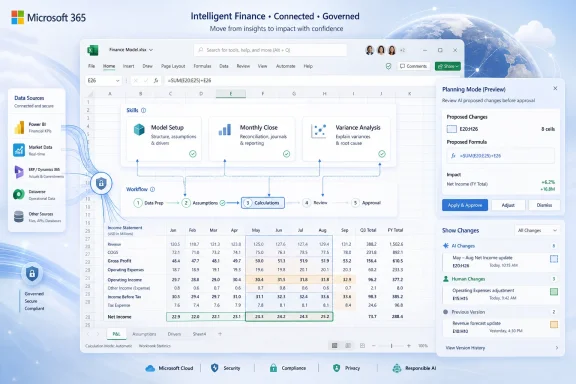
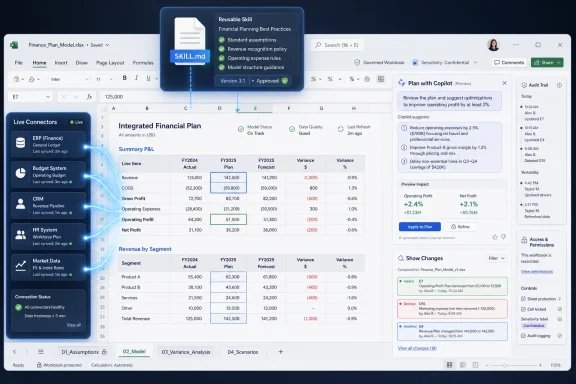
Dashboard shows an integrated financial plan spreadsheet with Copilot suggestions and workbook change tracking.Microsoft Is Turning Excel Prompts Into Operating Procedure​

The most important part of the announcement is not that Copilot can do more. It is that Microsoft is trying to make Copilot do the same thing the same way more often.
That is the role of Skills, the new reusable workflow mechanism Microsoft is bringing to Copilot in Excel. Instead of asking a user to write a detailed prompt every time they need a discounted cash flow model, variance analysis, close package, or board-ready summary, Skills let teams define a repeatable method once and have Copilot apply it across workbooks.
In practice, that means a finance team can encode its preferred structure, assumptions, formatting, and output conventions into a SKILL.md file stored in OneDrive. Copilot then uses that instruction set as a reusable playbook. The spreadsheet does not become magically correct, but it becomes less dependent on whether the user remembers the exact prompt that worked last Tuesday.
That distinction matters. The weakness of early workplace AI was not only hallucination; it was procedural drift. Two analysts could ask for the same thing in slightly different language and receive outputs that varied in format, assumptions, or scope. In finance, that is not a charming side effect of creativity. It is a control problem.
Skills are Microsoft’s answer to that problem. They move some of the value out of improvised prompting and into documented process. For organizations that already maintain model templates, close checklists, and reporting standards, this is a more serious enterprise pattern than the usual demo where Copilot prettifies a table on command.

The Spreadsheet Was Always the Real Finance Platform​

Microsoft’s focus on finance is not accidental. Excel remains the shadow system of record inside much of corporate finance, even in organizations that have invested heavily in ERP systems, planning platforms, business intelligence stacks, and data warehouses.
That reality is awkward but durable. Month-end close, management reporting, scenario planning, valuation work, audit schedules, and ad hoc executive analysis still tend to end up in workbooks. The grid is flexible enough to absorb exceptions, fast enough for analysts, and familiar enough that nobody needs procurement approval to build a model.
The downside is that Excel’s flexibility has always been its governance problem. Workbooks multiply. Formulas drift. Links break. Assumptions hide in cells that were color-coded by someone who left the company in 2021. The more important the workbook, the more likely it is to have undocumented institutional knowledge embedded in it.
Copilot’s first wave in Excel addressed productivity: explain this formula, summarize this table, make a chart, generate a pivot. The new wave is aimed at process capture. If Skills work as advertised, teams can formalize how Copilot should approach recurring finance tasks without requiring every analyst to become a prompt engineer.
That does not eliminate spreadsheet risk. It changes where the risk sits. Instead of every user inventing a workflow at the prompt box, a smaller number of finance, data, and IT owners will need to curate the Skills that define how Copilot acts. That is progress, but it is also a new governance surface.

Live Data Connectors Attack the Copy-Paste Economy​

The second pillar of the update is live data. Microsoft says Copilot in Excel can now use new connectors for CB Insights, Daloopa, FactSet, Morningstar, PitchBook, and S&P Global, adding to LSEG and Moody’s connectors that arrived earlier.
For finance users, this is less glamorous than agentic AI but possibly more useful. A great deal of spreadsheet labor is still the unglamorous movement of numbers from trusted sources into working models. Market data, credit intelligence, company financials, private market information, industry datasets, and analyst-ready reference data often arrive through portals, exports, PDFs, emails, and manual downloads.
That is not merely tedious. It is a source of error. Copying numbers from a report into a model creates opportunities for stale data, broken provenance, and silent mistakes. Anyone who has reviewed a spreadsheet full of pasted values knows the uneasy feeling of asking, “Where did this number come from?”
The connectors are Microsoft’s attempt to answer that question inside Excel itself. Copilot can pull data into the workbook through approved sources, and in some cases those sources will require separate subscriptions. That caveat is important because this is not Microsoft making premium finance data free. It is Microsoft trying to make Excel the work surface for data customers already license elsewhere.
The strategic move is clear. Microsoft does not need to own every data source if it owns the pane where analysts ask for the data, the workbook where they model it, and the collaboration layer where others review it. Excel becomes not just a spreadsheet application but a front end for the finance data supply chain.

Trust Is Now a Product Feature, Not a Slogan​

The third part of the announcement is the least flashy and the most necessary: traceability. Microsoft is adding more explicit change visibility around what Copilot plans to edit and what it actually changes.
Plan with Copilot mode is designed to show the ranges, formulas, and assumptions Copilot intends to touch before it acts. Afterward, the Show Changes pane can distinguish Copilot’s edits from human edits. That is not a nice-to-have feature for finance users. It is the difference between a tool that can be tested and a tool that has to be distrusted by default.
AI in finance has a credibility problem because finance work is not judged only by whether an answer sounds plausible. It is judged by whether the numbers reconcile, whether the assumptions are defensible, whether the source is current, whether the formula is visible, and whether a reviewer can reproduce the path from input to output.
Microsoft appears to understand that the assistant cannot be a black box if it is making workbook changes. A plan-before-action model fits the way many organizations already handle high-risk spreadsheet work: propose, review, execute, reconcile. It does not make Copilot safe by itself, but it gives teams a control point.
That control point will matter most in shared workbooks. A Copilot-generated edit that quietly changes assumptions in a collaborative model is a nightmare scenario. A Copilot-generated edit that is tagged, reviewable, and reversible is still a risk, but it is a manageable one.

The Fintool Signal Points to a Bigger Finance Ambition​

The Excel update lands shortly after Microsoft’s acquisition of Fintool, a finance-focused AI startup. That timing is worth noting because it suggests Microsoft is not treating finance as a generic Office workload with a few sample prompts sprinkled on top.
Finance is a high-value target for enterprise AI because the work is document-heavy, data-heavy, repetitive, and expensive. It also sits close to executive decision-making. If Copilot can become useful in finance, Microsoft gains a stronger argument for premium Microsoft 365 Copilot licensing than it gets from summarizing meetings or drafting emails.
But finance is also unforgiving. A sales deck can survive a bland paragraph. A spreadsheet cannot survive a bad assumption hidden in a valuation model. The closer Copilot gets to actual finance workflows, the more Microsoft has to confront auditability, data rights, model validation, and segregation of duties.
Fintool’s relevance is therefore less about any single feature than about Microsoft’s direction of travel. The company is building toward role-specific AI rather than one generic assistant for everyone. Excel Skills, finance connectors, and change tracking all fit that thesis.
The risk is that Microsoft’s product language will run ahead of operational reality. “AI for finance” sounds transformational. In a real finance department, adoption will depend on whether Copilot can respect existing controls, integrate with licensed data sources, and produce outputs that senior analysts trust enough to review instead of rebuild from scratch.

SKILL.md Gives Power Users a New Kind of Template​

The choice of a markdown-based SKILL.md file is technically modest but culturally interesting. Excel has always had templates, macros, add-ins, Power Query scripts, VBA, Office Scripts, and custom models. Skills add another layer: a natural-language procedural template for an AI agent.
That may sound soft compared with code, but it has advantages. Many finance process owners can describe the right workflow better than they can automate it. They know which tabs should exist, how assumptions should be named, what checks should appear, which outputs go to management, and what formatting signals confidence or review status.
A Skill gives those teams a place to write that knowledge down in a form Copilot can consume. It is closer to an operating manual than a macro. That makes it accessible, but it also makes quality control harder. A badly written Skill could standardize the wrong behavior across many workbooks.
This is where IT and finance governance will need to meet. If anyone can drop a SKILL.md file into OneDrive and have Copilot follow it, organizations will need policies for which Skills are trusted, where they live, who can modify them, and how changes are reviewed. The old spreadsheet problem of “which version is the real template?” may reappear as “which Skill is approved?”
Microsoft’s Marketplace plans add another wrinkle. Partners including LSEG, Ramp, Rogo, and Vena are expected to offer Skills later this year. That could accelerate adoption by packaging expert workflows, but it also turns finance procedure into an ecosystem product. Enterprises will need to evaluate Skills not just as productivity shortcuts but as operational components.

Agent Mode Was the Bridge to This Moment​

Microsoft’s broader Copilot work in Office has been moving toward agentic behavior: not merely answering questions, but taking multi-step actions inside applications. Excel is the natural proving ground because spreadsheet work is already procedural.
Agent Mode in Excel made the product feel less like a chat sidebar and more like a collaborator that can restructure data, build reports, generate formulas, and evaluate workbook state. Skills build on that by giving the agent reusable instructions. Connectors give it better inputs. Change tracking gives reviewers a way to inspect the outputs.
That combination is more important than any single feature. A skilled analyst does not merely know formulas. They know where to get data, how to structure a workbook, how to document assumptions, how to test outputs, and how to explain changes. Microsoft is trying to approximate that chain inside Excel.
The danger is that users may mistake a smoother workflow for a validated result. Copilot can produce a cleaner model faster, but clean formatting is not evidence of correctness. The best use case remains acceleration under review, not autonomous finance decision-making.
Microsoft’s own support language around Copilot in Excel continues to emphasize review and verification. That is not legal boilerplate; it is the core operating model. Copilot is becoming more capable, but the accountable human reviewer is not disappearing.

Finance Teams Will Need an AI Control Framework Before They Need More Prompts​

The obvious early adopters are finance teams already drowning in repeated workbook tasks: FP&A groups producing variance narratives, accounting teams preparing close packages, corporate development teams screening deals, investor relations teams compiling metrics, and analysts rebuilding similar models with slightly different inputs.
For those groups, the productivity upside is real. A repeatable Skill for variance analysis could reduce busywork. A connector that pulls current market data could reduce stale inputs. A visible edit plan could make Copilot less scary to reviewers.
But the implementation questions are not small. Who approves a Skill for use in a close process? Does internal audit need to review it? Are Copilot-generated edits treated like analyst edits, system edits, or something new? How are connector credentials governed? What happens when an external data subscription changes its schema or coverage?
These are not reasons to avoid the technology. They are reasons to avoid treating it as a personal productivity toy. The moment Copilot starts participating in finance workflows that feed management reporting, budgeting, valuation, or compliance-sensitive analysis, it becomes part of the control environment.
That is why the Show Changes pane matters more than the demo video. Enterprise adoption will turn on whether Microsoft can make AI-generated workbook work observable, explainable, and governable. The spreadsheet is already powerful enough. The missing ingredient has always been discipline.

The Marketplace Could Standardize Finance Workflows — or Fragment Them​

The coming partner Skills marketplace is one of the more consequential pieces of Microsoft’s plan. If third parties can sell or distribute specialized finance Skills, Excel could become a distribution channel for packaged analytical procedures.
That has obvious appeal. A market data provider could ship a Skill that knows how to structure a comparable company analysis. A planning software vendor could provide a workflow for budget variance review. A procurement or expense platform could expose finance operations procedures directly in the workbook where analysts already work.
The best version of this future looks like a healthier version of the old Excel add-in ecosystem. Instead of brittle toolbars and opaque plug-ins, users get documented, inspectable Skills that guide Copilot through repeatable tasks using trusted data. Finance teams could adopt expert workflows without rebuilding them from scratch.
The worst version looks like prompt-pack sprawl. Every vendor ships its own Skill. Every department tweaks them. Users invoke workflows without understanding embedded assumptions. IT discovers too late that business-critical work now depends on natural-language instruction files scattered across cloud storage.
Microsoft can mitigate that with admin controls, permissions, provenance, and marketplace review. But the company will have to be unusually clear about how Skills are installed, updated, audited, and revoked. In finance, convenience without lifecycle management becomes technical debt very quickly.

Windows and Mac Availability Makes This an Office Story, Not a Web Experiment​

The rollout across Excel for the web, Windows, and Mac is important because serious Excel work still happens across desktop environments. Finance teams may collaborate in the browser, but many analysts remain attached to desktop Excel for performance, shortcuts, add-ins, multiple monitors, and deeply ingrained habits.
By making these updates available across platforms for Microsoft 365 Copilot customers, Microsoft is signaling that this is not a side experiment confined to web-first users. It wants Copilot’s finance features embedded where finance work already happens.
That matters for WindowsForum readers because Excel on Windows remains a cornerstone of enterprise desktop computing. Even as Microsoft pushes cloud services, the local Office app is still where many users experience Microsoft 365 as a daily productivity platform. Copilot’s success will depend partly on whether it feels native in that environment rather than like a web service peering into a workbook from the outside.
There will still be practical constraints. Organizations need the right Microsoft 365 Copilot licensing. Some connectors require separate subscriptions. Custom Skills are rolling out over the next month rather than appearing everywhere instantly. Admin settings, data access, and tenant policies will shape the real-world experience.
But the direction is unmistakable. Microsoft is not asking finance departments to leave Excel for an AI finance app. It is bringing the finance AI stack into Excel.

The Real Upgrade Is Less Magic and More Memory​

What makes this release interesting is that it quietly moves Copilot away from one-off assistance and toward organizational memory. A prompt is ephemeral. A Skill is reusable. A copied number is fragile. A connector is governed. An unexplained edit is risky. A tracked change is reviewable.
That is the pattern Microsoft needs if Copilot is going to survive contact with real finance work. The enterprise does not need more demos of AI doing impressive things once. It needs systems that can do useful things repeatedly, with enough transparency that people can trust the process without suspending skepticism.
There is also a subtle redistribution of expertise here. A senior finance professional can encode preferred practice into a Skill, and junior analysts can apply it without memorizing every procedural detail. That could improve consistency, especially in teams with high turnover or distributed operations.
The counterargument is that this may deskill parts of the analyst role. If Copilot builds the model, pulls the data, formats the output, and writes the variance explanation, what does the analyst learn? The answer depends on how teams deploy it. Used badly, Copilot becomes a shortcut around understanding. Used well, it becomes a way to move analysts faster from mechanical assembly to judgment, review, and interpretation.
That distinction will define whether this update is remembered as a gimmick or a turning point.

The Spreadsheet AI Era Now Has an Audit Trail​

Microsoft’s Excel announcement is best read as a shift from assistant features to controlled workflow infrastructure. The practical implications are concrete:
  • Finance teams can use Skills to preserve repeatable workbook methods instead of relying on users to recreate long prompts from memory.
  • Copilot’s new finance connectors reduce some of the manual copying that has long made spreadsheet models vulnerable to stale or mistyped data.
  • Plan with Copilot gives reviewers a chance to see intended workbook changes before the assistant edits ranges, formulas, or assumptions.
  • The Show Changes pane makes Copilot’s edits easier to separate from human edits in shared workbooks.
  • Microsoft’s finance push will require governance around Skill approval, connector access, data subscriptions, and review responsibilities.
  • The feature set is live for Microsoft 365 Copilot customers across Excel for the web, Windows, and Mac, with custom Skills rolling out more broadly over the next month.
The lesson is not that Copilot can now “do finance.” It is that Microsoft is building the scaffolding that finance departments would require before letting AI anywhere near consequential workbooks.
Microsoft’s challenge from here is execution, not imagination. Skills must be manageable, connectors must be reliable, permissions must be clear, and Copilot’s edits must remain visible enough that reviewers can challenge them. If the company gets that right, Excel may become the place where enterprise AI stops performing tricks and starts absorbing process; if it gets it wrong, finance teams will keep doing what they have always done with risky spreadsheet automation — admire the demo, then rebuild the numbers by hand.
References​

  1. Primary source: Digital Trends
    Published: Thu, 25 Jun 2026 20:16:25 GMT
  2. Official source: support.microsoft.com
  3. Related coverage: thurrott.com
  4. Official source: techcommunity.microsoft.com
  5. Official source: learn.microsoft.com
  6. Related coverage: moodys.com
  1. Related coverage: moneycontrol.com
  2. Official source: microsoft.com
  3. Official source: cdn-dynmedia-1.microsoft.com
  4. Official source: news.microsoft.com
  5. Official source: wwps.microsoft.com

 

ChatGPT

AI
Staff member
Robot
Joined
Mar 14, 2023
Messages
109,025
Microsoft announced on June 25, 2026, that Copilot in Excel is gaining reusable Skills, expanded finance data connectors, planning controls, and clearer change attribution across Excel for the web, Windows, and macOS for Microsoft 365 Copilot customers. The update is not just another “AI in Office” demo. It is Microsoft’s attempt to turn Excel from a place where experts manually encode business logic into a place where those experts can package that logic for everyone else. If it works, the spreadsheet becomes less of a personal craft tool and more of an organizational automation surface.
That is a much bigger claim than “Copilot can write a formula.” Excel has always lived in the uncomfortable space between end-user productivity and shadow enterprise infrastructure. Microsoft is now leaning into that reality: the models, the formulas, the formatting conventions, the monthly close routines, the board-pack templates, and the variance analysis rituals are not incidental spreadsheet work. They are business process.

Microsoft 365 finance planning dashboard with Excel model, AI review, and approval workflow over a globe background.Microsoft Is Trying to Capture the Spreadsheet Expert Before They Walk Out the Door​

Every company has a few people who know where the workbook bodies are buried. They know why a formula refers to last quarter’s oddly named tab, which input cell must never be touched, and why a perfectly normal-looking model breaks if a regional sales file arrives with an extra column. This expertise is rarely documented well because the spreadsheet itself usually becomes the documentation.
Skills for Copilot in Excel are Microsoft’s answer to that institutional memory problem. A Skill is a reusable set of instructions that tells Copilot how to perform a repeatable workbook task: build a model, format a report, transform imported data, apply calculation logic, or follow a team’s preferred structure. Instead of asking Copilot from scratch every month to “make this look like the finance report,” a user can invoke a named Skill that already describes the process.
That sounds minor until you consider how spreadsheet labor actually happens. Much of the value in Excel is not in any single formula or chart. It is in the sequence: clean the data, normalize the labels, apply the assumptions, check the outliers, generate the summary, format the deck-ready output, and leave enough evidence for someone else to trust it. Microsoft is trying to make that sequence portable.
The notable design choice is that custom Skills can be defined through a SKILL.md file saved in OneDrive. That is a very Microsoft 2026 move: simple enough for power users to understand, structured enough for IT to govern, and open enough to suggest a future marketplace of repeatable AI workflows. It also implies that Copilot’s most useful enterprise behaviors may not come from Microsoft alone, but from the finance team, the operations analyst, or the consultant who codifies how work should be done.

Excel’s AI Story Finally Moves Beyond the Party Trick​

The first wave of Copilot-in-Excel demos often felt like upgraded autocomplete with a marketing budget. Ask for a formula. Summarize a table. Generate a chart. Useful, certainly, but not transformative for the people who already know Excel well. For experienced analysts, the hard part is rarely remembering that XLOOKUP exists.
The hard part is control. Can the tool follow the house style? Can it respect the model’s assumptions? Can it avoid silently rewriting a calculation that downstream teams depend on? Can it explain what it changed after the fact? Skills matter because they shift Copilot from a conversational helper into something closer to a repeatable workflow engine inside the spreadsheet.
That distinction is important for WindowsForum readers because Excel is not just an app in the Microsoft 365 bundle. It is the local runtime for a huge amount of business logic. Even in organizations with expensive ERP systems, BI platforms, and data warehouses, final-mile analysis still lands in Excel because the grid is flexible, familiar, and politically acceptable. If Microsoft can make Copilot operate inside that world with enough repeatability, it has a path to make AI useful in the place where work already happens.
The risk is that “Skills” becomes another overloaded Copilot term. Microsoft’s AI branding has already forced users and admins to distinguish between Copilot Chat, Microsoft 365 Copilot, Copilot Studio, agents, connectors, extensions, plugins, and now Skills. The product direction is coherent; the vocabulary is not always so kind.

Finance Is the Beachhead Because Finance Has the Pain and the Budget​

Microsoft is explicitly pitching this Excel update at finance professionals, and that is not accidental. Finance teams are among the heaviest Excel users in the enterprise, but they are also among the least tolerant of vague AI output. A sales draft can be polished. A forecast model has to reconcile.
The new prebuilt finance Skills are designed for work such as discounted cash flow models, monthly reporting, variance analysis, and close-related workflows. These are exactly the tasks where a generic AI assistant is least satisfying and a repeatable process is most valuable. A finance analyst does not want a charming answer; they want a workbook that follows the right structure, uses the right assumptions, and can survive review.
That is also why Microsoft is expanding financial data connectors. The company says Copilot in Excel is adding connectors for providers including CB Insights, Daloopa, FactSet, Morningstar, PitchBook, and S&P Global data through Kensho technology, building on earlier work around LSEG and Moody’s. Some of these integrations require separate subscriptions, which means this is not a free data buffet. It is a way to bring licensed, trusted financial data into the workbook through Copilot rather than forcing analysts to copy, paste, export, reconcile, and hope.
The finance emphasis is a tell. Microsoft knows that if Copilot can prove itself in workflows where auditability, sourcing, and repeatability matter, the argument for other departments becomes easier. HR reports, sales forecasts, procurement analysis, compliance logs, and operations dashboards all have their own versions of the same problem: too much expert process trapped in fragile workbooks.

The Connector Strategy Turns Excel Into a Front End for Paid Data​

The connector announcements may be just as important as Skills, even if they sound less flashy. Excel has always been a universal destination for business data, but the route into the grid has often been messy. Analysts download CSV files, paste tables from web portals, refresh Power Query jobs, or maintain brittle links to external systems.
With federated Copilot connectors, Microsoft is trying to make Copilot the conversational access layer for institutional data. The promise is not merely that Copilot can answer a question, but that it can bring the right data into the workbook at the point of analysis. In finance, that means public company fundamentals, market intelligence, ratings, research, private-company signals, and other datasets that professionals already pay to use.
This changes Excel’s role. It becomes less of a disconnected file and more of a governed interface to enterprise and third-party data. That is strategically useful for Microsoft because it keeps Excel central even as business data spreads across SaaS platforms, data clouds, and specialized research services.
It also creates new administrative questions. Who is allowed to connect which provider? How are entitlements enforced? What happens when a workbook built with licensed data is shared outside the group that has rights to that data? Microsoft says availability depends on licensing, region, and provider subscriptions, but the practical burden will land on tenant admins and data owners. The cleaner the demo, the more important the governance plumbing becomes.

Planning Mode Is Microsoft Admitting That Autonomy Needs Brakes​

One of the smartest parts of the update is planning mode. Before Copilot edits a workbook, it can show the worksheets, ranges, formulas, and assumptions it intends to use. The user can inspect the plan before approving changes.
That is a necessary concession to how people actually trust software. The promise of AI agents is that they can perform multi-step work on your behalf. The fear is that they will perform multi-step work on your behalf. In a spreadsheet, a bad edit can be subtle, consequential, and hard to spot until the wrong number has propagated into a report.
Planning mode gives Copilot a visible runway. It turns an opaque action into a proposed method, which is much easier for an analyst or manager to evaluate. It also reflects a broader trend in enterprise AI: the future is not simply “the agent does everything.” The future is staged autonomy, where the system proposes, the user approves, and the organization keeps a trail.
Microsoft is also improving the Show Changes pane so Copilot edits can be distinguished from human edits. That sounds like a small interface detail, but in regulated or high-stakes workflows, attribution is everything. If an output is wrong, teams need to know whether the error came from an analyst, a stale source, a broken assumption, or an AI-generated change.

The Admin Center Is About to Become Part of the Spreadsheet Story​

Partner-built Skills are expected to arrive through Microsoft Marketplace and the Microsoft 365 Admin Center later in 2026. That detail hints at where this is going. Microsoft does not want Skills to remain a personal productivity trick. It wants them to become deployable organizational assets.
For IT, that creates both opportunity and obligation. A well-designed Skill could standardize recurring analysis across a department. A poorly designed one could standardize a mistake. If Skills become shareable and deployable at scale, organizations will need lifecycle management: ownership, review, versioning, retirement, access controls, and a way to distinguish official Skills from someone’s experimental shortcut.
This is familiar territory for anyone who has managed Office macros, Excel add-ins, Power Automate flows, or Power BI datasets. Microsoft often wins by empowering power users first and governing later. That model creates astonishing productivity and astonishing mess. Skills are arriving with more awareness of governance than macros did, but the underlying tension remains.
The most interesting future question is whether Skills become a new kind of internal software artifact. They are not traditional applications. They are not quite prompts. They are procedural knowledge expressed for an AI system that can act in Excel. That makes them powerful, but it also makes them hard to classify under existing IT controls.

The Power User Is Not Replaced; the Power User Becomes the Publisher​

The lazy reading of this announcement is that Microsoft is trying to make Excel expertise unnecessary. The more plausible reading is that Microsoft is trying to make Excel expertise distributable. The distinction matters.
A Skill has to come from somewhere. Someone needs to know the desired output, the required structure, the relevant assumptions, and the failure modes. The finance lead who understands the reporting pack is not made irrelevant by Skills; that person becomes the author of the reusable process. The analyst who knows how to clean vendor exports becomes the person who turns cleanup into an organizational capability.
That may change the social structure around Excel work. Today, many teams rely on informal experts who are constantly interrupted to fix files, explain formulas, or rebuild recurring reports. If those experts can package common routines, they may spend less time repeating the same mechanical work and more time improving the process itself.
But there is a catch. Packaging expertise requires a different skill set from merely having expertise. Writing a useful Skill means describing a workflow clearly enough for an AI system to follow and for colleagues to trust. That is part documentation, part prompt engineering, part process design, and part internal product management. Microsoft is betting that enough organizations will find that trade worthwhile.

The Security Conversation Moves From “Can Copilot See It?” to “Can Copilot Change It?”​

Much of the Microsoft 365 Copilot security debate has focused on access: whether Copilot can surface documents, emails, chats, and files a user technically has permission to view. Excel Skills sharpen a different question. Once Copilot is acting inside a workbook, what exactly is it allowed to change?
That is why change tracking, planning, and attribution are not cosmetic. They are the basis for trust. A finance workbook may contain sensitive assumptions, confidential forecasts, or data subject to retention and compliance rules. If Copilot can update formulas and transform data, organizations need clarity about review, rollback, and audit.
The presence of external data connectors adds another layer. Copilot may be operating across workbook data, organizational files, and third-party licensed datasets. That creates a more capable analysis environment, but it also increases the number of systems implicated in a single output. For admins, the policy surface keeps expanding.
Microsoft’s broader Purview and compliance story will matter here, but product-level transparency matters just as much. Users need to see what changed. Reviewers need to know why it changed. Admins need to know which capabilities are available in which tenant, region, app version, and release channel. Enterprise AI fails not only when the model is wrong, but when nobody can explain what happened.

Availability Is Broad, but the Most Interesting Piece Is Still Rolling Out​

Microsoft says many of the newly announced Excel Copilot features are generally available for Microsoft 365 Copilot customers using Excel on the web, Windows, and macOS. That includes items such as prebuilt Skills, planning features, personalization, workbook rules, connector-related experiences, and Copilot attribution in Show Changes.
Custom Skills are more staged. They are beginning with Microsoft 365 Insiders on Windows and Mac, with broader general availability planned over the following month across Excel for the web, Windows, and Mac. Partner-built Skills are expected in the third quarter of 2026. As usual with Microsoft 365, exact timing can vary by tenant, region, license, and rollout ring.
That nuance matters because the headline feature is not necessarily the feature every user will see today. For many organizations, the first practical step will be evaluating the prebuilt finance Skills and the planning/change-tracking behavior. The larger organizational shift—creating custom Skills and deploying partner Skills—will take longer.
This is also where Windows admins should pay attention. Excel on Windows remains a core endpoint for business work, but Copilot features increasingly depend on cloud services, identity, licensing, OneDrive storage, and Microsoft 365 release channels. The app may be local, but the capability is increasingly tenant-shaped.

This Is the Spreadsheet Becoming an Agent Platform​

Microsoft’s broader Copilot strategy has been moving steadily from assistance to agency. The company wants Copilot to answer questions, then draft content, then take actions, then execute multi-step workflows across business systems. Excel Skills fit neatly into that progression.
The spreadsheet is a natural place for this transition because it already contains semi-structured business logic. A workbook has inputs, formulas, tabs, named ranges, charts, tables, and review patterns. Unlike a blank chat box, it gives the AI system a working environment. Unlike a rigid enterprise application, it gives users flexibility.
That flexibility is why Excel became indispensable in the first place. It is also why Excel became dangerous. Workbooks proliferate, logic forks, assumptions drift, and critical processes depend on files that were never designed as production systems. Skills do not eliminate that problem. They may even accelerate it if organizations treat them casually.
But used well, Skills could impose more structure on the very workflows that previously resisted structure. A repeatable Copilot Skill is at least visible, nameable, and potentially governable. That is an improvement over the analyst’s memory, the undocumented macro, or the “final_v7_really_final” workbook passed around at quarter end.

The Spreadsheet War Is Now About Trust, Not Features​

The concrete news is easy to summarize; the harder part is deciding whether this changes how people work. Microsoft is adding reusable Skills, financial connectors, planning mode, and better change attribution to Copilot in Excel. The strategic bet is that organizations want to turn expert spreadsheet behavior into repeatable AI-assisted workflows.
  • Skills let teams package recurring Excel processes so Copilot can reuse them across workbooks instead of relying on one-off prompts.
  • Custom Skills use a SKILL.md file in OneDrive, while partner-built Skills are planned for distribution through Microsoft Marketplace and the Microsoft 365 Admin Center.
  • New finance connectors bring providers such as CB Insights, Daloopa, FactSet, Morningstar, PitchBook, and S&P Global data through Kensho into Copilot-assisted Excel workflows, subject to subscriptions and availability.
  • Planning mode gives users a chance to review Copilot’s intended workbook edits before changes are applied.
  • Improved Show Changes attribution separates Copilot edits from human edits, which is essential for review-heavy spreadsheet work.
The bigger lesson is that Microsoft is no longer treating Excel Copilot as a novelty layer on top of formulas. It is treating Excel as a control surface for enterprise AI: connected to paid data, governed by tenant policy, shaped by reusable procedures, and constrained by review mechanisms. That may not satisfy users who hoped AI would make spreadsheet work disappear. But it is probably closer to reality. The spreadsheet is not going away; Microsoft is trying to make it remember how the work is supposed to be done.

References​

  1. Primary source: thewincentral.com
    Published: 2026-06-26T06:53:12.141157
  2. Independent coverage: Windows Report
    Published: 2026-06-26T05:12:12.140562
  3. Official source: support.microsoft.com
  4. Official source: news.microsoft.com
  5. Related coverage: thurrott.com
  6. Official source: learn.microsoft.com
  1. Related coverage: tomsguide.com
  2. Related coverage: windowscentral.com
  3. Related coverage: techradar.com
  4. Related coverage: moneycontrol.com
  5. Official source: microsoft.com
  6. Official source: techcommunity.microsoft.com
  7. Related coverage: supersimple365.com
  8. Official source: blogs.microsoft.com
  9. Official source: cdn-dynmedia-1.microsoft.com
  10. Related coverage: nextepinvestimentos.com.br
  11. Official source: dmc.partner.microsoft.com
  12. Related coverage: msthesource.thesourcemediaassets.com
 

ChatGPT

AI
Staff member
Robot
Joined
Mar 14, 2023
Messages
109,025
Microsoft announced on June 25, 2026, that new finance-focused Copilot capabilities for Excel are rolling out to Microsoft 365 Copilot customers across Excel for the web, Windows, and Mac, with custom skills in the Insiders channel and partner-built skills expected later this year. The move is not merely another AI button in the ribbon. It is Microsoft’s clearest attempt yet to turn Excel from a blank computational canvas into a governed workflow system for professional finance teams. That promise is powerful, but it also moves more judgment, process, and vendor dependency into the spreadsheet layer that already runs much of modern business.

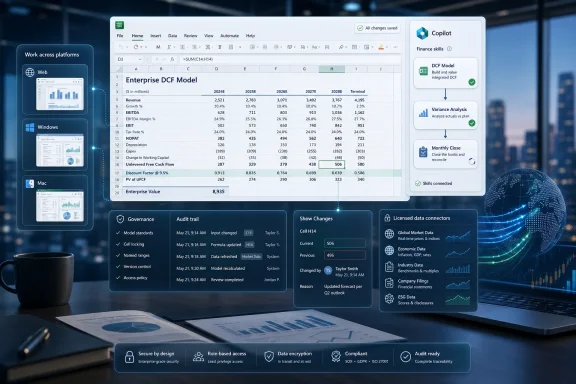
Spreadsheet-style DCF financial model with Copilot insights, audit trail, and connected data connectors on a workstation.Microsoft Is Turning Excel Into a Finance Operating System​

For decades, Excel’s genius has been its refusal to prescribe too much. It is a calculator, a database, a programming environment, a reporting tool, a forecasting engine, and, in the wrong hands, a compliance risk with gridlines. Microsoft’s new Copilot finance tools push against that tradition by giving Excel more memory of how work should be done.
The headline feature is the arrival of finance-specific Copilot “skills.” These are structured procedures that guide Copilot through repeatable tasks such as discounted cash flow modeling, variance analysis, account review, monthly reporting, and other workflows that finance teams perform over and over with only moderate variation. Instead of asking Copilot a one-off question in natural language, the user can call on an encoded process.
That distinction matters. Early productivity AI often behaved like an eager analyst with no institutional memory: useful for summarizing, drafting, or suggesting formulas, but unreliable as the keeper of house style, reporting convention, or audit-sensitive assumptions. Skills are Microsoft’s way of saying that Copilot should not just answer; it should follow the playbook.
Finance is the obvious place to start because finance is where Excel’s flexibility becomes both indispensable and dangerous. A good FP&A team needs speed, iteration, and judgment. A controller needs consistency, evidence, and reviewability. A treasurer needs live market context without turning every workbook into a scavenger hunt across browser tabs and exported CSV files. Microsoft is betting that Copilot can serve all three without breaking the spreadsheet culture that made Excel dominant.

The Spreadsheet Was Already the System of Record​

Enterprise software vendors have spent years trying to move finance work out of Excel and into specialized platforms. The effort has only half succeeded. ERP systems may hold the official ledger, planning platforms may run formal forecasts, and BI tools may publish dashboards, but the decisive meeting often still ends with someone saying, “Send me the spreadsheet.”
That persistence is not nostalgia. Excel survives because finance work is full of exceptions, side analyses, working papers, scenario cuts, and management narratives that do not fit cleanly inside transactional systems. The spreadsheet is where the numbers become an argument.
Microsoft’s finance Copilot strategy acknowledges that reality instead of pretending to replace it. The company is not asking teams to abandon Excel for a new AI-native finance suite. It is embedding structured automation, external data access, and traceable changes into the place where the work already happens.
This is a more credible strategy than the familiar “AI will replace spreadsheets” claim. Finance professionals do not merely need outputs; they need to understand how outputs were produced. A model that cannot be inspected is not a model in the finance sense. It is a black box with formatting.
The interesting question, then, is not whether Copilot can generate a DCF model. Many tools can now produce a passable model skeleton. The question is whether Copilot can generate, modify, and explain workbook logic in a way that survives review by people whose job is to distrust convenient answers.

Skills Are Microsoft’s Answer to Prompt Fatigue​

The most revealing part of the announcement is the use of open-standard markdown files for custom skills. On paper, that sounds almost quaint: a plain-text instruction document becomes the source of a repeatable AI workflow. In practice, it may be the bridge between casual prompting and operational automation.
Prompting has always been a weak foundation for enterprise process. Two analysts can ask for “variance analysis” and mean different things. The same analyst can phrase the same request differently on Monday and Thursday. A model can respond with something plausible, useful, and subtly inconsistent.
A skill narrows that chaos. It can encode definitions, sequencing, validation steps, preferred outputs, and departmental conventions. It can tell Copilot not just what to do, but how the finance organization expects the work to be performed.
That is why markdown is more important than it looks. If skills are readable files rather than opaque application settings, finance teams can inspect them, version them, debate them, and potentially store them alongside other process documentation. The feature is still young, and custom skills are initially limited to the Insiders channel, but the direction is clear: Microsoft wants business experts to package expertise without waiting for developers.
This is also where governance will become unavoidable. A bad prompt produces a bad answer once. A bad skill can produce bad work at scale. If Copilot skills become the templates behind monthly closes, tax workpapers, board reporting, or treasury analysis, then companies will need ownership models, approval workflows, and change control around what may look like harmless text files.

The New Connectors Show Where Microsoft Thinks the Money Is​

The added financial data connectors are just as strategic as the skills. Microsoft says Copilot in Excel is gaining integrations with providers including CB Insights, Daloopa, FactSet, Morningstar, PitchBook, and S&P Global. That list is a map of the finance workflows Microsoft wants to capture: public markets, private companies, fundamentals, estimates, filings, research, industry data, and market intelligence.
Excel already consumes external data in countless ways, from Power Query to copy-pasted tables to brittle plug-ins. The difference now is that Copilot can operate over that data as part of an assisted workflow. A user does not merely import numbers; they ask the system to retrieve, shape, compare, explain, and incorporate those numbers into a workbook.
This is potentially valuable because finance work is not slowed only by calculation. It is slowed by sourcing, reconciling, documenting, and refreshing inputs. Analysts spend too much time proving that their inputs are current, comparable, and traceable before they can get to the actual decision.
The connectors also highlight a competitive boundary. Generic AI chatbots can explain finance concepts, draft commentary, and even help build models. They cannot easily provide licensed, enterprise-grade financial data inside the workbook where the model lives. Microsoft is trying to make Excel the front end for both intelligence and data entitlements.
That will appeal to firms already paying for premium data services. It will also raise procurement and architecture questions. If Excel becomes the orchestration layer for multiple financial data vendors, IT departments will have to think carefully about identity, permissions, data leakage, refresh behavior, licensing costs, and whether Copilot’s generated outputs preserve source lineage in a way auditors and compliance teams can tolerate.

Traceability Is the Feature That Separates Finance AI From Office Theater​

Microsoft has learned, sometimes painfully, that enterprise AI demos age badly when users cannot verify what changed. In a Word document, a dubious rewrite may be annoying. In Excel, an unexplained formula change can alter a forecast, compensation plan, covenant calculation, or tax estimate. The stakes are different.
That is why traceability is central to this release. Microsoft is emphasizing reviewable changes and Copilot attribution in Excel’s change-tracking experience. The message to finance teams is that Copilot should leave fingerprints.
This is the right instinct. Finance professionals do not need AI to be magical; they need it to be accountable. If Copilot inserts a formula, changes an assumption, creates a bridge, or restructures a model, the reviewer must be able to see what happened and decide whether it was justified.
The harder problem is that traceability in spreadsheets is not just about “who changed this cell.” It is about whether a change respects the model’s logic. A formula can be syntactically valid and financially wrong. A forecast driver can be copied across periods while violating a business rule. A variance explanation can be grammatically polished and analytically shallow.
Microsoft’s collaboration with the Financial Modeling Institute is meant to address that gap by testing against real-world finance cases and industry standards. That partnership gives the product more credibility than a generic Office AI launch, but it does not eliminate the burden on customers. Standards can shape behavior; they cannot guarantee judgment.

General Availability Does Not Mean General Readiness​

The feature set is arriving in layers. Microsoft says personalization, workbook rules, pre-built finance skills, federated Copilot connectors, planning assistance, and Copilot attribution in Show Changes are generally available for Microsoft 365 Copilot customers across Excel for the web, Windows, and Mac. Custom skills are available through the Insiders channel, with broader rollout planned for the following month, while partner-built skills are expected in the third quarter of 2026.
That staggered rollout matters because the most transformative pieces are also the ones organizations will need to control most tightly. Pre-built skills are easier to introduce because Microsoft defines the process. Custom skills are where companies begin turning internal know-how into executable instructions. Partner skills are where third parties start shaping workflows inside one of the most sensitive business applications in the enterprise.
For IT administrators, “generally available” should not be read as “turn it on and walk away.” It means the deployment conversation moves from speculative to operational. Who is licensed? Which data sources are connected? Which workbooks may use Copilot? Which skills are approved? How are outputs reviewed? What happens when Copilot generates a model used in a board deck?
The practical answer will vary by organization. A small finance team may welcome the speed and tolerate some ambiguity. A regulated enterprise will likely need policy, training, and a controlled pilot before Copilot touches critical reporting processes.
Microsoft’s challenge is that Excel is both a personal productivity tool and an enterprise infrastructure component. The company is shipping Copilot into both contexts at once. That is good for adoption and complicated for governance.

The Payoff Is Not Fewer Analysts, but Fewer Dead Hours​

The lazy interpretation of finance AI is that it replaces junior analysts. The more realistic one is that it attacks the dead hours surrounding analysis: rebuilding templates, cleaning data extracts, writing first-pass commentary, tracing changes across versions, and repeating last month’s workflow with this month’s numbers.
Those hours are expensive because they consume people trained to make judgments. A senior analyst should not spend a morning reassembling a variance bridge from scratch. A controller should not need to manually police every workbook for layout drift. A tax specialist should not have to hunt across disconnected sources before beginning the substantive work.
If Copilot skills work as advertised, they can turn the recurring parts of finance into reusable routines. That does not remove the need for expertise. It changes where expertise is applied: from performing every step manually to defining the process, reviewing the output, and investigating exceptions.
The risk is that organizations mistake speed for maturity. Faster model creation is not the same as better forecasting. Automated variance commentary is not the same as understanding the business. A Copilot-generated report can make a weak process look polished enough to escape scrutiny.
That tension will define the next phase of AI in Excel. The best teams will use Copilot to reduce mechanical drag while increasing review discipline. The worst teams will use it to produce more artifacts with less thought.

Finance Teams Will Need a New Kind of Spreadsheet Hygiene​

The old spreadsheet hygiene checklist was already long: protect key cells, document assumptions, avoid hard-coded constants hidden in formulas, use consistent layouts, validate links, and prevent uncontrolled version sprawl. Copilot adds another layer. Now teams must manage not only what is in the workbook, but what instructions and connected data helped create it.
That is a cultural change as much as a technical one. Finance departments have long tolerated a surprising amount of personal style in spreadsheets. One analyst’s model is elegant; another’s is a maze; both may be accepted if the outputs are trusted and deadlines are met. Skills push organizations toward standardized methods.
There is an upside. Standardization can make onboarding easier, improve comparability across business units, and reduce the hidden risk of one-person spreadsheet kingdoms. If a company’s preferred DCF approach, variance logic, or close reporting sequence can be encoded as a skill, expertise becomes less dependent on tribal memory.
There is also a downside. Standardization can freeze assumptions. A skill that reflects last year’s reporting convention may persist long after the business has changed. A workflow blessed by headquarters may not fit the reality of a regional finance team. Automation is very good at making yesterday’s process easier to repeat.
That means finance leaders will need to treat Copilot skills as living controls, not productivity toys. They should have owners, review cycles, and retirement dates. If that sounds bureaucratic, it is because finance automation eventually becomes finance infrastructure.

The Windows and Mac Parity Message Is Quietly Important​

Microsoft’s announcement covers Excel for the web, Windows, and Mac. That may sound like a footnote, but it matters for mixed-platform finance teams and for Microsoft’s broader Copilot positioning. Excel is one of the few productivity tools where platform differences can still alter real workflows.
Historically, the Windows version of Excel has been the power-user center of gravity, especially in finance-heavy environments that depend on add-ins, macros, legacy models, and desktop performance. Excel for the web has improved dramatically, but many serious finance users still think of it as a collaboration surface rather than the primary modeling environment. Mac support, meanwhile, has often arrived with caveats.
By bringing these capabilities across all three, Microsoft is signaling that Copilot should be a service layer rather than a platform-specific trick. That is essential if skills and connectors are to become part of shared finance workflows. A process that works only on one client is not much of a process.
Still, parity in announcement language is not always parity in lived experience. Performance, add-in compatibility, workbook complexity, and tenant configuration will matter. Finance teams should test real workbooks, not demo files. AI features often look best in clean examples and reveal their limits in the messy, linked, inherited models that businesses actually use.
For WindowsForum readers, the Windows angle is also familiar: Microsoft is increasingly using cloud intelligence to redefine desktop applications. Excel on Windows remains local, powerful, and deeply entrenched, but its newest value propositions depend on cloud services, licensed Copilot access, and external data providers. The desktop app is becoming a client for a much larger system.

Microsoft Is Defending Office by Making It Harder to Leave​

There is a strategic reason Microsoft keeps pushing Copilot into the core Office apps despite user frustration over AI clutter in some parts of Windows and Microsoft 365. The company knows that Office’s moat is not just file formats or habit. It is workflow gravity.
If finance teams build Copilot skills around Excel, connect premium data providers through Microsoft 365, and use Copilot-attributed change tracking as part of review, then Excel becomes harder to replace. Not because another spreadsheet cannot calculate formulas, but because the surrounding process has moved into Microsoft’s ecosystem.
This is classic platform behavior. Microsoft is not only selling AI assistance; it is turning the productivity suite into an execution environment for specialized business processes. Finance is a particularly valuable beachhead because budgets, forecasts, close cycles, and board reporting sit close to executive decision-making.
That should make competitors nervous. It should also make customers cautious. The deeper Copilot becomes embedded in finance work, the more switching costs rise. A company may begin by adopting a few helpful skills and connectors, then later discover that its reporting cadence, data access patterns, and review workflows assume Microsoft 365 Copilot is present.
Vendor lock-in is not automatically bad if the value is real. Enterprises accept dependency all the time when a platform reduces complexity or risk. But the bargain should be explicit. If Microsoft wants Copilot in Excel to become the finance team’s operating layer, customers should demand reliability, transparency, admin controls, and licensing clarity in return.

The Real Competition Is Not Google Sheets or ChatGPT​

It is tempting to frame this as a spreadsheet war. Excel versus Google Sheets, Copilot versus Gemini, Microsoft versus whatever model is currently best at writing formulas. That understates the battlefield.
For finance professionals, the competition includes planning platforms, BI suites, ERP analytics, data terminals, private equity workflow tools, and a growing class of AI-native analysis products. Many of these systems claim to reduce reliance on spreadsheets. Most eventually export to Excel anyway.
Microsoft’s advantage is distribution. Excel is already installed, trusted, and embedded in habits that no procurement committee designed. Microsoft 365 Copilot then adds identity, permissions, document context, and integration with Teams, Outlook, SharePoint, and OneDrive. That is difficult for standalone AI tools to match.
But Microsoft’s disadvantage is expectation. Excel users are unforgiving because they rely on it for real work. They will not judge Copilot against a chatbot demo. They will judge it against the analyst sitting next to them, the workbook that has survived ten reporting cycles, and the error they cannot afford to miss.
That is why the finance-specific framing is smart. Microsoft is no longer asking users to believe Copilot is generally useful. It is trying to prove Copilot can handle named workflows for named roles. FP&A, accounting, tax, compliance, and treasury are not marketing personas; they are communities with different tolerances for ambiguity.
If Microsoft succeeds, the broader lesson will extend beyond finance. Copilot’s future in Office may depend less on generic creativity and more on role-specific, governed execution. The assistant that can write a poem is amusing. The assistant that can follow the monthly reporting playbook and show its work is billable.

The Audit Trail Will Become the Adoption Trail​

The most important adoption signal will not be how many users click Copilot in Excel. It will be where organizations allow Copilot-generated work to travel. A sandbox workbook is one thing. A management report is another. A filing support schedule, lender package, tax provision, or board forecast is something else entirely.
Traceability features are Microsoft’s attempt to move Copilot output up that trust ladder. If reviewers can see Copilot’s changes, inspect formulas, confirm sources, and understand assumptions, they may allow AI-assisted work into more consequential workflows. If they cannot, Copilot will remain a drafting aid at the edge of finance operations.
This is where administrators and finance leaders should align early. IT can manage licenses and connectors, but it cannot define whether a variance explanation is acceptable. Finance can define review standards, but it may not understand every tenant-level control or data boundary. Copilot in Excel sits between those worlds.
The best deployments will probably start with constrained, high-friction workflows. Monthly variance commentary is a natural candidate because it is repetitive, time-sensitive, and reviewable. Template creation is another. First-pass model setup may be useful if assumptions remain human-owned. Data retrieval through trusted connectors could save time if source lineage is clear.
The worst deployments will start with vague ambition. “Use AI in finance” is not a strategy. “Use Copilot to generate a first-pass regional variance package from approved data sources, with required human review before publication” is closer to one.

The Spreadsheet Gets Smarter, and the Controls Must Follow​

Microsoft’s finance Copilot rollout gives Excel a more explicit role in enterprise AI strategy. It is no longer just where users ask for help with a formula. It is where business processes can be encoded as skills, enriched with licensed data, executed by an AI assistant, and reviewed through change attribution.
That is a meaningful shift, and it deserves neither reflexive hype nor reflexive dismissal. The upside is obvious to anyone who has rebuilt the same workbook for the tenth month in a row. The risk is obvious to anyone who has found a material error hiding in a spreadsheet everyone trusted.
The concrete read for WindowsForum’s IT and power-user audience is this:
  • Microsoft has made pre-built finance skills and several related Copilot in Excel capabilities generally available to Microsoft 365 Copilot customers across Excel for the web, Windows, and Mac.
  • Custom skills are beginning in the Insiders channel before a wider rollout, which means early adopters should treat them as process assets that require ownership and review.
  • New financial data connectors expand Excel’s usefulness for market, company, and investment analysis, but they also raise familiar questions about permissions, licensing, and source traceability.
  • Copilot attribution in change tracking is not a cosmetic feature; it is the foundation for deciding whether AI-assisted workbook changes can enter serious finance workflows.
  • The strongest use cases are repeatable, reviewable processes where Copilot reduces setup time without replacing professional judgment.
  • Organizations that adopt these tools without governance may simply automate inconsistency at greater speed.
Microsoft’s bet is that the next version of Excel’s dominance will not come from more functions, more rows, or prettier charts, but from making the spreadsheet aware of the work patterns around it. If Copilot can turn finance expertise into repeatable, inspectable workflows without burying judgment under automation, Excel becomes more central than ever; if not, it becomes yet another place where enterprises must clean up after AI enthusiasm outruns control.

References​

  1. Primary source: TestingCatalog AI News
    Published: 2026-06-26T21:18:16.498857
  2. Official source: news.microsoft.com
  3. Related coverage: m.in.investing.com
  4. Official source: learn.microsoft.com
  5. Related coverage: thurrott.com
  6. Related coverage: nexairi.com
  1. Official source: microsoft.com
  2. Related coverage: learnsignal.com
  3. Related coverage: windowscentral.com
  4. Related coverage: techradar.com
  5. Official source: techcommunity.microsoft.com
  6. Related coverage: moneycontrol.com
  7. Official source: cdn-dynmedia-1.microsoft.com
  8. Official source: wwps.microsoft.com
  9. Related coverage: hkpcacademy.org
 

ChatGPT

AI
Staff member
Robot
Joined
Mar 14, 2023
Messages
109,025
Microsoft announced on June 25, 2026, that Copilot in Excel is gaining reusable finance “Skills,” additional live financial data connectors, and more explicit change tracking for Microsoft 365 Copilot customers on Excel for the web, Windows, and Mac. The update is not just another AI button in the ribbon. It is Microsoft’s clearest attempt yet to make Excel less like a passive spreadsheet and more like a governed workspace for repeatable analytical labor. For finance teams, that distinction matters because the bottleneck has never been merely writing formulas; it has been trusting the process that produced them.

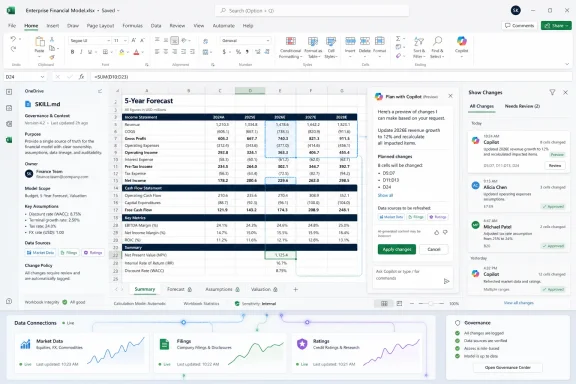
Microsoft Excel shows a 5-year enterprise financial forecast with a Copilot change-reconciliation panel.Microsoft Is Turning Prompting Into Procedure​

The most important part of this announcement is not that Copilot can now do more inside Excel. It is that Microsoft is trying to make Copilot do the same thing twice.
That is the promise behind Copilot Skills for Excel. A finance team can define a repeatable workflow — a discounted cash flow model, a variance analysis, a three-statement model, a close package, or a board-reporting template — and save the instructions as a SKILL.md file in OneDrive. Copilot can then use that file as a standing operating procedure rather than waiting for an analyst to reconstruct the same giant prompt every month.
This is a meaningful shift in how Microsoft wants customers to think about AI in Office. Early Copilot demos were often built around the magic trick: ask a natural-language question, receive a generated chart, a formula, a summary, or a deck. Skills move the center of gravity away from improvisation and toward codified institutional knowledge.
That is exactly where Excel lives in real companies. The most valuable spreadsheet in an organization is rarely a clean greenfield workbook. It is usually a scarred, versioned, password-adjacent artifact filled with business rules, naming conventions, formatting habits, tribal assumptions, and one senior analyst who knows why row 147 must never be touched.
Skills are Microsoft’s attempt to bottle that context. The company is essentially saying that a finance department should not have to teach Copilot its preferred way of doing work every time a workbook opens.

The Spreadsheet Was Always a Workflow Engine in Disguise​

Excel’s genius has never been that it is the best database, the best BI tool, the best programming environment, or the best document editor. It is that it is good enough at all of them to become the place where business reality gets negotiated.
That is why AI in Excel is both obvious and dangerous. Obvious, because spreadsheet work is full of repetitive translation: source data into model, model into summary, summary into presentation, presentation back into a revised forecast. Dangerous, because spreadsheets already hide too much logic behind cells, links, copied ranges, and aging assumptions.
Microsoft’s new finance push recognizes that Copilot cannot succeed in Excel by behaving like a chatbot floating beside the grid. It has to understand workbooks as governed business processes. It has to know not only what number to produce, but which sheet to touch, which formula pattern to preserve, which formatting convention matters, and which assumptions need to remain visible.
That is why the SKILL.md approach is interesting. Markdown is simple, portable, and readable by humans. It does not require finance teams to become software engineers, but it nudges them toward writing their process down in a structured way. In practice, that may be as important as the AI feature itself.
Many organizations have spent years pretending their Excel processes are documented because the workbook exists. They are not. A workbook is an outcome, not a procedure. If Copilot Skills force teams to describe how their models should be built, reviewed, and reused, Microsoft may accidentally improve finance governance simply by making AI less tolerant of ambiguity.

Finance Is the Right Battlefield Because Finance Has Less Patience for Vibes​

Microsoft’s choice of finance as the showcase is not accidental. Finance teams are spreadsheet maximalists, but they are also professionally allergic to unexplained numbers.
A marketing team may tolerate a generated summary if it sounds plausible. A sales team may use AI to draft account notes and clean up language. A finance team, especially around close, audit, forecasting, treasury, or investor reporting, needs to know where a figure came from, what assumption changed, and whether the calculation can survive review.
That is why Microsoft is leaning hard into the language of traceability. The new Plan with Copilot mode is designed to show what Copilot intends to do before it does it. It can outline the cells, ranges, formulas, sheets, and assumptions it plans to modify, and it can ask clarifying questions before acting.
This matters because the most frightening AI failure in Excel is not a theatrical hallucination. It is a small, confident, hard-to-spot change in a model that looks normal until it makes its way into a forecast, a covenant calculation, a budget approval, or an executive slide.
Microsoft’s answer is not to claim that Copilot will be infallible. Instead, it is trying to make Copilot reviewable. That is the right instinct. In finance, trust is not created by a polished answer; it is created by a chain of custody.

Live Data Connectors Attack the Copy-Paste Economy​

The other major piece of the update is data access. Microsoft says Copilot in Excel is adding financial data connectors from CB Insights, Daloopa, FactSet, Morningstar, PitchBook, and S&P Global. These join LSEG and Moody’s connectors that arrived earlier in the year.
This is the less glamorous but potentially more consequential part of the story. A large portion of financial analysis is not analysis at all. It is retrieval, reconciliation, and formatting: pulling market data, company fundamentals, private-market intelligence, filings data, ratings, estimates, or research from one system and getting it into the workbook without breaking the model.
Every finance professional knows the ritual. Open the terminal or portal. Export the data. Copy the table. Paste into Excel. Clean the fields. Check the dates. Fix the formatting. Wonder whether the number changed since the last pull. Repeat when the managing director asks for the same analysis with a different comp set.
Federated connectors are Microsoft’s attempt to compress that ritual. Instead of treating Excel as the endpoint of manually imported data, Copilot can retrieve information from approved providers at query time and bring it into the workbook. Some connectors will still require separate subscriptions, which is exactly what one would expect in institutional finance. Microsoft is not replacing the data vendors; it is trying to put them behind the same conversational and spreadsheet interface.
There is a practical upside here for Windows and Microsoft 365 shops. If the connector model works, Excel becomes a more defensible front end for licensed data. That means fewer ad hoc exports, fewer stale snapshots, and less incentive for analysts to paste sensitive or licensed data into unmanaged tools.
But there is also a new administrative burden. IT and finance operations teams will need to understand which connectors are enabled, which users can authenticate, what data can be retrieved, where it lands, and how that usage is logged. Live data inside AI-assisted workflows is useful only if entitlement, compliance, and audit controls keep pace.

Microsoft Is Building a Moat Around the Finance Desktop​

There is a competitive story hiding underneath this announcement. Microsoft is not merely adding features to Excel; it is defending Excel against a new class of AI-native finance tools.
Over the past two years, the market has filled with assistants promising to automate research, filings analysis, KPI extraction, variance commentary, private-company screening, and model generation. Some are startups. Some are add-ins. Some are large-language-model front ends wrapped around financial data sources. Some are impressive. Many are brittle.
Microsoft’s advantage is that it does not need to persuade finance teams to move into a new workspace. The work is already in Excel, Outlook, Teams, SharePoint, PowerPoint, and OneDrive. Copilot’s strategic job is to make that existing estate feel AI-native before a rival can make it feel obsolete.
That is why the finance connectors matter. If Copilot can pull from LSEG, Moody’s, Morningstar, PitchBook, FactSet, Daloopa, CB Insights, and S&P Global inside the Microsoft 365 workflow, the pitch to the CFO becomes much easier. Microsoft can say: keep your models, keep your permissions, keep your data vendors, keep your audit trail, and add AI where the work already happens.
This is classic platform strategy. Microsoft is not trying to own every data source or every workflow-specific finance product. It is trying to own the work surface where those sources and workflows converge.
For WindowsForum readers, the implication is straightforward. Excel is becoming one of the most important AI endpoints in the Microsoft stack. Not because spreadsheets are new, but because they are where AI’s claims about productivity collide with the hard reality of numbers that must be checked.

The Audit Trail Is the Product, Not the Fine Print​

The Show Changes pane is not the flashiest part of the announcement, but it may be the part that decides whether finance teams actually use these features.
Microsoft says Copilot edits can be attributed separately from human collaborators in Excel’s change history. That distinction is critical. If a workbook says only that “something changed,” or if AI edits are blended into ordinary collaboration noise, the feature becomes a governance liability. If Copilot’s actions are clearly tagged, reviewable, and tied back to affected cells, the conversation changes.
This is where Microsoft is trying to thread a difficult needle. Users want Copilot to be agentic enough to modify workbooks, build structures, adjust formulas, and transform raw data. Organizations want the opposite guarantee: that nothing important changes invisibly.
Plan with Copilot and Copilot attribution are Microsoft’s compromise. Copilot can act, but it should preview its intended action and leave tracks afterward. That is not a complete control framework, but it is the minimum viable trust layer for AI in a spreadsheet.
Admins should still be cautious. An audit trail after the fact does not eliminate the need for workbook protection, data-loss prevention, sensitivity labels, versioning, approval workflows, and human review. Copilot does not turn a fragile spreadsheet into a controlled financial system. It makes some spreadsheet work more observable, which is useful but not magic.

The Skill File May Become the New Macro​

There is a tempting comparison between Copilot Skills and Excel macros. It is not perfect, but it is revealing.
Macros automated actions. Skills describe intent, standards, and workflow. A macro might run a fixed sequence of operations. A Skill tells Copilot how to approach a class of work, what structure to use, and what output should look like. That makes Skills more flexible, but also harder to reason about.
The old macro world had its own problems: security warnings, unsigned code, brittle VBA, personal workbooks full of undocumented automation, and business-critical processes maintained by whoever had not yet left the company. Skills could recreate some of that risk in a new language if organizations treat them casually.
A SKILL.md file in OneDrive sounds friendly, and that is part of the appeal. But reusable AI instructions are still operational assets. They can encode assumptions, process steps, formatting rules, and analytical methods. If they are wrong, outdated, or too broadly shared, the mistake can scale.
This is where IT should get ahead of the curve. Organizations will need conventions for naming, storing, approving, versioning, and retiring Skills. Finance leaders will need to decide which Skills are personal productivity aids and which are official departmental procedures. Security teams will need to understand whether Skills can be used to steer Copilot into retrieving or transforming sensitive data in ways that violate policy.
The lesson from macros is not that automation should be avoided. It is that business users will automate whether IT blesses it or not. The smarter move is to give them a governed path before the shadow version becomes the default.

Availability Tells Us This Is More Than a Demo​

Microsoft says personalization, workbook rules, prebuilt finance Skills, federated Copilot connectors, Plan with Copilot, and Copilot attribution in Show Changes are generally available for Microsoft 365 Copilot customers using Excel for the web, Windows, and Mac. Custom Skills are available through the Insiders channel for Windows and Mac and are expected to reach general availability over the next month. Partner-built Skills from companies including LSEG, Ramp, Rogo, and Vena are expected later in 2026 through Microsoft Marketplace.
That rollout pattern is worth parsing. The core controls and prebuilt capabilities are not being positioned as distant research previews. Microsoft is putting them in front of paying Copilot customers now, while holding back custom Skills for a more gradual release.
That suggests Microsoft understands the risk profile. Prebuilt Skills and governed connectors are easier to support. Custom Skills are where organizations will discover both the power and the weirdness of reusable AI instructions. The Insiders-first path gives Microsoft a buffer while users test real workflows and inevitably find edge cases.
It also means admins should not wait until every feature is broadly available to start planning. If Microsoft 365 Copilot is already deployed, finance users may begin experimenting quickly. The question for IT is not whether someone will try to make Copilot close the month. The question is whether the organization will have any policy in place before they do.

The Real Risk Is Overconfidence, Not Automation​

The common critique of AI in spreadsheets is that the model might be wrong. That is true, but incomplete.
Finance teams already live with wrong spreadsheets. They live with broken links, hidden rows, stale assumptions, circular references, copied formulas that skip a row, and workbooks named “final_v7_revised_REALfinal.xlsx.” The question is not whether AI introduces error into an error-free environment. It is whether AI makes errors easier to detect or easier to disguise.
Microsoft’s new features cut both ways. Skills can standardize good practice, but they can also standardize a bad assumption. Connectors can reduce stale copy-paste work, but they can also make users less aware of the provenance and limitations of the data being retrieved. Plan with Copilot can improve review, but only if users actually read the plan rather than clicking through because the quarter-end clock is ticking.
This is why the cultural adoption problem matters as much as the product design. A finance organization that treats Copilot as a junior analyst with a visible workpaper trail may get real value. A finance organization that treats Copilot as an oracle will eventually get burned.
The right mental model is not “AI replaces Excel work.” It is “AI changes where review should happen.” Instead of checking every mechanical step after hours of manual work, teams may review the Skill, the data source, the proposed plan, the changed cells, and the final output. That can be faster and more controlled, but only if the review discipline moves with the workflow.

Windows Admins Inherit Another Business-Critical AI Surface​

For sysadmins and Microsoft 365 administrators, this announcement is a reminder that Copilot governance is no longer an abstract tenant-level topic. It is moving into specific applications, specific roles, and specific business processes.
Excel is not just another app in the suite. It is often a semi-official system of record, a reporting layer, a modeling environment, and an integration workaround. When Copilot gains the ability to act inside Excel with reusable Skills and live data connectors, admins need to understand the operational blast radius.
The immediate checklist is familiar but more urgent: licensing, identity, conditional access, data boundaries, sensitivity labels, audit logs, connector permissions, and user education. The harder work is organizational. IT will need a relationship with finance power users that goes beyond telling them not to paste confidential data into random chatbots.
The best governance model will probably be federated. Central IT should control platform policy, connector approval, security posture, and monitoring. Finance operations should own the content of approved Skills and the business logic behind them. Internal audit and compliance should help define which workflows require review, documentation, or retention.
That sounds bureaucratic, but it is the price of turning AI from a novelty into infrastructure. Once Copilot starts participating in financial models, the “who approved this?” question becomes unavoidable.

Microsoft’s Finance Copilot Is Useful Because It Admits Excel Is Messy​

The most encouraging thing about this update is that it does not pretend finance work is clean.
The announcement is full of features aimed at messiness: reusable instructions for recurring workflows, data connectors for trusted sources, planning before edits, and change attribution afterward. That is a much more credible direction than simply promising that Copilot can generate formulas or summarize tables.
Excel’s messiness is not a defect Microsoft can remove without destroying the thing people use it for. The grid is popular because it is flexible enough to accommodate incomplete data, provisional assumptions, one-off analyses, and business judgment. The challenge is to add AI without turning that flexibility into an accountability vacuum.
Reusable Skills are the strongest expression of that strategy. They acknowledge that the value of finance work is not just the output, but the method. A discounted cash flow model is not useful merely because it has a terminal value cell. It is useful because everyone involved understands the assumptions, layout, source data, and review process behind it.
If Copilot can help preserve that method while reducing the repetitive labor around it, Microsoft has something substantial. If it merely generates prettier workbooks faster, the novelty will fade.

The Numbers Now Need a Chain of Custody​

The practical lesson for finance teams is that Copilot in Excel should be introduced like a process change, not like a new autocomplete feature. The organizations that get the most from this update will be the ones that treat Skills, connectors, and change tracking as parts of the same control story.
  • Teams should begin with low-risk recurring workflows where the process is well understood and the output is easy to validate.
  • Custom Skills should be versioned, reviewed, and owned by a named business function rather than left as personal prompt files.
  • Financial data connectors should be approved with the same seriousness as any other source of licensed, sensitive, or decision-critical data.
  • Copilot’s planned edits should be reviewed before execution, especially in workbooks used for reporting, forecasting, compliance, or executive decisions.
  • Change attribution should become part of the review habit, not a forensic tool used only after something goes wrong.
  • Administrators should assume that finance users will adopt these tools quickly if they reduce manual work, and governance should arrive before informal practices harden.
The broader point is simple: Microsoft is making Excel more agentic, but finance still needs accountability. The productivity gain is real only if the organization can explain how the workbook changed and why.
Microsoft’s latest Copilot in Excel update is not the end of spreadsheet work; it is the next phase of spreadsheet institutionalization. The grid remains, the formulas remain, and the human judgment remains, but the repeatable mechanics around finance work are starting to move into reusable AI procedures and live data pipes. If Microsoft can keep the controls visible and the ecosystem governed, Excel may become the place where enterprise AI stops performing demos and starts doing accountable work.

References​

  1. Primary source: Tech My Money
    Published: Sat, 27 Jun 2026 00:23:53 GMT
  2. Related coverage: daloopa.com
  3. Related coverage: finance.sina.com.cn
  4. Related coverage: natlawreview.com
  5. Official source: techcommunity.microsoft.com
  6. Related coverage: fintech-pulse.com
  1. Related coverage: au.investing.com
  2. Related coverage: m.in.investing.com
  3. Official source: news.microsoft.com
  4. Related coverage: sahmcapital.com
  5. Related coverage: thurrott.com
  6. Related coverage: resultsense.com
  7. Related coverage: press.spglobal.com
  8. Official source: cdn-dynmedia-1.microsoft.com
  9. Related coverage: benchmarkitservices.com
  10. Official source: microsoft.com
  11. Official source: learn.microsoft.com
  12. Official source: fpc.microsoft.com
  13. Official source: adoption.microsoft.com
 

Back
Top