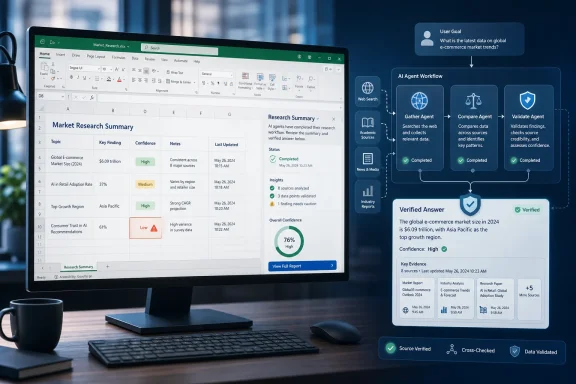
Microsoft added Roadmap ID 566872 on July 1, 2026, describing an in-development Microsoft 365 Copilot upgrade for Excel on desktop, Mac, and web that uses a multi-agent search system to improve complex web research, with general availability targeted for July 2026. The short version is that Excel is no longer being treated merely as a place where Copilot explains formulas or summarizes tables. Microsoft is positioning the spreadsheet as a front end for research, synthesis, and verification. That is a bigger change than it sounds, because Excel remains where business facts go to become decisions.
The new roadmap item is easy to under-read. “Complex web search with Copilot in Excel” sounds like a convenience feature, the sort of product note that slides past in a monthly Microsoft 365 admin digest. But the phrasing matters: Microsoft says Copilot in Excel will coordinate parallel research, verify findings, and re-check gaps when needed.
That is not the old model of asking a chatbot to “look this up.” It is closer to a lightweight research workflow, where the system decomposes a request, sends pieces of it outward, compares results, and then returns something that looks less like a search result and more like a provisional analyst memo.
Excel is the crucial context. A web answer in a browser is disposable; a web-derived answer in a spreadsheet is likely to be copied into a forecast, procurement comparison, pricing model, board pack, or operations tracker. Microsoft is effectively shrinking the distance between external information and structured business work.
That move fits the company’s broader Copilot strategy. Microsoft has spent the past year pushing Copilot from a drafting assistant toward an agentic layer inside Office apps. The selling point is no longer just that AI can write a paragraph or explain a pivot table. It is that AI can plan, execute, check, and revise multi-step work inside the software where employees already spend their day.
The traditional spreadsheet workflow has a rhythm. Someone searches the web, copies numbers, pastes sources into cells or comments, writes assumptions in a tab nobody reads, and then builds formulas on top. The danger is not merely manual effort; it is that the chain of evidence is usually brittle. A missing date, a stale figure, or a badly understood source can quietly become the basis for a confident model.
Copilot’s new web-search system appears designed to attack that weak point. By coordinating multiple search agents in parallel, it can theoretically cover more ground than a single retrieval pass. By verifying findings and checking for gaps, it can also make the research process less linear and less dependent on the first plausible answer.
The practical promise is obvious. An analyst could ask Excel to compare suppliers, gather public pricing, summarize market benchmarks, or locate regulatory requirements that affect an operating model. Instead of leaving the workbook to gather the raw material, the user may increasingly expect the workbook to gather it on their behalf.
But the practical risk is just as obvious. Excel users are accustomed to seeing cells as concrete. Once a number lands in a table, it can gain undeserved authority. The question for Microsoft is whether Copilot can make external research more transparent inside Excel, rather than simply making uncertain research easier to paste.
A multi-agent search system is Microsoft’s attempt to make Copilot behave less like a fast intern and more like a small research team. One agent can search broadly, another can pursue a subtopic, another can verify claims, and another can identify what is still missing. The user may never see that machinery, but the output is supposed to reflect it.
For complex web search, that matters. A simple query such as “What is the current exchange rate?” can be answered with a direct lookup. A complex query such as “Which three vendors should we shortlist for this regional rollout?” requires freshness, comparison, context, and caution. It is not a search problem in the old sense; it is a research problem.
Microsoft’s roadmap language also suggests a recognition that speed alone is not enough. “Faster and more complete answers” is the product promise, but the more important phrase is “verifies findings.” In a spreadsheet, completeness without verification is just a faster way to generate misleading work.
Still, verification is not magic. Web sources can disagree, pages can be outdated, and public information can be incomplete. A multi-agent system may reduce shallow mistakes, but it cannot guarantee truth. The best version of this feature will show enough of its reasoning trail for users to challenge it.
That difference changes the adoption curve. In Excel, trust is not earned by producing something impressive once. It is earned by producing something traceable, repeatable, and easy to audit. This is why spreadsheet professionals obsess over named ranges, assumptions tabs, locked cells, formula lineage, and version history.
Complex web search introduces a new kind of spreadsheet dependency. A workbook may not only depend on cells, formulas, and linked files, but also on research performed at a particular moment against a changing web. If Copilot finds a figure today and a different figure next week, users need to understand why. If it synthesizes three sources into one conclusion, users need to know which sources carried the weight.
That is where Microsoft’s enterprise credibility will be tested. The company knows how to sell productivity gains, but administrators and finance teams will ask harder questions. Was web access enabled by policy? Were prompts logged? Were sources stored? Can a user reproduce the answer? Can the organization defend the result during an audit?
For casual spreadsheet work, those questions may feel heavy. For regulated industries, public companies, law firms, healthcare organizations, and government agencies, they are the difference between a useful assistant and an unapproved shadow research system.
Microsoft has been careful to tell admins that web search can be controlled. That matters because organizations are not evenly ready for AI-assisted research. Some will embrace it quickly for sales, marketing, and competitive intelligence. Others will restrict it until legal, compliance, and security teams decide how much outside retrieval is acceptable.
The roadmap item’s listed platforms — desktop, Mac, and web — make the governance challenge broader. This is not a Windows-only experiment. Microsoft wants the capability to follow the user across the main Excel surfaces, which means policy consistency becomes essential. An admin who disables or limits web search will expect that choice to hold across clients.
The cloud instance detail is also telling. The item is listed for Worldwide standard multi-tenant customers, not as a sovereign-cloud or government-specific rollout. That is normal for many Microsoft 365 features, but it also means organizations with stricter cloud requirements may watch from a distance before adopting similar capabilities.
The feature’s release rings include Targeted Release and General Availability. That suggests Microsoft expects some customers to test it before broad deployment, but the July 2026 GA target is aggressive because the item was created on July 1, 2026. In roadmap terms, this looks less like a distant architectural bet and more like a near-term switch being prepared for rollout.
Every organization has people who spend hours gathering public information and turning it into tables. They look up market prices, regional rules, product specs, grant requirements, vendor claims, labor statistics, shipping constraints, and competitor announcements. The work is not glamorous, but it is foundational.
If Copilot can reliably shorten that process, Excel becomes more valuable not because it calculates better, but because it reduces the cost of getting useful inputs. That is the strategic play. Microsoft does not need to replace search engines outright; it needs to make the Office document feel like the more natural place to begin work.
This is also why the feature belongs in Microsoft 365 Copilot rather than standalone consumer Copilot. The value is highest when research flows into documents, mail, meetings, and spreadsheets under organizational identity. A public web answer is useful. A web answer that can be shaped into a workbook, discussed in Teams, summarized in Outlook, and governed by Microsoft 365 policy is stickier.
For WindowsForum readers, the key point is that Excel is becoming one of the main battlegrounds for enterprise AI. Word and PowerPoint get the attention because writing and slides are visible. Excel gets the durable workflows, the recurring reports, and the operational models that businesses actually run.
Adding AI-assisted web research does not remove those problems. It adds a new layer. Now the workbook may include external facts gathered through a system whose internal research path is partially automated. That may be better than a user casually copying from a web page, but it is not automatically auditable.
The best outcome would be for Copilot to bring discipline to messy spreadsheet research. It could include source summaries, timestamps, confidence signals, and reminders when data is likely to change. It could separate retrieved facts from generated interpretation. It could help users build assumptions tables instead of burying assumptions inside prose.
The worst outcome would be for Copilot to make weak sourcing feel polished. AI systems are good at producing coherent explanations even when the underlying evidence is thin. In Excel, coherence can be dangerous because users may mistake a well-phrased answer for a verified input.
Microsoft’s mention of re-checking gaps is encouraging precisely because it acknowledges incompleteness. The web is not a single database. If Copilot can say, in effect, “I found pricing for these vendors but not those,” or “I found regional guidance but not an official update for this jurisdiction,” it becomes more useful than an assistant that pretends every answer is equally settled.
What they share is a desire to inspect how a result was produced. If Copilot in Excel returns a table built from web research, users will want to know whether the entries are linked to source pages, whether the data can be refreshed, and whether the answer can be regenerated with the same prompt. They will also want to know what happens when the web changes.
This is where Microsoft’s design choices will matter more than its model quality. A brilliant research answer that lands as static text is less useful than a slightly less brilliant answer that lands as structured data with clear provenance. Excel users do not merely consume answers; they manipulate them.
There is also a training issue. Many users will ask Copilot broad questions and expect a final answer. Better users will learn to ask for assumptions, source categories, missing information, and uncertainty. Microsoft can influence that behavior through interface design, suggested prompts, and the way Copilot frames its responses.
The company has an opportunity to teach better spreadsheet hygiene by default. If Copilot encourages users to separate source data, assumptions, calculations, and conclusions, it could improve workbook quality. If it simply produces attractive tables, it may accelerate the same bad habits Excel has carried for decades.
Targeted Release customers will likely see the feature first, giving admins and early adopters a chance to observe behavior before broader deployment. But the short gap between roadmap creation and planned GA suggests Microsoft may already have the underlying capability substantially built. The roadmap entry is the public marker, not necessarily the beginning of development.
That timing also reflects the speed of the Copilot product cycle. Microsoft is no longer treating Office AI features as annual tentpole releases. Capabilities arrive through cloud services, subscription entitlements, admin policies, and staged rollouts. For IT departments, that means Copilot governance is becoming continuous rather than episodic.
The old Office deployment model let organizations evaluate a major version, package it, test it, and roll it out on a familiar cadence. Microsoft 365 changed that rhythm years ago, but AI intensifies it. A feature like complex web search can alter user behavior without requiring a traditional software upgrade in the old sense.
That is why admins should pay attention even if they are not excited about the feature. The question is not whether every user will immediately perform complex research inside Excel. The question is whether the capability changes what users believe Excel is allowed to do.
That compression can be productive. It can help smaller teams perform work that previously required more staff time. It can reduce tedious fact-gathering and let humans focus on interpretation. It can also expose how much office work is really semi-structured research dressed up as reporting.
But compression can also create friction. If Copilot produces a vendor comparison in minutes, who owns the judgment? If an employee uses web search to populate a workbook, does the manager review the sources or only the final table? If Copilot’s answer conflicts with an internal analyst’s view, whose work carries authority?
Microsoft’s product language tends to smooth over these questions with the language of productivity. Real workplaces will not be so tidy. The more capable Copilot becomes, the more it moves from being a helper to being a participant in decision workflows.
That is why the Excel context matters so much. A Copilot answer in chat may influence a conversation. A Copilot answer in Excel may influence a budget. The social weight of the output changes when it arrives in the format organizations already use to justify decisions.
The organizations that handle this well will treat complex web search in Excel as both a productivity capability and a governance event. They will test it with real prompts, compare its answers against known research workflows, and decide where it belongs. They will also document when users should rely on it, when they should verify manually, and when they should not use it at all.
 Microsoft Moves the Search Box Into the Spreadsheet
The new roadmap item is easy to under-read. “Complex web search with Copilot in Excel” sounds like a convenience feature, the sort of product note that slides past in a monthly Microsoft 365 admin digest. But the phrasing matters: Microsoft says Copilot in Excel will coordinate parallel research, verify findings, and re-check gaps when needed.That is not the old model of asking a chatbot to “look this up.” It is closer to a lightweight research workflow, where the system decomposes a request, sends pieces of it outward, compares results, and then returns something that looks less like a search result and more like a provisional analyst memo.
Excel is the crucial context. A web answer in a browser is disposable; a web-derived answer in a spreadsheet is likely to be copied into a forecast, procurement comparison, pricing model, board pack, or operations tracker. Microsoft is effectively shrinking the distance between external information and structured business work.
That move fits the company’s broader Copilot strategy. Microsoft has spent the past year pushing Copilot from a drafting assistant toward an agentic layer inside Office apps. The selling point is no longer just that AI can write a paragraph or explain a pivot table. It is that AI can plan, execute, check, and revise multi-step work inside the software where employees already spend their day.
The Spreadsheet Is Becoming a Research Surface
Excel has always been more than a grid. It is a database for people who do not want to administer a database, a programming environment for people who do not call themselves programmers, and a reporting layer for organizations that have never fully trusted any reporting layer. That makes it a natural place for Microsoft to embed research automation.The traditional spreadsheet workflow has a rhythm. Someone searches the web, copies numbers, pastes sources into cells or comments, writes assumptions in a tab nobody reads, and then builds formulas on top. The danger is not merely manual effort; it is that the chain of evidence is usually brittle. A missing date, a stale figure, or a badly understood source can quietly become the basis for a confident model.
Copilot’s new web-search system appears designed to attack that weak point. By coordinating multiple search agents in parallel, it can theoretically cover more ground than a single retrieval pass. By verifying findings and checking for gaps, it can also make the research process less linear and less dependent on the first plausible answer.
The practical promise is obvious. An analyst could ask Excel to compare suppliers, gather public pricing, summarize market benchmarks, or locate regulatory requirements that affect an operating model. Instead of leaving the workbook to gather the raw material, the user may increasingly expect the workbook to gather it on their behalf.
But the practical risk is just as obvious. Excel users are accustomed to seeing cells as concrete. Once a number lands in a table, it can gain undeserved authority. The question for Microsoft is whether Copilot can make external research more transparent inside Excel, rather than simply making uncertain research easier to paste.
Multi-Agent Search Is Microsoft’s Answer to the “One-Shot AI” Problem
The phrase “multi-agent” has become one of the most overworked terms in enterprise AI, but in this case it points to a real product limitation. Single-pass AI search often fails in predictable ways. It may find one source and over-trust it, miss conflicting information, or answer before it has established whether the question has hidden subparts.A multi-agent search system is Microsoft’s attempt to make Copilot behave less like a fast intern and more like a small research team. One agent can search broadly, another can pursue a subtopic, another can verify claims, and another can identify what is still missing. The user may never see that machinery, but the output is supposed to reflect it.
For complex web search, that matters. A simple query such as “What is the current exchange rate?” can be answered with a direct lookup. A complex query such as “Which three vendors should we shortlist for this regional rollout?” requires freshness, comparison, context, and caution. It is not a search problem in the old sense; it is a research problem.
Microsoft’s roadmap language also suggests a recognition that speed alone is not enough. “Faster and more complete answers” is the product promise, but the more important phrase is “verifies findings.” In a spreadsheet, completeness without verification is just a faster way to generate misleading work.
Still, verification is not magic. Web sources can disagree, pages can be outdated, and public information can be incomplete. A multi-agent system may reduce shallow mistakes, but it cannot guarantee truth. The best version of this feature will show enough of its reasoning trail for users to challenge it.
Excel Users Will Judge Copilot by the Bad Answers, Not the Good Ones
Microsoft’s AI demos often show Copilot turning vague requests into polished artifacts. That is useful marketing, but Excel users tend to be less forgiving than Word users. A clumsy sentence can be edited; a wrong number can distort a budget.That difference changes the adoption curve. In Excel, trust is not earned by producing something impressive once. It is earned by producing something traceable, repeatable, and easy to audit. This is why spreadsheet professionals obsess over named ranges, assumptions tabs, locked cells, formula lineage, and version history.
Complex web search introduces a new kind of spreadsheet dependency. A workbook may not only depend on cells, formulas, and linked files, but also on research performed at a particular moment against a changing web. If Copilot finds a figure today and a different figure next week, users need to understand why. If it synthesizes three sources into one conclusion, users need to know which sources carried the weight.
That is where Microsoft’s enterprise credibility will be tested. The company knows how to sell productivity gains, but administrators and finance teams will ask harder questions. Was web access enabled by policy? Were prompts logged? Were sources stored? Can a user reproduce the answer? Can the organization defend the result during an audit?
For casual spreadsheet work, those questions may feel heavy. For regulated industries, public companies, law firms, healthcare organizations, and government agencies, they are the difference between a useful assistant and an unapproved shadow research system.
The Admin Toggle Becomes a Governance Boundary
Copilot in Excel already sits inside the broader Microsoft 365 governance model, and web search is not just a feature preference. It is a data boundary. When users ask Copilot to search the web, they are inviting external information into internal workflows and potentially exposing the shape of internal questions to systems governed by enterprise policy.Microsoft has been careful to tell admins that web search can be controlled. That matters because organizations are not evenly ready for AI-assisted research. Some will embrace it quickly for sales, marketing, and competitive intelligence. Others will restrict it until legal, compliance, and security teams decide how much outside retrieval is acceptable.
The roadmap item’s listed platforms — desktop, Mac, and web — make the governance challenge broader. This is not a Windows-only experiment. Microsoft wants the capability to follow the user across the main Excel surfaces, which means policy consistency becomes essential. An admin who disables or limits web search will expect that choice to hold across clients.
The cloud instance detail is also telling. The item is listed for Worldwide standard multi-tenant customers, not as a sovereign-cloud or government-specific rollout. That is normal for many Microsoft 365 features, but it also means organizations with stricter cloud requirements may watch from a distance before adopting similar capabilities.
The feature’s release rings include Targeted Release and General Availability. That suggests Microsoft expects some customers to test it before broad deployment, but the July 2026 GA target is aggressive because the item was created on July 1, 2026. In roadmap terms, this looks less like a distant architectural bet and more like a near-term switch being prepared for rollout.
The Real Competition Is Not Google Search, It Is the Analyst Workflow
It is tempting to frame this as Microsoft bringing better search into Excel to compete with Google. That misses the more interesting fight. Microsoft is competing with the messy human workflow that sits between search engines, browser tabs, PDFs, Teams chats, and spreadsheets.Every organization has people who spend hours gathering public information and turning it into tables. They look up market prices, regional rules, product specs, grant requirements, vendor claims, labor statistics, shipping constraints, and competitor announcements. The work is not glamorous, but it is foundational.
If Copilot can reliably shorten that process, Excel becomes more valuable not because it calculates better, but because it reduces the cost of getting useful inputs. That is the strategic play. Microsoft does not need to replace search engines outright; it needs to make the Office document feel like the more natural place to begin work.
This is also why the feature belongs in Microsoft 365 Copilot rather than standalone consumer Copilot. The value is highest when research flows into documents, mail, meetings, and spreadsheets under organizational identity. A public web answer is useful. A web answer that can be shaped into a workbook, discussed in Teams, summarized in Outlook, and governed by Microsoft 365 policy is stickier.
For WindowsForum readers, the key point is that Excel is becoming one of the main battlegrounds for enterprise AI. Word and PowerPoint get the attention because writing and slides are visible. Excel gets the durable workflows, the recurring reports, and the operational models that businesses actually run.
Better Search Does Not Eliminate Spreadsheet Risk
Spreadsheets have always had a trust problem hidden behind a productivity story. They are flexible, universal, and easy to share, which is precisely why they become fragile. A single workbook can contain manual inputs, outdated assumptions, broken links, hidden sheets, circular references, and formulas nobody wants to touch.Adding AI-assisted web research does not remove those problems. It adds a new layer. Now the workbook may include external facts gathered through a system whose internal research path is partially automated. That may be better than a user casually copying from a web page, but it is not automatically auditable.
The best outcome would be for Copilot to bring discipline to messy spreadsheet research. It could include source summaries, timestamps, confidence signals, and reminders when data is likely to change. It could separate retrieved facts from generated interpretation. It could help users build assumptions tables instead of burying assumptions inside prose.
The worst outcome would be for Copilot to make weak sourcing feel polished. AI systems are good at producing coherent explanations even when the underlying evidence is thin. In Excel, coherence can be dangerous because users may mistake a well-phrased answer for a verified input.
Microsoft’s mention of re-checking gaps is encouraging precisely because it acknowledges incompleteness. The web is not a single database. If Copilot can say, in effect, “I found pricing for these vendors but not those,” or “I found regional guidance but not an official update for this jurisdiction,” it becomes more useful than an assistant that pretends every answer is equally settled.
Power Users Will Want the Receipts
Excel power users are not a single audience. Some are finance professionals living in models. Some are operations managers maintaining trackers. Some are sysadmins exporting logs and license data. Some are developers using Excel as an input or output layer for more formal systems.What they share is a desire to inspect how a result was produced. If Copilot in Excel returns a table built from web research, users will want to know whether the entries are linked to source pages, whether the data can be refreshed, and whether the answer can be regenerated with the same prompt. They will also want to know what happens when the web changes.
This is where Microsoft’s design choices will matter more than its model quality. A brilliant research answer that lands as static text is less useful than a slightly less brilliant answer that lands as structured data with clear provenance. Excel users do not merely consume answers; they manipulate them.
There is also a training issue. Many users will ask Copilot broad questions and expect a final answer. Better users will learn to ask for assumptions, source categories, missing information, and uncertainty. Microsoft can influence that behavior through interface design, suggested prompts, and the way Copilot frames its responses.
The company has an opportunity to teach better spreadsheet hygiene by default. If Copilot encourages users to separate source data, assumptions, calculations, and conclusions, it could improve workbook quality. If it simply produces attractive tables, it may accelerate the same bad habits Excel has carried for decades.
July 2026 Is a Product Deadline, Not a Trust Deadline
The roadmap says general availability is planned for July 2026. That date should be read as a rollout target, not a declaration that the enterprise has solved AI-assisted research. Availability and readiness are different things.Targeted Release customers will likely see the feature first, giving admins and early adopters a chance to observe behavior before broader deployment. But the short gap between roadmap creation and planned GA suggests Microsoft may already have the underlying capability substantially built. The roadmap entry is the public marker, not necessarily the beginning of development.
That timing also reflects the speed of the Copilot product cycle. Microsoft is no longer treating Office AI features as annual tentpole releases. Capabilities arrive through cloud services, subscription entitlements, admin policies, and staged rollouts. For IT departments, that means Copilot governance is becoming continuous rather than episodic.
The old Office deployment model let organizations evaluate a major version, package it, test it, and roll it out on a familiar cadence. Microsoft 365 changed that rhythm years ago, but AI intensifies it. A feature like complex web search can alter user behavior without requiring a traditional software upgrade in the old sense.
That is why admins should pay attention even if they are not excited about the feature. The question is not whether every user will immediately perform complex research inside Excel. The question is whether the capability changes what users believe Excel is allowed to do.
The Feature Makes Excel More Useful and More Political
There is an organizational politics angle here. Research work is not evenly distributed or evenly trusted. A junior analyst may gather inputs, a manager may approve assumptions, and an executive may present the resulting chart as fact. Copilot compresses parts of that chain.That compression can be productive. It can help smaller teams perform work that previously required more staff time. It can reduce tedious fact-gathering and let humans focus on interpretation. It can also expose how much office work is really semi-structured research dressed up as reporting.
But compression can also create friction. If Copilot produces a vendor comparison in minutes, who owns the judgment? If an employee uses web search to populate a workbook, does the manager review the sources or only the final table? If Copilot’s answer conflicts with an internal analyst’s view, whose work carries authority?
Microsoft’s product language tends to smooth over these questions with the language of productivity. Real workplaces will not be so tidy. The more capable Copilot becomes, the more it moves from being a helper to being a participant in decision workflows.
That is why the Excel context matters so much. A Copilot answer in chat may influence a conversation. A Copilot answer in Excel may influence a budget. The social weight of the output changes when it arrives in the format organizations already use to justify decisions.
The July Roadmap Item Tells IT Where to Look First
The immediate action is not panic, and it is not blind enthusiasm. It is inspection. Microsoft has given administrators enough detail to start asking the right questions before the feature lands broadly.The organizations that handle this well will treat complex web search in Excel as both a productivity capability and a governance event. They will test it with real prompts, compare its answers against known research workflows, and decide where it belongs. They will also document when users should rely on it, when they should verify manually, and when they should not use it at all.
- Microsoft’s Roadmap ID 566872 was created on July 1, 2026, and targets general availability in July 2026 for Excel across desktop, Mac, and web.
- The feature is designed for Microsoft 365 Copilot customers in Worldwide standard multi-tenant cloud environments.
- The central product change is a multi-agent web search system that can run parallel research, verify findings, and re-check gaps.
- The practical benefit is faster research inside Excel, especially for workflows that turn public information into structured tables and decisions.
- The practical risk is that AI-sourced web findings may become spreadsheet inputs without enough provenance, review, or reproducibility.
- Administrators should review Copilot web-search controls, Targeted Release exposure, and internal guidance before users normalize the feature in business-critical workbooks.
References
- Primary source: Microsoft 365 Roadmap
Published: 2026-07-01T23:03:18.2442931Z
Microsoft 365 Roadmap | Microsoft 365
The Microsoft 365 Roadmap lists updates that are currently planned for applicable subscribers. Check here for more information on the status of new features and updates.www.microsoft.com
- Official source: support.microsoft.com
Frequently asked questions about Copilot in Excel | Microsoft Support
Get answers to frequently asked questions about using Copilot in Excel.support.microsoft.com - Related coverage: techradar.com
No escape from AI now - Microsoft is shoving Copilot into every Excel cell | TechRadar
Excel gets a new =COPILOT functionwww.techradar.com - Related coverage: windowscentral.com
Microsoft Excel Agent Mode: Features, Models, and Availability | Windows Central
Copilot is graduating from a basic chat interface to a full-blown agent that can autonomously edit workbooks and toggle between GPT-5.2 and Claude 4.5.www.windowscentral.com - Related coverage: pcgamer.com
Microsoft launches Copilot AI function in Excel, but warns not to use it in 'any task requiring accuracy or reproducibility' | PC Gamer
You can have Copilot generate your formulas in Excel now, but it doesn't sound ready for prime time.www.pcgamer.com