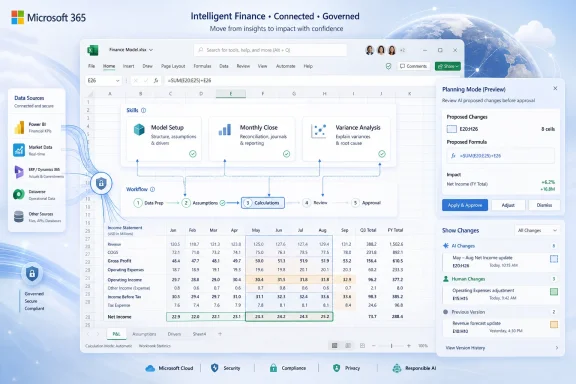
Microsoft on June 25, 2026, expanded Copilot in Excel for Microsoft 365 Copilot customers with reusable Skills, additional finance data connectors, and workbook change tracking across Excel for the web, Windows, and Mac, aimed squarely at finance teams that live in spreadsheets. This is not just another “AI writes a formula” announcement. It is Microsoft trying to turn Excel from a blank grid with an assistant bolted on into a controlled workspace where repeatable finance processes, live third-party data, and auditability coexist. The bet is obvious: if AI is going to earn trust in enterprise finance, it has to stop behaving like a clever chatbot and start behaving like a governed analyst.
The most important part of the announcement is not that Copilot can do more. It is that Microsoft is trying to make Copilot do the same thing the same way more often.
That is the role of Skills, the new reusable workflow mechanism Microsoft is bringing to Copilot in Excel. Instead of asking a user to write a detailed prompt every time they need a discounted cash flow model, variance analysis, close package, or board-ready summary, Skills let teams define a repeatable method once and have Copilot apply it across workbooks.
In practice, that means a finance team can encode its preferred structure, assumptions, formatting, and output conventions into a
That distinction matters. The weakness of early workplace AI was not only hallucination; it was procedural drift. Two analysts could ask for the same thing in slightly different language and receive outputs that varied in format, assumptions, or scope. In finance, that is not a charming side effect of creativity. It is a control problem.
Skills are Microsoft’s answer to that problem. They move some of the value out of improvised prompting and into documented process. For organizations that already maintain model templates, close checklists, and reporting standards, this is a more serious enterprise pattern than the usual demo where Copilot prettifies a table on command.
That reality is awkward but durable. Month-end close, management reporting, scenario planning, valuation work, audit schedules, and ad hoc executive analysis still tend to end up in workbooks. The grid is flexible enough to absorb exceptions, fast enough for analysts, and familiar enough that nobody needs procurement approval to build a model.
The downside is that Excel’s flexibility has always been its governance problem. Workbooks multiply. Formulas drift. Links break. Assumptions hide in cells that were color-coded by someone who left the company in 2021. The more important the workbook, the more likely it is to have undocumented institutional knowledge embedded in it.
Copilot’s first wave in Excel addressed productivity: explain this formula, summarize this table, make a chart, generate a pivot. The new wave is aimed at process capture. If Skills work as advertised, teams can formalize how Copilot should approach recurring finance tasks without requiring every analyst to become a prompt engineer.
That does not eliminate spreadsheet risk. It changes where the risk sits. Instead of every user inventing a workflow at the prompt box, a smaller number of finance, data, and IT owners will need to curate the Skills that define how Copilot acts. That is progress, but it is also a new governance surface.
For finance users, this is less glamorous than agentic AI but possibly more useful. A great deal of spreadsheet labor is still the unglamorous movement of numbers from trusted sources into working models. Market data, credit intelligence, company financials, private market information, industry datasets, and analyst-ready reference data often arrive through portals, exports, PDFs, emails, and manual downloads.
That is not merely tedious. It is a source of error. Copying numbers from a report into a model creates opportunities for stale data, broken provenance, and silent mistakes. Anyone who has reviewed a spreadsheet full of pasted values knows the uneasy feeling of asking, “Where did this number come from?”
The connectors are Microsoft’s attempt to answer that question inside Excel itself. Copilot can pull data into the workbook through approved sources, and in some cases those sources will require separate subscriptions. That caveat is important because this is not Microsoft making premium finance data free. It is Microsoft trying to make Excel the work surface for data customers already license elsewhere.
The strategic move is clear. Microsoft does not need to own every data source if it owns the pane where analysts ask for the data, the workbook where they model it, and the collaboration layer where others review it. Excel becomes not just a spreadsheet application but a front end for the finance data supply chain.
Plan with Copilot mode is designed to show the ranges, formulas, and assumptions Copilot intends to touch before it acts. Afterward, the Show Changes pane can distinguish Copilot’s edits from human edits. That is not a nice-to-have feature for finance users. It is the difference between a tool that can be tested and a tool that has to be distrusted by default.
AI in finance has a credibility problem because finance work is not judged only by whether an answer sounds plausible. It is judged by whether the numbers reconcile, whether the assumptions are defensible, whether the source is current, whether the formula is visible, and whether a reviewer can reproduce the path from input to output.
Microsoft appears to understand that the assistant cannot be a black box if it is making workbook changes. A plan-before-action model fits the way many organizations already handle high-risk spreadsheet work: propose, review, execute, reconcile. It does not make Copilot safe by itself, but it gives teams a control point.
That control point will matter most in shared workbooks. A Copilot-generated edit that quietly changes assumptions in a collaborative model is a nightmare scenario. A Copilot-generated edit that is tagged, reviewable, and reversible is still a risk, but it is a manageable one.
Finance is a high-value target for enterprise AI because the work is document-heavy, data-heavy, repetitive, and expensive. It also sits close to executive decision-making. If Copilot can become useful in finance, Microsoft gains a stronger argument for premium Microsoft 365 Copilot licensing than it gets from summarizing meetings or drafting emails.
But finance is also unforgiving. A sales deck can survive a bland paragraph. A spreadsheet cannot survive a bad assumption hidden in a valuation model. The closer Copilot gets to actual finance workflows, the more Microsoft has to confront auditability, data rights, model validation, and segregation of duties.
Fintool’s relevance is therefore less about any single feature than about Microsoft’s direction of travel. The company is building toward role-specific AI rather than one generic assistant for everyone. Excel Skills, finance connectors, and change tracking all fit that thesis.
The risk is that Microsoft’s product language will run ahead of operational reality. “AI for finance” sounds transformational. In a real finance department, adoption will depend on whether Copilot can respect existing controls, integrate with licensed data sources, and produce outputs that senior analysts trust enough to review instead of rebuild from scratch.
That may sound soft compared with code, but it has advantages. Many finance process owners can describe the right workflow better than they can automate it. They know which tabs should exist, how assumptions should be named, what checks should appear, which outputs go to management, and what formatting signals confidence or review status.
A Skill gives those teams a place to write that knowledge down in a form Copilot can consume. It is closer to an operating manual than a macro. That makes it accessible, but it also makes quality control harder. A badly written Skill could standardize the wrong behavior across many workbooks.
This is where IT and finance governance will need to meet. If anyone can drop a
Microsoft’s Marketplace plans add another wrinkle. Partners including LSEG, Ramp, Rogo, and Vena are expected to offer Skills later this year. That could accelerate adoption by packaging expert workflows, but it also turns finance procedure into an ecosystem product. Enterprises will need to evaluate Skills not just as productivity shortcuts but as operational components.
Agent Mode in Excel made the product feel less like a chat sidebar and more like a collaborator that can restructure data, build reports, generate formulas, and evaluate workbook state. Skills build on that by giving the agent reusable instructions. Connectors give it better inputs. Change tracking gives reviewers a way to inspect the outputs.
That combination is more important than any single feature. A skilled analyst does not merely know formulas. They know where to get data, how to structure a workbook, how to document assumptions, how to test outputs, and how to explain changes. Microsoft is trying to approximate that chain inside Excel.
The danger is that users may mistake a smoother workflow for a validated result. Copilot can produce a cleaner model faster, but clean formatting is not evidence of correctness. The best use case remains acceleration under review, not autonomous finance decision-making.
Microsoft’s own support language around Copilot in Excel continues to emphasize review and verification. That is not legal boilerplate; it is the core operating model. Copilot is becoming more capable, but the accountable human reviewer is not disappearing.
For those groups, the productivity upside is real. A repeatable Skill for variance analysis could reduce busywork. A connector that pulls current market data could reduce stale inputs. A visible edit plan could make Copilot less scary to reviewers.
But the implementation questions are not small. Who approves a Skill for use in a close process? Does internal audit need to review it? Are Copilot-generated edits treated like analyst edits, system edits, or something new? How are connector credentials governed? What happens when an external data subscription changes its schema or coverage?
These are not reasons to avoid the technology. They are reasons to avoid treating it as a personal productivity toy. The moment Copilot starts participating in finance workflows that feed management reporting, budgeting, valuation, or compliance-sensitive analysis, it becomes part of the control environment.
That is why the Show Changes pane matters more than the demo video. Enterprise adoption will turn on whether Microsoft can make AI-generated workbook work observable, explainable, and governable. The spreadsheet is already powerful enough. The missing ingredient has always been discipline.
That has obvious appeal. A market data provider could ship a Skill that knows how to structure a comparable company analysis. A planning software vendor could provide a workflow for budget variance review. A procurement or expense platform could expose finance operations procedures directly in the workbook where analysts already work.
The best version of this future looks like a healthier version of the old Excel add-in ecosystem. Instead of brittle toolbars and opaque plug-ins, users get documented, inspectable Skills that guide Copilot through repeatable tasks using trusted data. Finance teams could adopt expert workflows without rebuilding them from scratch.
The worst version looks like prompt-pack sprawl. Every vendor ships its own Skill. Every department tweaks them. Users invoke workflows without understanding embedded assumptions. IT discovers too late that business-critical work now depends on natural-language instruction files scattered across cloud storage.
Microsoft can mitigate that with admin controls, permissions, provenance, and marketplace review. But the company will have to be unusually clear about how Skills are installed, updated, audited, and revoked. In finance, convenience without lifecycle management becomes technical debt very quickly.
By making these updates available across platforms for Microsoft 365 Copilot customers, Microsoft is signaling that this is not a side experiment confined to web-first users. It wants Copilot’s finance features embedded where finance work already happens.
That matters for WindowsForum readers because Excel on Windows remains a cornerstone of enterprise desktop computing. Even as Microsoft pushes cloud services, the local Office app is still where many users experience Microsoft 365 as a daily productivity platform. Copilot’s success will depend partly on whether it feels native in that environment rather than like a web service peering into a workbook from the outside.
There will still be practical constraints. Organizations need the right Microsoft 365 Copilot licensing. Some connectors require separate subscriptions. Custom Skills are rolling out over the next month rather than appearing everywhere instantly. Admin settings, data access, and tenant policies will shape the real-world experience.
But the direction is unmistakable. Microsoft is not asking finance departments to leave Excel for an AI finance app. It is bringing the finance AI stack into Excel.
That is the pattern Microsoft needs if Copilot is going to survive contact with real finance work. The enterprise does not need more demos of AI doing impressive things once. It needs systems that can do useful things repeatedly, with enough transparency that people can trust the process without suspending skepticism.
There is also a subtle redistribution of expertise here. A senior finance professional can encode preferred practice into a Skill, and junior analysts can apply it without memorizing every procedural detail. That could improve consistency, especially in teams with high turnover or distributed operations.
The counterargument is that this may deskill parts of the analyst role. If Copilot builds the model, pulls the data, formats the output, and writes the variance explanation, what does the analyst learn? The answer depends on how teams deploy it. Used badly, Copilot becomes a shortcut around understanding. Used well, it becomes a way to move analysts faster from mechanical assembly to judgment, review, and interpretation.
That distinction will define whether this update is remembered as a gimmick or a turning point.
Microsoft’s challenge from here is execution, not imagination. Skills must be manageable, connectors must be reliable, permissions must be clear, and Copilot’s edits must remain visible enough that reviewers can challenge them. If the company gets that right, Excel may become the place where enterprise AI stops performing tricks and starts absorbing process; if it gets it wrong, finance teams will keep doing what they have always done with risky spreadsheet automation — admire the demo, then rebuild the numbers by hand.
 Microsoft Is Turning Excel Prompts Into Operating Procedure
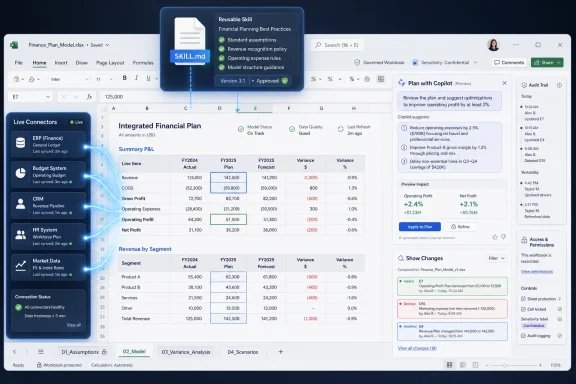
The most important part of the announcement is not that Copilot can do more. It is that Microsoft is trying to make Copilot do the same thing the same way more often.That is the role of Skills, the new reusable workflow mechanism Microsoft is bringing to Copilot in Excel. Instead of asking a user to write a detailed prompt every time they need a discounted cash flow model, variance analysis, close package, or board-ready summary, Skills let teams define a repeatable method once and have Copilot apply it across workbooks.
In practice, that means a finance team can encode its preferred structure, assumptions, formatting, and output conventions into a
SKILL.md file stored in OneDrive. Copilot then uses that instruction set as a reusable playbook. The spreadsheet does not become magically correct, but it becomes less dependent on whether the user remembers the exact prompt that worked last Tuesday.That distinction matters. The weakness of early workplace AI was not only hallucination; it was procedural drift. Two analysts could ask for the same thing in slightly different language and receive outputs that varied in format, assumptions, or scope. In finance, that is not a charming side effect of creativity. It is a control problem.
Skills are Microsoft’s answer to that problem. They move some of the value out of improvised prompting and into documented process. For organizations that already maintain model templates, close checklists, and reporting standards, this is a more serious enterprise pattern than the usual demo where Copilot prettifies a table on command.
The Spreadsheet Was Always the Real Finance Platform
Microsoft’s focus on finance is not accidental. Excel remains the shadow system of record inside much of corporate finance, even in organizations that have invested heavily in ERP systems, planning platforms, business intelligence stacks, and data warehouses.That reality is awkward but durable. Month-end close, management reporting, scenario planning, valuation work, audit schedules, and ad hoc executive analysis still tend to end up in workbooks. The grid is flexible enough to absorb exceptions, fast enough for analysts, and familiar enough that nobody needs procurement approval to build a model.
The downside is that Excel’s flexibility has always been its governance problem. Workbooks multiply. Formulas drift. Links break. Assumptions hide in cells that were color-coded by someone who left the company in 2021. The more important the workbook, the more likely it is to have undocumented institutional knowledge embedded in it.
Copilot’s first wave in Excel addressed productivity: explain this formula, summarize this table, make a chart, generate a pivot. The new wave is aimed at process capture. If Skills work as advertised, teams can formalize how Copilot should approach recurring finance tasks without requiring every analyst to become a prompt engineer.
That does not eliminate spreadsheet risk. It changes where the risk sits. Instead of every user inventing a workflow at the prompt box, a smaller number of finance, data, and IT owners will need to curate the Skills that define how Copilot acts. That is progress, but it is also a new governance surface.
Live Data Connectors Attack the Copy-Paste Economy
The second pillar of the update is live data. Microsoft says Copilot in Excel can now use new connectors for CB Insights, Daloopa, FactSet, Morningstar, PitchBook, and S&P Global, adding to LSEG and Moody’s connectors that arrived earlier.For finance users, this is less glamorous than agentic AI but possibly more useful. A great deal of spreadsheet labor is still the unglamorous movement of numbers from trusted sources into working models. Market data, credit intelligence, company financials, private market information, industry datasets, and analyst-ready reference data often arrive through portals, exports, PDFs, emails, and manual downloads.
That is not merely tedious. It is a source of error. Copying numbers from a report into a model creates opportunities for stale data, broken provenance, and silent mistakes. Anyone who has reviewed a spreadsheet full of pasted values knows the uneasy feeling of asking, “Where did this number come from?”
The connectors are Microsoft’s attempt to answer that question inside Excel itself. Copilot can pull data into the workbook through approved sources, and in some cases those sources will require separate subscriptions. That caveat is important because this is not Microsoft making premium finance data free. It is Microsoft trying to make Excel the work surface for data customers already license elsewhere.
The strategic move is clear. Microsoft does not need to own every data source if it owns the pane where analysts ask for the data, the workbook where they model it, and the collaboration layer where others review it. Excel becomes not just a spreadsheet application but a front end for the finance data supply chain.
Trust Is Now a Product Feature, Not a Slogan
The third part of the announcement is the least flashy and the most necessary: traceability. Microsoft is adding more explicit change visibility around what Copilot plans to edit and what it actually changes.Plan with Copilot mode is designed to show the ranges, formulas, and assumptions Copilot intends to touch before it acts. Afterward, the Show Changes pane can distinguish Copilot’s edits from human edits. That is not a nice-to-have feature for finance users. It is the difference between a tool that can be tested and a tool that has to be distrusted by default.
AI in finance has a credibility problem because finance work is not judged only by whether an answer sounds plausible. It is judged by whether the numbers reconcile, whether the assumptions are defensible, whether the source is current, whether the formula is visible, and whether a reviewer can reproduce the path from input to output.
Microsoft appears to understand that the assistant cannot be a black box if it is making workbook changes. A plan-before-action model fits the way many organizations already handle high-risk spreadsheet work: propose, review, execute, reconcile. It does not make Copilot safe by itself, but it gives teams a control point.
That control point will matter most in shared workbooks. A Copilot-generated edit that quietly changes assumptions in a collaborative model is a nightmare scenario. A Copilot-generated edit that is tagged, reviewable, and reversible is still a risk, but it is a manageable one.
The Fintool Signal Points to a Bigger Finance Ambition
The Excel update lands shortly after Microsoft’s acquisition of Fintool, a finance-focused AI startup. That timing is worth noting because it suggests Microsoft is not treating finance as a generic Office workload with a few sample prompts sprinkled on top.Finance is a high-value target for enterprise AI because the work is document-heavy, data-heavy, repetitive, and expensive. It also sits close to executive decision-making. If Copilot can become useful in finance, Microsoft gains a stronger argument for premium Microsoft 365 Copilot licensing than it gets from summarizing meetings or drafting emails.
But finance is also unforgiving. A sales deck can survive a bland paragraph. A spreadsheet cannot survive a bad assumption hidden in a valuation model. The closer Copilot gets to actual finance workflows, the more Microsoft has to confront auditability, data rights, model validation, and segregation of duties.
Fintool’s relevance is therefore less about any single feature than about Microsoft’s direction of travel. The company is building toward role-specific AI rather than one generic assistant for everyone. Excel Skills, finance connectors, and change tracking all fit that thesis.
The risk is that Microsoft’s product language will run ahead of operational reality. “AI for finance” sounds transformational. In a real finance department, adoption will depend on whether Copilot can respect existing controls, integrate with licensed data sources, and produce outputs that senior analysts trust enough to review instead of rebuild from scratch.
SKILL.md Gives Power Users a New Kind of Template
The choice of a markdown-basedSKILL.md file is technically modest but culturally interesting. Excel has always had templates, macros, add-ins, Power Query scripts, VBA, Office Scripts, and custom models. Skills add another layer: a natural-language procedural template for an AI agent.That may sound soft compared with code, but it has advantages. Many finance process owners can describe the right workflow better than they can automate it. They know which tabs should exist, how assumptions should be named, what checks should appear, which outputs go to management, and what formatting signals confidence or review status.
A Skill gives those teams a place to write that knowledge down in a form Copilot can consume. It is closer to an operating manual than a macro. That makes it accessible, but it also makes quality control harder. A badly written Skill could standardize the wrong behavior across many workbooks.
This is where IT and finance governance will need to meet. If anyone can drop a
SKILL.md file into OneDrive and have Copilot follow it, organizations will need policies for which Skills are trusted, where they live, who can modify them, and how changes are reviewed. The old spreadsheet problem of “which version is the real template?” may reappear as “which Skill is approved?”Microsoft’s Marketplace plans add another wrinkle. Partners including LSEG, Ramp, Rogo, and Vena are expected to offer Skills later this year. That could accelerate adoption by packaging expert workflows, but it also turns finance procedure into an ecosystem product. Enterprises will need to evaluate Skills not just as productivity shortcuts but as operational components.
Agent Mode Was the Bridge to This Moment
Microsoft’s broader Copilot work in Office has been moving toward agentic behavior: not merely answering questions, but taking multi-step actions inside applications. Excel is the natural proving ground because spreadsheet work is already procedural.Agent Mode in Excel made the product feel less like a chat sidebar and more like a collaborator that can restructure data, build reports, generate formulas, and evaluate workbook state. Skills build on that by giving the agent reusable instructions. Connectors give it better inputs. Change tracking gives reviewers a way to inspect the outputs.
That combination is more important than any single feature. A skilled analyst does not merely know formulas. They know where to get data, how to structure a workbook, how to document assumptions, how to test outputs, and how to explain changes. Microsoft is trying to approximate that chain inside Excel.
The danger is that users may mistake a smoother workflow for a validated result. Copilot can produce a cleaner model faster, but clean formatting is not evidence of correctness. The best use case remains acceleration under review, not autonomous finance decision-making.
Microsoft’s own support language around Copilot in Excel continues to emphasize review and verification. That is not legal boilerplate; it is the core operating model. Copilot is becoming more capable, but the accountable human reviewer is not disappearing.
Finance Teams Will Need an AI Control Framework Before They Need More Prompts
The obvious early adopters are finance teams already drowning in repeated workbook tasks: FP&A groups producing variance narratives, accounting teams preparing close packages, corporate development teams screening deals, investor relations teams compiling metrics, and analysts rebuilding similar models with slightly different inputs.For those groups, the productivity upside is real. A repeatable Skill for variance analysis could reduce busywork. A connector that pulls current market data could reduce stale inputs. A visible edit plan could make Copilot less scary to reviewers.
But the implementation questions are not small. Who approves a Skill for use in a close process? Does internal audit need to review it? Are Copilot-generated edits treated like analyst edits, system edits, or something new? How are connector credentials governed? What happens when an external data subscription changes its schema or coverage?
These are not reasons to avoid the technology. They are reasons to avoid treating it as a personal productivity toy. The moment Copilot starts participating in finance workflows that feed management reporting, budgeting, valuation, or compliance-sensitive analysis, it becomes part of the control environment.
That is why the Show Changes pane matters more than the demo video. Enterprise adoption will turn on whether Microsoft can make AI-generated workbook work observable, explainable, and governable. The spreadsheet is already powerful enough. The missing ingredient has always been discipline.
The Marketplace Could Standardize Finance Workflows — or Fragment Them
The coming partner Skills marketplace is one of the more consequential pieces of Microsoft’s plan. If third parties can sell or distribute specialized finance Skills, Excel could become a distribution channel for packaged analytical procedures.That has obvious appeal. A market data provider could ship a Skill that knows how to structure a comparable company analysis. A planning software vendor could provide a workflow for budget variance review. A procurement or expense platform could expose finance operations procedures directly in the workbook where analysts already work.
The best version of this future looks like a healthier version of the old Excel add-in ecosystem. Instead of brittle toolbars and opaque plug-ins, users get documented, inspectable Skills that guide Copilot through repeatable tasks using trusted data. Finance teams could adopt expert workflows without rebuilding them from scratch.
The worst version looks like prompt-pack sprawl. Every vendor ships its own Skill. Every department tweaks them. Users invoke workflows without understanding embedded assumptions. IT discovers too late that business-critical work now depends on natural-language instruction files scattered across cloud storage.
Microsoft can mitigate that with admin controls, permissions, provenance, and marketplace review. But the company will have to be unusually clear about how Skills are installed, updated, audited, and revoked. In finance, convenience without lifecycle management becomes technical debt very quickly.
Windows and Mac Availability Makes This an Office Story, Not a Web Experiment
The rollout across Excel for the web, Windows, and Mac is important because serious Excel work still happens across desktop environments. Finance teams may collaborate in the browser, but many analysts remain attached to desktop Excel for performance, shortcuts, add-ins, multiple monitors, and deeply ingrained habits.By making these updates available across platforms for Microsoft 365 Copilot customers, Microsoft is signaling that this is not a side experiment confined to web-first users. It wants Copilot’s finance features embedded where finance work already happens.
That matters for WindowsForum readers because Excel on Windows remains a cornerstone of enterprise desktop computing. Even as Microsoft pushes cloud services, the local Office app is still where many users experience Microsoft 365 as a daily productivity platform. Copilot’s success will depend partly on whether it feels native in that environment rather than like a web service peering into a workbook from the outside.
There will still be practical constraints. Organizations need the right Microsoft 365 Copilot licensing. Some connectors require separate subscriptions. Custom Skills are rolling out over the next month rather than appearing everywhere instantly. Admin settings, data access, and tenant policies will shape the real-world experience.
But the direction is unmistakable. Microsoft is not asking finance departments to leave Excel for an AI finance app. It is bringing the finance AI stack into Excel.
The Real Upgrade Is Less Magic and More Memory
What makes this release interesting is that it quietly moves Copilot away from one-off assistance and toward organizational memory. A prompt is ephemeral. A Skill is reusable. A copied number is fragile. A connector is governed. An unexplained edit is risky. A tracked change is reviewable.That is the pattern Microsoft needs if Copilot is going to survive contact with real finance work. The enterprise does not need more demos of AI doing impressive things once. It needs systems that can do useful things repeatedly, with enough transparency that people can trust the process without suspending skepticism.
There is also a subtle redistribution of expertise here. A senior finance professional can encode preferred practice into a Skill, and junior analysts can apply it without memorizing every procedural detail. That could improve consistency, especially in teams with high turnover or distributed operations.
The counterargument is that this may deskill parts of the analyst role. If Copilot builds the model, pulls the data, formats the output, and writes the variance explanation, what does the analyst learn? The answer depends on how teams deploy it. Used badly, Copilot becomes a shortcut around understanding. Used well, it becomes a way to move analysts faster from mechanical assembly to judgment, review, and interpretation.
That distinction will define whether this update is remembered as a gimmick or a turning point.
The Spreadsheet AI Era Now Has an Audit Trail
Microsoft’s Excel announcement is best read as a shift from assistant features to controlled workflow infrastructure. The practical implications are concrete:- Finance teams can use Skills to preserve repeatable workbook methods instead of relying on users to recreate long prompts from memory.
- Copilot’s new finance connectors reduce some of the manual copying that has long made spreadsheet models vulnerable to stale or mistyped data.
- Plan with Copilot gives reviewers a chance to see intended workbook changes before the assistant edits ranges, formulas, or assumptions.
- The Show Changes pane makes Copilot’s edits easier to separate from human edits in shared workbooks.
- Microsoft’s finance push will require governance around Skill approval, connector access, data subscriptions, and review responsibilities.
- The feature set is live for Microsoft 365 Copilot customers across Excel for the web, Windows, and Mac, with custom Skills rolling out more broadly over the next month.
Microsoft’s challenge from here is execution, not imagination. Skills must be manageable, connectors must be reliable, permissions must be clear, and Copilot’s edits must remain visible enough that reviewers can challenge them. If the company gets that right, Excel may become the place where enterprise AI stops performing tricks and starts absorbing process; if it gets it wrong, finance teams will keep doing what they have always done with risky spreadsheet automation — admire the demo, then rebuild the numbers by hand.
References
- Primary source: Digital Trends
Published: Thu, 25 Jun 2026 20:16:25 GMT
Microsoft Copilot can now handle more of your finance work in Excel with reusable skills and data connectors - Digital Trends
Microsoft added reusable Skills, new financial data connectors, and traceability features to Copilot in Excel, built specifically for finance teams.www.digitaltrends.com - Official source: support.microsoft.com
Get started with Copilot in Excel | Microsoft Support
Use Copilot in Excel to analyze data, generate formulas, create charts, and more.support.microsoft.com - Related coverage: thurrott.com
Microsoft Excel Adds New Financial Connectors and Reusable Copilot Skills
Microsoft announced today the introduction of new financial connectors in Microsoft Excel, along with reusable Copilot Skills.www.thurrott.com - Official source: techcommunity.microsoft.com
Introducing federated Copilot connectors for LSEG and Moody's in Excel | Microsoft Community Hub
Earlier this month, we announced Microsoft 365 Copilot federated connectors were coming to Copilot in Excel. Built on the emerging industry standard... techcommunity.microsoft.com
- Official source: learn.microsoft.com
Finance Agent features that work with Microsoft 365 Excel | Microsoft Learn
This article contains a list of Finance Agent features that work with Excel.learn.microsoft.com - Related coverage: moodys.com
- Related coverage: moneycontrol.com
Microsoft CEO Satya Nadella announces Copilot Agent Mode as default across Word, Excel and PowerPoint
Microsoft says Copilot now uses agent mode by default across Word, Excel and PowerPoint, enabling task execution, deeper context understanding, improved workflows, and higher engagement across productivity applications for users.www.moneycontrol.com - Official source: microsoft.com
Copilot's agentic capabilities in Word, Excel, and PowerPoint are generally available | Microsoft 365 Blog
Copilot's newest features are now generally available as the default experience across all Microsoft 365 subscriptions.www.microsoft.com - Official source: cdn-dynmedia-1.microsoft.com
- Official source: news.microsoft.com
- Official source: wwps.microsoft.com