

Microsoft is pushing Copilot in Word deeper into the part of the workflow that matters most to businesses: the messy, high-stakes world of contracts, policy drafts, compliance documents, and executive briefs. The new update is less about flashy AI writing and more about controlled editing, with word-level track changes, comment handling, table of contents management, dynamic page elements, and real-time progress messages designed to make Copilot feel trustworthy inside long documents. Microsoft says the experience is grounded in Work IQ, its context layer for Microsoft 365, and the rollout is beginning through the Frontier program and the Microsoft 365 Insider Beta Channel. ompany that once seemed determined to put Copilot everywhere at once, this Word update feels more disciplined. Microsoft has spent much of 2025 and early 2026 tightening the product story around context, governance, and reviewability, especially in Microsoft 365, where the company’s latest messaging stresses that AI should work inside the application rather than as a detached assistant floating above it. That is why the Word changes matter: they turn Copilot from a drafting helper into an editing participant that understands document structure and preserves the formal mechanics of review.
The timing is important too. Microsoft has been refining Copilot in Word for some time, and previous support materials already positioned the app as a place where users could draft, revise, and ask questions about existing content. The newer work pushes beyond generic text generation by respecting Track Changes, anchoring comments to the right text, and making structural elements such as headings and page numbers behave more like part of a governed publishing flow than a loose AI experiment.
What makes this update stand out is not that Microsoft added more AI, but that it added AI in ways traditional Word users can actually audit. That distinction matters in enterprise settings, where a useful AI feature is not one that merely completes a sentence quickly, but one that keeps the revision history intact, preserves formatting, and does not silently rewrite a policy into something nobody can defend later. Microsoft is clearly betting that trust will be won through workflow fidelity rather than novelty.
The broader backdrop is Microsoft’s ongoing shift from the old “AI everywhere” impulse toward a more selective, app-native strategy. The companutter in Windows while continuing to deepen AI in Microsoft 365, and the contrast is telling. In Windows, Copilot is being reined in; in Word, it is being made more useful by disappearing into the document itself. That is a much more mature product posture, and it may be the one that enterprises were waiting for.
The headline features in Word are straightforward, but the implications are broader than they look at first glance. Track Changes with word-level precision means Cops that are visible and reviewable rather than opaque. Contextual comments let users add, read, reply to, and manage threads anchored to the correct text, which is the difference between meaningful collaboration and a comment trail that drifts away from the content it was supposed to improve.
That also helps explain why Microsoft is so focused on Word rather than standalone chat. Word is where final language hardens into contracts, policy memos, press statements, and internal controls. It is where revision history becomes a record, not just a convenience. Copilot’s value rises sharply when it participates in that record instead of bypassing it.
There is also a psychological effect here. Users are far more willing to let AI edit sensitive material if they can see every move it makes in the standard Word interface. That transparency lowers the perceived risk of using AI in the documents that matter most, which is exactly the kind of trust hurdle Microsoft has been trying to clear for months. ([suppps://support.microsoft.com/en-us/office/agent-mode-in-word-frontier-647d5d14-eaec-4e8a-a574-7cefffa7f8f0)
That is especially important in collaborative review cycles where several departments are weighing in at once. A legal team may flag a clause, finance may question a number, and operations may ask for clarity on implementation. If Copilot can keep those threads tied to the correct text, it becomes much easier to maintain a single source of truth.
The feature also hints at a bigger trend: Microsoft wants Copilot to become a participant in working documents, not just a generator of finished ones. That means the assistant has to understand the social mechanics of document work, including revisions, dissent, and final approval. In that sense, comments may be the most underrated feature in the whole release.
Microsoft also appears determined to keep sensitive data inside organizational boundaries. That is a keyr enterprise buyers, who do not want proprietary content leaking into consumer-grade workflows or getting treated as a generic prompt stream. In practical terms, that means Copilot’s power has to be balanced by enterprise controls and data governance.
The company’s recent Microsoft 365 blog language is explicit about this direction: Copilot should stay grounded in work context so edits reflect what is current and relevant across files, meetings, chats, and relationships. That is a much stronger promise than “AI that writes well,” because it addresses the harder problem of relevance under organizational constraint.
This is where Microsoft seems to have learned from earlier Copilot criticism. Users were often enthusiastic about the drafts but uneasy about the confidence gap between a good-looking answer and a trustworthy result. Showing the work is a direct response to that skepticism, and it may matter more than another layer of model sophistication.
It is also a practical productivity choice. If users can see that Copilot is still processing, they are less likely to interrupt it or assume a failure. That reduces friction and makes the feature easier to adopt in a busy office setting, where every extra click or uncertainty compounds across the workday.
For consumers, the value is more modest but still real. Anyone who works on long school papers, proposals, nonprofit reports, or personal documents with multiple sections can benefit from automated structure handling. The average home user may not care about audit trails, but they will care if Copilot keeps the table of contents accurate and preserves formatting while editing.
Still, the consumer story is less urgent because the feature set is clearly aligned with professional workflows. Microsoft’s emphasis on Frontier, Insiders, and enterprise language suggests the company sees this as a premium productivity capability first, and a broadly distributed feature second. That sequencing makes sense because the strongest willingness to pay is likely to come from commercial customers.
This is also part of the broader shift away from a single-model story. Microsoft’s recent Copilot strategy has included model diversity and new controls, which suggests the company wants to be seen as a platform for governed AI work rather than as a one-model chatbot vendor. That framing is important because it raises the competitive bar from “good answer” to “safe workflow.”
Rivals in the productivity space will likely have to respond with more than drafting aids. They will need better document state awareness, better collaboration anchoring, and more explicit governance features. In the enterprise market, those are not optional extras; they are the price of admission.
The company also appears to be using the rollout to reinforce its app-by-app AI strategy. Rather than promoting a one-size-fits-all Copilot banner, Microsoft is adding features where the workflow is strongest and the user intent is clearest. That kind of deployment discipline is a sign of maturity, and it is probably necessary if Microsoft wants to avoid the clutter complaints that have followed it in Windows.
The mention of web and Mac support coming soon is another clue that Microsoft wants this to be a cross-platform productivity capability, not just a Windows perk. That matters because document collaboration now spans desktops, browsers, and mobile devices, and users increasingly expect continuity across all three.
Microsoft will also have to keep balancing ambition with restraint. The company’s recent strategy shows it understands that users want AI to be helpful, not intrusive, and Word’s new document-aware features reflect that lesson. If Microsoft continues to push Copilot deeper into the work process while keeping review, transparency, and governance intact, it may finally be building the version of office AI that businesses can adopt without hesitation.
Source: Windows Report https://windowsreport.com/copilot-in-word-just-got-better-at-handling-complex-documents/
The timing is important too. Microsoft has been refining Copilot in Word for some time, and previous support materials already positioned the app as a place where users could draft, revise, and ask questions about existing content. The newer work pushes beyond generic text generation by respecting Track Changes, anchoring comments to the right text, and making structural elements such as headings and page numbers behave more like part of a governed publishing flow than a loose AI experiment.
What makes this update stand out is not that Microsoft added more AI, but that it added AI in ways traditional Word users can actually audit. That distinction matters in enterprise settings, where a useful AI feature is not one that merely completes a sentence quickly, but one that keeps the revision history intact, preserves formatting, and does not silently rewrite a policy into something nobody can defend later. Microsoft is clearly betting that trust will be won through workflow fidelity rather than novelty.
The broader backdrop is Microsoft’s ongoing shift from the old “AI everywhere” impulse toward a more selective, app-native strategy. The companutter in Windows while continuing to deepen AI in Microsoft 365, and the contrast is telling. In Windows, Copilot is being reined in; in Word, it is being made more useful by disappearing into the document itself. That is a much more mature product posture, and it may be the one that enterprises were waiting for.
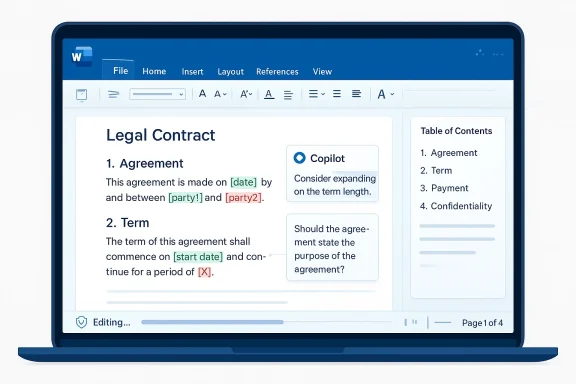 What Microsoft Actually Changed
The headline features in Word are straightforward, but the implications are broader than they look at first glance. Track Changes with word-level precision means Cops that are visible and reviewable rather than opaque. Contextual comments let users add, read, reply to, and manage threads anchored to the correct text, which is the difference between meaningful collaboration and a comment trail that drifts away from the content it was supposed to improve.From Drafting to Revision
This is the real transition: Copilot is no longer just helping you produce a first draft. It is entering the revision layer, which is where professional documents become official documents. In that setting, how something changed is often more important than whether it changed at all. ([support.microsoft.com](Edit with Copilot in Word - Microsoft Support added more structure-aware tools, including the ability to insert and update table of contents entries based on Word’s built-in heading types. That sounds mundane, but it matters because complex documents live or die by structure. A table of contents that stays current as sections move around is a small feature with outsized value in legal, policy, and technical wriue for dynamic page features such as headers, footers, columns, margins, page numbers, and dates. These are not glamorous features, but they are exactly the elements that make a document feel finished and professionally controlled. If Copilot can manage them without breaking formatting, it reduces the amount of manual cleanup after a draft is gedits remain visible by default.- Track Changes can be turned on directly from Copilot.
- Comments stay anchored to the relevant text.
- Tables of contents can be updated from Word’s headings.
- Headers, footers, and page numbers can refresh automatically.
- Progress messages show what Copilot is doing during multi-step edits.
Why Track Changes Matters So Much
Track Changes is not a cosmetic feature. In business writing, it is the mechanism that preserves authorship, accountability, and disagreement. Microsoft’s new approach is significant because it makes Copilot behave like a contributor inside the review process rather than a black box that outputs a polished paragraph and walks away.Audit Trails Are the Product
For legal and compliance teams, auditability is the product. A document can be improved only if reviewers can see what changed, who approved it, and whether a suggestion was accepted because it was useful or simply because it sounded plausible. By making Copilot respect tracked edits, Microsoft is acknowledging that enterprise users do not just need accuracy; they need defensibility.That also helps explain why Microsoft is so focused on Word rather than standalone chat. Word is where final language hardens into contracts, policy memos, press statements, and internal controls. It is where revision history becomes a record, not just a convenience. Copilot’s value rises sharply when it participates in that record instead of bypassing it.
There is also a psychological effect here. Users are far more willing to let AI edit sensitive material if they can see every move it makes in the standard Word interface. That transparency lowers the perceived risk of using AI in the documents that matter most, which is exactly the kind of trust hurdle Microsoft has been trying to clear for months. ([suppps://support.microsoft.com/en-us/office/agent-mode-in-word-frontier-647d5d14-eaec-4e8a-a574-7cefffa7f8f0)
- Legal teams need line-by-line accountability.
- Finance teams need clear review trails.
- Policy teams need document integrity.
- Executives need confidence that no hidden rewrite occurred.
- IT needs controls that fit existing governance processes.
Comments and Collaboration Become More Precise
Microsoft’s new comment handling is another sign that the company is working harder to fit Copilot into established collaborative behavior. Comments in Word are not just notes; they are conversations with context, and the context must remain attached to the right clause, paragraph, or table cell if the discussion is going to remain useful.Keeping the Conversation on the Page
By allowing Copilot to add, read, reply to, and manage threads, Microsoft is trying to collapse a common workflow problem: users often have to ask AI for help in one place and then manually translate that help into comments in another. Here, the AI is being pulled into the native collaboration layer, which should reduce copy-paste friction and limit the chance of comment drift.That is especially important in collaborative review cycles where several departments are weighing in at once. A legal team may flag a clause, finance may question a number, and operations may ask for clarity on implementation. If Copilot can keep those threads tied to the correct text, it becomes much easier to maintain a single source of truth.
The feature also hints at a bigger trend: Microsoft wants Copilot to become a participant in working documents, not just a generator of finished ones. That means the assistant has to understand the social mechanics of document work, including revisions, dissent, and final approval. In that sense, comments may be the most underrated feature in the whole release.
Work IQ and the Context Layer
Microsoft keeps returning to Work IQ, and for good reason. If Copilot is going to edit serious documents, it needs more than raw language generation; it needs context about files, meetings, chats, and relationships. That context is what lets the assistant tell the difference between a generic request and one that should reflect an organization’s actual working state.Why Context Beats Raw Generation
The company’s messaging around Work IQ suggests that Microsoft wants AI to be grounded in the user’s real environment rather than in abstract prompt engineering. That matters because complex documents are usually not written from scratch. They are assembled from prior drafts, meeting notes, related files, and institutional habits. Copilot can only be reliably useful if it can navigate that reality.Microsoft also appears determined to keep sensitive data inside organizational boundaries. That is a keyr enterprise buyers, who do not want proprietary content leaking into consumer-grade workflows or getting treated as a generic prompt stream. In practical terms, that means Copilot’s power has to be balanced by enterprise controls and data governance.
The company’s recent Microsoft 365 blog language is explicit about this direction: Copilot should stay grounded in work context so edits reflect what is current and relevant across files, meetings, chats, and relationships. That is a much stronger promise than “AI that writes well,” because it addresses the harder problem of relevance under organizational constraint.
- Context makes AI useful in real enterprises.
- Grounding reduces hallucination and stale references.
- Data boundaries matter as much as model quality.
- Relevance depends on nearby files and conversations.
- Governance is part of the feature set, not an afterthought.
Progress Messages and User Trust
One of the more subtle additions is the progress messaging that appears during multi-step edits. That may sound minor, but it addresses a serious trust issue in workplace AI: users are much more comfortable with an assistant when they can tell whether it is working, thinking, or stuck. In long document workflocertainty, and uncertainty creates skepticism.Transparency as a Design Choice
Progress feedback is especially useful when Copilot is making structural edits across a long document. Users do not want to wonder whether a heading update finished, whether the table of contents refreshed, or whether the AI is about to overwrite the formatting of a carefully prepared memo. A visible progress trail makes the interaction feel more like a software operation and less like a gamble.This is where Microsoft seems to have learned from earlier Copilot criticism. Users were often enthusiastic about the drafts but uneasy about the confidence gap between a good-looking answer and a trustworthy result. Showing the work is a direct response to that skepticism, and it may matter more than another layer of model sophistication.
It is also a practical productivity choice. If users can see that Copilot is still processing, they are less likely to interrupt it or assume a failure. That reduces friction and makes the feature easier to adopt in a busy office setting, where every extra click or uncertainty compounds across the workday.
Enterprise vs. Consumer Impact
The strongest impact here is clearly enterprise-first. Microsoft’s examples center on executive summaries, risk sections, Finance and Legal review, and document structures that support governance. That is not the language of casual home use; it is the language of organizations that live and die by version control, approvals, and formal sign-off.What Businesses Get
For enterprises, the update offers a cleaner route to AI-assisted production without sacrificing compliance habits. Word already sits at the center of countless review processes, and these features help preserve those processes rather than replacing them. That will matter to IT admins, records managers, and legal operations teams who want AI benefits without destabilizing policy.For consumers, the value is more modest but still real. Anyone who works on long school papers, proposals, nonprofit reports, or personal documents with multiple sections can benefit from automated structure handling. The average home user may not care about audit trails, but they will care if Copilot keeps the table of contents accurate and preserves formatting while editing.
Still, the consumer story is less urgent because the feature set is clearly aligned with professional workflows. Microsoft’s emphasis on Frontier, Insiders, and enterprise language suggests the company sees this as a premium productivity capability first, and a broadly distributed feature second. That sequencing makes sense because the strongest willingness to pay is likely to come from commercial customers.
- Enterprises want governed AI editing.
- Consumers want less formatting cleanup.
- Admins want predictable rollout channels.
- Power users want fewer manual revision steps.
- Both groups want fewer broken documents.
The Competitive Landscape
Microsoft’s move puts pressure on a growing number of AI writing and document-assistance tools. The difference is that many competitors can generate text, but far fewer can operate natively inside the most widely used office document standard with formal revision controls intact. That makes Word a strategic moat, not just an app.Why Native Integration Wins
If a competitor wants to chal, it has to match three things at once: document intelligence, revision integrity, and enterprise trust. That is a tall order. Word already owns the default workplace format for contracts, memos, policies, and briefing materials, so Microsoft is not just shipping an AI feature; it is embedding AI into an incumbent wrosoft.com]This is also part of the broader shift away from a single-model story. Microsoft’s recent Copilot strategy has included model diversity and new controls, which suggests the company wants to be seen as a platform for governed AI work rather than as a one-model chatbot vendor. That framing is important because it raises the competitive bar from “good answer” to “safe workflow.”
Rivals in the productivity space will likely have to respond with more than drafting aids. They will need better document state awareness, better collaboration anchoring, and more explicit governance features. In the enterprise market, those are not optional extras; they are the price of admission.
Rollout Strategy and Access
Microsoft is not shipping this as a fully universal change right away. The update is available first through the Frontier program and the Office Insiders Beta Channel, which tells us the company is still collecting feedback before broader deployment. That staged rollout is sensible for a feature touching complex document editing, because any defect in tracking or formatting would be highly visible.Why Microsoft Is Starting Small
A narrow rollout reduces the risk of breaking high-value workflows at scale. Word documents used in legal, finance, and operations are often shared across many people and systems, so a mistake in document structure or revision logic could create downstream confusion. Microsoft is correctly treating this as a precision feature rather than a mass-market novelty.The company also appears to be using the rollout to reinforce its app-by-app AI strategy. Rather than promoting a one-size-fits-all Copilot banner, Microsoft is adding features where the workflow is strongest and the user intent is clearest. That kind of deployment discipline is a sign of maturity, and it is probably necessary if Microsoft wants to avoid the clutter complaints that have followed it in Windows.
The mention of web and Mac support coming soon is another clue that Microsoft wants this to be a cross-platform productivity capability, not just a Windows perk. That matters because document collaboration now spans desktops, browsers, and mobile devices, and users increasingly expect continuity across all three.
Strengths and Opportunities
Microsoft’s new Word Copilot features are strongest where they solve real document pain, not imaginary AI hype. They improve the review process, make edits easier to trust, and fit into the existing structure of professional Word documents rather than asking users to change how they work. That combination creates a credible path to wider adoption.- Native Track Changes support improves accountability.
- Contextual comments keep collaboration aligned with the text.
- Table of contents automation reduces manual maintenance.
- Dynamic page controls preserve document professionalism.
- Progress messages increase trust in multi-step edits.
- Work IQ grounding supports relevance across work artifacts.
- Enterprise-first design matches real buyer needs.
Risks and Concerns
The update is promising, but it also raises familiar concerns about AI overreach, document integrity, and rollout reliability. If Copilot misreads structure, over-edits sensitive text, or creates subtle formatting issues, the damage in a business setting could be larger than the productivity gain. That is why the precision promise will be judged harshly.- Formatting errors could undermine trust fast.
- Overconfident edits may still require extensive human review.
- Enterprise governance expectations will be high.
- Preview-channel instability could limit early enthusiasm.
- Feature fragmentation may confuse users across platforms.
- Security and privacy scrutiny will remain intense.
- Workflow dependence could create new training burdens.
Looking Ahead
The most important question now is whether Microsoft can turn these gains into a durable pattern across the Office suite. Word is the right place to prove the concept because it is where precision, revision history, and document structure matter most. If Copilot performs well here, Microsoft can use that credibility to deepen AI in Excel, PowerPoint, Outlook, and beyond.The Next Test
The next test is not whether Copilot can write faster, but whether it can make organizations more comfortable letting AI participate in formal work. That means better change control, better explainability, and fewer moments where the user has to guess what the assistant is doing. In other words, the future of Copilot in Word depends on trust at scale.Microsoft will also have to keep balancing ambition with restraint. The company’s recent strategy shows it understands that users want AI to be helpful, not intrusive, and Word’s new document-aware features reflect that lesson. If Microsoft continues to push Copilot deeper into the work process while keeping review, transparency, and governance intact, it may finally be building the version of office AI that businesses can adopt without hesitation.
- Watch for broader rollout beyond Frontier and Beta.
- Watch for Mac and web parity.
- Watch for improvements to comments and revision handling.
- Watch for enterprise admin controls and compliance messaging.
- Watch for whether Copilot stays reliable in very long documents.
Source: Windows Report https://windowsreport.com/copilot-in-word-just-got-better-at-handling-complex-documents/
