

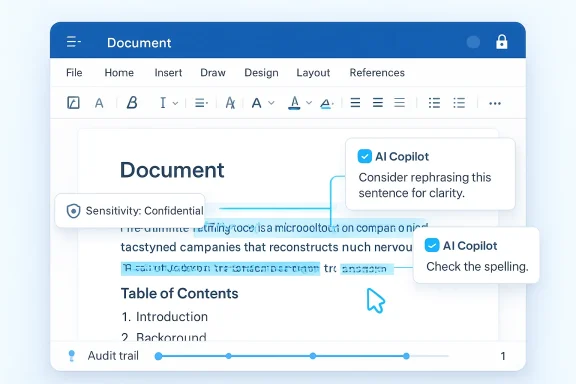
Microsoft’s latest Copilot in Word push is more than a cosmetic AI update. It signals a deeper shift in how Word is being positioned: not just as a document editor, but as an intelligent workspace for high-stakes, collaborative, auditable work. The new capabilities Microsoft has outlined include word-level Track Changes, contextual comments, and smarter document structuring tools that preserve formatting and collaboration history while AI makes edits inside the file itself. Microsoft says the features are arriving through its Frontier early-access program first, with broader support for Word for the web and Mac coming later. (techcommunity.microsoft.com)
Microsoft has been steadily reworking Copilot from a chat box that drafts text into a system that can participate in the actual mechanics of office work. The company’s March 2026 “Wave 3” announcement emphasized that Copilot would work directly inside Word, Excel, PowerPoint, and Outlook, using Work IQ to ground edits in the user’s files, meetings, chats, and relationships. That matters because it moves the product away from generic AI output and toward context-aware document operations. (microsoft.com)
The Word update described this month builds on that direction by addressing a long-standing weakness of AI writing tools: they can draft, but they often struggle to edit in ways that preserve the collaboration conventions people already rely on. Microsoft’s new Word experience is explicitly aimed at legal, finance, and compliance professionals, which is a telling choice. Those users do not just need polished language; they need traceability, accountability, and consistency under review. (techcommunity.microsoft.com)
That focus also reflects the broader enterprise market reality. In most organizations, the hardest part of AI adoption is not generating words, but fitting AI into approval chains, version control, and governance rules. Microsoft says its Copilot changes respect sensitivity labels, data loss prevention policies, and the Microsoft 365 trust boundary, which suggests the company understands that trust is now as important as novelty. (techcommunity.microsoft.com)
The timing is important too. Microsoft has spent the last year turning Frontier into a channel for previewing “agentic” features and operational AI workflows. That strategy lets the company test high-value use cases with early adopters before wider rollout, while also creating a sense that the most advanced Copilot capabilities live behind Microsoft 365 licensing and governance rather than in a generic consumer chatbot. (support.microsoft.com)
At a market level, the Word announcement fits a pattern: Microsoft is trying to make Copilot feel native to the file, not bolted on top of it. That distinction is crucial. If AI can edit a document while preserving comments, track changes, headers, footers, and document structure, then the app becomes a workflow engine rather than a writing assistant. That is the strategic game Microsoft wants to win. (techcommunity.microsoft.com)
Microsoft also says Copilot can handle contextual comments anchored to the correct text. That sounds modest, but it is one of the most important details in the release. Comment threads are how teams preserve rationale, challenge assumptions, and record decisions, and if an AI can attach comments to the right passage, it becomes much easier to preserve review context across multiple contributors. (techcommunity.microsoft.com)
The third major addition is document structuring. Copilot can update a table of contents using Word’s heading styles and manage dynamic page features like headers, footers, page numbers, and dates. These are the kinds of repetitive tasks that burn time in business document production, and they are also the kinds of tasks AI can do well because they are rule-driven rather than stylistically subjective. (techcommunity.microsoft.com)
A smaller but meaningful enhancement is the new progress messaging for multi-step edits. Microsoft says Copilot shows what it is working on in real time, which helps reduce the “black box” feeling that often accompanies generative AI. Visibility matters here because users are more likely to trust automated editing if they can see the steps unfold. (techcommunity.microsoft.com)
The company also emphasizes that Copilot edits are “transparent, reviewable, and reversible.” In practical terms, that is the minimum bar for serious document operations. Enterprises are rarely afraid of automation itself; they are afraid of automation that cannot be explained when an auditor, lawyer, or regulator asks how a conclusion was reached. (microsoft.com)
This is also why the audience matters. Microsoft explicitly framed the release around legal, finance, and compliance professionals. Those roles depend on draft control, commentary chains, and version history. A system that can edit in place while preserving the collaboration trail is much more useful there than a standalone chat assistant that returns a prose block for copy-paste. (techcommunity.microsoft.com)
The move is especially significant because many companies have already hit a ceiling with generic AI assistants. Employees can generate an outline, but the labor savings disappear if someone still has to manually apply revisions, fix formatting, reinsert headers, and reconcile comments. Microsoft is targeting that hidden overhead directly. That is where the real productivity cost lives. (techcommunity.microsoft.com)
Microsoft’s support documentation also notes that Work IQ is available to Microsoft 365 Copilot license holders and that, in shared documents, suggestions are previewed in chat before being applied. That preview step is critical in collaborative settings because it creates a human checkpoint before content changes reach the document itself. (support.microsoft.com)
The broader strategic point is that Microsoft wants Copilot to feel like a native extension of Microsoft 365, not a generic model glued onto Office. Work IQ lets the company claim both usefulness and enterprise trust in the same breath. In competitive terms, that combination is difficult for rivals to match because it depends on app-level integration, document permissions, and data governance, not just model quality. (microsoft.com)
But Work IQ also raises expectations. If the system is supposed to know the right context, users will be less forgiving when it misses nuance or edits too aggressively. The promise of contextual intelligence is powerful, but it also creates a higher standard for accuracy and restraint. The smarter the assistant, the less room there is for sloppy behavior. (techcommunity.microsoft.com)
This is also a quiet answer to the complaint that AI creates “version sprawl.” Microsoft’s March messaging explicitly criticized AI tools that produce locally downloaded artifacts detached from the applications where work actually happens. By keeping Copilot inside Word, Microsoft is trying to preserve a single source of truth. (microsoft.com)
There is another practical gain here: structural consistency. Table of contents generation, dynamic headings, and page elements are boring features until someone has to maintain a 60-page policy document with multiple revision rounds. Then they become essential. Automating those chores is exactly the sort of small-friction removal that can create outsized user goodwill. (techcommunity.microsoft.com)
Still, the product identity shift is significant. Word is no longer just where you type; it is where AI edits, comments, and tracks. That changes user expectations around reliability, latency, and accountability. Every glitch in document handling will now feel more consequential because Copilot is touching the canonical file. (techcommunity.microsoft.com)
The rollout strategy reflects a balancing act. On one hand, Microsoft wants the halo effect of announcing cutting-edge AI capabilities. On the other hand, it must protect customers from overcommitting to features that may still change behavior or licensing terms. Early access creates urgency, but it also keeps Microsoft in control of the pace. (support.microsoft.com)
There is also a market segmentation angle. Enterprise users with Microsoft 365 Copilot licenses are the obvious target, but Microsoft’s documentation also references preview access paths for certain personal, family, or premium subscriptions. That suggests Microsoft is testing both enterprise and consumer appetite, even if the most advanced trust and governance messaging is aimed at business customers. (support.microsoft.com)
For now, the most realistic interpretation is that Microsoft is using Frontier to validate whether AI-native editing can become a habit rather than a novelty. If users repeatedly rely on Copilot for track changes, comments, and structure, the company can justify wider rollout. If they only use it occasionally, the pitch weakens. Adoption, not announcement, will decide the feature’s future. (techcommunity.microsoft.com)
Even so, consumer adoption may lag enterprise adoption. Many home users do not live in Track Changes or comment threads, and they may not care enough about auditability to pay for premium access. Microsoft’s strongest value proposition remains tied to organizational workflows where collaboration is formal and repeatable. (support.microsoft.com)
There is also a usability challenge. AI-powered editing features can be impressive, but they must remain predictable enough for ordinary users who may not understand Track Changes conventions or comment-thread management. If the system becomes too complex, the average consumer may simply revert to the old habit of asking Copilot for a draft and pasting it elsewhere. (techcommunity.microsoft.com)
In short, the consumer story is real, but it is secondary. Microsoft’s best use case is still the office, where Word remains a daily instrument of work and where the company can bundle AI value into an existing subscription relationship. That is the lane where Microsoft is strongest. (microsoft.com)
That does not mean Microsoft is invulnerable. If competitors can deliver simpler or cheaper AI-assisted editing, some organizations may prefer best-of-breed tools for lighter workflows. But in regulated sectors, the assurance that AI edits happen inside the governed environment will likely outweigh novelty. Compliance beats cleverness when the document matters. (techcommunity.microsoft.com)
The release also shows how Microsoft is reframing AI competition. Instead of fighting only on chatbot benchmarks, it is making the battleground the entire work artifact. The company wants to own the moment where intent becomes a document, a spreadsheet, a presentation, or an email. That is a much broader ambition than drafting assistance alone. (microsoft.com)
If Microsoft succeeds, the impact could ripple through adjacent products as well. Once users expect contextual AI in Word, they will expect similar behavior in PowerPoint, Outlook, and other Microsoft 365 apps. That creates a platform effect that makes the suite more defensible over time. (microsoft.com)
The other thing to watch is how quickly Microsoft expands support beyond Windows desktop. Broadening to Word for the web and Mac is important because document work is rarely confined to one platform anymore. The more consistent the experience becomes across devices, the more likely Microsoft is to normalize AI-assisted editing as part of routine office behavior. (techcommunity.microsoft.com)
Finally, keep an eye on whether Microsoft extends these capabilities into adjacent file types and workflow stages. If Word can already manage review, structure, and comments intelligently, the natural next step is even tighter integration with planning, summarization, and multi-document coordination. That would move Copilot closer to being an operating layer for work, not just a helper inside an app. (microsoft.com)
Source: News9live Satya Nadella unveils AI Copilot in Microsoft Word with smart track changes and comments
 Background
Microsoft has been steadily reworking Copilot from a chat box that drafts text into a system that can participate in the actual mechanics of office work. The company’s March 2026 “Wave 3” announcement emphasized that Copilot would work directly inside Word, Excel, PowerPoint, and Outlook, using Work IQ to ground edits in the user’s files, meetings, chats, and relationships. That matters because it moves the product away from generic AI output and toward context-aware document operations. (microsoft.com)The Word update described this month builds on that direction by addressing a long-standing weakness of AI writing tools: they can draft, but they often struggle to edit in ways that preserve the collaboration conventions people already rely on. Microsoft’s new Word experience is explicitly aimed at legal, finance, and compliance professionals, which is a telling choice. Those users do not just need polished language; they need traceability, accountability, and consistency under review. (techcommunity.microsoft.com)
That focus also reflects the broader enterprise market reality. In most organizations, the hardest part of AI adoption is not generating words, but fitting AI into approval chains, version control, and governance rules. Microsoft says its Copilot changes respect sensitivity labels, data loss prevention policies, and the Microsoft 365 trust boundary, which suggests the company understands that trust is now as important as novelty. (techcommunity.microsoft.com)
The timing is important too. Microsoft has spent the last year turning Frontier into a channel for previewing “agentic” features and operational AI workflows. That strategy lets the company test high-value use cases with early adopters before wider rollout, while also creating a sense that the most advanced Copilot capabilities live behind Microsoft 365 licensing and governance rather than in a generic consumer chatbot. (support.microsoft.com)
At a market level, the Word announcement fits a pattern: Microsoft is trying to make Copilot feel native to the file, not bolted on top of it. That distinction is crucial. If AI can edit a document while preserving comments, track changes, headers, footers, and document structure, then the app becomes a workflow engine rather than a writing assistant. That is the strategic game Microsoft wants to win. (techcommunity.microsoft.com)
What Microsoft Actually Added
The headline feature is word-level Track Changes. Microsoft says Copilot can now turn on Track Changes from inside Word, making edits visible, auditable, and granular by default. That matters because many AI tools still produce opaque revisions that are hard to review line by line. Here, Microsoft is trying to make AI behavior conform to the discipline of human editorial workflows rather than bypass them. (techcommunity.microsoft.com)Why word-level precision matters
In document-heavy industries, the smallest wording change can carry legal or financial consequences. A single shifted phrase in a contract, policy draft, or board memo may alter meaning, intent, or liability. Word-level edits are therefore not just a convenience; they are a trust mechanism. (techcommunity.microsoft.com)Microsoft also says Copilot can handle contextual comments anchored to the correct text. That sounds modest, but it is one of the most important details in the release. Comment threads are how teams preserve rationale, challenge assumptions, and record decisions, and if an AI can attach comments to the right passage, it becomes much easier to preserve review context across multiple contributors. (techcommunity.microsoft.com)
The third major addition is document structuring. Copilot can update a table of contents using Word’s heading styles and manage dynamic page features like headers, footers, page numbers, and dates. These are the kinds of repetitive tasks that burn time in business document production, and they are also the kinds of tasks AI can do well because they are rule-driven rather than stylistically subjective. (techcommunity.microsoft.com)
A smaller but meaningful enhancement is the new progress messaging for multi-step edits. Microsoft says Copilot shows what it is working on in real time, which helps reduce the “black box” feeling that often accompanies generative AI. Visibility matters here because users are more likely to trust automated editing if they can see the steps unfold. (techcommunity.microsoft.com)
- Track Changes can be enabled from Copilot and applies at a more granular level.
- Comments can be added, read, replied to, and managed in context.
- Tables of contents update with built-in heading styles.
- Headers, footers, and page numbers refresh dynamically.
- Progress indicators show multi-step operations as they happen. (techcommunity.microsoft.com)
Why This Matters for Enterprise Workflows
For enterprises, the headline is not “AI writes faster.” The real value is that AI can now participate in formal document workflows without breaking them. Microsoft is positioning Copilot as a collaborator that can edit under existing governance, not as a separate content generator that creates yet another file variant. That distinction is the difference between adoption and chaos. (microsoft.com)Governance and auditability
Microsoft says the new Word capabilities operate within the Microsoft 365 trust boundary and preserve sensitivity labels and data loss prevention controls. That is a major enterprise selling point because regulated organizations need AI to respect policy, not merely produce useful text. If the system keeps documents inside governed Microsoft 365 storage and honors access rules, IT departments have a stronger case for deployment. (techcommunity.microsoft.com)The company also emphasizes that Copilot edits are “transparent, reviewable, and reversible.” In practical terms, that is the minimum bar for serious document operations. Enterprises are rarely afraid of automation itself; they are afraid of automation that cannot be explained when an auditor, lawyer, or regulator asks how a conclusion was reached. (microsoft.com)
This is also why the audience matters. Microsoft explicitly framed the release around legal, finance, and compliance professionals. Those roles depend on draft control, commentary chains, and version history. A system that can edit in place while preserving the collaboration trail is much more useful there than a standalone chat assistant that returns a prose block for copy-paste. (techcommunity.microsoft.com)
The move is especially significant because many companies have already hit a ceiling with generic AI assistants. Employees can generate an outline, but the labor savings disappear if someone still has to manually apply revisions, fix formatting, reinsert headers, and reconcile comments. Microsoft is targeting that hidden overhead directly. That is where the real productivity cost lives. (techcommunity.microsoft.com)
- Reduced manual formatting work.
- Stronger audit trails for edits.
- Better alignment with compliance processes.
- Less version sprawl from copied outputs.
- Fewer workflow jumps between drafting and review tools. (techcommunity.microsoft.com)
Work IQ as the Engine Behind the Experience
Microsoft repeatedly points to Work IQ as the intelligence layer behind these features. In practice, that means Copilot is supposed to understand not just the content of the current document, but the broader organizational context in which the document lives. Microsoft says this helps it tailor responses to content, context, and priorities while staying inside enterprise controls. (techcommunity.microsoft.com)Context-aware editing
This matters because editing quality depends on more than grammar. If Copilot knows a document is part of a recurring workflow, it can preserve terminology, mirror organizational language, and avoid suggesting changes that conflict with prior decisions or related materials. That is a meaningful step toward situationally aware AI. (techcommunity.microsoft.com)Microsoft’s support documentation also notes that Work IQ is available to Microsoft 365 Copilot license holders and that, in shared documents, suggestions are previewed in chat before being applied. That preview step is critical in collaborative settings because it creates a human checkpoint before content changes reach the document itself. (support.microsoft.com)
The broader strategic point is that Microsoft wants Copilot to feel like a native extension of Microsoft 365, not a generic model glued onto Office. Work IQ lets the company claim both usefulness and enterprise trust in the same breath. In competitive terms, that combination is difficult for rivals to match because it depends on app-level integration, document permissions, and data governance, not just model quality. (microsoft.com)
But Work IQ also raises expectations. If the system is supposed to know the right context, users will be less forgiving when it misses nuance or edits too aggressively. The promise of contextual intelligence is powerful, but it also creates a higher standard for accuracy and restraint. The smarter the assistant, the less room there is for sloppy behavior. (techcommunity.microsoft.com)
- Uses organizational context to shape edits.
- Works inside Microsoft 365 permissions.
- Supports preview-before-apply behavior in shared documents.
- Aims to preserve existing document intent.
- Raises the bar for accuracy and relevance. (techcommunity.microsoft.com)
How This Changes Word as a Product
Word has always been more than a word processor, but Copilot pushes it closer to a workflow platform. Microsoft is effectively teaching the app to understand editing states, review states, and structural states, then automate the transitions between them. That is a meaningful evolution from “generate text” to “manage documents.” (techcommunity.microsoft.com)From drafting to document operations
The implication is that Word may become the place where a document’s life cycle is managed from start to finish. A user can draft, revise, reformat, comment, and prepare a review summary without leaving the app or exporting content elsewhere. That reduces friction, but it also centralizes more of the knowledge worker’s process into Microsoft’s ecosystem. (techcommunity.microsoft.com)This is also a quiet answer to the complaint that AI creates “version sprawl.” Microsoft’s March messaging explicitly criticized AI tools that produce locally downloaded artifacts detached from the applications where work actually happens. By keeping Copilot inside Word, Microsoft is trying to preserve a single source of truth. (microsoft.com)
There is another practical gain here: structural consistency. Table of contents generation, dynamic headings, and page elements are boring features until someone has to maintain a 60-page policy document with multiple revision rounds. Then they become essential. Automating those chores is exactly the sort of small-friction removal that can create outsized user goodwill. (techcommunity.microsoft.com)
Still, the product identity shift is significant. Word is no longer just where you type; it is where AI edits, comments, and tracks. That changes user expectations around reliability, latency, and accountability. Every glitch in document handling will now feel more consequential because Copilot is touching the canonical file. (techcommunity.microsoft.com)
- Drafting becomes only one stage of the workflow.
- Structural formatting is increasingly automated.
- The app becomes a hub for review and revision.
- Document history becomes part of the AI value proposition.
- Reliability expectations rise sharply. (techcommunity.microsoft.com)
Availability, Frontier, and Rollout Strategy
Microsoft says these features are available now in the Frontier program on Windows desktop through the Office Insiders Beta Channel, with Word for the web and Mac support coming soon. That is classic Microsoft: seed the product with power users first, gather feedback, then broaden the audience once the rough edges are trimmed. (techcommunity.microsoft.com)Why Microsoft is using Frontier
Frontier is important because it turns product experimentation into a controlled enterprise preview rather than a public beta free-for-all. Microsoft describes Frontier as giving customers early hands-on access to experimental Copilot innovations in their own environment, while also warning that the capabilities may change at any time. That is a useful hedge, but it also makes clear these are still pre-general-availability features. (support.microsoft.com)The rollout strategy reflects a balancing act. On one hand, Microsoft wants the halo effect of announcing cutting-edge AI capabilities. On the other hand, it must protect customers from overcommitting to features that may still change behavior or licensing terms. Early access creates urgency, but it also keeps Microsoft in control of the pace. (support.microsoft.com)
There is also a market segmentation angle. Enterprise users with Microsoft 365 Copilot licenses are the obvious target, but Microsoft’s documentation also references preview access paths for certain personal, family, or premium subscriptions. That suggests Microsoft is testing both enterprise and consumer appetite, even if the most advanced trust and governance messaging is aimed at business customers. (support.microsoft.com)
For now, the most realistic interpretation is that Microsoft is using Frontier to validate whether AI-native editing can become a habit rather than a novelty. If users repeatedly rely on Copilot for track changes, comments, and structure, the company can justify wider rollout. If they only use it occasionally, the pitch weakens. Adoption, not announcement, will decide the feature’s future. (techcommunity.microsoft.com)
- Front-loaded to Insider and Frontier users.
- Windows desktop support appears first.
- Web and Mac support follow later.
- Feature behavior may still change during preview.
- Rollout is designed to collect real-world feedback. (techcommunity.microsoft.com)
Consumer Impact: Useful, but Less Transformational Than Enterprise
For everyday users, these changes are still valuable. Anyone who has ever updated a résumé, a school paper, a family budget memo, or a committee report knows how frustrating it is to fix formatting by hand after content revisions. Copilot’s ability to maintain headers, footers, and page numbers while editing content can remove a lot of low-value labor. (techcommunity.microsoft.com)Where consumers benefit most
The biggest consumer gain is likely in readability and speed. If Word can draft a cleaner summary, tighten vague language, and produce a structured review summary, it can save a lot of effort for users who are not document specialists. That will matter most to people who regularly write but do not want to become formatting experts. (techcommunity.microsoft.com)Even so, consumer adoption may lag enterprise adoption. Many home users do not live in Track Changes or comment threads, and they may not care enough about auditability to pay for premium access. Microsoft’s strongest value proposition remains tied to organizational workflows where collaboration is formal and repeatable. (support.microsoft.com)
There is also a usability challenge. AI-powered editing features can be impressive, but they must remain predictable enough for ordinary users who may not understand Track Changes conventions or comment-thread management. If the system becomes too complex, the average consumer may simply revert to the old habit of asking Copilot for a draft and pasting it elsewhere. (techcommunity.microsoft.com)
In short, the consumer story is real, but it is secondary. Microsoft’s best use case is still the office, where Word remains a daily instrument of work and where the company can bundle AI value into an existing subscription relationship. That is the lane where Microsoft is strongest. (microsoft.com)
- Helps with routine document cleanup.
- Reduces manual formatting work.
- Makes summaries and revisions easier.
- Is most compelling for frequent writers.
- May be underused by casual home users. (techcommunity.microsoft.com)
Competitive Implications
This announcement puts pressure on the rest of the productivity-software market, especially vendors that offer AI writing tools without deep document-state awareness. Microsoft is trying to demonstrate that the winning AI assistant is not the one that writes the fanciest paragraph, but the one that can safely operate inside real business files. That is a subtle but powerful competitive claim. (microsoft.com)Microsoft’s moat is the workflow
The moat here is not only the model. It is the combination of Word’s file format, Microsoft 365 permissions, sensitivity labeling, SharePoint and OneDrive integration, and the company’s own document collaboration conventions. Rivals can imitate AI editing features, but reproducing the full stack of trust, storage, policy, and editor behavior is much harder. (microsoft.com)That does not mean Microsoft is invulnerable. If competitors can deliver simpler or cheaper AI-assisted editing, some organizations may prefer best-of-breed tools for lighter workflows. But in regulated sectors, the assurance that AI edits happen inside the governed environment will likely outweigh novelty. Compliance beats cleverness when the document matters. (techcommunity.microsoft.com)
The release also shows how Microsoft is reframing AI competition. Instead of fighting only on chatbot benchmarks, it is making the battleground the entire work artifact. The company wants to own the moment where intent becomes a document, a spreadsheet, a presentation, or an email. That is a much broader ambition than drafting assistance alone. (microsoft.com)
If Microsoft succeeds, the impact could ripple through adjacent products as well. Once users expect contextual AI in Word, they will expect similar behavior in PowerPoint, Outlook, and other Microsoft 365 apps. That creates a platform effect that makes the suite more defensible over time. (microsoft.com)
- Raises the bar for AI-native editing.
- Strengthens Microsoft’s enterprise moat.
- Increases pressure on standalone writing tools.
- Expands Copilot’s role across the suite.
- Makes document trust a key competitive feature. (techcommunity.microsoft.com)
Strengths and Opportunities
Microsoft’s new Word capabilities are compelling because they solve real friction points, not just showcase model power. The best AI features are the ones that disappear into workflows, and this release is clearly aimed at that goal. It also helps that Microsoft is pairing the product pitch with governance language that enterprise buyers already understand.- Auditability is built into the editing process.
- Formatting preservation reduces cleanup work.
- Comment-thread management keeps collaboration intact.
- Work IQ adds context to edits and suggestions.
- Frontier gives Microsoft a controlled feedback loop.
- Document structure automation saves time on repetitive tasks.
- Native Word integration lowers adoption friction. (techcommunity.microsoft.com)
Risks and Concerns
The biggest risk is that users may expect more precision than the system can reliably deliver. Once Microsoft markets Copilot as a trustworthy editor for contracts and policy drafts, any awkward rewrite, misplaced comment, or overly aggressive change will feel more serious than it would in a casual drafting tool. That is the tradeoff of entering the high-stakes document market.- Overtrust could lead users to miss subtle errors.
- Comment deletion edge cases remain a concern in edited paragraphs.
- Preview-stage volatility means capabilities may change unexpectedly.
- Enterprise licensing complexity may slow adoption.
- Consumer confusion could limit broader uptake.
- Governance failures would damage confidence quickly.
- Too much automation could reduce human editorial discipline. (support.microsoft.com)
What to Watch Next
The key question is whether Microsoft can turn this preview into a stable, widely trusted workflow. If the company gets the reliability and governance right, Word may become the template for how AI is embedded into the rest of Microsoft 365. If not, the feature may still be useful, but it will remain a premium enhancement rather than a must-have habit. The difference will be adoption at scale. (techcommunity.microsoft.com)The other thing to watch is how quickly Microsoft expands support beyond Windows desktop. Broadening to Word for the web and Mac is important because document work is rarely confined to one platform anymore. The more consistent the experience becomes across devices, the more likely Microsoft is to normalize AI-assisted editing as part of routine office behavior. (techcommunity.microsoft.com)
Finally, keep an eye on whether Microsoft extends these capabilities into adjacent file types and workflow stages. If Word can already manage review, structure, and comments intelligently, the natural next step is even tighter integration with planning, summarization, and multi-document coordination. That would move Copilot closer to being an operating layer for work, not just a helper inside an app. (microsoft.com)
- Wider rollout beyond Frontier and Insider channels.
- Expansion to Word for the web and Mac.
- More robust comment and review controls.
- Deeper Work IQ context in shared documents.
- Similar editing intelligence in Excel, PowerPoint, and Outlook. (techcommunity.microsoft.com)
Source: News9live Satya Nadella unveils AI Copilot in Microsoft Word with smart track changes and comments
Last edited:
