

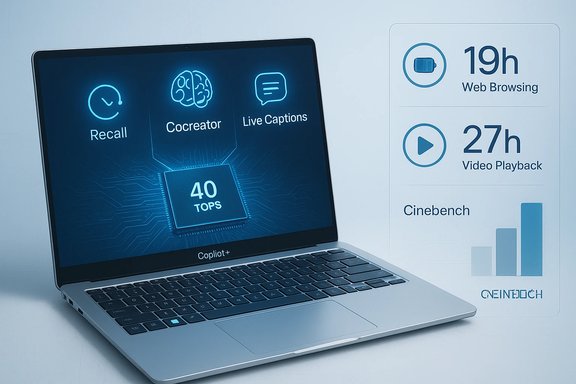
Microsoft’s new Copilot+ marketing leans hard on numbers: top-performing Copilot+ PCs, Microsoft says, can be “up to five times quicker than a 5‑year‑old Windows device,” beat the MacBook Air with M4 in Cinebench 2024 multi‑core, and deliver “up to 19 hours of web browsing” or “up to 27 hours of local video playback” — all powered by a turbocharged NPU capable of 40+ TOPS and a dedicated Copilot key to summon on‑device AI instantly.
However, limitations exist:
Source: Windows Latest Microsoft says Windows 11 AI PCs put the “plus” in productivity because they’re 5x faster than old Windows 10 PCs, beat M4 MacBook
 Background
What Microsoft is claiming — in plain terms
Microsoft’s Copilot+ branding groups a new class of Windows 11 laptops that pair recent silicon (Qualcomm Snapdragon X Elite/X Plus, Intel Core Ultra, AMD Ryzen AI) with a dedicated Neural Processing Unit (NPU) rated at 40+ TOPS. The company positions these machines as a generational leap over machines bought in 2020–2021, and as competitive with Apple’s M4 MacBook Air on multi‑threaded CPU benchmarks and battery longevity. Microsoft’s marketing pages and blog posts make headline claims about higher Cinebench R24 scores, multi‑hour battery figures, and superior local AI responsiveness when compared to both older Windows devices and current MacBook Air models.Why the messaging matters now
PC vendors and Microsoft are pushing an “AI‑ready” sales narrative at scale for 2024–2026 models. With NPUs becoming standard in modern laptop SoCs, vendors want to translate silicon specs into user benefits — responsiveness, longer battery life, and new creative or productivity features that rely on local model inference. But marketing claims, benchmark soundbites, and real‑world experience often diverge. Independent testing of ARM‑based and hybrid architectures shows wide variance, and reviewers caution that composite metrics like TOPS or Cinebench uplift don’t automatically equal better productivity in daily tasks.What Microsoft actually says: the claims unpacked
Performance and benchmarks
- “Up to 5x faster than a 5‑year‑old Windows device” (Cinebench 2024 multi‑core comparisons to an “average” 5‑year‑old PC).
- “Top‑performing Copilot+ PCs are faster than the MacBook Air M4” (again, Microsoft cites Cinebench R24 multi‑core as the metric).
- “Up to 3.7x faster in AI performance” compared with previous Windows 11 AI PCs, attributed to higher NPU TOPS.
These claims are repeated across Microsoft product pages and a December 2025 Copilot+ overview, where Microsoft specifies NPU thresholds and battery figures.
Battery life
Microsoft quotes up to:- 19 hours of web browsing,
- 27 hours of local video playback,
- 22 hours of streaming playback,
and frames those as “go all day” metrics for Copilot+ hardware. These numbers appear on product pages and the Copilot+ marketing hub. Microsoft points to lab testing windows (June–September 2025) for its internal comparisons.
NPU and the Copilot key
Microsoft requires NPUs capable of at least 40 TOPS for a Copilot+ designation, arguing that this hardware enables smooth local inference for features such as Copilot on Windows, Recall, Cocreator (image generation), and live captions/translations. The Copilot key is marketed as an always‑available shortcut to invoke on‑device AI workflows. Microsoft also notes that some features use cloud models or cloud services for higher‑fidelity results and responsible‑use checks.Independent verification and context
Microsoft’s benchmark evidence: public or private?
Microsoft’s Copilot+ pages reference Cinebench R24 comparisons and internal testing windows but do not publish a full dataset or lab report with test rigs, power limits, thermal constraints, or sample sizes. Independent outlets — including Windows‑focused sites and general tech media — reported Microsoft’s claims and ad campaigns but noted the limited publicly available methodology. That leaves reviewers and buyers to triangulate from device reviews and third‑party benchmarks.How independent benchmarks compare
Independent reviews of the latest Windows silicon and Apple’s M4 machines show varied outcomes:- Apple’s M4 chip in MacBook Air and related Mac models posts strong Cinebench R24 multi‑core results in real reviews, with multi‑core scores frequently reported in the mid‑to‑high hundreds up to around 1,500 depending on platform and thermal headroom. These numbers show Apple’s sustained performance is competitive for thin‑and‑light designs.
- Snapdragon X Elite / X Plus platforms and AMD Ryzen AI laptops demonstrate compelling efficiency and AI performance in many tests, especially for inference workloads that map well to their NPUs. But reviewers also warn that emulation overhead, software maturity, and thermal/power budgets cause large gaps in real‑world cross‑platform app performance.
The technical reality: what TOPS and Cinebench tell us — and what they don’t
TOPS is a narrow, useful but incomplete metric
TOPS (trillions of operations per second) measures the raw matrix throughput of an NPU under specific conditions (often INT8 workloads). Higher TOPS give headroom for larger or faster models, but TOPS alone do not reflect:- model accuracy,
- memory bandwidth,
- latency for real‑world models,
- power efficiency at different loads,
- software stack maturity and driver support.
Cinebench R24 measures CPU throughput, not AI usefulness
Cinebench R24 is a heavyweight multi‑threaded CPU benchmark focused on CPU floating‑point throughput. It’s useful for comparing raw sustained CPU performance under a synthetic load, but it:- doesn’t measure everyday productivity tasks (document editing, web apps),
- doesn’t assess AI inference throughput on NPUs,
- is sensitive to thermal and power limits that OEMs set differently.
Battery life: lab claims versus real life
Microsoft’s “up to 19 hours web browsing / 27 hours video / 22 hours streaming” figures are impressive marketing copy, but they are lab results that depend heavily on:- display brightness and panel type,
- wireless radios (Wi‑Fi/5G) and signal conditions,
- power profile and CPU/NPU throttling,
- browser and streaming codecs,
- background services such as indexing or cloud sync.
Features and functional tradeoffs
The Copilot key and on‑device workflows
Microsoft’s Copilot key is designed to be a single‑press gateway to summarization, drafting, image generation, and other Copilot experiences. For many scenarios it will be a genuine time saver — for example, quickly summarizing an article, extracting action items from a meeting transcript, or generating a draft email.However, limitations exist:
- Several Copilot experiences rely on cloud models, hybrid flows, or internet connectivity for higher quality or guardrails.
- Some advanced features or image co‑creation tools require a Microsoft account and cloud services for responsible‑use filtering and model updates.
- The Copilot key’s usefulness is tied to software maturity: application integrations, latency, and the degree to which Copilot’s outputs match a user’s needs determine whether it becomes indispensable or just another shortcut.
App support and emulation
Microsoft touts expanded Arm64 native support and an improved Prism emulator for legacy x86 apps. That matters because many mainstream productivity apps were historically optimized for x86:- Native Arm builds (Microsoft 365, Chrome, Photoshop variants, etc. run best.
- Emulation now is far better than in early ARM Windows eras, but reviewers still note performance and compatibility variances for emulated workloads.
- Developers and ISVs will determine long‑term platform parity; early adopters should verify mission‑critical apps run natively or perform acceptably under emulation.
Marketing critique: apples, five‑year gaps, and attention economics
Comparing to a “5‑year‑old Windows device” is a low bar
Saying Copilot+ laptops are “up to 5x faster than a 5‑year‑old Windows device” is factually easy to achieve because CPU, storage, memory, and display technologies have advanced markedly since 2020–2021. The implicit suggestion that this is chiefly an AI‑driven advantage is misleading: many modern laptops would be substantially faster than five‑year‑old models regardless of whether they carried a Copilot badge. Using an older baseline is a time‑tested marketing move to inflate perceived uplift. Readers should interpret “5x faster” as a relative statement anchored to a wide, device‑age gap rather than a proof of AI‑specific superiority.The Mac comparison needs nuance
Microsoft’s advertised wins over the MacBook Air M4 rely on specific Cinebench R24 results for certain Copilot+ SKUs under certain power limits. Independent reviews show the M4 is a competitive architecture for sustained single‑node performance and thermal efficiency in thin designs; whether a Windows Copilot+ machine “beats” it depends on the exact model, thermal envelope, and benchmark methodology. A blanket “we beat M4” headline simplifies a more complex, model‑specific reality.Dell and OEM messaging: AI branding fatigue
Several OEMs — including Dell — have signaled a pullback from loud “AI‑PC” marketing because consumers prioritize price, battery life, and real‑world reliability over buzzwords. Industry insiders at recent shows noted that while NPUs will become standard, the marketing emphasis is shifting toward clear, human benefits rather than abstract AI claims. This suggests Microsoft’s aggressive Copilot+ framing may prove useful for early adopters and enterprises but less resonant with mainstream buyers unless the benefits are demonstrable and tangible.Risks and potential downsides
- Opaque benchmarking: Microsoft’s lack of a published, reproducible methodology for the cited tests makes it hard for buyers or reviewers to validate claims end‑to‑end.
- Feature fragmentation: Copilot+ exclusives can create an access divide where certain AI workflows are locked behind specific hardware, OS versions, or subscriptions.
- Privacy and cloud dependence: Even with local NPUs, some Copilot features offload to cloud models or require online checks; local inference reduces attack surface but does not eliminate privacy considerations or telemetry concerns.
- Ecosystem and app readiness: App compatibility, emulation overhead, and developer buy‑in remain active concerns for power users expecting seamless cross‑platform parity.
- Marketing vs. user value: If Copilot branding overpromises, vendors risk buyer disappointment, which may slow adoption and prompt OEMs to de‑emphasize AI marketing (as Dell has signalled).
Practical buying guidance — what to check before you upgrade
- Confirm your top use cases (document work, video calls, image/video editing, local AI inference).
- Check whether those apps have native Arm64 builds or run acceptably under Prism/emulation.
- Look at real‑world reviews for the specific Copilot+ SKU you're considering — battery tests and sustained performance matter more than headline TOPS.
- Evaluate privacy, cloud dependency, and account requirements for the Copilot experiences you care about (some features require online services or Microsoft accounts).
- If you need the maximum CPU multi‑core throughput, compare Cinebench or sustained‑load results for the exact configurations and note the tested power limits.
Why Copilot+ could still be meaningful — and when it might be overkill
Copilot+ makes the most sense when:- You frequently use AI tasks that benefit from low latency (e.g., live captioning, local summarization, on‑device image generation).
- You need long battery life from efficiency‑focused architectures and your workflows are optimized for those platforms.
- Your organization values on‑device processing for compliance or privacy reasons.
- Your workload relies on x86 apps that are poorly supported or slow under emulation.
- Your usage is modest (web, email, light office work) and an upgrade to a modern non‑AI machine would suffice.
- You prioritize the very best software‑level performance for specific creative apps that still perform better on discrete GPU or different thermal designs.
Conclusion
Microsoft’s Copilot+ marketing draws a clear line from dedicated NPUs and recent silicon to a set of measurable benefits: faster synthetic CPU scores in some configurations, longer lab‑measured battery life in controlled tests, and a new set of on‑device AI experiences unlocked by the Copilot key and 40+ TOPS NPUs. Those claims are anchored in valid hardware improvements and emerging software capabilities. But the story is not as simple as a single “AI PC” label making every user more productive. Benchmarks like Cinebench R24 and TOPS figures are useful signals, not definitive proof of better outcomes for every user. Microsoft’s comparisons against five‑year‑old devices and selective Cinebench wins over M4 models are partly marketing framing; independent reviews and real‑world tests show the nuance behind those headlines. Prospective buyers should treat Copilot+ as a promising hardware class that can deliver genuine on‑device AI benefits — when the software, thermal design, and app ecosystem are aligned with a user’s needs. For everyone else, the most important questions remain: which features you will actually use, whether those features are locally available or cloud‑dependent, and how a specific Copilot+ SKU performs in independent, real‑world testing.Source: Windows Latest Microsoft says Windows 11 AI PCs put the “plus” in productivity because they’re 5x faster than old Windows 10 PCs, beat M4 MacBook
