

Microsoft’s Copilot cannot be judged by prompts alone; what matters to finance, IT, and users is measurable impact — fewer minutes spent on email, fewer unnecessary meetings, faster document cycles, and demonstrable reductions in governance risk — and the 90‑day playbook framework reframes Copilot from a curiosity into a defensible investment case by measuring outcomes, not engagement.
Microsoft 365 Copilot and the surrounding analytics stack (Viva Insights, Copilot Analytics / Copilot Dashboard, Microsoft 365 admin telemetry, Entra ID, and Purview) have shifted the conversation from “are people clicking the button?” to “what changed in their day?” This is an important shift: executives want CFO‑grade metrics, IT needs operational clarity, and end users want work that’s easier and faster. The 90‑day playbook turns these priorities into a practical measurement program that ties telemetry to time‑and‑motion sampling, governance controls, and FinOps guardrails.
The playbook’s core thesis is straightforward: usage is engagement; delta is value. High prompt counts alone are not evidence of ROI. Instead, organizations should validate Copilot’s influence through a small set of outcome metrics that map directly to time saved, process acceleration, and risk reduction, using data a tenant already collects.
What to measure:
What to measure:
What to measure:
What to measure:
Caution: many published savings numbers and vendor case studies are directional; replicate them with your own baseline data and pilot measurements before committing to large‑scale procurement.
Key immediate actions: instrument baseline telemetry, secure pilot readiness, choose 2 measurable micro‑use cases, and require CFO‑grade KPIs up front — then let the data decide whether Copilot scales beyond pilot.
Source: Petri IT Knowledgebase Copilot ROI: A 90‑Day Playbook That Measures Real Outcomes
 Background
Microsoft 365 Copilot and the surrounding analytics stack (Viva Insights, Copilot Analytics / Copilot Dashboard, Microsoft 365 admin telemetry, Entra ID, and Purview) have shifted the conversation from “are people clicking the button?” to “what changed in their day?” This is an important shift: executives want CFO‑grade metrics, IT needs operational clarity, and end users want work that’s easier and faster. The 90‑day playbook turns these priorities into a practical measurement program that ties telemetry to time‑and‑motion sampling, governance controls, and FinOps guardrails.The playbook’s core thesis is straightforward: usage is engagement; delta is value. High prompt counts alone are not evidence of ROI. Instead, organizations should validate Copilot’s influence through a small set of outcome metrics that map directly to time saved, process acceleration, and risk reduction, using data a tenant already collects.
Overview of the 90‑Day Measurement Framework
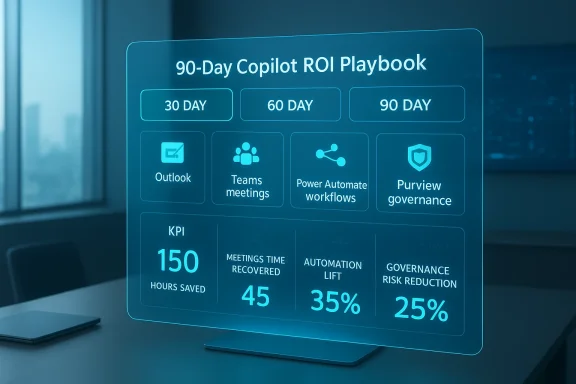
The playbook organizes the first 90 days into three dashboards — 30, 60, and 90 days — each with clear inputs, outputs, and signals of success. This staged approach forces decisions about readiness, measurement fidelity, and scale-up criteria rather than allowing “turn on and hope” rollouts that produce shelfware and uncontrolled spend.- 30‑day: Baseline and readiness — secure environment, gather pre‑Copilot telemetry, fix obvious governance gaps, and train a representative pilot cohort.
- 60‑day: Early impact — capture measurable productivity deltas (email time, meeting attendance/time recovered, document turnaround) and evidence that Copilot is accelerating work, not just being tried.
- 90‑day: Repeatability and scale — convert emergent wins into formal automation playbooks, quantify governance improvements, run a CFO‑grade ROI statement and decide whether to scale.
The Four Outcome Metrics That Prove ROI
The framework concentrates evidence around four measurable impacts. These are selected because they convert directly into time, cost, or risk metrics that finance and security teams can verify.1. Email time saved (Outlook + Viva Insights)
Why it matters: Email triage and drafting are high‑frequency, low‑value tasks. Even small percentage reductions compound across large teams.What to measure:
- Average daily email time (baseline vs. 30/60 days post rollout) from Viva Insights.
- Copilot‑generated drafts vs manual drafts from the Microsoft 365 Admin Center / Copilot telemetry.
- Reduction in long‑form replies (proxy by correlating Copilot draft increases with reduced ‘time in email’).
2. Meeting recap accuracy and time recovered (Microsoft Teams)
Why it matters: Meetings consume large blocks of collaborative time. Accurate automated recaps let people attend only where they add unique value.What to measure:
- Randomized accuracy audits: sample 10–20 recaps and score factual correctness against a ground truth (manager‑verified).
- Reduction in mandatory attendance and number/duration of follow‑up meetings.
- Time recovered from replacing live attendance with recap reviews.
3. Workflow automation lift (Power Automate + Microsoft 365)
Why it matters: Automation is where marginal minutes become structural savings. Copilot should seed repeatable automations, not just generate one‑off responses.What to measure:
- Number of tasks transitioned from manual to automated (Power Automate flows created and adopted).
- Cycle time improvements (monthly reports, incident writeups, compliance summaries).
- Reduction in manual Excel formula creation; increase in Copilot‑assisted transformations.
4. Governance and risk reduction (Entra ID + Purview)
Why it matters: ROI evaporates if AI increases exposure or non‑compliance. Governance gains are real ROI if they reduce incident frequency, audit time, or legal exposure.What to measure:
- Reduction in overshared files and sensitivity label adoption (Purview metrics).
- Drop in risky app consent prompts and unauthorized connectors.
- Lower incidence of data leakage behaviors (copy/extract/forward patterns).
- Alignment improvement with frameworks (NIST/ISO/SOC 2).
The 30 / 60 / 90 Day Dashboards — Practical Inputs and Signals
30‑day: Baseline & readiness
Inputs:- Viva Insights baseline (email, meetings, focus time).
- Current sensitivity label / DLP posture.
- Entra ID conditional access and device compliance state.
- Pilot cohort roster (roles and workloads).
- Readiness Score (classification health, identity controls, device compliance).
- Baseline Productivity Map with “before Copilot” metrics.
- Governance gap list with prioritized remediations.
- Clean, auditable baselines for email and meeting time.
- Pilot cohort trained in role‑specific Copilot tasks.
- Quick governance fixes implemented (labeling, conditional access) that reduce immediate risk.
60‑day: Productivity signals and early impact
Inputs:- Copilot usage telemetry (action-level, feature counts).
- Meeting recaps + accuracy audit samples.
- User-submitted “workflow wins” (with before/after time evidence).
- Productivity Delta dashboards (email time, meeting attendance, document cycle time).
- Recap Accuracy Score (quantitative sample rating).
- Emerging Automation Map of candidate flows for formal automation.
- Evidence of real minutes saved (not claimed) with manager verification.
- Recaps accurate enough to permit reduced attendance on low‑value meetings.
- Repeated automation instances across users/teams.
90‑day: Automation, governance, and ROI proof
Inputs:- Candidate workflows packaged for Power Automate.
- Purview event and DLP telemetry.
- Entra ID risk and OAuth consent trends.
- Automation Playbook with 3–5 repeatable workflows in production.
- Governance Strength Index showing quantifiable reductions in risky behavior.
- CFO‑ready ROI Report showing time saved, accuracy impact, and risk reduction.
- Replication of workflow wins across teams (not one‑off stories).
- Governance metrics showing fewer overshares and better label coverage.
- A defensible payback and NPV model for seat expansion.
How to Run Valid Measurements (Methodology)
A rigorous ROI statement combines telemetry with human‑verified sampling and conservative monetization.- Baseline (4–8 weeks)
- Collect telemetry (Viva, Teams, Copilot admin).
- Run time‑and‑motion samples for target tasks.
- Pilot (6–12 weeks)
- Enroll a controlled cohort (50–200 users) with role‑specific scenarios.
- Capture Copilot actions and manager‑verified outcomes.
- Convert minutes saved → financial value
- Minutes saved per user × target user count × working days/year ÷ 60 = annual hours saved.
- Multiply by loaded hourly rate to get annualized value.
- Subtract one‑time and ongoing costs: training, governance, additional Power Platform runs, and model consumption where applicable.
- Sensitivity analysis
- Present low/medium/high adoption scenarios with payback and three‑year NPV.
- Auditability
- Append raw telemetry, sample sizes, and scoring rubrics so finance and audit can reproduce the numbers.
Example ROI Calculation (conservative)
Assumptions:- Pilot group: 100 knowledge workers.
- Baseline daily email time: 60 minutes.
- Post‑Copilot reduction: 12% (7.2 minutes/day).
- Working days/year: 220.
- Loaded hourly rate: $60/hour.
- Minutes saved per user per year = 7.2 × 220 = 1,584 minutes = 26.4 hours.
- Annual hours saved across 100 users = 2,640 hours.
- Annual value = 2,640 × $60 = $158,400.
- Subtract pilot costs (training, governance remediation, incremental Copilot licenses, estimated $60 per user/month for 3 months pilot = $18,000) and verification overhead (estimated $12,000) = net roughly $128,400 in year one for email triage alone.
Governance, Security & FinOps: Hard Constraints, Not Afterthoughts
Two non‑negotiable requirements for any Copilot program are governance and cost control.- Governance: Enforce MFA and conditional access via Entra ID, apply Purview sensitivity labels and DLP policies before broad enablement, and enable human‑in‑the‑loop for high‑stakes outputs. Treat Copilot telemetry and prompt logs as auditable artifacts; version prompts and agents to preserve traceability. Failure to harden the tenant converts demonstrated gains into compliance and legal risk.
- FinOps: Copilot licensing and inference consumption are a material cost lever. Public pricing at commercial launch indicated per‑user pricing in the ~$30/month range for Copilot for Microsoft 365, which makes staged rollouts and pilot validation essential to avoid runaway spend. Model consumption costs (Power Platform flow runs, agent metering, Azure Foundry model choices) into OPEX and implement caps/alerts. Tie seat expansion to validated outcomes and reclaim unused seats quarterly.
- Role‑based Copilot gating (sales/legal/finance first).
- Consumption dashboards and caps for model usage.
- Agent lifecycle governance (owner, SLA, retirement policy).
- Prompt/version logging with retention rules for audit.
Strengths and Where Copilot Delivers Most
- Platform convergence: Copilot’s deep integration across Outlook, Teams, Word, Excel, Loop and Windows reduces friction and enables context‑aware outputs that bolt‑on tools can’t match. This native surface increases the chance that AI outputs are grounded in tenant data.
- Rapid throughput wins: First wins are typically email summarization, meeting recaps, and first‑draft content generation — high frequency, repeatable tasks where Copilot produces outsized marginal benefit. Document and spreadsheet accelerations are also common early wins.
- Low‑code automation: Power Automate and the Power Platform turn Copilot‑identified patterns into repeatable, audited workflows that scale the benefit beyond individual users.
Risks, Failure Modes and How to Mitigate Them
No single product is a silver bullet. The playbook documents several consistent failure modes and mitigation steps.- Over‑reliance on usage metrics: Counting prompts or actions without outcome linkage leads to vanity metrics. Mitigation: insist on pre/post baselines and manager‑verified sampling.
- Governance underinvestment: Poor labeling, lax conditional access, and unmanaged connectors create exposure. Mitigation: treat governance work as part of the project plan, not as an optional preflight.
- Hallucinations and high‑stakes errors: Generative outputs can be factually incorrect. Mitigation: require human approval for legal/financial/clinical outputs and log versioned prompts and outputs.
- FinOps surprise: Consumption spikes from model runs or agent orchestration can escalate costs. Mitigation: implement consumption caps, usage alerts, and staged rollouts tied to validated ROI.
- Agent sprawl: Many teams creating agents without lifecycle governance increases support burden. Mitigation: require registration, owner assignment, and retirement rules for every agent.
Practical Playbook: Steps You Can Run This Week
- Define executive KPIs (3 CFO‑grade metrics — e.g., hours saved, telephony Opex reclaimed, audit hours reduced).
- Inventory telemetry sources (Viva Insights, Copilot admin, Power Platform runs, Purview events, Entra logs).
- Select 2–3 micro use cases (email triage, meeting recaps, one spreadsheet transformation).
- Recruit a pilot cohort (50–100 users) and collect a 4–8 week baseline.
- Apply minimal governance hardening (conditional access, sensitivity labeling to pilot content).
- Train pilots in role‑specific prompts and playbooks; capture manager‑verified before/after samples.
- Run the 6–12 week pilot, publish 30/60/90 dashboards, and prepare the CFO‑grade ROI statement.
Checklist: What Finance, IT, and Security Will Want to See
- Raw telemetry exports for Viva, Copilot admin, Power Platform and Purview.
- Manager‑verified time‑and‑motion samples (pre/post).
- Conservative monetization model with sensitivity analysis.
- Governance Strength Index and evidence of decreased risky behaviors.
- Consumption and FinOps controls with cap rules and alerts.
- Agent ownership, versioning, and retirement policy.
Conclusion
Copilot’s business value is real when approached as an operational program — not a turned‑on feature. The 90‑day playbook reframes AI adoption as measurement, governance, and disciplined scaling: start with defensible baselines, require manager‑verified evidence, prioritize repeatable automation, and lock governance and FinOps controls before expansion. Organizations that stop celebrating prompts and start proving outcomes will convert Copilot from an experimental toy into a measurable productivity and risk‑reduction lever. Those that treat it as a checkbox will end up with attractive screenshots and poor ROI.Caution: many published savings numbers and vendor case studies are directional; replicate them with your own baseline data and pilot measurements before committing to large‑scale procurement.
Key immediate actions: instrument baseline telemetry, secure pilot readiness, choose 2 measurable micro‑use cases, and require CFO‑grade KPIs up front — then let the data decide whether Copilot scales beyond pilot.
Source: Petri IT Knowledgebase Copilot ROI: A 90‑Day Playbook That Measures Real Outcomes
