

New Horizons’ decision to embed Microsoft Copilot training directly into its Microsoft Office course lineup marks a clear shift in how enterprise learning providers are trying to close the gap between AI access and everyday use. The company—operating under the Educate 360 family—announced that Copilot instruction will be woven into core Office classes such as Teams, Excel, Word, and PowerPoint, with an emphasis on role-based prompting, responsible validation of AI outputs, and contextual practice inside familiar workflows.
Microsoft’s Copilot family (Microsoft 365 Copilot and Copilot Chat) has been rolled into mainstream Office experiences across Word, Excel, PowerPoint, Outlook, Teams and the Microsoft 365 Copilot app. The feature set now includes a side‑pane experience in core apps and a unified chat that can operate with web-grounded responses or, where licensed, with tenant-grounded access to an organization’s files and context. Microsoft’s official documentation and product pages make clear that Copilot Chat is available across the app suite and is intended to live where users already work.
New Horizons (an Educate 360 brand) positions this integration as a response to what training providers and customers alike describe as the “adoption gap”: many organizations have technical access to AI assistants, but their employees either don’t use them or use them inconsistently because they lack role-targeted, workflow-grounded instruction. New Horizons says embedding Copilot training inside everyday Office courses helps learners practise AI use at the exact point work happens, not in separate, abstract workshops.
That said, buyers must treat vendor claims as starting points, not guarantees. Verify partner designations, insist on tenant-grounded or tenant-representative labs, measure outcomes, and bind governance into every training engagement. When those conditions are met, embedding Copilot learning where people work is a pragmatic path to turning AI features into everyday productivity gains rather than leaving them as underused capabilities.
Source: lelezard.com /C O R R E C T I O N -- Educate 360/
 Background
Microsoft’s Copilot family (Microsoft 365 Copilot and Copilot Chat) has been rolled into mainstream Office experiences across Word, Excel, PowerPoint, Outlook, Teams and the Microsoft 365 Copilot app. The feature set now includes a side‑pane experience in core apps and a unified chat that can operate with web-grounded responses or, where licensed, with tenant-grounded access to an organization’s files and context. Microsoft’s official documentation and product pages make clear that Copilot Chat is available across the app suite and is intended to live where users already work.New Horizons (an Educate 360 brand) positions this integration as a response to what training providers and customers alike describe as the “adoption gap”: many organizations have technical access to AI assistants, but their employees either don’t use them or use them inconsistently because they lack role-targeted, workflow-grounded instruction. New Horizons says embedding Copilot training inside everyday Office courses helps learners practise AI use at the exact point work happens, not in separate, abstract workshops.
What Educate 360 / New Horizons is doing
- Embedding Copilot instruction into existing Office classes so that AI skills are taught in the context of actual productivity tasks.
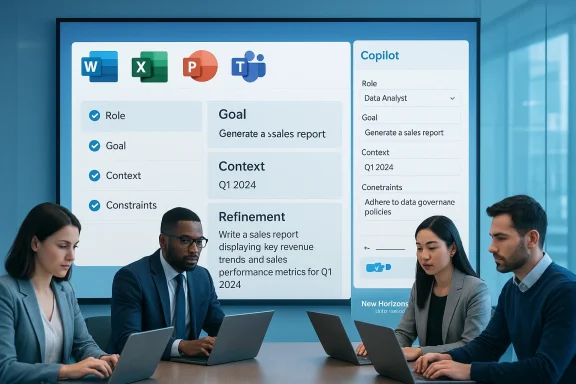
- Teaching a prompting approach described as Role, Goal, Context, Constraints (a pragmatic prompt framework) to help learners craft better prompts that deliver useful, verifiable outputs.
- Emphasizing responsible use: validating output accuracy, checking tone, and exercising professional judgement before acting on AI responses.
- Claiming organizational credibility: New Horizons highlights longstanding Microsoft training partnerships and solution-area designations as proof points for trusted delivery.
Why this matters now
Microsoft has intentionally surfaced Copilot capabilities inside the apps people use every day. That integration reduces friction—users no longer need to switch tools to leverage AI help. But product availability alone does not guarantee effective or safe use. Training that:- maps Copilot features to job roles,
- demonstrates when to rely on AI and when to manually validate,
- and practices prompt patterns on real templates and data
The training approach: practical, role-based, workflow-first
New Horizons’ public description of the training emphasizes the following elements:- Visibility: learners see where Copilot appears in each application and what it can do there.
- Prompt engineering: the Role / Goal / Context / Constraints pattern encourages employees to state who they are (role), what they want (goal), what information is available (context), and what restrictions apply (constraints).
- Responsible use: active verification steps to confirm accuracy, data privacy checks, and tone control when creating external-facing content.
- Integration: exercises use native app features—side panes, file uploads, and in‑app prompts—so skills transfer directly to the workplace.
What organizations should expect to gain
- Faster time to value for Copilot licenses: when employees understand how Copilot supports their daily tasks, utilization and ROI rise.
- Reduced help-desk load: well-trained users generate fewer trivial support tickets (e.g., “Why did Copilot do X?”) because they better understand tool behavior and guardrails.
- Better governance posture: training that pairs prompting with data‑handling rules and validation steps reduces inadvertent data exposure to AI services.
- Cross-role alignment: standardized prompting patterns and shared examples make it easier to scale use cases across teams.
- Built-in examples for Word, Excel, PowerPoint and Teams to show what success looks like.
- Role-centric exercises so learning is directly relevant.
- Instructor-led guidance from certified trainers familiar with Microsoft’s curriculum and certification standards.
Critical analysis: strengths and sensible design choices
- Practicality: Embedding AI instruction in the same class as Office skills is sensible. Learners are more likely to remember and reuse AI features when shown in a real template versus an abstract demo.
- Role-based prompting framework: Having a structured prompt recipe (Role / Goal / Context / Constraints) is an effective way to scale prompt design across non-technical users. It maps to how people already structure tasks—who is this for, what should the output be, what data is available, and what restraints apply.
- Responsible-use emphasis: Teaching validation, tone checking, and verification helps address the twin problems of hallucination and brand risk. Microsoft’s own guidance and product behavior encourage these checks, and aligning training to those behaviors is prudent.
- Vendor credibility: New Horizons publicly lists Microsoft training designations and an official Training Services Partner status, which supports their claim that the training is built on authorized materials and certified instructors. That institutional backing matters for large enterprises that require vendor accountability.
Risks, gaps, and where buyers should be cautious
- Company claims vs. independent verification
- Educate 360 / New Horizons assert they “hold all six Microsoft training designations” and qualify for Microsoft Cloud Training Partner status. While New Horizons’ site reiterates these designations, independent confirmation via Microsoft partner listings or direct verification with Microsoft partner programs is prudent for procurement teams. Treat vendor statements of certification as credible but verify license and partner-level status before relying on them for compliance or procurement decisions.
- Surface-level training danger
- Embedding Copilot into Office courses risks turning AI instruction into a single slide or a brief demo unless the curriculum is redesigned to replace part of the traditional syllabus with hands-on AI practice. Buyers should request detailed syllabi, lab scenarios, and measurable learning outcomes (e.g., exercises completed, assessment pass rates, or badges issued).
- Data governance and configuration gaps
- Copilot’s behavior depends on tenant configuration, Purview/DLP policies, and Entra/Identity controls. Training that ignores tenant setup and governance specifics may teach “how to ask” without teaching “what your tenant will allow.” Procurement teams should ensure training includes tenant-grounded scenarios or at least an adjacent advisory engagement to align governance with usage patterns. Microsoft’s documentation shows Copilot can function in different modes (web‑grounded vs. tenant-grounded), so training must reflect the customer’s environment.
- Measurement of effectiveness
- Any claimed adoption improvements should be measured. Organizations should insist on post-training metrics: Copilot usage lift, time savings on specific tasks, reduction in error or rework, and change in help-desk volume. Without those, the training is a cost with unverifiable impact.
- The “one-size-fits-all” temptation
- Role-based training is good, but job roles vary widely even inside a single title. Buyers should ask for customization options (functional templates, industry examples, or tenant-specific labs) rather than generic role tracks.
How to evaluate an embedded Copilot training offering (a buyer checklist)
- Curriculum transparency
- Ask for a detailed syllabus that shows how Copilot exercises are woven into app-specific lessons. Request sample labs and the exact prompts learners will practice.
- Trainer credentials
- Confirm which instructors will teach: request Microsoft Certified Trainer (MCT) or other recognized credentials and sample instructor CVs.
- Tenant-context scenarios
- Ensure at least a portion of training works from the organization’s real templates and, where possible, in a sandbox linked to the customer tenant (with appropriate safeguards).
- Governance tie-in
- Verify that the training includes Purview/DLP awareness, handling of protected data, and guidance on which prompts or data types are prohibited.
- Measurable outcomes
- Require KPIs and a measurement plan (e.g., pre/post surveys, usage telemetry, time-to-complete tasks with Copilot vs. without).
- Post-training reinforcement
- Confirm availability of follow-up coaching, refreshers, or office-hour sessions to convert one-off training into sustained adoption.
- Cost vs. impact
- Ask for case studies or references that show quantified ROI for similar customers.
Market context: many partners, converging best practices
New Horizons’ move mirrors an industry-wide response: training vendors, consultancies, and Microsoft partners are packaging role-based Copilot enablement programs that blend instructor-led training, hands-on workshops, and governance playbooks. The market consensus is that the most effective programs:- link training to measurable processes (e.g., faster first drafts, automated reconciliation in Excel),
- include executive alignment and manager coaching so adoption is monitored,
- pair training with governance artifacts to avoid unexpected data exposure.
What this means for IT and people leaders
- Short-term priorities (30–90 days)
- Inventory Copilot availability in your tenant—who has Copilot Chat, who has Microsoft 365 Copilot, and where is it accessible? Microsoft’s documentation explains where Copilot appears and how licensing affects features.
- Pilot with a business unit that has clear, measurable outcomes (e.g., sales proposal generation, monthly reporting in Excel).
- Insist on tenant-grounded labs in training or, if that’s not practical, a follow-up consultancy that maps training outputs to tenant configuration.
- Medium-term priorities (3–9 months)
- Expand role-based training once pilots demonstrate measurable gains.
- Pair learning with governance—define what data is off-limits for Copilot and embed those rules in employee-facing guidance.
- Instrument telemetry—track usage, task completion times, and help-desk queries to quantify training impact.
- Long-term strategic priorities (9–24 months)
- Build Copilot enablement into ongoing learning programs—make it part of annual upskilling rather than a one-off workshop.
- Standardize good prompting patterns for the organization and include them in official templates.
- Link AI enablement to performance outcomes and career development pathways so adoption becomes part of job proficiency metrics.
Verification and caveats
- The press release announcing this program and its correction was published by Educate 360 / New Horizons on 16 February 2026; the company states the training will be embedded across its Microsoft Office portfolio and details the Role/Goal/Context/Constraints prompting approach and responsible-use emphasis. These assertions are the vendor’s announcements.
- New Horizons’ own course pages and company statements reiterate their Microsoft Training Services Partner status and claim they hold six Solutions Partner designations across Microsoft solution areas. Those vendor statements appear on New Horizons’ official course and corporate pages; procurement teams should still confirm partner level and designation details against Microsoft’s partner resources when contractual or compliance requirements mandate it.
- Microsoft documentation confirms Copilot Chat’s availability across Office apps and documents expected behavior and access modes for Copilot Chat and Microsoft 365 Copilot. Training that teaches usage without aligning to your tenant configuration risks misrepresenting available features. Verify training content against the environment your users will operate in.
- Industry sources and independent analyses note that role-based, workflow-centered training has become best practice for Copilot adoption. That supports the design choices behind New Horizons’ program, though success depends on depth, customization, and follow-through.
Practical recommendations for purchasers
- Ask for a sample module that runs on one of your real templates (a budget report, an RFP template, a sales deck). If the vendor refuses to run tenant-bound scenarios, ask how they will simulate realistic context and how learning will translate to your environment.
- Require a measurement baseline. Define two or three KPIs before training (e.g., average time to draft a standard document, number of follow-up edits, help-desk tickets related to Copilot) and have the vendor commit to post‑training measurement.
- Make governance a prerequisite item in the training scope. Training should not just say “validate outputs”; it should show examples of common failure modes and what to do when Copilot output is inconsistent with company policy.
- Negotiate follow-up reinforcement. A single class is rarely enough to change behavior. Secure at least one follow-up check-in or a “refresher” session to reinforce learning.
- Confirm credentials. Ask for instructor CVs, Microsoft training badges or designations, and customer references with similar scale and industry.
Conclusion
Embedding Copilot training into everyday Microsoft Office courses is a logical and necessary evolution for enterprise enablement. Microsoft has made the technology broadly accessible inside the apps people use, and vendors who teach AI skills in context—using role-based prompting and practical validation—are better positioned to turn access into measurable adoption. Educate 360 / New Horizons’ announcement aligns with industry best practices by focusing on role-centered prompting, in-app practice, and responsible use, and their Microsoft training credentials strengthen their market pitch.That said, buyers must treat vendor claims as starting points, not guarantees. Verify partner designations, insist on tenant-grounded or tenant-representative labs, measure outcomes, and bind governance into every training engagement. When those conditions are met, embedding Copilot learning where people work is a pragmatic path to turning AI features into everyday productivity gains rather than leaving them as underused capabilities.
Source: lelezard.com /C O R R E C T I O N -- Educate 360/
