

IBM has begun surfacing its consulting knowledge and AI tooling directly inside Microsoft Copilot, claiming the integration is already saving the firm the equivalent of roughly 250,000 hours per year and unlocking what it values as tens of millions of dollars in redeployable consultant capacity.
Microsoft Copilot has rapidly evolved from an in-app assistant in Microsoft 365 into a full agent platform—Copilot Studio, Agent Mode in Office apps, agent stores and connectors—designed to let organizations run multi-step AI workflows from within Word, Excel, PowerPoint, Teams and Outlook. At the same time, major consulting firms are packaging their institutional know‑how—playbooks, templates, code artifacts and reusable assistants—into platforms that can be called programmatically by agents. IBM’s move stitches those two trends together by embedding IBM Consulting’s asset library and AI assistants into the point‑of‑work experience that Microsoft now exposes through Copilot.
This is an architecture-level shift in how enterprise AI is delivered: instead of moving users to a separate consulting portal or bespoke tool, IBM’s assets appear in the applications people already use, reducing context switching and making “consulting IP as an on‑demand assistant” a practical workflow. IBM describes the work as part of a larger Microsoft Practice initiative and positions it alongside its existing offerings (including IBM Copilot Runway and IBM Consulting Azure OpenAI Services) to accelerate customer deployments of generative AI and cloud-native integrations.
Important technical caveat: product and feature names used in early announcements (internal registries, branded modules) may be proprietary and not yet fully documented publicly. Organizations piloting these capabilities should insist on technical runbooks and integration specs before adoption.
How to read that number responsibly:
For organizations evaluating this pattern, the path is clear: run disciplined pilots with measurable baselines, enforce governance and least‑privilege connectors, cost‑model agent consumption, and demand transparent measurement methods from vendors. With those controls in place, agentized copilots—backed by disciplined RAG, audit trails and human oversight—can deliver real productivity gains while keeping risk and cost manageable.
Source: ERP Today IBM Embeds AI Consulting Tools Inside Microsoft Copilot, Cites 250,000 Hours Saved
 Background
Microsoft Copilot has rapidly evolved from an in-app assistant in Microsoft 365 into a full agent platform—Copilot Studio, Agent Mode in Office apps, agent stores and connectors—designed to let organizations run multi-step AI workflows from within Word, Excel, PowerPoint, Teams and Outlook. At the same time, major consulting firms are packaging their institutional know‑how—playbooks, templates, code artifacts and reusable assistants—into platforms that can be called programmatically by agents. IBM’s move stitches those two trends together by embedding IBM Consulting’s asset library and AI assistants into the point‑of‑work experience that Microsoft now exposes through Copilot.This is an architecture-level shift in how enterprise AI is delivered: instead of moving users to a separate consulting portal or bespoke tool, IBM’s assets appear in the applications people already use, reducing context switching and making “consulting IP as an on‑demand assistant” a practical workflow. IBM describes the work as part of a larger Microsoft Practice initiative and positions it alongside its existing offerings (including IBM Copilot Runway and IBM Consulting Azure OpenAI Services) to accelerate customer deployments of generative AI and cloud-native integrations.
What IBM says it shipped (overview of the integration)
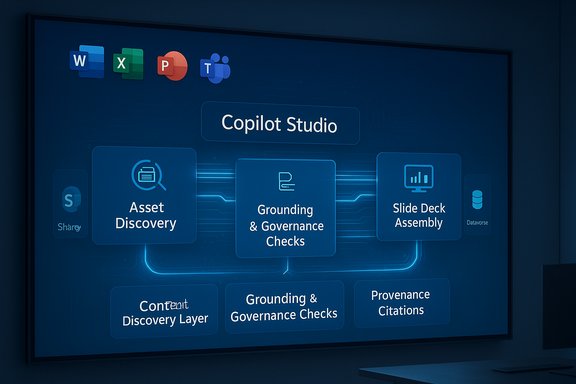
IBM’s publication around the integration highlights these primary elements:- Embedded consulting assistants: IBM says a curated suite of assistants and prebuilt agents — covering tasks like asset discovery, industry research, offering explanations, partnership briefings and client case extraction — is accessible within Microsoft Copilot’s UI.
- Discovery and routing layer: IBM references a context discovery layer (branded in IBM materials) intended to automatically select the right assistant or asset for a given task, reducing manual lookup.
- Tenant-grounded access: Agents are intended to operate against tenant data (SharePoint, Dataverse, Outlook, Graph) using standard grounding patterns to reduce hallucinations and preserve relevance.
- Scale and skilling: IBM reports a large internal cohort of Microsoft‑certified professionals (tens of thousands) and says the integration is already in use across thousands of consultants.
- Stated outcomes: IBM positions the rollout as delivering significant productivity gains—citing an equivalence of more than 250,000 hours saved annually, which the company converts into an estimated redeployable value in the multi‑million dollar range.
The technical plumbing: how the integration works in practice
Agent architecture and interoperability
The integration rests on the agent and connector tooling that Microsoft provides in Copilot Studio. Key technical themes:- Agent-hosted flows: Agents authored or registered by IBM can be invoked inside Office apps to perform multi‑step tasks—searching proprietary indices, assembling slide decks, extracting contract clauses or running multi-source summarization flows.
- Model Context Protocol (MCP) style discovery: To scale interoperation between models and third-party tools, the approach uses a discovery/registry pattern. This lets agents find and call specialized tools, indices, or assistants while preserving a controlled contract between parties.
- Grounding and retrieval (RAG): Expected production patterns place retrieval-augmented generation (RAG) at the core—agents fetch tenant data or curated indices and compose answers grounded to verifiable sources rather than free-ranging internet queries.
- Approval and governance hooks: Enterprises can enforce publish/approval gates, telemetry, and human‑in‑the‑loop checks before agents execute write‑backs or produce outputs that could be used directly in client deliverables.
IBM-specific components
IBM’s descriptions mention names and modules that package consulting knowledge into reusable assets (for example, branded discovery/context layers). Some of these items are productized within IBM Consulting’s delivery platform and are intended to be surfaced through Copilot as first‑class assistants.Important technical caveat: product and feature names used in early announcements (internal registries, branded modules) may be proprietary and not yet fully documented publicly. Organizations piloting these capabilities should insist on technical runbooks and integration specs before adoption.
Verifying the headline claim: 250,000 hours saved
IBM’s public messaging frames a headline outcome: the company reports that making Consulting Advantage assets available inside Microsoft Copilot has generated the equivalent of more than 250,000 hours saved per year across its consulting organization. That figure is presented as a company‑reported metric and IBM converts it to a redeployable economic value (IBM’s messaging presents it in the multi‑million‑dollar range).How to read that number responsibly:
- Plausibility: At enterprise scale, the arithmetic is straightforward—thousands of consultants saving a modest number of hours per week can aggregate to large totals. For example, 5,000 consultants each saving one hour per week equals ~260,000 hours per year.
- Vendor‑reported metric: The 250,000 hours claim originates from IBM’s own reporting of its internal rollout. It is a vendor‑reported outcome, not an independent audit. That matters because the baseline, measurement window, what counts as “saved” time, and how redeployable time is valued are all assumptions that can materially alter the headline.
- Corroborating case examples exist in the ecosystem: Several Microsoft partner case studies demonstrate multi‑thousand‑hour outcomes in discrete pilots (for example, client stories where Copilot-enabled workflows cut hundreds or thousands of hours in specific processes or tasks). Those cases support the narrative that agentized Copilot workflows yield substantial efficiencies in information work, though they don’t validate the company‑level aggregate and valuation methodology.
What the numbers mean for CIOs and procurement teams
Vendor ROI claims are useful as conversation starters, but CIOs and procurement leads should demand clarity and measurement discipline when contracting or piloting:- Ask for the measurement method: What baseline was used? How were hours captured (self‑report, telemetry, timed tasks)? What was the duration of the measurement window?
- Insist on revenue/redeployment documentation: If the claimed savings are converted into redeployable revenue, request evidence of how those hours were reallocated to billable work or measurable business outcomes.
- Require sample runbooks and audit trails: A pilot must include defined tasks, success criteria (time saved, quality, rework), and logging to verify the vendor’s claims on your data and with your users.
- Model consumption costs: Agents running inside Copilot consume model credits and compute. Map expected agent invocation volumes to Copilot Credits or model costs and compare net benefits after these expenses.
Case studies and evidence from the broader Copilot ecosystem
Across recent Copilot and Azure OpenAI customer stories, partners and clients have reported substantial productivity wins in targeted domains:- Document processing and SOP generation: Some organizations have reported dramatic time reductions when Copilot automates or assists in documentation tasks—one example saw thousands of SOPs generated or transformed with significant percentage reductions in time per SOP.
- Loan processing and customer service: Copilot‑enabled automation in customer‑facing workflows can reduce manual processing hours and triage customer queries, delivering measurable hours saved in specific operational workflows.
- Sales and quoting automation: Automated pricing and quoting systems backed by generative AI have replaced multi‑hour manual processes and delivered seconds-scale responses in production systems for high volumes of daily requests.
Risks and guardrails: what can go wrong
Embedding third‑party consulting assets inside productivity tools introduces both opportunities and new risk vectors. Key areas to guard:- Hallucination and incorrect outputs: Agents that synthesize across documents can produce plausible but wrong answers unless constrained to verified knowledge stores and instrumented with confidence scores and citations.
- Data leakage and compliance exposure: Agents with access to SharePoint, email, CRM or HR data create new attack surfaces; enforce least‑privilege connectors, tenant DLP policies, and logging.
- Agent sprawl and cost unpredictability: Low‑friction agent creation can produce dozens of bespoke agents, each incurring model‑credit consumption. Without consumption governance, costs and unpredictability can balloon.
- Vendor lock and portability: Relying on vendor‑authored assets can accelerate delivery—but organizations must plan for portability and exit: can assets be exported, rehosted, or reconstructed if contracts change?
- Quality‑of‑service and SLAs: Treat agents as production software: require versioning, owners, test suites, and deployment gates.
- Intellectual property and customer data: When third‑party assistants incorporate client examples or internal templates, clarify IP ownership, permitted reuse and retention policies.
Practical steps to pilot and measure impact
- Define a narrow, high‑value pilot.
- Choose 1–2 repeatable tasks (e.g., RFP research, slide deck assembly, contract clause extraction).
- Capture baseline cycle times and error rates.
- Instrument measurement.
- Use telemetry to log agent invocations and task completion times.
- Capture human verification/rewrites and quality ratings.
- Require governance up front.
- Approval workflow for agent publication.
- Connector least‑privileges and DLP policies.
- Human‑in‑the‑loop gates for high‑risk outputs (financial, legal, client deliverables).
- Model total cost of ownership.
- Forecast Copilot credits/model usage.
- Include training, change management and monitoring costs.
- Validate, iterate, and escalate.
- If baseline KPIs are met, scale incrementally across teams with cost caps and telemetry alerts.
- Treat agents as living assets with owners, SLAs and deprecation plans.
Competitive and market implications
IBM’s move is emblematic of a broader market shift: systems integrators and consulting firms are productizing their IP and delivering it as callable AI assets. Embedding those assets in mainstream productivity tooling accelerates adoption but raises commercial and governance questions.- Platform-versus‑services trade: Large consultancies can shorten time‑to‑value by surfacing prebuilt assets, but enterprises must decide whether to outsource agent creation or build internal capability.
- Ecosystem lock‑in: A deeper integration with a single productivity stack can yield faster value but increase migration friction later—mitigate via portability clauses and exportable artifacts.
- Standardization pressure: Interoperability standards (MCP and similar) are becoming critical. Organizations should favor architectures that support open connectors and tenant‑hosted indices to preserve control.
Strengths and likely near-term benefits
- Faster time-to-insight: Bringing expert playbooks into the apps people already use reduces friction and accelerates basic research, briefing and slide generation tasks.
- Repeatability and knowledge capture: Turning consulting know‑how into reusable agents preserves institutional memory and scales best practices across teams.
- Operational efficiency: For routine information‑work tasks, measured per-user savings typically multiply across large teams to produce meaningful aggregate gains.
Where to be cautious
- Treat headline figures as directional: Vendor‑level aggregate hours and dollar valuations are useful signals but require verification against your organization’s baseline and workloads.
- Don’t underestimate governance complexity: Agent lifecycle management, auditing, and DLP are not optional—these are operating requirements for any production deployment.
- Cost discipline is essential: Low friction ≠ low cost. Monitor model consumption closely and tie agent access to budgeted consumption.
Conclusion
Embedding IBM Consulting’s assets inside Microsoft Copilot represents a logical next step in enterprise AI: making consulting IP callable where knowledge workers already create and communicate. The approach addresses two perennial problems—scaling expert know‑how and reducing context switching—by surfacing reusable assistants inside Office apps. The claimed 250,000 annual hours saved is plausible given enterprise scale but should be treated as an IBM‑reported estimate pending independent verification and detailed methodology disclosure.For organizations evaluating this pattern, the path is clear: run disciplined pilots with measurable baselines, enforce governance and least‑privilege connectors, cost‑model agent consumption, and demand transparent measurement methods from vendors. With those controls in place, agentized copilots—backed by disciplined RAG, audit trails and human oversight—can deliver real productivity gains while keeping risk and cost manageable.
Source: ERP Today IBM Embeds AI Consulting Tools Inside Microsoft Copilot, Cites 250,000 Hours Saved
