

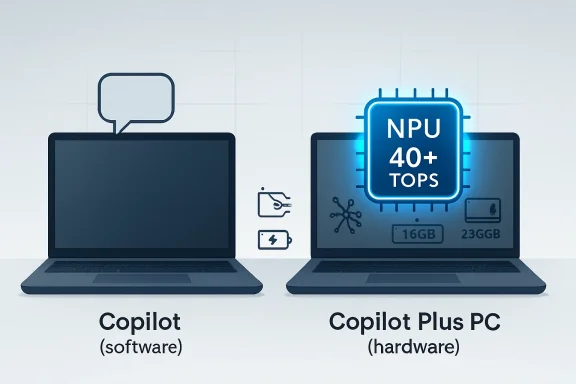
The result is a familiar Microsoft problem dressed in 2020s clothes. The company has taken a real technical shift — the arrival of neural processing units in mainstream laptops — and wrapped it in a name that sounds like an upsell button. Underneath the marketing, however, there is a meaningful dividing line between a normal Windows PC and a Copilot Plus PC, and it matters most for battery life, local AI features, privacy architecture, and the next few years of Windows development.
Microsoft Turned a Chip Requirement Into a Consumer Brand
A Copilot Plus PC is not defined by whether it has the Copilot app. It is defined by whether its hardware can run a new class of AI workloads locally, without sending every task to the cloud or leaning on the CPU and GPU for work they were never optimized to do efficiently.
The key component is the neural processing unit, or NPU. In plain terms, an NPU is a specialized accelerator for the repetitive math behind AI inference — the process of running an already-trained model to generate, classify, summarize, translate, or enhance something. CPUs can do that work. GPUs can do much of it faster. But NPUs are designed to do it at lower power, with less heat, and without stealing as many resources from the rest of the system.
Microsoft drew the line at 40 trillion operations per second, usually shortened to 40 TOPS. That number is not magic, but it is the badge threshold. A laptop with a 10 TOPS NPU may still be an “AI PC” in a loose industry sense, and a gaming laptop with a powerful Nvidia GPU may be spectacularly capable at AI workloads, but neither automatically qualifies as a Copilot Plus PC.
The other baseline requirements are less glamorous but just as revealing. Microsoft’s floor is 16GB of RAM and 256GB of storage, with modern Windows security requirements layered on top. In 2026, that does not sound exotic; it sounds like a sane minimum for a midrange laptop. That is part of the point. Copilot Plus is not supposed to mean “workstation.” It is supposed to mean “mainstream Windows PC built for the next phase of Windows.”
Copilot Is the App; Copilot Plus Is the Machine
The easiest way to understand the naming mess is to separate the nouns. Copilot is Microsoft’s AI assistant. Copilot Plus PC is a kind of computer.
Copilot lives in Windows, Edge, Microsoft 365, and Microsoft’s broader software ecosystem. Depending on the app and account type, it can help write text, summarize documents, generate images, answer questions, search the web, inspect files, organize messages, or act as a productivity assistant. Much of that experience still depends on cloud models and Microsoft services.
A regular Windows 11 PC can use Copilot because Copilot is primarily a service. You do not need a 40 TOPS NPU to type a prompt into a chatbot, summarize a webpage in Edge, or ask for help drafting an email. The heavy lifting can happen in Microsoft’s data centers, which is how generative AI reached ordinary PCs before laptop silicon had caught up.
Copilot Plus PCs are different because Microsoft wants some AI features to run locally on the device. That means the machine needs enough dedicated AI hardware to deliver those features without making the fans scream, draining the battery, or turning a thin-and-light notebook into a hand warmer. The badge is Microsoft’s promise that the PC has the minimum local AI horsepower for that class of experiences.
This distinction is why a cheap Windows laptop from a few years ago can have a Copilot key and still not be a Copilot Plus PC. The key launches software. The badge describes hardware.
The NPU Is the New Spec Sheet Battleground
For decades, PC buyers were trained to look at CPU cores, clock speeds, RAM, SSD capacity, and maybe GPU model numbers. Copilot Plus adds another number to the shelf tag: NPU TOPS.
That is awkward, because TOPS is a blunt metric. It tells you something about peak theoretical AI throughput, but it does not tell you everything about model support, memory bandwidth, drivers, software optimization, or real-world responsiveness. The PC industry loves a single number because it is easy to print on a box. Real performance is messier.
Still, the NPU number matters because Microsoft has built a platform line around it. Below 40 TOPS, a system may run Windows beautifully and may even have AI acceleration of some kind. At or above 40 TOPS, it enters Microsoft’s Copilot Plus tier and becomes eligible for features that Microsoft does not want to support across older or weaker hardware.
That is a major shift in how Windows features are gated. In the past, many Windows features depended on broad architectural support: TPM for Windows 11, virtualization extensions for security, DirectX features for graphics, or specific camera hardware for Windows Hello. Copilot Plus continues that pattern but moves the spotlight to AI inference performance.
For IT departments, that creates a new procurement question. Buying “a Windows laptop” is no longer quite enough if the organization expects to test Microsoft’s local AI roadmap over a three- or four-year refresh cycle. The difference between a normal business notebook and a Copilot Plus PC may become less about what they can do on purchase day and more about what Windows will light up two years later.
Qualcomm Opened the Door, but Copilot Plus Did Not Stay Arm-Only
The first wave of Copilot Plus PCs was closely tied to Qualcomm’s Snapdragon X chips. That timing created a misconception that still lingers: that Copilot Plus means Windows on Arm.
It does not. Qualcomm arrived first with Snapdragon X Elite and Snapdragon X Plus parts that paired laptop-class CPU performance with 45 TOPS NPUs and strong battery-life claims. Microsoft used that launch to make a broader argument it had been trying to make for years: Windows laptops could compete more directly with MacBooks on standby behavior, battery life, thermals, and instant-on feel.
But the category was never meant to belong only to Qualcomm. Intel and AMD both moved their own laptop platforms above the 40 TOPS line. Intel’s Lunar Lake-era Core Ultra 200V chips and later Copilot Plus-capable mobile parts put x86 machines into the same Microsoft-defined category. AMD’s Ryzen AI 300 family likewise brought 50 TOPS-class NPU performance into premium and mainstream notebooks.
That matters because the early Arm association carried both promise and baggage. Windows on Arm has improved substantially, but it still asks buyers to think about app compatibility, emulation, drivers, and edge cases. Copilot Plus as a Windows category becomes more credible when buyers can choose between Arm and x86 rather than being forced into a single architectural bet.
The practical shopping lesson is simple: do not assume the badge tells you the processor family. A Copilot Plus PC can be Qualcomm-based, Intel-based, or AMD-based. What unites those machines is not instruction set architecture; it is Microsoft’s minimum AI hardware target.
The Regular PC Is Not Dead, Just Less Future-Proof
A regular PC can still be the right machine. That is especially true at the edges of the market.
A budget laptop with 8GB of RAM, a small SSD, and an older processor may be perfectly adequate for web browsing, schoolwork, streaming, remote desktops, and basic office tasks. It may run Copilot in the same way it runs any other web-backed app. If the purchase is about price above all else, the Copilot Plus badge may not justify a premium.
At the other end, a gaming laptop or mobile workstation can be far more powerful than a Copilot Plus ultrabook in conventional performance. A machine with a high-end Nvidia GPU can run demanding creative, rendering, gaming, and machine-learning workloads that an NPU-focused thin-and-light cannot touch. Yet that machine may still miss the Copilot Plus label if its built-in NPU falls below Microsoft’s threshold.
This is where the branding becomes genuinely strange. A “regular” PC may be faster, more expensive, and more capable in many ways than a Copilot Plus PC. Microsoft’s label does not mean “best PC.” It means “PC that meets Microsoft’s local Windows AI platform requirements.”
That nuance is easy to lose in retail marketing. Buyers hear “Plus” and assume a hierarchy. In reality, the PC market now has overlapping categories: budget PCs, gaming PCs, workstation PCs, AI PCs, Secured-core PCs, Copilot Plus PCs, and everything in between. Copilot Plus is a meaningful label, but it is not a universal measure of quality.
Recall Made the Hardware Story Political
No Copilot Plus discussion can avoid Recall, because Recall turned an otherwise nerdy hardware badge into a privacy argument.
Recall is Microsoft’s attempt to give Windows a searchable memory of user activity by saving snapshots that can be searched later. The appeal is obvious: find the document, webpage, chat, image, or workflow you remember seeing but cannot locate. The discomfort is just as obvious: a computer that continuously records user activity sounds like a compliance nightmare and a privacy scandal waiting to happen.
Microsoft’s answer has been to tie Recall to Copilot Plus-class hardware and modern security controls. The company has emphasized local processing, encryption, Windows Hello authentication, secured storage, and user controls over whether the feature is enabled and what it captures. The technical architecture matters, but the trust issue is bigger than architecture.
Recall shows why the Copilot Plus PC label is not merely about speed. Microsoft is using the category to define a security and privacy boundary for features that would be reckless if bolted onto any random PC. If Windows is going to maintain a local index of a user’s digital life, Microsoft wants that running on machines with a known baseline of hardware, storage, identity, and encryption capability.
That does not settle the debate. Some users will never want Recall, no matter how it is sandboxed. Some businesses will disable it by policy before the first device ships. But Recall explains Microsoft’s strategic logic: the company is not just selling “AI performance”; it is building a minimum viable hardware trust zone for Windows features that would have been unthinkable a decade ago.
The Best Copilot Plus Features Are the Ones That Feel Boring
The least flashy Copilot Plus features may prove the most durable. Real-time captions and translation, background blur, eye contact correction, image generation assistance, semantic search, and on-device enhancement tools do not all sound revolutionary in isolation. But they point toward a Windows experience where small AI tasks become ambient rather than exceptional.
That is the NPU’s natural home. The killer use case for NPUs is not necessarily a giant chatbot session. It is a steady stream of small, latency-sensitive, power-sensitive jobs that should happen quietly while the CPU handles applications and the GPU handles graphics.
Video calls are the clean example. Windows Studio Effects can blur backgrounds, correct gaze, frame the subject, and improve the camera feed without asking a cloud server to process every frame. That saves bandwidth, reduces latency, and avoids turning every meeting into a CPU tax.
Live Captions and translation are another example. If a PC can transcribe and translate locally, the feature becomes more useful in travel, classrooms, noisy offices, and privacy-conscious workplaces. A cloud service may still be better in some languages or complex contexts, but local availability changes the feel of the tool. It becomes part of the device rather than a remote service you invoke.
The lesson is that Copilot Plus will succeed less as a “chat with your laptop” brand than as an invisible performance layer. Users rarely celebrate hardware acceleration by name. They notice when the laptop stays cool, when the battery lasts, when the call looks better, and when a feature works without a round trip to the cloud.
The AI PC Is Also a Battery-Life Story
Microsoft and its partners talk about AI because AI sells the moment. But Copilot Plus PCs are also a response to a more old-fashioned Windows laptop weakness: efficiency.
The MacBook Air changed buyer expectations. It made long battery life, silent operation, instant wake, and strong everyday performance feel normal. Windows laptops could match or beat Macs in many categories, especially gaming, ports, repairability, display variety, and price range, but the thin-and-light segment often struggled to deliver the same consistency.
Copilot Plus gave Microsoft a way to reframe the Windows laptop around efficiency. Qualcomm’s Snapdragon X launch made that argument directly, but Intel and AMD have had to answer it too. NPUs are part of that efficiency story because they prevent low-level AI tasks from hammering the CPU or GPU.
This does not mean every Copilot Plus PC has amazing battery life. Display choice, battery size, firmware, workload, modem use, browser behavior, and OEM tuning still matter enormously. A bright OLED panel can eat into runtime. A thin chassis can constrain sustained performance. A poorly optimized app can ruin the best silicon story.
But the category does push the market in a useful direction. A laptop that qualifies as Copilot Plus is likely to be a modern design with current silicon, enough memory, enough storage, and the hardware blocks Microsoft expects for efficient AI work. Even if you never open Copilot, you may still benefit from the broader platform shift.
The Copilot Key Is the Most Visible Red Herring
Many recent Windows laptops ship with a Copilot key. It is usually placed near the right Alt key or in the neighborhood once occupied by menu keys and other keyboard afterthoughts. It is also the perfect symbol of the branding problem.
A physical Copilot key does not make a machine a Copilot Plus PC. It makes the keyboard a billboard.
That does not mean the key is useless. For users who rely on Microsoft’s assistant, a dedicated launcher can be convenient. For Microsoft, it is a way to normalize AI as a first-class Windows interaction, much as the Windows key normalized Start menu access decades ago.
But the key is not the platform. The platform is the silicon, memory, storage, drivers, security model, and Windows feature set beneath it. A laptop can have the key and lack the required NPU. A laptop can qualify as Copilot Plus and still be judged by its display, keyboard, trackpad, repairability, fan noise, port selection, and price.
That distinction should guide buyers. Do not shop for the key. Shop for the spec.
Enterprise IT Will Treat the Badge as a Policy Boundary
For home users, Copilot Plus may be a shopping shorthand. For enterprise IT, it is more likely to become a deployment boundary.
Businesses do not adopt features like Recall, local semantic indexing, AI-assisted search, and automated content analysis merely because Microsoft says they are clever. They ask harder questions. What data is captured? Where is it stored? How is it encrypted? Can it be disabled? Can users override policy? What happens during e-discovery? What happens on a lost laptop? What happens when regulated data appears on screen?
Copilot Plus PCs give Microsoft a cleaner answer than “it depends on the machine.” If the device meets a known hardware baseline, administrators can reason about policy with fewer unknowns. That does not eliminate risk, but it narrows the range of supported configurations.
The same logic applies to developers and software vendors. If Windows AI APIs increasingly assume a capable local NPU, developers need a target. The 40 TOPS line gives them one. It tells them the minimum class of PC where they can expect certain models and experiences to work.
This is how platform transitions often become real. First the hardware appears. Then the OS exposes APIs. Then first-party apps use them. Then third-party developers decide whether the installed base is large enough to matter. Copilot Plus is Microsoft’s attempt to accelerate that loop by making the target visible.
Gamers and Creators Should Read the Fine Print
Copilot Plus is not the same thing as a creator laptop, and it is definitely not the same thing as a gaming laptop.
For gamers, the GPU remains king. A Copilot Plus ultrabook with integrated graphics may be excellent for productivity and battery life but mediocre for modern AAA gaming. Conversely, a gaming laptop with a discrete GPU may be a monster for games, video rendering, Blender, local Stable Diffusion workflows, and CUDA-accelerated tools while failing Microsoft’s NPU requirement.
Creators face a more nuanced choice. Some creative AI features may benefit from NPUs, especially lightweight local tools integrated into Windows or apps. But many professional workflows still lean heavily on GPU acceleration, VRAM, color-accurate displays, fast storage, and sustained thermal performance. A Copilot Plus sticker should not distract from those fundamentals.
The mistake would be treating the badge as a universal performance score. It is not. It tells you the machine is ready for Microsoft’s local AI feature set. It does not tell you whether the laptop can edit 8K video smoothly, train a model, run your favorite game at high settings, or drive three external monitors without compromise.
For WindowsForum readers, the advice is almost annoyingly traditional: start with the workload. If the workload is office productivity, web work, video calls, travel, and emerging Windows AI features, Copilot Plus is increasingly a sensible default. If the workload is gaming, CAD, 3D rendering, or heavy local AI development, treat Copilot Plus as a nice addition, not the main event.
The Name Is Bad, but the Category Is Real
Microsoft’s naming has done the category no favors. Copilot, Copilot Pro, Copilot for Microsoft 365, Copilot Studio, Copilot Plus PC — the company has once again created a family of names that require a glossary before they require enthusiasm.
That confusion weakens the pitch. Many buyers reasonably assume Copilot Plus PC means a PC with a better version of Copilot. Others think it means a paid AI subscription is included. Some assume it is Arm-only. Some assume it is just a sticker for new laptops. Microsoft could have chosen a clearer name: Windows AI PC, NPU-ready PC, or even Windows 11 AI Certified. Instead, it chose brand gravity over clarity.
And yet, underneath the branding fog, the category describes a real hardware transition. The mainstream PC is gaining a third major compute block beside CPU and GPU. Microsoft is building OS features around that block. Chipmakers are competing on it. OEMs are designing laptops around it. Developers are beginning to target it.
That is not nothing. The early years of any platform shift are messy. USB-C was messy. TPM requirements were messy. Windows on Arm was very messy. AI PCs are messy too, especially because the software story is still catching up to the silicon.
The better critique is not that Copilot Plus is fake. It is that Microsoft is asking buyers to care about a category before the everyday must-have use cases are fully obvious. The hardware is ahead of the habits.
The Sticker Means Less Than the Refresh Cycle
For anyone buying a Windows laptop in 2026, the Copilot Plus question should be practical rather than ideological. If two machines are otherwise close in price, quality, and performance, the Copilot Plus model is usually the safer buy. It has a modern processor, enough memory, enough storage, and the NPU headroom Microsoft is likely to assume for future Windows features.
That does not mean you should throw away a perfectly good laptop. A regular Windows PC remains useful, secure, and capable if it meets your needs. Copilot Plus is not a cliff edge where older machines suddenly become obsolete. It is a direction of travel.
The real issue is longevity. A laptop bought today may stay in service until 2029 or 2030. During that span, Microsoft will keep pushing more AI features into Windows, Office, Edge, Teams, Photos, Paint, File Explorer, and management tools. Some will be cloud-backed. Some will be local. Some will be gimmicks. Some will become invisible infrastructure.
Buying below the Copilot Plus line may save money now, but it also increases the odds that future Windows features will either run worse, run only in the cloud, or not appear at all. That is not always a bad trade. It is simply the trade.
The Copilot Plus Shortcut for Buyers Who Hate Spec Sheets
A Copilot Plus PC is not automatically the best laptop, but it is a useful filter when the market is crowded and the model names look like someone spilled alphabet soup into a SKU database. The label says the machine belongs to the current generation of Windows hardware rather than the last one.
For buyers who do not want to memorize processor families, the practical reading is straightforward. Qualcomm Snapdragon X, Intel Core Ultra chips with qualifying NPUs, and AMD Ryzen AI parts are the families to look for, but the badge itself should confirm whether the OEM has met Microsoft’s bar. The absence of the badge does not always mean the PC is bad, but it does mean you should ask why it is missing.
Price still matters. Display quality still matters. Keyboard feel, ports, thermals, fan noise, warranty support, repairability, and Linux friendliness still matter. The NPU is not a substitute for the rest of the laptop.
But for mainstream Windows users, Copilot Plus is becoming less of a luxury feature and more of a “why not?” feature. If the laptop you like already includes it, you get the local AI baseline almost as a side effect. That is how new PC standards become boring — and boring is usually when they start to matter.
The Windows Laptop Now Has a New Minimum Worth Knowing
The useful takeaway is not that every buyer must chase AI. It is that Microsoft has quietly moved the definition of a modern Windows laptop.
- A Copilot Plus PC is a Windows 11 computer with a 40-plus TOPS NPU, at least 16GB of RAM, and at least 256GB of storage.
- Microsoft Copilot is an AI assistant that can run on many ordinary Windows PCs, while Copilot Plus PC is a hardware category.
- Qualcomm launched the first wave, but Copilot Plus PCs now include x86 systems from Intel and AMD as well as Arm systems from Qualcomm.
- The label does not mean the machine is better for gaming, workstation graphics, or every professional workload.
- The strongest reason to prefer a Copilot Plus PC is future Windows support for local AI features, not the promise that today’s chatbot will transform your life.
- A regular PC can still be the smarter purchase if price, GPU performance, app compatibility, or a specific workload matters more than Microsoft’s AI roadmap.
The Copilot Plus PC is best understood as Microsoft’s new baseline for where Windows is going, not a guarantee that every AI feature is essential today. The name may be clumsy, and some of the launch-era hype deserves skepticism, but the hardware shift is real: Windows laptops are being redesigned around local AI acceleration, stronger security assumptions, and longer battery life. The next few years will decide whether users remember the brand or simply come to expect that their PC can do these things quietly in the background, which is usually how the most successful platform changes disappear into normal life.