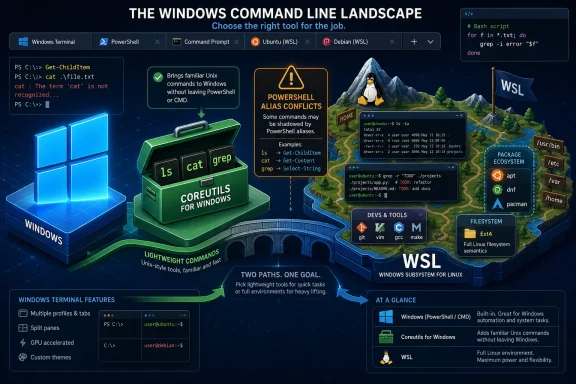
Microsoft released Coreutils for Windows during Build 2026, making familiar Unix and Linux command-line utilities available as native Windows applications through a Microsoft-maintained package installable with WinGet. The move is small in surface area and large in symbolism: Windows is no longer merely tolerating Linux-style developer workflows through WSL, Git Bash, or third-party ports. It is absorbing another layer of that workflow into the operating system’s native developer story.
For Windows users who live in File Explorer and Settings, this will barely register. For developers, administrators, DevOps engineers, and security teams, it changes the texture of the command line. Microsoft is not replacing PowerShell, and it is not turning Windows into Linux. It is doing something more pragmatic and more revealing: conceding that the modern development workstation is already a hybrid, and that the operating system wins when it stops making users translate their muscle memory.
The headline feature is straightforward. Install Microsoft’s Coreutils for Windows package, and commands such as
That last detail matters. This is not a ZIP file from an enthusiast’s website, not a compatibility layer installed as part of a larger Unix-like environment, and not an accidental side effect of Git for Windows. It is a Microsoft-maintained Windows package for Unix-style command-line tools.
The project builds on
That is Microsoft’s real pitch. A developer should not have to remember whether today’s terminal is PowerShell, Bash, CMD, a WSL shell, an SSH session into a Linux server, or a CI job running in a container before typing
When the user invokes one of those command names, Windows launches the shared binary. The program then decides which utility behavior to run based on the name used to call it. This multi-call binary pattern will look familiar to anyone who has used BusyBox or similar compact Unix toolsets, but on Windows it has a particular administrative appeal.
There is one binary to package, update, scan, sign, and deploy. There are many command names for user convenience, but a smaller maintenance surface underneath. In a world where endpoint management, software inventory, and vulnerability response are as important as developer ergonomics, that is not a minor implementation detail.
It also explains why an installed Coreutils directory can look odd at first glance. You may see a cluster of utilities that appear to be separate files but resolve to the same underlying executable. That is not duplication. It is the compatibility illusion doing exactly what it is supposed to do.
Coreutils for Windows sits in a different category. It does not try to emulate a full Unix system, and it does not ask users to cross the membrane into Linux. It brings a set of command-line tools into Windows itself, with Windows paths, Windows process semantics, Windows filesystems, and Windows caveats.
That makes it less powerful than WSL in some scenarios and more convenient in others. If you need Linux package managers, Linux daemons, namespaces, cgroups, or a faithful production-like environment, WSL remains the obvious answer. If you simply want
This distinction will matter in enterprises. Many organizations permit PowerShell and WinGet-managed tools but place stricter controls around WSL distributions, developer-mode features, or third-party Unix environments. A Microsoft-signed, Microsoft-maintained package gives IT departments a more governable way to satisfy a common developer request.
But it does challenge an older assumption: that Windows command-line work should be translated into Windows-native idioms first. Microsoft has spent years telling administrators that PowerShell is the better shell because it passes structured objects instead of text. That remains true in many administrative contexts. Yet developers continue to rely on text streams because text streams are portable, inspectable, composable, and deeply embedded in build systems and CI tooling.
The result is not a winner-take-all shell war. It is a layered command-line world. PowerShell can be the orchestration language. Native Unix-style tools can handle fast text processing and cross-platform scripts. WSL can provide the full Linux environment when needed. Windows Terminal becomes the stage on which all of them coexist.
That coexistence is messy, but it reflects reality. The developer workstation has already become a federation of shells and runtimes. Microsoft’s move is an attempt to make that federation feel deliberate rather than accidental.
This is not a footnote. It is the central operational wrinkle. PowerShell has long mapped commands such as
Microsoft has published compatibility information precisely because this cannot be hand-waved away. The command line is a namespace, and Windows already has occupants in many of the obvious addresses. Dropping Unix names into that namespace improves portability only when users know which command they are actually running.
This is where administrators will need policy rather than enthusiasm. Teams that adopt Coreutils for Windows should decide whether scripts invoke commands by bare name, explicit path, or controlled environment. They should document shell assumptions. They should treat PATH order as configuration, not folklore.
The absence of
This is healthy honesty. The worst compatibility projects pretend that platform differences are superficial. They are not. Windows has ACLs rather than POSIX permission bits. It has different process models, path conventions, device names, terminal behaviors, and historical assumptions about line endings.
Coreutils for Windows is useful because it narrows the translation gap. It is dangerous only if users mistake a narrower gap for no gap at all.
Microsoft’s caveats around Coreutils for Windows are therefore not legal boilerplate. They are a map of where scripts will break. Pattern matching with
Even symbolic links carry Windows-specific meaning. Reading them may work normally, while creating them can depend on Developer Mode or elevated privileges. That is not a Coreutils flaw so much as a reminder that filesystem semantics are part of the operating system, not just the command syntax.
For IT pros, this should encourage a conservative adoption pattern. Use Coreutils to make everyday interactive work easier. Use it to reduce script translation where the behavior is obvious. But test automation on the target platform, not merely on the developer’s preferred shell.
That choice carries technical and political weight. Rust gives Microsoft a memory-safety story at a time when the company and the broader industry are under pressure to reduce classes of vulnerabilities associated with C and C++ code. For command-line tools that parse arbitrary files, traverse directories, and sit inside pipelines, memory safety is not just a branding exercise.
The open-source angle is just as important. Microsoft is not presenting Coreutils for Windows as a closed reimplementation of Unix tradition. It is packaging and contributing around an existing ecosystem that aims to support Linux, macOS, BSD variants, Windows, WASI, and other platforms. That aligns with Microsoft’s broader pivot from owning the whole developer stack to making Windows viable inside a pluralistic stack.
There is still a risk here. GNU Coreutils is mature, heavily battle-tested, and full of edge cases accumulated over decades. A Rust rewrite can be safer and more portable while still diverging in behavior from what scripts expect. That is not an argument against uutils; it is an argument for respecting the difference between “compatible enough for most work” and “bit-for-bit substitute for every historical behavior.”
That pairing matters. Coreutils handles the small frictions: commands, scripts, pipelines, and everyday terminal muscle memory. WSL containers address a larger architectural friction: the fact that modern development increasingly assumes Linux containers even when the developer’s laptop runs Windows.
The old Microsoft strategy was to make developers target Windows. The modern strategy is to make Windows a good place to target everything else. That includes Azure, Linux servers, Kubernetes, GitHub-based workflows, local AI tooling, and whatever combination of runtimes a team happens to use.
This is defensive as much as visionary. If Windows cannot serve developers who live in Linux-flavored tooling, those developers will drift toward macOS or Linux workstations. By making the Windows command line less alien, Microsoft is protecting the relevance of Windows on the desks of people who influence platform decisions.
The difference is provenance. Many organizations already have similar tools installed through Git for Windows, MSYS2, Cygwin, developer toolchains, or ad hoc downloads. A Microsoft-maintained package may actually improve governance because it can be inventoried, updated, and approved through normal channels. The shadow version of this tooling is worse.
Still, administrators should decide where Coreutils belongs. Developer workstations are obvious candidates. Build agents may benefit, especially if scripts are intentionally cross-platform. General-purpose employee endpoints are a less compelling target unless there is a defined need.
The right security posture is not “block Unix commands because attackers like commands.” It is to treat Coreutils as another managed toolset. Know where it is installed, know who requested it, know how it is updated, and monitor behavior rather than names.
Sysadmins also gain a practical bridge. Windows administrators who occasionally borrow Unix-style text-processing habits can do so without installing a full Unix environment. Linux administrators forced onto Windows machines get a softer landing. DevOps teams can reduce some of the conditional logic that accumulates around platform-specific scripting.
The biggest win may be in documentation. Internal runbooks often assume a certain command vocabulary. Public developer docs frequently use Unix-style snippets by default. If Windows can run more of those snippets natively, fewer instructions need an apologetic “on Windows, instead do this” branch.
But this benefit has limits. Documentation that assumes POSIX permissions, Linux process behavior,
This does not erase the tribes, but it does make the boundary less useful. Developers increasingly care less about the ideological purity of the shell and more about whether the command works in the place they are standing. The modern terminal is not a temple; it is a switchyard.
There is a lesson here for Microsoft’s platform strategy. Windows does not need to win by forcing every workflow into Windows-native forms. It can win by hosting more workflows gracefully than its competitors. That means native Windows apps, PowerShell automation, WSL distributions, Linux containers, cloud CLIs, package managers, and now a Microsoft-maintained Unix-style utility set.
That strategy is untidy. It produces overlaps, conflicts, and documentation headaches. But it is also how real computing environments evolve. The clean-room platform lost to the messy workstation years ago.
For Windows users who live in File Explorer and Settings, this will barely register. For developers, administrators, DevOps engineers, and security teams, it changes the texture of the command line. Microsoft is not replacing PowerShell, and it is not turning Windows into Linux. It is doing something more pragmatic and more revealing: conceding that the modern development workstation is already a hybrid, and that the operating system wins when it stops making users translate their muscle memory.
![PowerShell shows [ICODE]coreutils --help[/ICODE] while WinGet installs GnuWin32 Coreutils on Windows 11.](https://data.windowsforum.com/attachments/116/116023-bb0f479c6e59634cde08e3ba1aa46ef4.jpg?hash=pC1zfPr9aG "PowerShell shows [ICODE]coreutils --help[/ICODE] while WinGet installs GnuWin32 Coreutils on Windows 11.") Microsoft Stops Treating Unix Muscle Memory as a Foreign Language
Microsoft Stops Treating Unix Muscle Memory as a Foreign Language
The headline feature is straightforward. Install Microsoft’s Coreutils for Windows package, and commands such as cat, cp, find, grep, hostname, ls, mv, pwd, rm, sleep, tee, and uptime become available as native Windows executables. The package is distributed through WinGet under Microsoft.Coreutils, which puts it squarely in the same administrative lane as other modern Windows developer tooling.That last detail matters. This is not a ZIP file from an enthusiast’s website, not a compatibility layer installed as part of a larger Unix-like environment, and not an accidental side effect of Git for Windows. It is a Microsoft-maintained Windows package for Unix-style command-line tools.
The project builds on
uutils, the open-source Rust rewrite of GNU Coreutils. Microsoft’s package combines uutils coreutils, findutils, and a GNU-compatible grep implementation into a single Windows-oriented distribution. The stated goal is not novelty; it is workflow continuity across Linux, macOS, Windows, containers, and WSL.That is Microsoft’s real pitch. A developer should not have to remember whether today’s terminal is PowerShell, Bash, CMD, a WSL shell, an SSH session into a Linux server, or a CI job running in a container before typing
grep into a pipeline. The more Windows can disappear into that workflow, the more viable it remains as the default workstation for developers who increasingly deploy to Linux.The Single Binary Is a Windows Answer to a Unix Problem
The most interesting engineering choice is not that Microsoft brought over Unix-style utilities. It is how the package exposes them. Rather than shipping dozens of unrelated executables, Microsoft uses a singlecoreutils.exe binary and creates NTFS hardlinks such as ls.exe, cp.exe, cat.exe, and rm.exe that all point back to the same file.When the user invokes one of those command names, Windows launches the shared binary. The program then decides which utility behavior to run based on the name used to call it. This multi-call binary pattern will look familiar to anyone who has used BusyBox or similar compact Unix toolsets, but on Windows it has a particular administrative appeal.
There is one binary to package, update, scan, sign, and deploy. There are many command names for user convenience, but a smaller maintenance surface underneath. In a world where endpoint management, software inventory, and vulnerability response are as important as developer ergonomics, that is not a minor implementation detail.
It also explains why an installed Coreutils directory can look odd at first glance. You may see a cluster of utilities that appear to be separate files but resolve to the same underlying executable. That is not duplication. It is the compatibility illusion doing exactly what it is supposed to do.
This Is Not Cygwin, and That Is the Point
Windows has had access to Unix-like tools for decades. Cygwin offered a deep POSIX environment. MSYS2 and Git Bash brought familiar shells and utilities to developers. GnuWin32 and other ports filled gaps for administrators who wantedgrep, sed, or awk without booting into another environment. WSL then changed the equation entirely by making a real Linux user space available on Windows.Coreutils for Windows sits in a different category. It does not try to emulate a full Unix system, and it does not ask users to cross the membrane into Linux. It brings a set of command-line tools into Windows itself, with Windows paths, Windows process semantics, Windows filesystems, and Windows caveats.
That makes it less powerful than WSL in some scenarios and more convenient in others. If you need Linux package managers, Linux daemons, namespaces, cgroups, or a faithful production-like environment, WSL remains the obvious answer. If you simply want
grep in a Windows terminal, or you want a script to use ls and cp without dragging in a full compatibility layer, native Coreutils is cleaner.This distinction will matter in enterprises. Many organizations permit PowerShell and WinGet-managed tools but place stricter controls around WSL distributions, developer-mode features, or third-party Unix environments. A Microsoft-signed, Microsoft-maintained package gives IT departments a more governable way to satisfy a common developer request.
PowerShell Is Not Being Replaced, but Its Monopoly Is Over
It is tempting to frame Coreutils for Windows as a threat to PowerShell. That misses the bigger picture. PowerShell remains the native administrative shell of Windows, with object pipelines, cmdlets, remoting, Desired State Configuration heritage, Microsoft Graph integrations, and deep hooks into Windows management. Coreutils does not compete with that model directly.But it does challenge an older assumption: that Windows command-line work should be translated into Windows-native idioms first. Microsoft has spent years telling administrators that PowerShell is the better shell because it passes structured objects instead of text. That remains true in many administrative contexts. Yet developers continue to rely on text streams because text streams are portable, inspectable, composable, and deeply embedded in build systems and CI tooling.
The result is not a winner-take-all shell war. It is a layered command-line world. PowerShell can be the orchestration language. Native Unix-style tools can handle fast text processing and cross-platform scripts. WSL can provide the full Linux environment when needed. Windows Terminal becomes the stage on which all of them coexist.
That coexistence is messy, but it reflects reality. The developer workstation has already become a federation of shells and runtimes. Microsoft’s move is an attempt to make that federation feel deliberate rather than accidental.
The Alias Problem Is Where the Romance Ends
The romantic version of the story says that Linux commands now “just work” on Windows. The practical version begins with shell conflicts. Many of the most familiar Unix command names overlap with existing CMD commands, PowerShell aliases, or Windows executables. Whether typingls, cat, cp, mv, rm, pwd, sleep, or tee launches Microsoft Coreutils depends on the shell, the PATH order, and in PowerShell’s case, the alias table.This is not a footnote. It is the central operational wrinkle. PowerShell has long mapped commands such as
ls and cat to PowerShell-native equivalents. Those aliases are convenient for casual use but hazardous for anyone expecting GNU-like command-line behavior. A script that works in one shell may behave differently in another if a name resolves to an alias rather than the Coreutils executable.Microsoft has published compatibility information precisely because this cannot be hand-waved away. The command line is a namespace, and Windows already has occupants in many of the obvious addresses. Dropping Unix names into that namespace improves portability only when users know which command they are actually running.
This is where administrators will need policy rather than enthusiasm. Teams that adopt Coreutils for Windows should decide whether scripts invoke commands by bare name, explicit path, or controlled environment. They should document shell assumptions. They should treat PATH order as configuration, not folklore.
The Missing Commands Tell the Truth About Windows
Microsoft did not ship every Unix utility, and the omissions are more revealing than the inclusions. Commands such aschmod, chown, chroot, nohup, tty, and who depend on POSIX concepts that do not map cleanly to Windows. Others, such as dir, more, paste, and whoami, are excluded because they conflict with existing Windows commands or would introduce more confusion than value.The absence of
kill and timeout is especially instructive. Windows does not support POSIX signals in the way Unix-like systems do, so utilities built around those assumptions cannot simply be copied over and expected to behave. Microsoft has indicated that some signal-related support may be possible in the future, but for now this is one of the places where the boundary remains hard.This is healthy honesty. The worst compatibility projects pretend that platform differences are superficial. They are not. Windows has ACLs rather than POSIX permission bits. It has different process models, path conventions, device names, terminal behaviors, and historical assumptions about line endings.
Coreutils for Windows is useful because it narrows the translation gap. It is dangerous only if users mistake a narrower gap for no gap at all.
Line Endings, ACLs, and Paths Are the Tax on Portability
Anyone who has debugged cross-platform scripts knows that the failures rarely announce themselves grandly. They arrive as a pattern that does not match because a file uses CRLF endings. They appear as a byte count that differs by one invisible character per line. They surface when a permission check behaves differently because Windows ACLs are not Unix mode bits wearing a different hat.Microsoft’s caveats around Coreutils for Windows are therefore not legal boilerplate. They are a map of where scripts will break. Pattern matching with
$ can be affected by Windows line endings. Permission-oriented predicates may be unavailable or behave differently. Path separators can appear as / or \, and output using one convention may surprise a downstream tool expecting the other.Even symbolic links carry Windows-specific meaning. Reading them may work normally, while creating them can depend on Developer Mode or elevated privileges. That is not a Coreutils flaw so much as a reminder that filesystem semantics are part of the operating system, not just the command syntax.
For IT pros, this should encourage a conservative adoption pattern. Use Coreutils to make everyday interactive work easier. Use it to reduce script translation where the behavior is obvious. But test automation on the target platform, not merely on the developer’s preferred shell.
Rust Is the Quiet Strategic Choice
Microsoft could have built a proprietary clone. It could have wrapped existing ports. It could have told users to install WSL and called the problem solved. Instead, it choseuutils, a Rust-based cross-platform reimplementation of GNU Coreutils, and is maintaining a Windows package around it.That choice carries technical and political weight. Rust gives Microsoft a memory-safety story at a time when the company and the broader industry are under pressure to reduce classes of vulnerabilities associated with C and C++ code. For command-line tools that parse arbitrary files, traverse directories, and sit inside pipelines, memory safety is not just a branding exercise.
The open-source angle is just as important. Microsoft is not presenting Coreutils for Windows as a closed reimplementation of Unix tradition. It is packaging and contributing around an existing ecosystem that aims to support Linux, macOS, BSD variants, Windows, WASI, and other platforms. That aligns with Microsoft’s broader pivot from owning the whole developer stack to making Windows viable inside a pluralistic stack.
There is still a risk here. GNU Coreutils is mature, heavily battle-tested, and full of edge cases accumulated over decades. A Rust rewrite can be safer and more portable while still diverging in behavior from what scripts expect. That is not an argument against uutils; it is an argument for respecting the difference between “compatible enough for most work” and “bit-for-bit substitute for every historical behavior.”
Build 2026’s Windows Story Is Really About Developer Gravity
Coreutils for Windows did not arrive in isolation. Microsoft used Build 2026 to push a broader message: Windows should be a trusted, low-friction development platform for modern workloads, including Linux-oriented and container-heavy workflows. The company also discussed WSL containers, aimed at letting users create, run, and manage Linux containers on Windows through native command-line tools and APIs.That pairing matters. Coreutils handles the small frictions: commands, scripts, pipelines, and everyday terminal muscle memory. WSL containers address a larger architectural friction: the fact that modern development increasingly assumes Linux containers even when the developer’s laptop runs Windows.
The old Microsoft strategy was to make developers target Windows. The modern strategy is to make Windows a good place to target everything else. That includes Azure, Linux servers, Kubernetes, GitHub-based workflows, local AI tooling, and whatever combination of runtimes a team happens to use.
This is defensive as much as visionary. If Windows cannot serve developers who live in Linux-flavored tooling, those developers will drift toward macOS or Linux workstations. By making the Windows command line less alien, Microsoft is protecting the relevance of Windows on the desks of people who influence platform decisions.
Native Tools Reduce Friction, but They Also Expand the Attack Surface
Security teams should not panic over Coreutils for Windows, but they should notice it. Adding widely used command-line utilities changes what attackers, red-teamers, administrators, and automation frameworks can assume is available on a Windows host. Tools such asgrep, find, cat, and tee are benign in themselves, but they are also useful for discovery, data staging, log scraping, and living-off-the-land workflows.The difference is provenance. Many organizations already have similar tools installed through Git for Windows, MSYS2, Cygwin, developer toolchains, or ad hoc downloads. A Microsoft-maintained package may actually improve governance because it can be inventoried, updated, and approved through normal channels. The shadow version of this tooling is worse.
Still, administrators should decide where Coreutils belongs. Developer workstations are obvious candidates. Build agents may benefit, especially if scripts are intentionally cross-platform. General-purpose employee endpoints are a less compelling target unless there is a defined need.
The right security posture is not “block Unix commands because attackers like commands.” It is to treat Coreutils as another managed toolset. Know where it is installed, know who requested it, know how it is updated, and monitor behavior rather than names.
The Biggest Beneficiaries Are the People Between Worlds
The most obvious beneficiaries are developers who already move between Windows and Unix-like environments. A web developer using Windows Terminal, PowerShell, WSL, GitHub repositories, Linux containers, and remote SSH sessions can now keep more of the same command vocabulary when stepping back into native Windows. That may sound minor until you multiply it across hundreds of context switches per week.Sysadmins also gain a practical bridge. Windows administrators who occasionally borrow Unix-style text-processing habits can do so without installing a full Unix environment. Linux administrators forced onto Windows machines get a softer landing. DevOps teams can reduce some of the conditional logic that accumulates around platform-specific scripting.
The biggest win may be in documentation. Internal runbooks often assume a certain command vocabulary. Public developer docs frequently use Unix-style snippets by default. If Windows can run more of those snippets natively, fewer instructions need an apologetic “on Windows, instead do this” branch.
But this benefit has limits. Documentation that assumes POSIX permissions, Linux process behavior,
/dev/null, or Bash-specific shell features will still not magically become Windows-native. Coreutils solves command availability. It does not solve every assumption embedded in Unix-oriented documentation.The Command Line Becomes a Shared Layer, Not a Tribal Marker
For decades, command names carried cultural meaning.dir meant DOS and Windows. ls meant Unix. PowerShell’s aliases blurred the distinction superficially, but the underlying models remained different. Now Microsoft is making the Unix names first-class enough to package and maintain.This does not erase the tribes, but it does make the boundary less useful. Developers increasingly care less about the ideological purity of the shell and more about whether the command works in the place they are standing. The modern terminal is not a temple; it is a switchyard.
There is a lesson here for Microsoft’s platform strategy. Windows does not need to win by forcing every workflow into Windows-native forms. It can win by hosting more workflows gracefully than its competitors. That means native Windows apps, PowerShell automation, WSL distributions, Linux containers, cloud CLIs, package managers, and now a Microsoft-maintained Unix-style utility set.
That strategy is untidy. It produces overlaps, conflicts, and documentation headaches. But it is also how real computing environments evolve. The clean-room platform lost to the messy workstation years ago.
The Windows Terminal Era Gets Its Missing Verbs
The practical advice for early adopters is simple, even if the implications are broad.- Coreutils for Windows is best understood as a native convenience layer for common Unix-style commands, not as a replacement for WSL or a complete POSIX environment.
- The package is installable through WinGet as
Microsoft.Coreutils, making it easier to deploy and manage than many older third-party Unix tool ports. - Shell behavior matters because PowerShell aliases, CMD built-ins, Windows executables, and PATH order can determine whether the Coreutils version of a command actually runs.
- Scripts that depend on permissions, signals, exact line-ending behavior, symbolic links, or Unix device conventions still need Windows-specific testing.
- Enterprise teams should treat the package as managed developer tooling, with explicit deployment rules rather than informal installation by individual users.
- The broader significance is that Microsoft is making Windows more comfortable for people whose production environments, build systems, and habits are increasingly Linux-shaped.
References
- Primary source: gHacks
Published: Thu, 04 Jun 2026 08:02:11 GMT

Microsoft Releases Coreutils for Windows, Bringing Native Linux Commands to the OS - gHacks Tech News
Microsoft has released Coreutils for Windows, bringing native Linux command-line utilities like cat, cp, grep, and ls to Windows as a single binary. www.ghacks.net
- Official source: github.com
GitHub - microsoft/coreutils: Coreutils for Windows: Installer & Packaging
Coreutils for Windows: Installer & Packaging. Contribute to microsoft/coreutils development by creating an account on GitHub. github.com
- Related coverage: phoronix.com
- Related coverage: gigazine.net

MicrosoftがgrepなどのUNIX系コマンドをWindowsで使用可能にする「Coreutils for Windows」を公開
MicrosoftがUNIXスタイルのコマンドラインユーティリティセット「Coreutils for Windows」を公開しました。Coreutils for Windowsをインストールするとコマンドプロンプト(CMD)やPowerShellでgrepなどのコマンドを使えるようになります。 gigazine.net
- Related coverage: ebisuda.net

Microsoft Build 2026:Coreutils for WindowsがGA、WSLコンテナでDockerなし開発が現実へ
MicrosoftがBuild 2026でRust実装GNU互換ツールCoreutils for WindowsをGA、WSLコンテナ機能もプレビュー予定と発表。 www.ebisuda.net
- Related coverage: windowsreport.com

- Related coverage: uutils.github.io
coreutils | uutils
uutils — cross-platform Rust reimplementations of essential Unix command-line utilitiesuutils.github.io - Related coverage: linuxteck.com

Windows Now Supports Popular Linux Coreutils Commands | LinuxTeck
Linux Coreutils Commands now run natively on Windows. See what Microsoft shipped, which tools are missing, and what it means for cross-platform work.www.linuxteck.com
- Related coverage: opensourceforu.com

Microsoft Brings Open Source Coreutils To Windows - Open Source For You
Microsoft is bringing open-source Linux tooling deeper into Windows with Rust-based Coreutils and new WSL containers, aiming to simplify cross-platform www.opensourceforu.com
- Related coverage: bleepingcomputer.com

Microsoft's Coreutils project brings Linux commands to Windows
Microsoft announced today at its Build 2026 developer conference the release of Coreutils for Windows, bringing many commonly used Linux command-line utilities to Windows as native applications.www.bleepingcomputer.com - Related coverage: fdaytalk.com

How to Install Microsoft Coreutils on Windows 11
Install Microsoft Coreutils for Windows 11 using WinGet and run native Linux commands like ls, cp, and rm without WSL. Setup guide with shell conflicts. www.fdaytalk.com
- Official source: news.microsoft.com
- Related coverage: gnu.org