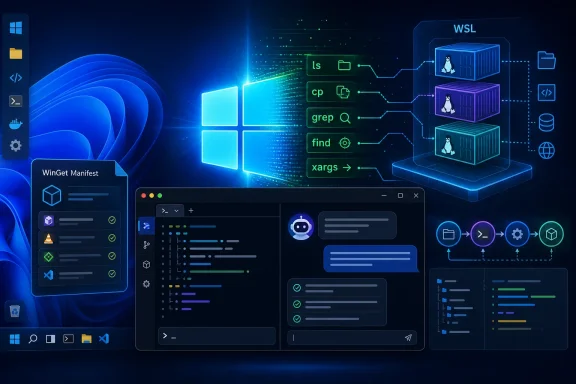
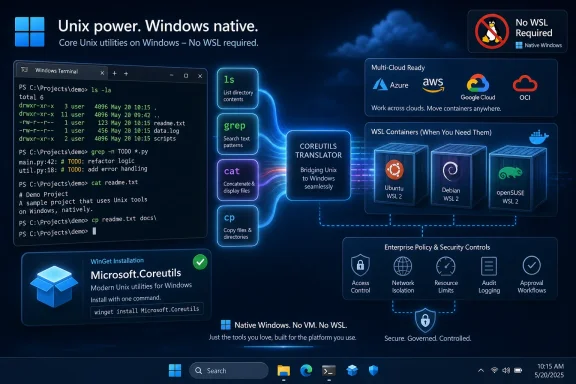
Microsoft announced Coreutils for Windows on June 2, 2026, making a Rust-based set of familiar Linux-style command-line utilities generally available as native Windows tools while also previewing built-in WSL container support for developers later this year. The move sounds small if you live in graphical apps, but it is a direct strike at one of Windows’ oldest developer irritants: the command line that almost, but not quite, behaves like the one everywhere else. Microsoft is not trying to turn Windows into Linux. It is trying to make Windows harder to leave.
For decades, Windows has had a split personality. It was the dominant desktop operating system, the enterprise workstation, the gaming platform, and the managed endpoint, but it was rarely the most frictionless place to run the text-first tooling that increasingly defines modern software work. Developers could write code on Windows, but the path of least resistance often ran through a compatibility layer, a separate terminal environment, a Linux VM, Git Bash, Cygwin, MSYS2, or eventually Windows Subsystem for Linux.
Coreutils for Windows is Microsoft admitting that the friction was not merely cosmetic. Commands like
The important phrase in Microsoft’s announcement is not “Linux-like.” It is “run natively on Windows.” The company is not simply telling developers to open WSL when they want familiar tools. It is putting a set of cross-platform command-line utilities directly into the Windows environment, based on the open-source uutils project, a Rust reimplementation of GNU Coreutils.
That distinction matters because developers do not only need Linux. They need predictability. The less a command changes its behavior when a script moves from a laptop to a container to a build server, the less time teams spend debugging the operating system instead of their own code.
The answer was often “it depends,” which is the least satisfying answer in computing. It depended on whether Git for Windows had been installed. It depended on whether a shell had injected a path before another path. It depended on whether the command was a Windows-native executable, a compatibility shim, a PowerShell alias, a GNU tool compiled for Windows, or something inside a WSL distribution.
That confusion created a strange hierarchy of workarounds. A developer might use PowerShell for Windows administration, Git Bash for open-source project commands, WSL for Linux packages, Docker Desktop for containers, and a browser-based cloud environment when the local setup became too tedious. None of those tools is bad. The problem was that Windows kept asking developers to choose a personality before they could do routine work.
Microsoft’s new approach is more pragmatic. Instead of pretending PowerShell syntax can satisfy every developer expectation, or that WSL should be the answer to every cross-platform gap, Windows is absorbing part of the Unix command-line baseline into itself. That is less ideologically dramatic than a shell war, but much more useful.
That gives Microsoft several advantages at once. Rust fits the company’s increasingly public emphasis on memory safety. uutils is already cross-platform by design. And by leaning on an existing open-source implementation, Microsoft can position itself as a participant in a broader portability effort rather than as the owner of a proprietary Windows-only clone.
There is also a licensing and engineering story beneath the surface. Rust-based replacements for classic low-level utilities have been gathering momentum because they promise a cleaner security posture while preserving the behavior administrators and developers expect. But “rewrite the plumbing” is a dangerous sentence in operating systems. Core utilities sit under scripts, installers, package managers, and build systems; small differences can have large consequences.
That is why the claim that commands “just work” deserves careful reading. The goal is compatibility, not magic. uutils itself has long treated differences from GNU behavior as bugs, but any implementation of decades-old command-line behavior will encounter edge cases. Windows adds its own complications: drive letters, path separators, alternate data streams, case-insensitive defaults, ACLs, line endings, symlinks, and executable resolution rules.
The promise, then, is not that Windows has erased every semantic difference between itself and Linux. The promise is that Microsoft now sees those differences as product problems worth reducing inside Windows itself.
The most expensive bugs in this space are not usually spectacular crashes. They are small mismatches. A flag works on Linux but not on Windows. A command emits a slightly different error. A path is interpreted differently. A script that was written casually for a Unix shell becomes a mini-porting project when a teammate runs it on Windows.
Native Coreutils will not solve all of that, because shell semantics and filesystem behavior still matter. But they remove one common layer of uncertainty. If the same utility set is available directly in Windows, a project can assume more of the command-line substrate without forcing every Windows user into a separate Linux environment.
That matters especially for open-source maintainers. Many projects nominally support Windows but quietly treat it as a second-class path because setup instructions are easier to write for macOS and Linux. Microsoft cannot make every maintainer care about Windows, but it can reduce the number of reasons they have to exclude it.
The effect is also cultural. Windows developers have often been told to adopt Linux tools by leaving the Windows environment. Coreutils for Windows sends a different message: the Windows environment itself can become more fluent in the shared language of modern development.
That is a bigger deal than it may sound, because containers are where local development, cloud deployment, test automation, and AI experimentation increasingly meet. Windows developers have relied heavily on third-party tooling to make Linux container workflows feel reasonable on a Windows host. That ecosystem has been essential, but it also introduced setup overhead, licensing considerations, management gaps, and another layer of enterprise approval.
Microsoft’s pitch is that WSL should become a first-class container substrate for Windows, not just a way to open Ubuntu in a terminal. The announced WSL containers CLI is meant to let developers build, run, and deploy Linux containers directly. The announced API is meant to let native Windows applications run Linux containers programmatically.
That API piece is the quiet enterprise hook. A local AI tool, a testing product, a data-processing application, or an internal developer platform could invoke Linux container workloads from a Windows app without making the user assemble a stack of separate pieces. The container becomes an application capability, not a separate ritual.
This is Microsoft’s old developer-platform playbook updated for the AI era. Make Windows the place where the work can start, even if the work eventually runs on Linux servers, Kubernetes clusters, cloud GPUs, or model-serving infrastructure.
That does not mean Docker Desktop or its competitors suddenly become irrelevant. Mature container products offer workflows, user interfaces, registries, enterprise features, Kubernetes integrations, extensions, policy controls, and support contracts that a platform primitive may not replace immediately. Many teams buy the whole experience, not merely the ability to start a container.
Still, built-in capability changes the bargaining position. If the baseline Windows install can handle common Linux container tasks, third-party tools must justify themselves above that baseline. For individual developers, students, and smaller teams, “good enough and built in” can be extremely disruptive.
For enterprises, the question is less emotional and more administrative. If Microsoft can provide policy-based enablement, image-source controls, visibility into running Linux containers, and host interaction governance using familiar Windows management channels, IT departments will pay attention. They may not rip out existing tools overnight, but they will ask why a separate platform is necessary for every scenario.
This is how platform vendors move markets without declaring war. They absorb the commodity layer, then let the ecosystem compete on higher-order features.
Coreutils itself is unlikely to be the hardest governance problem. Command-line utilities are tools, and Windows already supports plenty of powerful tools. The more interesting issue is that native Unix-like commands can make it easier for developers to bring cross-platform scripts into managed Windows environments. That is usually good, but it also means endpoint monitoring, allowlisting, script review, and developer workstation policy need to understand what “normal” looks like after the toolchain changes.
WSL containers raise the stakes. Containers are executable environments. They pull images, run processes, mount files, expose ports, and sometimes blur the line between local development and production-like workloads. If Microsoft delivers the enterprise controls it is promising, administrators will get a more official way to manage activity that already happens in less standardized forms.
The phrase “policy-based enablement” should be read as Microsoft speaking to the people who approve developer tools, not only the people who use them. In many companies, developers want Linux-like velocity and IT wants Windows-like manageability. Microsoft is trying to sell both sides the same answer.
The risk is that Windows becomes more complex even as individual workflows become easier. A Windows developer machine in 2026 can be a Windows endpoint, a Linux environment, a container host, an AI workstation, and a cloud-connected identity surface all at once. That is powerful. It is also a lot to inventory.
This is not charity. It is platform strategy. Microsoft needs Windows to remain credible to developers whose work is shaped by Linux, GitHub, containers, Python, Rust, Node.js, Kubernetes, and increasingly AI frameworks that assume Unix-like environments. The easiest way to keep those developers on Windows is not to rebuild the whole world in a Microsoft-specific image. It is to make Windows participate more naturally in the world that already exists.
That participation comes with tension. Open-source communities may welcome contributions while remaining skeptical of Microsoft’s platform incentives. Windows users may benefit from open tooling while still depending on Microsoft’s packaging, update cadence, and integration choices. Developers may like the native convenience but worry about subtle deviations from upstream behavior.
Those tensions are normal. The more important point is that Microsoft’s developer story now depends on reducing the distance between Windows and open-source infrastructure. Coreutils for Windows is a small executable expression of that reality. WSL containers are a larger architectural one.
Native Coreutils reduce the need to cross that boundary for simple tasks. A developer in a Windows shell can use familiar commands without deciding whether the job belongs in Linux. That sounds minor until you consider how often developers make those micro-decisions in a day.
The challenge is that native Windows execution also means native Windows semantics. A command may look like its GNU cousin, but it is operating against a Windows filesystem and Windows process model. The best outcome is not perfect illusion; it is honest consistency. Developers need to know when behavior matches, when it differs, and where documentation draws the line.
Microsoft should resist the temptation to oversell this as a revolution in application creation. It is more accurate, and more impressive, to call it a reduction in ambient friction. Great developer platforms are often built from boring improvements that remove thousands of tiny interruptions.
The revolution, if there is one, comes from accumulation. Native Coreutils, WSL, Windows Terminal, Dev Home-style setup flows, package managers, container support, GPU access, AI tooling, and enterprise policy together form a different Windows than the one developers tolerated a decade ago.
But the AI frame should not obscure the broader developer significance. Coreutils and containers matter even if you never run a local model. They matter for web development, backend services, embedded tooling, data pipelines, DevOps scripts, language runtimes, and classroom environments. They matter anywhere documentation begins with commands that were written on a Unix-like machine.
In fact, the non-AI use cases may be where the practical benefits arrive first. AI workflows can be hardware-sensitive, fast-changing, and dependent on large frameworks. Command-line utilities and container basics are mundane enough to become reliable quickly, assuming Microsoft packages and updates them well.
That mundanity is the point. Developers do not need every tool to be visionary. They need the ground under their feet to stop shifting when they move from one environment to another.
This is where the uutils foundation helps but does not eliminate risk. Reimplementing GNU behavior is an ongoing process, and the Windows environment adds its own compatibility traps. A utility that behaves correctly on Linux may still need Windows-specific care to feel predictable on NTFS, in corporate profiles, or inside paths synchronized by cloud storage clients.
Administrators and tool authors should expect a transition period. Some teams will embrace the new utilities immediately for interactive work. Others will test them carefully before relying on them in build scripts or deployment automation. Conservative organizations may pin known tool versions or continue using established environments until Coreutils for Windows proves itself across releases.
That caution is not cynicism. It is how serious tooling earns trust. The command line is unforgiving precisely because it is composable; one tiny behavioral mismatch can cascade through a pipeline.
That is a more mature strategy than the old binary choice between Windows and Linux. Most developers already live in hybrid environments. Their code editor may run on Windows, their shell may be Linux, their database may be in a container, their deployment target may be Kubernetes, and their identity may be managed through Microsoft Entra. The operating system that best coordinates this mess has an advantage.
Coreutils for Windows and WSL containers fit neatly into that coordination role. One makes the local command line less alien to cross-platform projects. The other makes Linux containers feel less like an add-on to Windows and more like a built-in capability.
The danger for Microsoft is that platform breadth can become platform sprawl. Windows must make these capabilities discoverable without turning the developer machine into a maze of overlapping tools. If a user has to ask whether a command came from PowerShell, Windows, WSL, Git, uutils, or a package manager, some of the benefit disappears.
The opportunity is equally clear. If Microsoft can make the defaults coherent, Windows becomes less of a compromise for developers who need Linux fluency but also need a Windows workstation.
Developers will ask for fewer exceptions if the standard Windows image already includes more of what they need. Security teams will ask for clearer policies if those capabilities become easier to use. Procurement teams will look again at paid desktop tooling where built-in features cover the basics. Platform engineering teams may build internal workflows around official Windows APIs instead of relying on unsupported glue.
This is where the announcement may have the most durable impact. The individual utility commands are familiar. The organizational implication is that Windows developer machines can become more standardized without becoming less capable.
That has been the missing piece in many enterprises. Linux-like tooling often arrived through developer initiative rather than central planning. Microsoft is now offering a managed path for capabilities developers were already finding elsewhere.
Coreutils for Windows chips away at that tax. WSL containers chip away at another part of it. Neither feature single-handedly transforms the platform, but both point in the same direction: Windows should not require developers to abandon Windows in order to use the tools that define modern software work.
There is a defensive motive here. Microsoft knows that developers have options: macOS laptops, Linux desktops, cloud workstations, browser-based IDEs, remote dev containers, and locked-down enterprise environments where the local OS matters less than it used to. To keep Windows relevant, Microsoft must make the local experience not merely tolerable, but compelling.
The offensive motive is just as important. If Windows becomes a first-class place to run Linux-like commands, containers, AI workloads, and native apps under enterprise governance, Microsoft can sell it as the developer workstation for hybrid computing. That is not nostalgia for the PC era. It is an argument that the PC still matters because it is where complex work is assembled.
 Microsoft Finally Treats the Shell as a Developer Platform
For decades, Windows has had a split personality. It was the dominant desktop operating system, the enterprise workstation, the gaming platform, and the managed endpoint, but it was rarely the most frictionless place to run the text-first tooling that increasingly defines modern software work. Developers could write code on Windows, but the path of least resistance often ran through a compatibility layer, a separate terminal environment, a Linux VM, Git Bash, Cygwin, MSYS2, or eventually Windows Subsystem for Linux.Coreutils for Windows is Microsoft admitting that the friction was not merely cosmetic. Commands like
ls, cat, cp, mv, rm, head, tail, sort, and grep-adjacent workflows are not just nostalgic Unix furniture. They are connective tissue for scripts, build systems, documentation, container recipes, CI jobs, and muscle memory.The important phrase in Microsoft’s announcement is not “Linux-like.” It is “run natively on Windows.” The company is not simply telling developers to open WSL when they want familiar tools. It is putting a set of cross-platform command-line utilities directly into the Windows environment, based on the open-source uutils project, a Rust reimplementation of GNU Coreutils.
That distinction matters because developers do not only need Linux. They need predictability. The less a command changes its behavior when a script moves from a laptop to a container to a build server, the less time teams spend debugging the operating system instead of their own code.
The Old Windows Compromise Was Powerful but Awkward
Windows has never lacked command lines. It had Command Prompt for the old world, PowerShell for automation, Windows Terminal for modern ergonomics, and WSL for real Linux userlands. What it lacked was a simple answer to a simple developer expectation: if a project README says to run a familiar Unix-style command, will that command behave the same way on a Windows machine?The answer was often “it depends,” which is the least satisfying answer in computing. It depended on whether Git for Windows had been installed. It depended on whether a shell had injected a path before another path. It depended on whether the command was a Windows-native executable, a compatibility shim, a PowerShell alias, a GNU tool compiled for Windows, or something inside a WSL distribution.
That confusion created a strange hierarchy of workarounds. A developer might use PowerShell for Windows administration, Git Bash for open-source project commands, WSL for Linux packages, Docker Desktop for containers, and a browser-based cloud environment when the local setup became too tedious. None of those tools is bad. The problem was that Windows kept asking developers to choose a personality before they could do routine work.
Microsoft’s new approach is more pragmatic. Instead of pretending PowerShell syntax can satisfy every developer expectation, or that WSL should be the answer to every cross-platform gap, Windows is absorbing part of the Unix command-line baseline into itself. That is less ideologically dramatic than a shell war, but much more useful.
Rust Gives the Announcement Its Strategic Weight
The choice of uutils is not incidental. GNU Coreutils is a cornerstone of Unix-like systems, but Microsoft is not shipping GNU Coreutils directly as the foundation of this Windows effort. It is building on a Rust-based project that aims to reproduce GNU behavior across platforms.That gives Microsoft several advantages at once. Rust fits the company’s increasingly public emphasis on memory safety. uutils is already cross-platform by design. And by leaning on an existing open-source implementation, Microsoft can position itself as a participant in a broader portability effort rather than as the owner of a proprietary Windows-only clone.
There is also a licensing and engineering story beneath the surface. Rust-based replacements for classic low-level utilities have been gathering momentum because they promise a cleaner security posture while preserving the behavior administrators and developers expect. But “rewrite the plumbing” is a dangerous sentence in operating systems. Core utilities sit under scripts, installers, package managers, and build systems; small differences can have large consequences.
That is why the claim that commands “just work” deserves careful reading. The goal is compatibility, not magic. uutils itself has long treated differences from GNU behavior as bugs, but any implementation of decades-old command-line behavior will encounter edge cases. Windows adds its own complications: drive letters, path separators, alternate data streams, case-insensitive defaults, ACLs, line endings, symlinks, and executable resolution rules.
The promise, then, is not that Windows has erased every semantic difference between itself and Linux. The promise is that Microsoft now sees those differences as product problems worth reducing inside Windows itself.
Native Coreutils Are About Scripts, Not Nostalgia
It is easy to trivialize Coreutils for Windows as a quality-of-life feature for people who preferls to dir. That misses the point. The modern developer workstation is full of text pipelines, project scaffolding scripts, code-generation steps, test harnesses, package commands, and documentation snippets copied from one environment to another.The most expensive bugs in this space are not usually spectacular crashes. They are small mismatches. A flag works on Linux but not on Windows. A command emits a slightly different error. A path is interpreted differently. A script that was written casually for a Unix shell becomes a mini-porting project when a teammate runs it on Windows.
Native Coreutils will not solve all of that, because shell semantics and filesystem behavior still matter. But they remove one common layer of uncertainty. If the same utility set is available directly in Windows, a project can assume more of the command-line substrate without forcing every Windows user into a separate Linux environment.
That matters especially for open-source maintainers. Many projects nominally support Windows but quietly treat it as a second-class path because setup instructions are easier to write for macOS and Linux. Microsoft cannot make every maintainer care about Windows, but it can reduce the number of reasons they have to exclude it.
The effect is also cultural. Windows developers have often been told to adopt Linux tools by leaving the Windows environment. Coreutils for Windows sends a different message: the Windows environment itself can become more fluent in the shared language of modern development.
WSL Containers Show the Bigger Target
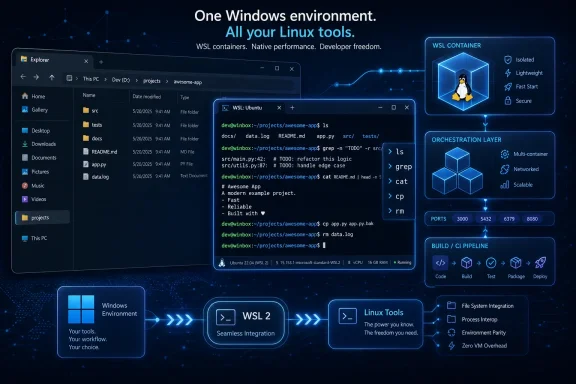
Coreutils is the visible, everyday change. WSL containers are the strategic one. Microsoft says WSL containers will enter public preview in the coming months as a regular WSL update, giving developers a built-in way to create, run, and interact with Linux containers on Windows.That is a bigger deal than it may sound, because containers are where local development, cloud deployment, test automation, and AI experimentation increasingly meet. Windows developers have relied heavily on third-party tooling to make Linux container workflows feel reasonable on a Windows host. That ecosystem has been essential, but it also introduced setup overhead, licensing considerations, management gaps, and another layer of enterprise approval.
Microsoft’s pitch is that WSL should become a first-class container substrate for Windows, not just a way to open Ubuntu in a terminal. The announced WSL containers CLI is meant to let developers build, run, and deploy Linux containers directly. The announced API is meant to let native Windows applications run Linux containers programmatically.
That API piece is the quiet enterprise hook. A local AI tool, a testing product, a data-processing application, or an internal developer platform could invoke Linux container workloads from a Windows app without making the user assemble a stack of separate pieces. The container becomes an application capability, not a separate ritual.
This is Microsoft’s old developer-platform playbook updated for the AI era. Make Windows the place where the work can start, even if the work eventually runs on Linux servers, Kubernetes clusters, cloud GPUs, or model-serving infrastructure.
The Docker Question Hangs Over the Room
Microsoft is careful not to frame WSL containers as a direct attack on any one vendor. But the implication is obvious: if Windows can run Linux containers out of the box through WSL, the role of third-party desktop container platforms changes.That does not mean Docker Desktop or its competitors suddenly become irrelevant. Mature container products offer workflows, user interfaces, registries, enterprise features, Kubernetes integrations, extensions, policy controls, and support contracts that a platform primitive may not replace immediately. Many teams buy the whole experience, not merely the ability to start a container.
Still, built-in capability changes the bargaining position. If the baseline Windows install can handle common Linux container tasks, third-party tools must justify themselves above that baseline. For individual developers, students, and smaller teams, “good enough and built in” can be extremely disruptive.
For enterprises, the question is less emotional and more administrative. If Microsoft can provide policy-based enablement, image-source controls, visibility into running Linux containers, and host interaction governance using familiar Windows management channels, IT departments will pay attention. They may not rip out existing tools overnight, but they will ask why a separate platform is necessary for every scenario.
This is how platform vendors move markets without declaring war. They absorb the commodity layer, then let the ecosystem compete on higher-order features.
Enterprise IT Gets a Gift With Strings Attached
For administrators, Microsoft’s announcement contains both relief and new work. The relief is obvious: a more consistent Windows developer environment is easier to document, support, and secure than a patchwork of unofficial tools. The new work is also obvious: once Windows can run more Linux-like tools and containers natively, organizations must decide how to govern them.Coreutils itself is unlikely to be the hardest governance problem. Command-line utilities are tools, and Windows already supports plenty of powerful tools. The more interesting issue is that native Unix-like commands can make it easier for developers to bring cross-platform scripts into managed Windows environments. That is usually good, but it also means endpoint monitoring, allowlisting, script review, and developer workstation policy need to understand what “normal” looks like after the toolchain changes.
WSL containers raise the stakes. Containers are executable environments. They pull images, run processes, mount files, expose ports, and sometimes blur the line between local development and production-like workloads. If Microsoft delivers the enterprise controls it is promising, administrators will get a more official way to manage activity that already happens in less standardized forms.
The phrase “policy-based enablement” should be read as Microsoft speaking to the people who approve developer tools, not only the people who use them. In many companies, developers want Linux-like velocity and IT wants Windows-like manageability. Microsoft is trying to sell both sides the same answer.
The risk is that Windows becomes more complex even as individual workflows become easier. A Windows developer machine in 2026 can be a Windows endpoint, a Linux environment, a container host, an AI workstation, and a cloud-connected identity surface all at once. That is powerful. It is also a lot to inventory.
The Open-Source Subtext Is No Longer Subtext
Microsoft’s relationship with open source has been analyzed so often that it can feel like old news. But announcements like this show how thoroughly the strategy has changed from accommodation to dependence. Coreutils for Windows is built from uutils. WSL was open-sourced at Build 2025. Microsoft is now talking about hundreds of monthly pull requests as part of the momentum behind the subsystem.This is not charity. It is platform strategy. Microsoft needs Windows to remain credible to developers whose work is shaped by Linux, GitHub, containers, Python, Rust, Node.js, Kubernetes, and increasingly AI frameworks that assume Unix-like environments. The easiest way to keep those developers on Windows is not to rebuild the whole world in a Microsoft-specific image. It is to make Windows participate more naturally in the world that already exists.
That participation comes with tension. Open-source communities may welcome contributions while remaining skeptical of Microsoft’s platform incentives. Windows users may benefit from open tooling while still depending on Microsoft’s packaging, update cadence, and integration choices. Developers may like the native convenience but worry about subtle deviations from upstream behavior.
Those tensions are normal. The more important point is that Microsoft’s developer story now depends on reducing the distance between Windows and open-source infrastructure. Coreutils for Windows is a small executable expression of that reality. WSL containers are a larger architectural one.
“Native” Is Doing a Lot of Work
The word “native” is central to the announcement because it addresses a specific frustration. WSL is excellent, but WSL is still a boundary. Files can cross it, terminals can enter it, IDEs can attach to it, and workflows can be designed around it, but users remain aware that Windows and Linux are coexisting rather than merging.Native Coreutils reduce the need to cross that boundary for simple tasks. A developer in a Windows shell can use familiar commands without deciding whether the job belongs in Linux. That sounds minor until you consider how often developers make those micro-decisions in a day.
The challenge is that native Windows execution also means native Windows semantics. A command may look like its GNU cousin, but it is operating against a Windows filesystem and Windows process model. The best outcome is not perfect illusion; it is honest consistency. Developers need to know when behavior matches, when it differs, and where documentation draws the line.
Microsoft should resist the temptation to oversell this as a revolution in application creation. It is more accurate, and more impressive, to call it a reduction in ambient friction. Great developer platforms are often built from boring improvements that remove thousands of tiny interruptions.
The revolution, if there is one, comes from accumulation. Native Coreutils, WSL, Windows Terminal, Dev Home-style setup flows, package managers, container support, GPU access, AI tooling, and enterprise policy together form a different Windows than the one developers tolerated a decade ago.
The AI Angle Is Real but Not the Whole Story
Microsoft’s Build-era framing naturally pulls everything toward AI. WSL containers are presented partly in terms of local AI workloads, Linux-based processing, and developer systems that need to move between Windows, cloud environments, and accelerated infrastructure. That is plausible. Much of the AI tooling stack expects Linux-like assumptions, and Windows remains a popular local workstation for developers who still need Office, Teams, device compatibility, GPU drivers, and enterprise management.But the AI frame should not obscure the broader developer significance. Coreutils and containers matter even if you never run a local model. They matter for web development, backend services, embedded tooling, data pipelines, DevOps scripts, language runtimes, and classroom environments. They matter anywhere documentation begins with commands that were written on a Unix-like machine.
In fact, the non-AI use cases may be where the practical benefits arrive first. AI workflows can be hardware-sensitive, fast-changing, and dependent on large frameworks. Command-line utilities and container basics are mundane enough to become reliable quickly, assuming Microsoft packages and updates them well.
That mundanity is the point. Developers do not need every tool to be visionary. They need the ground under their feet to stop shifting when they move from one environment to another.
Compatibility Will Be Judged in the Boring Edge Cases
The success of Coreutils for Windows will not be determined by whetherls prints a directory listing. It will be determined by the dull, annoying cases: flags, exit codes, Unicode behavior, symlink handling, timestamp precision, line endings, permissions, globbing interactions, error messages, and performance on large trees.This is where the uutils foundation helps but does not eliminate risk. Reimplementing GNU behavior is an ongoing process, and the Windows environment adds its own compatibility traps. A utility that behaves correctly on Linux may still need Windows-specific care to feel predictable on NTFS, in corporate profiles, or inside paths synchronized by cloud storage clients.
Administrators and tool authors should expect a transition period. Some teams will embrace the new utilities immediately for interactive work. Others will test them carefully before relying on them in build scripts or deployment automation. Conservative organizations may pin known tool versions or continue using established environments until Coreutils for Windows proves itself across releases.
That caution is not cynicism. It is how serious tooling earns trust. The command line is unforgiving precisely because it is composable; one tiny behavioral mismatch can cascade through a pipeline.
Windows Is Becoming a Better Host for Other Worlds
The broader story is that Windows is no longer trying to win developers by insisting they work in a Windows-only way. It is trying to win by being the best host for multiple worlds: native Windows apps, Linux workloads, containers, cloud CLIs, AI frameworks, enterprise identity, and graphical productivity.That is a more mature strategy than the old binary choice between Windows and Linux. Most developers already live in hybrid environments. Their code editor may run on Windows, their shell may be Linux, their database may be in a container, their deployment target may be Kubernetes, and their identity may be managed through Microsoft Entra. The operating system that best coordinates this mess has an advantage.
Coreutils for Windows and WSL containers fit neatly into that coordination role. One makes the local command line less alien to cross-platform projects. The other makes Linux containers feel less like an add-on to Windows and more like a built-in capability.
The danger for Microsoft is that platform breadth can become platform sprawl. Windows must make these capabilities discoverable without turning the developer machine into a maze of overlapping tools. If a user has to ask whether a command came from PowerShell, Windows, WSL, Git, uutils, or a package manager, some of the benefit disappears.
The opportunity is equally clear. If Microsoft can make the defaults coherent, Windows becomes less of a compromise for developers who need Linux fluency but also need a Windows workstation.
The Developer Workstation Just Got More Political
Tooling choices inside companies are rarely just personal preferences anymore. They intersect with procurement, endpoint security, software bills, compliance, open-source policy, and productivity metrics. A built-in Microsoft answer to Linux-style utilities and container workflows will change those internal conversations.Developers will ask for fewer exceptions if the standard Windows image already includes more of what they need. Security teams will ask for clearer policies if those capabilities become easier to use. Procurement teams will look again at paid desktop tooling where built-in features cover the basics. Platform engineering teams may build internal workflows around official Windows APIs instead of relying on unsupported glue.
This is where the announcement may have the most durable impact. The individual utility commands are familiar. The organizational implication is that Windows developer machines can become more standardized without becoming less capable.
That has been the missing piece in many enterprises. Linux-like tooling often arrived through developer initiative rather than central planning. Microsoft is now offering a managed path for capabilities developers were already finding elsewhere.
The Real Win Is Fewer Excuses to Leave Windows
Microsoft’s announcements do not make Windows the same as Linux, and they should not. Windows has its own strengths: hardware breadth, desktop software, enterprise management, backwards compatibility, gaming, accessibility infrastructure, and deep integration with Microsoft’s commercial ecosystem. The problem was that those strengths often came with a developer tax.Coreutils for Windows chips away at that tax. WSL containers chip away at another part of it. Neither feature single-handedly transforms the platform, but both point in the same direction: Windows should not require developers to abandon Windows in order to use the tools that define modern software work.
There is a defensive motive here. Microsoft knows that developers have options: macOS laptops, Linux desktops, cloud workstations, browser-based IDEs, remote dev containers, and locked-down enterprise environments where the local OS matters less than it used to. To keep Windows relevant, Microsoft must make the local experience not merely tolerable, but compelling.
The offensive motive is just as important. If Windows becomes a first-class place to run Linux-like commands, containers, AI workloads, and native apps under enterprise governance, Microsoft can sell it as the developer workstation for hybrid computing. That is not nostalgia for the PC era. It is an argument that the PC still matters because it is where complex work is assembled.
The Command Line Is Where Microsoft’s Windows Bet Becomes Concrete
The practical reading of this announcement is simple: Microsoft is moving long-standing developer workarounds into the platform, and that will change both daily workflows and enterprise planning.- Coreutils for Windows is generally available and brings Linux-style command-line utilities to Windows as native executables based on the Rust-based uutils project.
- WSL containers are not generally available yet, but Microsoft says they are coming to public preview in the coming months through a regular WSL update.
- The biggest benefit is not cosmetic familiarity; it is more predictable behavior for scripts, documentation, and cross-platform development habits.
- The enterprise significance lies in management, visibility, and policy controls for container workflows that previously leaned heavily on third-party tooling.
- The main risk is compatibility drift in edge cases, especially where GNU expectations meet Windows filesystem and process semantics.
- The broader strategy is to make Windows a better host for Linux, containers, AI tooling, and native Windows development without forcing users to choose one world at a time.
References
- Primary source: Neowin
Published: Tue, 02 Jun 2026 18:44:43 GMT
Microsoft outs new Windows 11 native command-line utility. Revolutionizes native app making. - Neowin
Microsoft unveils a new native command-line utility for Windows 11, and also introduces new tools that could radically transform native app development. www.neowin.net
- Independent coverage: Windows Report
Published: 2026-06-02T18:10:07.535662
Microsoft Announces Coreutils for Windows and Built-In WSL Containers
Microsoft is bringing Linux-style Coreutils and native WSL containers to Windows to simplify developer workflows. windowsreport.com
- Official source: github.com
GitHub - uutils/coreutils: Cross-platform Rust rewrite of the GNU coreutils · GitHub
Cross-platform Rust rewrite of the GNU coreutils. Contribute to uutils/coreutils development by creating an account on GitHub. github.com
- Official source: blogs.windows.com
Build 2026: Furthering Windows as the trusted platform for development
Build is one of our favorite moments each year - a chance to connect with the global developer community and share what we’ve been building. Over the past year, we have connected with many developers pushing the boundaries of what’s possible onblogs.windows.com - Related coverage: uutils.github.io

Installation - uutils Documentation
uutils.github.io
- Official source: news.microsoft.com
Microsoft Build Live
The home for real-time coverage of the news as it is announced from Microsoft Build, June 2-3, 2026.news.microsoft.com
- Official source: learn.microsoft.com
Install WSL | Microsoft Learn
Install Windows Subsystem for Linux with the command, wsl --install. Use a Bash terminal on your Windows machine run by your preferred Linux distribution - Ubuntu, Debian, SUSE, Kali, Fedora, Pengwin, Alpine, and more are available.learn.microsoft.com - Official source: opensource.microsoft.com
From open source to agentic systems: Microsoft at Open Source Summit North America 2026 | Microsoft Open Source Blog
Discover how Azure Linux 4.0 and Azure Container Linux deliver a secure, scalable Linux foundation for cloud native apps, containers, and AI workloads.opensource.microsoft.com - Official source: developer.microsoft.com
Developer Tools for Windows | Microsoft Developer
Discover the best developer tools for Windows — Windows Terminal, WSL, PowerToys, WinGet, and more.developer.microsoft.com - Related coverage: windowslatest.com
Microsoft to upgrade Windows Subsystem for Linux (WSL) with faster file access, better networking and easier setup
Microsoft plans major WSL improvements in Windows 11 2026, with faster file performance, better networking, and easier setup for developers. www.windowslatest.com
- Related coverage: techtimes.com
WSL 3 at Build 2026: Near-Native GPU and NPU Passthrough Brings Local AI to Windows
WSL 3 GPU passthrough for Windows arrives at Microsoft Build 2026, letting developers run Ollama, PyTorch, and llama.cpp inside Linux on Windows at near-native GPU and NPU speed. Qualcomm Snapdragonwww.techtimes.com - Related coverage: gnu.org
- Related coverage: apertis.org
Making sure you're not a bot!
www.apertis.org - Official source: download.microsoft.com