

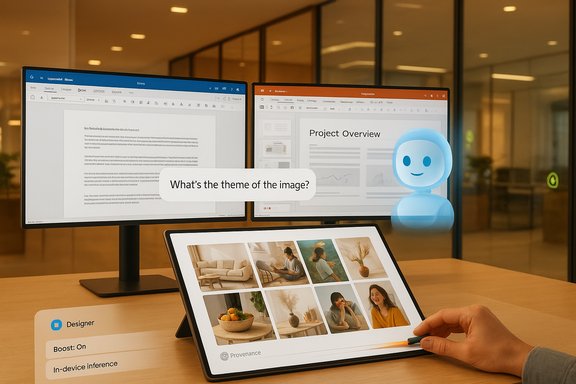
Microsoft’s “create confidently with AI” pitch for Copilot and Designer distills a simple idea: anyone can turn a brief sentence into a usable image, and Microsoft wants that first step to be fast, safe, and integrated into the apps people already use. The company positions Copilot as an approachable on‑ramp for novices while folding richer imaging tools into Microsoft Designer, the Photos app, and Office workflows—promising low friction, iterative control, and tight integration with Microsoft 365 when users need production readiness.
Creators should embrace Copilot as a powerful ideation and prototyping partner: maximize speed by iterating in the conversational loop, harden workflows by exporting and refining assets in established design tools, and manage legal risk by documenting provenance, choosing the appropriate subscription tier, and verifying current Microsoft terms before commercial use. With thoughtful guardrails and human judgment, Copilot and Designer deliver on the promise of accelerated creativity—but confident use depends on careful process, not just a single prompt.
Source: Microsoft Create Confidently with AI | Microsoft Copilot
 Background
Why Microsoft is pushing image generation into Copilot
Generative image tools have moved from research playgrounds into mass‑market productivity services. Microsoft’s strategy is pragmatic: embed image creation in authoring contexts (PowerPoint, Word, Photos, Paint) so visuals become part of everyday content creation. That approach reduces context switching—design work starts and finishes in the same place your document or slide lives—while offering a familiar conversational interface for iterative edits. Microsoft’s own guidance frames Copilot as a design companion that speeds ideation, generates multiple concept directions, and outputs images sized and formatted for immediate insertion into documents and presentations.The product surfaces: Designer, Image Creator, Copilot, and Paint
Microsoft exposes image generation through several overlapping surfaces:- Designer / Image Creator — the primary web and in‑app canvas for generating and editing images from text prompts, with a basic free tier and more capacity for paying users.
- Copilot (web, desktop, mobile) — the conversational hub that can generate or refine images conversationally and place them into Office content.
- Microsoft Photos and Paint (Cocreator) — context‑sensitive entry points where generative edits like Restyle, Generative Erase, and on‑device co‑creation live, especially on Copilot+ PCs with NPUs.
What’s under the hood: models, provenance, and recent shifts
From DALL·E 3 to in‑house MAI models
Historically, Microsoft integrated OpenAI’s imaging models (notably DALL·E 3) into Bing Image Creator and Designer, which shaped early Copilot imaging behavior and prompt syntax. However, Microsoft has been moving toward in‑house image models—collectively labeled MAI (Microsoft AI)—to gain tighter control over quality, latency, and safety. In 2025 Microsoft announced MAI‑Image‑1, a text‑to‑image model designed for photorealism, lighting fidelity, and fast inference, with plans to integrate it into Copilot and Bing/Image Creator surfaces. This shift toward proprietary models reflects a strategic push to control the entire stack and to tune models specifically for Microsoft workflows and safety systems.Provenance, metadata, and invisible watermarks
Microsoft has emphasized provenance—signals that identify an image as AI-generated. Product materials and community reporting note the use of invisible watermarking and metadata manifests (C2PA-style content credentials in some flows) to flag generated content, a capability intended to improve transparency and help platforms and consumers identify AI art. Provenance metadata also supports internal audit trails and enforcement of safety and copyright policies.Rapid model updates and public responsiveness
Embedding image models into high‑volume consumer surfaces is technically complex and socially sensitive. Microsoft’s product history over the last year shows rapid iteration—some successful, some controversial. A notable example: a December 2024 upgrade to a newer DALL·E version led to a wave of user complaints about reduced image fidelity and compositional errors; Microsoft acknowledged the issues and began rolling back changes to restore quality. That episode illustrates how subjective quality assessments can cause swift product reversions when a large user base reacts negatively.Practical features that matter to creators
Speed, boosts, and generation limits
Microsoft surfaces the concept of boosts—priority rendering tokens that give faster generation or higher throughput. Free tiers generally include a modest daily allotment of generation attempts, while paid subscriptions (Microsoft 365, Copilot Pro) expand quotas and priority. The boost model aims to balance free accessibility with premium throughput for power users. Community documentation and product pages note differences between free and paid experiences, including daily generation caps and turnaround time advantages for subscribers.Iterative edits and conversational refinement
A core UX win for Copilot is the conversational edit loop: generate an image, then ask Copilot to tweak “make the sky more golden” or “crop for a 16:9 slide” without leaving the chat. That reduces manual editing steps and lets non‑designers refine results quickly. Designer adds an in‑app editor for basic adjustments—resizing, color correction, text overlays—so many projects can be completed without a separate image editor.On‑device acceleration: Copilot+ PCs and NPUs
Microsoft markets a class of Copilot+ PCs with dedicated NPUs to accelerate on‑device generative operations like Cocreator in Paint and certain photo edits. On‑device inference reduces latency and can improve privacy for sensitive inputs, though many generation and safety checks remain cloud‑based. This hardware tier creates divergent experiences—fast local edits on modern silicon versus cloud-bound generation on older machines.How to get the best results: prompt and workflow guidance
Prompt craft: the short guide
- Be concise but specific: include subject, mood, lighting, camera style, and composition (e.g., “close‑up portrait of an elderly woodworker, warm tungsten lighting, shallow depth of field, documentary photo”).
- Add stylistic cues only when needed: art movement, lens type, or color palette. Too many style tags can confuse the model.
- Use iterations: generate a set, pick the best, then refine via conversational tweaks or in‑app edits.
A practical 3‑step workflow for designers
- Ideate: Ask Copilot for 8–12 quick mood images to explore directions.
- Narrow: Select top candidates and request focused refinements (composition, color, text).
- Polish: Export the chosen image and finalize in a vector or pixel editor for production (adjust color profiles, check print DPI).
Use cases where Copilot shines
- Pitch decks and hero images for presentations.
- Rapid mockups and campaign ideation.
- Classroom visual aids and small business marketing assets.
For production advertising, packaging, or large‑run print work, the common recommendation is: treat AI outputs as starting assets that require human-led quality control and rights clearance.
Rights, licensing, and legal caution — the messy center
Current state: ambiguity and evolving policies
The legal landscape for AI‑generated images remains unsettled. Microsoft’s public materials emphasize that it does not claim ownership of user prompts and creations in many contexts, but the exact scope of commercial rights can vary between product tiers and over time. Community threads, Microsoft Q&A entries, and product discussions have documented confusion: some Microsoft surfaces (historically) limited images to non‑commercial use, while others (or later updates) suggested broader rights for paid subscribers. Practical advice from community moderators and Microsoft support channels has been inconsistent, prompting many creators to treat commercial use as conditional on subscription level and current terms. This is an area where a creator must verify the service terms at the time of use.Copilot Copyright Commitment — what it claims
Microsoft has marketed a Copilot Copyright Commitment for commercial customers, offering defense against certain IP claims when customers follow Microsoft’s content filters and safety rules. The commitment covers a range of claims (copyright, patent, trademark, right of publicity) subject to conditions. However, the details and scope depend on contractual terms and often exclude willful misuse or content that violates safety filters. Always review the commitment text and contractual addenda before relying on it for high‑risk commercial projects.Best practices for commercial projects
- Document provenance: save prompts, intermediate variants, and generation metadata.
- Use paid tiers for commercial projects: companies and many creators prefer subscription tiers because terms are clearer and product commitments are stronger for paying customers.
- Human‑in‑the‑loop: overlay or significantly edit AI outputs to strengthen claims to originality and avoid potential third‑party style or likeness issues.
- Legal review: for high‑exposure uses (book covers, advertising, trademarks), consult legal counsel and confirm the current Microsoft terms for Copilot/Designer.
Safety, content policy, and governance
Built‑in safety controls
Microsoft runs safety filters at the API and UX level to block violent, pornographic, hate, or otherwise disallowed content. These filters are layered with human review signals, model‑level guardrails, and provenance metadata to reduce misuse. However, false positives and false negatives persist—sensitivity tuning is continuous—and some creative test cases can still slip through or be blocked incorrectly.Brand and bias risks
Generative models reflect training data biases. Designers using AI outputs for consumer‑facing materials should audit images for stereotyping, cultural insensitivity, or inaccurate depictions. Brands must enforce style systems, and teams should build QA checkpoints to catch problematic outputs before they go public.Real‑world limitations and known quality issues
Inconsistent hands, text, and fine detail
Even the best text‑to‑image models can struggle with hands, small text, and complex object interactions. Microsoft’s product guidance and community reports both stress that outputs are best used as foundations rather than final‑file deliverables in many professional contexts.Model rollbacks and subjective quality swings
As noted earlier, Microsoft’s December 2024 model upgrade (a DALL·E variant) produced user complaints about lower perceived quality and caused Microsoft to revert to an earlier version while fixes were made. This underscores the reality that model updates can reduce perceived quality for some users, and that continuous validation with real creator workflows is essential prior to broad rollouts. Teams relying on these tools must plan for such variability.Integration with Windows workflows and enterprise adoption
Copilot inside Microsoft 365
Copilot’s advantage is contextual productivity integration. Designers can call up Copilot from Office apps and generate a tailored hero image for a slide, a themed masthead for a report, or an email header—without copying files across separate apps. For enterprises already centered on Microsoft 365, the time‑to‑value is compelling, especially where consistent workflows and compliance controls are required.Enterprise governance and admin controls
Enterprise admins can leverage tenant controls, data residency settings, and content policy enforcement to reduce risk when employees use Copilot and Designer. For regulated industries, organizations should coordinate legal, security, and procurement teams to define allowed use cases and subscription entitlements.Risks, caveats, and recommended guardrails
- Do not assume perpetual or universal commercial rights. Terms can change; verify the Microsoft terms of service at time of use.
- Preserve prompts and metadata. Keep a record of prompts and the generation context in case provenance or licensing questions arise later.
- Treat AI images as production drafts. Always perform human review for brand alignment, legal exposure, and print specs.
- Use watermarks for early sharing. When circulating drafts publicly, consider watermarking to reduce unauthorized reuse and to be transparent about AI involvement.
Conclusion: practical judgement over hype
Microsoft’s “create confidently with AI” message is a useful framing: the company has built approachable entry points, conversational editing, and growing model capabilities into Copilot and Designer so non‑specialists can generate images quickly. For everyday tasks—mood boards, slide hero images, social posts—these tools deliver real time savings and creative velocity. However, the technology is not a turnkey replacement for human craft or legal due diligence. Model quality fluctuates with upgrades, licensing language remains a moving target, and domain‑specific needs (brand consistency, print quality, trademark clearance) still require experienced human oversight.Creators should embrace Copilot as a powerful ideation and prototyping partner: maximize speed by iterating in the conversational loop, harden workflows by exporting and refining assets in established design tools, and manage legal risk by documenting provenance, choosing the appropriate subscription tier, and verifying current Microsoft terms before commercial use. With thoughtful guardrails and human judgment, Copilot and Designer deliver on the promise of accelerated creativity—but confident use depends on careful process, not just a single prompt.
Source: Microsoft Create Confidently with AI | Microsoft Copilot
