

Microsoft’s public mapping for CVE-2024-30204 correctly calls out that Azure Linux includes the affected Emacs component and is therefore potentially affected, but that statement answers only which Microsoft product Microsoft has inventory-checked and declared as a carrier so far — it is not a categorical guarantee that no other Microsoft product or artifact might also include Emacs and therefore be exposed.
CVE-2024-30204 is a low-to-medium severity vulnerability in GNU Emacs: in Emacs releases prior to 29.3, LaTeX preview for e‑mail attachments was enabled by default, creating a risk where specially crafted Org/LaTeX content in mail attachments could be processed in a way that results in undesirable resource usage or other downstream consequences. The issue was publicly recorded in March 2024 and has been tracked and remediated upstream in the Emacs 29.3 release.
Across Linux distributions and vendors, the practical impact of this vulnerability varies: some vendors classified it as low (NVD/Ubuntu scoring), while other trackers assigned a medium severity and described the risk more practically (disk exhaustion, large PDF/log output leading to availability problems). Multiple distribution maintainers (Debian, Ubuntu, SUSE, Amazon Linux) published advisories and patches to either upgrade Emacs or alter the default behavior so that LaTeX preview is disabled for email attachments by default.
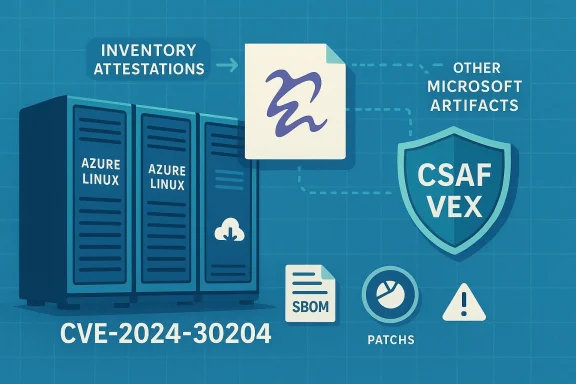
For CVE-2024-30204, Microsoft’s public mapping identifies Azure Linux (the Microsoft-maintained Linux distribution derived from CBL-Mariner) as a product that includes Emacs and hence is potentially affected. That mapping is authoritative for Azure Linux — i.e., Microsoft has inventory-checked Azure Linux and published that product-level status via its CSAF/VEX outputs. You can see that inventory mapping in Microsoft’s VEX-style output that lists Emacs as a component of Azure Linux.
However, it is critical to understand the precise semantics of this statement:
Why that distinction matters:
That said, defenders should be aware of the operational limitations and potential risks of interpreting a single attestation too quickly:
Action checklist (short):
Source: MSRC Security Update Guide - Microsoft Security Response Center
 Background / Overview
CVE-2024-30204 is a low-to-medium severity vulnerability in GNU Emacs: in Emacs releases prior to 29.3, LaTeX preview for e‑mail attachments was enabled by default, creating a risk where specially crafted Org/LaTeX content in mail attachments could be processed in a way that results in undesirable resource usage or other downstream consequences. The issue was publicly recorded in March 2024 and has been tracked and remediated upstream in the Emacs 29.3 release.Across Linux distributions and vendors, the practical impact of this vulnerability varies: some vendors classified it as low (NVD/Ubuntu scoring), while other trackers assigned a medium severity and described the risk more practically (disk exhaustion, large PDF/log output leading to availability problems). Multiple distribution maintainers (Debian, Ubuntu, SUSE, Amazon Linux) published advisories and patches to either upgrade Emacs or alter the default behavior so that LaTeX preview is disabled for email attachments by default.
What Microsoft said — and what that actually means
Microsoft’s security guidance for many upstream open-source CVEs has recently shifted toward machine-readable attestation (CSAF / VEX) that maps vulnerable upstream components to specific Microsoft products. The MSRC team published its commitment to machine-readable advisories late in 2024, and Microsoft’s practice since has been to publish product-scoped VEX/CSAF attestations that say, in plain language, which Microsoft-managed product is known to include a given open-source component.For CVE-2024-30204, Microsoft’s public mapping identifies Azure Linux (the Microsoft-maintained Linux distribution derived from CBL-Mariner) as a product that includes Emacs and hence is potentially affected. That mapping is authoritative for Azure Linux — i.e., Microsoft has inventory-checked Azure Linux and published that product-level status via its CSAF/VEX outputs. You can see that inventory mapping in Microsoft’s VEX-style output that lists Emacs as a component of Azure Linux.
However, it is critical to understand the precise semantics of this statement:
- Microsoft’s wording — “Azure Linux includes this open-source library and is therefore potentially affected” — is an inventory attestation, not a universal impact sweep across Microsoft’s entire product portfolio.
- An attestation naming one product is evidence that the vendor has found the component in that product, not proof that the component does not exist in other Microsoft products, services, or images. Absence of a public attestation does not equal absence## Is Azure Linux the only Microsoft product that includes Emacs?
Why that distinction matters:
- Microsoft’s published VEX/CSAF output is useful and actionable: it tells customers which Microsoft-managed product images you can treat as known carriers (so owners/operators can prioritize patching or mitigations).
- But the Microsoft ecosystem is large and heterogeneous: there are many Microsoft artifacts that can, in practice, carry the same upstream packages that appear in a distro — for example:
- WSL distribution images and WSL-enabled machines
- Azure Marketplace VM images
- Container base images and marketplace container artifacts
- Internal build images and developer tooling images used in CI runners
- Service-side binaries (less common for Emacs, but other components can be embedded)
- Any of those artifacts could include Emacs (or a copy of it) if Microsoft or a partner packaged that component into the image or product — and unless Microsoft has explicitly inventory-scanned and declared that product’s status in CSAF/VEX, defenders must consider the possibility of exposure until verified otherwise.
Independent corroboration and vendor responses
Multiple independent trackers and Linux distributors confirmed the Emacs problem and the relevant vendor patches:- The NVD entry for CVE-2024-30204 succinctly records the Emacs default-LaTeX-preview issue.
- Debian, Ubuntu, SUSE, and Amazon Linux all produced advisories or patches that either upgrade Emacs or disable risky defaults for email LaTeX preview in their packaged Emacs versions. Those advisories demonstrate how distributions treated the issue and the practical mitigations applied.
- The AWS ALAS listing and multiple vendor trackers also list affected versions and distribution-level fixes, which helps defenders map where and when fix releases appeared.
Practical guidance for defenders (what to do now)
If you are responsible for Microsoft-managed images, Azure workloads, or an environment that runs Microsoft-supplied artifacts, follow these concrete steps to determine exposure and reduce risk:- Inventory Microsoft artifacts you run:
- Check which Azure VM images, Azure Marketplace images, WSL distributions, container base images, and automation/CI images are deployed in your environment.
- Query package lists inside images for “emacs” (or search installed package registries / SBOM exports).
- Consult Microsoft’s VEX/CSAF mappings first:
- Where Microsoft has published product mappings (for example, Azure Linux), treat those products as known carriers and follow Microsoft remediation guidance for those images.
- Consult distribution advisories and patch the package where present:
- If your image’s Emacs package is older than 29.3, upgrade to the vendor-supplied patched package or Emacs 29.3+.
- If a vendor patch is not available, take mitigation steps (see below).
- Confirm patch application via image rebuilds and SBOM verification (or repeated package scans).
- Apply immediate mitigations while you patch:
- Disable automatic LaTeX preview for email attachments and treat inline MIME as untrusted in mail clients that reuse Emacs libraries (Gnus, notmuch, mu4e, etc.).
- For Emacs-derived mitigations, verify that the default now disables LaTeX preview for e‑mail attachments in fixed builds; upstream documented that Emacs 29.3 sets the safer defaults.
- Harden image builders and CI:
- Scan your build images and CI runner images for Emacs packages and ensure they are upgraded or removed.
- If you build your own distribution images, update the build recipe to pull a patched Emacs or remove the auctex/preview modules if not required.
- Monitor and automate:
- Subscribe to vendor advisories (MSRC, distribution security trackers) and implement an automated pipeline to cross-check VEX/CSAF statements against your inventory.
- Where available, use SBOMs and package inventory APIs in cloud providers to automate detection.
Recommended configuration and immediate mitigations for Emacs users
If you run Emacs or Emacs-based mail clients, adopt the following immediate actions until you can patch:- Upgrade to Emacs 29.3 or your distribution’s patched Emacs package as the priority mitigation.
- If you cannot immediately upgrade, disable LaTeX preview for e‑mail attachments and configure GNUS or your Emacs mail modes to treat inline MIME as untrusted. Upstream Emacs 29.3 also introduced a buffer-level variable and safer defaults to reduce risk.
- For transient hardening, consider removing or disabling the AUCTeX/latex-preview modules in your Emacs configuration if you do not require LaTeX preview in mail.
- Audit any mail-processing or automation that might process Org/LaTeX attachments in an automated context (scripts, bots, CI) and sandbox or rule them out.
Strengths and limits of Microsoft’s attestation approach — critical analysis
Microsoft’s move to publish CSAF/VEX-style product attestations is an important positive step for supply-chain transparency and customer automation. Publishing machine-readable status for specific CVEs and product mappings helps customers automate triage and prioritize patches for products Microsoft has scanned and declared affectble improvement over earlier, opaque advisories.That said, defenders should be aware of the operational limitations and potential risks of interpreting a single attestation too quickly:
- Product-scoped attestation is conservative by design: it tells you where Microsoft has found an affected component, not where it has not. Organizations must not treat the absence of a claim as a guarantee of non‑exposure. Over-reliance on a single attestation can create blind spots if other artifacts were not inventoried.
- Complex ecosystems increase risk: Microsoft ships kernels, container images, WSL distributions, appliance images, and marketplace artifacts — any of which can, in principle, carry upstream packages. An attestation for the Azure Linux distro does not automatically apply to those other artifacts, but it does raise the prior probability that similar images could carry the same package until verified.
- Timing and cadence matter: Microsoft’s VEX/CSAF inventory is continuously updated. A product may be declared affected today and additional products added later if discovered. Conversely, Microsoft may later declare other products not affected once an inventory check confirms the component is absent. Attackers and defenders both monitor these updates; defenders need automation to respond quickly.
How to validate whether other Microsoft products you use are impacted
If you need to determine concretely whether any other Microsoft-managed artifact in your environment includes Emacs, follow this workflow:- Collect SBOMs and installed-package inventories:
- From VMs: run the distro’s package manager query (e.g., dpkg -l / rpm -qa) inside images.
- From containers: run package queries inside container images or inspect image manifests and layer contents.
- From WSL: query the WSL distro’s package lists.
- Cross-check Microsoft CSAF/VEX outputs:
- Find the MSRC machine-readable "VEX" (CSAF) file for the CVE and see which Microsoft products are listed as “known affected” or “not affected.” If a product is not listed, it remains either not-checked or not-affected — you must verify via inventory. ([cve.circl.lu] package repositories:
- Microsoft’s packages servers (for CBL-Mariner/Azure Linux packages) and Azure Marketplace image manifests can show package lists for specific images and versions; compare these to your in-use images. (Where direct SBOMs are not available, you can launch a minimal container/VM from the same image and inspect package lists.)
- Escalate to vendor support if inventory is unclear:
- If you find Emacs or Emacs subcomponents and cannot determine if they are vulnerable, open a ticket with Microsoft support (or the image vendor) to request confirmation and recommended remediation steps.
- Automate: integrate these checks into vulnerability management and CI pipelines so future VEX/CSAF updates trigger re-evaluation.
Conclusion
Microsoft’s public attestation that Azure Linux includes the Emacs component implicated by CVE‑2024‑30204 is accurate and useful: it tells customers which Microsoft product the vendor has scanned and found to carry the vulnerable upstream code. However, Azure Linux being listed does not prove that no other Microsoft product includes the same open-source component. In practice, defenders must assume possible exposure in any Microsoft image, marketplace artifact, or service that runs Linux-based images until inventory checks (SBOMs, package queries, or VEX/CSAF mappings) confirm otherwise.Action checklist (short):
- Treat Azure Linux images that you run as known carriers and apply the vendor-supplied Emacs update or mitigations immediately.
- Inventory other Microsoft artifacts (WSL, Azure Marketplace images, containers) and search for Emacs; patch or disable risky features if present.
- Apply immediate mitigations (disable LaTeX preview for mail attachments, treat inline MIME as untrusted) if you cannot upgrade at once.
- Automate detection by integrating CSAF/VEX feeds and SBOM/package scanning into your vulnerability management pipeline.
Source: MSRC Security Update Guide - Microsoft Security Response Center
