

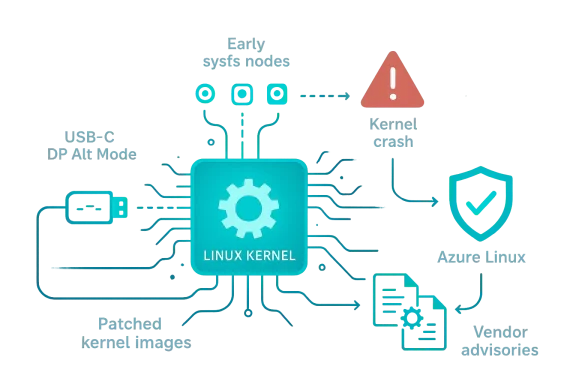
The Linux kernel change tracked as CVE-2024-35790 fixes a race/initialization bug in the USB Type‑C DisplayPort alternate‑mode driver that could allow a local user to trigger a kernel NULL‑pointer dereference (kernel crash/DoS) by reading sysfs attributes before the driver has finished initializing; Microsoft’s public advisory names Azure Linux as a product that “includes this open‑source library and is therefore potentially affected,” but that product‑level attestation is not a categorical guarantee that no other Microsoft product can or does include the same vulnerable code.
CVE‑2024‑35790 is a Linux kernel vulnerability introduced by the way the DisplayPort alternate‑mode (dp_altmode) driver exposed sysfs attributes. Specifically, the driver created sysfs nodes manually such that they could become visible to userspace before typec_altmode_set_drvdata() had stored the driver’s per‑device data pointer; a userspace read of attributes like hpd_show or pin_assignment_show could therefore dereference dp->hpd or dp->lock while dev_get_drvdata() still returned NULL, producing a NULL pointer dereference in kernel space. The upstream fix removes the manual sysfs creation and instead registers the attribute group as the driver’s default device attribute group so attributes become visible only after driver data is in place.
Why this matters in practice: a NULL pointer dereference in kernel code usually results in a kernel oops or panic — in other words, loss of availability for the affected host. The vulnerability is classified as local (exploitation requires the attacker to have local access or the ability to run code on the target machine) and has a mid‑range severity in public trackers (CVSS v3.1 Base Score ~5.5 in available analyses). The immediate security impact is therefore denial‑of‑service rather than remote code execution.
Important nuance to understand:
Why this matters to you as an administrator or defender:
For immediate remediation, prioritize patched Azure Linux images or kernel packages from Microsoft, verify WSL and Azure image kernels in your estate, and request SBOM/VEX attestations for any Microsoft‑supplied appliance or image that cannot be trivially confirmed. If you need help mapping a particular image, WSL kernel binary, or Marketplace artifact to the upstream fix commit, perform a kernel build/commit inspection or ask the vendor for the exact SBOM entry — that is the only way to move from “potentially affected” to “confirmed fixed” with confidence.
Acknowledgment: This analysis cross‑references vendor advisories and CVE aggregators for the technical description and remediation approach, and it interprets Microsoft’s product attestation language in the context of modern vendor VEX/CSAF practices. Where Microsoft has published a product attestation, that attestation has been treated as authoritative for the named product; where broader product coverage is unknown, the article calls for artifact‑level verification and conservative operational practice.
Source: MSRC Security Update Guide - Microsoft Security Response Center
 Background / Overview
CVE‑2024‑35790 is a Linux kernel vulnerability introduced by the way the DisplayPort alternate‑mode (dp_altmode) driver exposed sysfs attributes. Specifically, the driver created sysfs nodes manually such that they could become visible to userspace before typec_altmode_set_drvdata() had stored the driver’s per‑device data pointer; a userspace read of attributes like hpd_show or pin_assignment_show could therefore dereference dp->hpd or dp->lock while dev_get_drvdata() still returned NULL, producing a NULL pointer dereference in kernel space. The upstream fix removes the manual sysfs creation and instead registers the attribute group as the driver’s default device attribute group so attributes become visible only after driver data is in place.Why this matters in practice: a NULL pointer dereference in kernel code usually results in a kernel oops or panic — in other words, loss of availability for the affected host. The vulnerability is classified as local (exploitation requires the attacker to have local access or the ability to run code on the target machine) and has a mid‑range severity in public trackers (CVSS v3.1 Base Score ~5.5 in available analyses). The immediate security impact is therefore denial‑of‑service rather than remote code execution.
Affected kernel range and the upstream fix
Public trackers and vendor advisories indicate the defect was addressed upstream in the Linux kernel tree soon after disclosure in May 2024. Multiple CVE aggregators and vendor security pages summarize the fix and the mitigation approach (move from manual sysfs node creation to registering attribute groups via the standard macros). For practical triage, the important operational facts are:- The bug lives in the Type‑C DisplayPort altmode path of the kernel (drivers that handle USB‑C altmode / DisplayPort binding).
- The upstream remedy was to stop creating sysfs nodes early and use the device attribute group API so sysfs attributes are created only after driver state initialization.
- Vendor advisories (Red Hat, Amazon Linux, and others) surfaced the CVE and rolled fixes, confirming the change was merged and backported into distribution kernels per vendor policy.
What Microsoft actually published (and how to read it)
Microsoft’s Security Response Center (MSRC) entry mapped the upstream component to the Azure Linux product and included a short FAQ line: “Azure Linux includes this open‑source library and is therefore potentially affected.” Microsoft also announced a broader plan to publish CSAF/VEX machine‑readable attestations beginning October 2025 and committed to updating CVE records if additional Microsoft products are later found to ship the same upstream component. That wording is deliberate: it is an authoritative, product‑scoped inventory statement for Azure Linux rather than an exclusivity guarantee for the entire Microsoft product portfolio.Important nuance to understand:
- Attestation = inventory statement for a product. When Microsoft says a named product “includes” a component, that confirms they have inspected that product’s artifacts and found the upstream code mapped to the CVE. For Azure Linux, that is a high‑fidelity, actionable signal for customers who run Azure Linux images: they should prioritize applying the updated kernel/packages Microsoft identifies.
- Not an exclusivity claim. Microsoft’s advisory does not prove that no other Microsoft product includes the same upstream code. Microsoft distributes and maintains multiple independent Linux kernel artifacts across product lines (for example: Azure‑tuned kernels used on Azure VMs, the Microsoft WSL2 kernel, and other image families). Each artifact is built and packaged separately; presence or absence of a specific upstream driver is a per‑artifact, per‑build property. Until Microsoft publishes additional product attestations (or you perform artifact‑level inspection), other Microsoft products remain potential carriers.
Is Azure Linux the only Microsoft product that includes the library and is therefore potentially affected?
Short answer: No — not necessarily. Azure Linux is the only Microsoft product Microsoft has publicly attested (so far) to include the upstream component referenced by CVE‑2024‑35790, but that attestation is a product‑scoped inventory result rather than proof of exclusivity across all Microsoft artifacts. In operational terms, treat the MSRC statement as authoritative and immediate for Azure Linux, but do not assume other Microsoft‑supplied kernels or images are automatically safe.Why this matters to you as an administrator or defender:
- Microsoft maintains multiple kernel artifacts that could carry the same code. The public WSL2 kernel source is one concrete example: Microsoft publishes the WSL2 kernel source and ships WSL kernel binaries that are updated and distributed independently of Windows releases. If the WSL kernel build in your environment contains the affected dp_altmode code and is built from an unpatched upstream base, it can be vulnerable.
- Azure images and the “linux‑azure” kernel track are another example. Cloud vendors and distribution maintainers frequently publish Azure‑tuned kernel builds (linux‑azure) used in Marketplace or platform images. Those kernels are separate artifacts and must be inventoried individually. Canonical’s linux‑azure packages and security notices illustrate that Azure‑targeted kernels are tracked and updated as a family — and they are the precise carrier surface Microsoft’s Azure Linux attestation is intended to signal.
- Other Microsoft‑published images (Marketplace appliances, AKS node images, container host images) may reference separate kernel packages or rely on vendor kernels. Each image must be assessed on its own merits — the presence of a vulnerability depends on kernel version, configuration (which drivers/modules were compiled in), and any vendor backports applied.
How to verify whether a specific Microsoft artifact you run is affected
This is an artifact‑level exercise. Do the following checks for any Microsoft‑distributed or Microsoft‑curated Linux kernel image you run (Azure VM images, WSL2 instances, AKS node images, Marketplace appliances, edge appliances, etc.):- Identify the kernel binary and version:
- uname -r on the running system (or inspect the kernel image package metadata).
- For WSL2, inspect the WSL kernel version and consider whether you are using the Microsoft‑published kernel or a custom kernel.
- Confirm whether the kernel build includes the DisplayPort altmode driver:
- Check whether drivers/usb/typec/altmodes or drivers/gpu/drm/… (the dp_altmode path) exist in the kernel build or module list. On a running system, check lsmod and modinfo or the installed modules directory. If the driver is not present, that kernel may not be vulnerable.
- Map the installed kernel to upstream commits:
- If available, consult the vendor’s package changelog or SBOM/VEX/CSAF entry to find the upstream commit or the vendor patch that references the CVE. Microsoft’s VEX/CSAF attestations (when present) will make this mapping explicit for the Azure Linux artifacts they have examined.
- If you cannot determine presence from metadata, perform a binary or source inspection:
- Compare the kernel image against vendor patches, or use git bisect / source inspection against the upstream kernel to check whether the fix commit is present.
- Vendors often provide fixed package versions; applying vendor security updates and rebooting remains the simplest remedial path.
- Use vendor advisories and SBOM/VEX feeds:
- If Microsoft or your distribution vendor provides a CSAF/VEX attestation or an SBOM for the image in question, use that canonical mapping. Microsoft has committed to expanding VEX coverage over time; check MSRC/CVE records for updates.
Practical guidance and recommended actions
For organizations that run Azure Linux images, Microsoft’s attestation makes the operational decision straightforward: treat Azure Linux kernels as in‑scope and apply the relevant kernel updates or patched Azure Linux images as Microsoft publishes them. For other Microsoft‑supplied artifacts, take a conservative, evidence‑driven approach:- If you run WSL/WSL2 in your environment:
- Check the WSL kernel version (uname -r inside the WSL instance) and update WSL via Microsoft’s recommended channels (Windows Update/WSL update flow) if a vulnerable kernel is present. Microsoft’s WSL kernel source is public; verify whether your WSL kernel version includes the upstream fix.
- If you run Azure VMs (Marketplace or custom images):
- Identify the kernel package used by the VM image (linux‑azure, vendor kernel, etc.) and confirm whether the image provider has released a patched image or package. Apply vendor/kernel updates and reboot as required. Canonical’s linux‑azure notices demonstrate that Azure‑targeted kernels are tracked and updated.
- If you operate AKS node pools or cloud scale sets:
- Verify the node image’s kernel version and whether the node OS vendor or Microsoft has published a patched image. For managed node images, coordinate with the cloud image update process and schedule reboots where necessary.
- For all other Microsoft‑distributed kernels or appliances:
- Request SBOM/VEX or kernel package metadata from the vendor or Microsoft if the artifact is critical to your environment. When a public attestation exists (as with Azure Linux), use it; otherwise, perform the artifact inspection steps listed above.
- General mitigations while you triage:
- Restrict who can access accounts/containers that grant local execution rights.
- Harden host access controls and minimize unnecessary local user accounts.
- Monitor for kernel oops/panic logs and unusual reboots that might indicate local abuse.
Analysis: strengths, shortcomings, and supply‑chain implications
Strengths in Microsoft’s approach
- Product‑scoped transparency: Microsoft’s decision to publish CSAF/VEX attestations and to state explicitly which products include a mapped upstream component is operationally useful. It gives Azure Linux customers a high‑confidence signal and machine‑readable outputs for automation. This targeted transparency reduces ambiguity for at least one major product family.
- Commitment to update mappings: Microsoft’s promise to update CVE/VEX mappings if additional products are found to include the component is a sensible operational model — it recognizes that inventory work is phased and that a single attestation is not a complete, instantaneous sweep across a large vendor’s product set.
Risks and limitations
- Attestation does not equal exhaustiveness. The central risk is misunderstanding: many operators will see “Azure Linux includes this open‑source library” and assume the message implicitly means “no other Microsoft product is affected.” That inference is incorrect. Because Microsoft ships Linux kernels and kernel‑based artifacts in multiple places, the same upstream code can appear in other product images. Until Microsoft expands attestations or customers perform per‑artifact checks, the practical risk remains: unattested Microsoft artifacts are not proven safe.
- Per‑artifact variability makes automation hard. Kernel inclusion depends on version, configuration flags (CONFIG_*), and backports. That complexity means defenders must either rely on vendor SBOM/VEX feeds or run artifact inspection tools at scale. Until broad, consistent SBOM coverage exists for all Microsoft kernel artifacts, manual triage will remain necessary for many organizations.
- Communications timing and cadence. Because vendors publish attestations on a phased schedule, there is a window between upstream disclosure, vendor inventory, and attestation publication where customers must act from best evidence. Microsoft’s explicit commitment to update VEX entries helps, but customers should not wait for universal attestations before taking defensive action where they run Microsoft kernels.
Quick reference checklist for security teams
- For Azure Linux images: treat Microsoft’s attestation as authoritative; apply the Microsoft/patch/package update and reboot according to your maintenance windows.
- For WSL2: check uname -r inside WSL; if the WSL kernel is an affected version or lacks the upstream fix, update WSL or manually replace the kernel per Microsoft guidance.
- For Azure VMs and Marketplace images: identify whether images use linux‑azure or vendor kernels; follow vendor advisories and apply patched images or kernel package updates.
- For appliances and edge images obtained from Microsoft or partners: request SBOM/VEX mappings or perform binary inspection to confirm presence/absence of the DisplayPort altmode driver and the upstream commit state.
- Logging and monitoring: alert on kernel panics/oops timestamps, pro‑actively scan hosts for kernel versions, and block unnecessary local access that could enable exploitation attempts.
Final assessment
Microsoft’s public statement that “Azure Linux includes this open‑source library and is therefore potentially affected” is accurate and useful — it gives Azure Linux operators a clear, machine‑readable signal to act on. However, that attestation is product‑scoped and intentionally limited in scope; it is not a technical guarantee that no other Microsoft product includes the vulnerable Type‑C DisplayPort altmode code. Microsoft distributes Linux kernels and kernel artifacts in other contexts (notably WSL2 and Azure‑tuned kernel images), and those artifacts should be verified individually until Microsoft expands its CSAF/VEX mappings or publishes additional attestations. Operational defenders should therefore treat the MSRC Azure Linux attestation as a high‑priority, authoritative signal for Azure Linux while simultaneously scanning and verifying other Microsoft kernel artifacts in their environment.For immediate remediation, prioritize patched Azure Linux images or kernel packages from Microsoft, verify WSL and Azure image kernels in your estate, and request SBOM/VEX attestations for any Microsoft‑supplied appliance or image that cannot be trivially confirmed. If you need help mapping a particular image, WSL kernel binary, or Marketplace artifact to the upstream fix commit, perform a kernel build/commit inspection or ask the vendor for the exact SBOM entry — that is the only way to move from “potentially affected” to “confirmed fixed” with confidence.
Acknowledgment: This analysis cross‑references vendor advisories and CVE aggregators for the technical description and remediation approach, and it interprets Microsoft’s product attestation language in the context of modern vendor VEX/CSAF practices. Where Microsoft has published a product attestation, that attestation has been treated as authoritative for the named product; where broader product coverage is unknown, the article calls for artifact‑level verification and conservative operational practice.
Source: MSRC Security Update Guide - Microsoft Security Response Center
