

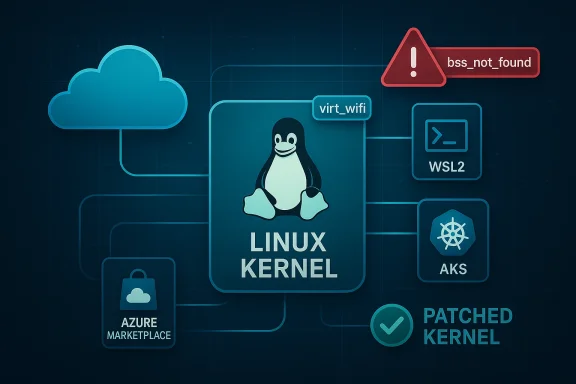
A deceptively small bug in the Linux kernel’s virtual Wi‑Fi driver — tracked as CVE‑2024‑43841 — has prompted an important question from customers: when Microsoft’s update guide states that “Azure Linux includes this open‑source library and is therefore potentially affected,” does that mean Azure Linux is the only Microsoft product that can carry the vulnerable code? The short, operationally useful answer is: Azure Linux is the only Microsoft product Microsoft has publicly attested to include the affected upstream component so far, but that attestation is a scoped inventory statement, not a technical guarantee of exclusivity. Other Microsoft‑distributed artifacts that ship a Linux kernel (WSL2 kernels, linux‑azure kernels used in Azure VM images, Marketplace images, managed node images, and other kernel‑containing artifacts) can — depending on kernel version and build configuration — include the same virt_wifi code and therefore must be verified at the artifact level.
This feature unpacks the technical details of CVE‑2024‑43841, explains exactly what Microsoft’s attestation language means, describes which Microsoft artifacts are plausible carriers, lays out practical detection and mitigation steps for administrators, and provides a prioritized checklist you can run across your estate today.
Put plainly: the driver could report a successful connection for the wrong SSID, creating false‑positive connection state and triggering kernel warnings. The issue was corrected upstream by adding an explicit SSID check in the virt_wifi connection path.
Source: MSRC Security Update Guide - Microsoft Security Response Center
This feature unpacks the technical details of CVE‑2024‑43841, explains exactly what Microsoft’s attestation language means, describes which Microsoft artifacts are plausible carriers, lays out practical detection and mitigation steps for administrators, and provides a prioritized checklist you can run across your estate today.
 Background / Overview
What is CVE‑2024‑43841 (the virt_wifi SSID bug)?
CVE‑2024‑43841 is a bug in the Linux kernel’s virt_wifi module — a virtual Wi‑Fi driver used primarily for testing and virtualization scenarios. The root cause is simple and narrowly scoped: when a user space process requests a connection, virt_wifi validated the target by BSSID only and omitted checking the SSID supplied from user space. As a result, virt_wifi could call the kernel’s connection result routine with a success code even when the requested SSID did not match the driver’s advertised SSID. The mismatch then causes the cfg80211 layer to emit a WARN_ON(bss_not_found) because it cannot locate the expected BSS entry.Put plainly: the driver could report a successful connection for the wrong SSID, creating false‑positive connection state and triggering kernel warnings. The issue was corrected upstream by adding an explicit SSID check in the virt_wifi connection path.
Severity and impact — what to expect
- The vulnerability’s impact is low in most operational contexts. It does not manifest as a remote code execution or direct data disclosure in the upstream description.
- The real operational effects are inaccurate connection state reporting, kernel WARNs, and potential disruption to workflows that rely on accurate virtual Wi‑Fi behavior (for example, testing or simulation environments).
- In some multi‑tenant or automated cloud environments, repeated kernel WARNs or unexpected state changes can cascade into service instability, watchdog reboots, or alert storms — so the practical consequence is environment dependent.
Which kernel releases were affected (operationally)?
Upstream maintainers integrated the fix into the stable kernel trees. Distribution and vendor security advisories later mapped which packaged kernels included the vulnerable code and which package versions contain the fix. Because distributors ship different kernel branches and backport security fixes at different paces, the canonical operational guidance is to treat the kernel supplied by your distribution or image as the authoritative artifact and apply the distribution’s security update as soon as it’s marked fixed.What Microsoft actually said — and what that language means
When Microsoft’s Security Response Center (MSRC) entry for a CVE states that “Azure Linux includes this open‑source library and is therefore potentially affected,” that sentence is an attestation of what Microsoft inspected and mapped for that product. The key points to understand about that wording:- It is an authoritative product‑level inventory statement for Azure Linux — it confirms Microsoft has scanned Azure Linux build artifacts (kernels, packages) and found the implicated upstream component mapped to the CVE.
- It is not an implicit claim that no other Microsoft product includes the same upstream code. The wording is intentionally scoped: Microsoft began publishing machine‑readable CSAF/VEX attestations (a transparency feature) and has indicated it will update mappings if additional Microsoft products are identified as carriers.
- Absence of a Microsoft attestation for a different product is not proof of absence. It simply means Microsoft has not (yet) publicly mapped that product to the vulnerability.
Why other Microsoft products might also include the vulnerable code
From a technical standpoint the virt_wifi driver lives in the upstream Linux kernel tree. Any Microsoft product or artifact that ships a Linux kernel build compiled from a vulnerable upstream range and with the virt_wifi module enabled could carry the same bug. Plausible Microsoft artifacts that can contain kernels include:- WSL2 (Windows Subsystem for Linux): Microsoft distributes a WSL2 kernel binary and also publishes kernel sources for WSL. Whether a particular WSL kernel includes virt_wifi depends entirely on the kernel version and configuration used in that WSL build.
- linux‑azure kernels: kernel packages used for Azure guest images can differ from Azure Linux; these kernel builds are separately packaged and used in many VM SKUs and managed images.
- Azure Marketplace images: images published to the Marketplace (whether by Microsoft or partners) embed kernel packages chosen by the image publisher; those images must be checked individually.
- AKS/managed node images and other managed appliances: managed services that run Linux node images or appliances may use kernels derived from different trees.
- CBL‑Mariner lineage and other Microsoft Linux distributions: previous and related Microsoft Linux artifacts may share upstream commits or drivers with Azure Linux.
- Custom kernels used by Docker Desktop, developer images, or other hybrid tools distributed by Microsoft or included in its products.
Practical detection: how to verify whether your images, VMs, or devices include virt_wifi
Below are concrete, repeatable checks you can run in each environment. These are prioritized: start with Azure Linux images (since Microsoft has attested those), then examine WSL2, then cloud images and appliances.1) Azure VMs and Linux servers (general)
- Identify the running kernel:
- uname -r
- cat /proc/version
- Check for the virt_wifi module or driver strings in installed modules:
- sudo lsmod | grep virt_wifi
- sudo modinfo virt_wifi 2>/dev/null || echo "virt_wifi module not present"
- Search the installed modules directory:
- ls -R /lib/modules/$(uname -r) | grep -i virt_wifi
- Inspect dmesg and syslog for the specific kernel warning:
- sudo dmesg | grep -i 'bss_not_found|WARN_ON'
- sudo journalctl -k | grep -i 'bss_not_found|virt_wifi'
- Confirm kernel package version and consult your distro’s security advisory to see whether that package contains the upstream fix.
2) WSL2 instances
- From a WSL shell:
- uname -r
- cat /proc/version
- If you see a kernel release containing the string “-microsoft-standard‑WSL2”, you are running the Microsoft‑distributed WSL kernel; update it with:
- Run an elevated PowerShell and execute: wsl --update ; then wsl --shutdown and restart your WSL distro.
- Inside the WSL distribution, run the same module checks as above (lsmod, modinfo). Note that WSL kernels are provided by Microsoft, and a WSL kernel update may be required to incorporate upstream fixes.
3) Azure Marketplace images, managed node images, and AKS nodes
- For images in your subscription:
- Boot a test VM from the image, run uname -r and module presence checks.
- For AKS or managed node pools, examine node kernel versions and images:
- kubectl get nodes -o wide (to identify node OS and kernel)
- ssh to a node (if permitted) and run uname -r and the module checks.
- For Marketplace images provided by third parties, ask the publisher for SBOM or kernel build details; don’t assume “Marketplace = safe.”
4) CI, test environments, and virtual test harnesses
- Because virt_wifi is commonly used in test and simulation contexts, ensure your CI images and test VMs are patched and that any test harnesses that rely on virt_wifi are validated post‑patch.
How to prioritize and remediate
- Prioritize affected systems where virt_wifi is present and where the kernel version matches the vulnerable range or where Microsoft has attested exposure (Azure Linux).
- Patch the kernel using your distribution’s security updates. Where vendors have released fixed kernel packages, apply those packages and reboot into the updated kernel.
- For WSL2, run an elevated wsl --update followed by wsl --shutdown and restart your WSL distributions; verify uname -r inside the WSL session afterward.
- For images in Azure Marketplace or custom images, rebuild images with patched kernel packages and redeploy.
- If you cannot patch immediately, mitigate by reducing the attack surface:
- Restrict local unprivileged access to systems that could trigger kernel code paths (e.g., limit who can run local tests or connect virtual Wi‑Fi devices).
- Harden monitoring and alerting to detect new WARN_ONs or patterns consistent with the bug.
- Maintain an inventory of all Microsoft‑supplied Linux artifacts you run (WSL, Azure images, Managed node images). Treat Microsoft’s attestation as a starting point and verify everything else.
Operational checklist — what every security and ops team should do now
- Inventory: enumerate every Microsoft‑supplied Linux artifact in your environment.
- Azure VMs (image families and kernel package versions)
- WSL2 instances on developer laptops and servers
- AKS node images and node pools
- Marketplace images in use
- Any other appliances or containers that include a Linux kernel image from Microsoft
- Detection: run the detection commands listed earlier across representative hosts.
- Patch: apply vendor and distribution kernel updates where the vendor indicates the fix is included.
- Validate: after patch, reboot and verify:
- uname -r shows the updated kernel
- dmesg and kernel logs no longer emit the WARN_ON/bss_not_found pattern
- lsmod/modinfo confirm virt_wifi not present or that the kernel includes the patched code
- Automate: integrate SBOM ingestion, VEX/CSAF attestation consumption, and kernel package version checks into your vulnerability management pipeline so that future upstream CVE attestations are actionable at scale.
- Communicate: inform developers and testers who run virtualization/test harnesses about the fix, since virt_wifi is more likely to be encountered in those groups.
- Document: log remediation steps and include a timeline (who patched what and when) for later audits.
Why you should not treat “not attested” as “not affected”
Microsoft’s public attestation that a specific product includes an upstream component is an important transparency step — but it is part of a phased rollout of machine‑readable attestations. There are three reasons you should not infer safety from absence of an attestation:- Scale and cadence: Microsoft (like many large vendors) has numerous artifacts and images; mapping every artifact to every upstream component is an operational exercise that occurs over time.
- Kernel variant diversity: Microsoft ships multiple kernel families (Azure‑specific kernels, WSL2 kernels, and so on). A given upstream defect may be present in one kernel family but not another depending on which upstream version was used and which drivers were enabled.
- Backports and custom builds: vendors sometimes backport specific fixes or selectively enable/disable modules; an attacker or operator must therefore check the actual binary kernels in use.
Monitoring and detections you should add
- Kernel log monitoring: alert on WARN_ON and bss_not_found messages appearing in dmesg or the kernel ring buffer.
- Syslog and journald rules: filter and forward kernel warnings to your SIEM and create an analytic rule to reduce false positives while capturing this class of kernel warnings.
- Vulnerability scanner rules: add checks to scan kernel package versions against upstream advisories, not just CVE lists — many distros publish which package version contains the fix.
- WSL endpoint management: ensure developer‑facing WSL kernels are listed in your asset inventory and included in patch/update guidance for laptops.
Risk analysis: low CVE score, but nontrivial operational risk
Although the technical severity of CVE‑2024‑43841 is low — it does not allow direct remote code execution or immediate data theft — the operational risk is nontrivial in several contexts:- In test and CI environments that rely heavily on virtual networking, false connection results can break test suites, erode developer trust, and create hard‑to‑diagnose flakes.
- In multi‑tenant or cloud environments, kernel WARNs or unusual state transitions can trigger automated recovery actions that cause downtime or churn.
- In environments where local users are untrusted or where local container escape is a concern, any class of kernel inconsistency or unexpected behavior should be treated seriously.
Example commands and a quick “playbook” you can copy
- Identify kernel and vendor build:
- uname -r
- cat /proc/version
- Check for virt_wifi module:
- sudo lsmod | grep -i virt_wifi || echo "virt_wifi not loaded"
- sudo modinfo virt_wifi 2>/dev/null || echo "virt_wifi module not present in module database"
- Search module files:
- ls -R /lib/modules/$(uname -r) | grep -i virt_wifi || echo "no module file found for this kernel"
- Check kernel logs for the specific symptom (run as root):
- sudo dmesg | grep -i 'bss_not_found|WARN_ON' || echo "no bss_not_found WARN found"
- If you find the module, consult your distribution vendor for the exact package to upgrade; if not, still verify the kernel package version against vendor advisories.
Final assessment: answering the original question directly
Is Azure Linux the only Microsoft product that includes the open‑source library and is therefore potentially affected by CVE‑2024‑43841?- Authoritative product attestation: Yes — Azure Linux is the only Microsoft product Microsoft has publicly attested (at the time of the advisory) to include the implicated upstream component for this CVE. If you run Azure Linux images, treat them as in‑scope and apply Microsoft’s recommended updates without delay.
- Technical possibility and practical risk: No — the attestation does not prove that no other Microsoft product contains the vulnerable code. Any Microsoft‑distributed artifact that ships a Linux kernel (for example, WSL2 kernels, linux‑azure kernels used by Azure VM SKUs, Marketplace images, AKS node images, or other kernel‑containing appliances) could include the same virt_wifi sources depending on the kernel version and configuration.
- Immediately prioritize patching of Azure Linux images (attested carrier).
- Inventory other Microsoft Linux artifacts you run and perform artifact‑level verification (WSL2, Marketplace images, AKS nodes, linux‑azure kernels).
- Apply vendor patches, or if unavailable, implement compensating controls and monitoring.
- Automate future attestations and SBOM/VEX ingestion so you can treat these attestation statements as machine‑actionable signals rather than one‑off advisories.
Source: MSRC Security Update Guide - Microsoft Security Response Center
