

A newly disclosed vulnerability in the Avahi mDNS/DNS‑SD implementation — tracked as CVE-2025-59529 — allows unprivileged local users to easily cause a denial-of-service (DoS) against name resolution on affected systems by abusing the simple protocol server’s UNIX domain socket. The bug stems from a logic error where the server ignores its documented client limit and accepts unlimited connections, then floods the daemon with logging when file descriptors are exhausted. A public proof‑of‑concept shows how to trigger resource exhaustion quickly, and while a candidate code fix exists, at the time of publication no official patched release has been published for all affected versions.
Avahi is an open‑source implementation of zero‑configuration networking, providing mDNS/DNS-SD (Multicast DNS / DNS Service Discovery) functionality on Linux and other Unix‑like systems. It enables discovery and name‑resolution for services on local networks using .local names — a capability widely used by desktop environments, printers, IoT devices, containers, and development environments like WSL or containers that expose host services. Because Avahi runs as a system daemon and exposes a UNIX domain socket for simple protocol clients, flaws in that socket handling can have outsized local impact. The vulnerability disclosure was published in mid‑December 2025 and assigned CVE‑2025‑59529. Multiple vulnerability trackers and major Linux vendor pages classify the issue as medium severity with a CVSS v3.1 score of 5.5 (AV:L/AC:L/PR:L/UI:N/S:U/C:N/I:N/A:H) — reflecting that exploitation is local and low complexity but that availability impact is high because mDNS/DNS‑SD resolution and the Avahi daemon can be disrupted.
Immediate priorities:
Avahi users and system administrators should prioritize the steps above and prepare to validate any upstream or vendor patch when it becomes available. Monitoring the Avahi project’s repository, distribution advisories, and your own telemetry will be the fastest path to removing this risk from production systems.
Source: MSRC Security Update Guide - Microsoft Security Response Center
 Background
Avahi is an open‑source implementation of zero‑configuration networking, providing mDNS/DNS-SD (Multicast DNS / DNS Service Discovery) functionality on Linux and other Unix‑like systems. It enables discovery and name‑resolution for services on local networks using .local names — a capability widely used by desktop environments, printers, IoT devices, containers, and development environments like WSL or containers that expose host services. Because Avahi runs as a system daemon and exposes a UNIX domain socket for simple protocol clients, flaws in that socket handling can have outsized local impact. The vulnerability disclosure was published in mid‑December 2025 and assigned CVE‑2025‑59529. Multiple vulnerability trackers and major Linux vendor pages classify the issue as medium severity with a CVSS v3.1 score of 5.5 (AV:L/AC:L/PR:L/UI:N/S:U/C:N/I:N/A:H) — reflecting that exploitation is local and low complexity but that availability impact is high because mDNS/DNS‑SD resolution and the Avahi daemon can be disrupted. What exactly is wrong? Technical summary
At its core the bug is a classic uncontrolled resource consumption problem (CWE‑400) in Avahi’s simple protocol server:- The Avahi codebase defines a constant (CLIENTS_MAX) intended to cap the number of concurrent simple‑protocol clients.
- In practice, the server loop calls accept unconditionally and appends every new connection via client_new without checking if the CLIENTS_MAX limit has been reached.
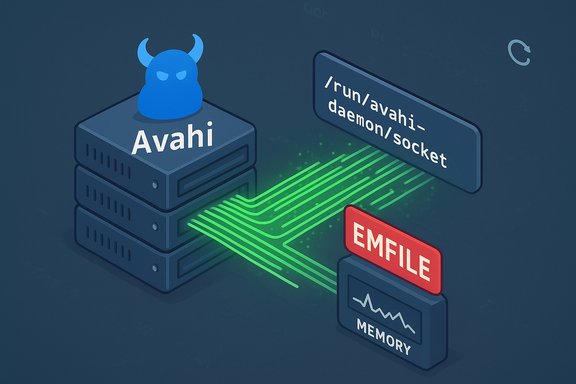
- When the process runs out of file descriptors, accept fails with EMFILE (“Too many open files”), but the code logs the failure repeatedly — once for each attempted connection — creating a logging storm that amplifies system load.
- The combined effect is that an unprivileged local account can open thousands of idle connections to /run/avahi-daemon/socket, causing the avahi‑daemon to hold many file descriptors and memory allocations, then loop on logging errors and become unresponsive or crash.
Proof‑of‑Concept and exploitability
The published advisory includes a simple proof‑of‑concept that demonstrates the issue using common command‑line tools. The PoC essentially opens a large number of concurrent UNIX domain socket connections to /run/avahi-daemon/socket (for example, using socat in a loop). Observers then report seeing avahi‑daemon’s memory and file descriptor counts grow until the daemon hangs or begins endlessly logging “accept: Too many open files” messages. Key exploitability points:- Complexity: low. The PoC is trivial to run for any local account with access to the socket.
- Privileges required: low. No elevated privileges are needed — only the ability to open a domain socket to the Avahi socket file.
- Impact: availability loss for mDNS/DNS‑SD and increased system load due to log flooding.
- Exploitability in the wild: plausible for systems with multi‑user access, CI runners, shared hosting, containers, or developer machines. Because the attack vector is local, it’s unlikely to be an Internetworm, but it is a practical escalation‑of‑impact in multi‑tenant environments.
Affected versions and distribution status
The vulnerability affects Avahi versions up to and including 0.9‑rc2. Multiple vendor trackers and vulnerability databases list the same affected range and identical impact narrative. Distributions tracking Avahi have begun publishing advisories or entries in their vulnerability trackers (Ubuntu, Debian, and others have published CVE entries and status pages). At the time of analysis, no universally shipped, fully vetted Avahi release containing the fix has reached all major distribution channels; instead, a candidate fix is available as a draft pull request in the Avahi upstream repository. Distributions will typically:- Backport the upstream candidate fix to their packaged Avahi builds (preferred for stable releases).
- Or ship a fixed newer Avahi package when upstream publishes a stable release containing the fix.
Why this matters to Windows users and mixed environments
Many readers of this site run hybrid setups where Linux components are present:- Windows Subsystem for Linux (WSL) distributions can run Avahi, and misbehaving services in WSL can affect developer workflows or tooling expecting local .local resolution.
- Dual‑boot systems, VMs, or Docker containers on Windows hosts may include Avahi and can be used to trigger local resource exhaustion.
- Home/office networks often mix Windows and Linux clients; causing a Linux box to lose mDNS resolution can break service discovery for printers, smart devices, or network media servers — a visible nuisance for Windows users relying on Bonjour‑like functionality.
Candidate upstream fix and current status
A candidate fix — submitted as pull request #808 in the Avahi upstream repository — introduces limits and per‑UID checks to ensure the simple protocol socket enforces sensible maximums and rejects new clients when limits are hit. The pull request is currently a draft and under review; reviewers have asked for additional tests and cross‑platform considerations (FreeBSD, other BSDs) before merging. In short: the code changes exist as a candidate fix, but they are not yet merged into a released stable Avahi version for all platforms. Because the fix is upstream and in draft form, distributions may:- Pull the patch into a security update (backport) for their Avahi package.
- Wait for an official upstream release and then package that release.
Practical mitigations and immediate workarounds
Until a vendor‑provided package update is available and installed, the following mitigations can substantially reduce risk and restore resilience. Each mitigation is trade‑off aware and should be tested in your environment.- Stop or disable Avahi if you do not need mDNS/DNS‑SD:
- systemctl stop avahi-daemon
- systemctl disable --now avahi-daemon
- Stopping Avahi removes the attack surface entirely but disables local .local name resolution. This is the simplest mitigation for single‑user or non‑mDNS environments.
- Restrict access to the UNIX socket (/run/avahi-daemon/socket):
- After Avahi starts, change socket permissions to limit which local users can connect:
- Identify the socket: ls -l /run/avahi-daemon/socket
- Set a restrictive group or mode: chown root:somegroup /run/avahi-daemon/socket && chmod 0660 /run/avahi-daemon/socket
- Note: Avahi does not provide a built‑in configuration option to change the socket’s permissions at startup; permission changes must be applied post‑start (e.g., via a systemd tmpfile or service drop‑in) and tested for compatibility with clients that legitimately need the socket.
- Use Mandatory Access Controls:
- Enable or tune SELinux/AppArmor policy to prevent untrusted local processes or container workloads from connecting to the Avahi socket. Locking down the process context prevents many local attackers from triggering the socket exhaustion even if they have a local account.
- Replace or limit nss-mdns usage:
- If your system uses the nss‑mdns glibc plugin for .local name resolution, consider configuring resolv.conf/nsswitch.conf to avoid automatic mDNS lookups for untrusted contexts, or install a minimal “simple client” wrapper for authorized resolution paths as suggested by maintainers. This prevents some applications from relying on Avahi directly.
- Monitor and throttle:
- Add monitoring for anomalous numbers of open UNIX domain connections to /run/avahi-daemon/socket and for repeated accept errors in syslog/journalctl. When an anomaly is detected, automated responders can restart avahi‑daemon or disable the socket as an emergency measure.
- Container and CI hygiene:
- Ensure containers running on shared hosts do not run untrusted code with access to the host’s UNIX domain sockets. Avoid bind‑mounting /run into containers unless strictly required and controlled. Use seccomp and AppArmor profiles for additional limits.
Step‑by‑step remediation checklist for administrators
- Inventory hosts with Avahi:
- Debian/Ubuntu: dpkg -l | grep avahi
- RPM systems (Fedora/RHEL/CentOS): rpm -qa | grep avahi
- Containers/WSL: check running images and installed packages inside each environment.
- Identify Avahi version and package maintainer status:
- avahi-daemon --version
- Check distribution security pages or CVE trackers for availability of a patched package.
- Apply immediate mitigations where appropriate:
- If mDNS is not required, stop and disable avahi‑daemon.
- If mDNS is required, restrict socket permissions or apply SELinux/AppArmor controls.
- Monitor logs and resource limits:
- journalctl -u avahi-daemon —follow
- Monitor file descriptor counts for avahi‑daemon (e.g., lsof -p <PID> | wc -l).
- Patch when available:
- Install vendor’s security update or apply a vetted backport as soon as the distribution publishes one.
- After patching, validate:
- Confirm that the patched avahi‑daemon enforces CLIENTS_MAX and closes new connections when limits are reached.
- Run your earlier PoC in a controlled environment (or a test job) to verify the fix.
Risks, caveats, and what to watch for
- Log amplification: The problem is made significantly worse by unconditional logging on accept errors. Even when attackers no longer open new sockets, a logging storm can keep the system under load. Administrators should watch for heavy syslog/journal throughput as an indicator of active exploitation or attempted exploitation.
- Multi‑tenant danger: Shared hosts, CI runners, and systems running untrusted workloads are at higher risk, because local accounts or container processes can mount the attack without privileged credentials. Harden shared infrastructures faster than single‑user desktops.
- WSL and developer machines: Many developers run WSL distributions that may include Avahi packages; consider applying mitigations locally in WSL instances or avoid installing Avahi into developer environments that do not require it. This is especially important because WSL instances may be used to interact with Windows tools or networks and unexpected mDNS failures can produce confusing side effects. (This Windows impact is indirect but practically relevant for mixed environments.
- Patching timeline uncertainty: The upstream candidate fix exists, but until that patch is merged and distributed in stable packages, some distributions may choose to backport different mitigations or take longer to test cross‑platform compatibility. Administrators should not assume an immediate vendor patch and should apply interim mitigations where feasible.
- False sense of security from socket permissions: Changing socket permissions is effective, but it must be orchestrated carefully so legitimate clients still function. Some nss‑mdns clients may rely on direct socket access; misconfiguring permissions can break legitimate name resolution for trusted users and services. Test changes on representative systems before broad rollout.
Why the Avahi maintainers and community reaction matters
The advisory credits a security researcher using an automated tool for discovery, and the Avahi maintainers have already received a pull request addressing the issue. Review comments on the PR emphasize cross‑platform behavior (Linux vs BSD) and the need for tests before merging — an encouraging sign that maintainers are taking engineering rigour seriously. However, the fact the patch is still draft demonstrates the realities of open‑source maintenance: fixes can exist but still require review, testing, and distribution packaging before systems receive them. Administrators should treat the candidate fix as useful evidence that a solution is forthcoming, but rely on vendor packages or carefully tested backports for production remediation.Final assessment and action plan
CVE‑2025‑59529 is a pragmatic, low‑complexity local denial‑of‑service that exploits a simple logic error in Avahi’s simple protocol server. While the vulnerability does not allow data theft or remote code execution, its impact on availability and service discovery can be materially disruptive in mixed and multi‑user environments. The presence of a public PoC and the trivial nature of exploitation mean administrators should treat this as a timely operational risk.Immediate priorities:
- Inventory and identify Avahi instances on your estate (including WSL, containers, VMs).
- Apply interim mitigations: stop the daemon where not needed, restrict socket access, and use MAC policies for untrusted workloads.
- Monitor distribution security notices and apply official vendor patches or vetted backports as soon as they are released.
- Add alerting on excessive accept errors or abnormal avahi resource usage in monitoring systems.
Avahi users and system administrators should prioritize the steps above and prepare to validate any upstream or vendor patch when it becomes available. Monitoring the Avahi project’s repository, distribution advisories, and your own telemetry will be the fastest path to removing this risk from production systems.
Source: MSRC Security Update Guide - Microsoft Security Response Center
