

Microsoft’s Browser Patch Story Now Starts Outside Redmond
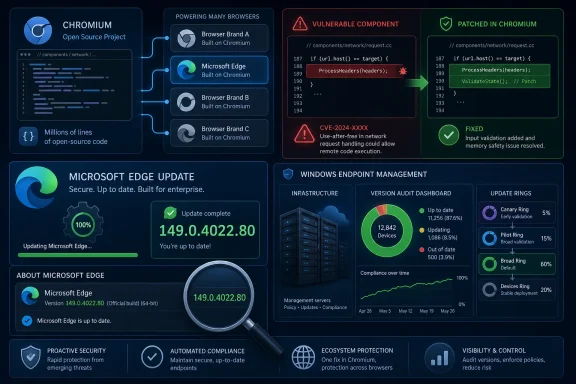
The Security Update Guide entry for CVE-2026-12444 reads like a small notice, but it points to one of the defining facts of modern browser security. Microsoft Edge is not a proprietary rendering-engine island in the way legacy EdgeHTML was, and it is certainly not Internet Explorer wearing a new coat of paint. It is a Microsoft product built on Chromium, which means some of its most important security fixes begin life in the Chromium project and arrive in Edge through Microsoft’s ingestion, validation, and release pipeline.
That is why the assigning CNA is Chrome, while the affected Microsoft product is Microsoft Edge. The vulnerability is described as an out-of-bounds read in Chromoting, the Chromium remote-access component family associated with Chrome Remote Desktop technologies. Microsoft does not need to have authored the vulnerable code for Microsoft customers to care about it. If that code ships inside Edge, Edge becomes part of the remediation story.
This can be confusing because Microsoft’s Security Update Guide has historically trained Windows admins to think in Microsoft product buckets: Windows kernel, Office, Exchange, SharePoint, SQL Server, .NET, and so on. Chromium-based Edge complicates that mental model. A vulnerability can be discovered, assigned, and first documented through Google’s Chrome ecosystem, then appear in Microsoft’s guide because Microsoft must tell its own customers which Edge build closes the exposure.
The key phrase in Microsoft’s entry is not the vulnerability title. It is the sentence explaining that Chromium OSS is “consumed” by Microsoft Edge. That single word captures the modern dependency chain better than a dozen architecture diagrams.
A Chrome CVE in Microsoft’s Guide Is a Supply-Chain Signal
There is a temptation to treat third-party CVEs in vendor advisories as noise. If the CVE says Chrome, some Windows administrators may mentally file it under “Google problem” and move on. That would be a mistake.
Browsers are now operating-system-adjacent software. They parse untrusted content, broker authentication, manage enterprise identities, host productivity apps, render documents, run JavaScript, sync credentials, and often serve as the real front door to corporate SaaS. If the browser engine is shared, vulnerabilities in that engine travel across brand boundaries. Chrome, Edge, Brave, Vivaldi, Opera, and other Chromium-based browsers may not ship identical features, but they inherit a large common attack surface.
Microsoft’s publication of CVE-2026-12444 is therefore not Microsoft saying “this is our bug.” It is Microsoft saying “this bug was in code we ship.” That distinction matters for blame, but not much for patching. Attackers do not care which company’s engineer committed a vulnerable line of C++ if the reachable code path exists on a target machine.
For enterprise IT, the Security Update Guide plays a second role beyond vulnerability disclosure. It is an inventory and compliance anchor. Security teams map CVEs to products, products to versions, and versions to deployment rings. By documenting the Chromium CVE in Microsoft’s own system, Redmond gives customers a Microsoft-native object to track, even when the underlying issue originated in the Chromium ecosystem.
That is the practical reason this entry exists. It closes the loop between upstream Chromium disclosure and downstream Edge compliance.
The Version Number Is the Real Remediation
The CVE entry’s most useful data point is the Edge version: 149.0.4022.80, released for the Stable channel in mid-June 2026 and listed by Microsoft as incorporating the latest Chromium security updates. The Security Update Guide entry maps CVE-2026-12444 to that build and shows the corresponding Chromium base version as 149.0.7827.156. In plain English, if Edge is at or beyond the fixed Microsoft build in the applicable channel, this specific exposure is addressed for that browser.
That is why “How can I see the version of the browser?” is not an afterthought. It is the remediation test. You can have Windows Update working, Group Policy configured, and a dashboard full of green check marks, but if Edge on an endpoint has not actually moved to the fixed build, the endpoint is still behind for this browser issue.
For a local check, the path is deliberately simple: open Edge, select the three-dot menu, choose Help and feedback, and then choose About Microsoft Edge. The About page displays the installed version and normally triggers an update check. For unmanaged users, that page is often the fastest way to confirm whether the browser has received the patch.
In managed environments, the same concept scales through inventory tooling rather than eyeballs. Microsoft Intune, Configuration Manager, endpoint detection platforms, software asset tools, and browser management dashboards can report installed Edge versions across fleets. The important thing is not the tool; it is the habit of treating browser build numbers as security state, not merely application metadata.
The patch is the version. Everything else is process.
Out-of-Bounds Reads Are Not Automatically Boring
The title “out of bounds read” can sound less alarming than “remote code execution,” “sandbox escape,” or “privilege escalation.” That is not a license to ignore it. An out-of-bounds read means software can read memory it was not supposed to read, and in browser contexts that can have consequences ranging from crashes to information disclosure to exploit-chain enablement.
Browser exploitation is rarely a single cinematic bug anymore. Modern browsers have layered mitigations, site isolation, sandbox boundaries, memory safety defenses, and hardening work that make one-shot compromise harder than it used to be. Attackers often need chains: one bug to corrupt or disclose memory, another to gain control, another to escape a sandbox, and sometimes another to persist or elevate.
An out-of-bounds read can be valuable in that chain because memory disclosure can defeat address randomization or leak sensitive state. Even when a specific advisory does not say exploitation is known in the wild, security teams have learned not to wait for a polished proof of concept before updating browsers. The browser is too exposed, and the patching friction is usually too low to justify delay.
The Chromoting component name adds a wrinkle. Remote-access-related code often attracts attention because it implies interaction with systems that bridge local and remote contexts. That does not mean every Chromoting bug is remotely exploitable in every Chromium-based browser configuration. It does mean defenders should resist the lazy comfort of “only an information disclosure” until the fixed version is deployed.
Microsoft’s entry does not need to overdramatize the flaw for the operational response to be clear. Edge should be updated.
Edge’s Fast Patch Cadence Is a Feature and a Management Burden
One of the biggest security improvements in the Chromium era is cadence. Browser vendors can ship security fixes quickly, outside the old monthly Patch Tuesday rhythm, and users can receive them with relatively little ceremony. Microsoft Edge has adopted that model, with Stable channel updates arriving as needed to incorporate Chromium security changes and Edge-specific fixes.
That speed is good news for defenders, but it changes the administrative burden. If your vulnerability management program still thinks in monthly Windows cumulative updates alone, it is missing a major moving part. Edge can receive critical security content between Windows patch cycles, and those updates may matter as much as anything landing on the second Tuesday of the month.
The CVE-2026-12444 entry is a clean example. Microsoft’s Stable channel release 149.0.4022.80 is the object that matters, not a traditional Windows KB package. The Security Update Guide can list the issue, but endpoint protection depends on whether the Edge updater, enterprise deployment channel, or admin-controlled package process actually brings machines forward.
This is where consumer and enterprise realities diverge. On a personal PC, Edge may quietly update in the background, and the About page finishes the job. In an enterprise, update rings, change windows, frozen images, VDI pools, application control, proxy rules, and network egress restrictions can all slow the browser down. A browser designed for continuous update can become stale if the organization treats it like a quarterly application release.
Security teams should be asking a simple question after this kind of advisory: how long does it take for an Edge Stable security build to reach 95 percent of our Windows endpoints? If the answer is measured in weeks, the organization has a browser patch problem, even if its Windows patch metrics look respectable.
The Security Update Guide Is Becoming a Dependency Ledger
Microsoft’s Security Update Guide used to be easiest to understand as a catalog of Microsoft’s own patches. It still is that, but entries like CVE-2026-12444 show it becoming something broader: a dependency ledger for Microsoft products. When Microsoft ships open source code, browser engine code, third-party libraries, container components, or cloud-integrated features, its customers need a Microsoft-facing record of what is fixed where.
That is a healthy development. The alternative would be worse: administrators would have to monitor upstream Chromium advisories, then manually infer whether and when Microsoft Edge became safe. Some sophisticated security teams already do that, especially when a Chrome zero-day is under active exploitation. But most organizations need vendor-normalized advisories that map upstream vulnerabilities to deployed products.
The challenge is that the guide can look odd to readers who expect every CVE to be born inside Microsoft. A Chrome CNA assignment in a Microsoft database looks, at first glance, like duplication. In reality, it is translation. Microsoft is translating an upstream Chromium security event into a Microsoft product and version statement.
That translation also helps auditors. An auditor may not accept “Google fixed it somewhere in Chromium” as proof that a Windows fleet is remediated. They need evidence that the Microsoft browser installed on corporate endpoints is at a fixed version. The Security Update Guide gives administrators that bridge.
The result is a more honest view of software risk. Modern products are composites. Security advisories increasingly have to reflect composition rather than corporate authorship.
The Chromium Bet Keeps Paying Dividends, But It Comes With Shared Exposure
Microsoft moved Edge to Chromium for reasons that were obvious at the time and remain compelling: web compatibility, extension ecosystem access, developer familiarity, and reduced friction with the web as it is actually built. For users, that move largely ended the era when Microsoft’s browser was punished for being different. For enterprises, it simplified testing against the same broad web platform assumptions that Chrome already dominated.
But shared foundations mean shared vulnerabilities. Edge benefits when Chromium hardening improves, when Google’s security researchers find bugs, when the broader open source community audits code, and when the patch train moves fast. Edge also inherits the urgency when a Chromium component has a security flaw.
This is not a scandal. It is the standard bargain of open source consumption at scale. The same bargain exists in Linux distributions, container images, JavaScript frameworks, compression libraries, cryptographic packages, and countless cloud services. The uncomfortable part for Windows administrators is that the bargain now sits inside one of the most visible Microsoft applications on the desktop.
Microsoft adds its own features, policies, identity integrations, management hooks, and enterprise controls on top of Chromium. Those additions can create Microsoft-specific vulnerabilities, and Microsoft documents those separately when they occur. CVE-2026-12444 is different. It is a reminder that sometimes the most important Edge fix is upstream work flowing downstream.
That is exactly how the model is supposed to function. The risk is not that Edge uses Chromium. The risk is assuming that Chromium-originated advisories do not apply to Edge.
Version Checking Is a User Skill, Not Just an Admin Task
The About Microsoft Edge page is deceptively important. It is one of the few security surfaces ordinary users can inspect without specialized tools. If a user can read the browser version and compare it against guidance from IT, they can confirm whether a machine is in a known-good state.
This matters in hybrid work, BYOD-adjacent environments, small businesses, and incident response. Not every endpoint is perfectly enrolled. Not every contractor machine reports into the same dashboard. Not every kiosk, lab system, jump box, or shared workstation gets the same administrative attention as a standard corporate laptop. When a browser CVE appears, the ability to say “open Edge and check About” remains useful.
For administrators, the better move is still centralized reporting. A human version check does not scale across thousands of endpoints, and it is prone to transcription errors. But local verification is an important fallback, especially when troubleshooting why a machine did not update, why an app compatibility ring is stuck, or why a vulnerability scanner still reports exposure after a deployment wave.
The version check also reveals a subtle user-experience advantage of browser updating. Edge’s About page does not merely display the version; it often initiates the update check and applies available updates. That makes the check partly self-healing. The user who verifies may also remediate.
Still, administrators should not rely on users to close security gaps. The right model is layered: automatic updates by default, enterprise reporting for assurance, and local version checks for exceptions.
The Patch Is Small, but the Governance Question Is Large
CVE-2026-12444 is not, on the face of the available Microsoft entry, a sprawling crisis. The guide does not describe a Windows-wide emergency, and the affected Microsoft product listed is Edge. The remediation is not conceptually difficult: update Edge to the fixed Stable build.
Yet the governance question is larger than this one bug. How does an organization track vulnerabilities that originate outside Microsoft but land inside Microsoft products? How quickly can it distinguish a Chrome-only issue from an Edge-relevant issue? How does it handle a browser release that arrives outside normal Windows patch windows? Who owns the response: the Windows team, the desktop engineering team, the security operations center, or the browser management owner?
Those questions are not academic. Browser vulnerabilities routinely sit near the top of real-world exploitation lists because browsers are exposed to arbitrary web content and heavily used. A mature patch program cannot let ownership ambiguity slow down deployment.
Edge also blurs old organizational boundaries. It is part of Windows in the user’s mind, a Microsoft 365 access point in the business owner’s mind, a Chromium derivative in the security engineer’s mind, and a managed application in the endpoint team’s mind. CVE-2026-12444 shows why those perspectives need to converge.
The best organizations will not debate whether a Chrome CNA entry belongs in a Microsoft guide. They will use the Microsoft guide to confirm their Edge exposure and move on to deployment.
The June 2026 Edge Release Was More Than a Security Wrapper
Microsoft’s Edge Stable 149.0.4022.80 release also included nonsecurity fixes and feature updates, including a fix for QR code generation and enterprise-facing changes around Intune MAM protected downloads, extension monitoring in the Edge management service, and Enterprise Preview validation. That combination is normal for browser releases: security content travels alongside reliability fixes and feature work.
This mixed payload can make change management harder. Security teams want speed; application owners want predictability; help desks want fewer surprises; compliance teams want proof. Browser vendors increasingly collapse those needs into rapid releases where waiting for a “security-only” package is not always realistic.
The enterprise answer is not to slow everything down. It is to build browser update rings that reflect risk. A pilot group can absorb early breakage, a broad ring can follow quickly, and emergency procedures can accelerate security releases when exploitation is active or severity demands it. The goal is not reckless speed; it is controlled speed.
For Edge, Microsoft’s management ecosystem gives administrators more options than consumer Chrome-style updating alone. Policies, Edge for Business tooling, Intune integration, and release channels can help organizations test and deploy without pretending the browser is static infrastructure.
But the security baseline remains simple. If the fixed Edge build is available and the vulnerability affects shipped Chromium code, delay needs a reason. “It came from Chrome” is not one.
The Edge Version Line Windows Admins Should Care About
For this specific advisory, the practical checkpoint is Microsoft Edge Stable version 149.0.4022.80. Microsoft’s guide lists the CVE as released on June 19, 2026, while the Edge Stable release notes identify the build as released on June 18, 2026. That one-day offset is not unusual in coordinated documentation; release notes, CVE publication, and guide indexing do not always land at the same hour.
The important fact is that the fixed Edge build exists and is named. Admins should verify that machines running Edge Stable have moved to 149.0.4022.80 or a later applicable build. Users can confirm from the browser’s About page, while managed fleets should confirm through inventory.
If scanners continue to report CVE-2026-12444 after Edge has updated, the next step is to check detection logic. Some vulnerability tools key off installed file versions, some look at registry entries, some lag behind vendor releases, and some confuse Chrome and Edge version mappings. The Security Update Guide’s build number is the anchor for resolving that dispute.
There is also a channel caveat. Stable, Extended Stable, Beta, Dev, Canary, mobile, and platform-specific builds do not always move in lockstep. Administrators should compare the advisory against the browser channel they actually deploy. In this case, Microsoft’s listed security update row is for Microsoft Edge Chromium-based, and the version information provided for the release is Stable 149.0.4022.80.
That sounds like bookkeeping because it is. Security at fleet scale is mostly bookkeeping performed before an attacker turns it into incident response.
The Lesson Hidden in a One-Row Edge Advisory
This advisory is small enough to miss and important enough to use as a process check. The right response is not panic, but verification.
- Microsoft included CVE-2026-12444 in the Security Update Guide because Edge consumes Chromium code and the vulnerable Chromium component was relevant to Microsoft’s browser.
- The fixed Microsoft Edge Stable build identified for this release is 149.0.4022.80, with Microsoft listing the corresponding Chromium version as 149.0.7827.156.
- Users can check Edge by opening the three-dot menu, choosing Help and feedback, and selecting About Microsoft Edge.
- Enterprise administrators should confirm Edge versions through centralized inventory rather than assuming Windows patch compliance implies browser compliance.
- A Chrome-assigned CVE can still be an Edge security issue when the vulnerable code is part of the Chromium base that Edge ships.
- Browser update latency should be measured as a security metric, because Edge security fixes can arrive outside the normal Windows cumulative update rhythm.
The most important takeaway is cultural, not procedural. Chromium made Edge a better browser and a more compatible enterprise standard, but it also made Microsoft part of a shared vulnerability ecosystem whose signals do not always wear Microsoft branding.
CVE-2026-12444 is the kind of advisory that separates mature patch programs from checkbox patch programs: the mature ones follow the code, not the logo. As Microsoft keeps building major user experiences on shared engines, open source components, cloud-connected services, and fast-moving release channels, Windows administrators will need to treat the Security Update Guide less like a monthly bulletin board and more like a live map of dependencies. The future of Windows security will not be defined only by what Microsoft writes; it will be defined by how quickly Microsoft, its upstreams, and its customers can prove that the code users actually run has moved past the bug.