

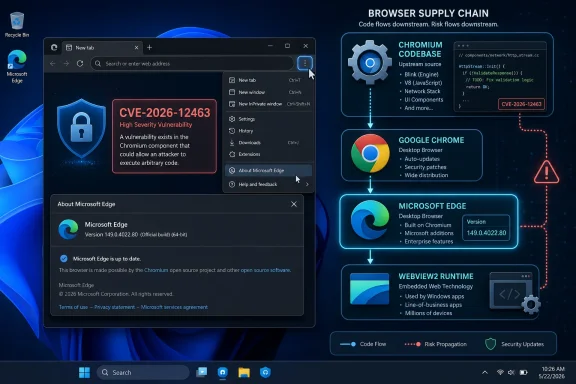
edge://settings/help into the address bar. But the more interesting story is why a vulnerability described as “in Google Chrome” shows up in a Microsoft security database at all. That answer says a great deal about the modern browser supply chain, where patching Windows increasingly means patching code Microsoft did not originate.
Microsoft’s Browser Is Now Part of Chromium’s Security Weather System
For decades, Microsoft browser security meant Internet Explorer, then EdgeHTML, then the long institutional memory of Patch Tuesday and Windows Update. That world is gone. Since Microsoft rebuilt Edge on Chromium, Edge has inherited not only Chromium’s rendering engine, JavaScript machinery, and web-platform plumbing, but also a large share of Chromium’s security exposure.
That is why CVE-2026-12463 appears in the Security Update Guide even though its wording points upstream. The vulnerability is described as an inappropriate implementation in Views, a Chromium UI framework component, affecting Google Chrome on Linux before version 149.0.7827.155 and allowing a remote attacker who had already compromised the renderer process to inject arbitrary scripts or HTML through a crafted page. Microsoft’s advisory language is careful: the issue is in Chromium open source software consumed by Edge, and the entry exists to announce that the latest Chromium-based Edge release is no longer vulnerable.
That wording matters. Microsoft is not claiming that this was a uniquely Microsoft-authored Edge bug, nor is it pretending that Edge and Chrome are identical products. It is saying something more operationally useful: if the vulnerable Chromium component was present in Edge’s codebase, Microsoft’s customers need to know when Edge incorporated the fix.
The Security Update Guide has therefore become more than a catalog of Windows flaws. It is also a downstream noticeboard for code Microsoft ships, integrates, brands, services, and supports, even when the vulnerability was found in an upstream project.
The “Chrome CVE” Label Is Technically True and Operationally Misleading
Calling CVE-2026-12463 a Chrome CVE is not wrong. Google Chrome is the most visible consumer of Chromium, and Chromium security bugs are commonly reported, triaged, and published through Google’s ecosystem. The vulnerability description itself names Google Chrome, which is why security scanners, CVE feeds, and administrators may initially read it as a Chrome-only problem.
But for enterprise IT, the product name in a CVE description is only the first clue. The real question is whether the vulnerable code path exists in software deployed across the fleet. Edge is Chromium-based, and that means many browser-engine vulnerabilities have to be evaluated through the lens of Chromium ancestry rather than vendor branding.
This is where the Security Update Guide performs a useful translation. Microsoft’s entry effectively tells administrators: do not ignore this because the description says Chrome. If Edge consumed the affected Chromium code, Edge needed the corresponding update, and the relevant Microsoft-serviced package is the Edge build now carrying that fix.
That distinction is not pedantic. Vulnerability management systems often match CVEs to products imperfectly, especially when upstream projects feed multiple downstream products. A scanner may flag Chrome, Edge, WebView2, Electron apps, or Linux browser packages differently even when the underlying defect traces back to the same shared code family. The administrator’s job is not to defend a product label; it is to close the vulnerable execution path.
Edge’s Security Cadence No Longer Waits for Patch Tuesday
The June 2026 Edge security release pattern shows the modern cadence clearly. Microsoft released Edge Stable version 149.0.4022.80 on June 18, 2026, stating that it incorporated the latest security updates from the Chromium project. That came only days after earlier 149.0.4022.x Stable releases in June, including builds on June 4, June 9, and June 12.
This is the browser patch model in miniature: fast, incremental, and sometimes messy to track. A Windows administrator accustomed to monthly cumulative updates may find Edge’s release stream almost twitchy by comparison. But browsers sit directly on the threat boundary between users and hostile content, so waiting for a monthly OS servicing train would be a security regression.
The Security Update Guide is Microsoft’s attempt to bridge those cultures. It gives CVE-minded security teams a familiar place to look, while Edge itself updates on a browser schedule. For consumers, the update may arrive quietly in the background. For enterprises, the release note becomes evidence that a given Stable or Extended Stable build incorporates upstream Chromium fixes.
The result is a two-track reality. The patch may be delivered through Edge’s own updater, enterprise deployment tooling, or mobile app stores, but the vulnerability record still appears in Microsoft’s security catalog because Microsoft owns the support obligation for Edge.
“Inappropriate Implementation” Is Vague by Design
The phrase “inappropriate implementation” is one of those security labels that sounds less alarming than it often is. It does not describe a single bug class the way “use after free” or “heap buffer overflow” does. It usually means the affected component behaved incorrectly in a security-relevant way, and that the public description is deliberately broad.
In CVE-2026-12463, the component named is Views. In Chromium, Views is tied to browser UI and platform interface machinery rather than ordinary web page content in the narrow sense. The reported impact is universal cross-site scripting after a renderer compromise, which means the attacker’s scenario is not simply “visit a bad page and instantly lose the machine.” It assumes the renderer process has already been compromised.
That prerequisite should not lull anyone. Modern browser exploits are often chains, not single magic bullets. One flaw gets code execution or control inside a constrained renderer process; another flaw helps break assumptions, cross boundaries, or manipulate privileged browser behavior. A bug that matters only after renderer compromise can still be valuable in the hands of an attacker building a multi-stage exploit.
The Linux qualifier in the Chrome description is also worth reading carefully. It indicates the known affected Chrome platform in the upstream description, not necessarily a promise that every downstream Chromium product has identical exposure. Microsoft’s job is to decide whether Edge’s consumed Chromium code required an update and then document the result for its customers.
The Renderer Compromise Clause Is the Quiet Red Flag
Browser vendors have spent years isolating web content in renderer sandboxes, precisely because hostile pages are expected. A renderer compromise is serious, but it is not supposed to be the end of the story. The rest of the browser architecture is designed to contain or limit what compromised web content can do.
That is why bugs requiring a compromised renderer still receive attention. They may not be the first link in an exploit chain, but they can widen the blast radius after the first link succeeds. Universal cross-site scripting is particularly ugly because it can let an attacker inject script or HTML across origins, undermining the same-origin boundaries on which web security depends.
For users, the practical takeaway is not that CVE-2026-12463 is guaranteed to be exploited in the wild. The available public language does not establish that. The point is that browser security is cumulative: each patched defect removes one possible stepping stone from an attacker’s path.
For administrators, this is why “no known exploitation” is not a reason to sit on a browser update. Browser exploitability changes when researchers publish details, when attackers combine bugs, and when older versions remain visible in enterprise fleets. Time is part of the vulnerability.
The Security Update Guide Is Becoming a Supply-Chain Ledger
Microsoft’s inclusion of Chromium CVEs in the Security Update Guide reflects a broader shift in software accountability. Vendors are no longer judged only by the code they write from scratch. They are judged by the code they ship.
That is especially true for browsers, where one engine may power multiple products with different logos, update systems, privacy models, enterprise policies, and platform integrations. Edge is not Chrome, but it is not independent of Chromium either. The dependency is architectural, not cosmetic.
In that sense, Microsoft’s CVE entry is a ledger entry in a supply chain. It records that a vulnerability existed upstream, that Edge consumed the affected open-source component, and that a newer Edge release incorporates the remediation. This is exactly the kind of traceability that security teams increasingly demand from vendors.
It also helps explain why the Security Update Guide can feel overinclusive to casual readers. A Windows user sees “Google Chrome” and wonders why Microsoft is talking about it. A security engineer sees “Chromium OSS consumed by Edge” and understands that Microsoft is documenting downstream exposure and patch status.
Users Should Check the Browser, Not Just Windows Update
The user’s immediate question — how to see the browser version — deserves a direct answer because it is the difference between abstract assurance and actual verification. In Microsoft Edge, click the three-dot menu in the upper-right corner, select Settings, and then select About Microsoft Edge. The same page can be reached by typing edge://settings/help in the address bar.
That page does two things. It displays the installed Edge version, and on most unmanaged systems it checks for updates automatically. If an update is available, Edge will download it and ask for a restart of the browser to complete installation.
On managed systems, the page may tell a different story. Updates can be controlled by enterprise policy, by Microsoft Edge Update settings, by software deployment tools, or by mobile app-store management. If the browser reports that updates are disabled or managed by an organization, the next step is not to hunt for a manual installer on a random website; it is to check the organization’s update policy and deployment ring.
The practical benchmark as of June 19, 2026 is that Microsoft’s Edge security release notes list Stable version 149.0.4022.80 as the June 18 Stable release incorporating the latest Chromium security updates. Systems on older 149.0.4022.x builds may still be awaiting the most recent security rollup, depending on channel, platform, and rollout timing.
WebView2 Makes the Edge Story Bigger Than the Edge Icon
For Windows administrators, Edge is not just a browser shortcut pinned to the taskbar. The Chromium-based WebView2 Runtime lets Windows applications embed web content using the Edge rendering stack. That means Chromium security has a second life inside desktop apps that users may not mentally associate with a browser.
CVE-2026-12463 is documented in the context of Edge, but the broader lesson is that Chromium servicing affects multiple surfaces. An organization that patches Chrome but neglects Edge, or patches Edge but forgets WebView2 runtime behavior, can end up with a false sense of closure. The shared engine model demands shared discipline.
This does not mean every Chromium CVE automatically maps to every WebView2 scenario. Exposure depends on the platform, the affected component, how the runtime is packaged, and how the application uses embedded web content. But the operational rule is straightforward: treat the browser engine as infrastructure.
That is one reason Microsoft’s update documentation emphasizes release channels and version numbers. The version string is the common language between user support, endpoint management, vulnerability scanning, and incident response. Without it, “we patched Edge” is just a hope.
Enterprise Policy Can Be a Patch Accelerator or a Patch Brake
Edge’s updater is capable of moving quickly, but enterprise policy decides whether it actually does. Microsoft provides update policies that let administrators control update behavior, target versions, rollback behavior, update suppression windows, and channel selection. Those controls are valuable, but they can also become self-inflicted exposure if they freeze browsers for too long.
The temptation to pin browser versions is understandable. Web apps break, line-of-business portals can be fragile, and sudden UI or platform changes can generate help-desk tickets. But browser rollback and version targeting are inherently risky because they keep known-vulnerable code in production after fixes exist.
That tradeoff is sharper for Chromium-based browsers because high-severity browser bugs often move from advisory to exploit kit faster than traditional enterprise change processes are comfortable with. A good browser update policy therefore needs both safety rails and urgency. It should allow testing, but it should not turn every security update into a quarterly migration project.
For CVE-2026-12463, the sane enterprise posture is verification rather than panic. Confirm which Edge versions are deployed, confirm whether Linux Edge deployments are present if relevant, check whether Stable channel systems have advanced to the current security build, and identify any policy that prevents automatic update completion.
The Version Number Is the Evidence
A surprising amount of vulnerability response collapses into a simple question: what version is actually running? Not what the image had at build time, not what the software catalog says should be installed, not what a user thinks they updated last week, but what the executable reports now.
Edge makes that visible through the About page. Administrators can also inventory versions through endpoint management tools, scripts, registry data, installed application reports, or browser management telemetry. However it is collected, the version number should be treated as evidence.
That evidence matters because Microsoft’s Security Update Guide entry is not a general blessing over all Edge installs. It says the latest version is no longer vulnerable. Older builds remain older builds, and “Chromium-based” does not magically confer immunity unless the patched Chromium code has actually landed on the endpoint.
The distinction is especially important during staged rollouts. A release can exist publicly while some devices have not yet restarted the browser, while others are on a metered connection, while still others are blocked by policy. In browser security, release date and remediation date are not always the same day inside a real fleet.
The June Edge Build Tells Admins Where to Look First
The relevant June 2026 Edge release stream gives administrators a practical anchor. Microsoft’s June 18 Stable build, version 149.0.4022.80, is the latest Stable security release listed at the time of writing. That is the build that Microsoft says incorporates the latest Chromium security updates.
That does not mean every environment must be on Stable. Some organizations use Extended Stable, Beta, Dev, or mobile channels, and each has its own servicing model. But it does mean that checking against the correct channel is essential. Comparing an Extended Stable system to a Stable build number without understanding the channel can produce false alarms.
For home users, the advice is less complicated. Open the About Microsoft Edge page, let the browser check for updates, and relaunch when prompted. If the browser says it is up to date and reports a current build, there is usually nothing more to do.
For IT pros, the job is to turn that individual action into fleet assurance. Browser patching should be visible in dashboards, alerting should distinguish installed version from pending restart, and exception lists should be short-lived. The browser is now one of the most exposed applications on the endpoint; it deserves the same urgency as the operating system.
Microsoft’s Documentation Is Also a Message to Scanner Vendors
There is another audience for this Security Update Guide entry: the vulnerability management ecosystem. Scanner vendors, managed detection providers, and compliance platforms need authoritative mappings between CVEs and Microsoft products. Without Microsoft’s entry, a Chromium CVE might be treated inconsistently across tools.
That inconsistency is more than an annoyance. If a scanner misses Edge exposure because it keys too narrowly on “Google Chrome,” the organization may underpatch. If it flags every Chromium-derived product without regard to platform or fixed version, the organization may drown in false positives. Microsoft’s documentation gives those tools a vendor-backed reference point.
This is why the Security Update Guide entry’s explanation is so terse but important. It does not try to retell the whole Chromium bug. It answers the mapping question: this vulnerability is in Chromium OSS, Edge consumes Chromium OSS, and Microsoft is documenting the Edge status.
In a world of shared components, that kind of mapping may be as important as the CVE description itself. The vulnerability tells you what broke. The vendor advisory tells you whether your product line carried the broken part and when the fix arrived.
The Browser Monopoly That Isn’t a Monopoly Still Shares a Blast Radius
The web has converged heavily around Chromium, even though the market still contains multiple browser brands. That convergence has advantages: faster standards implementation, shared security research, and less duplicated engineering. It also creates correlated risk.
When a Chromium flaw lands, it can ripple through Chrome, Edge, Brave, Opera, Vivaldi, Electron apps, embedded runtimes, and platform-specific builds in uneven ways. Each vendor has to ingest, test, package, and ship the fix. Users see different logos, but attackers see shared code paths.
Microsoft’s inclusion of CVE-2026-12463 in its guide is a small reminder of that concentration. Edge’s security posture is tied to Microsoft’s engineering and Chromium’s upstream health. The company can add its own protections, policies, and release discipline, but it cannot opt out of the security consequences of its engine choice.
That is not an indictment of Edge specifically. It is the modern browser bargain. Shared engineering can make the web safer faster, but only if downstream vendors patch quickly and downstream administrators deploy quickly.
The Practical Answer Hides a Bigger Patch-Management Lesson
Here is the user-level answer in plain terms: to see your Microsoft Edge version, open Edge, select the three-dot menu, choose Settings, and then choose About Microsoft Edge. You can also type edge://settings/help directly into the address bar. Edge will show the installed version and usually check for updates on that page.
That answer should be enough for one PC. It is not enough for an organization. Enterprises need to know which channel is deployed, which policies govern updates, whether relaunches are pending, and whether any systems are pinned to older versions for compatibility reasons.
The reason CVE-2026-12463 is in the Security Update Guide is the same reason those questions matter. Edge’s risk is not defined solely by Microsoft-authored code. It is defined by the entire browser stack Microsoft ships.
That makes browser version inventory one of the cheapest security controls available. It is not glamorous, but it tells you whether the fix described in the advisory has reached the machine where web content actually runs.
The June Chromium Fix Is a Reminder, Not an Oddity
CVE-2026-12463 looks unusual only if one assumes vendor boundaries still map neatly onto code boundaries. They do not. Chromium is an upstream project; Edge is a downstream product; the Security Update Guide is Microsoft’s downstream accountability mechanism.
That makes the advisory’s wording less confusing. Microsoft is not publishing a Google advisory for fun, nor is it padding the Security Update Guide with irrelevant Chrome trivia. It is telling Edge customers that a Chromium vulnerability relevant to Microsoft’s browser supply chain has been addressed in the latest Edge release.
For WindowsForum readers, the lesson is more durable than this single CVE. When a browser advisory says Chromium, think supply chain. When Microsoft says the latest Edge is no longer vulnerable, check the installed version. When an enterprise policy delays Edge updates, treat that delay as accepted risk, not administrative convenience.
The Edge Build Is the Thing to Check Before the Ticket Is Closed
Before closing the loop on CVE-2026-12463, the concrete checks are refreshingly mundane:
- Confirm that Microsoft Edge reports its version from the About Microsoft Edge page or from managed endpoint inventory.
- Verify that Stable channel systems have received the June 18, 2026 security release or a later applicable build for their channel and platform.
- Relaunch Edge after updating, because a downloaded browser update does not fully protect a still-running old process.
- Review enterprise update policies if Edge says updates are managed, disabled, suppressed, or pinned to a target version.
- Include Edge-adjacent Chromium surfaces, especially WebView2-dependent applications, in the broader inventory conversation.
That list is not exciting, which is exactly why it is useful. Browser security work often fails not because the fix is mysterious, but because the last mile is boring: version checks, restart prompts, policy review, and proof that deployed machines match the advisory.
CVE-2026-12463 is therefore less a strange case of Microsoft documenting a Google bug than a normal case of modern software dependency made visible. Edge is a Microsoft product built on Chromium, and Microsoft’s responsibility does not end at the boundary between its own code and upstream open source. The next time a “Chrome” CVE appears in the Security Update Guide, the right reaction is not surprise; it is to ask which Edge build carries the fix, how quickly it reached your machines, and whether your update process can prove it.