

Google fixed CVE-2026-13905 in Chrome for iOS version 150.0.7871.47, closing a medium-severity race condition that could allow a local attacker with physical access to obtain potentially sensitive information from the browser’s process memory on an iPhone running an earlier version. The narrow attack path keeps this below emergency-patch territory, but the remediation is still clear: update affected iPhones and verify the installed Chrome version rather than assuming automatic updates completed.
The operational facts are compact. The affected product is Chrome on iOS, and the published affected range is versions prior to 150.0.7871.47. The Chrome-originated CVE description carried by the National Vulnerability Database says exploitation requires a local attacker with physical access to the device.
The stated consequence is disclosure rather than code execution or device takeover. A successful attacker may be able to obtain potentially sensitive information from Chrome’s process memory. The published assessment does not assign integrity or availability impact.
The public description does not identify the precise data that could be recovered. It would therefore be unsupported to say that exploitation necessarily exposes passwords, cookies, authentication tokens, browsing history, form entries, synchronized account information, or any other specific data type. The defensible boundary is the language in the CVE record: potentially sensitive information from process memory.
That boundary should guide both remediation and communication. An affected version establishes exposure to the vulnerability; it does not prove that information was taken. Conversely, the absence of a documented data type does not make the vulnerability irrelevant. Updating removes the documented exposure without requiring administrators to reconstruct the underlying race condition.
The exact threshold is more useful than a general instruction to keep Chrome current. Administrators can compare the complete installed application version with 150.0.7871.47, remediate values below it, and keep missing or stale values open.
The wording also matters when discussing later versions. The supported statement is that the published affected range covers versions prior to 150.0.7871.47. Organizations do not need to claim that every subsequent build has been independently tested against the vulnerability. They need to apply the disclosed range accurately and maintain normal application-update controls.
The restricted report also means the public material does not reveal the shared resource involved in the race, the operations that must occur concurrently, the duration of the exploitation window, or the precise method by which information is obtained from process memory.
Defenders should not fill those gaps with hypothetical mechanisms. The record does not establish that the vulnerability involves a particular user-interface element, browser state, callback sequence, object lifetime, initialization path, or ownership transition. Nor does it identify a special device condition, a required Chrome screen, or a visible symptom that would allow administrators to test for exploitation.
The useful conclusion is narrower:
This distinction is important for vulnerability-management systems. Sparse descriptions often encourage analysts to enrich tickets with assumptions so that the issue appears more complete. In this case, unsupported enrichment would reduce accuracy. The version boundary and platform condition should drive remediation, while unknown technical details should remain explicitly unknown.
The vector describes an attack requiring physical access and high attack complexity. It does not require prior privileges or user interaction once the attacker is in position to attempt exploitation. Scope is unchanged. Confidentiality impact is rated High, while integrity and availability impacts are None.
That combination explains the medium score without minimizing the disclosure consequence. The vulnerability is not described as remotely exploitable through ordinary web browsing, and it is not presented as a general iPhone takeover. Its reach is constrained by the physical-access prerequisite and high complexity, while its potential confidentiality impact remains significant.
The displayed 4.2 score is CISA-ADP’s CVSS 3.1 assessment. The supplied NVD record does not contain a separate NVD CVSS assessment. Vulnerability platforms should preserve that provenance rather than presenting the score as though NVD independently calculated it.
CVSS should inform prioritization, not replace the remediation decision. An update is available, the affected range is precise, and verifying an application version is generally less disruptive than accepting an unresolved browser vulnerability. The proportionate response is prompt routine patching, not an emergency declaration and not indefinite deferral.
An affected Chrome version answers one question: was the application within the published vulnerable range? It does not answer whether another person physically accessed the device, whether exploitation was attempted, or whether information was disclosed.
Organizations should therefore separate remediation from incident assessment:
The same restraint applies in the other direction. Recovering possession of a device does not automatically establish that the device remained secure while it was unavailable. The security or incident-response team should assess that situation using its existing process, with the Chrome version and inventory history included as evidence.
For an individual user, the complete procedure is immediately actionable:
If Chrome is not shown under Available Updates, refresh the App Store account screen and check again. The user can also open Chrome’s App Store product page to see whether an Update button is offered. Regardless of the route used to initiate installation, the final test remains the Chrome version shown in the application or the version reported by trusted mobile application inventory.
Managed organizations should prefer centrally collected version data where available. A recent management record can show the application identifier, installed version, device identity, ownership or user mapping where appropriate, and collection time. That allows administrators to distinguish an updated device from one that has not checked in since the remediation began.
Missing data must not be interpreted as success. A device with no Chrome version, an incomplete version, stale inventory, or conflicting reports should remain open until the mobile-management owner obtains a current result or applies the organization’s normal noncompliance procedure.
Version evidence is therefore the primary administrative control. The basic workflow is:
A synchronized vulnerability feed or closed deployment job can support the record, but neither substitutes for application inventory. The strongest remediation evidence is a recent report showing the affected iPhone running Chrome 150.0.7871.47 or later.
The platform condition is equally important. The published product scope is Chrome on iOS only. Administrators should not assign this CVE to Chrome on Windows, macOS, Android, or another Chromium-based browser solely because the product family or major version looks similar.
CISA-ADP enrichment — CISA-ADP supplies the 4.2 Medium CVSS 3.1 assessment and the vector showing physical attack access, high complexity, no required privileges, no user interaction, unchanged scope, High confidentiality impact, and no integrity or availability impact.
Weakness classification — The record associates the issue with CWE-362, which covers concurrent execution using a shared resource with improper synchronization.
NIST product analysis — The affected-product configuration connects the vulnerable Chrome range with Apple’s iPhone operating-system platform, reinforcing the iOS-only scope.
Current operational state — The published affected range remains Chrome for iOS versions prior to 150.0.7871.47. The attached Chromium issue remains permission-restricted, so the detailed exploit mechanics are not available in the supplied public material.
This layered structure explains why a vulnerability page can display data from several contributors. The CVE description, CISA-ADP score, weakness classification, and NIST configuration serve related but different functions. Vulnerability-management systems should retain the contributor associated with each field.
The absence of a separate NVD CVSS assessment is particularly important. A dashboard that labels every score appearing on an NVD page as an “NVD score” loses useful provenance. For CVE-2026-13905, the displayed 4.2 score should be identified as CISA-ADP’s CVSS 3.1 assessment.
The update decision is inexpensive compared with many enterprise patches. Chrome is updated through the iPhone’s normal application-update process, and the compliance result can be expressed as an exact version comparison. The harder task is often obtaining reliable mobile inventory, particularly for personally owned, lightly managed, offline, or unenrolled devices.
That difference should shape the response. Organizations do not need an emergency change program, but they do need an owner, a remediation window, a current inventory query, and a rule for devices that cannot demonstrate compliance.
Devices whose versions cannot be verified should be prioritized because the organization cannot establish whether they remain in the affected range. Devices that were outside organizational or user control should also receive priority because physical access is part of the vulnerability’s published attack conditions.
Other devices can move through the normal mobile application-update process, provided that process ends with version evidence. “Automatic updates enabled” is a configuration state, not a completed remediation result.
The mobile-device-management or application-management owner is responsible for identifying iPhones with Chrome installed, obtaining current application inventory, deploying or requiring the update, and verifying that each in-scope installation reports version 150.0.7871.47 or later.
The vulnerability-management team is responsible for tracking the exact threshold, preserving the iOS-only platform condition, keeping unknown versions open, and ensuring that the 4.2 score is attributed to CISA-ADP rather than presented as an independent NVD assessment.
The security or incident-response team is responsible for assessing affected or unverified iPhones that were outside organizational or user control. That assessment should use the organization’s existing lost-device and exposure process rather than assuming either compromise or safety from the CVE record alone.
This division prevents the finding from stalling between desktop browser operations, mobile administration, and security. It also prevents scope inflation: Windows administrators may encounter the CVE in general Chrome feeds, but the published affected product is Chrome on iOS.
Future record updates may add technical detail, change enrichment fields, or make the restricted issue available. None of that is required to complete today’s action. The published affected range is versions prior to 150.0.7871.47, the remediation threshold is precise, and the ownership decision is concrete: mobile management verifies the installed versions, vulnerability management tracks the threshold, and the security team assesses devices that were outside control.
What to do now
On each iPhone:
- Affected product: Google Chrome on iOS only.
- Affected range: Versions prior to 150.0.7871.47.
- Remediation: Update Chrome to 150.0.7871.47 or later.
- Prioritize: Devices whose Chrome version cannot be verified and devices that were outside organizational or user control.
If the version remains below the threshold, return to the App Store, refresh the available-update list, and retry. If the version cannot be obtained, keep the device in the remediation queue rather than marking it compliant.
- Open App Store.
- Tap the profile picture in the upper-right corner.
- Go to Available Updates.
- Tap Update next to Chrome.
- After installation, open Chrome.
- Tap … and select Settings.
- Open Google Chrome. If that label is not available in the installed interface, use About Chrome.
- Confirm that the version shown is 150.0.7871.47 or later.
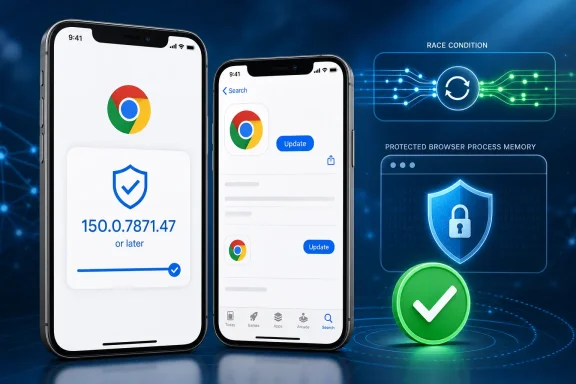 A Physical-Access Flaw With a Precise Patch Boundary
The operational facts are compact. The affected product is Chrome on iOS, and the published affected range is versions prior to 150.0.7871.47. The Chrome-originated CVE description carried by the National Vulnerability Database says exploitation requires a local attacker with physical access to the device.The stated consequence is disclosure rather than code execution or device takeover. A successful attacker may be able to obtain potentially sensitive information from Chrome’s process memory. The published assessment does not assign integrity or availability impact.
The public description does not identify the precise data that could be recovered. It would therefore be unsupported to say that exploitation necessarily exposes passwords, cookies, authentication tokens, browsing history, form entries, synchronized account information, or any other specific data type. The defensible boundary is the language in the CVE record: potentially sensitive information from process memory.
That boundary should guide both remediation and communication. An affected version establishes exposure to the vulnerability; it does not prove that information was taken. Conversely, the absence of a documented data type does not make the vulnerability irrelevant. Updating removes the documented exposure without requiring administrators to reconstruct the underlying race condition.
| Deployment state | Chrome for iOS version | Published CVE status | Practical response |
|---|---|---|---|
| Vulnerable | Earlier than 150.0.7871.47 | Within the published affected range | Update Chrome and verify the result |
| Remediation threshold | 150.0.7871.47 | Outside the published affected range | Record the observed version and collection time |
| Newer installation | Later than 150.0.7871.47 | Outside the published affected range | Continue normal update monitoring |
| Unknown or stale inventory | Not verified | Compliance cannot be established | Prioritize verification or update the device |
The wording also matters when discussing later versions. The supported statement is that the published affected range covers versions prior to 150.0.7871.47. Organizations do not need to claim that every subsequent build has been independently tested against the vulnerability. They need to apply the disclosed range accurately and maintain normal application-update controls.
The Restricted Issue Does Not Support a Reconstructed Exploit Narrative
The Chromium issue attached to CVE-2026-13905 is permission-restricted. That establishes that the technical report is not publicly readable through the supplied issue reference. It does not, by itself, establish why access is restricted, how long the restriction will remain, or what disclosure policy applies to this particular bug.The restricted report also means the public material does not reveal the shared resource involved in the race, the operations that must occur concurrently, the duration of the exploitation window, or the precise method by which information is obtained from process memory.
Defenders should not fill those gaps with hypothetical mechanisms. The record does not establish that the vulnerability involves a particular user-interface element, browser state, callback sequence, object lifetime, initialization path, or ownership transition. Nor does it identify a special device condition, a required Chrome screen, or a visible symptom that would allow administrators to test for exploitation.
The useful conclusion is narrower:
- The attacker is local.
- Physical access is required.
- Attack complexity is assessed as high.
- The potential consequence is disclosure of sensitive information from process memory.
- Chrome for iOS versions prior to 150.0.7871.47 are in the published affected range.
This distinction is important for vulnerability-management systems. Sparse descriptions often encourage analysts to enrich tickets with assumptions so that the issue appears more complete. In this case, unsupported enrichment would reduce accuracy. The version boundary and platform condition should drive remediation, while unknown technical details should remain explicitly unknown.
One Short Risk Reading: Medium, Physical, and Confidentiality-Focused
CISA-ADP assigned CVE-2026-13905 a CVSS 3.1 base score of 4.2, rated Medium, using the vector:CVSS:3.1/AV:P/AC:H/PR:N/UI:N/S:U/C:H/I:N/A:NThe vector describes an attack requiring physical access and high attack complexity. It does not require prior privileges or user interaction once the attacker is in position to attempt exploitation. Scope is unchanged. Confidentiality impact is rated High, while integrity and availability impacts are None.
That combination explains the medium score without minimizing the disclosure consequence. The vulnerability is not described as remotely exploitable through ordinary web browsing, and it is not presented as a general iPhone takeover. Its reach is constrained by the physical-access prerequisite and high complexity, while its potential confidentiality impact remains significant.
The displayed 4.2 score is CISA-ADP’s CVSS 3.1 assessment. The supplied NVD record does not contain a separate NVD CVSS assessment. Vulnerability platforms should preserve that provenance rather than presenting the score as though NVD independently calculated it.
CVSS should inform prioritization, not replace the remediation decision. An update is available, the affected range is precise, and verifying an application version is generally less disruptive than accepting an unresolved browser vulnerability. The proportionate response is prompt routine patching, not an emergency declaration and not indefinite deferral.
Physical Access Defines the Incident Boundary
CVE-2026-13905 should be handled as a mobile application vulnerability whose relevance increases when an affected iPhone has been outside trusted control. That does not mean every outdated phone is compromised, and it does not mean every misplaced phone requires the same incident response.An affected Chrome version answers one question: was the application within the published vulnerable range? It does not answer whether another person physically accessed the device, whether exploitation was attempted, or whether information was disclosed.
Organizations should therefore separate remediation from incident assessment:
- Remediation is required for Chrome on iOS versions below 150.0.7871.47.
- Verification is required when the installed version is missing, stale, incomplete, or supplied only through an unconfirmed user report.
- Incident assessment is appropriate when an affected or unverified device was outside organizational or user control.
- Broader response actions should depend on evidence and the organization’s established lost-device procedures, not on the CVE number alone.
The same restraint applies in the other direction. Recovering possession of a device does not automatically establish that the device remained secure while it was unavailable. The security or incident-response team should assess that situation using its existing process, with the Chrome version and inventory history included as evidence.
Chrome on iOS Requires Its Own Compliance Check
Updating Chrome on a Windows PC does not update Chrome on an iPhone. Desktop browser compliance cannot be used as evidence that the mobile application received the corrected release.For an individual user, the complete procedure is immediately actionable:
- Open App Store.
- Tap the profile picture.
- Review Available Updates.
- Locate Chrome.
- Tap Update next to Chrome.
- Wait for installation to finish.
- Open Chrome.
- Tap ….
- Open Settings.
- Select Google Chrome, or About Chrome if that is the label provided by the installed interface.
- Confirm that the installed version is 150.0.7871.47 or later.
If Chrome is not shown under Available Updates, refresh the App Store account screen and check again. The user can also open Chrome’s App Store product page to see whether an Update button is offered. Regardless of the route used to initiate installation, the final test remains the Chrome version shown in the application or the version reported by trusted mobile application inventory.
Managed organizations should prefer centrally collected version data where available. A recent management record can show the application identifier, installed version, device identity, ownership or user mapping where appropriate, and collection time. That allows administrators to distinguish an updated device from one that has not checked in since the remediation began.
Missing data must not be interpreted as success. A device with no Chrome version, an incomplete version, stale inventory, or conflicting reports should remain open until the mobile-management owner obtains a current result or applies the organization’s normal noncompliance procedure.
Application Inventory Is the Main Detection Control
The supplied record provides a version boundary, not an indicator-of-compromise package. There is no supported basis for promising a distinctive crash, log message, network signature, user warning, or forensic artifact that reliably identifies exploitation of CVE-2026-13905.Version evidence is therefore the primary administrative control. The basic workflow is:
- Identify iPhones on which Chrome is installed.
- Collect the complete installed application version.
- Compare it with 150.0.7871.47.
- Mark lower versions as affected.
- Treat unknown, incomplete, or stale values as unresolved.
- Deploy or require the update.
- Collect fresh inventory after the remediation window.
- Close the finding only after the observed version reaches the threshold.
A synchronized vulnerability feed or closed deployment job can support the record, but neither substitutes for application inventory. The strongest remediation evidence is a recent report showing the affected iPhone running Chrome 150.0.7871.47 or later.
The platform condition is equally important. The published product scope is Chrome on iOS only. Administrators should not assign this CVE to Chrome on Windows, macOS, Android, or another Chromium-based browser solely because the product family or major version looks similar.
The Public Record Developed in Layers
The supplied material supports a sequence of record development, but not the unsupported calendar dates and exact event times previously attached to it. Those dates should not be used to create a false sense of disclosure precision.Timeline
Chrome-originated CVE information — The vulnerability description identifies Chrome on iOS versions prior to 150.0.7871.47 as affected. It describes a race condition through which a local attacker with physical access may obtain potentially sensitive information from process memory.CISA-ADP enrichment — CISA-ADP supplies the 4.2 Medium CVSS 3.1 assessment and the vector showing physical attack access, high complexity, no required privileges, no user interaction, unchanged scope, High confidentiality impact, and no integrity or availability impact.
Weakness classification — The record associates the issue with CWE-362, which covers concurrent execution using a shared resource with improper synchronization.
NIST product analysis — The affected-product configuration connects the vulnerable Chrome range with Apple’s iPhone operating-system platform, reinforcing the iOS-only scope.
Current operational state — The published affected range remains Chrome for iOS versions prior to 150.0.7871.47. The attached Chromium issue remains permission-restricted, so the detailed exploit mechanics are not available in the supplied public material.
This layered structure explains why a vulnerability page can display data from several contributors. The CVE description, CISA-ADP score, weakness classification, and NIST configuration serve related but different functions. Vulnerability-management systems should retain the contributor associated with each field.
The absence of a separate NVD CVSS assessment is particularly important. A dashboard that labels every score appearing on an NVD page as an “NVD score” loses useful provenance. For CVE-2026-13905, the displayed 4.2 score should be identified as CISA-ADP’s CVSS 3.1 assessment.
Medium Severity Still Requires a Completed Patch Decision
CVE-2026-13905 should not displace remediation of an actively exploited, network-accessible critical vulnerability. It also should not remain open indefinitely merely because its attack vector is physical.The update decision is inexpensive compared with many enterprise patches. Chrome is updated through the iPhone’s normal application-update process, and the compliance result can be expressed as an exact version comparison. The harder task is often obtaining reliable mobile inventory, particularly for personally owned, lightly managed, offline, or unenrolled devices.
That difference should shape the response. Organizations do not need an emergency change program, but they do need an owner, a remediation window, a current inventory query, and a rule for devices that cannot demonstrate compliance.
Devices whose versions cannot be verified should be prioritized because the organization cannot establish whether they remain in the affected range. Devices that were outside organizational or user control should also receive priority because physical access is part of the vulnerability’s published attack conditions.
Other devices can move through the normal mobile application-update process, provided that process ends with version evidence. “Automatic updates enabled” is a configuration state, not a completed remediation result.
Action checklist for admins
- Confirm that the affected product in the ticket is Chrome on iOS, not desktop Chrome or Chrome on Android.
- Inventory Chrome installations on managed or enrolled iPhones.
- Collect the complete installed application version and the inventory collection time.
- Mark every version earlier than 150.0.7871.47 as affected.
- Treat missing, incomplete, stale, or conflicting version data as unresolved.
- Deploy or require the current Chrome update through the organization’s supported mobile application-management process.
- Give unmanaged users the exact path: App Store > profile picture > Available Updates > Update next to Chrome.
- Require users to verify through Chrome > … > Settings > Google Chrome, or About Chrome where applicable.
- Confirm that the resulting version is 150.0.7871.47 or later.
- Re-query managed application inventory after deployment.
- Do not close a finding merely because an update command was sent or automatic updates are enabled.
- Prioritize devices that cannot be version-verified.
- Prioritize devices that were outside organizational or user control.
- Send those loss-of-control cases to the security or incident-response team for assessment under existing procedures.
- Do not order password resets, authenticator replacement, device wiping, or session revocation solely because an affected version was found.
- Keep Windows, macOS, Android, and other Chromium-family findings out of scope unless separate evidence establishes that they are affected.
- Monitor later authoritative changes to the CVE record, scoring, scope, and restricted issue without delaying the current update.
Assign Ownership to Three Concrete Functions
CVE-2026-13905 does not require a broad mixed-fleet governance exercise. It requires a direct ownership decision.The mobile-device-management or application-management owner is responsible for identifying iPhones with Chrome installed, obtaining current application inventory, deploying or requiring the update, and verifying that each in-scope installation reports version 150.0.7871.47 or later.
The vulnerability-management team is responsible for tracking the exact threshold, preserving the iOS-only platform condition, keeping unknown versions open, and ensuring that the 4.2 score is attributed to CISA-ADP rather than presented as an independent NVD assessment.
The security or incident-response team is responsible for assessing affected or unverified iPhones that were outside organizational or user control. That assessment should use the organization’s existing lost-device and exposure process rather than assuming either compromise or safety from the CVE record alone.
This division prevents the finding from stalling between desktop browser operations, mobile administration, and security. It also prevents scope inflation: Windows administrators may encounter the CVE in general Chrome feeds, but the published affected product is Chrome on iOS.
Future record updates may add technical detail, change enrichment fields, or make the restricted issue available. None of that is required to complete today’s action. The published affected range is versions prior to 150.0.7871.47, the remediation threshold is precise, and the ownership decision is concrete: mobile management verifies the installed versions, vulnerability management tracks the threshold, and the security team assesses devices that were outside control.
References
- Primary source: NVD / Chromium
Published: 2026-07-11T15:40:19-07:00
Loading…
nvd.nist.gov - Security advisory: MSRC
Published: 2026-07-11T15:40:19-07:00
Original feed URL
Loading…
msrc.microsoft.com - Official source: support.google.com
Set up Chrome for iPhone or iPad - Google Chrome Help
Google Chrome is a fast web browser available at no charge. Before you download, check if Chrome supports your operating system and you’ve met all the other system requirements. You can use Chrome wi support.google.com
- Related coverage: tracker.security.nixos.org
Loading…
tracker.security.nixos.org - Related coverage: o3.security
Loading…
o3.security - Related coverage: cve.imfht.com
CVE-2026-13902: Inappropriate implementation in Chrome for iOS in Google - Vulnerability Platform
[中危] Overview An inappropriate implementation issue exists in Google Chrome for iOS prior to version 150.0.7871.47. An attacker can execute UI Spoofing by cve.imfht.com
- Related coverage: cvefeed.io
Loading…
cvefeed.io