

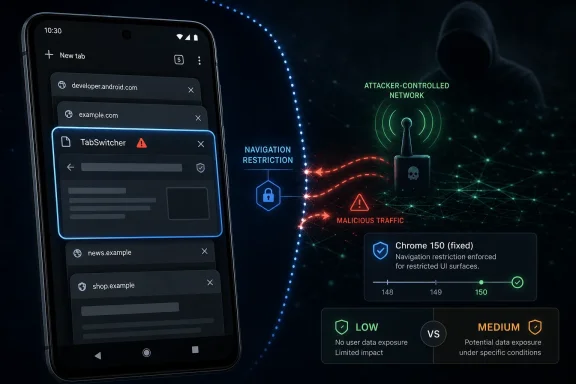
Google disclosed CVE-2026-14080 on June 30, 2026, as a low-severity Chrome for Android TabSwitcher flaw fixed before version 150.0.7871.47, where insufficient validation of untrusted input could let a remote attacker bypass navigation restrictions through malicious network traffic. The bug is not the kind of Chrome vulnerability that usually drives emergency patch headlines. That is precisely why it matters: it exposes the quieter layer of browser security where mobile UI, navigation state, and user trust meet. As detailed by the National Vulnerability Database entry sourced from Chrome, and reflected in Google’s Chrome Releases post for Chrome 150, this is a small flaw inside a very large update, but small flaws in browser navigation are rarely meaningless.
Google’s own Chromium severity rating is Low, while CISA’s ADP enrichment assigns a CVSS 3.1 score of 4.3, placing it in Medium territory with network attack vector, low complexity, no privileges required, user interaction required, and limited integrity impact. That split tells the story better than either label alone. Chrome’s security team is saying this is not a memory-corruption crisis; the federal vulnerability ecosystem is saying administrators should still treat it as a real remotely reachable browser defect.
The name of the vulnerable component, TabSwitcher, sounds mundane. On Android, though, the tab switcher is not merely a convenience surface for people juggling shopping carts, inboxes, and documentation tabs. It is part of the browser’s mental model: the place where users decide what page they are on, where they go next, and whether the navigation context they see is the one they meant to trust.
The easiest mistake with CVE-2026-14080 is to file it under “not urgent” because Google classified it as Low. That would be too casual. Low severity in Chromium’s taxonomy usually means the bug is not expected, on its own, to produce the nightmare outcomes administrators fear most: arbitrary code execution, sandbox escape, credential theft, or cross-origin data exposure at scale.
But Chrome is not just a rendering engine wrapped in tabs. It is the operating environment through which most users encounter identity providers, banking portals, corporate SaaS dashboards, device-management enrollment pages, and password-reset workflows. A navigation restriction bypass may not execute code, but it can interfere with the browser’s promise that movement from one page or context to another obeys the rules Chrome claims to enforce.
The NVD description says the flaw allowed a remote attacker to bypass navigation restrictions via malicious network traffic. That language is broad, and because Google restricts bug details until enough users are patched, we do not yet have the kind of exploit narrative that would show exactly what the attacker could make a victim see or do. Still, the contours are clear enough: Chrome for Android accepted something it should have validated more carefully, and the consequence landed in navigation behavior.
This is the category of bug that tends to be underestimated because it does not sound like a crash. Modern browser attacks are often less theatrical than exploit demos suggest. They frequently rely on confusing state, racing transitions, abusing user gestures, or making a trusted surface carry an untrusted implication.
That matters on mobile more than on desktop. A phone screen compresses browser state into small cards, transient previews, and gesture-driven transitions. The user does not have the same persistent address bar visibility, window chrome, extension indicators, and side-by-side context available on a large display. Android Chrome’s tab switcher is therefore part UI, part memory aid, part trust surface.
If an attacker can influence navigation restrictions around that surface, the immediate impact may be limited, but the trust implications are not trivial. Navigation is how phishing attacks acquire plausibility. Navigation is how malicious pages steer users through flows they believe are controlled by a legitimate service. Navigation is how a browser enforces “you may not go there from here” rules that most users never see but rely on every day.
The phrase “malicious network traffic” is also notable. This is not framed as a purely local attack, nor as something requiring an installed malicious app. CISA’s vector says the attack is network-reachable, requires no privileges, and needs user interaction. In practical terms, that places it in the same broad operational bucket as many web-delivered browser bugs: exposure begins with a vulnerable browser encountering attacker-controlled content or traffic, but success depends on the user doing something in the flow.
That version-number wrinkle is worth reading carefully rather than pedantically. Chrome versioning across platforms often produces different visible build numbers while the security boundary is the family of fixes shipped with the stable release. For Android users, the practical advice is simpler than the recordkeeping: update Chrome from Google Play and verify that the device is no longer running a pre-fix Chrome 150 build or older.
The broader Chrome 150 security release is enormous. Google’s release notes list hundreds of security fixes, including critical, high, medium, and low issues across the Chromium codebase. CVE-2026-14080 is one line in that ledger, but security teams do not get to patch one line at a time.
That is the operational point. Enterprises with Android fleets, kiosk devices, shared tablets, frontline-worker phones, or bring-your-own-device access policies should not ask whether this particular CVE alone justifies action. They should ask why any managed Chrome installation would be allowed to lag behind a release that closes hundreds of browser defects, some far more severe than this TabSwitcher issue.
CISA’s ADP enrichment added a CVSS 3.1 vector and an SSVC assessment on July 1, 2026. The SSVC values are useful because they speak in operational language rather than just numeric scoring: exploitation was listed as none, automatable as no, and technical impact as partial. That aligns with the story of a bug that deserves patching but not panic.
The CWE mapping is also unsurprising: CWE-20, improper input validation. Input validation is the gray concrete of browser security. It is everywhere, easy to dismiss, and catastrophic when placed in the wrong load-bearing position. Here, the load-bearing position appears to be a navigation-related Android UI component.
The interesting detail in the change history is that CISA-ADP added and then removed the CWE-20 entry in one modification trail, while the NVD page still presents CWE-20 as the weakness enumeration source associated with Chrome. That kind of churn is normal during enrichment, but it is a reminder that CVE pages are living records. Security teams should treat the vendor advisory and fixed-version guidance as the authority for action, while watching NVD and CISA metadata for risk triage.
Those details matter. They separate this flaw from the browser emergencies that force weekend patch campaigns and executive briefings. A user-interaction requirement means an attacker cannot simply scan the internet and compromise devices by the million. A partial technical impact means the expected consequence is narrower than total confidentiality, integrity, and availability loss.
But “not a zero-day” should not become “not worth patching.” Browser bugs often become more useful after patch publication because attackers can diff the fix, infer the vulnerable logic, and look for reachable patterns. Google’s standard restriction on bug details exists for exactly that reason: the time between disclosure and broad patch adoption is the danger window.
For Chrome on Android, that window is shaped by Google Play rollout timing, device policies, user behavior, and whether the browser is controlled by enterprise management. Consumers who assume Chrome silently updates may be mostly right eventually, but not necessarily quickly. Administrators who assume mobile devices are “handled by the store” are outsourcing their patch SLA to hope.
Android is different. Chrome updates flow through Google Play, subject to rollout waves, Play Store settings, device idle state, battery conditions, data restrictions, OEM behavior, work-profile separation, and sometimes the peculiarities of managed Google Play. The result is that “Google has released the fix” and “the user’s browser is fixed” are not the same statement.
That distinction is especially important for WindowsForum’s IT audience because many Windows shops are now hybrid endpoint shops whether they planned to be or not. The identity plane is Microsoft Entra ID. The productivity suite is Microsoft 365. The endpoint fleet includes Windows laptops, iPhones, Android phones, ChromeOS devices, and unmanaged contractor hardware. A Chrome for Android flaw may still affect a Windows-centric organization if Android browsers are used to approve MFA prompts, access webmail, open SharePoint links, or sign into corporate portals.
Mobile browser patching also suffers from a visibility problem. Vulnerability scanners that produce beautiful desktop dashboards may have a much weaker view of personal Android devices. MDM and mobile threat defense tools can help, but only if the organization has actually enrolled the devices and set minimum browser-version compliance. In less mature environments, the first inventory question — “Who is running vulnerable Chrome for Android?” — may not have an answer.
Consider the everyday workflow. A user receives a Teams link, opens it in mobile Chrome, authenticates through a web flow, follows a redirect, and lands in a corporate resource. The security of that journey depends on multiple vendors: Google for the browser, Microsoft for identity and service logic, the Android platform for app isolation, the MDM provider for compliance, and the organization for policy. A navigation restriction bypass in the browser sits in the seam between those responsibilities.
The severity may be low, but seams are where enterprise risk accumulates. No one vendor owns the entire path. Each layer assumes the layer below it will preserve certain invariants: this redirect goes where it says, this frame cannot escape its intended context, this UI state corresponds to this origin, this user gesture means what the browser says it means. When one invariant bends, attackers look for another weak assumption nearby.
That is why practical response should be policy-based rather than CVE-drama-based. If your organization allows Android Chrome to access corporate resources, then Chrome version should be part of conditional access, device compliance, or at least user guidance. If the browser is too old, access should narrow until it updates. This is boring security, but boring security is what keeps low-severity bugs from becoming incident footnotes.
A navigation restriction bypass could support several classes of attacker goal, depending on the exact implementation details. It might let a malicious flow move the user somewhere the browser intended to block. It might weaken assumptions around tab state, previews, or restricted transitions. It might assist a phishing page in maintaining continuity where Chrome expected a break.
We should not overclaim. The public record does not show that CVE-2026-14080 enables address-bar spoofing, credential theft, data exfiltration, or code execution. Google’s Low severity and CISA’s limited integrity impact argue against treating it as a major standalone compromise path.
But it is fair to say that navigation integrity is part of anti-phishing architecture. Browsers have spent years tightening mixed-content handling, cross-origin isolation, safe browsing warnings, download prompts, interstitials, permission prompts, and UI indicators precisely because users make trust decisions at speed. If a flaw bypasses a navigation restriction, the risk is not merely that a page moved. The risk is that a user’s next decision is made inside a subtly less trustworthy flow.
The modern browser is a PDF reader, video stack, GPU client, JavaScript runtime, WebAssembly host, password manager, identity broker, payment surface, remote-work portal, and application platform. Chrome’s component list reads like an operating system because, functionally, it is one. TabSwitcher may sound like UI plumbing, but UI plumbing in a browser is still security-relevant plumbing.
This is the paradox administrators live with. Chrome’s sandboxing, site isolation, exploit mitigations, and rapid-update pipeline are among the reasons the web remains usable at planetary scale. The same complexity that enables that scale guarantees a constant stream of CVEs, many of them in components most users have never heard of.
CVE-2026-14080 sits on the quiet side of that paradox. It is not a sign that Chrome is uniquely broken. It is a sign that even mature browser surfaces still contain edge cases where untrusted input and user navigation meet in ways the designers did not fully constrain.
Risk is vulnerability multiplied by exposure and consequence. For a consumer who keeps automatic updates enabled, the answer is probably simple: update Chrome when Google Play offers it, or trigger the update manually if it has not happened yet. For an enterprise, the answer depends on device inventory, mobile access policies, and how quickly managed Play updates are enforced.
The right patch policy for Chrome should not hinge on whether a particular CVE is rated Low, Medium, or High. Chrome is too central and updates too frequently for bespoke debate over every minor component bug. A reasonable organization sets a browser currency target — for example, stable channel within a defined number of days — and treats exceptions as technical debt.
This is especially true for mobile. If users can access corporate resources from Android Chrome, the organization should know whether the browser is current enough. If it cannot know, that is a governance problem masquerading as a vulnerability-management problem.
The trade-off is that administrators must act with partial information. For CVE-2026-14080, we know the affected component, the broad weakness, the affected platform, the fixed-version boundary, and the likely impact class. We do not know the exact navigation restriction, the attacker-controlled input format, the user interaction needed, or whether the issue composes neatly with other bugs.
That uncertainty should push response toward basic hygiene rather than speculation. There is no need to invent dramatic exploit chains. There is also no need to wait for a proof-of-concept before updating a browser that already has a vendor fix.
The phrase “undergoing enrichment” on the NVD page can make the record look unfinished. Operationally, the record is finished enough. The vendor shipped the patch. The affected product is identified. The remediation path is Chrome update. Everything else is refinement.
CVE-2026-14080 is a useful reminder because it is not terrifying. Terrifying bugs get attention. Low-severity mobile browser bugs expose whether the patch machinery works when nobody is yelling.
A mature response looks like this: confirm Chrome for Android update availability, check managed-device version reporting, enforce automatic updates where possible, nudge users who are outside management, and verify that conditional-access policies do not allow indefinitely stale browsers into sensitive workflows. The work is dull, but it scales.
Security teams should also be careful with vulnerability feeds that flatten nuance. One feed may show the bug as Low because Chromium said so. Another may show Medium because CISA scored it 4.3. A third may lack a score while NVD enrichment continues. The productive answer is not to argue about the label; it is to align on the fixed version and reduce exposure.
Google’s own Chromium severity rating is Low, while CISA’s ADP enrichment assigns a CVSS 3.1 score of 4.3, placing it in Medium territory with network attack vector, low complexity, no privileges required, user interaction required, and limited integrity impact. That split tells the story better than either label alone. Chrome’s security team is saying this is not a memory-corruption crisis; the federal vulnerability ecosystem is saying administrators should still treat it as a real remotely reachable browser defect.
The name of the vulnerable component, TabSwitcher, sounds mundane. On Android, though, the tab switcher is not merely a convenience surface for people juggling shopping carts, inboxes, and documentation tabs. It is part of the browser’s mental model: the place where users decide what page they are on, where they go next, and whether the navigation context they see is the one they meant to trust.
 A Low-Severity Chrome Bug Can Still Be a Navigation Story
The easiest mistake with CVE-2026-14080 is to file it under “not urgent” because Google classified it as Low. That would be too casual. Low severity in Chromium’s taxonomy usually means the bug is not expected, on its own, to produce the nightmare outcomes administrators fear most: arbitrary code execution, sandbox escape, credential theft, or cross-origin data exposure at scale.But Chrome is not just a rendering engine wrapped in tabs. It is the operating environment through which most users encounter identity providers, banking portals, corporate SaaS dashboards, device-management enrollment pages, and password-reset workflows. A navigation restriction bypass may not execute code, but it can interfere with the browser’s promise that movement from one page or context to another obeys the rules Chrome claims to enforce.
The NVD description says the flaw allowed a remote attacker to bypass navigation restrictions via malicious network traffic. That language is broad, and because Google restricts bug details until enough users are patched, we do not yet have the kind of exploit narrative that would show exactly what the attacker could make a victim see or do. Still, the contours are clear enough: Chrome for Android accepted something it should have validated more carefully, and the consequence landed in navigation behavior.
This is the category of bug that tends to be underestimated because it does not sound like a crash. Modern browser attacks are often less theatrical than exploit demos suggest. They frequently rely on confusing state, racing transitions, abusing user gestures, or making a trusted surface carry an untrusted implication.
The Tab Switcher Is a Security Boundary Because Users Treat It Like One
Browser makers do not usually describe the tab switcher as a security boundary in the same way they describe the sandbox, site isolation, or certificate validation. Users do, implicitly. When someone opens the Android tab overview, they are asking a security-relevant question: what is open, what is active, and what am I about to return to?That matters on mobile more than on desktop. A phone screen compresses browser state into small cards, transient previews, and gesture-driven transitions. The user does not have the same persistent address bar visibility, window chrome, extension indicators, and side-by-side context available on a large display. Android Chrome’s tab switcher is therefore part UI, part memory aid, part trust surface.
If an attacker can influence navigation restrictions around that surface, the immediate impact may be limited, but the trust implications are not trivial. Navigation is how phishing attacks acquire plausibility. Navigation is how malicious pages steer users through flows they believe are controlled by a legitimate service. Navigation is how a browser enforces “you may not go there from here” rules that most users never see but rely on every day.
The phrase “malicious network traffic” is also notable. This is not framed as a purely local attack, nor as something requiring an installed malicious app. CISA’s vector says the attack is network-reachable, requires no privileges, and needs user interaction. In practical terms, that places it in the same broad operational bucket as many web-delivered browser bugs: exposure begins with a vulnerable browser encountering attacker-controlled content or traffic, but success depends on the user doing something in the flow.
Chrome 150 Was the Real Security Event
CVE-2026-14080 arrived inside Chrome 150, not as a lonely emergency fix. Google’s Chrome Releases blog announced the promotion of Chrome 150 to the stable channel on June 30, 2026, for Windows, Mac, and Linux, while the Android update on the same date moved Chrome for Android to 150.0.7871.63 and stated that Android releases contain the same security fixes as corresponding desktop releases unless otherwise noted. The NVD affected-version language for this CVE points specifically to Chrome on Android prior to 150.0.7871.47.That version-number wrinkle is worth reading carefully rather than pedantically. Chrome versioning across platforms often produces different visible build numbers while the security boundary is the family of fixes shipped with the stable release. For Android users, the practical advice is simpler than the recordkeeping: update Chrome from Google Play and verify that the device is no longer running a pre-fix Chrome 150 build or older.
The broader Chrome 150 security release is enormous. Google’s release notes list hundreds of security fixes, including critical, high, medium, and low issues across the Chromium codebase. CVE-2026-14080 is one line in that ledger, but security teams do not get to patch one line at a time.
That is the operational point. Enterprises with Android fleets, kiosk devices, shared tablets, frontline-worker phones, or bring-your-own-device access policies should not ask whether this particular CVE alone justifies action. They should ask why any managed Chrome installation would be allowed to lag behind a release that closes hundreds of browser defects, some far more severe than this TabSwitcher issue.
NVD Is Still Enriching the Record, but the Shape Is Already Clear
The NVD record is marked as undergoing enrichment, which means the federal vulnerability entry may still change as tags, scoring, CWE mapping, CPE applicability, and references settle. That should not be confused with uncertainty about whether the flaw exists. The CVE was received from Chrome on June 30, and the record includes the Chrome Releases reference, the Chromium issue reference, the affected-product statement, and the description.CISA’s ADP enrichment added a CVSS 3.1 vector and an SSVC assessment on July 1, 2026. The SSVC values are useful because they speak in operational language rather than just numeric scoring: exploitation was listed as none, automatable as no, and technical impact as partial. That aligns with the story of a bug that deserves patching but not panic.
The CWE mapping is also unsurprising: CWE-20, improper input validation. Input validation is the gray concrete of browser security. It is everywhere, easy to dismiss, and catastrophic when placed in the wrong load-bearing position. Here, the load-bearing position appears to be a navigation-related Android UI component.
The interesting detail in the change history is that CISA-ADP added and then removed the CWE-20 entry in one modification trail, while the NVD page still presents CWE-20 as the weakness enumeration source associated with Chrome. That kind of churn is normal during enrichment, but it is a reminder that CVE pages are living records. Security teams should treat the vendor advisory and fixed-version guidance as the authority for action, while watching NVD and CISA metadata for risk triage.
The Attack Prerequisites Keep This Out of Zero-Day Territory
CVE-2026-14080 does not currently look like a zero-day fire drill. There is no public indication in the supplied NVD record or Google’s release note that exploitation has been observed in the wild. CISA’s SSVC enrichment says exploitation is none. The CVSS vector requires user interaction. The attack is not marked automatable.Those details matter. They separate this flaw from the browser emergencies that force weekend patch campaigns and executive briefings. A user-interaction requirement means an attacker cannot simply scan the internet and compromise devices by the million. A partial technical impact means the expected consequence is narrower than total confidentiality, integrity, and availability loss.
But “not a zero-day” should not become “not worth patching.” Browser bugs often become more useful after patch publication because attackers can diff the fix, infer the vulnerable logic, and look for reachable patterns. Google’s standard restriction on bug details exists for exactly that reason: the time between disclosure and broad patch adoption is the danger window.
For Chrome on Android, that window is shaped by Google Play rollout timing, device policies, user behavior, and whether the browser is controlled by enterprise management. Consumers who assume Chrome silently updates may be mostly right eventually, but not necessarily quickly. Administrators who assume mobile devices are “handled by the store” are outsourcing their patch SLA to hope.
Android Makes Browser Patch Discipline Messier Than Desktop
Desktop Chrome has a familiar update ritual. You open the menu, go to Help, check About Chrome, and relaunch. Managed Windows environments can enforce update policies, report versions, and stage rollouts. Even users who ignore prompts usually see the red or orange update indicator eventually nag them into compliance.Android is different. Chrome updates flow through Google Play, subject to rollout waves, Play Store settings, device idle state, battery conditions, data restrictions, OEM behavior, work-profile separation, and sometimes the peculiarities of managed Google Play. The result is that “Google has released the fix” and “the user’s browser is fixed” are not the same statement.
That distinction is especially important for WindowsForum’s IT audience because many Windows shops are now hybrid endpoint shops whether they planned to be or not. The identity plane is Microsoft Entra ID. The productivity suite is Microsoft 365. The endpoint fleet includes Windows laptops, iPhones, Android phones, ChromeOS devices, and unmanaged contractor hardware. A Chrome for Android flaw may still affect a Windows-centric organization if Android browsers are used to approve MFA prompts, access webmail, open SharePoint links, or sign into corporate portals.
Mobile browser patching also suffers from a visibility problem. Vulnerability scanners that produce beautiful desktop dashboards may have a much weaker view of personal Android devices. MDM and mobile threat defense tools can help, but only if the organization has actually enrolled the devices and set minimum browser-version compliance. In less mature environments, the first inventory question — “Who is running vulnerable Chrome for Android?” — may not have an answer.
Microsoft Shops Should Care Even When the Bug Is in Google’s Browser
It is tempting for Windows administrators to treat Chrome for Android as someone else’s ecosystem. That is no longer realistic. Microsoft’s cloud services are browser-first from almost any device, and Android Chrome is one of the front doors into that estate.Consider the everyday workflow. A user receives a Teams link, opens it in mobile Chrome, authenticates through a web flow, follows a redirect, and lands in a corporate resource. The security of that journey depends on multiple vendors: Google for the browser, Microsoft for identity and service logic, the Android platform for app isolation, the MDM provider for compliance, and the organization for policy. A navigation restriction bypass in the browser sits in the seam between those responsibilities.
The severity may be low, but seams are where enterprise risk accumulates. No one vendor owns the entire path. Each layer assumes the layer below it will preserve certain invariants: this redirect goes where it says, this frame cannot escape its intended context, this UI state corresponds to this origin, this user gesture means what the browser says it means. When one invariant bends, attackers look for another weak assumption nearby.
That is why practical response should be policy-based rather than CVE-drama-based. If your organization allows Android Chrome to access corporate resources, then Chrome version should be part of conditional access, device compliance, or at least user guidance. If the browser is too old, access should narrow until it updates. This is boring security, but boring security is what keeps low-severity bugs from becoming incident footnotes.
Navigation Bugs Are the Browser Version of Social Engineering Assistants
Many security discussions divide vulnerabilities into “technical” and “social engineering” buckets. Browser navigation bugs live awkwardly between them. They are technical defects whose value often depends on helping social engineering feel less suspicious.A navigation restriction bypass could support several classes of attacker goal, depending on the exact implementation details. It might let a malicious flow move the user somewhere the browser intended to block. It might weaken assumptions around tab state, previews, or restricted transitions. It might assist a phishing page in maintaining continuity where Chrome expected a break.
We should not overclaim. The public record does not show that CVE-2026-14080 enables address-bar spoofing, credential theft, data exfiltration, or code execution. Google’s Low severity and CISA’s limited integrity impact argue against treating it as a major standalone compromise path.
But it is fair to say that navigation integrity is part of anti-phishing architecture. Browsers have spent years tightening mixed-content handling, cross-origin isolation, safe browsing warnings, download prompts, interstitials, permission prompts, and UI indicators precisely because users make trust decisions at speed. If a flaw bypasses a navigation restriction, the risk is not merely that a page moved. The risk is that a user’s next decision is made inside a subtly less trustworthy flow.
The Chrome Security Model Is Winning and Losing at the Same Time
Chrome 150’s security-fix volume is both reassuring and exhausting. It is reassuring because bugs are being found, cataloged, and patched across a huge codebase. It is exhausting because the browser has become one of the largest attack surfaces on any endpoint, and the patch treadmill never slows.The modern browser is a PDF reader, video stack, GPU client, JavaScript runtime, WebAssembly host, password manager, identity broker, payment surface, remote-work portal, and application platform. Chrome’s component list reads like an operating system because, functionally, it is one. TabSwitcher may sound like UI plumbing, but UI plumbing in a browser is still security-relevant plumbing.
This is the paradox administrators live with. Chrome’s sandboxing, site isolation, exploit mitigations, and rapid-update pipeline are among the reasons the web remains usable at planetary scale. The same complexity that enables that scale guarantees a constant stream of CVEs, many of them in components most users have never heard of.
CVE-2026-14080 sits on the quiet side of that paradox. It is not a sign that Chrome is uniquely broken. It is a sign that even mature browser surfaces still contain edge cases where untrusted input and user navigation meet in ways the designers did not fully constrain.
The Patch Decision Should Not Wait for a Perfect Score
Security scoring is useful, but it can seduce organizations into false precision. CVSS 4.3 says this bug is medium by CISA’s enrichment. Chromium says Low. NVD has not yet provided its own NIST score. None of those numbers tells you whether your company has thousands of Android devices with stale browsers and access to sensitive systems.Risk is vulnerability multiplied by exposure and consequence. For a consumer who keeps automatic updates enabled, the answer is probably simple: update Chrome when Google Play offers it, or trigger the update manually if it has not happened yet. For an enterprise, the answer depends on device inventory, mobile access policies, and how quickly managed Play updates are enforced.
The right patch policy for Chrome should not hinge on whether a particular CVE is rated Low, Medium, or High. Chrome is too central and updates too frequently for bespoke debate over every minor component bug. A reasonable organization sets a browser currency target — for example, stable channel within a defined number of days — and treats exceptions as technical debt.
This is especially true for mobile. If users can access corporate resources from Android Chrome, the organization should know whether the browser is current enough. If it cannot know, that is a governance problem masquerading as a vulnerability-management problem.
Google’s Sparse Disclosure Is a Feature, but It Leaves Defenders Reading Shadows
Google’s Chrome advisory follows a familiar pattern: name the CVE, identify the component, state the broad bug class, list severity, and keep deeper bug details restricted until a majority of users are updated. That is frustrating for defenders who want to understand exploitability, but it is usually the least bad option. Full technical disclosure on day one can hand attackers a roadmap while the update is still rolling out.The trade-off is that administrators must act with partial information. For CVE-2026-14080, we know the affected component, the broad weakness, the affected platform, the fixed-version boundary, and the likely impact class. We do not know the exact navigation restriction, the attacker-controlled input format, the user interaction needed, or whether the issue composes neatly with other bugs.
That uncertainty should push response toward basic hygiene rather than speculation. There is no need to invent dramatic exploit chains. There is also no need to wait for a proof-of-concept before updating a browser that already has a vendor fix.
The phrase “undergoing enrichment” on the NVD page can make the record look unfinished. Operationally, the record is finished enough. The vendor shipped the patch. The affected product is identified. The remediation path is Chrome update. Everything else is refinement.
The Practical Risk Is in Devices Nobody Checks
The most vulnerable Chrome installation in many organizations is not the CEO’s managed laptop. It is the Android phone outside the formal inventory, the shared tablet in a branch office, the warehouse handheld that only gets charged overnight, the contractor’s device used for webmail, or the kiosk that nobody wants to reboot.CVE-2026-14080 is a useful reminder because it is not terrifying. Terrifying bugs get attention. Low-severity mobile browser bugs expose whether the patch machinery works when nobody is yelling.
A mature response looks like this: confirm Chrome for Android update availability, check managed-device version reporting, enforce automatic updates where possible, nudge users who are outside management, and verify that conditional-access policies do not allow indefinitely stale browsers into sensitive workflows. The work is dull, but it scales.
Security teams should also be careful with vulnerability feeds that flatten nuance. One feed may show the bug as Low because Chromium said so. Another may show Medium because CISA scored it 4.3. A third may lack a score while NVD enrichment continues. The productive answer is not to argue about the label; it is to align on the fixed version and reduce exposure.
Chrome 150 Turns a Small Android Bug Into a Fleet-Management Test
The concrete lesson from CVE-2026-14080 is not that TabSwitcher suddenly deserves its own risk register. The lesson is that browser patching has become fleet hygiene across every device class, and Android can no longer sit outside that discipline. A low-severity navigation bypass is exactly the kind of issue that reveals whether update assumptions are real.- Chrome for Android versions before the fixed Chrome 150 line are the affected population for CVE-2026-14080, and users should update through Google Play rather than waiting for the browser to become obviously broken.
- The public record does not indicate active exploitation, and CISA’s SSVC enrichment lists exploitation as none, so this is a patch-now hygiene issue rather than an emergency-response incident.
- The vulnerability requires user interaction and has limited integrity impact, which lowers urgency but does not erase risk in phishing-prone mobile workflows.
- Organizations that permit Android Chrome access to Microsoft 365, identity portals, SaaS dashboards, or internal web apps should treat browser version as a compliance signal.
- The larger Chrome 150 security release matters more than this single CVE, because administrators patch releases in the real world, not isolated vulnerability descriptions.
- The most important remediation question is whether the organization can prove Chrome for Android is current on devices that touch corporate data.
References
- Primary source: NVD / Chromium
Published: 2026-07-03T07:00:05-07:00
NVD - CVE-2026-14080
 nvd.nist.gov
- Security advisory: MSRC
Published: 2026-07-03T07:00:05-07:00
Original feed URL
Security Update Guide - Microsoft Security Response Center
 msrc.microsoft.com
- Related coverage: cvefeed.io
CVE-2026-14080 - Chrome for Android TabSwitcher Navigation Restriction Bypass
Insufficient validation of untrusted input in TabSwitcher in Google Chrome on Android prior to 150.0.7871.47 allowed a remote attacker to bypass navigation restrictions via malicious network traffic. (Chromium security severity: Low)cvefeed.io
