

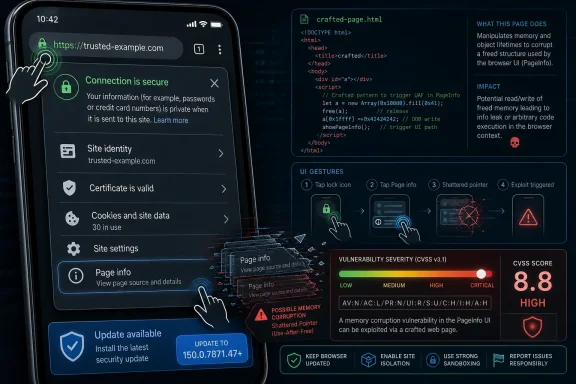
Google disclosed CVE-2026-14064 on June 30, 2026, as a use-after-free flaw in Chrome’s PageInfo component on Android before version 150.0.7871.47, allowing remote code execution if an attacker lures a user into specific interface gestures on a crafted web page. The bug is not the loudest entry in Chrome 150’s enormous security rollup, and Chromium itself labels it Low severity. But the gap between that label and CISA’s high CVSS assessment is exactly why this one deserves attention. It is a small Android browser bug with a big lesson: the most dangerous browser vulnerabilities are not always the ones that look dramatic in a release note.
CVE-2026-14064 sits in an uncomfortable middle ground. Google’s Chromium security process calls it Low severity, while the CISA-backed enrichment data attached to the NVD record gives it a CVSS 3.1 score of 7.5, squarely in High territory. The NVD entry, still marked as undergoing enrichment as of July 2, says NIST had not yet assigned its own CVSS vector, but CISA’s ADP vector rates the technical impact as total.
That apparent contradiction is not necessarily an error. It is a difference in perspective. Chromium’s internal severity rating often reflects exploitability in the browser’s architecture, sandboxing assumptions, user gesture requirements, and component context. CVSS, by contrast, tries to describe the abstract consequence if exploitation succeeds: arbitrary code execution, no privileges required, network attack vector, and high impact to confidentiality, integrity, and availability.
The practical reading for WindowsForum readers is simple: this is not a “the sky is falling” Chrome zero-day, but it is also not a bug to ignore because a single word in Google’s ecosystem says Low. The bug affects Chrome on Android before 150.0.7871.47, requires user interaction, and has no public indication of exploitation in the NVD material provided. Still, the end state described by the CVE is code execution through a crafted HTML page.
That is the kind of vulnerability that becomes more interesting when paired with social engineering. Android users are conditioned to tap through permission bubbles, site controls, account prompts, embedded web views, and app-like pages. A bug that requires “specific UI gestures” may sound hard to weaponize in a lab report, but on a phone screen, persuasion is part of the attack surface.
That makes PageInfo an unusually sensitive place for a use-after-free defect. A normal rendering-engine bug can be understood as malicious web content colliding with parsing, layout, script execution, or graphics code. A PageInfo flaw brings the browser’s security interface into the story. The CVE description says the attacker must convince the user to engage in specific UI gestures, which strongly suggests the exploit path depends on the boundary between web content and browser-controlled interface behavior.
This matters because modern browser security is not just cryptography and sandboxing. It is also ceremony. Users are trained to trust the lock icon, permission prompts, site settings, and “this site wants to…” warnings. When a vulnerability lurks near those controls, even a technically constrained bug can carry outsized risk because the browser’s interface is part of the protection model.
Google’s Chrome Releases blog tied Android updates to the corresponding desktop security fixes unless otherwise noted, and the NVD record identifies Chrome on Android before 150.0.7871.47 as affected. That specificity should prevent overreaction on Windows desktops: this CVE, as currently described, is an Android Chrome issue. But the broader lesson is cross-platform. Browser UI code is now security-critical code.
In Chrome, as in other major browsers, use-after-free bugs can occur in complicated object lifetimes: tabs, frames, UI widgets, permissions panels, media elements, renderer processes, GPU objects, and IPC plumbing. Browsers are among the most complex consumer applications ever shipped, and they constantly juggle untrusted input from the web against native code, privilege boundaries, and user interface state. That makes memory lifetime mistakes both more likely and more consequential.
The industry has spent years trying to push these bugs down. Chrome has sandboxing, site isolation, exploit mitigations, fuzzing, safer allocators, MiraclePtr-style hardening in some areas, and an aggressive vulnerability reward program. Yet the Chrome 150 cycle still included a large pile of fixes, with security vendors and the Chrome Releases blog documenting hundreds of addressed issues across the release.
That is not evidence that Chrome is unusually careless. It is evidence that browsers are now operating systems in miniature. They parse hostile documents, execute code, render video, broker hardware access, manage identities, store secrets, and present security decisions to non-expert users. In that environment, use-after-free is less a legacy bug class than a recurring tax on complexity.
But user interaction requirements are not the same as safety. Phishing exists because attackers are good at turning user action into part of the exploit chain. A mobile web page can ask users to tap, swipe, long-press, open browser controls, check a site setting, enable a permission, or “verify” something through a sequence that feels routine. The exploit does not need to be automatic if the attacker can make the action feel like ordinary phone behavior.
On Android, the gesture issue is especially important because screen real estate is tight. Browser chrome, permission dialogs, address bars, bottom sheets, and page content live closer together than they do on desktop. A security control that is visually obvious on a 27-inch monitor may be just another layered surface on a phone. That gives UI-dependent vulnerabilities more room to be socially engineered.
This is why “requires UI gestures” should be read as “harder to mass exploit silently,” not “safe to postpone.” Enterprises with Android fleets should still push the update through managed Play policies or mobile device management channels. Consumers should still check Play Store updates rather than assume Chrome has already moved.
That context matters. Browser security in 2026 is increasingly about patch velocity, not just individual CVEs. Chrome, Edge, Brave, Vivaldi, Opera, and other Chromium-based browsers all live downstream of a massive shared codebase. A security fix in Chromium becomes a race across vendors, platforms, app stores, enterprise controls, and user update habits.
For Windows users, the Android-only description may seem peripheral. But many WindowsForum readers administer Microsoft 365 tenants, Intune-managed devices, BYOD phones, Android tablets in frontline work, or mixed fleets where Chrome is installed everywhere. A Chrome Android vulnerability can be an enterprise vulnerability even if no Windows executable is directly affected.
The patch volume also creates fatigue. When a release fixes hundreds of issues, individual CVEs blur together. Administrators stop reading every description; users never read them at all. That is rational, but it creates a blind spot for bugs like CVE-2026-14064, where the interesting part is not the numeric severity alone but the combination of mobile UI, PageInfo, user gestures, and code execution.
This is now a routine feature of vulnerability management. CVEs often become operationally relevant before all metadata is clean, complete, and harmonized. Security teams must decide whether to patch, prioritize, defer, or escalate while public databases are still catching up. In this case, the lack of a NIST score should not be mistaken for a lack of risk.
The available data is enough for action. The product is Chrome on Android. The fixed threshold is 150.0.7871.47. The weakness class is use after free. The consequence is arbitrary code execution through crafted HTML after specific UI gestures. CISA’s SSVC entry says exploitation is “none” and automatable is “no,” while technical impact is “total.”
That mix points to a moderate operational priority rather than panic. Patch quickly, especially on managed Android fleets and high-risk users, but do not treat this as confirmed exploitation. It belongs in the regular emergency-adjacent browser patch lane: fast rollout, verification, and monitoring, without the drama reserved for actively exploited zero-days.
Android Chrome is where employees open identity-provider links, Teams and Slack URLs, SharePoint documents, password reset messages, travel portals, SaaS dashboards, and QR-code landing pages. If a crafted HTML page can trigger code execution in a vulnerable Chrome build after user gestures, it is not just a consumer browsing issue. It is a potential foothold in the mobile work environment.
The risk is not limited to full device compromise. Browser-level code execution may expose session material, sensitive page contents, corporate web app interactions, or chained attack opportunities. Android’s sandbox and Chrome’s process architecture are designed to contain damage, but exploit chains are built by stacking weaknesses. A PageInfo use-after-free is not automatically a total compromise of the phone, yet it is exactly the sort of primitive attackers value.
For administrators, the lesson is boring but important: mobile browser versions need inventory. If your tooling can report Android app versions, Chrome should be in the compliance dashboard. If it cannot, this is another reminder that BYOD without app visibility is partly a trust exercise.
Still, Edge administrators should not tune out. Microsoft Edge is Chromium-based, and many Chromium fixes are relevant across browsers even when a particular CVE entry names Chrome. Microsoft typically ships Edge security updates on its own cadence, and the only safe enterprise habit is to track Edge version compliance independently rather than infer safety from Chrome’s version numbers.
The PageInfo component also maps conceptually to browser identity and site controls, areas every Chromium-based browser customizes or integrates with its own UI. Even when a specific bug is Android Chrome-only, the broader pattern is shared: browser UI state has become part of the exploit surface. Microsoft, Google, and other Chromium vendors all have to defend not just rendering engines but the trust surfaces wrapped around them.
Windows admins should therefore treat this CVE as a reminder to keep Chromium patch management boring and automatic. Edge Update, Chrome Update, Intune, Group Policy, mobile app management, and Play Store controls all exist to keep dot releases from becoming helpdesk archaeology. The failure mode is not that administrators misunderstand CVE-2026-14064; it is that they never see the vulnerable version hiding on a phone.
All of those statements can be true at once. A vulnerability can be difficult to exploit reliably and still have severe consequences if exploitation succeeds. A bug can sit in a constrained component and still provide a powerful primitive. A mobile-only issue can be irrelevant to one environment and urgent in another.
This is why vulnerability management by headline severity alone is increasingly inadequate. The more useful question is not “is it Low or High?” but “what must an attacker do, what do they get, and where do we have exposure?” In this case, the attacker needs a crafted page and specific user gestures. The attacker may get code execution. Exposure exists on Android Chrome builds before 150.0.7871.47.
That should lead to a concrete decision: update Chrome on Android promptly, validate version compliance where possible, and do not spend the week writing executive briefings unless your organization has unusual mobile threat exposure. Severity labels should inform that decision, not replace it.
For enterprises, the problem is less about obtaining the patch and more about proving it landed. Android app updates can be delayed by device state, battery conditions, user behavior, managed Play policy, regional rollout timing, and vendor-specific Android distributions. In a fleet, “Google released the fix” is not the same as “our devices have the fix.”
Managed environments should check three things. First, confirm Chrome version inventory for Android devices. Second, enforce update policy where the platform allows it. Third, pay attention to users in high-risk roles, such as executives, finance staff, administrators, developers, and anyone routinely targeted by credential phishing or mobile messaging attacks.
There is also a communications angle. Telling users “Chrome had a Low severity bug” invites complacency. Telling them “update Chrome because a crafted page could exploit a browser memory bug after taps or gestures” is more accurate without being alarmist. Mobile security guidance works best when it is concrete.
That lack of exploit detail cuts both ways. It reduces urgency compared with an actively exploited zero-day, but it also means defenders cannot rely on indicators of compromise, proof-of-concept behavior, or known exploit chains. The correct posture is preventive patching, not detective confidence.
It is tempting to wait for exploit code before prioritizing a bug. That is usually backwards for browsers. Once exploit details are public, attackers can move quickly, and mobile browser bugs can be wrapped in phishing lures, malicious ads, compromised sites, or targeted messages. The patch is available before the playbook is public; that is the window defenders should use.
This is especially true for vulnerabilities that involve UI gestures. A proof of concept may look awkward at first, but attackers are good at turning awkward interaction into plausible instruction. “Tap the lock icon to verify,” “open site settings to continue,” or “press allow to view secure content” are not technically sophisticated lures, but they work because they resemble things users have seen before.
The web platform is too interactive for users to be removed completely. Permissions need consent. Identity indicators need interpretation. Site settings need controls. Mobile browsers need gestures. Every one of those features creates state transitions between web content, browser UI, operating-system APIs, and human action.
Attackers do not need to defeat the entire browser if they can find a seam in that transition. A use-after-free in PageInfo is a seam bug by nature. It lives where the browser explains and controls trust, not merely where it paints pixels.
This is why UI security deserves the same seriousness as engine security. Spoofing bugs, gesture confusion, permission prompt flaws, and PageInfo vulnerabilities may sound less glamorous than JIT compiler bugs, but they exploit the part of the system users actually touch. In mobile browsers, touch is both input and attack choreography.
The problem is that users and administrators can no longer comprehend the volume. Hundreds of fixes arrive in a single release. Severity labels vary across Google, NVD, CISA, and vendor databases. Some bugs are platform-specific; others are shared. Some require user gestures; others need renderer compromise; still others are sandbox escapes or data leaks. The result is a steady hum of risk that is easy to ignore until a zero-day siren goes off.
CVE-2026-14064 is not the siren. It is the hum. But mature security programs respond to the hum with automation, not manual heroics. They do not wait for every CVE to become famous. They maintain browser patch compliance because the browser is where hostile code meets real users every day.
For consumers, the equivalent is simpler: leave automatic updates on, check Chrome when security news breaks, and do not treat phones as magically safer than PCs. Android’s security model is strong, but the browser is still an application parsing untrusted content at internet scale.
That is precisely why it is useful. Most security work is not about famous bugs. It is about keeping routine flaws from becoming useful primitives. It is about shrinking the time between disclosure and deployment. It is about noticing when a supposedly Low bug touches a sensitive trust surface and has a High-impact outcome if the attacker clears the interaction hurdle.
For WindowsForum’s audience, the concrete reading is narrow but important:
 A Low-Severity Chrome Bug With High-Severity Consequences
CVE-2026-14064 sits in an uncomfortable middle ground. Google’s Chromium security process calls it Low severity, while the CISA-backed enrichment data attached to the NVD record gives it a CVSS 3.1 score of 7.5, squarely in High territory. The NVD entry, still marked as undergoing enrichment as of July 2, says NIST had not yet assigned its own CVSS vector, but CISA’s ADP vector rates the technical impact as total.That apparent contradiction is not necessarily an error. It is a difference in perspective. Chromium’s internal severity rating often reflects exploitability in the browser’s architecture, sandboxing assumptions, user gesture requirements, and component context. CVSS, by contrast, tries to describe the abstract consequence if exploitation succeeds: arbitrary code execution, no privileges required, network attack vector, and high impact to confidentiality, integrity, and availability.
The practical reading for WindowsForum readers is simple: this is not a “the sky is falling” Chrome zero-day, but it is also not a bug to ignore because a single word in Google’s ecosystem says Low. The bug affects Chrome on Android before 150.0.7871.47, requires user interaction, and has no public indication of exploitation in the NVD material provided. Still, the end state described by the CVE is code execution through a crafted HTML page.
That is the kind of vulnerability that becomes more interesting when paired with social engineering. Android users are conditioned to tap through permission bubbles, site controls, account prompts, embedded web views, and app-like pages. A bug that requires “specific UI gestures” may sound hard to weaponize in a lab report, but on a phone screen, persuasion is part of the attack surface.
PageInfo Is the Browser’s Trust Panel, Not Just a Menu
The most notable part of CVE-2026-14064 is not merely that it is a memory-safety bug. It is where the bug lives. PageInfo is the part of Chrome users encounter when they inspect a site’s identity, connection state, permissions, and related controls. It is the browser’s user-facing trust panel — the place Chrome uses to explain what a site is, what it can do, and how much confidence the user should have.That makes PageInfo an unusually sensitive place for a use-after-free defect. A normal rendering-engine bug can be understood as malicious web content colliding with parsing, layout, script execution, or graphics code. A PageInfo flaw brings the browser’s security interface into the story. The CVE description says the attacker must convince the user to engage in specific UI gestures, which strongly suggests the exploit path depends on the boundary between web content and browser-controlled interface behavior.
This matters because modern browser security is not just cryptography and sandboxing. It is also ceremony. Users are trained to trust the lock icon, permission prompts, site settings, and “this site wants to…” warnings. When a vulnerability lurks near those controls, even a technically constrained bug can carry outsized risk because the browser’s interface is part of the protection model.
Google’s Chrome Releases blog tied Android updates to the corresponding desktop security fixes unless otherwise noted, and the NVD record identifies Chrome on Android before 150.0.7871.47 as affected. That specificity should prevent overreaction on Windows desktops: this CVE, as currently described, is an Android Chrome issue. But the broader lesson is cross-platform. Browser UI code is now security-critical code.
Use-After-Free Remains the Bug Class Browsers Cannot Quite Shake
CVE-2026-14064 is categorized as CWE-416, use after free, a memory-corruption pattern that has haunted browsers for decades. The concept is straightforward: software releases a piece of memory, then later continues to use a pointer to that memory as if it were still valid. If an attacker can influence what occupies that freed memory afterward, the program may read attacker-controlled data, corrupt state, or execute code.In Chrome, as in other major browsers, use-after-free bugs can occur in complicated object lifetimes: tabs, frames, UI widgets, permissions panels, media elements, renderer processes, GPU objects, and IPC plumbing. Browsers are among the most complex consumer applications ever shipped, and they constantly juggle untrusted input from the web against native code, privilege boundaries, and user interface state. That makes memory lifetime mistakes both more likely and more consequential.
The industry has spent years trying to push these bugs down. Chrome has sandboxing, site isolation, exploit mitigations, fuzzing, safer allocators, MiraclePtr-style hardening in some areas, and an aggressive vulnerability reward program. Yet the Chrome 150 cycle still included a large pile of fixes, with security vendors and the Chrome Releases blog documenting hundreds of addressed issues across the release.
That is not evidence that Chrome is unusually careless. It is evidence that browsers are now operating systems in miniature. They parse hostile documents, execute code, render video, broker hardware access, manage identities, store secrets, and present security decisions to non-expert users. In that environment, use-after-free is less a legacy bug class than a recurring tax on complexity.
The Gesture Requirement Is a Speed Bump, Not a Wall
The CVE text says a remote attacker would need to convince a user to perform specific UI gestures. That phrase will make some administrators relax, and to a point, it should. This is not described as a no-click attack, and CISA’s CVSS vector marks attack complexity as high and user interaction as required. Those two fields matter.But user interaction requirements are not the same as safety. Phishing exists because attackers are good at turning user action into part of the exploit chain. A mobile web page can ask users to tap, swipe, long-press, open browser controls, check a site setting, enable a permission, or “verify” something through a sequence that feels routine. The exploit does not need to be automatic if the attacker can make the action feel like ordinary phone behavior.
On Android, the gesture issue is especially important because screen real estate is tight. Browser chrome, permission dialogs, address bars, bottom sheets, and page content live closer together than they do on desktop. A security control that is visually obvious on a 27-inch monitor may be just another layered surface on a phone. That gives UI-dependent vulnerabilities more room to be socially engineered.
This is why “requires UI gestures” should be read as “harder to mass exploit silently,” not “safe to postpone.” Enterprises with Android fleets should still push the update through managed Play policies or mobile device management channels. Consumers should still check Play Store updates rather than assume Chrome has already moved.
Chrome 150’s Patch Volume Is the Bigger Story Behind the CVE
CVE-2026-14064 arrived as part of the Chrome 150 release stream, not as a standalone emergency patch. Google’s Chrome Releases blog announced the Stable Channel update on June 30, moving desktop builds to 150.0.7871.46 or .47 depending on platform and noting that Android releases generally contain the same security fixes as their corresponding desktop releases unless Google says otherwise. Security trackers and third-party vulnerability databases quickly surfaced CVE-2026-14064 as one entry in that larger security wave.That context matters. Browser security in 2026 is increasingly about patch velocity, not just individual CVEs. Chrome, Edge, Brave, Vivaldi, Opera, and other Chromium-based browsers all live downstream of a massive shared codebase. A security fix in Chromium becomes a race across vendors, platforms, app stores, enterprise controls, and user update habits.
For Windows users, the Android-only description may seem peripheral. But many WindowsForum readers administer Microsoft 365 tenants, Intune-managed devices, BYOD phones, Android tablets in frontline work, or mixed fleets where Chrome is installed everywhere. A Chrome Android vulnerability can be an enterprise vulnerability even if no Windows executable is directly affected.
The patch volume also creates fatigue. When a release fixes hundreds of issues, individual CVEs blur together. Administrators stop reading every description; users never read them at all. That is rational, but it creates a blind spot for bugs like CVE-2026-14064, where the interesting part is not the numeric severity alone but the combination of mobile UI, PageInfo, user gestures, and code execution.
NVD Enrichment Lag Leaves Defenders Reading Between the Lines
The NVD record for CVE-2026-14064 is still in the familiar “undergoing enrichment” state. That means the record has a description, references, affected product data, and some externally contributed scoring, but NIST had not yet completed its own CVSS assessment when the user-provided snapshot was captured. In the meantime, CISA-ADP supplied a CVSS 3.1 vector and SSVC data.This is now a routine feature of vulnerability management. CVEs often become operationally relevant before all metadata is clean, complete, and harmonized. Security teams must decide whether to patch, prioritize, defer, or escalate while public databases are still catching up. In this case, the lack of a NIST score should not be mistaken for a lack of risk.
The available data is enough for action. The product is Chrome on Android. The fixed threshold is 150.0.7871.47. The weakness class is use after free. The consequence is arbitrary code execution through crafted HTML after specific UI gestures. CISA’s SSVC entry says exploitation is “none” and automatable is “no,” while technical impact is “total.”
That mix points to a moderate operational priority rather than panic. Patch quickly, especially on managed Android fleets and high-risk users, but do not treat this as confirmed exploitation. It belongs in the regular emergency-adjacent browser patch lane: fast rollout, verification, and monitoring, without the drama reserved for actively exploited zero-days.
Android Chrome Is an Enterprise Surface Even When IT Pretends It Is Personal
Many organizations still treat mobile browsers as personal software. They lock down Windows endpoints, manage Edge policies, harden Office macros, and tune EDR alerts, while assuming phones are mostly a separate consumer problem. That model does not match how work happens.Android Chrome is where employees open identity-provider links, Teams and Slack URLs, SharePoint documents, password reset messages, travel portals, SaaS dashboards, and QR-code landing pages. If a crafted HTML page can trigger code execution in a vulnerable Chrome build after user gestures, it is not just a consumer browsing issue. It is a potential foothold in the mobile work environment.
The risk is not limited to full device compromise. Browser-level code execution may expose session material, sensitive page contents, corporate web app interactions, or chained attack opportunities. Android’s sandbox and Chrome’s process architecture are designed to contain damage, but exploit chains are built by stacking weaknesses. A PageInfo use-after-free is not automatically a total compromise of the phone, yet it is exactly the sort of primitive attackers value.
For administrators, the lesson is boring but important: mobile browser versions need inventory. If your tooling can report Android app versions, Chrome should be in the compliance dashboard. If it cannot, this is another reminder that BYOD without app visibility is partly a trust exercise.
The Microsoft Edge Angle Is Mostly About Chromium Discipline
Because this is WindowsForum, the obvious question is whether Microsoft Edge is implicated. Based on the CVE description available from NVD and the Chrome source, CVE-2026-14064 is described as affecting Google Chrome on Android prior to 150.0.7871.47. The user-provided record does not name Edge, Windows, or desktop Chromium browsers as affected products.Still, Edge administrators should not tune out. Microsoft Edge is Chromium-based, and many Chromium fixes are relevant across browsers even when a particular CVE entry names Chrome. Microsoft typically ships Edge security updates on its own cadence, and the only safe enterprise habit is to track Edge version compliance independently rather than infer safety from Chrome’s version numbers.
The PageInfo component also maps conceptually to browser identity and site controls, areas every Chromium-based browser customizes or integrates with its own UI. Even when a specific bug is Android Chrome-only, the broader pattern is shared: browser UI state has become part of the exploit surface. Microsoft, Google, and other Chromium vendors all have to defend not just rendering engines but the trust surfaces wrapped around them.
Windows admins should therefore treat this CVE as a reminder to keep Chromium patch management boring and automatic. Edge Update, Chrome Update, Intune, Group Policy, mobile app management, and Play Store controls all exist to keep dot releases from becoming helpdesk archaeology. The failure mode is not that administrators misunderstand CVE-2026-14064; it is that they never see the vulnerable version hiding on a phone.
The Severity Label Fight Is a Symptom of a Broken Vocabulary
Security severity labels are supposed to help prioritize work. Too often, they become a debate over adjectives. CVE-2026-14064 is a good example: Chromium says Low, CISA’s CVSS says High, and the description says arbitrary code execution with high attack complexity and required user interaction.All of those statements can be true at once. A vulnerability can be difficult to exploit reliably and still have severe consequences if exploitation succeeds. A bug can sit in a constrained component and still provide a powerful primitive. A mobile-only issue can be irrelevant to one environment and urgent in another.
This is why vulnerability management by headline severity alone is increasingly inadequate. The more useful question is not “is it Low or High?” but “what must an attacker do, what do they get, and where do we have exposure?” In this case, the attacker needs a crafted page and specific user gestures. The attacker may get code execution. Exposure exists on Android Chrome builds before 150.0.7871.47.
That should lead to a concrete decision: update Chrome on Android promptly, validate version compliance where possible, and do not spend the week writing executive briefings unless your organization has unusual mobile threat exposure. Severity labels should inform that decision, not replace it.
The Patch Path Is Simple, the Verification Path Is Not
For consumers, the fix is straightforward: update Chrome on Android through Google Play and confirm the installed version is 150.0.7871.47 or later. Chrome updates often roll out gradually, so some users may not see the same build at the same moment. If the Play Store offers an update, install it; if Chrome reports a newer version, the CVE threshold is already passed.For enterprises, the problem is less about obtaining the patch and more about proving it landed. Android app updates can be delayed by device state, battery conditions, user behavior, managed Play policy, regional rollout timing, and vendor-specific Android distributions. In a fleet, “Google released the fix” is not the same as “our devices have the fix.”
Managed environments should check three things. First, confirm Chrome version inventory for Android devices. Second, enforce update policy where the platform allows it. Third, pay attention to users in high-risk roles, such as executives, finance staff, administrators, developers, and anyone routinely targeted by credential phishing or mobile messaging attacks.
There is also a communications angle. Telling users “Chrome had a Low severity bug” invites complacency. Telling them “update Chrome because a crafted page could exploit a browser memory bug after taps or gestures” is more accurate without being alarmist. Mobile security guidance works best when it is concrete.
The Exploit Story Is Still Mostly Empty, and That Matters
No public detail in the NVD material says CVE-2026-14064 is being exploited in the wild. CISA’s SSVC entry lists exploitation as none. Google’s public bug links for Chrome vulnerabilities are often restricted until enough users have updated, and the Chromium issue reference may not reveal technical detail immediately.That lack of exploit detail cuts both ways. It reduces urgency compared with an actively exploited zero-day, but it also means defenders cannot rely on indicators of compromise, proof-of-concept behavior, or known exploit chains. The correct posture is preventive patching, not detective confidence.
It is tempting to wait for exploit code before prioritizing a bug. That is usually backwards for browsers. Once exploit details are public, attackers can move quickly, and mobile browser bugs can be wrapped in phishing lures, malicious ads, compromised sites, or targeted messages. The patch is available before the playbook is public; that is the window defenders should use.
This is especially true for vulnerabilities that involve UI gestures. A proof of concept may look awkward at first, but attackers are good at turning awkward interaction into plausible instruction. “Tap the lock icon to verify,” “open site settings to continue,” or “press allow to view secure content” are not technically sophisticated lures, but they work because they resemble things users have seen before.
The Browser Security Model Keeps Moving Toward the User
For years, browser security improvements aimed to make web attacks less dependent on user judgment. Sandboxes, site isolation, HTTPS defaults, permission prompts, certificate transparency, Safe Browsing, and exploit mitigations all tried to reduce the burden on the person holding the device. But CVE-2026-14064 shows how the user keeps re-entering the security model through the interface.The web platform is too interactive for users to be removed completely. Permissions need consent. Identity indicators need interpretation. Site settings need controls. Mobile browsers need gestures. Every one of those features creates state transitions between web content, browser UI, operating-system APIs, and human action.
Attackers do not need to defeat the entire browser if they can find a seam in that transition. A use-after-free in PageInfo is a seam bug by nature. It lives where the browser explains and controls trust, not merely where it paints pixels.
This is why UI security deserves the same seriousness as engine security. Spoofing bugs, gesture confusion, permission prompt flaws, and PageInfo vulnerabilities may sound less glamorous than JIT compiler bugs, but they exploit the part of the system users actually touch. In mobile browsers, touch is both input and attack choreography.
Chrome’s Fast Patch Culture Is Working, but It Has a Comprehension Problem
Google’s browser security machine is one of the most mature in consumer software. Bugs are found, assigned CVEs, patched, and pushed at a pace most software vendors cannot match. The June 30 Chrome 150 update is another example of that machine doing what it is supposed to do.The problem is that users and administrators can no longer comprehend the volume. Hundreds of fixes arrive in a single release. Severity labels vary across Google, NVD, CISA, and vendor databases. Some bugs are platform-specific; others are shared. Some require user gestures; others need renderer compromise; still others are sandbox escapes or data leaks. The result is a steady hum of risk that is easy to ignore until a zero-day siren goes off.
CVE-2026-14064 is not the siren. It is the hum. But mature security programs respond to the hum with automation, not manual heroics. They do not wait for every CVE to become famous. They maintain browser patch compliance because the browser is where hostile code meets real users every day.
For consumers, the equivalent is simpler: leave automatic updates on, check Chrome when security news breaks, and do not treat phones as magically safer than PCs. Android’s security model is strong, but the browser is still an application parsing untrusted content at internet scale.
The Real Lesson From CVE-2026-14064 Is Hidden in the Small Print
CVE-2026-14064 will probably not become a household vulnerability name. It has no catchy branding, no known active exploitation in the supplied record, no dramatic worm scenario, and no immediate Windows desktop impact. It is a PageInfo use-after-free in Chrome on Android, fixed before most users will ever hear about it.That is precisely why it is useful. Most security work is not about famous bugs. It is about keeping routine flaws from becoming useful primitives. It is about shrinking the time between disclosure and deployment. It is about noticing when a supposedly Low bug touches a sensitive trust surface and has a High-impact outcome if the attacker clears the interaction hurdle.
For WindowsForum’s audience, the concrete reading is narrow but important:
- Chrome on Android builds before 150.0.7871.47 are the affected target named in the CVE record.
- The vulnerability is a use-after-free flaw in PageInfo, the browser area tied to site identity and permission controls.
- Exploitation requires a crafted HTML page and specific user gestures, which lowers mass-exploitation likelihood but does not eliminate phishing risk.
- CISA’s contributed CVSS 3.1 score is High even though Chromium’s internal severity is Low, so administrators should read the full conditions rather than trust a single label.
- There is no public indication in the supplied NVD and CISA data that the flaw is being exploited in the wild.
- The correct operational response is prompt Android Chrome updating and fleet verification, not panic.
References
- Primary source: NVD / Chromium
Published: 2026-07-03T07:00:50-07:00
NVD - CVE-2026-14064
 nvd.nist.gov
- Security advisory: MSRC
Published: 2026-07-03T07:00:50-07:00
Original feed URL
Security Update Guide - Microsoft Security Response Center
 msrc.microsoft.com
- Related coverage: windowsforum.com
Chrome CVE-2026-13989 Fix: Update to 150.0.7871.47 to Stop PageInfo UI Spoofing | Windows Forum
Google Chrome before 150.0.7871.47 contains CVE-2026-13989, a medium-severity PageInfo flaw disclosed on June 30, 2026, that can let an attacker who has...windowsforum.com
