

CVE-2026-10923 is a high-severity Google Chrome for Android vulnerability published by NVD on June 4, 2026, affecting Chrome versions before 149.0.7827.53 and describing a WebAppInstalls use-after-free flaw that could allow arbitrary code execution through a malicious file. The short version is that this is not just another Chrome line item to wave through a patch dashboard. It is a useful case study in how modern browser CVEs can be technically narrow, operationally awkward, and surprisingly easy to misread. The CPE question is not clerical trivia; it is the difference between finding the vulnerable asset and quietly exempting it.
The description attached to CVE-2026-10923 is unusually direct by Chrome standards: a use-after-free bug in WebAppInstalls in Google Chrome on Android prior to 149.0.7827.53 allowed a local attacker to execute arbitrary code via a malicious file. Google classifies the Chromium severity as High, and CISA’s ADP enrichment assigns a CVSS 3.1 score of 8.8 with network attack vector, low complexity, no privileges required, user interaction required, unchanged scope, and high impact to confidentiality, integrity, and availability.
That is a lot of signal packed into a small entry. The affected component, WebAppInstalls, points toward Chrome’s progressive web app installation plumbing rather than the browser’s JavaScript engine, GPU stack, or networking layer. The affected platform, Android, matters because Chrome on Android is not merely another packaged desktop application with a different installer.
The strange part is the exploit framing. NVD’s description says “local attacker” and “malicious file,” while the ADP vector says network attack vector and user interaction. Those are not necessarily contradictory, but they do highlight the familiar ambiguity of browser CVEs: the harmful object may arrive over a network, the user may have to open or handle it, and the code path may be exercised locally inside the browser or WebAPK/PWA installation workflow.
For administrators, the safe reading is not “this requires physical access.” It is closer to: an attacker must get a crafted file or install flow in front of a user, and a vulnerable Chrome for Android build may mishandle memory during WebAppInstalls processing badly enough to permit code execution. That is materially different from a wormable server bug, but it is not benign.
That is a defensible modeling choice, but it is not as clean as many vulnerability scanners and asset systems would like. Chrome is the vulnerable product, Android is the platform condition, and the CVE description is explicit that this is Chrome on Android. The AND relationship is the key. If a tool flattens that into “all Chrome before 149.0.7827.53” without preserving the Android condition, it may over-report desktop Chrome. If it drops the Android condition or fails to match mobile applications, it may under-report the actual affected population.
This is why the “Are we missing a CPE?” prompt deserves a serious answer. The likely missing concept is not another desktop Chrome CPE. It is a more precise mobile-package representation that many ecosystems still do poorly. CPE was born in a world of operating systems, servers, and desktop software; mobile app packaging lives in a different naming universe, where package identifiers, Play Store channels, OEM builds, and WebView dependencies all complicate the neat vendor-product-version hierarchy.
There may be no universally satisfying CPE for “Google Chrome for Android” that every scanner consumes correctly. Some vulnerability feeds model Chrome generically and constrain by Android OS. Others rely on package metadata outside CPE. Others simply flag the browser product and leave the platform nuance to the analyst. That is not elegant, but it is how much of the vulnerability-management stack still works.
Still, the mismatch is operationally important. A desktop release note can pull Windows, macOS, and Linux administrators into the orbit of a CVE that is actually described as Android-specific. Conversely, mobile administrators who rely on desktop-centric Chrome advisories may miss that the relevant fixed version for Android is the one in the CVE description.
That is the trap: Chrome is one product family, but not one risk surface. Chrome on Windows, Chrome on macOS, Chrome on Linux, Chrome on Android, Chromium-based embedded browsers, Android System WebView, and OEM-modified mobile builds are closely related but not interchangeable. A single version string can make them look more uniform than they are.
For WindowsForum readers, the desktop reference should be treated as context, not proof of Windows exposure. The actionable exposure described by the CVE is Chrome on Android before 149.0.7827.53. If your patch dashboard shows vulnerable Windows Chrome installations solely because of this CVE, that is a cue to inspect the detection logic, not to panic.
The industry has spent years hardening against this class of bug. Memory-safe languages, MiraclePtr-style mitigations, allocator hardening, sandboxing, site isolation, control-flow protections, and fuzzing have all raised the cost of exploitation. Yet use-after-free flaws continue to appear because browsers sit at the intersection of hostile content and complex user-facing features.
WebAppInstalls is a particularly interesting component because it touches a part of Chrome that users often do not think of as “web browsing.” Installing a web app sounds administrative and benign: accept a prompt, pin an icon, create an app-like entry point. Underneath, it involves parsing metadata, handling icons and files, checking permissions, integrating with the operating system, and creating a bridge between web content and a more persistent app-like experience.
That bridge is exactly where bugs matter. The more web apps resemble native apps, the more installation workflows become security boundaries rather than convenience features. A flaw in that path does not need to look like a classic drive-by exploit to be worth patching quickly.
User interaction can mean opening a file, visiting a page, accepting a prompt, tapping through an install flow, or otherwise doing something that the product is designed to encourage. Attackers do not need users to behave irrationally; they need users to behave normally in a maliciously arranged context. That is why browser and document-reader bugs with user interaction requirements still earn high severity scores.
The other parts of the vector are more concerning. Low attack complexity and no privileges required suggest that exploitation does not depend on an unusually fragile setup or an already-compromised account. High impact across confidentiality, integrity, and availability is the standard red flag for potential code execution.
There is no public indication in the material provided that CVE-2026-10923 is being exploited in the wild. That distinction matters. A high-severity Chrome bug is not automatically a zero-day campaign. But waiting for exploitation confirmation before patching mobile browsers is backward risk management, especially when Chrome updates are already a routine operational channel.
Android is messier. Chrome may update through Google Play, but enterprise control depends on device enrollment, managed Play policy, work profile configuration, OEM behavior, user settings, regional rollout timing, and whether the device is personally owned or corporate-owned. Some organizations have beautiful desktop patch SLAs and only a foggy idea of which Chrome build is on employee phones.
That is why a CPE mismatch matters more here than it would in a purely desktop advisory. A vulnerability scanner built around laptops and servers may not see Android Chrome at all. A mobile device management platform may see the app package and version but not map it cleanly to CVE feeds. A SIEM may ingest the CVE but never correlate it with mobile inventory.
The result is a split-brain security picture: desktop teams may see noise, mobile teams may see nothing, and the actual affected device may sit in a user’s pocket. CVE-2026-10923 is not catastrophic on its face, but it exposes the brittle handoff between vulnerability intelligence and mobile asset management.
For unmanaged or bring-your-own-device environments, the answer is policy and communication. If users access corporate resources from Android devices, the organization needs a way to require a minimum Chrome version, require app updates, or constrain access through mobile application management. Otherwise, browser CVEs become advisory theater: everyone agrees the bug is real, but nobody owns the endpoint.
For managed Android fleets, administrators should check the Play app version reported by their MDM rather than relying only on generic vulnerability feeds. The package identity, installed version, update source, and device compliance state are more valuable than a CPE match alone. Where possible, compliance rules should look for the actual Chrome app version and enforce update availability.
There is also a lesson for scanner vendors. If a CVE says “Chrome on Android,” the detection should preserve that platform condition all the way through the UI. A finding titled simply “Google Chrome before 149.0.7827.53” is likely to be misrouted. Good vulnerability management is partly about severity, but it is also about directing the right team to the right asset with the right remediation path.
In the old mental model, the browser displayed pages and downloaded files. In the modern model, the browser brokers identity, stores credentials, syncs data, manages permissions, renders untrusted code, mediates hardware access, and installs app-like experiences. On Android, it also sits inside a mobile permission model that users experience through taps and prompts, not registry keys and MSI packages.
That is why security teams should resist the instinct to treat PWA-related bugs as edge cases. The installation pipeline is an attack surface precisely because it is a trust-making machine. It turns web content into something that looks and behaves more persistent, more privileged, and more native.
This does not mean progressive web apps are unsafe. It means they deserve the same operational discipline as extensions, document handlers, and file associations. If an enterprise would not ignore a vulnerability in an installer framework, it should not ignore one in the browser code that installs web apps.
That speed is useful, but it also creates a window where automated systems ingest half-formed data. Some scanners may pick up the CVE before NVD enrichment. Others may import the CVSS vector but not the later CPE logic. Still others may retain stale interpretations even after the record changes. Vulnerability data is not a static tablet; it is a living record that can be corrected, enriched, and occasionally muddied.
This is why administrators should be cautious with first-day dashboards. A Chrome CVE published on Wednesday may look different by Friday, and the difference can matter. Platform constraints, affected ranges, references, and severity vectors may all shift as NVD, CISA, vendors, and third-party databases process the advisory.
The answer is not to distrust the feeds. It is to understand their lifecycle. Fast vulnerability intelligence is valuable, but fast intelligence without analyst context can create both false urgency and false reassurance.
Employees read mail on Android phones. They open shared files in mobile browsers. They authenticate to Microsoft 365, Entra ID-backed applications, VPN portals, SaaS dashboards, and helpdesk systems from mobile devices. They install web apps that point to business systems. If the mobile browser is behind, the Windows estate is still indirectly exposed through identity and data access.
That is the quiet truth of endpoint security in 2026: the “Windows environment” includes every device that can touch Windows-adjacent credentials and corporate data. A vulnerable Android browser may not compromise a domain controller directly, but it can be part of the path to session theft, credential exposure, malicious file handling, or abuse of trusted user workflows.
For small businesses and enthusiast households, the lesson is simpler. Update Chrome on Android. Check the version. Do not assume that because a desktop Chrome update installed, every Chrome in your life is current. Browser branding is unified; patch state is not.
Security teams should treat this as a standard rapid browser patch, with extra attention to mobile visibility. If the fleet can prove Chrome for Android is at or beyond 149.0.7827.53, the operational story is short. If the fleet cannot prove that, the real finding is not only a vulnerable browser; it is an inventory gap.
The CPE issue should be documented rather than hand-waved. If internal tools are over-reporting desktop Chrome, tune the detection. If they are failing to report Android Chrome, integrate MDM data or package-version checks. If the vendor feed lacks a clean Android Chrome CPE, compensate with practical version-based policy.
That is less satisfying than a perfect vulnerability entry, but it is how real patch management works. The cleanest data model is not always the one that protects the user fastest.
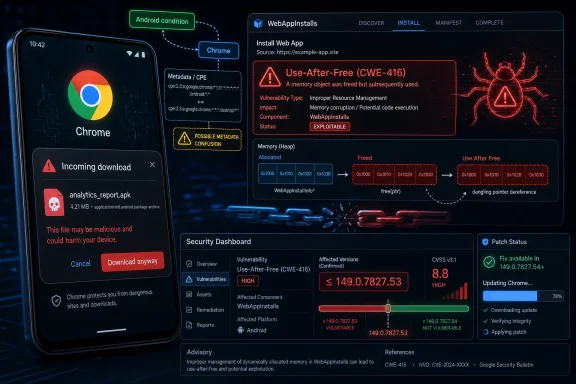 The Vulnerability Is Android-Specific, but the Metadata Speaks in Browser Shorthand
The description attached to CVE-2026-10923 is unusually direct by Chrome standards: a use-after-free bug in WebAppInstalls in Google Chrome on Android prior to 149.0.7827.53 allowed a local attacker to execute arbitrary code via a malicious file. Google classifies the Chromium severity as High, and CISA’s ADP enrichment assigns a CVSS 3.1 score of 8.8 with network attack vector, low complexity, no privileges required, user interaction required, unchanged scope, and high impact to confidentiality, integrity, and availability.That is a lot of signal packed into a small entry. The affected component, WebAppInstalls, points toward Chrome’s progressive web app installation plumbing rather than the browser’s JavaScript engine, GPU stack, or networking layer. The affected platform, Android, matters because Chrome on Android is not merely another packaged desktop application with a different installer.
The strange part is the exploit framing. NVD’s description says “local attacker” and “malicious file,” while the ADP vector says network attack vector and user interaction. Those are not necessarily contradictory, but they do highlight the familiar ambiguity of browser CVEs: the harmful object may arrive over a network, the user may have to open or handle it, and the code path may be exercised locally inside the browser or WebAPK/PWA installation workflow.
For administrators, the safe reading is not “this requires physical access.” It is closer to: an attacker must get a crafted file or install flow in front of a user, and a vulnerable Chrome for Android build may mishandle memory during WebAppInstalls processing badly enough to permit code execution. That is materially different from a wormable server bug, but it is not benign.
The CPE Entry Looks Like a Compromise Between Accuracy and Discoverability
The CPE shown in NVD’s change history is the real wrinkle. NIST added a configuration usingcpe:2.3:a:google:chrome:*:*:*:*:*:*:*:* for versions up to, but excluding, 149.0.7827.53, combined with cpe:2.3:o:google:android:-:*:*:*:*:*:*:*. In plain English, that says the vulnerable software is Google Chrome in the affected version range, in an Android operating system environment.That is a defensible modeling choice, but it is not as clean as many vulnerability scanners and asset systems would like. Chrome is the vulnerable product, Android is the platform condition, and the CVE description is explicit that this is Chrome on Android. The AND relationship is the key. If a tool flattens that into “all Chrome before 149.0.7827.53” without preserving the Android condition, it may over-report desktop Chrome. If it drops the Android condition or fails to match mobile applications, it may under-report the actual affected population.
This is why the “Are we missing a CPE?” prompt deserves a serious answer. The likely missing concept is not another desktop Chrome CPE. It is a more precise mobile-package representation that many ecosystems still do poorly. CPE was born in a world of operating systems, servers, and desktop software; mobile app packaging lives in a different naming universe, where package identifiers, Play Store channels, OEM builds, and WebView dependencies all complicate the neat vendor-product-version hierarchy.
There may be no universally satisfying CPE for “Google Chrome for Android” that every scanner consumes correctly. Some vulnerability feeds model Chrome generically and constrain by Android OS. Others rely on package metadata outside CPE. Others simply flag the browser product and leave the platform nuance to the analyst. That is not elegant, but it is how much of the vulnerability-management stack still works.
Desktop Chrome’s Release Note Is a Bad Map for an Android Bug
One oddity in the record is that the referenced Chrome release post is for the Stable Channel Update for Desktop, even though the CVE description says Chrome on Android. That does not automatically make the CVE wrong, nor does it prove the vulnerability affects desktop systems. Chrome release notes often collect security fixes across closely related codebases, and public bug details can remain restricted for weeks or months after a patch ships.Still, the mismatch is operationally important. A desktop release note can pull Windows, macOS, and Linux administrators into the orbit of a CVE that is actually described as Android-specific. Conversely, mobile administrators who rely on desktop-centric Chrome advisories may miss that the relevant fixed version for Android is the one in the CVE description.
That is the trap: Chrome is one product family, but not one risk surface. Chrome on Windows, Chrome on macOS, Chrome on Linux, Chrome on Android, Chromium-based embedded browsers, Android System WebView, and OEM-modified mobile builds are closely related but not interchangeable. A single version string can make them look more uniform than they are.
For WindowsForum readers, the desktop reference should be treated as context, not proof of Windows exposure. The actionable exposure described by the CVE is Chrome on Android before 149.0.7827.53. If your patch dashboard shows vulnerable Windows Chrome installations solely because of this CVE, that is a cue to inspect the detection logic, not to panic.
Use-After-Free Bugs Remain the Browser Security Tax
The weakness classification is CWE-416, use after free. That is one of the great recurring villains of browser security, because browsers are large, stateful, asynchronous applications built around lifetimes: tabs, frames, workers, permissions, install prompts, manifests, icons, intents, files, and user gestures all come and go. If code keeps using an object after its memory has been freed, an attacker may be able to shape what occupies that memory next.The industry has spent years hardening against this class of bug. Memory-safe languages, MiraclePtr-style mitigations, allocator hardening, sandboxing, site isolation, control-flow protections, and fuzzing have all raised the cost of exploitation. Yet use-after-free flaws continue to appear because browsers sit at the intersection of hostile content and complex user-facing features.
WebAppInstalls is a particularly interesting component because it touches a part of Chrome that users often do not think of as “web browsing.” Installing a web app sounds administrative and benign: accept a prompt, pin an icon, create an app-like entry point. Underneath, it involves parsing metadata, handling icons and files, checking permissions, integrating with the operating system, and creating a bridge between web content and a more persistent app-like experience.
That bridge is exactly where bugs matter. The more web apps resemble native apps, the more installation workflows become security boundaries rather than convenience features. A flaw in that path does not need to look like a classic drive-by exploit to be worth patching quickly.
The CVSS Vector Says User Interaction, Not User Blame
CISA’s ADP vector includes user interaction. That will tempt some organizations to downgrade the urgency, because “the user has to do something” sounds like a training problem. In browser security, that is usually a mistake.User interaction can mean opening a file, visiting a page, accepting a prompt, tapping through an install flow, or otherwise doing something that the product is designed to encourage. Attackers do not need users to behave irrationally; they need users to behave normally in a maliciously arranged context. That is why browser and document-reader bugs with user interaction requirements still earn high severity scores.
The other parts of the vector are more concerning. Low attack complexity and no privileges required suggest that exploitation does not depend on an unusually fragile setup or an already-compromised account. High impact across confidentiality, integrity, and availability is the standard red flag for potential code execution.
There is no public indication in the material provided that CVE-2026-10923 is being exploited in the wild. That distinction matters. A high-severity Chrome bug is not automatically a zero-day campaign. But waiting for exploitation confirmation before patching mobile browsers is backward risk management, especially when Chrome updates are already a routine operational channel.
Android Makes Browser Patching Less Centralized Than It Looks
On desktop Windows, Chrome patching is boring in the best possible way when managed correctly. Google Update, enterprise policies, software deployment tools, and inventory systems can usually converge on a fixed build quickly. There are exceptions, but the model is straightforward: identify the installed Chrome version, update it, verify it.Android is messier. Chrome may update through Google Play, but enterprise control depends on device enrollment, managed Play policy, work profile configuration, OEM behavior, user settings, regional rollout timing, and whether the device is personally owned or corporate-owned. Some organizations have beautiful desktop patch SLAs and only a foggy idea of which Chrome build is on employee phones.
That is why a CPE mismatch matters more here than it would in a purely desktop advisory. A vulnerability scanner built around laptops and servers may not see Android Chrome at all. A mobile device management platform may see the app package and version but not map it cleanly to CVE feeds. A SIEM may ingest the CVE but never correlate it with mobile inventory.
The result is a split-brain security picture: desktop teams may see noise, mobile teams may see nothing, and the actual affected device may sit in a user’s pocket. CVE-2026-10923 is not catastrophic on its face, but it exposes the brittle handoff between vulnerability intelligence and mobile asset management.
The Right Fix Is Version Verification, Not CPE Theology
It is tempting to solve this by arguing over the perfect CPE string. That debate has value, but it will not patch a phone. The practical control is simpler: confirm that Chrome for Android is at 149.0.7827.53 or later on managed devices, and make sure the browser can continue updating automatically.For unmanaged or bring-your-own-device environments, the answer is policy and communication. If users access corporate resources from Android devices, the organization needs a way to require a minimum Chrome version, require app updates, or constrain access through mobile application management. Otherwise, browser CVEs become advisory theater: everyone agrees the bug is real, but nobody owns the endpoint.
For managed Android fleets, administrators should check the Play app version reported by their MDM rather than relying only on generic vulnerability feeds. The package identity, installed version, update source, and device compliance state are more valuable than a CPE match alone. Where possible, compliance rules should look for the actual Chrome app version and enforce update availability.
There is also a lesson for scanner vendors. If a CVE says “Chrome on Android,” the detection should preserve that platform condition all the way through the UI. A finding titled simply “Google Chrome before 149.0.7827.53” is likely to be misrouted. Good vulnerability management is partly about severity, but it is also about directing the right team to the right asset with the right remediation path.
Web Apps Have Become Part of the Endpoint Attack Surface
The WebAppInstalls component is not a household name, but the idea behind it is everywhere. Progressive web apps, installable sites, app shortcuts, notification permissions, file handlers, protocol handlers, and OS integration have steadily blurred the boundary between “a website” and “an application.” That blurring is a feature, not a bug, but it expands the security responsibilities of the browser.In the old mental model, the browser displayed pages and downloaded files. In the modern model, the browser brokers identity, stores credentials, syncs data, manages permissions, renders untrusted code, mediates hardware access, and installs app-like experiences. On Android, it also sits inside a mobile permission model that users experience through taps and prompts, not registry keys and MSI packages.
That is why security teams should resist the instinct to treat PWA-related bugs as edge cases. The installation pipeline is an attack surface precisely because it is a trust-making machine. It turns web content into something that looks and behaves more persistent, more privileged, and more native.
This does not mean progressive web apps are unsafe. It means they deserve the same operational discipline as extensions, document handlers, and file associations. If an enterprise would not ignore a vulnerability in an installer framework, it should not ignore one in the browser code that installs web apps.
The NVD Timing Shows How Fast Metadata Can Change After Disclosure
The chronology is short but revealing. The CVE was received from Chrome on June 4, 2026. CISA-ADP added CVSS and CWE information on June 5. NIST’s initial analysis added the CPE configuration and reference classifications later that same day. In less than 48 hours, the entry moved from a vendor-provided description to a partially enriched vulnerability record with severity, weakness type, and affected-product modeling.That speed is useful, but it also creates a window where automated systems ingest half-formed data. Some scanners may pick up the CVE before NVD enrichment. Others may import the CVSS vector but not the later CPE logic. Still others may retain stale interpretations even after the record changes. Vulnerability data is not a static tablet; it is a living record that can be corrected, enriched, and occasionally muddied.
This is why administrators should be cautious with first-day dashboards. A Chrome CVE published on Wednesday may look different by Friday, and the difference can matter. Platform constraints, affected ranges, references, and severity vectors may all shift as NVD, CISA, vendors, and third-party databases process the advisory.
The answer is not to distrust the feeds. It is to understand their lifecycle. Fast vulnerability intelligence is valuable, but fast intelligence without analyst context can create both false urgency and false reassurance.
Windows Shops Still Have a Stake in a Chrome-on-Android CVE
At first glance, CVE-2026-10923 might seem outside the WindowsForum wheelhouse. It is Chrome on Android, not Edge on Windows, not Windows Update, not a kernel driver, not Active Directory. But modern Windows environments rarely end at the Windows device boundary.Employees read mail on Android phones. They open shared files in mobile browsers. They authenticate to Microsoft 365, Entra ID-backed applications, VPN portals, SaaS dashboards, and helpdesk systems from mobile devices. They install web apps that point to business systems. If the mobile browser is behind, the Windows estate is still indirectly exposed through identity and data access.
That is the quiet truth of endpoint security in 2026: the “Windows environment” includes every device that can touch Windows-adjacent credentials and corporate data. A vulnerable Android browser may not compromise a domain controller directly, but it can be part of the path to session theft, credential exposure, malicious file handling, or abuse of trusted user workflows.
For small businesses and enthusiast households, the lesson is simpler. Update Chrome on Android. Check the version. Do not assume that because a desktop Chrome update installed, every Chrome in your life is current. Browser branding is unified; patch state is not.
The Alert Is High Severity, Not High Drama
The correct response to CVE-2026-10923 is urgency without theatrics. There is no need to claim a mass exploitation wave if the public record does not show one. There is also no reason to dismiss a high-severity use-after-free in a browser install component simply because it requires user interaction or involves Android rather than desktop Windows.Security teams should treat this as a standard rapid browser patch, with extra attention to mobile visibility. If the fleet can prove Chrome for Android is at or beyond 149.0.7827.53, the operational story is short. If the fleet cannot prove that, the real finding is not only a vulnerable browser; it is an inventory gap.
The CPE issue should be documented rather than hand-waved. If internal tools are over-reporting desktop Chrome, tune the detection. If they are failing to report Android Chrome, integrate MDM data or package-version checks. If the vendor feed lacks a clean Android Chrome CPE, compensate with practical version-based policy.
That is less satisfying than a perfect vulnerability entry, but it is how real patch management works. The cleanest data model is not always the one that protects the user fastest.
The Chrome 149 Lesson Is That Mobile Browsers Need First-Class Patch Discipline
CVE-2026-10923 is small enough to be easy to miss and specific enough to expose weak assumptions. The affected version boundary is clear, the component is named, the weakness class is familiar, and the platform condition is explicit. The uncertainty sits in the machinery around it: references, CPE matching, scanner interpretation, and mobile fleet visibility.- Chrome for Android should be updated to version 149.0.7827.53 or later wherever the browser is installed and used to access sensitive content.
- The NVD CPE configuration appears to model Chrome as the vulnerable application with Android as a required platform condition, which scanners must preserve to avoid misleading results.
- Desktop Chrome findings tied only to this CVE should be reviewed carefully, because the public CVE description identifies Chrome on Android rather than Windows, macOS, or Linux.
- A use-after-free in WebAppInstalls matters because web app installation is part of the browser’s trust boundary, not just a convenience feature.
- Organizations that cannot verify Chrome versions on Android devices have a mobile asset-management problem, not merely a vulnerability-triage problem.
- The absence of public exploitation claims should lower the drama, not the patch priority.
References
- Primary source: NVD / Chromium
Published: 2026-06-09T07:00:46-07:00
NVD - CVE-2026-10923
 nvd.nist.gov
- Security advisory: MSRC
Published: 2026-06-09T07:00:46-07:00
Original feed URL
Security Update Guide - Microsoft Security Response Center
 msrc.microsoft.com
- Related coverage: vuldb.com
CVE-2026-10923 Google Chrome WebAppInstalls use after free (ID 499423 / Nessus ID 319275)
A security flaw has been discovered in Google Chrome on Android. This vulnerability was named CVE-2026-10923. The affected component should be upgraded.vuldb.com
