

Google disclosed CVE-2026-13993 on June 30, 2026, as a medium-severity Chrome WebAppInstalls flaw fixed before version 150.0.7871.47, where a crafted HTML page and specific user gestures could misrepresent a domain during web app installation. That sounds modest next to memory corruption and sandbox escapes, but it lands in a more human part of browser security: whether the user can trust what the browser says. The National Vulnerability Database, CISA’s enrichment data, and Google’s Chrome release notes all point to the same uncomfortable lesson. In 2026, the address bar is no longer the only place where origin trust can be won or lost.
The narrow reading of CVE-2026-13993 is simple: update Chrome. Google’s stable-channel release fixed the flaw in Chrome 150.0.7871.47, and NVD lists versions prior to that build as affected. CISA’s ADP scoring gives it a 4.2 CVSS 3.1 base score, with network attack vector, high attack complexity, no privileges required, user interaction required, and limited integrity and availability impact.
That score is useful, but it is not the story. A browser flaw that requires a user to perform “specific UI gestures” can sound almost academic until you remember that the web’s most successful attacks are usually choreography, not magic. Phishing, fake login flows, consent prompt fatigue, malicious ads, and “install this app to continue” screens all depend on persuading people to click through a sequence.
CVE-2026-13993 lives in Chrome’s WebAppInstalls component, the part of the browser that helps turn web applications into installed apps. That makes the bug more interesting than a one-off spoofing glitch. The vulnerability sits at the seam between website and application, which is exactly where modern browsers have been trying to blur the boundary for a decade.
The flaw is categorized as CWE-451, user interface misrepresentation of critical information. That is a dry label for a serious design problem: the browser showed the user something security-relevant that could be misleading. If the browser is the referee between hostile web content and the person behind the keyboard, then incorrect security UI is not cosmetic. It is the referee pointing at the wrong goal line.
That is precisely why WebAppInstalls is a sensitive component. An installation flow is not merely a convenience feature; it is a trust ceremony. The browser is effectively telling the user: this thing comes from this place, and if you accept, it will have a more durable presence on your system than a disposable tab.
CVE-2026-13993 does not appear, based on public data, to grant arbitrary code execution or silently install software. NVD’s description says an attacker would need to convince a user to engage in specific UI gestures. CISA’s scoring marks the attack complexity as high and user interaction as required, which is a meaningful constraint.
But “not silent” is not the same as “not dangerous.” Social engineering is the oldest compatibility layer on the internet. If an attacker can craft a page that nudges the victim through a believable sequence and the browser’s install UI misstates the domain, the technical exploit and the psychological exploit become one workflow.
For administrators, that is the part worth caring about. The risk is not that every Chrome user is one click away from catastrophe. The risk is that a spoofed installation flow can give a malicious web app a legitimacy it did not earn.
The public record supports that measured response. CISA’s SSVC data for CVE-2026-13993 lists exploitation as “none,” automation as “no,” and technical impact as “partial.” That is the language of a vulnerability that is plausible, constrained, and worth fixing before it becomes one ingredient in a larger campaign.
The catch is that browser attacks are often compositional. A UI spoofing issue may not be devastating alone, but it can strengthen phishing, credential theft, fake support scams, or malicious app distribution. In that sense, the flaw is less a battering ram than a forged badge.
Google’s own Chromium severity rating is medium, according to NVD’s entry. That is consistent with a bug that depends on convincing the user rather than breaking isolation outright. But a medium browser UI flaw can still matter in enterprises where users are already exposed to SaaS impersonation, OAuth consent abuse, fake Teams invites, and lookalike domains.
WindowsForum readers should resist both extremes. This is neither “drop everything” nor “ignore it because it is medium.” It is a browser-trust bug in a feature designed to make websites look and behave more like installed software.
The likely practical answer is not complicated: Chrome users should be on 150.0.7871.47 or later. Google’s release note and the CVE description point to that fixed threshold, and CISA’s enrichment uses the same vulnerability narrative. If an asset scanner flags a slightly different cutoff because of CPE enrichment, the scanner output should be reconciled against the vendor advisory.
This is not a rare problem. CPE data is often added or amended after initial CVE publication, and NVD change records can briefly expose the sausage-making. Vendors submit affected ranges, NVD enriches, CISA adds scoring and weakness classifications, and scanners ingest all of it at different speeds.
For IT shops, the operational question is therefore not “which database field is philosophically pure?” It is whether managed endpoints have received the Chrome stable update that contains the fix. The browser’s own version number, enterprise update telemetry, and patch compliance dashboards matter more than a single CPE line.
There is also a second lesson. When a CVE affects a cross-platform application such as Chrome, the presence of Windows, macOS, and Linux in configuration data can confuse readers into thinking the operating system itself is vulnerable. In this case, the vulnerable product is Chrome; the listed operating systems describe where affected Chrome builds run.
That distinction matters on Windows because Chrome often coexists with Edge, WebView2 runtimes, Electron apps, and enterprise-managed browser policies. A Chrome CVE is not automatically an Edge CVE, but Chromium lineage means admins should still watch for downstream advisories from Microsoft and other Chromium-based browser vendors.
CVE-2026-13993 is troubling because it targets that compression layer. If a crafted HTML page can influence a security-relevant install UI enough to spoof a domain, then the user’s decision is being made against corrupted evidence. The browser may still enforce many underlying protections, but the human protection layer has been weakened.
That is why CWE-451 deserves more attention than it usually gets. UI misrepresentation sounds soft compared with memory safety bugs, but it reaches the final mile of security. The browser can block scripts, sandbox processes, partition storage, and validate certificates, yet still fail if it presents the wrong identity at the moment a user grants trust.
Web app installation makes that final mile especially important. A tab is transient. An installed app is remembered. It can get a launcher icon, a dedicated window, a title, and a place in the user’s routine. Once that happens, the app’s apparent origin becomes part of the user’s mental whitelist.
Attackers love mental whitelists. If an installed web app looks like it belongs to a bank, help desk, HR portal, password manager, shipping service, or cloud provider, users may treat it as safer than a random browser tab. A domain spoofing flaw in the installation flow therefore does not need to break the operating system to become useful.
Microsoft has pursued similar territory with Edge, Windows integration, and web-powered app experiences. Google’s Chrome ecosystem has pushed PWAs as a way to make the web more app-like across platforms. Developers like the reach; users like the convenience; administrators inherit the governance problem.
That governance problem is bigger than CVE-2026-13993. Organizations need to decide whether users may install web apps freely, whether install prompts should be restricted, and whether managed browser policies should limit PWA installation to approved origins. The more web apps behave like desktop software, the more they need desktop-style controls.
The vulnerability is a reminder that install UX is policy surface. It is not enough to block unsigned executables while letting any convincing website become a persistent app. If a browser-mediated app install can create a durable foothold in the user’s workflow, it belongs in the same risk conversation as extensions, OAuth applications, and downloaded installers.
That does not mean PWAs are bad. It means their security model must be judged by the reality of user behavior rather than the elegance of the specification. Users do not think in terms of manifests, service workers, and origins. They think in terms of names, icons, windows, and whether the browser appeared to vouch for something.
For admins, this is a good moment to review Chrome enterprise policies around web app installation. If users can install any web app from any origin, a spoofing flaw in the install UI is more relevant than it would be in a locked-down environment. If web app installs are already restricted to approved sites, the blast radius is smaller.
User education also has a role, though it should not become an excuse for weak UI. The correct message is not “users should have spotted the trick.” The better message is that install prompts deserve more skepticism than ordinary page interactions because they create persistence.
A useful policy stance is to treat unexpected web app installation prompts like unexpected software downloads. If the prompt appears during a login flow, support interaction, document viewing session, or video playback page, it should be considered suspicious. Legitimate web apps rarely need to surprise users into installation at the exact moment they are trying to accomplish something else.
Security teams should also watch for help desk reports that sound mundane: strange new app icons, duplicate-looking web apps, unfamiliar login windows, or taskbar entries that resemble trusted services. Those reports can be early evidence of spoofed or malicious web-app installs, even when endpoint protection does not light up.
That sparseness invites speculation, especially when third-party vulnerability databases try to fill in gaps. Some summaries have described the issue as cross-site scripting, while NVD’s description is more specific: incorrect security UI in WebAppInstalls leading to domain spoofing through crafted HTML and user gestures. The latter is the safer formulation because it tracks the vendor-supplied CVE language.
This distinction matters. Cross-site scripting usually implies script execution in a context where it should not run. Domain spoofing through incorrect security UI implies misleading presentation of identity. Those are different bug classes with different operational meanings.
The public data does not say that attackers are exploiting CVE-2026-13993 in the wild. CISA’s enrichment explicitly marks exploitation as none at the time of its assessment. Nor does the public description say the bug enables arbitrary code execution, credential theft by itself, or silent installation.
But a thin public bug trail does not mean defenders should wait for a proof-of-concept. Chrome is a high-value target, and the safest assumption is that once a fixed build is available, attackers and researchers alike will compare versions. Medium-severity browser bugs have a habit of becoming more interesting after the patch ships.
That is why security UI should be treated as part of the security boundary. If a browser prompt tells the user that an app belongs to a domain, that statement must be derived from trustworthy state and rendered in a way hostile content cannot confuse. Anything less turns the prompt into theater.
Chrome is hardly alone in this problem. Every major browser, operating system, identity provider, and cloud platform struggles with how to present security state without overwhelming users. Too much information becomes noise; too little becomes ambiguity; the wrong information becomes an exploit primitive.
Web apps intensify that problem because they inherit the web’s fluidity while borrowing native apps’ legitimacy. A native installer has signatures, publisher names, SmartScreen reputation, notarization on other platforms, and enterprise software inventory. A web app has origin, manifest metadata, browser UI, and user perception.
CVE-2026-13993 is therefore best understood as a product-security failure rather than merely a browser bug. It asks whether the installation experience made the correct trust facts legible. According to the CVE record, before Chrome 150.0.7871.47, the answer in at least one crafted scenario was no.
If a malicious or misleading web app is installed through Chrome, the artifact may appear to users as an app rather than as a website. That can complicate help desk triage. A user may report that “the payroll app” or “the password reset app” looks strange, when the object in question is a browser-installed PWA with a misleading name and icon.
Admins should therefore pair patching with visibility. Managed Chrome environments can expose browser version data, extension state, and some app management controls. Endpoint management platforms may also show installed app entries or shortcuts, depending on configuration and operating system integration.
The practical concern is not only this one CVE. It is the broader class of browser-mediated persistence. Extensions, installed web apps, saved site permissions, notification grants, and identity sessions all create durable browser state. Attackers do not need kernel access if they can live comfortably inside the user’s trusted workflow.
That is why security teams should consider web app installation policy alongside extension policy. Many companies already block unapproved extensions because they can read data, inject code, or exfiltrate content. Web apps are not the same risk, but they can still impersonate workflows, capture credentials, and keep users returning to attacker-controlled surfaces.
The Windows angle is practical. Users often pin web apps to the taskbar or launch them from the Start menu without thinking about the browser that created them. That convenience becomes risky when a spoofed install flow gives a malicious app a familiar costume.
Chrome’s update process usually minimizes the window of exposure, but only if the browser is allowed to restart. A machine that has downloaded an update but not relaunched may still be running the vulnerable build. That detail matters for users who keep browser sessions open for weeks.
Users should also be wary of any website that demands installation as a condition for viewing ordinary content, receiving support, tracking a package, opening a document, or joining a meeting. Some legitimate services promote app installation aggressively, which is part of the problem. Attackers imitate the pushiest patterns because users have been trained to accept them.
The safest habit is simple: if you want to install a web app, start from the known domain yourself. Do not install from a link in an email, chat message, ad, pop-up, or support session. That habit will outlive this CVE.
The modern model is messier. A browser extension, PWA, OAuth grant, synced profile setting, push notification permission, or cloud app authorization can all change the user’s working environment without feeling like software installation. The browser is not just a viewer anymore; it is an application platform and, increasingly, an installer.
CVE-2026-13993 lands squarely in that transition. The vulnerability does not need to make Chrome execute native code to matter. It only needs to make Chrome’s installation ceremony less trustworthy.
That is a subtle but important shift for Windows users. Windows security has improved around executable downloads, reputation checks, and application control, but browser-mediated trust decisions can bypass some of the instincts users developed around “real” software. A web app can feel lighter, safer, and less consequential precisely because it came through the browser.
Attackers follow trust. If users trust app icons more than tabs, attackers will want app icons. If users trust browser install prompts more than random page content, attackers will target install prompts. If users trust domain displays, attackers will try to spoof them.
Microsoft’s Edge team typically ships its own advisories and updates for Chromium-derived fixes. Admins managing Windows fleets should therefore avoid thinking only in terms of “Chrome installed or not.” The real question is which Chromium-based runtimes and browsers exist across the estate and how quickly each receives relevant patches.
That is particularly true for UI and web app features, where vendor-specific integration can matter. Chrome’s WebAppInstalls implementation is not necessarily identical to every other Chromium-based browser’s user experience. But the architectural pressure is shared: make web apps feel native while preserving origin clarity.
For WindowsForum’s audience, this is where browser choice meets operational reality. Many users run Edge and Chrome side by side. Many businesses standardize on one but still tolerate the other. Developers may use multiple channels, including beta and canary builds, while support teams troubleshoot whatever browser the user happens to open.
The right response is not browser tribalism. It is update discipline and feature governance. Chromium’s success means its security model is now a foundation layer for a huge amount of Windows computing.
The NVD entry’s change history and Google’s release information put the disclosure at the end of June 2026, with NVD publication on June 30 and modification on July 1. That means this is not an ancient advisory resurfacing in a scanner. It is fresh enough that some endpoints may still be waiting for restart, staged rollout, or administrative approval.
For small businesses, the action can be as simple as checking Chrome’s About page and relaunching. For larger environments, it means querying browser versions, confirming update policy health, and watching for machines stuck behind maintenance windows or broken update services. The gap between “update available” and “update running” is where browser CVEs remain alive.
Scanner teams should also account for the CPE oddity rather than blindly suppressing alerts. If a tool reports exposure below 150.0.7871.46 while the advisory says prior to 150.0.7871.47, treat 150.0.7871.47 or later as the clean operational target unless Google issues a correction. In patch management, clarity beats cleverness.
The most important point is that this is an easy fix compared with many enterprise vulnerabilities. There is no firmware dependency, no complex compensating control, and no application rewrite. Patch the browser, restart it, and review whether users should have unrestricted web app install rights.
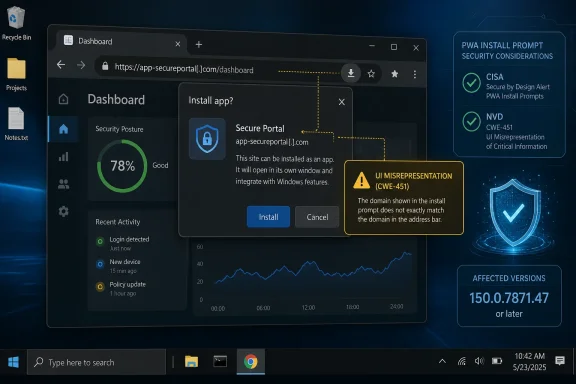 Chrome’s Patch Notes Hide a Bigger Argument About Trust
The narrow reading of CVE-2026-13993 is simple: update Chrome. Google’s stable-channel release fixed the flaw in Chrome 150.0.7871.47, and NVD lists versions prior to that build as affected. CISA’s ADP scoring gives it a 4.2 CVSS 3.1 base score, with network attack vector, high attack complexity, no privileges required, user interaction required, and limited integrity and availability impact.That score is useful, but it is not the story. A browser flaw that requires a user to perform “specific UI gestures” can sound almost academic until you remember that the web’s most successful attacks are usually choreography, not magic. Phishing, fake login flows, consent prompt fatigue, malicious ads, and “install this app to continue” screens all depend on persuading people to click through a sequence.
CVE-2026-13993 lives in Chrome’s WebAppInstalls component, the part of the browser that helps turn web applications into installed apps. That makes the bug more interesting than a one-off spoofing glitch. The vulnerability sits at the seam between website and application, which is exactly where modern browsers have been trying to blur the boundary for a decade.
The flaw is categorized as CWE-451, user interface misrepresentation of critical information. That is a dry label for a serious design problem: the browser showed the user something security-relevant that could be misleading. If the browser is the referee between hostile web content and the person behind the keyboard, then incorrect security UI is not cosmetic. It is the referee pointing at the wrong goal line.
Web Apps Became Real Apps, So Their Install Prompts Became Attack Surface
Progressive Web Apps were sold as a bridge between the web’s reach and native apps’ convenience. They can be pinned, launched, themed, and treated by users as software rather than as a tab among many. For Windows users, especially, that distinction matters because installed web apps can sit in the Start menu, taskbar, app list, and window switcher in ways that feel familiar and trusted.That is precisely why WebAppInstalls is a sensitive component. An installation flow is not merely a convenience feature; it is a trust ceremony. The browser is effectively telling the user: this thing comes from this place, and if you accept, it will have a more durable presence on your system than a disposable tab.
CVE-2026-13993 does not appear, based on public data, to grant arbitrary code execution or silently install software. NVD’s description says an attacker would need to convince a user to engage in specific UI gestures. CISA’s scoring marks the attack complexity as high and user interaction as required, which is a meaningful constraint.
But “not silent” is not the same as “not dangerous.” Social engineering is the oldest compatibility layer on the internet. If an attacker can craft a page that nudges the victim through a believable sequence and the browser’s install UI misstates the domain, the technical exploit and the psychological exploit become one workflow.
For administrators, that is the part worth caring about. The risk is not that every Chrome user is one click away from catastrophe. The risk is that a spoofed installation flow can give a malicious web app a legitimacy it did not earn.
Medium Severity Is Not a Synonym for Low Priority
Security teams have learned, sometimes painfully, that CVSS is a triage tool rather than a moral ranking. A medium Chrome flaw requiring user interaction is not the same emergency as an actively exploited zero-day in V8 or a sandbox escape. It should not trigger panic, but it should trigger patch verification.The public record supports that measured response. CISA’s SSVC data for CVE-2026-13993 lists exploitation as “none,” automation as “no,” and technical impact as “partial.” That is the language of a vulnerability that is plausible, constrained, and worth fixing before it becomes one ingredient in a larger campaign.
The catch is that browser attacks are often compositional. A UI spoofing issue may not be devastating alone, but it can strengthen phishing, credential theft, fake support scams, or malicious app distribution. In that sense, the flaw is less a battering ram than a forged badge.
Google’s own Chromium severity rating is medium, according to NVD’s entry. That is consistent with a bug that depends on convincing the user rather than breaking isolation outright. But a medium browser UI flaw can still matter in enterprises where users are already exposed to SaaS impersonation, OAuth consent abuse, fake Teams invites, and lookalike domains.
WindowsForum readers should resist both extremes. This is neither “drop everything” nor “ignore it because it is medium.” It is a browser-trust bug in a feature designed to make websites look and behave more like installed software.
The CPE Confusion Is a Symptom of Messy Vulnerability Plumbing
The user-facing CVE entry contains one awkward wrinkle: the configuration data shown in NVD’s change history lists Chrome versions up to, but excluding, 150.0.7871.46, while the description and affected-version language say the issue is fixed prior to 150.0.7871.47. That kind of mismatch is exactly why vulnerability management teams should be careful about treating raw CPE strings as gospel.The likely practical answer is not complicated: Chrome users should be on 150.0.7871.47 or later. Google’s release note and the CVE description point to that fixed threshold, and CISA’s enrichment uses the same vulnerability narrative. If an asset scanner flags a slightly different cutoff because of CPE enrichment, the scanner output should be reconciled against the vendor advisory.
This is not a rare problem. CPE data is often added or amended after initial CVE publication, and NVD change records can briefly expose the sausage-making. Vendors submit affected ranges, NVD enriches, CISA adds scoring and weakness classifications, and scanners ingest all of it at different speeds.
For IT shops, the operational question is therefore not “which database field is philosophically pure?” It is whether managed endpoints have received the Chrome stable update that contains the fix. The browser’s own version number, enterprise update telemetry, and patch compliance dashboards matter more than a single CPE line.
There is also a second lesson. When a CVE affects a cross-platform application such as Chrome, the presence of Windows, macOS, and Linux in configuration data can confuse readers into thinking the operating system itself is vulnerable. In this case, the vulnerable product is Chrome; the listed operating systems describe where affected Chrome builds run.
That distinction matters on Windows because Chrome often coexists with Edge, WebView2 runtimes, Electron apps, and enterprise-managed browser policies. A Chrome CVE is not automatically an Edge CVE, but Chromium lineage means admins should still watch for downstream advisories from Microsoft and other Chromium-based browser vendors.
Spoofing the Install Flow Attacks the User’s Mental Model
Browser security depends on a bargain: users cannot inspect TLS handshakes, origin isolation, permission state, manifest metadata, and renderer process boundaries, so the browser compresses those facts into interface cues. The lock icon, the domain display, the permission chip, the install prompt, and the warning interstitial are all small pieces of a larger story. They tell the user whether to proceed.CVE-2026-13993 is troubling because it targets that compression layer. If a crafted HTML page can influence a security-relevant install UI enough to spoof a domain, then the user’s decision is being made against corrupted evidence. The browser may still enforce many underlying protections, but the human protection layer has been weakened.
That is why CWE-451 deserves more attention than it usually gets. UI misrepresentation sounds soft compared with memory safety bugs, but it reaches the final mile of security. The browser can block scripts, sandbox processes, partition storage, and validate certificates, yet still fail if it presents the wrong identity at the moment a user grants trust.
Web app installation makes that final mile especially important. A tab is transient. An installed app is remembered. It can get a launcher icon, a dedicated window, a title, and a place in the user’s routine. Once that happens, the app’s apparent origin becomes part of the user’s mental whitelist.
Attackers love mental whitelists. If an installed web app looks like it belongs to a bank, help desk, HR portal, password manager, shipping service, or cloud provider, users may treat it as safer than a random browser tab. A domain spoofing flaw in the installation flow therefore does not need to break the operating system to become useful.
Windows Desktops Are Where PWA Trust Gets Political
On Windows, web apps are not an abstract browser feature. They are part of the ongoing negotiation over what counts as an application. Chrome can install web apps into a desktop environment where users expect app windows, icons, taskbar entries, notifications, and Start menu placement to mean something.Microsoft has pursued similar territory with Edge, Windows integration, and web-powered app experiences. Google’s Chrome ecosystem has pushed PWAs as a way to make the web more app-like across platforms. Developers like the reach; users like the convenience; administrators inherit the governance problem.
That governance problem is bigger than CVE-2026-13993. Organizations need to decide whether users may install web apps freely, whether install prompts should be restricted, and whether managed browser policies should limit PWA installation to approved origins. The more web apps behave like desktop software, the more they need desktop-style controls.
The vulnerability is a reminder that install UX is policy surface. It is not enough to block unsigned executables while letting any convincing website become a persistent app. If a browser-mediated app install can create a durable foothold in the user’s workflow, it belongs in the same risk conversation as extensions, OAuth applications, and downloaded installers.
That does not mean PWAs are bad. It means their security model must be judged by the reality of user behavior rather than the elegance of the specification. Users do not think in terms of manifests, service workers, and origins. They think in terms of names, icons, windows, and whether the browser appeared to vouch for something.
The Real Patch Is Both Technical and Behavioral
The immediate technical fix is straightforward: update Chrome to 150.0.7871.47 or later. On unmanaged consumer systems, Chrome’s automatic updater should handle that for most users, but anyone assessing exposure should verify the version directly. In managed environments, the question is whether update policies allowed the fixed build to deploy promptly.For admins, this is a good moment to review Chrome enterprise policies around web app installation. If users can install any web app from any origin, a spoofing flaw in the install UI is more relevant than it would be in a locked-down environment. If web app installs are already restricted to approved sites, the blast radius is smaller.
User education also has a role, though it should not become an excuse for weak UI. The correct message is not “users should have spotted the trick.” The better message is that install prompts deserve more skepticism than ordinary page interactions because they create persistence.
A useful policy stance is to treat unexpected web app installation prompts like unexpected software downloads. If the prompt appears during a login flow, support interaction, document viewing session, or video playback page, it should be considered suspicious. Legitimate web apps rarely need to surprise users into installation at the exact moment they are trying to accomplish something else.
Security teams should also watch for help desk reports that sound mundane: strange new app icons, duplicate-looking web apps, unfamiliar login windows, or taskbar entries that resemble trusted services. Those reports can be early evidence of spoofed or malicious web-app installs, even when endpoint protection does not light up.
The Public Bug Trail Is Thin by Design
Like many Chrome security bugs, the linked Chromium issue is not necessarily fully public at disclosure time. Google often restricts bug details until users have had time to patch, which is sensible for browser vulnerabilities. The result is that defenders must make decisions from sparse public language: component, impact, affected versions, severity, and mitigation.That sparseness invites speculation, especially when third-party vulnerability databases try to fill in gaps. Some summaries have described the issue as cross-site scripting, while NVD’s description is more specific: incorrect security UI in WebAppInstalls leading to domain spoofing through crafted HTML and user gestures. The latter is the safer formulation because it tracks the vendor-supplied CVE language.
This distinction matters. Cross-site scripting usually implies script execution in a context where it should not run. Domain spoofing through incorrect security UI implies misleading presentation of identity. Those are different bug classes with different operational meanings.
The public data does not say that attackers are exploiting CVE-2026-13993 in the wild. CISA’s enrichment explicitly marks exploitation as none at the time of its assessment. Nor does the public description say the bug enables arbitrary code execution, credential theft by itself, or silent installation.
But a thin public bug trail does not mean defenders should wait for a proof-of-concept. Chrome is a high-value target, and the safest assumption is that once a fixed build is available, attackers and researchers alike will compare versions. Medium-severity browser bugs have a habit of becoming more interesting after the patch ships.
Security UI Bugs Are Product Bugs With Security Consequences
One reason UI vulnerabilities are easy to underrate is that they do not always look like classic exploitation. There may be no crash, no shellcode, no obvious privilege boundary violation, and no dramatic forensic artifact. The user clicks through a plausible flow, and the system behaves as designed except for the fact that the design communicated the wrong truth.That is why security UI should be treated as part of the security boundary. If a browser prompt tells the user that an app belongs to a domain, that statement must be derived from trustworthy state and rendered in a way hostile content cannot confuse. Anything less turns the prompt into theater.
Chrome is hardly alone in this problem. Every major browser, operating system, identity provider, and cloud platform struggles with how to present security state without overwhelming users. Too much information becomes noise; too little becomes ambiguity; the wrong information becomes an exploit primitive.
Web apps intensify that problem because they inherit the web’s fluidity while borrowing native apps’ legitimacy. A native installer has signatures, publisher names, SmartScreen reputation, notarization on other platforms, and enterprise software inventory. A web app has origin, manifest metadata, browser UI, and user perception.
CVE-2026-13993 is therefore best understood as a product-security failure rather than merely a browser bug. It asks whether the installation experience made the correct trust facts legible. According to the CVE record, before Chrome 150.0.7871.47, the answer in at least one crafted scenario was no.
Enterprise Defenders Should Read This as an Inventory Problem
Most organizations already know how to track browser versions. The harder part is tracking browser-created applications. Installed web apps can fall into a gray zone between software inventory and browsing history, which makes them easy to miss in audits.If a malicious or misleading web app is installed through Chrome, the artifact may appear to users as an app rather than as a website. That can complicate help desk triage. A user may report that “the payroll app” or “the password reset app” looks strange, when the object in question is a browser-installed PWA with a misleading name and icon.
Admins should therefore pair patching with visibility. Managed Chrome environments can expose browser version data, extension state, and some app management controls. Endpoint management platforms may also show installed app entries or shortcuts, depending on configuration and operating system integration.
The practical concern is not only this one CVE. It is the broader class of browser-mediated persistence. Extensions, installed web apps, saved site permissions, notification grants, and identity sessions all create durable browser state. Attackers do not need kernel access if they can live comfortably inside the user’s trusted workflow.
That is why security teams should consider web app installation policy alongside extension policy. Many companies already block unapproved extensions because they can read data, inject code, or exfiltrate content. Web apps are not the same risk, but they can still impersonate workflows, capture credentials, and keep users returning to attacker-controlled surfaces.
Consumers Should Patch, Then Delete What They Do Not Recognize
For home users, the advice is less bureaucratic but just as concrete. Chrome should be updated, and the installed app list should be treated with the same skepticism as browser extensions. If an app appeared unexpectedly, duplicates a familiar service, or launches to a login page you do not remember installing, remove it and navigate to the service directly.The Windows angle is practical. Users often pin web apps to the taskbar or launch them from the Start menu without thinking about the browser that created them. That convenience becomes risky when a spoofed install flow gives a malicious app a familiar costume.
Chrome’s update process usually minimizes the window of exposure, but only if the browser is allowed to restart. A machine that has downloaded an update but not relaunched may still be running the vulnerable build. That detail matters for users who keep browser sessions open for weeks.
Users should also be wary of any website that demands installation as a condition for viewing ordinary content, receiving support, tracking a package, opening a document, or joining a meeting. Some legitimate services promote app installation aggressively, which is part of the problem. Attackers imitate the pushiest patterns because users have been trained to accept them.
The safest habit is simple: if you want to install a web app, start from the known domain yourself. Do not install from a link in an email, chat message, ad, pop-up, or support session. That habit will outlive this CVE.
The Browser Is Now the Installer, and That Changes the Threat Model
The old desktop security model had a relatively clear ceremony for software installation. You downloaded an executable, ran an installer, confronted operating system warnings, and ended up with a program. It was not perfect, but it was legible.The modern model is messier. A browser extension, PWA, OAuth grant, synced profile setting, push notification permission, or cloud app authorization can all change the user’s working environment without feeling like software installation. The browser is not just a viewer anymore; it is an application platform and, increasingly, an installer.
CVE-2026-13993 lands squarely in that transition. The vulnerability does not need to make Chrome execute native code to matter. It only needs to make Chrome’s installation ceremony less trustworthy.
That is a subtle but important shift for Windows users. Windows security has improved around executable downloads, reputation checks, and application control, but browser-mediated trust decisions can bypass some of the instincts users developed around “real” software. A web app can feel lighter, safer, and less consequential precisely because it came through the browser.
Attackers follow trust. If users trust app icons more than tabs, attackers will want app icons. If users trust browser install prompts more than random page content, attackers will target install prompts. If users trust domain displays, attackers will try to spoof them.
Microsoft’s Chromium Stake Makes This Everyone’s Problem
Although CVE-2026-13993 is a Google Chrome CVE, the Windows ecosystem cannot treat Chromium bugs as someone else’s weather. Microsoft Edge, Electron applications, embedded web surfaces, and the broader Chromium project have made browser-engine security a shared dependency. A bug in one Chromium component may not automatically affect every Chromium-based product, but it should always prompt downstream scrutiny.Microsoft’s Edge team typically ships its own advisories and updates for Chromium-derived fixes. Admins managing Windows fleets should therefore avoid thinking only in terms of “Chrome installed or not.” The real question is which Chromium-based runtimes and browsers exist across the estate and how quickly each receives relevant patches.
That is particularly true for UI and web app features, where vendor-specific integration can matter. Chrome’s WebAppInstalls implementation is not necessarily identical to every other Chromium-based browser’s user experience. But the architectural pressure is shared: make web apps feel native while preserving origin clarity.
For WindowsForum’s audience, this is where browser choice meets operational reality. Many users run Edge and Chrome side by side. Many businesses standardize on one but still tolerate the other. Developers may use multiple channels, including beta and canary builds, while support teams troubleshoot whatever browser the user happens to open.
The right response is not browser tribalism. It is update discipline and feature governance. Chromium’s success means its security model is now a foundation layer for a huge amount of Windows computing.
The Version Number Is the Line Between Theory and Hygiene
There is a reason every serious analysis of this CVE eventually returns to 150.0.7871.47. Security UI theory is interesting, but version compliance is what closes the immediate hole. If Chrome is older than that build, it should be updated.The NVD entry’s change history and Google’s release information put the disclosure at the end of June 2026, with NVD publication on June 30 and modification on July 1. That means this is not an ancient advisory resurfacing in a scanner. It is fresh enough that some endpoints may still be waiting for restart, staged rollout, or administrative approval.
For small businesses, the action can be as simple as checking Chrome’s About page and relaunching. For larger environments, it means querying browser versions, confirming update policy health, and watching for machines stuck behind maintenance windows or broken update services. The gap between “update available” and “update running” is where browser CVEs remain alive.
Scanner teams should also account for the CPE oddity rather than blindly suppressing alerts. If a tool reports exposure below 150.0.7871.46 while the advisory says prior to 150.0.7871.47, treat 150.0.7871.47 or later as the clean operational target unless Google issues a correction. In patch management, clarity beats cleverness.
The most important point is that this is an easy fix compared with many enterprise vulnerabilities. There is no firmware dependency, no complex compensating control, and no application rewrite. Patch the browser, restart it, and review whether users should have unrestricted web app install rights.
The Practical Read on CVE-2026-13993 Is Smaller Than the Lesson
CVE-2026-13993 should not be inflated into a crisis, but it should not be filed away as yet another medium Chrome bug. Its value is as a reminder of where browser security is heading: away from obvious page loads and toward ambiguous app-like surfaces. The specific fix is one version number; the broader fix is a more skeptical approach to install prompts.- Chrome users should run version 150.0.7871.47 or later to receive Google’s fix for the WebAppInstalls domain-spoofing flaw.
- The vulnerability requires user interaction and specific UI gestures, so it is more useful for social engineering than for fully automated compromise.
- CISA’s enrichment data lists no known exploitation at the time of assessment, but that should not delay routine browser patching.
- The affected product is Google Chrome, while the Windows, macOS, and Linux entries describe supported platforms for vulnerable Chrome builds.
- Administrators should review whether users can freely install web apps, because PWA installation is now part of the endpoint trust surface.
- Users should remove unfamiliar installed web apps and avoid installing web apps from links, pop-ups, ads, or support-session prompts.
References
- Primary source: NVD / Chromium
Published: 2026-07-03T07:00:32-07:00
NVD - CVE-2026-13993
 nvd.nist.gov
- Security advisory: MSRC
Published: 2026-07-03T07:00:32-07:00
Original feed URL
Security Update Guide - Microsoft Security Response Center
 msrc.microsoft.com
- Related coverage: cvefeed.io
CVE-2026-13993 - Google Chrome: Domain Spoofing via Security UI Vulnerability
Incorrect security UI in WebAppInstalls in Google Chrome prior to 150.0.7871.47 allowed a remote attacker who convinced a user to engage in specific UI gestures to perform domain spoofing via a crafted HTML page. (Chromium security severity: Medium)cvefeed.io - Related coverage: windowsforum.com
CVE-2026-13881: Chrome WebAppInstalls Same-Origin Bypass (Patch to 150.0.7871.47) | Windows Forum
Google Chrome users running builds earlier than 150.0.7871.47 should treat CVE-2026-13881 as patched but not yet fully explained: the flaw was published...windowsforum.com
