

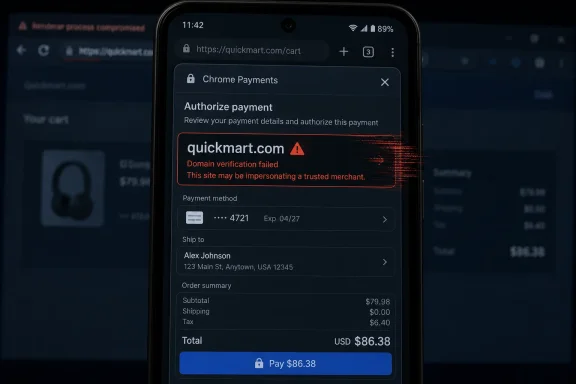
CVE-2026-11019 is a medium-severity Google Chrome for Android flaw, published June 4, 2026 and last modified June 8, that affected versions before 149.0.7827.53 and could let a remote attacker with a compromised renderer spoof a domain through a crafted HTML page. The dry phrasing hides the real issue: this is not a classic “your phone is instantly owned” browser bug, but a trust-boundary failure in one of the most sensitive user interfaces Chrome presents. Payments are where browser chrome, web content, identity, and user attention collide. If that boundary blurs, the damage is measured less in shell access than in misplaced confidence.
The most important phrase in the CVE description is not “remote attacker.” It is “domain spoofing.” Chrome’s Payments component is supposed to help users understand who they are paying, which origin is involved, and whether the browser is mediating a transaction in a way that deserves trust.
That makes CVE-2026-11019 more interesting than its medium severity label suggests. A payment UI does not need to leak memory or execute arbitrary code to become dangerous. It only needs to make the wrong site look like the right site at the moment the user is about to approve something consequential.
The vulnerability is constrained in important ways. The attacker must already have compromised the renderer process, and user interaction is required under the CISA-ADP CVSS vector. That is a meaningful bar. But in browser security, a post-renderer-compromise condition is not a footnote; it is a familiar stage in exploit chains, malicious ad flows, phishing kits, and hostile pages designed to squeeze value out of whatever foothold they can get.
The result is a bug that lives in the gap between engineering severity and human risk. Security scanners will mark it medium. Administrators should treat it as another reason that mobile browser patch latency is no longer a soft problem.
CVE-2026-11019 sits precisely on that seam. The description says the attacker must have compromised the renderer process, which means this bug is not the initial break-in. It is the follow-on move: after getting influence inside the part of the browser that handles web content, the attacker can reportedly abuse an inappropriate implementation in Payments to create domain spoofing through crafted HTML.
That distinction matters because many users and even some IT inventories treat browser bugs as isolated units. A medium spoofing bug looks less urgent than a critical memory corruption bug. But attackers do not think in isolated CVEs. They think in chains: one weakness to get execution, another to escape a boundary, another to deceive the user, another to harvest money, credentials, or authorization.
A compromised renderer combined with a misleading payment surface is a practical escalation of persuasion. It may not elevate kernel privileges, but it can elevate user trust. In consumer and enterprise contexts alike, that can be enough.
That intervention created a new security obligation. When Chrome presents payment-related UI, the user is no longer judging only the webpage. The user is judging the browser’s framing of that webpage. The browser’s address bar, sheet, dialog, permissions prompt, and payment interface become a single trust ceremony.
This is why UI misrepresentation bugs are not cosmetic. A spoofed domain in a payments context can push a user toward approving a transaction, entering credentials, confirming a card, or accepting a flow that appears to belong to a familiar merchant. The CVE’s associated CWE entries point in that direction: authentication bypass by spoofing and UI misrepresentation of critical information.
Those categories are easy to underestimate because they do not sound like the spectacular bugs that dominate patch headlines. But the web has spent decades proving that users are not defeated only by code execution. They are defeated by plausible interfaces at vulnerable moments.
That compression magnifies UI ambiguity. A payment prompt that misstates or disguises domain context can be harder to challenge on a six-inch screen than on a desktop monitor. The user is usually moving quickly, often inside an app-driven journey that has already trained them to accept transitions between webviews, browser tabs, wallets, and embedded checkout flows.
Chrome for Android also lives in a particularly dense ecosystem. It is a browser, a default handler, a system component for many users, and a conduit for account-bound services. A flaw in its payments handling does not need to affect every Android app to matter; it matters because Chrome is the place many users assume the platform is stepping in to protect them.
For IT teams, this is where mobile device management policy meets human behavior. A fully patched Windows fleet is not enough if employees approve fraudulent payments, enter credentials, or follow spoofed workflows on unmanaged or loosely managed Android devices that still touch corporate identity systems.
That sequence matters because vulnerability management teams often expect the NVD page to arrive as a fully formed answer. It rarely does. The first public CVE record may tell you the product, version threshold, and rough class of bug, while scoring, CPE mapping, weakness classification, and downstream scanner behavior arrive later.
CVE-2026-11019 is a useful example of why “NVD has no score yet” should not mean “no action.” NVD had not provided its own CVSS assessment at the time reflected in the entry, but CISA-ADP had already supplied a medium 6.5 vector. The absence of one enrichment field does not make the vendor’s version boundary disappear.
The CPE configuration is also worth reading carefully. NIST’s entry ties vulnerable Chrome versions below 149.0.7827.53 to Android. That is the machine-readable clue many inventory and exposure tools need in order to match a CVE to deployed software. If your scanner misses that relationship, the problem is not the CVE’s importance; it is the lag and fragility of the data plumbing around it.
The safe reading is straightforward: the affected product described by the CVE is Google Chrome on Android, and the fixed boundary is 149.0.7827.53. Administrators should not infer that Windows desktop Chrome is vulnerable to this specific Android Payments issue merely because a desktop release note appears as a reference. Nor should they ignore the bug because the reference title appears desktop-oriented.
This is the kind of metadata wrinkle that frustrates automated compliance workflows. A scanner may ingest the CVE, a CPE, and a release-note URL, then present a confusing summary to an operator. The human job is to separate the authoritative impact statement from the artifacts of how Chromium publishes and cross-references its updates.
That does not mean desktop Chrome can be ignored in the same patch cycle. Chrome 149 has its own security fixes, and subsequent June updates addressed additional vulnerabilities. But CVE-2026-11019, as described, is an Android payments-domain spoofing issue, and that specificity should drive the remediation conversation.
CVSS is doing what CVSS does. It is measuring technical properties of an individual vulnerability. It is not measuring whether your CFO uses Chrome on Android to approve procurement workflows, whether your field staff rely on browser-based payment pages, or whether your help desk can distinguish a payment spoof from a normal checkout complaint.
The high integrity impact is the signal. A successful exploit does not have to steal data directly to be serious. If a user can be made to believe they are interacting with one domain while a different domain drives the flow, the attacker is interfering with the truthfulness of the transaction context.
That is why UI integrity deserves more respect in risk scoring. The security industry has spent years teaching users to look for the domain, the lock, the prompt, the origin, and the browser-mediated confirmation. Bugs like this erode the very signals users were told to trust.
That ambiguity benefits attackers. Enterprises are good at responding to malware detections and endpoint alerts. They are weaker at investigating “the user says the site looked real” cases, especially on personal mobile devices where logs are sparse and browser state is hard to reconstruct.
In that sense, CVE-2026-11019 belongs to the same uncomfortable family as address-bar spoofing, permission-prompt confusion, and malicious overlay tricks. These are bugs that weaponize the user interface rather than the operating system. They do not always produce dramatic telemetry, but they can produce real financial and identity consequences.
For consumers, the advice is simple but unsatisfying: update Chrome, be skeptical of payment flows reached through unexpected links, and prefer known apps or manually typed destinations for sensitive transactions. For administrators, the practical question is whether mobile Chrome version compliance is actually measured, or merely assumed.
That means patching Chrome is no longer just about preventing drive-by compromise. It is about preserving the reliability of the prompts and surfaces users depend on to make decisions. CVE-2026-11019 is a clean illustration because the bug is explicitly about spoofing, not silent data theft.
Organizations that already enforce Chrome updates on Windows may still have blind spots on Android. Bring-your-own-device policies often focus on mail access, device encryption, screen locks, and app-level conditional access. Browser version enforcement can be treated as a lower-tier hygiene item, especially if the browser is not the formal managed app.
That gap is increasingly hard to defend. If corporate identity, SaaS approvals, expense systems, payment processors, or partner portals are reachable from mobile Chrome, then Chrome’s security posture is part of the corporate perimeter. The perimeter just happens to be in an employee’s hand.
But “not known exploited” is not the same as “not exploitable,” and it is certainly not the same as “safe to defer.” Chrome updates are fast-moving, cumulative, and often bundled with many fixes. Waiting for exploit confirmation before pushing a browser update is a strategy for organizations that enjoy learning from incident reports.
The right response is routine: verify Chrome for Android is at or above 149.0.7827.53, prioritize users who handle payments or sensitive approvals on mobile, and make sure MDM or enterprise mobility tooling can report browser versions accurately. If Chrome is managed through Google Play in an enterprise context, update policy should be checked rather than assumed.
For unmanaged personal devices, the answer is education and conditional access where appropriate. If a device is too unmanaged to verify its browser posture, it may be too unmanaged to trust for high-value workflows. That is not a Chrome-specific conclusion. It is the reality of mobile security in 2026.
When a CVE record is new, its metadata can be incomplete, corrected, or enriched over several days. CVE-2026-11019 moved through that process quickly: published June 4, modified June 8, augmented by CISA-ADP scoring and NIST configuration data. Even so, there was a window in which teams relying on a single feed might have seen less than the full picture.
This is especially painful for browser vulnerabilities because Chrome’s version cadence is relentless. A vulnerability may be fixed before all downstream tools agree on how to describe it. By the time a scanner produces a clean, enriched finding, the update may already have been superseded by another stable build.
The lesson is not to abandon vulnerability databases. It is to stop treating them as the only source of truth. Vendor release channels, OS and app inventory, MDM reporting, and exploit intelligence all have to be reconciled. For a bug like this, the decisive fact is the version boundary, not whether every enrichment field has reached final form.
Thin stories invite bad prioritization. A memory corruption bug sounds technical and urgent. A spoofing bug sounds like something users should simply be smart enough to avoid. That framing is wrong.
A browser UI is a security control. If the UI lies, or can be induced to tell an incomplete truth, the control has failed. The fact that a human must be present does not reduce the importance of the failure; it defines the target.
Security teams should talk about these bugs in operational language. Could this mislead a user during payment approval? Could it affect a business workflow? Could it make a malicious domain appear trustworthy at the exact point of consent? Those are better questions than whether “medium” sounds scary enough.
That is exactly why it is useful. The ordinary medium bug shows the true shape of browser risk better than the headline zero-day does. Most enterprise exposure is not a single catastrophic flaw; it is an accumulation of small trust failures, delayed updates, ambiguous inventories, and users asked to make security decisions inside compressed interfaces.
For WindowsForum readers, there is also a cross-platform warning here. Windows administrators may be tempted to file this under “Android problem” and move on. But the identity systems, payment portals, Microsoft 365 sessions, password managers, and SaaS tools those Android devices reach are often the same systems defended from Windows endpoints.
The browser is now the common operating environment across platforms. A Chrome-for-Android UI bug can matter to a Windows shop because the user, account, transaction, and data are shared even when the kernel is not.
 Chrome’s Payments Bug Is a Trust Failure, Not Just a Browser Bug
The most important phrase in the CVE description is not “remote attacker.” It is “domain spoofing.” Chrome’s Payments component is supposed to help users understand who they are paying, which origin is involved, and whether the browser is mediating a transaction in a way that deserves trust.That makes CVE-2026-11019 more interesting than its medium severity label suggests. A payment UI does not need to leak memory or execute arbitrary code to become dangerous. It only needs to make the wrong site look like the right site at the moment the user is about to approve something consequential.
The vulnerability is constrained in important ways. The attacker must already have compromised the renderer process, and user interaction is required under the CISA-ADP CVSS vector. That is a meaningful bar. But in browser security, a post-renderer-compromise condition is not a footnote; it is a familiar stage in exploit chains, malicious ad flows, phishing kits, and hostile pages designed to squeeze value out of whatever foothold they can get.
The result is a bug that lives in the gap between engineering severity and human risk. Security scanners will mark it medium. Administrators should treat it as another reason that mobile browser patch latency is no longer a soft problem.
The Renderer Was Already Lost, But the Story Wasn’t Over
Modern browser architecture assumes that web content is hostile. The renderer process is where pages execute JavaScript, draw HTML, process layout, and generally do the risky work of turning the internet into pixels. Chrome’s sandbox model is built on the idea that even if a renderer goes bad, it should not be able to freely impersonate privileged browser UI.CVE-2026-11019 sits precisely on that seam. The description says the attacker must have compromised the renderer process, which means this bug is not the initial break-in. It is the follow-on move: after getting influence inside the part of the browser that handles web content, the attacker can reportedly abuse an inappropriate implementation in Payments to create domain spoofing through crafted HTML.
That distinction matters because many users and even some IT inventories treat browser bugs as isolated units. A medium spoofing bug looks less urgent than a critical memory corruption bug. But attackers do not think in isolated CVEs. They think in chains: one weakness to get execution, another to escape a boundary, another to deceive the user, another to harvest money, credentials, or authorization.
A compromised renderer combined with a misleading payment surface is a practical escalation of persuasion. It may not elevate kernel privileges, but it can elevate user trust. In consumer and enterprise contexts alike, that can be enough.
Payments Are a Browser Feature With Banking-App Stakes
The web’s payment layer is designed to reduce friction. Autofill, stored cards, Payment Request flows, and mobile wallet integrations all exist because checkout pages have historically been ugly, inconsistent, and vulnerable to abandonment. Browsers stepped in to become trusted intermediaries.That intervention created a new security obligation. When Chrome presents payment-related UI, the user is no longer judging only the webpage. The user is judging the browser’s framing of that webpage. The browser’s address bar, sheet, dialog, permissions prompt, and payment interface become a single trust ceremony.
This is why UI misrepresentation bugs are not cosmetic. A spoofed domain in a payments context can push a user toward approving a transaction, entering credentials, confirming a card, or accepting a flow that appears to belong to a familiar merchant. The CVE’s associated CWE entries point in that direction: authentication bypass by spoofing and UI misrepresentation of critical information.
Those categories are easy to underestimate because they do not sound like the spectacular bugs that dominate patch headlines. But the web has spent decades proving that users are not defeated only by code execution. They are defeated by plausible interfaces at vulnerable moments.
Android Makes the Boundary More Personal
The Android angle is not incidental. On desktop, users may have multiple visual cues: large address bars, extension icons, security indicators, password managers, and the simple benefit of screen real estate. On phones, trust is compressed into a few lines, a sheet, or a modal surface that appears over a page.That compression magnifies UI ambiguity. A payment prompt that misstates or disguises domain context can be harder to challenge on a six-inch screen than on a desktop monitor. The user is usually moving quickly, often inside an app-driven journey that has already trained them to accept transitions between webviews, browser tabs, wallets, and embedded checkout flows.
Chrome for Android also lives in a particularly dense ecosystem. It is a browser, a default handler, a system component for many users, and a conduit for account-bound services. A flaw in its payments handling does not need to affect every Android app to matter; it matters because Chrome is the place many users assume the platform is stepping in to protect them.
For IT teams, this is where mobile device management policy meets human behavior. A fully patched Windows fleet is not enough if employees approve fraudulent payments, enter credentials, or follow spoofed workflows on unmanaged or loosely managed Android devices that still touch corporate identity systems.
The NVD Entry Shows the Vulnerability Data Pipeline at Work
The chronology is unusually instructive. The CVE was received from Chrome on June 4, 2026. CISA-ADP added a CVSS 3.1 score of 6.5, along with CWE-290 and CWE-451, on June 8. NIST’s initial analysis followed the same day, adding affected product configuration data and references to Chrome’s release material and the Chromium issue tracker.That sequence matters because vulnerability management teams often expect the NVD page to arrive as a fully formed answer. It rarely does. The first public CVE record may tell you the product, version threshold, and rough class of bug, while scoring, CPE mapping, weakness classification, and downstream scanner behavior arrive later.
CVE-2026-11019 is a useful example of why “NVD has no score yet” should not mean “no action.” NVD had not provided its own CVSS assessment at the time reflected in the entry, but CISA-ADP had already supplied a medium 6.5 vector. The absence of one enrichment field does not make the vendor’s version boundary disappear.
The CPE configuration is also worth reading carefully. NIST’s entry ties vulnerable Chrome versions below 149.0.7827.53 to Android. That is the machine-readable clue many inventory and exposure tools need in order to match a CVE to deployed software. If your scanner misses that relationship, the problem is not the CVE’s importance; it is the lag and fragility of the data plumbing around it.
The Desktop Reference Is Messy, But the Android Version Boundary Is Clear
One awkward detail in the submitted material is the Chrome release reference. The NVD change history points to a Chrome “Stable Channel Update for Desktop” page, while the vulnerability description itself says Chrome on Android before 149.0.7827.53. That mismatch is not unusual in Chromium CVE handling, where a release post may cover a broad stable milestone while individual bugs have platform-specific impact.The safe reading is straightforward: the affected product described by the CVE is Google Chrome on Android, and the fixed boundary is 149.0.7827.53. Administrators should not infer that Windows desktop Chrome is vulnerable to this specific Android Payments issue merely because a desktop release note appears as a reference. Nor should they ignore the bug because the reference title appears desktop-oriented.
This is the kind of metadata wrinkle that frustrates automated compliance workflows. A scanner may ingest the CVE, a CPE, and a release-note URL, then present a confusing summary to an operator. The human job is to separate the authoritative impact statement from the artifacts of how Chromium publishes and cross-references its updates.
That does not mean desktop Chrome can be ignored in the same patch cycle. Chrome 149 has its own security fixes, and subsequent June updates addressed additional vulnerabilities. But CVE-2026-11019, as described, is an Android payments-domain spoofing issue, and that specificity should drive the remediation conversation.
Medium Severity Is Not a Permission Slip
The CISA-ADP CVSS vector tells a compact story: network attack vector, low attack complexity, no privileges required, user interaction required, unchanged scope, no confidentiality impact, high integrity impact, and no availability impact. That lands at 6.5, squarely medium.CVSS is doing what CVSS does. It is measuring technical properties of an individual vulnerability. It is not measuring whether your CFO uses Chrome on Android to approve procurement workflows, whether your field staff rely on browser-based payment pages, or whether your help desk can distinguish a payment spoof from a normal checkout complaint.
The high integrity impact is the signal. A successful exploit does not have to steal data directly to be serious. If a user can be made to believe they are interacting with one domain while a different domain drives the flow, the attacker is interfering with the truthfulness of the transaction context.
That is why UI integrity deserves more respect in risk scoring. The security industry has spent years teaching users to look for the domain, the lock, the prompt, the origin, and the browser-mediated confirmation. Bugs like this erode the very signals users were told to trust.
Attackers Love Bugs That Look Like User Error
A domain spoofing bug is attractive because its aftermath can be ambiguous. If a user approves something under a misleading payment context, the incident may look like phishing, a bad merchant, credential reuse, or simple negligence. The technical exploit can vanish behind the social outcome.That ambiguity benefits attackers. Enterprises are good at responding to malware detections and endpoint alerts. They are weaker at investigating “the user says the site looked real” cases, especially on personal mobile devices where logs are sparse and browser state is hard to reconstruct.
In that sense, CVE-2026-11019 belongs to the same uncomfortable family as address-bar spoofing, permission-prompt confusion, and malicious overlay tricks. These are bugs that weaponize the user interface rather than the operating system. They do not always produce dramatic telemetry, but they can produce real financial and identity consequences.
For consumers, the advice is simple but unsatisfying: update Chrome, be skeptical of payment flows reached through unexpected links, and prefer known apps or manually typed destinations for sensitive transactions. For administrators, the practical question is whether mobile Chrome version compliance is actually measured, or merely assumed.
Patch Management Has Moved From Endpoints to Attention
The old patch-management model treated browsers as desktop software with a version number. That model is obsolete. Browsers are identity surfaces, payment brokers, document viewers, password managers, sync clients, and application runtimes. On Android, they are also entangled with app links, account sessions, and mobile checkout behavior.That means patching Chrome is no longer just about preventing drive-by compromise. It is about preserving the reliability of the prompts and surfaces users depend on to make decisions. CVE-2026-11019 is a clean illustration because the bug is explicitly about spoofing, not silent data theft.
Organizations that already enforce Chrome updates on Windows may still have blind spots on Android. Bring-your-own-device policies often focus on mail access, device encryption, screen locks, and app-level conditional access. Browser version enforcement can be treated as a lower-tier hygiene item, especially if the browser is not the formal managed app.
That gap is increasingly hard to defend. If corporate identity, SaaS approvals, expense systems, payment processors, or partner portals are reachable from mobile Chrome, then Chrome’s security posture is part of the corporate perimeter. The perimeter just happens to be in an employee’s hand.
The Right Response Is Boring, Which Is Why It Gets Missed
There is no public indication in the provided CVE material that CVE-2026-11019 is being exploited in the wild. That matters. It should prevent panic and keep this from being miscast as a zero-day fire drill.But “not known exploited” is not the same as “not exploitable,” and it is certainly not the same as “safe to defer.” Chrome updates are fast-moving, cumulative, and often bundled with many fixes. Waiting for exploit confirmation before pushing a browser update is a strategy for organizations that enjoy learning from incident reports.
The right response is routine: verify Chrome for Android is at or above 149.0.7827.53, prioritize users who handle payments or sensitive approvals on mobile, and make sure MDM or enterprise mobility tooling can report browser versions accurately. If Chrome is managed through Google Play in an enterprise context, update policy should be checked rather than assumed.
For unmanaged personal devices, the answer is education and conditional access where appropriate. If a device is too unmanaged to verify its browser posture, it may be too unmanaged to trust for high-value workflows. That is not a Chrome-specific conclusion. It is the reality of mobile security in 2026.
Vulnerability Metadata Is Becoming Part of the Risk
The “Are we missing a CPE?” prompt on NVD pages is easy to skim past, but it points to a real operational issue. Vulnerability databases are not just libraries. They are inputs into scanners, ticketing systems, dashboards, cyber-insurance questionnaires, procurement rules, and patch SLAs.When a CVE record is new, its metadata can be incomplete, corrected, or enriched over several days. CVE-2026-11019 moved through that process quickly: published June 4, modified June 8, augmented by CISA-ADP scoring and NIST configuration data. Even so, there was a window in which teams relying on a single feed might have seen less than the full picture.
This is especially painful for browser vulnerabilities because Chrome’s version cadence is relentless. A vulnerability may be fixed before all downstream tools agree on how to describe it. By the time a scanner produces a clean, enriched finding, the update may already have been superseded by another stable build.
The lesson is not to abandon vulnerability databases. It is to stop treating them as the only source of truth. Vendor release channels, OS and app inventory, MDM reporting, and exploit intelligence all have to be reconciled. For a bug like this, the decisive fact is the version boundary, not whether every enrichment field has reached final form.
Spoofing Bugs Deserve Better Language
The phrase “inappropriate implementation” has become one of Chromium’s most elastic vulnerability descriptions. It tells us the component and the consequence, but not the mechanism. That is understandable when bug details are restricted, especially before users have had time to update, but it leaves defenders with a thin story.Thin stories invite bad prioritization. A memory corruption bug sounds technical and urgent. A spoofing bug sounds like something users should simply be smart enough to avoid. That framing is wrong.
A browser UI is a security control. If the UI lies, or can be induced to tell an incomplete truth, the control has failed. The fact that a human must be present does not reduce the importance of the failure; it defines the target.
Security teams should talk about these bugs in operational language. Could this mislead a user during payment approval? Could it affect a business workflow? Could it make a malicious domain appear trustworthy at the exact point of consent? Those are better questions than whether “medium” sounds scary enough.
The June Chrome Cycle Reminds Us That Browsers Are Never Done
Chrome’s June 2026 security cycle was already busy, with Chrome 149 bringing a large stable-channel update and subsequent advisories addressing additional vulnerabilities. CVE-2026-11019 is not the loudest bug in that crowd. It lacks the drama of active exploitation, sandbox escape, or remote code execution.That is exactly why it is useful. The ordinary medium bug shows the true shape of browser risk better than the headline zero-day does. Most enterprise exposure is not a single catastrophic flaw; it is an accumulation of small trust failures, delayed updates, ambiguous inventories, and users asked to make security decisions inside compressed interfaces.
For WindowsForum readers, there is also a cross-platform warning here. Windows administrators may be tempted to file this under “Android problem” and move on. But the identity systems, payment portals, Microsoft 365 sessions, password managers, and SaaS tools those Android devices reach are often the same systems defended from Windows endpoints.
The browser is now the common operating environment across platforms. A Chrome-for-Android UI bug can matter to a Windows shop because the user, account, transaction, and data are shared even when the kernel is not.
The Practical Reading of CVE-2026-11019 Is Narrow, But the Lesson Is Broad
This CVE should not be inflated into something it is not. It is a medium-severity Chrome for Android Payments issue requiring a compromised renderer and user interaction, fixed before version 149.0.7827.53. But it should also not be dismissed as “just spoofing,” because spoofing inside a payment context attacks the browser’s role as a trusted witness.- Chrome for Android installations should be updated to 149.0.7827.53 or later to close the specific CVE-2026-11019 exposure.
- The vulnerability is best understood as a post-renderer-compromise domain spoofing problem in Payments, not as a standalone remote takeover of Android devices.
- The CISA-ADP score of 6.5 medium reflects user interaction and no direct confidentiality or availability impact, but the high integrity impact is the operational warning.
- The NVD reference to a desktop Chrome release page should not override the CVE description’s Android-specific affected-product statement.
- Organizations should verify mobile browser versions through MDM or mobility tooling rather than assuming app-store auto-updates have completed.
- Security teams should treat payment and identity UI spoofing as a control failure, not merely as a user-awareness issue.
References
- Primary source: NVD / Chromium
Published: 2026-06-09T07:00:36-07:00
NVD - CVE-2026-11019
 nvd.nist.gov
- Security advisory: MSRC
Published: 2026-06-09T07:00:36-07:00
Original feed URL
Security Update Guide - Microsoft Security Response Center
 msrc.microsoft.com
- Official source: nist.gov
National Vulnerability Database
NIST maintains the National Vulnerability Database (NVD), a repository of information on software and hardware flaws that can compromise computer security. This is a key piece of the nation’s cybersecurity infrastructure.www.nist.gov - Related coverage: security.snyk.io
- Related coverage: govcert.gov.hk
GovCERT.HK - Security Alert (A26-06-08): Multiple Vulnerabilities in Google Chrome
Security Alert (A26-06-08): Multiple Vulnerabilities in Google Chromewww.govcert.gov.hk
- Related coverage: labs.cloudsecurityalliance.org
NVD Enrichment Triage: Enterprise Vulnerability Programs Must Adapt
PDF documentlabs.cloudsecurityalliance.org

