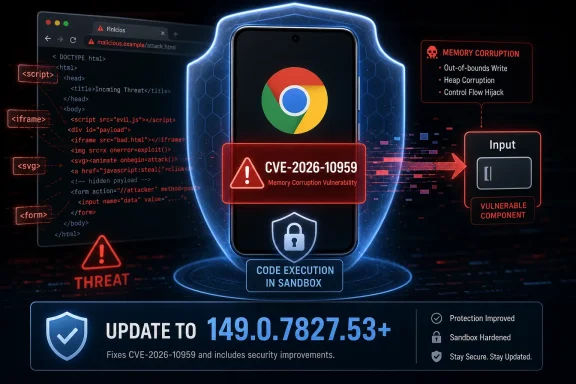
Google Chrome for Android versions earlier than 149.0.7827.53 are affected by CVE-2026-10959, a high-severity use-after-free flaw in the browser’s Input component disclosed on June 4, 2026, that can let a remote attacker execute code inside Chrome’s sandbox through a crafted HTML page. The bug is not yet another abstract CVE entry for administrators to file away; it is a reminder that mobile browsers are now fully fledged application platforms with desktop-class attack surfaces. For WindowsForum readers, the lesson is larger than Android alone: Chromium’s security model is only as strong as the update chain that carries fixes from Google to every browser, device, and managed endpoint that depends on it.
CVE-2026-10959 lands in a familiar category: use after free, the memory-safety failure that keeps showing up in browser advisories because browsers are sprawling, performance-sensitive engines built to process hostile input at internet speed. In plain terms, the browser mishandles memory that has already been released, and an attacker may be able to shape that stale memory into something useful. In this case, the reported impact is arbitrary code execution inside the Chrome sandbox after a user encounters a crafted HTML page.
That “inside a sandbox” phrase matters. It means the described bug is not, by itself, a full device takeover. Chrome’s sandbox is designed precisely to contain renderer-level compromise and prevent web content from casually reaching the operating system, app data, or privileged browser services.
But it would be a mistake to treat sandboxed code execution as harmless. Modern exploit chains often begin with one bug that gives an attacker code execution in a constrained process, then continue with a second vulnerability that escapes the sandbox or abuses exposed interfaces. A high-severity renderer or input-path flaw is therefore not the end of the story; it is often the opening move.
That makes it an attractive place for memory bugs. A crafted page can generate complex sequences of events, force unusual timing, and mix layout changes with user interaction in ways that stress assumptions deep in the engine. Browsers must respond quickly enough to feel native, but safely enough to survive content built by adversaries.
The CVE description says exploitation requires a crafted HTML page and user interaction. That is still a meaningful barrier, but not a comforting one. On mobile, “user interaction” can be as banal as opening a link, tapping a prompt, scrolling a page, dismissing an overlay, or interacting with a maliciously designed web surface that looks like something ordinary.
This is why browser teams tend to rate these issues harshly even when the exploit path is not fully public. The web’s threat model assumes the browser will parse and execute untrusted content every minute of the day. If that content can corrupt memory in a high-reach component, the theoretical line between bug and exploit is uncomfortably thin.
Security teams sometimes talk themselves into waiting when a vulnerability is not described as a sandbox escape. That instinct is understandable in a crowded patch queue, but browsers deserve different treatment. They sit at the boundary between users and untrusted code, and they are continuously exercised by email links, chat apps, QR codes, advertising networks, captive portals, and embedded web views.
The other practical issue is disclosure asymmetry. Public CVE entries intentionally omit exploit detail while users are still patching. The absence of a published exploit is not proof of safety; it is often a deliberate part of responsible disclosure. For administrators, the correct operational stance is not panic, but it is also not complacency.
On consumer Android devices, Chrome updates generally flow through Google Play, but timing can still vary by device policy, region, managed profile configuration, and user behavior. In enterprise fleets, the situation is more complicated. Work profiles, mobile device management baselines, app update deferrals, kiosk configurations, and compliance checks can all determine whether a patched browser is present when it matters.
The NVD change history is also notable because it added a CPE configuration tying vulnerable Google Chrome versions to Android. That is not glamorous, but it is operationally important. Vulnerability scanners, asset databases, and exposure-management tools depend on this metadata to decide what is affected.
Still, CPE data is not magic. A mobile app version in a scanner does not always map cleanly to a real-world device state. Organizations that care about this vulnerability should verify app inventory directly rather than assuming a central dashboard has already understood every Android endpoint correctly.
CVSS should not be read as destiny, but it is a useful shorthand. The score does not say that every Android user is about to be compromised. It says the preconditions are plausible enough, and the consequences serious enough, that delaying the patch is a poor bet.
The “user interaction required” field is often misunderstood. It does not necessarily mean the victim must do something suspicious or technically complex. In a browser context, ordinary web activity is the interaction. That is why browser vulnerabilities with UI:R can still be urgent in practice.
The current NVD entry also lacks a NIST CVSS score at the time described in the supplied record, while CISA’s ADP score is available. That gap is not unusual in the early life of a CVE. It does mean defenders should pay attention to the concrete affected version and vendor fix rather than waiting for every database to settle into final form.
CVE-2026-10959 is described specifically as Google Chrome on Android prior to 149.0.7827.53. That does not automatically make every Chromium-derived browser vulnerable in the same way. Mobile implementations differ, platform code differs, and downstream projects may include or exclude relevant components.
But the broader lesson remains. Chromium vulnerabilities create a patch-synchronization problem across an ecosystem that does not move in lockstep. Google can publish a fixed Chrome build, but every downstream vendor has to ingest, validate, package, and ship the relevant changes. Enterprise administrators then have to prove that those updates reached their endpoints.
For WindowsForum’s core audience, this is where a mobile Chrome CVE becomes relevant to Windows shops. Many organizations standardize on Edge or Chrome on Windows while also supporting Android phones, tablets, rugged devices, or bring-your-own-device access. Browser security policy is no longer a desktop-only discipline.
A crafted page can be delivered through phishing, malvertising, compromised sites, messaging apps, forum posts, short links, QR codes, or any environment where a user can be nudged into opening web content. The attacker does not need to ship a traditional executable. The browser is the execution environment.
That changes the defensive equation. Traditional endpoint controls can still help, but browser patching is the primary mitigation. Once a vulnerable browser is asked to process malicious content, the difference between a near miss and a compromise may be a single heap state, timing condition, or mitigation bypass.
Security teams should also remember that mobile users are often harder to protect with legacy tooling. Their browsing context is personal, mobile, and intermittent. They may not be on the corporate network when exposed, and they may not be running the same monitoring stack as managed desktops.
This is not a Chromium-only critique. Every major browser engine has spent years fighting the same class of defects. The web platform is vast, legacy compatibility is sacred, performance budgets are brutal, and adversarial input is constant.
But the recurring nature of CWE-416 should influence how organizations think about browsers. A browser is not a normal productivity app. It is a high-risk execution platform that must be patched with the urgency normally reserved for internet-facing services.
The industry’s gradual movement toward memory-safe languages is encouraging, but it will not erase the existing attack surface overnight. Until then, the practical defense remains layered: fast updates, sandbox hardening, site isolation, exploit mitigation, app control, and reducing the number of unpatched browser variants in use.
First comes the vendor disclosure, often with intentionally limited technical detail. Then enrichment services add scoring, weakness mapping, and configuration data. Then vulnerability-management platforms ingest that data, sometimes before it is complete, and administrators see alerts begin to fire.
This creates a window where the vulnerability is real but the metadata is still moving. A scanner may show incomplete severity. A dashboard may not yet have a clean affected-products mapping. A ticketing workflow may wait for data that arrives hours or days later.
For a high-severity browser flaw, waiting for perfect metadata is the wrong optimization. The fixed version is already enough to act. The mature response is to update first, then let the records converge.
Managed Android devices can be locked down effectively, but many organizations still operate in a hybrid reality. Some users have corporate-owned devices. Some have personally owned phones with work profiles. Some access Microsoft 365, identity portals, SaaS tools, or internal web apps from unmanaged devices. The browser becomes a moving target.
That is why this CVE should prompt more than a reminder email telling users to update Chrome. It should prompt a check of mobile compliance rules. If access to sensitive resources depends on a healthy device posture, browser version should be part of that posture where tooling allows it.
There is also a consumer angle. Android users often assume app updates are automatic, and often they are. But automatic does not mean instantaneous, and it does not mean successful. A failed Play Store update, a low-storage device, a disabled update setting, or a neglected secondary profile can leave an old browser in place.
Microsoft Edge is Chromium-based, and WebView2 is now a common runtime for Windows desktop applications. That means enterprise Windows environments increasingly depend on Chromium code even when users never launch Google Chrome. The right lesson is not that this specific CVE compromises Windows; the right lesson is that browser-engine patch hygiene has become part of Windows fleet hygiene.
For Edge, administrators should already be enforcing update policies and monitoring version drift. For WebView2, they should understand whether the Evergreen Runtime is present and updating normally. For third-party applications that bundle Chromium or Electron, they should demand vendor transparency on embedded browser versions.
The most dangerous Chromium instance in an enterprise is not always the one with a familiar icon on the taskbar. It may be the one hidden inside a line-of-business app that updates quarterly.
Those fragments are enough for operational action, but not enough for full public understanding. The Chromium issue tracker reference may require permissions, which is common for security bugs during the rollout period. The lack of public exploit detail is not a cover-up; it is the trade-off that lets vendors patch before attackers get a tutorial.
The correct response is to separate two questions. “Do we know exactly how this works?” is a research question, and the public answer may be no. “Do we know enough to patch?” is an operations question, and the answer is clearly yes.
That distinction matters because vulnerability fatigue tempts teams to defer anything that lacks a dramatic exploit write-up. Browser vulnerabilities should be judged by exposure and plausibility, not by whether a proof-of-concept has already been pasted into public view.
For home users, the advice is simple: update Chrome from Google Play and confirm the installed version is 149.0.7827.53 or later. For administrators, the task is broader. Inventory, enforcement, and exception handling matter more than the advisory headline.
Chrome’s version number also deserves careful handling. The affected boundary is “prior to 149.0.7827.53” for Chrome on Android. Administrators should avoid assuming that any Chrome 149 build is necessarily safe unless it is at or above the fixed version described for the platform.
The same caution applies to vulnerability tools. If a scanner flags the CVE but cannot see mobile app inventory, the absence of an alert is not proof of absence. If the tool sees Chrome but not the Android context, the result may need interpretation.
This does not mean every high-severity Chrome bug becomes a mass-exploitation event. Most do not. But the patch window is still the period of highest avoidable risk, because defenders know enough to update while attackers know enough to start digging.
Mobile browsing makes that window harder to police. Users carry vulnerable browsers across networks, time zones, and personal contexts. They open links in messaging apps more often than they type domains into an address bar. They may interact with malicious content before a corporate help desk even finishes drafting an advisory.
That is why browser auto-update systems are among the most important security mechanisms in consumer computing. They are not merely convenience features. They are the distribution layer for emergency risk reduction.
Mobile device management can help, but only if policy matches reality. If users can access corporate resources from unmanaged Android devices, the organization needs conditional access rules that reflect that risk. If users rely on Android work profiles, administrators should verify that Chrome in the relevant profile is actually updated.
Security awareness also has a role, but it should not be oversold. Telling users not to click suspicious links is useful at the margins. It is not a substitute for patching the software that must safely render the modern web.
The better user-facing message is practical and brief: update Chrome, restart it if needed, and do not assume automatic updates have already finished. The better administrator-facing message is equally direct: prove the version, do not merely presume the update.
 A Mobile Chrome Bug With Desktop-Class Implications
CVE-2026-10959 lands in a familiar category: use after free, the memory-safety failure that keeps showing up in browser advisories because browsers are sprawling, performance-sensitive engines built to process hostile input at internet speed. In plain terms, the browser mishandles memory that has already been released, and an attacker may be able to shape that stale memory into something useful. In this case, the reported impact is arbitrary code execution inside the Chrome sandbox after a user encounters a crafted HTML page.That “inside a sandbox” phrase matters. It means the described bug is not, by itself, a full device takeover. Chrome’s sandbox is designed precisely to contain renderer-level compromise and prevent web content from casually reaching the operating system, app data, or privileged browser services.
But it would be a mistake to treat sandboxed code execution as harmless. Modern exploit chains often begin with one bug that gives an attacker code execution in a constrained process, then continue with a second vulnerability that escapes the sandbox or abuses exposed interfaces. A high-severity renderer or input-path flaw is therefore not the end of the story; it is often the opening move.
The Input Stack Is Where Trust Goes to Die
The vulnerable component named in the CVE is “Input,” which sounds mundane until you consider what input means inside a browser. Input is not just taps and keystrokes. It is event dispatch, gesture interpretation, focus handling, scrolling behavior, form interaction, touch state, pointer state, accessibility pathways, and the translation layer between messy human behavior and deterministic browser code.That makes it an attractive place for memory bugs. A crafted page can generate complex sequences of events, force unusual timing, and mix layout changes with user interaction in ways that stress assumptions deep in the engine. Browsers must respond quickly enough to feel native, but safely enough to survive content built by adversaries.
The CVE description says exploitation requires a crafted HTML page and user interaction. That is still a meaningful barrier, but not a comforting one. On mobile, “user interaction” can be as banal as opening a link, tapping a prompt, scrolling a page, dismissing an overlay, or interacting with a maliciously designed web surface that looks like something ordinary.
This is why browser teams tend to rate these issues harshly even when the exploit path is not fully public. The web’s threat model assumes the browser will parse and execute untrusted content every minute of the day. If that content can corrupt memory in a high-reach component, the theoretical line between bug and exploit is uncomfortably thin.
The Sandbox Narrows the Blast Radius, Not the Urgency
Google’s phrasing says arbitrary code execution occurs inside a sandbox. That should shape risk management without minimizing it. A sandboxed compromise may not immediately yield Android system privileges, but it can still expose browser-process behaviors, enable further exploitation, or serve as a foothold in a broader chain.Security teams sometimes talk themselves into waiting when a vulnerability is not described as a sandbox escape. That instinct is understandable in a crowded patch queue, but browsers deserve different treatment. They sit at the boundary between users and untrusted code, and they are continuously exercised by email links, chat apps, QR codes, advertising networks, captive portals, and embedded web views.
The other practical issue is disclosure asymmetry. Public CVE entries intentionally omit exploit detail while users are still patching. The absence of a published exploit is not proof of safety; it is often a deliberate part of responsible disclosure. For administrators, the correct operational stance is not panic, but it is also not complacency.
Version 149.0.7827.53 Becomes the Line in the Sand
The remediation boundary is straightforward: Chrome on Android should be at 149.0.7827.53 or later. Anything earlier falls on the wrong side of the CVE description. That simplicity is useful, because the hardest part of mobile browser security is rarely understanding the fix; it is proving that the fix has actually arrived everywhere it needs to.On consumer Android devices, Chrome updates generally flow through Google Play, but timing can still vary by device policy, region, managed profile configuration, and user behavior. In enterprise fleets, the situation is more complicated. Work profiles, mobile device management baselines, app update deferrals, kiosk configurations, and compliance checks can all determine whether a patched browser is present when it matters.
The NVD change history is also notable because it added a CPE configuration tying vulnerable Google Chrome versions to Android. That is not glamorous, but it is operationally important. Vulnerability scanners, asset databases, and exposure-management tools depend on this metadata to decide what is affected.
Still, CPE data is not magic. A mobile app version in a scanner does not always map cleanly to a real-world device state. Organizations that care about this vulnerability should verify app inventory directly rather than assuming a central dashboard has already understood every Android endpoint correctly.
CISA’s Score Captures the Shape of the Threat
CISA’s ADP enrichment gives the vulnerability a CVSS 3.1 score of 8.8, with network attack vector, low attack complexity, no privileges required, and user interaction required. That combination tells a familiar browser story: the attacker does not need an account or local access, but does need to lure the user into interacting with hostile content. Confidentiality, integrity, and availability impacts are all rated high.CVSS should not be read as destiny, but it is a useful shorthand. The score does not say that every Android user is about to be compromised. It says the preconditions are plausible enough, and the consequences serious enough, that delaying the patch is a poor bet.
The “user interaction required” field is often misunderstood. It does not necessarily mean the victim must do something suspicious or technically complex. In a browser context, ordinary web activity is the interaction. That is why browser vulnerabilities with UI:R can still be urgent in practice.
The current NVD entry also lacks a NIST CVSS score at the time described in the supplied record, while CISA’s ADP score is available. That gap is not unusual in the early life of a CVE. It does mean defenders should pay attention to the concrete affected version and vendor fix rather than waiting for every database to settle into final form.
This Is Not Just Google’s Problem
Chromium’s reach extends far beyond Chrome. Microsoft Edge, Brave, Vivaldi, Opera, Electron applications, embedded browsers, and Android WebView-adjacent experiences all live in the gravitational field of Chromium’s security work, even when a CVE is formally scoped to a specific product and platform.CVE-2026-10959 is described specifically as Google Chrome on Android prior to 149.0.7827.53. That does not automatically make every Chromium-derived browser vulnerable in the same way. Mobile implementations differ, platform code differs, and downstream projects may include or exclude relevant components.
But the broader lesson remains. Chromium vulnerabilities create a patch-synchronization problem across an ecosystem that does not move in lockstep. Google can publish a fixed Chrome build, but every downstream vendor has to ingest, validate, package, and ship the relevant changes. Enterprise administrators then have to prove that those updates reached their endpoints.
For WindowsForum’s core audience, this is where a mobile Chrome CVE becomes relevant to Windows shops. Many organizations standardize on Edge or Chrome on Windows while also supporting Android phones, tablets, rugged devices, or bring-your-own-device access. Browser security policy is no longer a desktop-only discipline.
The Crafted HTML Page Is the Oldest Trick in the Modern Browser Book
The exploit vector described here is a crafted HTML page. That phrase appears so often in browser CVEs that it can fade into the wallpaper, but it remains one of the most important details in the advisory. HTML is the delivery format of the modern internet, and browsers are built to consume it automatically.A crafted page can be delivered through phishing, malvertising, compromised sites, messaging apps, forum posts, short links, QR codes, or any environment where a user can be nudged into opening web content. The attacker does not need to ship a traditional executable. The browser is the execution environment.
That changes the defensive equation. Traditional endpoint controls can still help, but browser patching is the primary mitigation. Once a vulnerable browser is asked to process malicious content, the difference between a near miss and a compromise may be a single heap state, timing condition, or mitigation bypass.
Security teams should also remember that mobile users are often harder to protect with legacy tooling. Their browsing context is personal, mobile, and intermittent. They may not be on the corporate network when exposed, and they may not be running the same monitoring stack as managed desktops.
Memory Safety Remains Chromium’s Most Expensive Debt
Use-after-free bugs are not new, and that is precisely the problem. Chromium has invested heavily in exploit mitigations, sandboxing, fuzzing, safer allocators, and memory-safety initiatives, yet memory corruption continues to be a recurring feature of browser security updates. That persistence reflects both the complexity of the codebase and the limits of retrofitting safety into systems built largely in unsafe languages.This is not a Chromium-only critique. Every major browser engine has spent years fighting the same class of defects. The web platform is vast, legacy compatibility is sacred, performance budgets are brutal, and adversarial input is constant.
But the recurring nature of CWE-416 should influence how organizations think about browsers. A browser is not a normal productivity app. It is a high-risk execution platform that must be patched with the urgency normally reserved for internet-facing services.
The industry’s gradual movement toward memory-safe languages is encouraging, but it will not erase the existing attack surface overnight. Until then, the practical defense remains layered: fast updates, sandbox hardening, site isolation, exploit mitigation, app control, and reducing the number of unpatched browser variants in use.
The NVD Metadata Tells Its Own Story
The NVD record supplied for CVE-2026-10959 shows the vulnerability arriving from Chrome on June 4, 2026, CISA adding CVSS enrichment later that day, and NIST adding initial analysis and CPE configuration on June 5. That timeline is a useful snapshot of how modern vulnerability data is assembled in public.First comes the vendor disclosure, often with intentionally limited technical detail. Then enrichment services add scoring, weakness mapping, and configuration data. Then vulnerability-management platforms ingest that data, sometimes before it is complete, and administrators see alerts begin to fire.
This creates a window where the vulnerability is real but the metadata is still moving. A scanner may show incomplete severity. A dashboard may not yet have a clean affected-products mapping. A ticketing workflow may wait for data that arrives hours or days later.
For a high-severity browser flaw, waiting for perfect metadata is the wrong optimization. The fixed version is already enough to act. The mature response is to update first, then let the records converge.
The Android Angle Makes Update Proof Harder
On Windows, browser updates are comparatively easy to audit. Administrators can query installed versions, enforce update policies, and use software inventory tools with a reasonable expectation of accuracy. Android fleets are more uneven.Managed Android devices can be locked down effectively, but many organizations still operate in a hybrid reality. Some users have corporate-owned devices. Some have personally owned phones with work profiles. Some access Microsoft 365, identity portals, SaaS tools, or internal web apps from unmanaged devices. The browser becomes a moving target.
That is why this CVE should prompt more than a reminder email telling users to update Chrome. It should prompt a check of mobile compliance rules. If access to sensitive resources depends on a healthy device posture, browser version should be part of that posture where tooling allows it.
There is also a consumer angle. Android users often assume app updates are automatic, and often they are. But automatic does not mean instantaneous, and it does not mean successful. A failed Play Store update, a low-storage device, a disabled update setting, or a neglected secondary profile can leave an old browser in place.
Windows Administrators Should Watch Edge and WebView by Habit
CVE-2026-10959 is scoped to Chrome on Android, but Windows administrators should resist the urge to file it under “not our platform” and move on. Chromium vulnerabilities rarely stay neatly boxed in a single mental category. The same advisory cycle that produces Android-specific issues also produces desktop Chrome, Edge, and WebView2-relevant fixes.Microsoft Edge is Chromium-based, and WebView2 is now a common runtime for Windows desktop applications. That means enterprise Windows environments increasingly depend on Chromium code even when users never launch Google Chrome. The right lesson is not that this specific CVE compromises Windows; the right lesson is that browser-engine patch hygiene has become part of Windows fleet hygiene.
For Edge, administrators should already be enforcing update policies and monitoring version drift. For WebView2, they should understand whether the Evergreen Runtime is present and updating normally. For third-party applications that bundle Chromium or Electron, they should demand vendor transparency on embedded browser versions.
The most dangerous Chromium instance in an enterprise is not always the one with a familiar icon on the taskbar. It may be the one hidden inside a line-of-business app that updates quarterly.
Security Advisories Are Written for Patching, Not Storytelling
One reason CVE entries feel unsatisfying is that they are not written to explain the exploit. They are written to tell the ecosystem what to patch, how to classify the weakness, and where the boundary of affected versions appears to sit. That leaves readers with awkward fragments: “use after free,” “Input,” “crafted HTML,” “inside a sandbox.”Those fragments are enough for operational action, but not enough for full public understanding. The Chromium issue tracker reference may require permissions, which is common for security bugs during the rollout period. The lack of public exploit detail is not a cover-up; it is the trade-off that lets vendors patch before attackers get a tutorial.
The correct response is to separate two questions. “Do we know exactly how this works?” is a research question, and the public answer may be no. “Do we know enough to patch?” is an operations question, and the answer is clearly yes.
That distinction matters because vulnerability fatigue tempts teams to defer anything that lacks a dramatic exploit write-up. Browser vulnerabilities should be judged by exposure and plausibility, not by whether a proof-of-concept has already been pasted into public view.
The Real Risk Is Version Drift
The practical enemy here is version drift. A fixed build exists, but some devices will not have it. Some will be offline. Some will be outside management. Some will be blocked by policy. Some will be running an alternative Chromium browser whose update cadence is opaque.For home users, the advice is simple: update Chrome from Google Play and confirm the installed version is 149.0.7827.53 or later. For administrators, the task is broader. Inventory, enforcement, and exception handling matter more than the advisory headline.
Chrome’s version number also deserves careful handling. The affected boundary is “prior to 149.0.7827.53” for Chrome on Android. Administrators should avoid assuming that any Chrome 149 build is necessarily safe unless it is at or above the fixed version described for the platform.
The same caution applies to vulnerability tools. If a scanner flags the CVE but cannot see mobile app inventory, the absence of an alert is not proof of absence. If the tool sees Chrome but not the Android context, the result may need interpretation.
The Patch Window Is Where Attackers Shop
Public disclosure changes attacker economics. Even when detailed exploit information is withheld, a CVE tells attackers where to look, which component is implicated, and which version boundary contains the fix. Skilled researchers can diff patched and unpatched code, study regression tests, and look for related patterns.This does not mean every high-severity Chrome bug becomes a mass-exploitation event. Most do not. But the patch window is still the period of highest avoidable risk, because defenders know enough to update while attackers know enough to start digging.
Mobile browsing makes that window harder to police. Users carry vulnerable browsers across networks, time zones, and personal contexts. They open links in messaging apps more often than they type domains into an address bar. They may interact with malicious content before a corporate help desk even finishes drafting an advisory.
That is why browser auto-update systems are among the most important security mechanisms in consumer computing. They are not merely convenience features. They are the distribution layer for emergency risk reduction.
What Enterprises Should Do Before the Next Chrome CVE Lands
The concrete response to CVE-2026-10959 is update Chrome on Android to 149.0.7827.53 or later. The strategic response is to treat browser patching as a measurable control rather than a hopeful background process. Organizations should know which browsers are permitted, which update channels are allowed, and how quickly critical and high-severity browser fixes reach managed devices.Mobile device management can help, but only if policy matches reality. If users can access corporate resources from unmanaged Android devices, the organization needs conditional access rules that reflect that risk. If users rely on Android work profiles, administrators should verify that Chrome in the relevant profile is actually updated.
Security awareness also has a role, but it should not be oversold. Telling users not to click suspicious links is useful at the margins. It is not a substitute for patching the software that must safely render the modern web.
The better user-facing message is practical and brief: update Chrome, restart it if needed, and do not assume automatic updates have already finished. The better administrator-facing message is equally direct: prove the version, do not merely presume the update.
The Chrome 149 Line Administrators Should Draw in Ink
CVE-2026-10959 is a narrow advisory with a broad operational lesson. It is about Chrome on Android, but it is also about the fragility of the browser supply chain and the danger of treating mobile browsers as peripheral assets. The useful actions are concrete, and they should be completed before the next Chromium advisory forces the same conversation again.- Chrome on Android should be updated to version 149.0.7827.53 or later wherever it is installed.
- The vulnerability is a high-severity CWE-416 use-after-free issue in the Input component, triggered through crafted HTML with user interaction.
- The reported code execution occurs inside Chrome’s sandbox, which reduces immediate blast radius but does not make the issue safe to ignore.
- CISA’s CVSS 3.1 enrichment rates the flaw at 8.8, reflecting low attack complexity, no required privileges, and high potential impact.
- Administrators should verify actual mobile app versions rather than relying solely on incomplete early CVE metadata or desktop-oriented inventory tools.
- Chromium-based browser governance should include Chrome, Edge, WebView2, Android devices, and any third-party applications that embed browser runtimes.
References
- Primary source: NVD / Chromium
Published: 2026-06-09T07:00:30-07:00
NVD - CVE-2026-10959
 nvd.nist.gov
- Security advisory: MSRC
Published: 2026-06-09T07:00:30-07:00
Original feed URL
Security Update Guide - Microsoft Security Response Center
 msrc.microsoft.com
- Related coverage: security.snyk.io
Use After Free in chromium | CVE-2026-10959 | Snyk
Use After Free in chromium | CVE-2026-10959security.snyk.io - Related coverage: vuldb.com
CVE-2026-10953 Google Chrome Core use after free (ID 506147 / WID-SEC-2026-1794)
A flaw has been found in Google Chrome on Android. The identification of this vulnerability is CVE-2026-10953. The affected component should be upgraded.vuldb.com - Related coverage: stack.watch
- Related coverage: cvefeed.io
CVE-2026-11118 - Google Chrome Use-After-Free in WebRTC
Use after free in WebRTC in Google Chrome prior to 149.0.7827.53 allowed a remote attacker to execute arbitrary code inside a sandbox via a crafted HTML page. (Chromium security severity: Medium)cvefeed.io