Google assigned CVE-2026-10984 to a high-severity Chrome for Android accessibility flaw, fixed before version 149.0.7827.53, that allowed a remote attacker to spoof user-interface elements through a crafted HTML page and was published through NVD on June 4, 2026. The dry wording hides a familiar browser-security problem: the attack does not need to break encryption, defeat sandboxing, or own the kernel if it can make the user believe the wrong thing at the wrong moment. For WindowsForum readers, the immediate patch story is Android Chrome, but the broader lesson reaches every Chromium shop that treats “UI bugs” as second-tier risks. Trust in the browser chrome — the thing around the web page, not inside it — remains one of the last defenses users actually see.
CVE-2026-10984 is awkwardly classified in the way modern vulnerability databases often are. Google’s Chromium security label calls it High, while the CISA ADP CVSS 3.1 vector lands at 5.4, or Medium, because exploitation requires user interaction and the measured impact is limited to integrity and availability rather than confidentiality. That split is not necessarily a contradiction; it is a reminder that CVSS is a scoring system, not a newsroom headline.
The reported bug sits in Chrome for Android’s Accessibility implementation. According to the CVE description, versions before 149.0.7827.53 could allow a remote attacker to perform UI spoofing with a crafted HTML page. In plainer language: a web page could make the browser or page interface misrepresent something important enough that a user might take an action under false assumptions.
That matters because UI spoofing is rarely the final payload. It is usually the hinge in a larger attack: the fake permission dialog, the misleading tap target, the deceptive navigation state, the login prompt that looks more legitimate than it is, or the page transition that hides where the user really is. It is social engineering with rendering-engine help.
The NVD record identifies the weakness as CWE-451, “User Interface Misrepresentation of Critical Information.” That phrase is bureaucratic, but accurate. Browsers are trusted because they are supposed to draw bright lines between web content, browser controls, permissions, identity, and operating-system surfaces. When those lines blur, the web page gets a costume.
That scale matters. A 429-fix release is not a normal “close a few bugs and move on” browser update; it is a reminder that Chrome is now less a standalone application than a platform substrate. It includes rendering, JavaScript, graphics, media, password handling, WebRTC, extensions, dev tools, sync-adjacent surfaces, WebView-related concepts, and increasingly AI-tinged user-interface features.
For desktop administrators, Chrome 149 is already a significant patching event because Windows and macOS received 149.0.7827.53/54, while Linux received 149.0.7827.53. But CVE-2026-10984’s description specifically names Chrome on Android, which creates an odd practical split. The advisory trail points to the same Chrome release family, but the exposed product named in the CVE is mobile.
That does not mean Windows admins can shrug. In enterprise fleets, Chrome for Android is often the unmanaged edge of an otherwise carefully managed environment. BYOD phones open corporate identity portals, approve MFA prompts, read email, join Teams meetings, and touch password managers. A browser UI spoofing issue on Android can still become an enterprise incident if it helps an attacker trick a user into a bad credential or permission decision.
That is why this category is easy to underestimate. Security teams are trained to respond quickly to remote code execution, sandbox escapes, and use-after-free bugs. A spoofing flaw in an accessibility component sounds softer, almost like a UX defect. But the browser’s security model depends heavily on users recognizing where they are, what they are granting, and which surface is asking.
On mobile, that dependence becomes sharper. Android Chrome runs on small screens, where the address bar may collapse, permissions appear as compact prompts, and gestures replace precise pointer behavior. A crafted page does not need to fool a user for ten minutes. It may need only one tap, one mistaken confirmation, or one moment of misplaced confidence.
Accessibility also intersects with automation and assistive services. The CVE record does not say this bug required a malicious accessibility service, and we should not invent that claim. But as a design matter, any browser subsystem that translates web content into actionable interface semantics deserves to be treated as part of the trust boundary, not merely as a compatibility layer.
That makes CVE-2026-10984 different from the memory-safety bugs that dominate Chrome advisories. A use-after-free in GPU or V8 is terrifying because it can become code execution. A UI spoofing bug is dangerous because it can turn the user into the exploit primitive. It asks the victim to complete the chain.
This is also why the CVSS vector includes user interaction. That requirement lowers the numerical score, but in browser attacks it is not much comfort. The web is an interaction machine. Every login, MFA approval, file upload, payment, permission grant, copy-paste workflow, and deep link is an opportunity for attackers to shape context.
The phrase “crafted HTML page” is doing a lot of work here. It means exploitation does not require the victim to install a native app or open a strange file format. A link in a message, a malicious ad, a compromised site, or a redirect chain can place the user in front of hostile content. The browser is the delivery mechanism.
Still, Chromium vulnerabilities rarely stay neatly contained in the public imagination because Chromium’s codebase underpins more than Google Chrome. Microsoft Edge, Brave, Vivaldi, Opera, and many embedded browser surfaces depend on Chromium to varying degrees, though they ship their own versions, patches, feature flags, and platform integrations. A CVE naming Chrome for Android does not automatically mean every Chromium-based browser is vulnerable in the same way.
For WindowsForum’s core audience, that distinction is important. The Windows desktop patch version is visible in Google’s Chrome 149 stable-channel update, but the CVE language points to Android. Administrators should avoid both errors: ignoring it because it says Android, or overclaiming that every Chromium browser on every platform is affected without vendor confirmation.
The operationally sane approach is boring but effective. Patch Chrome everywhere, verify Android devices are actually receiving current Play Store updates, and watch downstream Chromium vendors for their own releases. In mixed fleets, the lag between upstream Chromium fixes and downstream browser availability is where theoretical exposure becomes practical risk.
CPEs are supposed to make vulnerability matching machine-readable. In practice, browsers complicate that promise. Chrome is an application, Android is an operating system, WebView may exist separately, OEM update behavior varies, and enterprise mobility management may report app versions differently from vulnerability scanners. A clean CVE sentence can become a messy asset query.
The NVD page’s “Are we missing a CPE here?” prompt is not just boilerplate. It reflects a real problem: vulnerability databases are often corrected after publication as vendors, researchers, and enrichment systems improve affected-product mappings. A scanner that ran on June 5 may not tell the same story as one that runs after later CPE adjustments.
For admins, the right conclusion is not to distrust NVD. It is to treat NVD as one input. The vendor advisory, installed application version, mobile-management telemetry, and browser self-reporting should all be reconciled. When a vulnerability is specific to Chrome on Android, the absence or ambiguity of a CPE should not become an excuse for waiting.
The tradeoff is that defenders must make decisions with partial information. We know the component, the rough class, the affected product, the fixed version, the severity label, and the general exploitation path. We do not know the precise UI surface, the reproduction steps, the exploit reliability, or whether proof-of-concept code exists privately.
That uncertainty should push response toward patching, not speculation. There is no public indication in the supplied material that CVE-2026-10984 is being exploited in the wild. There is also no basis for treating it as harmless. Browser UI bugs can be weaponized quickly once enough attackers understand the pattern.
The restricted-details period is especially uncomfortable for organizations that need to write user guidance. “Update Chrome” is easy. “Avoid pages that exploit an accessibility UI spoofing issue” is meaningless to ordinary users. This is one of those cases where the technical mitigation is far stronger than behavioral advice.
That is why mobile browsers matter inside corporate environments. Phones are not secondary devices anymore; they are identity terminals. They receive authentication links, approve push prompts, open single sign-on portals, and act as recovery devices. A UI spoofing vulnerability in the browser that handles those flows deserves more attention than its medium CVSS score implies.
Windows administrators should also remember how many “Windows” incidents begin outside Windows. A stolen session, phished credential, OAuth consent mistake, or malicious file approval can arrive through Android Chrome and end inside Microsoft 365, Entra ID, a VPN, a remote desktop gateway, or a Windows endpoint. The attack path crosses platforms because the user does.
The best mitigation is still patching, but policy helps. Conditional access, phishing-resistant MFA, managed browser requirements, app protection policies, and session controls all reduce the blast radius when browser trust cues fail. The lesson is not that UI spoofing beats everything. It is that UI spoofing becomes far more dangerous when identity systems still depend on users visually adjudicating trust.
For managed Android fleets, this CVE is a good excuse to inspect the boring plumbing. Are Chrome updates automatic? Are users allowed to disable Play Store updates? Is Chrome pinned, delayed, or replaced by another managed browser? Do compliance policies check app version, or only OS patch level? Does the help desk know how to verify Chrome’s version on Android?
For unmanaged devices, the organization has fewer levers but not zero. Access policies can require compliant devices for sensitive apps, block outdated browsers where telemetry allows it, and steer users toward managed app containers. Security awareness messaging should be narrow: update Chrome from the Play Store and restart the browser. Anything more elaborate risks becoming noise.
Consumers have the simplest path. Open the Play Store, update Chrome, and confirm the installed version is at least 149.0.7827.53. If the update is not available yet, check again soon, because Chrome rollouts can stage over time. The important point is not to wait for a visible attack story before taking a browser update.
That does not make Edge irrelevant. It means the responsible statement is narrower: administrators should monitor Microsoft’s Edge release notes and update channels for corresponding Chromium fixes, while treating the Android Chrome version threshold as the confirmed exposure in this CVE record. Chromium lineage is a reason to watch, not a license to assume.
Microsoft’s own browser update cadence has generally become fast enough that many Chromium fixes flow downstream quickly. The remaining risk is visibility. In many organizations, Chrome and Edge are both installed, both used, and both capable of becoming the default for different workflows. Patch management that treats “the browser” as a single item is already outdated.
The same applies to Electron apps, embedded webviews, and vendor-bundled Chromium runtimes. CVE-2026-10984 may not apply to each of those surfaces, but the Chrome 149 advisory’s breadth is another reminder that Chromium debt is everywhere. Every organization needs to know not just which browsers it deploys, but which products quietly carry browser engines inside them.
CVE-2026-10984 is small in that landscape, but it is symbolically useful. It is not about a spectacular exploit chain. It is about the fragility of interface truth. The browser must tell users what is page content, what is browser UI, what is a permission, what is a credential prompt, and what origin is responsible. If those distinctions fail, the attacker does not need to defeat every defense.
This is why security teams should resist ranking browser bugs only by whether they smell like memory corruption. Memory safety remains critical, and the Chrome 149 advisory includes plenty of serious memory-related vulnerabilities. But UI integrity is part of the security model too. A browser that cannot reliably represent trust cannot reliably enforce it at the human layer.
The industry has spent years training users to “check the URL,” “look for the lock,” and “approve only expected prompts.” Those instructions were always brittle. UI spoofing flaws make them more brittle still, because they attack the very evidence users are told to inspect.
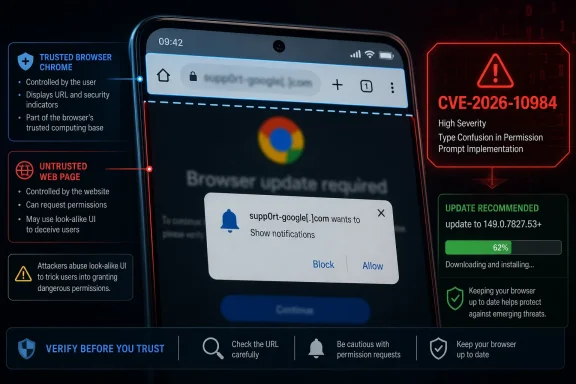 A “Medium” Score Does Not Make This a Medium Problem
CVE-2026-10984 is awkwardly classified in the way modern vulnerability databases often are. Google’s Chromium security label calls it High, while the CISA ADP CVSS 3.1 vector lands at 5.4, or Medium, because exploitation requires user interaction and the measured impact is limited to integrity and availability rather than confidentiality. That split is not necessarily a contradiction; it is a reminder that CVSS is a scoring system, not a newsroom headline.The reported bug sits in Chrome for Android’s Accessibility implementation. According to the CVE description, versions before 149.0.7827.53 could allow a remote attacker to perform UI spoofing with a crafted HTML page. In plainer language: a web page could make the browser or page interface misrepresent something important enough that a user might take an action under false assumptions.
That matters because UI spoofing is rarely the final payload. It is usually the hinge in a larger attack: the fake permission dialog, the misleading tap target, the deceptive navigation state, the login prompt that looks more legitimate than it is, or the page transition that hides where the user really is. It is social engineering with rendering-engine help.
The NVD record identifies the weakness as CWE-451, “User Interface Misrepresentation of Critical Information.” That phrase is bureaucratic, but accurate. Browsers are trusted because they are supposed to draw bright lines between web content, browser controls, permissions, identity, and operating-system surfaces. When those lines blur, the web page gets a costume.
Chrome 149 Was Not a Routine Patch Train
The fix for CVE-2026-10984 arrived in the larger Chrome 149 stable-channel update announced on June 2, 2026. Google said Chrome 149.0.7827.53 for Linux and 149.0.7827.53/54 for Windows and macOS contained numerous fixes and improvements, including 429 security fixes. CVE-2026-10984 appears among the high-severity entries as “Inappropriate implementation in Accessibility,” reported internally by Google on May 17, 2026.That scale matters. A 429-fix release is not a normal “close a few bugs and move on” browser update; it is a reminder that Chrome is now less a standalone application than a platform substrate. It includes rendering, JavaScript, graphics, media, password handling, WebRTC, extensions, dev tools, sync-adjacent surfaces, WebView-related concepts, and increasingly AI-tinged user-interface features.
For desktop administrators, Chrome 149 is already a significant patching event because Windows and macOS received 149.0.7827.53/54, while Linux received 149.0.7827.53. But CVE-2026-10984’s description specifically names Chrome on Android, which creates an odd practical split. The advisory trail points to the same Chrome release family, but the exposed product named in the CVE is mobile.
That does not mean Windows admins can shrug. In enterprise fleets, Chrome for Android is often the unmanaged edge of an otherwise carefully managed environment. BYOD phones open corporate identity portals, approve MFA prompts, read email, join Teams meetings, and touch password managers. A browser UI spoofing issue on Android can still become an enterprise incident if it helps an attacker trick a user into a bad credential or permission decision.
Accessibility Is a Security Boundary, Even When Nobody Calls It One
Accessibility code is supposed to make software legible and usable to people and assistive technologies. That mission gives it unusual proximity to meaning: labels, focus states, actions, page structure, announcements, controls, and gestures. When accessibility plumbing is wrong, the bug may not look like a classic memory-corruption exploit, but it can still corrupt what the user understands.That is why this category is easy to underestimate. Security teams are trained to respond quickly to remote code execution, sandbox escapes, and use-after-free bugs. A spoofing flaw in an accessibility component sounds softer, almost like a UX defect. But the browser’s security model depends heavily on users recognizing where they are, what they are granting, and which surface is asking.
On mobile, that dependence becomes sharper. Android Chrome runs on small screens, where the address bar may collapse, permissions appear as compact prompts, and gestures replace precise pointer behavior. A crafted page does not need to fool a user for ten minutes. It may need only one tap, one mistaken confirmation, or one moment of misplaced confidence.
Accessibility also intersects with automation and assistive services. The CVE record does not say this bug required a malicious accessibility service, and we should not invent that claim. But as a design matter, any browser subsystem that translates web content into actionable interface semantics deserves to be treated as part of the trust boundary, not merely as a compatibility layer.
The Attack Is About Persuasion, Not Just Pixels
UI spoofing has an uncomfortable place in browser security because it straddles technical exploitation and human behavior. The exploit begins in code, but the damage often happens in the user’s head. A page can misrepresent state, obscure origin cues, imitate browser-owned UI, or manipulate the timing of visual elements so that a user performs an action they would otherwise avoid.That makes CVE-2026-10984 different from the memory-safety bugs that dominate Chrome advisories. A use-after-free in GPU or V8 is terrifying because it can become code execution. A UI spoofing bug is dangerous because it can turn the user into the exploit primitive. It asks the victim to complete the chain.
This is also why the CVSS vector includes user interaction. That requirement lowers the numerical score, but in browser attacks it is not much comfort. The web is an interaction machine. Every login, MFA approval, file upload, payment, permission grant, copy-paste workflow, and deep link is an opportunity for attackers to shape context.
The phrase “crafted HTML page” is doing a lot of work here. It means exploitation does not require the victim to install a native app or open a strange file format. A link in a message, a malicious ad, a compromised site, or a redirect chain can place the user in front of hostile content. The browser is the delivery mechanism.
Android Is the Named Victim, but Chromium Is the Shared Concern
The CVE description is explicit: Google Chrome on Android before 149.0.7827.53. That specificity should guide response. If you are inventorying exposure, Android Chrome is the product named by the vulnerability record, and 149.0.7827.53 is the version threshold that matters.Still, Chromium vulnerabilities rarely stay neatly contained in the public imagination because Chromium’s codebase underpins more than Google Chrome. Microsoft Edge, Brave, Vivaldi, Opera, and many embedded browser surfaces depend on Chromium to varying degrees, though they ship their own versions, patches, feature flags, and platform integrations. A CVE naming Chrome for Android does not automatically mean every Chromium-based browser is vulnerable in the same way.
For WindowsForum’s core audience, that distinction is important. The Windows desktop patch version is visible in Google’s Chrome 149 stable-channel update, but the CVE language points to Android. Administrators should avoid both errors: ignoring it because it says Android, or overclaiming that every Chromium browser on every platform is affected without vendor confirmation.
The operationally sane approach is boring but effective. Patch Chrome everywhere, verify Android devices are actually receiving current Play Store updates, and watch downstream Chromium vendors for their own releases. In mixed fleets, the lag between upstream Chromium fixes and downstream browser availability is where theoretical exposure becomes practical risk.
NVD’s CPE Trail Shows the Messiness of Real Vulnerability Data
The user-supplied NVD change history is unusually revealing. NIST’s initial analysis added a CPE configuration that appears to combine Google Chrome versions before 149.0.7827.53 with Android as the operating-system component. That is consistent with the description, but it also shows why CPE data can be frustrating in real vulnerability management workflows.CPEs are supposed to make vulnerability matching machine-readable. In practice, browsers complicate that promise. Chrome is an application, Android is an operating system, WebView may exist separately, OEM update behavior varies, and enterprise mobility management may report app versions differently from vulnerability scanners. A clean CVE sentence can become a messy asset query.
The NVD page’s “Are we missing a CPE here?” prompt is not just boilerplate. It reflects a real problem: vulnerability databases are often corrected after publication as vendors, researchers, and enrichment systems improve affected-product mappings. A scanner that ran on June 5 may not tell the same story as one that runs after later CPE adjustments.
For admins, the right conclusion is not to distrust NVD. It is to treat NVD as one input. The vendor advisory, installed application version, mobile-management telemetry, and browser self-reporting should all be reconciled. When a vulnerability is specific to Chrome on Android, the absence or ambiguity of a CPE should not become an excuse for waiting.
The Restricted Bug Link Is Normal, but It Leaves Defenders Reading Shadows
The Chromium issue linked from the advisory is access-restricted, which is normal for recently patched Chrome vulnerabilities. Google often keeps bug details private until a majority of users have updated, and sometimes longer if the issue affects third-party libraries or dependent projects. That policy reduces the chance that public bug notes become an exploit recipe.The tradeoff is that defenders must make decisions with partial information. We know the component, the rough class, the affected product, the fixed version, the severity label, and the general exploitation path. We do not know the precise UI surface, the reproduction steps, the exploit reliability, or whether proof-of-concept code exists privately.
That uncertainty should push response toward patching, not speculation. There is no public indication in the supplied material that CVE-2026-10984 is being exploited in the wild. There is also no basis for treating it as harmless. Browser UI bugs can be weaponized quickly once enough attackers understand the pattern.
The restricted-details period is especially uncomfortable for organizations that need to write user guidance. “Update Chrome” is easy. “Avoid pages that exploit an accessibility UI spoofing issue” is meaningless to ordinary users. This is one of those cases where the technical mitigation is far stronger than behavioral advice.
The Enterprise Risk Lives in Identity Workflows
If CVE-2026-10984 is exploited in the real world, the most plausible damage path is not a dramatic system takeover. It is a deceptive interaction around identity, permissions, or trust. A spoofed UI can make a user believe they are on a safe origin, approving a benign prompt, or interacting with browser-controlled interface when they are actually responding to attacker-controlled content.That is why mobile browsers matter inside corporate environments. Phones are not secondary devices anymore; they are identity terminals. They receive authentication links, approve push prompts, open single sign-on portals, and act as recovery devices. A UI spoofing vulnerability in the browser that handles those flows deserves more attention than its medium CVSS score implies.
Windows administrators should also remember how many “Windows” incidents begin outside Windows. A stolen session, phished credential, OAuth consent mistake, or malicious file approval can arrive through Android Chrome and end inside Microsoft 365, Entra ID, a VPN, a remote desktop gateway, or a Windows endpoint. The attack path crosses platforms because the user does.
The best mitigation is still patching, but policy helps. Conditional access, phishing-resistant MFA, managed browser requirements, app protection policies, and session controls all reduce the blast radius when browser trust cues fail. The lesson is not that UI spoofing beats everything. It is that UI spoofing becomes far more dangerous when identity systems still depend on users visually adjudicating trust.
Patch Management Has to Include the Phone in the User’s Pocket
Desktop Chrome is easy by comparison. Enterprises can push updates, enforce browser relaunch deadlines, audit versions, and monitor compliance. Android Chrome can be harder, especially in BYOD environments where update cadence depends on user behavior, Play Store settings, device storage, OEM constraints, and mobile-management coverage.For managed Android fleets, this CVE is a good excuse to inspect the boring plumbing. Are Chrome updates automatic? Are users allowed to disable Play Store updates? Is Chrome pinned, delayed, or replaced by another managed browser? Do compliance policies check app version, or only OS patch level? Does the help desk know how to verify Chrome’s version on Android?
For unmanaged devices, the organization has fewer levers but not zero. Access policies can require compliant devices for sensitive apps, block outdated browsers where telemetry allows it, and steer users toward managed app containers. Security awareness messaging should be narrow: update Chrome from the Play Store and restart the browser. Anything more elaborate risks becoming noise.
Consumers have the simplest path. Open the Play Store, update Chrome, and confirm the installed version is at least 149.0.7827.53. If the update is not available yet, check again soon, because Chrome rollouts can stage over time. The important point is not to wait for a visible attack story before taking a browser update.
Microsoft Edge Is Not the Headline, but It Is Part of the Habit
Because this is WindowsForum, it is tempting to pivot immediately to Microsoft Edge. Edge is Chromium-based, and Windows users rightly track Chrome CVEs as early indicators for Edge update pressure. But CVE-2026-10984’s public description names Google Chrome on Android, not Edge on Windows.That does not make Edge irrelevant. It means the responsible statement is narrower: administrators should monitor Microsoft’s Edge release notes and update channels for corresponding Chromium fixes, while treating the Android Chrome version threshold as the confirmed exposure in this CVE record. Chromium lineage is a reason to watch, not a license to assume.
Microsoft’s own browser update cadence has generally become fast enough that many Chromium fixes flow downstream quickly. The remaining risk is visibility. In many organizations, Chrome and Edge are both installed, both used, and both capable of becoming the default for different workflows. Patch management that treats “the browser” as a single item is already outdated.
The same applies to Electron apps, embedded webviews, and vendor-bundled Chromium runtimes. CVE-2026-10984 may not apply to each of those surfaces, but the Chrome 149 advisory’s breadth is another reminder that Chromium debt is everywhere. Every organization needs to know not just which browsers it deploys, but which products quietly carry browser engines inside them.
The Real Signal Is the Browser’s Expanding Attack Surface
Chrome 149’s security list reads like a map of modern browser sprawl. ANGLE, Dawn, WebRTC, media, GPU, Autofill, Passwords, DevTools, Printing, Extensions, Skia, V8, WebUI, WebView, Accessibility — each component exists because the browser has become an operating environment. Every feature that makes Chrome more capable also creates another surface where trust can fracture.CVE-2026-10984 is small in that landscape, but it is symbolically useful. It is not about a spectacular exploit chain. It is about the fragility of interface truth. The browser must tell users what is page content, what is browser UI, what is a permission, what is a credential prompt, and what origin is responsible. If those distinctions fail, the attacker does not need to defeat every defense.
This is why security teams should resist ranking browser bugs only by whether they smell like memory corruption. Memory safety remains critical, and the Chrome 149 advisory includes plenty of serious memory-related vulnerabilities. But UI integrity is part of the security model too. A browser that cannot reliably represent trust cannot reliably enforce it at the human layer.
The industry has spent years training users to “check the URL,” “look for the lock,” and “approve only expected prompts.” Those instructions were always brittle. UI spoofing flaws make them more brittle still, because they attack the very evidence users are told to inspect.
The Practical Read for WindowsForum Readers
The narrow fix is straightforward, but the wider operational message is more interesting. CVE-2026-10984 is a Chrome for Android UI spoofing vulnerability fixed before 149.0.7827.53, published by NVD on June 4, 2026, and included in the much larger Chrome 149 security wave. It is not publicly described as an in-the-wild zero-day in the material reviewed here, but it is also not a cosmetic bug.- Chrome for Android users should update to version 149.0.7827.53 or later and should not rely on staged rollout timing as a security plan.
- Enterprise administrators should verify Android Chrome versions through mobile-device or endpoint-management telemetry rather than assuming Play Store auto-update has completed.
- Windows and macOS Chrome deployments should still be brought to the Chrome 149 stable builds because the same release contains hundreds of other security fixes.
- Edge and other Chromium-based browser administrators should monitor vendor-specific advisories instead of assuming the Chrome for Android CVE maps cleanly to every Chromium product.
- Security teams should treat UI spoofing in browser trust surfaces as a meaningful phishing and identity risk, even when the CVSS number looks modest.
- Vulnerability scanners should be checked against real installed browser versions because CPE enrichment can lag or shift after initial publication.
References
- Primary source: NVD / Chromium
Published: 2026-06-09T07:00:57-07:00
NVD - CVE-2026-10984
 nvd.nist.gov
- Security advisory: MSRC
Published: 2026-06-09T07:00:57-07:00
Original feed URL
Security Update Guide - Microsoft Security Response Center
 msrc.microsoft.com
- Related coverage: security.snyk.io
CVE-2026-10984 in chromium | CVE-2026-10984 | Snyk
CVE-2026-10984 in chromium | CVE-2026-10984security.snyk.io - Related coverage: vuldb.com
CVE-2026-10984 Google Chrome Accessibility clickjacking (ID 514022 / WID-SEC-2026-1794)
A vulnerability was determined in Google Chrome on Android. This vulnerability is tracked as CVE-2026-10984. It is recommended to upgrade the affected component.vuldb.com - Related coverage: stack.watch
- Related coverage: govcert.gov.hk
GovCERT.HK - Security Alert (A26-06-08): Multiple Vulnerabilities in Google Chrome
Security Alert (A26-06-08): Multiple Vulnerabilities in Google Chromewww.govcert.gov.hk