

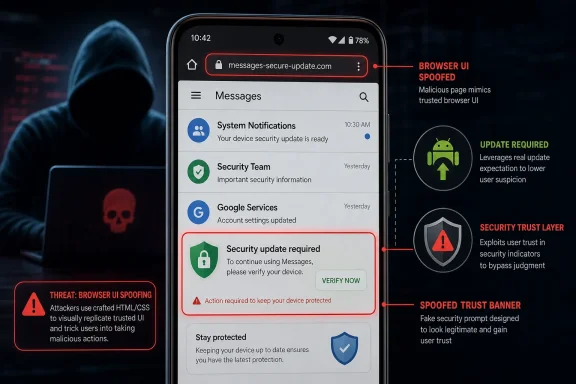
The Vulnerability Is Small in Wording and Large in Implication
CVE-2026-11175 is described in spare Chromium language: “Incorrect security UI in Messages” in Google Chrome on Android prior to 149.0.7827.53 allowed a remote attacker to perform UI spoofing through a crafted HTML page. Chromium rated it Medium. CISA’s ADP enrichment, however, attached a CVSS 3.1 score of 8.8, which puts it in High territory.
That mismatch is not unusual in browser security, but it is instructive. Chrome’s own severity taxonomy is tied to exploitability, component boundaries, sandbox assumptions, and the practical consequence inside the browser threat model. CVSS, by contrast, often rewards a worst-case reading of network reachability, low attack complexity, and potential impact if the spoof succeeds.
The important phrase is security UI. This is not just cosmetic rendering. In a browser, security UI is the trust layer: the place where the user is told whether they are looking at a safe origin, a legitimate prompt, a protected message, or a piece of browser chrome that deserves more trust than the webpage beneath it.
Spoof that layer, and the attack stops being purely technical. It becomes behavioral. The attacker does not necessarily need to break encryption, escape a sandbox, or corrupt memory if they can persuade the user that the browser has already vouched for something it has not.
Chrome’s Android Surface Keeps Getting More Complicated
Desktop Chrome is often discussed as the canonical browser, but Android Chrome is the more interesting target in cases like this. Mobile browsers sit at the junction of webpages, app-like permission flows, system share sheets, account identity, autofill, SMS-style messaging, notifications, and increasingly rich embedded surfaces. Users do not experience these as separate security domains; they experience them as one continuous phone interface.
That is where UI spoofing becomes potent. A carefully crafted page can exploit the small-screen economy of attention: limited space, overlapping interface conventions, gesture-heavy navigation, and user habituation around prompts. The difference between browser UI, Android UI, and webpage UI is obvious to browser engineers. It is much less obvious to someone tapping through a message link while commuting.
The “Messages” wording in the CVE is notable because it suggests the bug was not merely about the omnibox or a generic dialog. It points to a specific Chrome-on-Android surface where communication, identity, or trust cues intersect with rendered content. Google’s public issue tracker entry requires permission, so the technical mechanics are not visible to ordinary defenders yet.
That opacity is intentional in many browser disclosures. Vendors often restrict bug details until patches propagate and downstream projects have time to absorb fixes. But it also leaves enterprise defenders parsing sparse CVE prose and machine-generated enrichment, which is exactly where CPE mistakes and severity confusion can become operationally expensive.
The CPE Record Tells a Messier Story Than the CVE
The user-facing question here is whether the NVD record is missing a CPE. Based on the change history supplied, the stranger issue is not simply a missing CPE; it is that the recorded configuration appears to combine google:chrome versions prior to 149.0.7827.53 with google:android in an AND relationship. In plain English, that can read as “Chrome before this version, on Android.”
That may be the intended meaning. CVE-2026-11175 affects Chrome on Android, not desktop Chrome in the same way. But CPE modeling has always been clumsy when a vulnerability belongs to an application only on a specific operating system. An AND block with a vulnerable application CPE and an OS CPE is one way to express platform scope, but scanners and dashboards do not always interpret those relationships consistently.
The bigger concern is that the Chrome CPE shown in the record is broad: cpe:2.3:a:google:chrome:*:*:*:*:*:*:*:* up to but excluding 149.0.7827.53. That application CPE does not itself encode Android. The Android CPE is then attached as the platform condition. If a tool flattens the logic or ignores the AND relationship, it can misclassify desktop Chrome, Linux Chromium packages, or Android OS itself.
That is not a theoretical nuisance. Several vulnerability databases and scanner plugins have already surfaced this CVE in Linux or Debian-oriented contexts because Chromium packaging ecosystems ingest upstream Chrome CVEs aggressively. Some of that is defensible caution. Some of it is noise. The difference depends on whether the downstream package actually includes the affected Android-specific code path.
“Prior to 149.0.7827.53” Does Not Mean Every Chrome Build Is Equally Exposed
The version boundary is clear: Chrome on Android before 149.0.7827.53 is the affected line in the CVE description. But version boundaries in Chrome have become deceptively simple labels over a complicated release machine. Desktop, Android, iOS, ChromeOS, and downstream Chromium builds do not all share the same components, permissions, UI surfaces, or update cadence.
That is why defenders should resist the reflex to treat every Chrome CVE as a universal browser emergency. A V8 bug with active exploitation is one thing. A UI spoofing flaw in an Android-specific Messages surface is another. Both deserve patching, but they do not drive the same remediation plan.
For WindowsForum readers, the practical desktop impact is indirect. Windows users running Chrome on Windows should still move forward with current stable releases because Chrome 149 and its follow-on point releases contain many fixes, including fixes unrelated to this Android issue. But CVE-2026-11175 itself is framed as an Android Chrome bug, and Windows asset teams should not let a mobile-specific CVE pollute desktop compliance reporting without a platform qualifier.
That distinction matters in managed environments. If the same vulnerability management console tracks Windows endpoints, Android Enterprise devices, Linux servers with Chromium packages, and developer workstations, a broad CPE match can inflate risk counts. Inflated counts train teams to ignore dashboards. That is how real emergencies get buried later.
Medium in Chromium, High in CVSS Is Not a Contradiction So Much as a Warning
The Chrome team’s Medium label will tempt some admins to shrug. CISA-ADP’s 8.8 score will tempt others to overcorrect. The correct reading is in between: UI spoofing is rarely the final stage of an intrusion, but it can be a highly effective first move.
A spoofed security interface can support credential theft, consent trickery, fraudulent permission flows, or phishing that looks more convincing because it borrows the browser’s own trust vocabulary. On Android, where password managers, passkeys, account choosers, and app handoffs converge, deception can be enough to move a victim from suspicion to action.
The CVSS vector supplied by CISA-ADP includes user interaction. That is important. The flaw does not describe a wormable or drive-by remote-code-execution condition. The attacker needs the user to engage with crafted content. But modern phishing campaigns are built around exactly that premise, and attackers have spent years proving that user interaction is not much of a barrier when the lure is plausible.
The more meaningful question is whether the spoof could cause the user to disclose secrets, approve a sensitive action, or trust a malicious origin. The public record does not yet give enough detail to answer that definitively. In the absence of exploit details, defenders should treat the issue as a trust-boundary bug rather than a catastrophic code-execution bug.
The Desktop Advisory Link Adds to the Confusion
One oddity in the NVD record is the reference to a Chrome stable channel update for desktop. That may simply be where Google listed the broader Chrome 149 security fixes, including issues that span platforms and issues that do not. Chrome release posts often serve as umbrella advisories, not perfectly segmented product matrices.
For readers accustomed to Microsoft’s more granular KB ecosystem, this can feel sloppy. A Windows cumulative update article, for all its complexity, usually tries to identify affected products and build numbers in a way that maps directly to inventory. Chrome’s release blog posts are faster and more compact, but they often require defenders to correlate CVE text, issue tracker permissions, release channels, and downstream package advisories.
That is not just a documentation complaint. Security automation feeds on these records. If the advisory reference says desktop, the CVE description says Android, the CPE says Chrome plus Android, and downstream scanners say Debian Chromium, every consuming tool has to choose which signal to trust.
The safest hierarchy is straightforward. The CVE description and affected version statement tell us this is Chrome on Android prior to 149.0.7827.53. The NVD CPE configuration attempts to model that by pairing Chrome with Android. Desktop Chrome should be patched for its own Chrome 149 fixes, but this specific CVE should not be used as evidence that a Windows Chrome install contains the Messages UI spoofing flaw unless Google later broadens the affected scope.
CPE Was Built for Naming Products, Not Explaining Modern Browser Reality
CPE remains useful because asset management needs a common language. But modern browsers stretch that language almost to breaking point. Chrome is a product, a browser engine distribution, an Android app, a desktop app, a ChromeOS component, an embedded WebView relative, and the upstream basis for many downstream packages.
When a vulnerability is in “Chrome,” the next question is always “which Chrome?” The answer can depend on platform, channel, component, feature flag, build configuration, and whether a downstream distributor carries a patch or even ships the affected code. CPE can encode some of that through version ranges and logical conditions, but it cannot easily express user-interface surfaces that only exist in one mobile implementation.
The google:android CPE in the configuration is therefore not necessarily wrong. It is a platform constraint. The problem is that many vulnerability workflows still present CPE matches as flat affected-product lists rather than conditional statements. A human can read “Chrome AND Android” correctly. A dashboard may render it as “Chrome” and “Android” separately, creating false positives in both directions.
If NVD wanted to make this cleaner, a more specific application CPE for Chrome on Android would be ideal. The historical CPE ecosystem, however, does not always provide product granularity at the level defenders want. That is why vulnerability analysts often need to supplement CPE with vendor advisory text and package-level knowledge.
For Windows Admins, the Lesson Is About Mobile Inventory Too
WindowsForum’s core audience naturally asks what a Chrome-on-Android CVE has to do with Windows. The answer is that most Windows environments are no longer purely Windows environments. Microsoft 365, Entra ID, Intune, passkeys, Edge and Chrome sync, Android work profiles, and bring-your-own-device policies have blurred the edge of the endpoint estate.
A spoofing bug in Android Chrome can still matter to a Windows shop if employees use Android devices to access corporate mail, Teams, SharePoint, VPN portals, password managers, or identity prompts. The attacker does not need to compromise the Windows laptop if the account can be socially steered from the phone. The phone is now part of the Windows security perimeter whether administrators like it or not.
That is especially true for organizations that enforce strong Windows patching but tolerate unmanaged mobile browsers. Chrome updates on Android usually flow through Google Play, but update timing can vary by device policy, Play Store availability, OEM restrictions, region, and user behavior. Managed Android fleets should verify Chrome version compliance rather than assuming automatic updates have landed.
The CVE also reinforces a recurring enterprise point: browser patching is identity security. The browser is where authentication happens, where users approve prompts, where password managers fill secrets, and where phishing resistance either succeeds or fails. Treating browser UI bugs as second-class vulnerabilities is a mistake.
Security UI Is the Browser’s Most Human Attack Surface
Memory safety bugs dominate headlines because they can produce remote code execution, sandbox escapes, and spyware chains. But security UI bugs attack the human part of the browser, and the human part is often less patched than the code. Users learn patterns: green locks, account chips, permission prompts, message banners, install sheets, autofill overlays.
A spoofing vulnerability weaponizes those patterns. It does not need to invent trust; it borrows trust already built by the platform. That is why browser vendors are so cautious about web content being able to imitate privileged interface elements.
The industry has spent years improving site isolation, sandboxing, exploit mitigations, and memory-safe rewrites. Those efforts matter enormously. But every browser still has to answer a simpler question many times per session: what does the user think they are interacting with?
If the answer can be manipulated, the system has a problem even when the cryptography is sound and the sandbox holds. Security UI is not decoration. It is the user-facing half of the browser’s security model.
Patch the Browser, Then Fix the Reporting
The immediate remediation is not complicated. Chrome on Android should be updated to 149.0.7827.53 or later, and managed environments should verify that Android Chrome devices have actually received the update. Given later Chrome stable releases in the same milestone, organizations should generally target the newest stable build available to their channel rather than freezing at the first fixed version.
The more subtle remediation is in reporting. Security teams should check whether their scanners are flagging CVE-2026-11175 against Windows Chrome, Linux Chromium, Android OS, or unrelated assets. If they are, the team should inspect whether the tool is honoring the CPE logical relationship or flattening it into noise.
This is where vulnerability management becomes editorial work. Someone has to decide what the record actually means, not merely what a feed says. The right answer may be to mark desktop detections as not applicable, track Android Chrome separately, and monitor downstream Chromium package advisories for any distributor-specific interpretation.
That approach is not minimizing the bug. It is preserving signal. A high-severity score attached to the wrong asset is not risk management; it is spreadsheet theater.
The Real Story Is the Trust Boundary, Not the Score
CVE-2026-11175 is unlikely to be remembered as the most dramatic Chrome bug of June 2026. It does not arrive, at least publicly, with evidence of active exploitation. It does not promise arbitrary code execution. It does not have the visceral appeal of a V8 zero-day.
But it is a useful case study because it exposes three recurring weaknesses in the way the industry consumes browser vulnerabilities. Vendor severity and CVSS severity can diverge. CPE logic can obscure platform scope. And UI spoofing bugs can look minor until they are placed inside a real phishing or account-takeover chain.
Administrators should treat those as operational lessons. Patch quickly, but classify precisely. Don’t let “Chrome” become a bucket so broad that platform-specific bugs lose meaning. Don’t let “Medium” become a synonym for “ignore.” Don’t let “High” become a synonym for “panic.”
The Practical Read Is Narrower Than the Alert Stream
The clearest read of CVE-2026-11175 is that it affects Google Chrome on Android before 149.0.7827.53 and enables UI spoofing through crafted web content. Everything beyond that should be handled with care until Google or Chromium exposes more technical detail.
- Organizations should update Chrome on Android to 149.0.7827.53 or later, preferably to the newest stable release available for the device and channel.
- Windows Chrome installations should still be kept current, but this specific CVE should not be treated as a Windows Chrome exposure based on the public description.
- Vulnerability teams should verify whether their scanners preserve the NVD configuration logic that ties the Chrome CPE to Android as a platform condition.
- Linux Chromium findings for this CVE should be reviewed against distributor advisories, because upstream Chrome-for-Android wording does not automatically prove exposure in every downstream package.
- Security teams should treat UI spoofing as a phishing and identity-risk amplifier, not merely as a cosmetic browser defect.
The most useful outcome from CVE-2026-11175 would be a little less blind trust in vulnerability feeds and a little more discipline in reading product scope. Chrome’s security surface is now too broad for one product name to tell the whole story, and mobile browser UI is too central to identity workflows to be dismissed as a second-tier concern. The next browser bug that matters may not smash the sandbox; it may simply convince the user that the wrong thing is safe.