

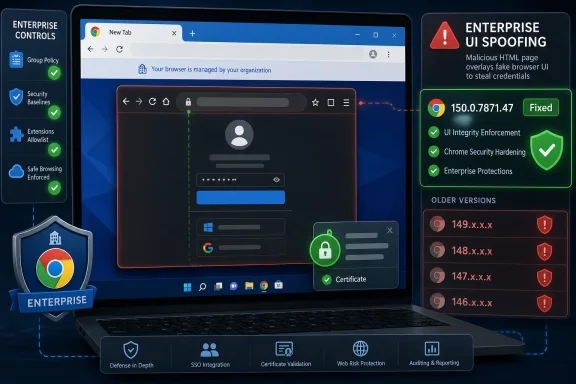
CVE-2026-13865 is a medium-severity Google Chrome Enterprise input-validation flaw, published by NVD on June 30, 2026, fixed in Chrome 150.0.7871.47 for Windows and Mac, and exploitable by a remote attacker using a crafted HTML page to spoof browser UI. The bug is not a remote-code-execution emergency, and CISA’s ADP scoring puts it at 4.3 under CVSS 3.1. But for Windows administrators, the interesting part is not the score; it is the component name. A browser bug in “Enterprise” is a reminder that Chrome’s managed surface has become part of the Windows security perimeter.
As detailed in Google’s Chrome Releases advisory for the June 30 Stable Channel update, Chrome 150 arrived with hundreds of security fixes across desktop platforms. NVD later enriched the record for CVE-2026-13865 with a vulnerable CPE for Google Chrome versions before 150.0.7871.47, after initially publishing the CVE entry without its own NIST score. That sequencing matters because many vulnerability-management systems do not treat a CVE as truly actionable until the metadata catches up.
The phrase “UI spoofing” sounds almost quaint beside the usual Chrome horror show of use-after-free, type confusion, and heap corruption. It suggests trickery rather than takeover, which is precisely why bugs like this are easy to underestimate. The attacker does not need to break the renderer sandbox or execute arbitrary code; the goal is to make a user believe the browser is saying something it is not.
That distinction is important, but it is not comforting. Modern enterprise security workflows depend heavily on browser-mediated trust: sign-in prompts, extension notices, managed-profile warnings, identity-provider flows, certificate indicators, download banners, and policy-controlled UX. If an attacker can convincingly imitate or confuse part of that surface, the exploit chain may begin with persuasion instead of memory corruption.
NVD describes CVE-2026-13865 as “insufficient validation of untrusted input in Enterprise” in Chrome before 150.0.7871.47. CISA’s ADP vector says the attack is network-accessible, low-complexity, requires no privileges, and requires user interaction. That is the classic shape of a phishing-adjacent browser flaw: not self-propagating, not automatically wormable, but reachable anywhere a user can be lured to a page.
The word Enterprise is doing a lot of work here. Google’s public CVE text does not disclose the precise affected code path, and the linked Chromium issue is permission-restricted, as is normal while patches are still rolling out. But even without exploit details, the label points defenders toward Chrome’s managed-browser machinery rather than the open web platform alone.
That is both true and misleading. In raw exploit-risk terms, administrators will naturally focus first on critical and high-severity memory-safety flaws in components such as GPU, ANGLE, Skia, Views, V8, Bluetooth, and browser UI code. Chrome’s security bulletins routinely include many such issues, and Google keeps bug details restricted until enough users have patched.
But enterprise patch triage is not only about the scariest CVSS number. A medium flaw in a feature used across managed fleets can have a wider operational footprint than a theoretically worse bug in an obscure path. Chrome is not simply a browser on corporate Windows machines; it is often the front end for identity, SaaS, endpoint management, passwordless sign-in, and policy enforcement.
That is why this CVE deserves a closer look. It sits at the intersection of browser UX and administrative trust. A user interface spoof does not need to own the machine if it can nudge a user into approving the next step.
That last part is easy to misread. “Integrity: low” does not mean harmless; it means the scoring system expects limited modification or deception rather than broad system compromise. UI spoofing is an integrity problem because the interface is part of the security model. Users make security decisions based on what the browser appears to say.
CISA’s SSVC entry reportedly marked exploitation as “none,” automatable as “no,” and technical impact as “partial.” That is a useful signal for emergency response: there is no public indication in the provided NVD record that this CVE is being actively exploited. It is not, on current evidence, a drop-everything zero-day.
Still, the remediation answer is the same: update Chrome. The difference is tempo. This is not a panic patch for most environments, but it is the kind of browser update that should be absorbed into the next normal patch window, especially for managed Windows endpoints that rely on Chrome Enterprise policies.
This is not a scandal; it is how the plumbing works. CVE publication, vendor advisory release, CISA ADP scoring, NVD enrichment, CPE mapping, and scanner plugin updates are related but separate events. During the first 24 to 72 hours, a vulnerability may exist in one system as a text description, in another as a score, and in a third as a fully matchable affected-product rule.
For IT teams, that lag creates operational ambiguity. A security engineer may see the advisory and know Chrome needs updating, while a compliance dashboard still shows “NVD assessment not yet provided.” Conversely, once NVD adds the CPE, the same issue can suddenly appear across fleets as if the risk emerged that day, even though the vendor fix was already available.
CVE-2026-13865 is a textbook example of why browser patch management cannot wait for perfect enrichment. The CPE is now present in the NVD record, mapping vulnerable software to Google Chrome before 150.0.7871.47. But the practical decision was already available from Google’s release note: Chrome 150 shipped, and older builds were affected.
The right posture is boring and effective: inventory browser versions, identify Chromium-based browsers, and check each vendor’s security channel for matching updates. Chrome 150.0.7871.47 closes the Google Chrome exposure described by NVD. Other vendors need their own corresponding release decisions.
This matters in Windows environments because browser sprawl is common. A company may standardize on Edge but still have Chrome installed for developer tooling, legacy web apps, QA testing, or user preference. Security baselines often cover the primary browser while secondary browsers drift behind.
A medium UI-spoofing flaw is exactly the kind of issue that can hide in that drift. It may not trigger urgent endpoint alerts, and it may not have exploit code circulating on the usual feeds. But an outdated browser still expands the attack surface, particularly on machines used by privileged staff.
A crafted HTML page capable of UI spoofing may be used to imitate browser chrome, confuse prompts, or visually misrepresent the origin or safety of an action. The public CVE entry does not provide enough detail to say exactly which of those scenarios applies here. That uncertainty is deliberate; Google restricts bug details while patches are still reaching users.
But the general defensive lesson is clear. Security UX is only useful if users can distinguish real browser signals from web content. When that boundary blurs, attackers can blend browser-native trust cues with page-controlled deception.
This is especially relevant for enterprise users because they are trained to obey managed prompts. They accept device-compliance messages, sign into SSO portals, approve MFA requests, install approved extensions, and follow help-desk instructions. A spoofed interface that looks like part of that managed workflow can be more persuasive than a generic phishing page.
For administrators, the real work is verification. Managed Chrome deployments can be updated through enterprise tooling, Google Update policies, software distribution systems, or platform-native management. The hard part is catching machines that are online intermittently, users who postpone restarts, stale VDI images, and local installs outside the official deployment channel.
The version threshold in the NVD CPE is useful here: anything before 150.0.7871.47 for Google Chrome should be treated as vulnerable for this CVE. That does not mean 150.0.7871.46 is equally exposed on every platform in every context, but NVD’s affected configuration uses 150.0.7871.47 as the exclusion point. In a WindowsForum audience, that means Windows admins should look for 150.0.7871.47 or newer.
The patch also offers a moment to check policy hygiene. If Chrome Enterprise features are in use, administrators should confirm update policies, extension controls, managed profile behavior, and browser reporting. A spoofing bug is not solved by policy alone, but well-managed browsers reduce the chance that a user-facing deception becomes a larger compromise.
CVSS is good at describing technical attributes, not business relevance. A low-integrity-impact browser bug on a kiosk machine is one thing. The same bug on a help-desk technician’s workstation, a domain admin’s daily driver, or a finance user’s SSO-heavy environment deserves more attention.
The better question is not “Is this CVE critical?” It is “Where do we allow browsers to make trust decisions on behalf of the organization?” Once framed that way, Chrome Enterprise issues become more than browser bugs. They become identity, policy, and workflow bugs.
This is also why the absence of known exploitation should not be used as an excuse for neglect. CISA’s SSVC signal says there is no reported exploitation in the record, and the vulnerability is not considered automatable. Good. That argues against emergency disruption, not against timely patching.
That growth has made Chrome indispensable and harder to reason about. A flaw in “Enterprise” does not necessarily mean a policy bypass, a management console bug, or a domain-specific issue. It may simply refer to a component category in Chromium’s bug taxonomy. But the naming still reflects an architectural reality: the browser’s enterprise code is now a meaningful attack surface.
Microsoft’s own strategy reinforces the point. Edge is deeply integrated into Windows, Microsoft 365, Entra ID workflows, Defender signals, and enterprise policy. Google Chrome plays a similar role in many organizations, even on Windows-first networks. The browser is no longer just where employees visit websites; it is where they authenticate, approve, download, sync, and administer.
That is why browser patching belongs in endpoint security, not desktop housekeeping. The release cadence may be rapid, and the advisories may blur together, but each update adjusts the boundary between web content and trusted interface.
That does not make it a crisis. There is no public evidence in the NVD record of active exploitation, no confidentiality impact in the CISA vector, and no availability impact. User interaction is required. In a triage queue, this sits below actively exploited RCEs and privilege-escalation bugs.
But “not a crisis” is not the same as “ignore.” The bug affects the trust boundary users see, and that boundary is increasingly central to enterprise security. If the browser can be made to lie convincingly, attackers may not need it to crash.
For WindowsForum readers, the action is familiar: check Chrome’s version, enforce restart completion, confirm enterprise update policy, and watch Chromium-based browser vendors for parallel updates. Treat the CVE as part of the Chrome 150 security rollup rather than as an isolated curiosity.
As detailed in Google’s Chrome Releases advisory for the June 30 Stable Channel update, Chrome 150 arrived with hundreds of security fixes across desktop platforms. NVD later enriched the record for CVE-2026-13865 with a vulnerable CPE for Google Chrome versions before 150.0.7871.47, after initially publishing the CVE entry without its own NIST score. That sequencing matters because many vulnerability-management systems do not treat a CVE as truly actionable until the metadata catches up.
 A Medium Browser Bug Can Still Hit the Enterprise Nerve
The phrase “UI spoofing” sounds almost quaint beside the usual Chrome horror show of use-after-free, type confusion, and heap corruption. It suggests trickery rather than takeover, which is precisely why bugs like this are easy to underestimate. The attacker does not need to break the renderer sandbox or execute arbitrary code; the goal is to make a user believe the browser is saying something it is not.That distinction is important, but it is not comforting. Modern enterprise security workflows depend heavily on browser-mediated trust: sign-in prompts, extension notices, managed-profile warnings, identity-provider flows, certificate indicators, download banners, and policy-controlled UX. If an attacker can convincingly imitate or confuse part of that surface, the exploit chain may begin with persuasion instead of memory corruption.
NVD describes CVE-2026-13865 as “insufficient validation of untrusted input in Enterprise” in Chrome before 150.0.7871.47. CISA’s ADP vector says the attack is network-accessible, low-complexity, requires no privileges, and requires user interaction. That is the classic shape of a phishing-adjacent browser flaw: not self-propagating, not automatically wormable, but reachable anywhere a user can be lured to a page.
The word Enterprise is doing a lot of work here. Google’s public CVE text does not disclose the precise affected code path, and the linked Chromium issue is permission-restricted, as is normal while patches are still rolling out. But even without exploit details, the label points defenders toward Chrome’s managed-browser machinery rather than the open web platform alone.
Google Fixed One Bug Inside a Much Larger Chrome 150 Security Dump
The June 30 Chrome Stable Channel update was not built around CVE-2026-13865. Google’s release post announced Chrome 150 for Windows, Mac, and Linux, with Windows and Mac moving to 150.0.7871.46/.47 and Linux to 150.0.7871.46. The same advisory said the release included 433 security fixes, a number large enough to make any individual medium-severity CVE look like a footnote.That is both true and misleading. In raw exploit-risk terms, administrators will naturally focus first on critical and high-severity memory-safety flaws in components such as GPU, ANGLE, Skia, Views, V8, Bluetooth, and browser UI code. Chrome’s security bulletins routinely include many such issues, and Google keeps bug details restricted until enough users have patched.
But enterprise patch triage is not only about the scariest CVSS number. A medium flaw in a feature used across managed fleets can have a wider operational footprint than a theoretically worse bug in an obscure path. Chrome is not simply a browser on corporate Windows machines; it is often the front end for identity, SaaS, endpoint management, passwordless sign-in, and policy enforcement.
That is why this CVE deserves a closer look. It sits at the intersection of browser UX and administrative trust. A user interface spoof does not need to own the machine if it can nudge a user into approving the next step.
The Score Says “Partial Impact,” Not “No Impact”
CISA’s ADP assessment gives CVE-2026-13865 a 4.3 medium score with the vector AV:N/AC:L/PR:N/UI:R/S:U/C:N/I:L/A:N. Translated into plain English, the attacker can be remote, the exploit path is not considered difficult, no account is required, the victim must interact, and the expected impact is limited to integrity rather than confidentiality or availability.That last part is easy to misread. “Integrity: low” does not mean harmless; it means the scoring system expects limited modification or deception rather than broad system compromise. UI spoofing is an integrity problem because the interface is part of the security model. Users make security decisions based on what the browser appears to say.
CISA’s SSVC entry reportedly marked exploitation as “none,” automatable as “no,” and technical impact as “partial.” That is a useful signal for emergency response: there is no public indication in the provided NVD record that this CVE is being actively exploited. It is not, on current evidence, a drop-everything zero-day.
Still, the remediation answer is the same: update Chrome. The difference is tempo. This is not a panic patch for most environments, but it is the kind of browser update that should be absorbed into the next normal patch window, especially for managed Windows endpoints that rely on Chrome Enterprise policies.
The Metadata Lag Is Part of the Story
The user-submitted NVD record shows a familiar vulnerability-management irritation: the CVE was received from Chrome on June 30, modified by CISA-ADP on July 1, and enriched by NIST on July 2 with the CPE configuration for Google Chrome versions up to but excluding 150.0.7871.47. That means scanners and dashboards may have seen different levels of usefulness depending on when they ingested the record.This is not a scandal; it is how the plumbing works. CVE publication, vendor advisory release, CISA ADP scoring, NVD enrichment, CPE mapping, and scanner plugin updates are related but separate events. During the first 24 to 72 hours, a vulnerability may exist in one system as a text description, in another as a score, and in a third as a fully matchable affected-product rule.
For IT teams, that lag creates operational ambiguity. A security engineer may see the advisory and know Chrome needs updating, while a compliance dashboard still shows “NVD assessment not yet provided.” Conversely, once NVD adds the CPE, the same issue can suddenly appear across fleets as if the risk emerged that day, even though the vendor fix was already available.
CVE-2026-13865 is a textbook example of why browser patch management cannot wait for perfect enrichment. The CPE is now present in the NVD record, mapping vulnerable software to Google Chrome before 150.0.7871.47. But the practical decision was already available from Google’s release note: Chrome 150 shipped, and older builds were affected.
Windows Administrators Should Think in Browser Families, Not Just Chrome
Chrome’s Windows build number is the immediate remediation target, but the enterprise impact rarely stops at Google’s installer. Microsoft Edge, Brave, Vivaldi, Opera, and other Chromium-derived browsers depend on the Chromium project but ship on their own schedules. A Chrome CVE does not automatically mean every Chromium browser is affected in the same way, especially when the vulnerable component is labeled “Enterprise,” but administrators should avoid assuming safety by branding.The right posture is boring and effective: inventory browser versions, identify Chromium-based browsers, and check each vendor’s security channel for matching updates. Chrome 150.0.7871.47 closes the Google Chrome exposure described by NVD. Other vendors need their own corresponding release decisions.
This matters in Windows environments because browser sprawl is common. A company may standardize on Edge but still have Chrome installed for developer tooling, legacy web apps, QA testing, or user preference. Security baselines often cover the primary browser while secondary browsers drift behind.
A medium UI-spoofing flaw is exactly the kind of issue that can hide in that drift. It may not trigger urgent endpoint alerts, and it may not have exploit code circulating on the usual feeds. But an outdated browser still expands the attack surface, particularly on machines used by privileged staff.
UI Spoofing Is a Social Engineering Multiplier
The modern browser is a security product masquerading as an application runtime. It tells users whether a site is trusted, whether a file is suspicious, whether a profile is managed, whether a password has been compromised, whether an extension is allowed, and whether an authentication flow belongs to the organization. Attackers know this, which is why they attack not just code execution paths but the perception layer.A crafted HTML page capable of UI spoofing may be used to imitate browser chrome, confuse prompts, or visually misrepresent the origin or safety of an action. The public CVE entry does not provide enough detail to say exactly which of those scenarios applies here. That uncertainty is deliberate; Google restricts bug details while patches are still reaching users.
But the general defensive lesson is clear. Security UX is only useful if users can distinguish real browser signals from web content. When that boundary blurs, attackers can blend browser-native trust cues with page-controlled deception.
This is especially relevant for enterprise users because they are trained to obey managed prompts. They accept device-compliance messages, sign into SSO portals, approve MFA requests, install approved extensions, and follow help-desk instructions. A spoofed interface that looks like part of that managed workflow can be more persuasive than a generic phishing page.
The Patch Is Simple; Proving Coverage Is Not
For individual users, the fix is straightforward: update Chrome to 150.0.7871.47 or later on Windows and Mac, and to the corresponding fixed Chrome 150 build on Linux as shipped by Google. Chrome’s built-in updater normally handles this, but the browser typically needs a restart before the new version is actually running. “Update downloaded” is not the same as “risk removed.”For administrators, the real work is verification. Managed Chrome deployments can be updated through enterprise tooling, Google Update policies, software distribution systems, or platform-native management. The hard part is catching machines that are online intermittently, users who postpone restarts, stale VDI images, and local installs outside the official deployment channel.
The version threshold in the NVD CPE is useful here: anything before 150.0.7871.47 for Google Chrome should be treated as vulnerable for this CVE. That does not mean 150.0.7871.46 is equally exposed on every platform in every context, but NVD’s affected configuration uses 150.0.7871.47 as the exclusion point. In a WindowsForum audience, that means Windows admins should look for 150.0.7871.47 or newer.
The patch also offers a moment to check policy hygiene. If Chrome Enterprise features are in use, administrators should confirm update policies, extension controls, managed profile behavior, and browser reporting. A spoofing bug is not solved by policy alone, but well-managed browsers reduce the chance that a user-facing deception becomes a larger compromise.
This Is Where Vulnerability Dashboards Mislead
A 4.3 CVSS score has a way of disappearing below the fold. In a week with critical Chrome bugs, exploited zero-days in other products, and the usual flood of SaaS advisories, a medium UI-spoofing issue will not dominate a risk meeting. That is rational prioritization, but it can also flatten context.CVSS is good at describing technical attributes, not business relevance. A low-integrity-impact browser bug on a kiosk machine is one thing. The same bug on a help-desk technician’s workstation, a domain admin’s daily driver, or a finance user’s SSO-heavy environment deserves more attention.
The better question is not “Is this CVE critical?” It is “Where do we allow browsers to make trust decisions on behalf of the organization?” Once framed that way, Chrome Enterprise issues become more than browser bugs. They become identity, policy, and workflow bugs.
This is also why the absence of known exploitation should not be used as an excuse for neglect. CISA’s SSVC signal says there is no reported exploitation in the record, and the vulnerability is not considered automatable. Good. That argues against emergency disruption, not against timely patching.
Chrome’s Enterprise Surface Keeps Growing
Chrome began as a fast browser, but in managed Windows environments it now behaves more like an endpoint platform. It has cloud management, extension governance, profile controls, certificate handling, password-management integrations, data-loss-prevention hooks, and policy enforcement. The more security decisions move into the browser, the more valuable browser UI integrity becomes.That growth has made Chrome indispensable and harder to reason about. A flaw in “Enterprise” does not necessarily mean a policy bypass, a management console bug, or a domain-specific issue. It may simply refer to a component category in Chromium’s bug taxonomy. But the naming still reflects an architectural reality: the browser’s enterprise code is now a meaningful attack surface.
Microsoft’s own strategy reinforces the point. Edge is deeply integrated into Windows, Microsoft 365, Entra ID workflows, Defender signals, and enterprise policy. Google Chrome plays a similar role in many organizations, even on Windows-first networks. The browser is no longer just where employees visit websites; it is where they authenticate, approve, download, sync, and administer.
That is why browser patching belongs in endpoint security, not desktop housekeeping. The release cadence may be rapid, and the advisories may blur together, but each update adjusts the boundary between web content and trusted interface.
The Practical Reading of CVE-2026-13865
The cleanest interpretation of this CVE is also the least dramatic: Chrome before 150.0.7871.47 had an input-validation weakness in an Enterprise component that could allow a remote attacker to spoof UI through a crafted HTML page. Google fixed it in the Chrome 150 Stable Channel update, NVD published the record on June 30, and NIST later added the affected Chrome CPE.That does not make it a crisis. There is no public evidence in the NVD record of active exploitation, no confidentiality impact in the CISA vector, and no availability impact. User interaction is required. In a triage queue, this sits below actively exploited RCEs and privilege-escalation bugs.
But “not a crisis” is not the same as “ignore.” The bug affects the trust boundary users see, and that boundary is increasingly central to enterprise security. If the browser can be made to lie convincingly, attackers may not need it to crash.
For WindowsForum readers, the action is familiar: check Chrome’s version, enforce restart completion, confirm enterprise update policy, and watch Chromium-based browser vendors for parallel updates. Treat the CVE as part of the Chrome 150 security rollup rather than as an isolated curiosity.
The Version Number Is the Story Administrators Can Act On
The useful facts are narrow, but they are concrete. This is one of those security items where the response should be disciplined rather than theatrical.- Chrome installations older than 150.0.7871.47 should be considered exposed to CVE-2026-13865 under NVD’s affected-product mapping.
- The flaw is a medium-severity UI-spoofing issue tied to insufficient validation of untrusted input in Chrome’s Enterprise component.
- CISA’s ADP scoring rates the issue at 4.3 under CVSS 3.1, with user interaction required and no known confidentiality or availability impact in that vector.
- Google’s June 30 Chrome 150 Stable Channel update fixed this bug as part of a much larger security release containing hundreds of fixes.
- Administrators should verify that Chrome has not only downloaded the update but restarted into the fixed build.
- Mixed-browser Windows fleets should check other Chromium-based browsers separately rather than assuming Chrome’s update covers them.
References
- Primary source: NVD / Chromium
Published: 2026-07-03T07:00:53-07:00
NVD - CVE-2026-13865
 nvd.nist.gov
- Security advisory: MSRC
Published: 2026-07-03T07:00:53-07:00
Original feed URL
Security Update Guide - Microsoft Security Response Center
 msrc.microsoft.com
