

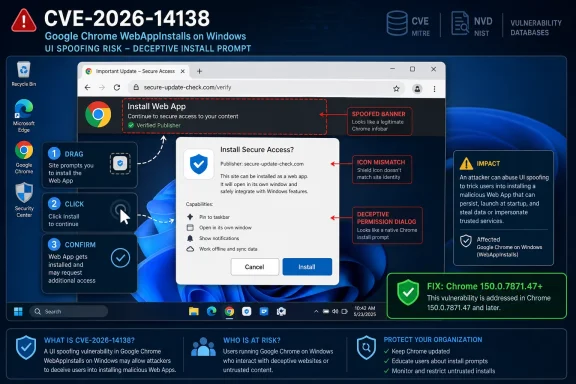
CVE-2026-14138 is a Windows-only Google Chrome WebAppInstalls flaw disclosed on June 30, 2026, fixed in Chrome 150.0.7871.47, that allowed UI spoofing when a remote attacker persuaded a user to perform specific gestures on a crafted HTML page. The bug is not a drive-by code execution emergency, and Chromium’s own severity rating is Low, but that does not make it irrelevant. It sits in the awkward middle ground where browser security, user trust, install prompts, and vulnerability databases all meet. For Windows administrators, the story is less “panic now” than “make sure your Chrome inventory is telling the truth.”
As recorded by the National Vulnerability Database and Google’s Chrome Releases advisory, CVE-2026-14138 affects Google Chrome on Windows before version 150.0.7871.47. CISA’s ADP enrichment gives it a CVSS 3.1 score of 4.2, classifying it as Medium, while Chromium labels it Low. That difference is not a contradiction so much as a reminder that browser vendors and vulnerability-management systems often grade risk through different lenses.
The vulnerability lives in Chrome’s WebAppInstalls component, the part of the browser experience involved when websites are treated as installable web apps. That is precisely why the issue matters more than its short CVE prose initially suggests. Browser UI is security boundary-adjacent: it is where users distinguish the website from the browser, the page from the permission prompt, and the app from the tab.
CVE-2026-14138 is described as an “inappropriate implementation” that could enable UI spoofing via a crafted HTML page. In plain English, an attacker could create a page that makes the user interface lie, or at least makes the user misunderstand what they are interacting with. The attacker still needs the user to perform specific gestures, which is why this is not a high-confidence, fully automatable exploit chain.
But the security model of the modern browser increasingly depends on tiny moments of user interpretation. Is this an install prompt? Is this a trusted app surface? Is this the browser asking, or the website pretending to be the browser? A flaw that muddies those distinctions may not crash a process or escape a sandbox, but it can still help an attacker push a user into a bad decision.
That is especially true on Windows, where Chrome is not merely a browser but often an application platform. Progressive Web Apps, desktop shortcuts, app-like launchers, identity sessions, and enterprise-managed browser profiles all blur the old line between “website” and “installed software.” A WebAppInstalls spoofing flaw lands exactly in that blur.
There is one small but important versioning wrinkle. NVD’s initial analysis shows a CPE configuration using Google Chrome versions up to, but excluding, 150.0.7871.46, while the CVE description and affected-version language point to “prior to 150.0.7871.47.” That kind of mismatch is exactly the sort of thing that can create scanner confusion, particularly when a vendor ships closely related builds across platforms or staged channels.
For Windows, the safer interpretation is the one in the CVE description: remediate to Chrome 150.0.7871.47 or later. If a vulnerability scanner says 150.0.7871.46 is clean while the CVE description says “prior to 150.0.7871.47,” administrators should not treat that as a philosophical debate. They should update to .47 and then decide whether the scanner rule needs tuning.
This is also where the user’s CPE question matters. The NVD record appears to include an application CPE for Google Chrome and an operating-system CPE for Microsoft Windows in an AND configuration, reflecting that the vulnerable product is Chrome in a Windows environment. If an asset-management platform expects a more granular CPE, such as a specific Windows edition or a cleaner vendor-product-only Chrome match, it may appear as though something is “missing.” More likely, the record is trying to express a platform-specific Chrome vulnerability in the limited grammar of CPE matching.
That distinction matters in enterprise vulnerability management. A scanner that matches only
The NVD record’s “Are we missing a CPE here?” prompt is a familiar artifact of this problem. It is not proof that the vulnerability is undocumented or that there is a second affected product hiding offstage. It is a signal that vulnerability data is still being enriched and normalized, and that CPE mapping may lag behind the vendor’s actual security statement.
This is why Windows administrators should treat CPE as a starting point, not the final authority. The vendor advisory and the CVE wording establish the affected product and fixed build. CPE matching tells your tools how to find it at scale. When the two are out of step, patch policy should follow the vendor boundary while vulnerability teams file exceptions or wait for feed corrections.
The modern browser is full of trusted signals: origin indicators, permission prompts, install dialogs, download warnings, password-manager affordances, and app banners. Users have been trained, imperfectly, to look for those signals before making decisions. If a crafted page can imitate or manipulate those signals well enough, the exploit becomes a social-engineering amplifier.
CVE-2026-14138 requires user interaction, according to both the NVD description and CISA’s scoring vector. That is a major mitigating factor, but it is not a complete defense. Many real-world attacks already depend on getting the user to click, drag, approve, install, or reauthenticate. The question is not whether interaction is needed; it is whether the attacker can make that interaction look ordinary.
The WebAppInstalls angle is particularly relevant because installing a web app can feel less risky than installing a native executable. A user may think they are pinning a site, accepting a convenience shortcut, or launching a familiar app-like experience. If the browser’s install surface can be misrepresented, attackers gain room to exploit that ambiguity.
That score produces a 4.2 Medium rating, even while Chromium’s severity tag is Low. Both assessments can be defensible. From Google’s product-security perspective, a UI spoofing flaw that requires specific gestures may not rank with memory safety vulnerabilities or sandbox escapes. From an enterprise vulnerability-management perspective, remote reachability and no privilege requirement keep it from being dismissed outright.
The more useful reading is qualitative. This is not a vulnerability that should displace emergency response to actively exploited browser zero-days. It is also not something to ignore for a quarter because “Low” appears in the Chromium note. Chrome is an internet-facing application with rapid release cadence, and the cheapest mitigation is simply being on the current stable build.
Security teams often mis-handle medium and low browser issues because they ask the wrong question. They ask, “Can this alone own the workstation?” The better question is, “Can this help an attacker make a user take the next step in a chain?” For CVE-2026-14138, the answer appears to be yes, even if the step is narrow.
Web app installation is a good example of a feature that is both convenient and subtle. It allows web services to live on the desktop with fewer browser trappings, often appearing in the Start menu or taskbar like native applications. For managed Windows fleets, that can be a productivity win, but it also creates new expectations about trust.
When Chrome offers to install a web app, users are making a judgment about persistence. They are deciding whether a web experience deserves a more durable foothold on the system. If that interface can be spoofed, the risk is not merely visual confusion; it is misplaced trust in something that will remain accessible after the original browsing session ends.
That does not mean WebAppInstalls is inherently dangerous. It means the installation ceremony matters. Browsers must make the boundary between website, browser chrome, and installed app unmistakable, because attackers thrive wherever those boundaries become decorative.
On Windows, install flows interact with desktop shortcuts, taskbar behavior, Start menu entries, profile paths, notification surfaces, and default app expectations. A flaw in a web app installation path may therefore depend on Windows-specific UI conventions or implementation details. That is exactly the kind of nuance CPE and scanner logic often struggle to express cleanly.
For mixed fleets, this distinction has practical value. Linux desktops and macOS devices may still need Chrome updates for the broader stable-channel security bundle, but CVE-2026-14138 itself is described as Windows-specific. Windows endpoints should be the priority when validating exposure to this CVE in particular.
At the same time, Chrome updates are rarely single-CVE events. Google’s stable-channel releases typically bundle numerous security fixes and functional changes. Even if this specific bug is Windows-only and low severity, staying current remains the right baseline across platforms.
That sequence reflects the post-disclosure machinery security teams now depend on. Vendor advisories arrive first, CVE records follow, enrichment layers add severity and decision-support metadata, and then scanners ingest the result with varying degrees of lag and interpretation. Every stage can introduce delay, ambiguity, or small mismatches.
In this case, the vulnerability maps to CWE-451, user interface misrepresentation of critical information. CISA’s SSVC entry indicates no known exploitation, not automatable, and partial technical impact. Those fields are useful because they tell defenders how to prioritize the issue without pretending that the absence of a NIST CVSS score means the issue does not exist.
The lesson is not that NVD is unreliable. The lesson is that NVD is part of a pipeline, not an oracle. For fast-moving browser vulnerabilities, especially those with platform-specific affected products, administrators should expect the first 48 hours of metadata to be imperfect.
That last point is easy to miss. Chrome can download an update and still run the old vulnerable build until the user relaunches. In managed environments, that creates a familiar gap between “update available,” “update installed,” and “risk actually reduced.” For CVE-2026-14138, the risk may be modest, but the operational pattern is the same as for more severe browser flaws.
Administrators should verify installed Chrome versions, not just package availability. On Windows, that means checking Chrome’s reported version in the browser, enterprise inventory, endpoint management telemetry, or software inventory tools. The target for this CVE is straightforward: Chrome 150.0.7871.47 or later.
Where organizations use Chrome for business-critical SaaS, staged rollout is reasonable. But staged rollout should not become passive drift. Low and medium browser vulnerabilities accumulate quickly, and the combined exposure of “minor” UI issues, permission bugs, and navigation flaws can become meaningful over time.
But attackers are very good at manufacturing gestures. Fake CAPTCHA flows, “click to verify,” drag-to-continue tricks, bogus update prompts, login interstitials, and app-install lures all exist because users can be coached into actions that feel routine. A high-complexity UI attack may be impractical at scale in one campaign and perfectly usable in a targeted phishing scenario.
This is where the CVSS “UI:R” field can be misleading to non-specialists. User interaction is not rare; it is the normal currency of web attacks. The more relevant question is how specific and fragile the required gesture sequence is. Google and Chromium do not appear to have published full public exploit details for this issue, which is standard while users are still updating.
That lack of detail is good for defense but frustrating for risk teams. Without a proof of concept, defenders must rely on the vendor description, severity, and patch boundary. In this case, those signals point toward routine-but-real remediation rather than emergency containment.
That is not a reason to ignore the finding. It is a reason to document the policy decision. For Windows systems, the defensible remediation target is Chrome 150.0.7871.47 or newer. If a tool says otherwise, the tool should be reconciled against the vendor advisory and CVE language.
Security teams should also check whether Chromium-based browsers inherit the relevant fix. The CVE as submitted names Google Chrome, not every Chromium derivative. Still, Edge, Brave, Vivaldi, Opera, and other Chromium-based browsers often pick up upstream security fixes on their own schedules. Administrators responsible for those browsers should track their vendors’ release notes rather than assume Chrome’s version number maps directly.
For WindowsForum readers, the practical point is familiar: browser monoculture makes patch speed matter. Even a low-severity Chrome UI flaw can become interesting if a large population lingers on an affected build and attackers discover a reliable lure.
The absence of known exploitation should lower the temperature, not stop the update. Chrome is one of the highest-value targets in the software ecosystem. Attackers read patch notes, diff code, and watch for slow enterprise adoption. A bug does not need to be exploited on disclosure day to become useful later.
It is also important not to overstate what UI spoofing gives an attacker. This CVE is not described as allowing code execution, credential theft by itself, sandbox escape, or privilege escalation. Its documented impact is limited integrity and availability under CISA’s scoring. The danger is in deception and chaining.
That makes this a good example of mature security communication. Users do not need alarmist claims about total compromise. Administrators do need a clear statement of affected versions, fixed versions, and why a low-severity label does not excuse indefinite delay.
That reality makes UI correctness a security property. If users cannot reliably tell what the browser is asking, or whether the browser is asking at all, then the strongest sandbox in the world still has a human-shaped opening. CVE-2026-14138 is small, but it points at that larger dependency.
Enterprise policy can help. Organizations can restrict web app installation, control extension behavior, force updates, and reduce the number of surfaces where users are asked to make security-sensitive choices. But policy cannot compensate for every UI ambiguity, especially on unmanaged or lightly managed devices.
The browser vendors know this, which is why they continue to patch UI spoofing and permission-confusion bugs even when severity is low. Trust indicators only work if they remain hard to fake. Once users learn that browser UI can be plausibly imitated, training loses its foundation.
If your vulnerability tool cannot match that cleanly, the fix is not to wait for the perfect NVD record. The fix is to query Windows endpoints for Chrome versions and enforce the fixed build. CPE helps automate the process, but it should not override direct product-version evidence.
The oddity in the NVD change history around “excluding 150.0.7871.46” versus “prior to 150.0.7871.47” deserves attention. It may be a data-entry artifact, a version-stream nuance, or an enrichment mismatch. Until clarified, Windows environments should assume that 150.0.7871.47 is the safe floor because that is the version named in the CVE description as the boundary.
This is a broader lesson for vulnerability managers in 2026. The hard part is no longer merely knowing that a CVE exists. The hard part is translating vendor prose, CVSS vectors, CPE logic, platform qualifiers, and scanner output into a decision that can survive audit and actually reduce risk.
For home users, Chrome’s built-in updater should do most of the work, provided the browser is relaunched. For administrators, the work is in measuring completion. Browser patch compliance is only as real as the telemetry showing that users have left the vulnerable process behind.
Organizations that manage Chrome policies should also revisit whether web app installation is allowed, restricted, or left entirely to user discretion. That decision should be based on business need, not this one CVE alone. Still, a WebAppInstalls spoofing flaw is a timely reminder that app-like web experiences deserve app-like governance.
The worst response would be to treat the CPE ambiguity as a reason for paralysis. Vulnerability data will always have seams. Attackers do not wait for enrichment feeds to become elegant.
As recorded by the National Vulnerability Database and Google’s Chrome Releases advisory, CVE-2026-14138 affects Google Chrome on Windows before version 150.0.7871.47. CISA’s ADP enrichment gives it a CVSS 3.1 score of 4.2, classifying it as Medium, while Chromium labels it Low. That difference is not a contradiction so much as a reminder that browser vendors and vulnerability-management systems often grade risk through different lenses.
 A Low-Severity Chrome Bug Still Has a Real Windows Story
The vulnerability lives in Chrome’s WebAppInstalls component, the part of the browser experience involved when websites are treated as installable web apps. That is precisely why the issue matters more than its short CVE prose initially suggests. Browser UI is security boundary-adjacent: it is where users distinguish the website from the browser, the page from the permission prompt, and the app from the tab.CVE-2026-14138 is described as an “inappropriate implementation” that could enable UI spoofing via a crafted HTML page. In plain English, an attacker could create a page that makes the user interface lie, or at least makes the user misunderstand what they are interacting with. The attacker still needs the user to perform specific gestures, which is why this is not a high-confidence, fully automatable exploit chain.
But the security model of the modern browser increasingly depends on tiny moments of user interpretation. Is this an install prompt? Is this a trusted app surface? Is this the browser asking, or the website pretending to be the browser? A flaw that muddies those distinctions may not crash a process or escape a sandbox, but it can still help an attacker push a user into a bad decision.
That is especially true on Windows, where Chrome is not merely a browser but often an application platform. Progressive Web Apps, desktop shortcuts, app-like launchers, identity sessions, and enterprise-managed browser profiles all blur the old line between “website” and “installed software.” A WebAppInstalls spoofing flaw lands exactly in that blur.
The Patch Number Is the Practical Boundary
Google’s advisory line is simple: Chrome on Windows prior to 150.0.7871.47 is affected. The NVD change history shows that the record was received from Chrome on June 30, 2026, then modified by CISA-ADP later that day, with NIST adding analysis and CPE configuration data on July 1. The stable-channel update from Google is therefore the operational marker administrators should use.There is one small but important versioning wrinkle. NVD’s initial analysis shows a CPE configuration using Google Chrome versions up to, but excluding, 150.0.7871.46, while the CVE description and affected-version language point to “prior to 150.0.7871.47.” That kind of mismatch is exactly the sort of thing that can create scanner confusion, particularly when a vendor ships closely related builds across platforms or staged channels.
For Windows, the safer interpretation is the one in the CVE description: remediate to Chrome 150.0.7871.47 or later. If a vulnerability scanner says 150.0.7871.46 is clean while the CVE description says “prior to 150.0.7871.47,” administrators should not treat that as a philosophical debate. They should update to .47 and then decide whether the scanner rule needs tuning.
This is also where the user’s CPE question matters. The NVD record appears to include an application CPE for Google Chrome and an operating-system CPE for Microsoft Windows in an AND configuration, reflecting that the vulnerable product is Chrome in a Windows environment. If an asset-management platform expects a more granular CPE, such as a specific Windows edition or a cleaner vendor-product-only Chrome match, it may appear as though something is “missing.” More likely, the record is trying to express a platform-specific Chrome vulnerability in the limited grammar of CPE matching.
CPE Was Built for Inventory, Not Browser Reality
CPE is useful because it gives vulnerability tools a shared language for product identification. It is also brittle because modern software does not always fit neatly into product strings, especially when a flaw is platform-specific inside a cross-platform application. Chrome is Chrome, but this vulnerability is not described as affecting every Chrome build equally; it is explicitly Chrome on Windows.That distinction matters in enterprise vulnerability management. A scanner that matches only
google:chrome may over-report on non-Windows systems. A scanner that requires both the Chrome CPE and a Windows OS CPE may under-report if the asset inventory does not normalize operating systems correctly. A scanner that keys off the wrong fixed version may create a false sense of closure.The NVD record’s “Are we missing a CPE here?” prompt is a familiar artifact of this problem. It is not proof that the vulnerability is undocumented or that there is a second affected product hiding offstage. It is a signal that vulnerability data is still being enriched and normalized, and that CPE mapping may lag behind the vendor’s actual security statement.
This is why Windows administrators should treat CPE as a starting point, not the final authority. The vendor advisory and the CVE wording establish the affected product and fixed build. CPE matching tells your tools how to find it at scale. When the two are out of step, patch policy should follow the vendor boundary while vulnerability teams file exceptions or wait for feed corrections.
UI Spoofing Is the Browser Bug Everyone Underestimates
UI spoofing rarely gets the dramatic treatment reserved for memory corruption. It does not carry the same immediate dread as “remote code execution,” “sandbox escape,” or “use-after-free.” Yet browser UI spoofing has an uncomfortable history because it targets the human part of the security stack.The modern browser is full of trusted signals: origin indicators, permission prompts, install dialogs, download warnings, password-manager affordances, and app banners. Users have been trained, imperfectly, to look for those signals before making decisions. If a crafted page can imitate or manipulate those signals well enough, the exploit becomes a social-engineering amplifier.
CVE-2026-14138 requires user interaction, according to both the NVD description and CISA’s scoring vector. That is a major mitigating factor, but it is not a complete defense. Many real-world attacks already depend on getting the user to click, drag, approve, install, or reauthenticate. The question is not whether interaction is needed; it is whether the attacker can make that interaction look ordinary.
The WebAppInstalls angle is particularly relevant because installing a web app can feel less risky than installing a native executable. A user may think they are pinning a site, accepting a convenience shortcut, or launching a familiar app-like experience. If the browser’s install surface can be misrepresented, attackers gain room to exploit that ambiguity.
The CVSS Score Tells Only Half the Story
CISA-ADP’s CVSS 3.1 vector for CVE-2026-14138 is AV:N/AC:H/PR:N/UI:R/S:U/C:N/I:L/A:L. Translated, the attack is network-accessible, requires high attack complexity, needs no privileges, requires user interaction, does not cross security scope, and has limited integrity and availability impact. Confidentiality impact is scored as none.That score produces a 4.2 Medium rating, even while Chromium’s severity tag is Low. Both assessments can be defensible. From Google’s product-security perspective, a UI spoofing flaw that requires specific gestures may not rank with memory safety vulnerabilities or sandbox escapes. From an enterprise vulnerability-management perspective, remote reachability and no privilege requirement keep it from being dismissed outright.
The more useful reading is qualitative. This is not a vulnerability that should displace emergency response to actively exploited browser zero-days. It is also not something to ignore for a quarter because “Low” appears in the Chromium note. Chrome is an internet-facing application with rapid release cadence, and the cheapest mitigation is simply being on the current stable build.
Security teams often mis-handle medium and low browser issues because they ask the wrong question. They ask, “Can this alone own the workstation?” The better question is, “Can this help an attacker make a user take the next step in a chain?” For CVE-2026-14138, the answer appears to be yes, even if the step is narrow.
The Web App Install Surface Is Now Part of Endpoint Security
A decade ago, browser security conversations mostly revolved around plugins, JavaScript engines, and download prompts. Today, the browser is an app runtime, identity broker, password manager, policy enforcement point, and SaaS operating system. That expansion makes user-interface integrity more important, not less.Web app installation is a good example of a feature that is both convenient and subtle. It allows web services to live on the desktop with fewer browser trappings, often appearing in the Start menu or taskbar like native applications. For managed Windows fleets, that can be a productivity win, but it also creates new expectations about trust.
When Chrome offers to install a web app, users are making a judgment about persistence. They are deciding whether a web experience deserves a more durable foothold on the system. If that interface can be spoofed, the risk is not merely visual confusion; it is misplaced trust in something that will remain accessible after the original browsing session ends.
That does not mean WebAppInstalls is inherently dangerous. It means the installation ceremony matters. Browsers must make the boundary between website, browser chrome, and installed app unmistakable, because attackers thrive wherever those boundaries become decorative.
Windows Gets Named Because Platform Details Matter
The CVE text repeatedly specifies Google Chrome on Windows. That does not necessarily mean other platforms had identical exposure, and administrators should resist the habit of flattening every Chrome CVE into a universal cross-platform alert. Chrome’s codebase is shared, but operating-system integrations are not.On Windows, install flows interact with desktop shortcuts, taskbar behavior, Start menu entries, profile paths, notification surfaces, and default app expectations. A flaw in a web app installation path may therefore depend on Windows-specific UI conventions or implementation details. That is exactly the kind of nuance CPE and scanner logic often struggle to express cleanly.
For mixed fleets, this distinction has practical value. Linux desktops and macOS devices may still need Chrome updates for the broader stable-channel security bundle, but CVE-2026-14138 itself is described as Windows-specific. Windows endpoints should be the priority when validating exposure to this CVE in particular.
At the same time, Chrome updates are rarely single-CVE events. Google’s stable-channel releases typically bundle numerous security fixes and functional changes. Even if this specific bug is Windows-only and low severity, staying current remains the right baseline across platforms.
The NVD Timeline Shows the New Vulnerability Data Reality
The change history for CVE-2026-14138 is almost as interesting as the bug. Chrome submitted the CVE on June 30, 2026. CISA-ADP added CVSS, CWE, and SSVC enrichment later the same day. NIST added initial analysis, CPE configuration, and reference typing on July 1.That sequence reflects the post-disclosure machinery security teams now depend on. Vendor advisories arrive first, CVE records follow, enrichment layers add severity and decision-support metadata, and then scanners ingest the result with varying degrees of lag and interpretation. Every stage can introduce delay, ambiguity, or small mismatches.
In this case, the vulnerability maps to CWE-451, user interface misrepresentation of critical information. CISA’s SSVC entry indicates no known exploitation, not automatable, and partial technical impact. Those fields are useful because they tell defenders how to prioritize the issue without pretending that the absence of a NIST CVSS score means the issue does not exist.
The lesson is not that NVD is unreliable. The lesson is that NVD is part of a pipeline, not an oracle. For fast-moving browser vulnerabilities, especially those with platform-specific affected products, administrators should expect the first 48 hours of metadata to be imperfect.
Patch Management Should Not Wait for Perfect Metadata
Chrome’s update model is designed around rapid movement. Consumer Chrome normally updates itself, but enterprise Chrome depends on policy, network conditions, maintenance windows, and user restarts. The fixed version only matters once the browser process has actually restarted into it.That last point is easy to miss. Chrome can download an update and still run the old vulnerable build until the user relaunches. In managed environments, that creates a familiar gap between “update available,” “update installed,” and “risk actually reduced.” For CVE-2026-14138, the risk may be modest, but the operational pattern is the same as for more severe browser flaws.
Administrators should verify installed Chrome versions, not just package availability. On Windows, that means checking Chrome’s reported version in the browser, enterprise inventory, endpoint management telemetry, or software inventory tools. The target for this CVE is straightforward: Chrome 150.0.7871.47 or later.
Where organizations use Chrome for business-critical SaaS, staged rollout is reasonable. But staged rollout should not become passive drift. Low and medium browser vulnerabilities accumulate quickly, and the combined exposure of “minor” UI issues, permission bugs, and navigation flaws can become meaningful over time.
The User-Gesture Requirement Is a Mitigation, Not a Magic Shield
The attack described for CVE-2026-14138 depends on convincing a user to engage in specific UI gestures. That requirement raises the bar. It means an attacker cannot simply load a page in the background and expect the vulnerability to fire silently.But attackers are very good at manufacturing gestures. Fake CAPTCHA flows, “click to verify,” drag-to-continue tricks, bogus update prompts, login interstitials, and app-install lures all exist because users can be coached into actions that feel routine. A high-complexity UI attack may be impractical at scale in one campaign and perfectly usable in a targeted phishing scenario.
This is where the CVSS “UI:R” field can be misleading to non-specialists. User interaction is not rare; it is the normal currency of web attacks. The more relevant question is how specific and fragile the required gesture sequence is. Google and Chromium do not appear to have published full public exploit details for this issue, which is standard while users are still updating.
That lack of detail is good for defense but frustrating for risk teams. Without a proof of concept, defenders must rely on the vendor description, severity, and patch boundary. In this case, those signals point toward routine-but-real remediation rather than emergency containment.
Administrators Should Watch the Scanner, Not Worship It
The CPE ambiguity around this CVE is exactly the kind of thing that causes help-desk tickets and vulnerability-management exceptions. One tool may flag Chrome before 150.0.7871.47. Another may key off the NVD CPE range and behave differently around 150.0.7871.46. A third may not flag the issue until its content feed catches up.That is not a reason to ignore the finding. It is a reason to document the policy decision. For Windows systems, the defensible remediation target is Chrome 150.0.7871.47 or newer. If a tool says otherwise, the tool should be reconciled against the vendor advisory and CVE language.
Security teams should also check whether Chromium-based browsers inherit the relevant fix. The CVE as submitted names Google Chrome, not every Chromium derivative. Still, Edge, Brave, Vivaldi, Opera, and other Chromium-based browsers often pick up upstream security fixes on their own schedules. Administrators responsible for those browsers should track their vendors’ release notes rather than assume Chrome’s version number maps directly.
For WindowsForum readers, the practical point is familiar: browser monoculture makes patch speed matter. Even a low-severity Chrome UI flaw can become interesting if a large population lingers on an affected build and attackers discover a reliable lure.
This Is Not a Zero-Day, and That Distinction Matters
Nothing in the NVD entry or CISA-ADP enrichment indicates known exploitation in the wild. CISA’s SSVC data marks exploitation as none. That separates CVE-2026-14138 from the kind of Chrome emergency where organizations should consider forced restarts, user warnings, and accelerated deployment outside normal windows.The absence of known exploitation should lower the temperature, not stop the update. Chrome is one of the highest-value targets in the software ecosystem. Attackers read patch notes, diff code, and watch for slow enterprise adoption. A bug does not need to be exploited on disclosure day to become useful later.
It is also important not to overstate what UI spoofing gives an attacker. This CVE is not described as allowing code execution, credential theft by itself, sandbox escape, or privilege escalation. Its documented impact is limited integrity and availability under CISA’s scoring. The danger is in deception and chaining.
That makes this a good example of mature security communication. Users do not need alarmist claims about total compromise. Administrators do need a clear statement of affected versions, fixed versions, and why a low-severity label does not excuse indefinite delay.
The Browser Is Now the Most Important Security UI on Windows
Windows has spent years hardening its operating-system prompts, SmartScreen warnings, application control, Defender integrations, and identity flows. But for many users, the browser is where most security decisions actually happen. Chrome’s address bar, permission prompts, install banners, and profile indicators are effectively part of the Windows security experience.That reality makes UI correctness a security property. If users cannot reliably tell what the browser is asking, or whether the browser is asking at all, then the strongest sandbox in the world still has a human-shaped opening. CVE-2026-14138 is small, but it points at that larger dependency.
Enterprise policy can help. Organizations can restrict web app installation, control extension behavior, force updates, and reduce the number of surfaces where users are asked to make security-sensitive choices. But policy cannot compensate for every UI ambiguity, especially on unmanaged or lightly managed devices.
The browser vendors know this, which is why they continue to patch UI spoofing and permission-confusion bugs even when severity is low. Trust indicators only work if they remain hard to fake. Once users learn that browser UI can be plausibly imitated, training loses its foundation.
The Real Answer to the CPE Question Is Operational, Not Semantic
So, are we missing a CPE here? The best answer is: maybe the record is still imperfect, but the remediation decision is not. The vulnerability is Chrome on Windows before 150.0.7871.47, and the presence of both a Chrome application CPE and a Windows OS CPE appears intended to capture that platform-specific scope.If your vulnerability tool cannot match that cleanly, the fix is not to wait for the perfect NVD record. The fix is to query Windows endpoints for Chrome versions and enforce the fixed build. CPE helps automate the process, but it should not override direct product-version evidence.
The oddity in the NVD change history around “excluding 150.0.7871.46” versus “prior to 150.0.7871.47” deserves attention. It may be a data-entry artifact, a version-stream nuance, or an enrichment mismatch. Until clarified, Windows environments should assume that 150.0.7871.47 is the safe floor because that is the version named in the CVE description as the boundary.
This is a broader lesson for vulnerability managers in 2026. The hard part is no longer merely knowing that a CVE exists. The hard part is translating vendor prose, CVSS vectors, CPE logic, platform qualifiers, and scanner output into a decision that can survive audit and actually reduce risk.
The Sensible Windows Playbook Is Boring, Which Is Good
The right response to CVE-2026-14138 is deliberately unglamorous. Update Chrome, verify the version, restart the browser, and make sure vulnerability tooling reflects the Windows-specific scope. Do not over-prioritize it above actively exploited browser flaws, but do not let it vanish under the “Low” label either.For home users, Chrome’s built-in updater should do most of the work, provided the browser is relaunched. For administrators, the work is in measuring completion. Browser patch compliance is only as real as the telemetry showing that users have left the vulnerable process behind.
Organizations that manage Chrome policies should also revisit whether web app installation is allowed, restricted, or left entirely to user discretion. That decision should be based on business need, not this one CVE alone. Still, a WebAppInstalls spoofing flaw is a timely reminder that app-like web experiences deserve app-like governance.
The worst response would be to treat the CPE ambiguity as a reason for paralysis. Vulnerability data will always have seams. Attackers do not wait for enrichment feeds to become elegant.
Chrome 150.0.7871.47 Is the Line Windows Fleets Should Draw
The concrete lessons from CVE-2026-14138 are narrower than the noise around browser security, but they are useful precisely because they are concrete. This is a small Chrome flaw with a clear Windows patch boundary and a familiar vulnerability-management wrinkle.- Chrome on Windows should be updated to version 150.0.7871.47 or later to address CVE-2026-14138.
- The bug is a WebAppInstalls UI spoofing issue, not a documented remote-code-execution or sandbox-escape vulnerability.
- User interaction is required, but that should be treated as a mitigating factor rather than a complete defense.
- The NVD CPE configuration may not express the affected-version boundary as cleanly as administrators would like, so vendor wording should guide remediation.
- Security teams should verify running browser versions after restart, not merely confirm that an update package was offered.
- Chromium-based browsers other than Chrome should be tracked through their own vendor advisories and release channels.
References
- Primary source: NVD / Chromium
Published: 2026-07-03T07:00:05-07:00
NVD - CVE-2026-14138
 nvd.nist.gov
- Security advisory: MSRC
Published: 2026-07-03T07:00:05-07:00
Original feed URL
Security Update Guide - Microsoft Security Response Center
 msrc.microsoft.com
- Related coverage: cvefeed.io
CVE-2026-14138 - Google Chrome UI Spoofing Vulnerability
Inappropriate implementation in WebAppInstalls in Google Chrome on Windows prior to 150.0.7871.47 allowed a remote attacker who convinced a user to engage in specific UI gestures to perform UI spoofing via a crafted HTML page. (Chromium security severity: Low)cvefeed.io - Official source: nist.gov
National Vulnerability Database
NIST maintains the National Vulnerability Database (NVD), a repository of information on software and hardware flaws that can compromise computer security. This is a key piece of the nation’s cybersecurity infrastructure.www.nist.gov - Related coverage: vuldb.com
CVE-2026-14138 Google Chrome WebAppInstalls escalationi di privilegi
È stata scoperta una vulnerabilità in Google Chrome su Windows. Questa vulnerabilità viene indicata come CVE-2026-14138. È raccomandato aggiornare il componente coinvolto.vuldb.com - Related coverage: labs.cloudsecurityalliance.org
NVD Enrichment Triage: Enterprise Vulnerability Programs Must Adapt
PDF documentlabs.cloudsecurityalliance.org
