

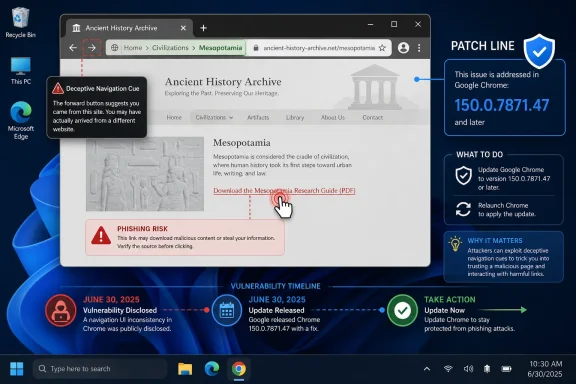
Google disclosed CVE-2026-13966 on June 30, 2026, as a medium-severity Chrome History flaw fixed before version 150.0.7871.47, allowing a remote attacker to spoof browser interface cues through a crafted HTML page if the user interacted with it. The National Vulnerability Database later added the affected Chrome CPE and CISA-ADP scored the issue at 4.3 under CVSS 3.1. That score is modest, but the bug belongs to a class of browser problems that tends to be underestimated because it attacks judgment rather than memory safety. For Windows users and administrators, the practical answer is simple: Chrome 150.0.7871.47 or later is the line between “known vulnerable” and “patched.”
CVE-2026-13966 is not the kind of Chrome vulnerability that usually dominates security headlines. It is not described as remote code execution, sandbox escape, or a zero-day under active exploitation. Google’s own Chromium severity rating is Medium, and CISA-ADP’s SSVC record says there was no known exploitation at the time of its July 1 assessment.
That makes it easy to dismiss. It would also be a mistake.
The bug sits in Chrome’s History component and is categorized as CWE-451, user interface misrepresentation of critical information. In plain English, that means the browser could be induced to show or imply something misleading at a moment when the user is making a trust decision. The exploit path described by Chrome and repeated by NVD is a crafted HTML page, not malware already running on the machine.
That distinction matters because modern browser security is not only about preventing arbitrary code execution. It is also about preserving the small visual contracts users rely on dozens of times a day: where they are, what they clicked, what page they are returning to, and which interface elements belong to the browser rather than the site. A History spoofing flaw is not a skeleton key, but it can become a convincing costume.
That is why UI spoofing bugs are awkward to score. A vulnerability that requires user interaction naturally earns a lower CVSS score than one that fires automatically over the network. CISA-ADP’s vector for CVE-2026-13966 reflects that: network attack vector, low attack complexity, no privileges required, user interaction required, unchanged scope, no confidentiality impact, low integrity impact, and no availability impact.
Those metrics are technically coherent. They also flatten the real-world risk into a number that can look harmless in a dashboard. The integrity impact is “low” because the attacker is not rewriting system files or modifying protected browser state in the way a higher-impact vulnerability would. But if a user is steered into entering credentials, approving a deceptive workflow, or trusting a false navigation cue, the downstream blast radius can be much larger than the CVSS line suggests.
This is the recurring problem with browser UI security. The browser is both a sandboxed application and a trust interpreter. Users do not verify TLS state, page identity, navigation history, permissions, and origin boundaries as abstract concepts; they infer them from pixels, timing, placement, and habit. When a crafted page can bend those cues, the attack lands in the space between technical correctness and human perception.
For consumers, that means opening Chrome’s About page and letting the browser finish the update-and-relaunch cycle. For managed Windows fleets, it means checking that policy-controlled update rings have actually advanced the installed version, not merely staged the installer. Chrome’s version number is not a ceremonial detail here; it is the boundary named in the vulnerability record.
The timing is also worth noting. Chrome received the CVE on June 30, CISA-ADP added SSVC information on July 1, CISA-ADP added the CVSS 3.1 vector and CWE the same day, and NIST’s initial analysis followed on July 2. That is a normal enrichment sequence, but it creates a short window in which scanners, asset inventories, and vulnerability dashboards may disagree on completeness.
That explains the “Are we missing a CPE?” anxiety that often appears around fresh NVD records. In this case, NVD’s later change history shows that a Chrome CPE was added for the affected range. If a scanner still fails to map the CVE to Chrome, the issue is likely scanner lag or feed ingestion timing rather than an absence of NVD product mapping.
The obvious scenario is a crafted page that manipulates navigation expectations. A user believes they are returning to a legitimate page, revisiting a trusted site, or interacting with a browser-provided surface, when the attacker is still controlling the content. The NVD description does not disclose exploit mechanics, and the Chromium issue reference is permission-restricted, so responsible analysis has to stop short of inventing a proof-of-concept.
But the general pattern is familiar. Browser UI spoofing bugs often aim to blur the boundary between web content and browser chrome, or between one origin and another. The malicious page does not have to own the whole session. It only has to present one convincing moment at the right time.
That is why this issue should be understood as an attacker enablement bug rather than a standalone catastrophe. On its own, CVE-2026-13966 is Medium. In a phishing chain, help-desk impersonation flow, fake SSO prompt, or malicious advertising redirect, it could make the difference between suspicion and compliance.
That does not mean it should drift.
Chrome is one of the most exposed applications in any Windows environment. It touches untrusted input continuously, receives frequent security updates, and is often allowed through controls that would block less common software. A Medium browser flaw can have more operational relevance than a High flaw in a rarely deployed internal component.
The right posture is boring by design: let Chrome’s normal update machinery do its job, then verify. Enterprises should confirm update compliance through endpoint management, browser cloud management, or vulnerability scanners once feeds catch up. The work is not heroic, but it is still work.
Administrators should also remember that Chromium-based browsers are not automatically patched because Chrome is patched. Microsoft Edge, Brave, Vivaldi, Opera, and embedded Chromium runtimes each have their own release cadence and vulnerability handling. CVE-2026-13966 is recorded against Google Chrome, but the underlying Chromium code lineage makes it worth watching downstream vendor advisories for related fixes.
CVE-2026-13966 is a reminder that browser inventory must be version-specific. An asset list that says “Google Chrome installed” is not enough. The relevant question is whether the installed channel has crossed 150.0.7871.47 and whether the application has been relaunched after update installation.
Relaunch is the unglamorous failure mode. Chrome can download and stage an update while the user continues running an older process for days. In managed environments, that creates a gap between patch availability and patch effectiveness. Security teams that track only installed package metadata may miss the active runtime version.
There is also the question of user profile sprawl. Chrome’s security posture is shaped not just by binaries but by extensions, policies, stored sessions, and user behavior. A UI spoofing bug does not require a malicious extension, but extension-heavy profiles and unmanaged browsing habits can increase exposure to hostile pages and deceptive flows.
Still, administrators should treat Chromium security advisories as early warning signals for the broader browser estate. If a flaw is in shared Chromium code, downstream browsers typically need to assess and merge the fix. If it is in Chrome-specific UI or product integration code, the impact may be narrower.
The public description for CVE-2026-13966 names Google Chrome and the History component. Without public Chromium issue details, it is not possible to state from the available record whether every Chromium derivative inherited the same vulnerable path. The safe operational move is not to speculate; it is to check vendor advisories and deployed versions for each browser in the environment.
This is where Microsoft’s update model can be both a blessing and a source of confusion. Edge updates may be governed by Windows Update, Microsoft Edge Update, enterprise policies, or offline packaging workflows. If your organization standardizes on Edge but allows Chrome for compatibility, both browsers need independent compliance checks.
CVE-2026-13966 shows why that habit is risky. The vendor advisory and affected version boundary were already actionable when the CVE arrived from Chrome on June 30. CISA-ADP added scoring and weakness classification on July 1. NIST added the Chrome CPE on July 2.
None of those later enrichments changed the operational answer. They made the record easier for scanners and dashboards to process, but they did not alter the patch target. If Chrome is below 150.0.7871.47, update it. If Chrome is at or above that version, verify that the update is active and move on to fleet coverage.
The database is a map, not the terrain. Security teams should use NVD to normalize and automate, but vendor release notes remain the first source of truth for browser patch action. That is especially true for Chrome, where security fixes arrive on a cadence that often moves faster than enterprise vulnerability-management rituals.
For defenders, the lack of public exploit code is good news but not a guarantee. CISA-ADP’s SSVC assessment recorded no exploitation and said the issue was not automatable. That lowers urgency compared with a wormable or actively exploited flaw. It does not eliminate the need to patch, because browser bugs become more useful to attackers as patch diffing and advisory aggregation reveal patterns.
UI spoofing issues also do not require the same exploit maturity as memory corruption bugs. An attacker does not need a reliable ROP chain or a kernel primitive. They need a deceptive interaction that works often enough against distracted users. If the flaw improves the credibility of that deception, it has value.
This is the uncomfortable truth for security teams that prefer clean severity tiers. A Medium UI bug may be less technically impressive than a Critical memory bug, but it maps neatly onto the most common attack path in enterprise security: persuading a person to do the wrong thing.
CVE-2026-13966 lives in that quieter layer. Its public description is short, but the weakness category is revealing. CWE-451 is about misrepresentation of critical UI information, which is precisely the kind of flaw that erodes user decision-making.
This is not merely a user education problem. Telling users to “look carefully” only works if the interface they are inspecting is trustworthy. When the browser itself can be manipulated into presenting misleading cues, training becomes less reliable.
That does not mean users are helpless. It means technical controls and user guidance have to reinforce each other. Keep the browser patched, reduce exposure to untrusted sites, limit risky extensions, and make authentication flows less dependent on users recognizing subtle visual differences.
That shift should change how administrators think about patch windows. Browser updates are not comparable to optional feature updates. They are closer to infrastructure maintenance for the client-side web platform. Delaying them because the severity is not Critical misunderstands how much daily work now happens inside browser tabs.
At the same time, panic is counterproductive. The public record for CVE-2026-13966 does not show known exploitation, automation, confidentiality loss, or availability impact. This is not a drop-everything event for a well-managed fleet. It is a test of whether your routine browser update process is actually routine.
The organizations that handle this best will be the ones that already have boring controls in place: enforced updates, restart nudges, version reporting, extension governance, and clear ownership of browser policy. The organizations that struggle will be the ones that discover they have three Chrome populations, two Edge update paths, and no reliable answer for which version is running today.
That cluster should not be overread as evidence of a single systemic failure. Large browser releases fix many bugs, and UI components are sprawling. But it does suggest that browser interface hardening remains an active battleground rather than a solved problem.
Attackers have strong incentives to target trust surfaces. Memory corruption is increasingly expensive because browsers have layered mitigations, fuzzing, sandboxing, and rapid patch distribution. Deception, by contrast, thrives on complexity. The more features browsers add around history, permissions, account state, tab management, AI helpers, payments, and identity, the more visual states users must interpret.
This is the tradeoff modern browsers keep making. They are no longer thin document viewers. They are operating environments with dense UI, privileged prompts, and deep integration into enterprise identity. That richness creates value, but it also creates spoofing opportunities.
There is a temptation to reserve serious attention for vulnerabilities with dramatic payloads. That instinct is understandable. But modern attacks often begin with a believable page, a trusted-looking prompt, and a user who thinks the browser is telling them the truth. CVE-2026-13966 is a reminder that the browser’s job is not only to isolate code; it is to keep the stage from being rearranged behind the user’s back.
The patch also highlights why security programs should measure time-to-effective-update, not just time-to-release. Google can ship quickly, but organizations still have to absorb the update. A browser that has downloaded a fix but has not restarted is still a weak link.
 A Medium Bug That Aims at the User, Not the Kernel
CVE-2026-13966 is not the kind of Chrome vulnerability that usually dominates security headlines. It is not described as remote code execution, sandbox escape, or a zero-day under active exploitation. Google’s own Chromium severity rating is Medium, and CISA-ADP’s SSVC record says there was no known exploitation at the time of its July 1 assessment.That makes it easy to dismiss. It would also be a mistake.
The bug sits in Chrome’s History component and is categorized as CWE-451, user interface misrepresentation of critical information. In plain English, that means the browser could be induced to show or imply something misleading at a moment when the user is making a trust decision. The exploit path described by Chrome and repeated by NVD is a crafted HTML page, not malware already running on the machine.
That distinction matters because modern browser security is not only about preventing arbitrary code execution. It is also about preserving the small visual contracts users rely on dozens of times a day: where they are, what they clicked, what page they are returning to, and which interface elements belong to the browser rather than the site. A History spoofing flaw is not a skeleton key, but it can become a convincing costume.
The History Surface Is More Sensitive Than It Looks
The browser history feature sounds mundane because users mostly think of it as a searchable list of past pages. But history is woven into navigation, session restoration, back-forward behavior, address-bar expectations, and the broader sense of continuity between pages. When that continuity can be manipulated, a malicious page does not need to defeat every Chrome defense; it only needs to make the user believe the next thing they see is more trustworthy than it is.That is why UI spoofing bugs are awkward to score. A vulnerability that requires user interaction naturally earns a lower CVSS score than one that fires automatically over the network. CISA-ADP’s vector for CVE-2026-13966 reflects that: network attack vector, low attack complexity, no privileges required, user interaction required, unchanged scope, no confidentiality impact, low integrity impact, and no availability impact.
Those metrics are technically coherent. They also flatten the real-world risk into a number that can look harmless in a dashboard. The integrity impact is “low” because the attacker is not rewriting system files or modifying protected browser state in the way a higher-impact vulnerability would. But if a user is steered into entering credentials, approving a deceptive workflow, or trusting a false navigation cue, the downstream blast radius can be much larger than the CVSS line suggests.
This is the recurring problem with browser UI security. The browser is both a sandboxed application and a trust interpreter. Users do not verify TLS state, page identity, navigation history, permissions, and origin boundaries as abstract concepts; they infer them from pixels, timing, placement, and habit. When a crafted page can bend those cues, the attack lands in the space between technical correctness and human perception.
Google’s Patch Line Is the Only Line That Matters
The remediation guidance is unusually clean: update Chrome to 150.0.7871.47 or later. NVD’s July 2 change history added a CPE configuration for Google Chrome versions up to, but excluding, 150.0.7871.47. The Chrome release note referenced by NVD is Google’s vendor advisory for the stable desktop update.For consumers, that means opening Chrome’s About page and letting the browser finish the update-and-relaunch cycle. For managed Windows fleets, it means checking that policy-controlled update rings have actually advanced the installed version, not merely staged the installer. Chrome’s version number is not a ceremonial detail here; it is the boundary named in the vulnerability record.
The timing is also worth noting. Chrome received the CVE on June 30, CISA-ADP added SSVC information on July 1, CISA-ADP added the CVSS 3.1 vector and CWE the same day, and NIST’s initial analysis followed on July 2. That is a normal enrichment sequence, but it creates a short window in which scanners, asset inventories, and vulnerability dashboards may disagree on completeness.
That explains the “Are we missing a CPE?” anxiety that often appears around fresh NVD records. In this case, NVD’s later change history shows that a Chrome CPE was added for the affected range. If a scanner still fails to map the CVE to Chrome, the issue is likely scanner lag or feed ingestion timing rather than an absence of NVD product mapping.
The Real Risk Is Phishing With Better Stagecraft
UI spoofing does not need to be spectacular to be effective. Most phishing succeeds through small mismatches between what a user thinks is happening and what is actually happening. A browser history flaw gives an attacker another surface for that mismatch.The obvious scenario is a crafted page that manipulates navigation expectations. A user believes they are returning to a legitimate page, revisiting a trusted site, or interacting with a browser-provided surface, when the attacker is still controlling the content. The NVD description does not disclose exploit mechanics, and the Chromium issue reference is permission-restricted, so responsible analysis has to stop short of inventing a proof-of-concept.
But the general pattern is familiar. Browser UI spoofing bugs often aim to blur the boundary between web content and browser chrome, or between one origin and another. The malicious page does not have to own the whole session. It only has to present one convincing moment at the right time.
That is why this issue should be understood as an attacker enablement bug rather than a standalone catastrophe. On its own, CVE-2026-13966 is Medium. In a phishing chain, help-desk impersonation flow, fake SSO prompt, or malicious advertising redirect, it could make the difference between suspicion and compliance.
CVSS Says “Medium”; Security Teams Should Read “Patch Normally, Verify Carefully”
CISA-ADP’s CVSS 3.1 base score of 4.3 is the kind of number that often lands below emergency thresholds. Many enterprises reserve out-of-band action for critical vulnerabilities, known exploited vulnerabilities, or flaws with code execution and no user interaction. CVE-2026-13966 does not meet that bar based on the public record.That does not mean it should drift.
Chrome is one of the most exposed applications in any Windows environment. It touches untrusted input continuously, receives frequent security updates, and is often allowed through controls that would block less common software. A Medium browser flaw can have more operational relevance than a High flaw in a rarely deployed internal component.
The right posture is boring by design: let Chrome’s normal update machinery do its job, then verify. Enterprises should confirm update compliance through endpoint management, browser cloud management, or vulnerability scanners once feeds catch up. The work is not heroic, but it is still work.
Administrators should also remember that Chromium-based browsers are not automatically patched because Chrome is patched. Microsoft Edge, Brave, Vivaldi, Opera, and embedded Chromium runtimes each have their own release cadence and vulnerability handling. CVE-2026-13966 is recorded against Google Chrome, but the underlying Chromium code lineage makes it worth watching downstream vendor advisories for related fixes.
Windows Shops Have a Browser Inventory Problem Masquerading as a Patch Problem
On paper, Chrome auto-updates. In practice, Windows environments accumulate exceptions. Some machines are pinned by legacy web apps, some are offline at the wrong time, some are frozen in VDI images, and some carry duplicate browser installations under user and machine scopes. The result is that “Chrome is patched” can mean “most interactive desktops are probably fine,” which is not the same as knowing.CVE-2026-13966 is a reminder that browser inventory must be version-specific. An asset list that says “Google Chrome installed” is not enough. The relevant question is whether the installed channel has crossed 150.0.7871.47 and whether the application has been relaunched after update installation.
Relaunch is the unglamorous failure mode. Chrome can download and stage an update while the user continues running an older process for days. In managed environments, that creates a gap between patch availability and patch effectiveness. Security teams that track only installed package metadata may miss the active runtime version.
There is also the question of user profile sprawl. Chrome’s security posture is shaped not just by binaries but by extensions, policies, stored sessions, and user behavior. A UI spoofing bug does not require a malicious extension, but extension-heavy profiles and unmanaged browsing habits can increase exposure to hostile pages and deceptive flows.
Microsoft Edge Is Not the Same Advisory, But It Is the Same Ecosystem
For WindowsForum readers, the natural follow-up is Microsoft Edge. Edge is Chromium-based, but Edge updates are shipped by Microsoft, not Google. A Chrome CVE does not automatically mean Edge is vulnerable in the same way, nor does it mean Edge was patched on the same day.Still, administrators should treat Chromium security advisories as early warning signals for the broader browser estate. If a flaw is in shared Chromium code, downstream browsers typically need to assess and merge the fix. If it is in Chrome-specific UI or product integration code, the impact may be narrower.
The public description for CVE-2026-13966 names Google Chrome and the History component. Without public Chromium issue details, it is not possible to state from the available record whether every Chromium derivative inherited the same vulnerable path. The safe operational move is not to speculate; it is to check vendor advisories and deployed versions for each browser in the environment.
This is where Microsoft’s update model can be both a blessing and a source of confusion. Edge updates may be governed by Windows Update, Microsoft Edge Update, enterprise policies, or offline packaging workflows. If your organization standardizes on Edge but allows Chrome for compatibility, both browsers need independent compliance checks.
NVD Enrichment Lag Is Not a Reason to Wait
Fresh CVEs often look incomplete when they first appear. NVD may not have a CVSS score. CPEs may be absent or delayed. References may be sparse. That incompleteness can tempt teams to postpone triage until the database entry looks mature.CVE-2026-13966 shows why that habit is risky. The vendor advisory and affected version boundary were already actionable when the CVE arrived from Chrome on June 30. CISA-ADP added scoring and weakness classification on July 1. NIST added the Chrome CPE on July 2.
None of those later enrichments changed the operational answer. They made the record easier for scanners and dashboards to process, but they did not alter the patch target. If Chrome is below 150.0.7871.47, update it. If Chrome is at or above that version, verify that the update is active and move on to fleet coverage.
The database is a map, not the terrain. Security teams should use NVD to normalize and automate, but vendor release notes remain the first source of truth for browser patch action. That is especially true for Chrome, where security fixes arrive on a cadence that often moves faster than enterprise vulnerability-management rituals.
The Silence Around Exploit Details Is a Feature, Not a Gap
The Chromium issue linked from the CVE is permission-restricted, according to NVD’s reference metadata. That is normal for browser security bugs, especially soon after disclosure. Google often limits technical detail until users have had time to update.For defenders, the lack of public exploit code is good news but not a guarantee. CISA-ADP’s SSVC assessment recorded no exploitation and said the issue was not automatable. That lowers urgency compared with a wormable or actively exploited flaw. It does not eliminate the need to patch, because browser bugs become more useful to attackers as patch diffing and advisory aggregation reveal patterns.
UI spoofing issues also do not require the same exploit maturity as memory corruption bugs. An attacker does not need a reliable ROP chain or a kernel primitive. They need a deceptive interaction that works often enough against distracted users. If the flaw improves the credibility of that deception, it has value.
This is the uncomfortable truth for security teams that prefer clean severity tiers. A Medium UI bug may be less technically impressive than a Critical memory bug, but it maps neatly onto the most common attack path in enterprise security: persuading a person to do the wrong thing.
Browser Trust Is Built From Small Guarantees
Chrome’s security model has spent years hardening memory safety, site isolation, sandbox boundaries, permission prompts, and origin rules. Those investments matter. But the browser also depends on a quieter layer of guarantees: that interface elements appear where they should, that history behaves predictably, and that web content cannot convincingly masquerade as trusted browser state.CVE-2026-13966 lives in that quieter layer. Its public description is short, but the weakness category is revealing. CWE-451 is about misrepresentation of critical UI information, which is precisely the kind of flaw that erodes user decision-making.
This is not merely a user education problem. Telling users to “look carefully” only works if the interface they are inspecting is trustworthy. When the browser itself can be manipulated into presenting misleading cues, training becomes less reliable.
That does not mean users are helpless. It means technical controls and user guidance have to reinforce each other. Keep the browser patched, reduce exposure to untrusted sites, limit risky extensions, and make authentication flows less dependent on users recognizing subtle visual differences.
The Enterprise Control Plane Needs to Treat Browsers Like Infrastructure
A decade ago, many organizations treated browsers as user applications. Today, they are runtime platforms, identity gateways, SaaS launchers, PDF viewers, password managers, and policy enforcement points. A Chrome History flaw is therefore not just a browser bug; it is a small crack in the interface layer through which enterprise identity and workflow trust often pass.That shift should change how administrators think about patch windows. Browser updates are not comparable to optional feature updates. They are closer to infrastructure maintenance for the client-side web platform. Delaying them because the severity is not Critical misunderstands how much daily work now happens inside browser tabs.
At the same time, panic is counterproductive. The public record for CVE-2026-13966 does not show known exploitation, automation, confidentiality loss, or availability impact. This is not a drop-everything event for a well-managed fleet. It is a test of whether your routine browser update process is actually routine.
The organizations that handle this best will be the ones that already have boring controls in place: enforced updates, restart nudges, version reporting, extension governance, and clear ownership of browser policy. The organizations that struggle will be the ones that discover they have three Chrome populations, two Edge update paths, and no reliable answer for which version is running today.
The Patch Tells a Bigger Story Than the CVE
The interesting thing about CVE-2026-13966 is not that one History bug was fixed. It is that Chrome 150.0.7871.47 appears in public vulnerability records as the fix line for multiple UI spoofing issues around the same release window. WindowsForum has already tracked neighboring Chrome 150 advisories involving PageInfo, SplitView, Omnibox, and other interface-adjacent components.That cluster should not be overread as evidence of a single systemic failure. Large browser releases fix many bugs, and UI components are sprawling. But it does suggest that browser interface hardening remains an active battleground rather than a solved problem.
Attackers have strong incentives to target trust surfaces. Memory corruption is increasingly expensive because browsers have layered mitigations, fuzzing, sandboxing, and rapid patch distribution. Deception, by contrast, thrives on complexity. The more features browsers add around history, permissions, account state, tab management, AI helpers, payments, and identity, the more visual states users must interpret.
This is the tradeoff modern browsers keep making. They are no longer thin document viewers. They are operating environments with dense UI, privileged prompts, and deep integration into enterprise identity. That richness creates value, but it also creates spoofing opportunities.
The Practical Work Is Smaller Than the Strategic Lesson
For most Windows users, the fix is simply to update Chrome and relaunch it. For administrators, the checklist is not much longer: confirm version coverage, watch downstream Chromium browsers, and avoid letting NVD enrichment lag delay an already clear vendor fix. The strategic lesson is bigger: browser UI integrity belongs in the same risk conversation as sandboxing and code execution.There is a temptation to reserve serious attention for vulnerabilities with dramatic payloads. That instinct is understandable. But modern attacks often begin with a believable page, a trusted-looking prompt, and a user who thinks the browser is telling them the truth. CVE-2026-13966 is a reminder that the browser’s job is not only to isolate code; it is to keep the stage from being rearranged behind the user’s back.
The patch also highlights why security programs should measure time-to-effective-update, not just time-to-release. Google can ship quickly, but organizations still have to absorb the update. A browser that has downloaded a fix but has not restarted is still a weak link.
Chrome 150.0.7871.47 Is the Number to Audit This Week
The operational message is narrow enough to act on without drama. Treat CVE-2026-13966 as a normal-priority browser security update with phishing-adjacent implications, not as a crisis and not as noise.- Chrome versions prior to 150.0.7871.47 are the affected range named in the public vulnerability record.
- The flaw is a Medium-severity History implementation issue that can enable UI spoofing through a crafted HTML page.
- CISA-ADP scored the issue at 4.3 under CVSS 3.1 and recorded no known exploitation in its SSVC assessment.
- User interaction is required, which lowers exploitability but aligns the bug with phishing and social-engineering workflows.
- Administrators should verify active browser versions after relaunch, not merely assume that auto-update has completed.
- Chromium-based browsers outside Google Chrome should be checked through their own vendor advisories and update channels.
References
- Primary source: NVD / Chromium
Published: 2026-07-03T07:00:11-07:00
NVD - CVE-2026-13966
 nvd.nist.gov
- Security advisory: MSRC
Published: 2026-07-03T07:00:11-07:00
Original feed URL
Security Update Guide - Microsoft Security Response Center
 msrc.microsoft.com
- Related coverage: cvefeed.io
CVE-2026-13966 - Google Chrome UI Spoofing
Inappropriate implementation in History in Google Chrome prior to 150.0.7871.47 allowed a remote attacker to perform UI spoofing via a crafted HTML page. (Chromium security severity: Medium)cvefeed.io
