

Google Chrome before version 150.0.7871.47 contained CVE-2026-13982, a medium-severity flaw in the browser’s Passwords interface that could let an attacker spoof security UI after first compromising the renderer process with a crafted HTML page. The vulnerability was published by Chrome on June 30, 2026, modified by CISA-ADP on July 1, and updated by NIST on July 2 with an affected Chrome CPE. The narrow technical precondition makes this less alarming than a drive-by code-execution bug, but the affected surface — the browser’s password manager — makes it more interesting than its low CVSS score suggests.
As detailed in the National Vulnerability Database entry and Google’s Chrome Stable Channel update for desktop, CVE-2026-13982 is not a standalone “visit a page and lose your passwords” disaster. It is a post-compromise deception bug: the attacker already needs renderer compromise before the Passwords UI can be made to lie. That distinction matters, because it changes the patching conversation from panic to discipline — and it reminds Windows users that browser security increasingly fails in chains, not single dramatic explosions.
CVE-2026-13982 sits in an awkward category for defenders. On paper, CISA-ADP assigned it a CVSS 3.1 score of 3.1, with network attack vector, high attack complexity, no privileges required, required user interaction, unchanged scope, no confidentiality impact, low integrity impact, and no availability impact. That is the sort of score that can get buried in dashboards already groaning under louder Chrome vulnerabilities.
But the CVE description contains the phrase that should stop administrators from dismissing it outright: “had compromised the renderer process.” Chrome’s renderer is where web content lives, and Chromium’s multi-process architecture is built around containing that dangerous world away from browser privileges, local files, credentials, and operating-system resources. If a renderer is compromised, the attacker has already crossed the first meaningful line.
The issue, then, is not that CVE-2026-13982 gives an attacker everything. It is that it may help an attacker make the next step look legitimate. A compromised renderer paired with misleading Passwords UI is exactly the kind of combination that turns a technical foothold into a human decision problem.
This is why UI vulnerabilities in browsers deserve more respect than their scores often receive. They do not always steal secrets directly. They reshape the user’s perception of what is safe, what is trusted, and what is being requested by the browser rather than by a hostile page.
That creates a trust boundary that is partly technical and partly psychological. Users may ignore a suspicious web form, but they are more likely to trust something that looks like Chrome’s own password interface. If the browser appears to be asking them to confirm, reveal, save, update, or act on a credential, many users will assume the request is anchored in the browser’s security model.
CVE-2026-13982 is categorized under CWE-451, “User Interface Misrepresentation of Critical Information.” That wording is dry, but the concept is simple: security UI is only useful if it tells the truth. If an attacker can make a browser’s security interface appear to say one thing while something else is happening, the user becomes the confused deputy in the middle of the exploit chain.
This is especially relevant on Windows, where Chrome is frequently the operational front door for Microsoft 365, Google Workspace, SaaS admin portals, VPN enrollment pages, help desk consoles, and identity provider flows. A spoofed Passwords UI does not need to break Windows to matter. It only needs to mislead the person holding the keys.
That low score is not wrong. It is a useful signal that CVE-2026-13982 should not be ranked alongside actively exploited V8 zero-days or critical use-after-free bugs that can punch through process boundaries. The problem is that CVSS is better at measuring isolated technical impact than compound trust abuse.
In a real intrusion, a bug like this would likely be one link in a chain. An attacker compromises a renderer through one vulnerability, uses spoofed UI to influence a user action, and then leverages that action to persist, phish, or pivot. Each piece may look limited in isolation. Together, they form the sort of sequence defenders actually lose sleep over.
This is where enterprise vulnerability management can become too score-driven. A scanner may see “3.1 LOW” and allow the ticket to age. A browser fleet manager should see “Chrome Passwords UI spoofing after renderer compromise” and ask a different question: how quickly do we get everyone to 150.0.7871.47 or later?
That matters because CVE-2026-13982 is not arriving in a vacuum. Chrome has spent 2026 shipping high-volume security updates, including earlier releases with hundreds of fixes and at least one actively exploited V8 issue in Chrome 149, according to Google’s own advisories and contemporaneous reporting from security publications. In that context, any single medium-severity UI bug can look like background noise.
The right reading is the opposite. Chrome’s security model is now so broad, layered, and heavily attacked that the “interesting” bugs are not only the ones with the highest severity rating. A medium spoofing flaw in Passwords is worth attention precisely because it touches the human-facing layer of a system already absorbing memory-safety bugs, sandbox issues, extension policy fights, GPU problems, and cross-platform update pressure.
For Windows administrators, this reinforces a familiar operational reality: browser patching is operating-system patching in everything but name. Chrome is not a user app sitting politely at the edge of the estate. It is where authentication, SaaS data access, remote administration, and endpoint exposure converge.
CVE-2026-13982 appears to live in that surrounding zone. It does not say the attacker escapes the sandbox. It says a remote attacker who has compromised the renderer process can perform UI spoofing through a crafted HTML page. That means the vulnerability is about what the browser shows, not necessarily what the attacker can directly read.
This is why the bug feels deceptively modern. The hardest part of many attacks is no longer merely executing code somewhere; it is converting that foothold into a trusted action. Browser vendors have spent years hardening process boundaries, but user trust remains a boundary too, and it is much harder to fuzz.
Security UI bugs often expose the gap between formal security architecture and lived user behavior. A prompt, icon, interstitial, password bubble, permission dialog, or account warning can be technically “just UI” while still carrying enormous authority in the mind of the person using the browser.
Attackers love furniture. The more ordinary a prompt feels, the less scrutiny it receives. A spoofing vulnerability does not need to be perfect if it appears at the right moment, in the right tab, after the right user action.
This is why password-manager UI deserves the same seriousness as cryptographic storage. Encryption protects secrets at rest. UI protects the user’s understanding of what is happening. If the latter fails, the former can be bypassed socially rather than mathematically.
Enterprises often try to solve this by forbidding browser password storage outright, pushing users toward managed password vaults or identity-provider flows. That may be appropriate in high-control environments, but it does not eliminate the broader lesson. Any credential UI that users trust — whether built into Chrome, Edge, a third-party extension, or a single sign-on portal — becomes part of the attack surface.
Users can check the installed version through Chrome’s About page. If Chrome shows 150.0.7871.47 or later, this specific CVE should be addressed. If it shows an earlier version, the user should apply the update and restart the browser.
The more subtle advice is behavioral. Users should be especially cautious about browser prompts that appear after landing on unfamiliar pages, clicking unusual links, or interacting with unexpected account flows. A password-related prompt that appears out of context should be treated as suspicious, even if it looks polished.
That does not mean users should mistrust every browser dialog. It means that security UI works best when it is predictable. If the browser appears to be asking for a credential action at a strange time, the safest move is to close the tab, open the relevant site directly, and verify account status from a known path.
That answer may come from Chrome Browser Cloud Management, Microsoft Intune inventory, Defender for Endpoint, third-party EDR, software asset management, or vulnerability scanning. The tool matters less than the confidence. If the fleet cannot produce a reliable Chrome version inventory, this medium bug is exposing a high-value process gap.
There is also a policy dimension. Organizations that permit Chrome password storage should understand that they are accepting Chrome’s Passwords UI as part of their credential security boundary. Organizations that forbid it should verify that policy is actually enforced, not merely written down in a security standard nobody checks.
The same applies to extension posture. While CVE-2026-13982 is not described as an extension vulnerability, real-world browser risk rarely respects neat category lines. Password managers, identity extensions, endpoint agents, and web security add-ons all coexist in the same daily user environment. A spoofing bug in one trusted surface should prompt a broader review of what users are trained to click.
In other words, the obvious Chrome CPE is not missing in the current NVD change history. It appears to have been added during NIST’s initial analysis, after the CVE was first received from Chrome on June 30 and after CISA-ADP added CVSS, CWE, and SSVC information on July 1. The lag is normal: CVE publication, enrichment, scoring, weakness mapping, and CPE assignment often arrive in stages.
There is still a wrinkle worth noting. Chromium-derived browsers are not automatically covered by a Google Chrome CPE just because they share engine code. Microsoft Edge, Brave, Vivaldi, Opera, and Electron-based applications may consume Chromium fixes on their own schedules and publish their own advisories or version mappings. The NVD CPE for Google Chrome answers the Chrome question, not every Chromium ecosystem question.
That distinction matters for WindowsForum readers because many Windows environments run both Chrome and Edge. Edge is Chromium-based, but Edge patch status is tracked through Microsoft’s channel, versioning, and servicing mechanisms. A Chrome CVE may be relevant to Edge engineering, but administrators should not infer Edge exposure purely from a Chrome CPE line unless Microsoft’s advisories or Edge release notes say so.
But “none” is a timestamped statement, not a permanent property. Browser bugs often become more understandable after patches ship, especially when commit diffs, crash reports, or adjacent bug details become easier to study. Google also commonly restricts access to bug details until enough users have updated, which is prudent but leaves defenders operating with incomplete technical visibility.
The practical conclusion is not to overstate the threat. There is no basis in the provided record to call CVE-2026-13982 an actively exploited zero-day. The practical conclusion is to patch before the story gets more interesting.
This is the normal rhythm of browser security now. Vendors patch first, researchers and attackers learn later, and defenders are safest when they do not wait for a proof-of-concept to make the update feel real.
Modern browsers have tried to make critical UI harder to fake. Address bars, permission prompts, password dialogs, download warnings, certificate indicators, and account pickers are supposed to be privileged surfaces. Web content should not be able to convincingly impersonate them, especially when credentials are involved.
Yet the boundary is visually delicate. Browser interfaces are cleaner, flatter, and more web-like than they used to be. Web apps, progressive web apps, in-browser account flows, and native-looking design systems all blur the line between site chrome and browser chrome. The more seamless the experience becomes, the more valuable any spoofing foothold becomes.
CVE-2026-13982 is one bug in one component, but it belongs to that larger pattern. Browser vendors are not just defending memory allocators and IPC boundaries. They are defending the user’s ability to tell who is speaking.
If a system depends on the user making a safe choice, then the integrity of the UI presenting that choice is a security control. That is true for password save prompts, MFA approvals, SSO redirects, browser permission requests, certificate warnings, and download confirmations. A misleading prompt can turn a strong backend into a weak frontline.
This is not an argument for blaming users. It is an argument against designing security systems that require users to distinguish subtle UI provenance under pressure. If a browser dialog can be spoofed only after renderer compromise, the vendor should fix that. If employees are trained to approve credential prompts reflexively, the organization should fix that too.
The best enterprise response is layered. Patch quickly, reduce unnecessary credential prompts, prefer phishing-resistant authentication where possible, restrict browser password storage where policy demands it, and educate users about context rather than asking them to memorize screenshots.
Consumer Chrome users often assume the browser has updated because the menu is quiet. Admins know better. A browser can download an update but remain vulnerable until restart. A user can defer relaunch. A kiosk profile can lag. A virtual desktop image can preserve an older build. A packaged app estate can contain stale Chromium runtimes that will not be fixed by updating Chrome alone.
CVE-2026-13982 is a good forcing function for version attestation. A mature endpoint program should be able to report Chrome versions, identify outliers, enforce restart windows, and confirm remediation after patch deployment. If it cannot, the next Chrome bug with a higher score will find the same weakness.
For Windows-heavy organizations, this also means aligning browser management with Patch Tuesday discipline without pretending browsers follow Patch Tuesday. Chrome ships when Chrome ships. Edge ships when Microsoft ships Edge. Attackers do not wait for monthly maintenance windows.
As detailed in the National Vulnerability Database entry and Google’s Chrome Stable Channel update for desktop, CVE-2026-13982 is not a standalone “visit a page and lose your passwords” disaster. It is a post-compromise deception bug: the attacker already needs renderer compromise before the Passwords UI can be made to lie. That distinction matters, because it changes the patching conversation from panic to discipline — and it reminds Windows users that browser security increasingly fails in chains, not single dramatic explosions.
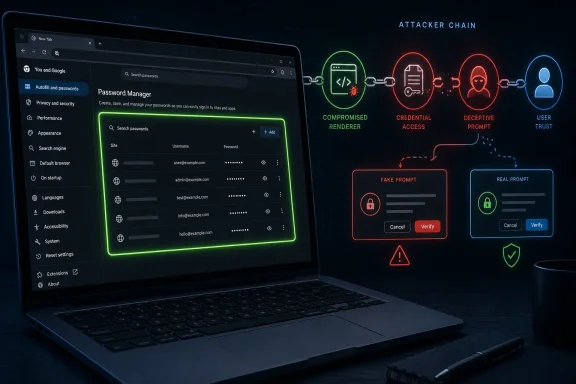 The Bug Is Small Because the Attack Chain Is Not
CVE-2026-13982 sits in an awkward category for defenders. On paper, CISA-ADP assigned it a CVSS 3.1 score of 3.1, with network attack vector, high attack complexity, no privileges required, required user interaction, unchanged scope, no confidentiality impact, low integrity impact, and no availability impact. That is the sort of score that can get buried in dashboards already groaning under louder Chrome vulnerabilities.But the CVE description contains the phrase that should stop administrators from dismissing it outright: “had compromised the renderer process.” Chrome’s renderer is where web content lives, and Chromium’s multi-process architecture is built around containing that dangerous world away from browser privileges, local files, credentials, and operating-system resources. If a renderer is compromised, the attacker has already crossed the first meaningful line.
The issue, then, is not that CVE-2026-13982 gives an attacker everything. It is that it may help an attacker make the next step look legitimate. A compromised renderer paired with misleading Passwords UI is exactly the kind of combination that turns a technical foothold into a human decision problem.
This is why UI vulnerabilities in browsers deserve more respect than their scores often receive. They do not always steal secrets directly. They reshape the user’s perception of what is safe, what is trusted, and what is being requested by the browser rather than by a hostile page.
Password Managers Are Security Products Wearing Convenience Clothing
Chrome’s built-in password manager is not just another browser feature. For many users, including plenty of small-business and lightly managed enterprise users, it is the de facto credential vault. It stores saved logins, generates passwords, syncs them across devices, warns about compromised credentials, and presents security prompts that users have been trained to treat as browser-native.That creates a trust boundary that is partly technical and partly psychological. Users may ignore a suspicious web form, but they are more likely to trust something that looks like Chrome’s own password interface. If the browser appears to be asking them to confirm, reveal, save, update, or act on a credential, many users will assume the request is anchored in the browser’s security model.
CVE-2026-13982 is categorized under CWE-451, “User Interface Misrepresentation of Critical Information.” That wording is dry, but the concept is simple: security UI is only useful if it tells the truth. If an attacker can make a browser’s security interface appear to say one thing while something else is happening, the user becomes the confused deputy in the middle of the exploit chain.
This is especially relevant on Windows, where Chrome is frequently the operational front door for Microsoft 365, Google Workspace, SaaS admin portals, VPN enrollment pages, help desk consoles, and identity provider flows. A spoofed Passwords UI does not need to break Windows to matter. It only needs to mislead the person holding the keys.
The CVSS Score Tells the Truth, but Not the Whole Truth
The CISA-ADP vector is conservative for understandable reasons. The attack requires user interaction and high complexity, and the description does not claim direct password disclosure, arbitrary code execution, sandbox escape, or denial of service. NVD had not yet supplied its own CVSS assessment in the material available as of the July 2 modification.That low score is not wrong. It is a useful signal that CVE-2026-13982 should not be ranked alongside actively exploited V8 zero-days or critical use-after-free bugs that can punch through process boundaries. The problem is that CVSS is better at measuring isolated technical impact than compound trust abuse.
In a real intrusion, a bug like this would likely be one link in a chain. An attacker compromises a renderer through one vulnerability, uses spoofed UI to influence a user action, and then leverages that action to persist, phish, or pivot. Each piece may look limited in isolation. Together, they form the sort of sequence defenders actually lose sleep over.
This is where enterprise vulnerability management can become too score-driven. A scanner may see “3.1 LOW” and allow the ticket to age. A browser fleet manager should see “Chrome Passwords UI spoofing after renderer compromise” and ask a different question: how quickly do we get everyone to 150.0.7871.47 or later?
Google’s Fix Lands in a Very Busy Chrome Security Cycle
Google’s Stable Channel update moved desktop Chrome to 150.0.7871.46 or 150.0.7871.47 depending on platform, with Windows and Mac receiving the .47 build noted in the CVE record. The advisory listed a large batch of security fixes, and subsequent security coverage from outlets such as Malwarebytes emphasized the unusually high number of bugs addressed in this Chrome 150 release cycle.That matters because CVE-2026-13982 is not arriving in a vacuum. Chrome has spent 2026 shipping high-volume security updates, including earlier releases with hundreds of fixes and at least one actively exploited V8 issue in Chrome 149, according to Google’s own advisories and contemporaneous reporting from security publications. In that context, any single medium-severity UI bug can look like background noise.
The right reading is the opposite. Chrome’s security model is now so broad, layered, and heavily attacked that the “interesting” bugs are not only the ones with the highest severity rating. A medium spoofing flaw in Passwords is worth attention precisely because it touches the human-facing layer of a system already absorbing memory-safety bugs, sandbox issues, extension policy fights, GPU problems, and cross-platform update pressure.
For Windows administrators, this reinforces a familiar operational reality: browser patching is operating-system patching in everything but name. Chrome is not a user app sitting politely at the edge of the estate. It is where authentication, SaaS data access, remote administration, and endpoint exposure converge.
Renderer Compromise Is the Doorway, Not the Destination
The renderer precondition is the most important phrase in the CVE and the easiest to misunderstand. A renderer process is intentionally exposed to untrusted web content. Chrome’s sandbox is designed so that even if malicious code runs inside that renderer, the damage is constrained unless the attacker finds additional ways to escape, confuse, or exploit surrounding browser components.CVE-2026-13982 appears to live in that surrounding zone. It does not say the attacker escapes the sandbox. It says a remote attacker who has compromised the renderer process can perform UI spoofing through a crafted HTML page. That means the vulnerability is about what the browser shows, not necessarily what the attacker can directly read.
This is why the bug feels deceptively modern. The hardest part of many attacks is no longer merely executing code somewhere; it is converting that foothold into a trusted action. Browser vendors have spent years hardening process boundaries, but user trust remains a boundary too, and it is much harder to fuzz.
Security UI bugs often expose the gap between formal security architecture and lived user behavior. A prompt, icon, interstitial, password bubble, permission dialog, or account warning can be technically “just UI” while still carrying enormous authority in the mind of the person using the browser.
The Passwords Surface Is a Prime Target Because It Blends Identity and Habit
Chrome’s Passwords interface is powerful because it is routine. Users see browser prompts all day: save this password, update that password, use this generated credential, check passwords, unlock saved credentials, confirm sync, choose an account. Over time, the browser’s security language becomes part of the furniture.Attackers love furniture. The more ordinary a prompt feels, the less scrutiny it receives. A spoofing vulnerability does not need to be perfect if it appears at the right moment, in the right tab, after the right user action.
This is why password-manager UI deserves the same seriousness as cryptographic storage. Encryption protects secrets at rest. UI protects the user’s understanding of what is happening. If the latter fails, the former can be bypassed socially rather than mathematically.
Enterprises often try to solve this by forbidding browser password storage outright, pushing users toward managed password vaults or identity-provider flows. That may be appropriate in high-control environments, but it does not eliminate the broader lesson. Any credential UI that users trust — whether built into Chrome, Edge, a third-party extension, or a single sign-on portal — becomes part of the attack surface.
Windows Users Should Treat This as a Patch-Now, Not Panic-Now, Issue
For ordinary Windows users, the practical advice is simple: update Chrome and relaunch it. The fixed version identified in the CVE record is 150.0.7871.47, and the affected configuration covers Chrome versions before that build. Chrome normally updates automatically, but automatic update is not the same as automatic restart, especially on systems that keep browser windows open for days.Users can check the installed version through Chrome’s About page. If Chrome shows 150.0.7871.47 or later, this specific CVE should be addressed. If it shows an earlier version, the user should apply the update and restart the browser.
The more subtle advice is behavioral. Users should be especially cautious about browser prompts that appear after landing on unfamiliar pages, clicking unusual links, or interacting with unexpected account flows. A password-related prompt that appears out of context should be treated as suspicious, even if it looks polished.
That does not mean users should mistrust every browser dialog. It means that security UI works best when it is predictable. If the browser appears to be asking for a credential action at a strange time, the safest move is to close the tab, open the relevant site directly, and verify account status from a known path.
Administrators Should Not Let the Low Score Hide the Asset Class
For managed Windows fleets, CVE-2026-13982 is a browser hygiene test. The vulnerability is not severe enough to justify emergency theater, but it is specific enough to justify verification. Admins should be able to answer a basic question quickly: which endpoints are still running Chrome before 150.0.7871.47?That answer may come from Chrome Browser Cloud Management, Microsoft Intune inventory, Defender for Endpoint, third-party EDR, software asset management, or vulnerability scanning. The tool matters less than the confidence. If the fleet cannot produce a reliable Chrome version inventory, this medium bug is exposing a high-value process gap.
There is also a policy dimension. Organizations that permit Chrome password storage should understand that they are accepting Chrome’s Passwords UI as part of their credential security boundary. Organizations that forbid it should verify that policy is actually enforced, not merely written down in a security standard nobody checks.
The same applies to extension posture. While CVE-2026-13982 is not described as an extension vulnerability, real-world browser risk rarely respects neat category lines. Password managers, identity extensions, endpoint agents, and web security add-ons all coexist in the same daily user environment. A spoofing bug in one trusted surface should prompt a broader review of what users are trained to click.
The CPE Question Has a Straightforward Answer
The user-submitted NVD record asks, in effect, whether a CPE is missing. Based on the change history provided, NIST added a CPE configuration on July 2, 2026:cpe:2.3:a:google:chrome:*:*:*:*:*:*:*:* with versions up to, but excluding, 150.0.7871.47. That is the expected generic application CPE for Google Chrome.In other words, the obvious Chrome CPE is not missing in the current NVD change history. It appears to have been added during NIST’s initial analysis, after the CVE was first received from Chrome on June 30 and after CISA-ADP added CVSS, CWE, and SSVC information on July 1. The lag is normal: CVE publication, enrichment, scoring, weakness mapping, and CPE assignment often arrive in stages.
There is still a wrinkle worth noting. Chromium-derived browsers are not automatically covered by a Google Chrome CPE just because they share engine code. Microsoft Edge, Brave, Vivaldi, Opera, and Electron-based applications may consume Chromium fixes on their own schedules and publish their own advisories or version mappings. The NVD CPE for Google Chrome answers the Chrome question, not every Chromium ecosystem question.
That distinction matters for WindowsForum readers because many Windows environments run both Chrome and Edge. Edge is Chromium-based, but Edge patch status is tracked through Microsoft’s channel, versioning, and servicing mechanisms. A Chrome CVE may be relevant to Edge engineering, but administrators should not infer Edge exposure purely from a Chrome CPE line unless Microsoft’s advisories or Edge release notes say so.
CISA’s SSVC Entry Says “No Known Exploitation,” but That Is Not a Lifetime Warranty
CISA-ADP’s SSVC data for CVE-2026-13982 lists exploitation as “none,” automatable as “no,” and technical impact as “partial.” That is a sensible triage profile. It suggests there was no public evidence, at the time of that assessment, that attackers were exploiting this specific flaw in the wild.But “none” is a timestamped statement, not a permanent property. Browser bugs often become more understandable after patches ship, especially when commit diffs, crash reports, or adjacent bug details become easier to study. Google also commonly restricts access to bug details until enough users have updated, which is prudent but leaves defenders operating with incomplete technical visibility.
The practical conclusion is not to overstate the threat. There is no basis in the provided record to call CVE-2026-13982 an actively exploited zero-day. The practical conclusion is to patch before the story gets more interesting.
This is the normal rhythm of browser security now. Vendors patch first, researchers and attackers learn later, and defenders are safest when they do not wait for a proof-of-concept to make the update feel real.
UI Spoofing Is the Browser Security Problem That Never Quite Goes Away
The web has always been vulnerable to impersonation. Fake login pages, misleading pop-ups, lookalike domains, permission prompt abuse, and deceptive full-screen overlays are ancient tricks. What changes with browser UI spoofing is the target: the attacker is not merely imitating a website, but something the user believes belongs to the browser itself.Modern browsers have tried to make critical UI harder to fake. Address bars, permission prompts, password dialogs, download warnings, certificate indicators, and account pickers are supposed to be privileged surfaces. Web content should not be able to convincingly impersonate them, especially when credentials are involved.
Yet the boundary is visually delicate. Browser interfaces are cleaner, flatter, and more web-like than they used to be. Web apps, progressive web apps, in-browser account flows, and native-looking design systems all blur the line between site chrome and browser chrome. The more seamless the experience becomes, the more valuable any spoofing foothold becomes.
CVE-2026-13982 is one bug in one component, but it belongs to that larger pattern. Browser vendors are not just defending memory allocators and IPC boundaries. They are defending the user’s ability to tell who is speaking.
The Enterprise Lesson Is That Trust Prompts Need Their Own Threat Model
Security teams are comfortable threat-modeling APIs, authentication flows, device compliance, and network paths. They are less consistent about threat-modeling prompts. But prompts are where policy becomes behavior.If a system depends on the user making a safe choice, then the integrity of the UI presenting that choice is a security control. That is true for password save prompts, MFA approvals, SSO redirects, browser permission requests, certificate warnings, and download confirmations. A misleading prompt can turn a strong backend into a weak frontline.
This is not an argument for blaming users. It is an argument against designing security systems that require users to distinguish subtle UI provenance under pressure. If a browser dialog can be spoofed only after renderer compromise, the vendor should fix that. If employees are trained to approve credential prompts reflexively, the organization should fix that too.
The best enterprise response is layered. Patch quickly, reduce unnecessary credential prompts, prefer phishing-resistant authentication where possible, restrict browser password storage where policy demands it, and educate users about context rather than asking them to memorize screenshots.
Chrome’s Fix Is the Easy Part; Measuring Exposure Is Harder
The mechanical remediation is uncomplicated. Install Chrome 150.0.7871.47 or later on affected Windows and Mac systems, and ensure Linux systems receive the corresponding fixed channel build for their platform. The hard part is proving completion across a real fleet.Consumer Chrome users often assume the browser has updated because the menu is quiet. Admins know better. A browser can download an update but remain vulnerable until restart. A user can defer relaunch. A kiosk profile can lag. A virtual desktop image can preserve an older build. A packaged app estate can contain stale Chromium runtimes that will not be fixed by updating Chrome alone.
CVE-2026-13982 is a good forcing function for version attestation. A mature endpoint program should be able to report Chrome versions, identify outliers, enforce restart windows, and confirm remediation after patch deployment. If it cannot, the next Chrome bug with a higher score will find the same weakness.
For Windows-heavy organizations, this also means aligning browser management with Patch Tuesday discipline without pretending browsers follow Patch Tuesday. Chrome ships when Chrome ships. Edge ships when Microsoft ships Edge. Attackers do not wait for monthly maintenance windows.
The Password UI Bug That Should Change a Few Habits
The concrete lessons from CVE-2026-13982 are less dramatic than the phrase “password vulnerability” might imply, but they are still useful. This is a narrow bug with a narrow fix, and the operational response should be similarly focused.- Chrome users should update to version 150.0.7871.47 or later and restart the browser, because downloaded updates do not fully protect a still-running old session.
- Administrators should verify Chrome version inventory across Windows endpoints rather than relying on automatic update assumptions.
- Security teams should treat browser password UI as part of the credential attack surface, not as a harmless convenience feature.
- The NVD record does include the expected Google Chrome CPE for versions before 150.0.7871.47, added during NIST’s July 2 analysis.
- Chromium-based browsers and embedded Chromium runtimes should be tracked through their own vendor advisories and release channels, not inferred solely from Chrome’s CPE.
- A low CVSS score should not automatically bury a vulnerability that affects trusted security UI, especially when it can assist a broader attack chain.
References
- Primary source: NVD / Chromium
Published: 2026-07-03T07:00:24-07:00
NVD - CVE-2026-13982
 nvd.nist.gov
- Security advisory: MSRC
Published: 2026-07-03T07:00:24-07:00
Original feed URL
Security Update Guide - Microsoft Security Response Center
 msrc.microsoft.com
- Related coverage: cvefeed.io
CVE-2026-13982 - Google Chrome UI Spoofing Vulnerability
Incorrect security UI in Passwords in Google Chrome prior to 150.0.7871.47 allowed a remote attacker who had compromised the renderer process to perform UI spoofing via a crafted HTML page. (Chromium security severity: Medium)cvefeed.io - Related coverage: malwarebytes.com
Chrome needs another whopper update to fix 382 security bugs | Malwarebytes
Google released a huge update of 382 security fixes, 15 of which were rated as critical. So, it's time to update againwww.malwarebytes.com - Related coverage: techradar.com
Update Chrome now — Google patches new zero-day flaw already being exploited | TechRadar
A new bug could allow crooks to execute arbitrary code in Chromewww.techradar.com
