

Google Chrome’s CVE-2026-13960 is a medium-severity Passwords-component flaw, published by NVD on June 30, 2026 and modified on July 2, that affects Chrome versions before 150.0.7871.47 and allows UI spoofing through a crafted HTML page. The short answer to the submitted question is: no, the CPE does not appear to be missing anymore. NIST’s change history now shows a Chrome CPE configuration for
As documented in the NVD entry and tied back to Google’s Chrome Stable Channel update, CVE-2026-13960 lives in Chrome’s Passwords area and maps to CWE-451, the weakness category for user-interface misrepresentation of critical information. CISA’s ADP enrichment gives it a CVSS 3.1 score of 4.3, with network attack vector, low attack complexity, no privileges required, user interaction required, and limited integrity impact. That sounds almost modest beside the usual Chrome drumbeat of use-after-free, sandbox escape, and renderer compromise bugs. But password UI spoofing is not about crashing a process; it is about making the user trust the wrong thing.
The NVD record’s change history shows why this one can look confusing if you catch it mid-enrichment. The CVE was received from Chrome on June 30, with the description, Google’s release-note reference, the Chromium issue reference, and affected-version metadata. CISA-ADP then added its SSVC assessment and later the CVSS vector and CWE mapping on July 1. NIST followed on July 2 by adding the CPE configuration:
That means the vulnerability entry has moved through the normal pipeline from vendor disclosure to government enrichment. If a scanner, vulnerability-management platform, or internal dashboard briefly showed “CPEs loading” or asked whether a CPE was missing, it was likely observing the record before NIST’s configuration work landed. As of the July 2 modification reflected in the entry, the affected software mapping is there.
There is still a wrinkle worth calling out. The original affected JSON in the CVE record reportedly describes Chrome version
For Windows admins, that distinction matters more than the database grammar. Asset tools tend to live or die on normalized CPEs, but patch operations live on actual installed versions. If Chrome on a managed Windows machine reports 150.0.7871.47 or later, this specific CVE should no longer be in scope for that endpoint.
Yet UI spoofing belongs to a different risk category than heap corruption. It targets judgment rather than silicon. A crafted HTML page that can misrepresent password-related UI does not need to own the browser process if it can persuade a user that a fake prompt, fake credential surface, or misleading browser-adjacent interface is legitimate.
That is why the affected component matters. “Passwords” is not just another Chrome subsystem; it is one of the places where browser chrome, web content, autofill, identity, and user habit collide. Users have been trained to recognize password managers, save-password prompts, passkey surfaces, credential fill dialogs, and sign-in assistance as part of the browser’s trust fabric. A spoofing weakness in that zone exploits familiarity.
The CVSS vector captures the mechanical limits: the attacker must get the user to interact, and the listed impact is integrity rather than confidentiality or availability. But attackers routinely build campaigns around exactly that kind of interaction. Phishing has never required magic; it requires a believable screen at the right moment.
CWE-451 exists because that frame is hard to defend. If the user cannot tell whether critical information came from the browser or from a page, a security decision becomes compromised even if the underlying sandbox remains intact. The exploit may be “only” visual, but the consequence can be behavioral.
Chrome has spent years reducing the amount of security decision-making pushed onto users. Permission prompts have become quieter, unsafe-download warnings more opinionated, and password-manager flows more integrated. That evolution is generally good security design. It also raises the stakes when one of those trusted surfaces is visually misrepresented.
For WindowsForum readers, this is familiar territory. The Windows desktop itself has long wrestled with the difference between a system dialog and a convincingly styled application window. Browsers face the same problem at web speed, with adversaries able to iterate a malicious page instantly and distribute it globally.
On unmanaged Windows PCs, users can check Chrome’s version through the browser’s About Chrome page, which also triggers update checks in normal configurations. In enterprise environments, the work belongs in Chrome Browser Cloud Management, Group Policy-backed deployment, software inventory, or whatever patch orchestration system is already tracking browser versions. The important thing is not merely that the update exists, but that the installed base has actually crossed the fixed-version threshold.
The browser-update problem is also more complicated than it looks in mixed fleets. Many organizations run Chrome, Edge, WebView2-dependent applications, embedded Chromium runtimes, Electron applications, and third-party Chromium-based browsers side by side. CVE-2026-13960 is identified as a Google Chrome issue, but the underlying class of bug is a reminder that Chromium-derived components can inherit security assumptions, UI patterns, and occasionally defects from the same family tree.
That does not mean every Chromium-based browser is automatically affected in the same way or on the same schedule. It does mean admins should avoid the lazy conclusion that “Chrome patched” equals “all Chromium risk closed.” Edge, Brave, Vivaldi, Electron apps, and embedded browser components each have their own release cadence and exposure model.
That staggered process is normal, but it can create noisy windows for defenders. A vulnerability may appear in one tool without CPEs, in another with incomplete scoring, and in a third with vendor-only affected-version data. If your patch process depends entirely on one field appearing at one moment, you will occasionally mistake “not yet enriched” for “not applicable.”
The right hierarchy is straightforward. Vendor release notes define the fix line. CVE descriptions define the security issue. NVD CPEs help automated matching. CISA enrichment helps prioritization. None of those should be treated as interchangeable.
This is especially true for browsers, where release velocity is high and the cost of delay is low compared with many enterprise applications. When the vendor says a Chrome security update fixes a class of bugs, the practical answer is usually to move the fleet, then let the vulnerability databases catch up.
Still, browser UI spoofing deserves faster treatment than the word “medium” sometimes receives in enterprise queues. Chrome is internet-facing software used continuously by users who move between work and personal contexts, cloud dashboards, identity providers, SaaS apps, and password stores. A flaw that can mislead users in a password-related interface sits close to the authentication path.
The vulnerability also fits neatly into phishing and credential-harvesting workflows. An attacker does not need to exfiltrate passwords from Chrome’s encrypted store if a user can be nudged into entering credentials into a deceptive page. Nor does the attacker need to bypass multifactor authentication in the browser if the spoofed interaction is part of a broader adversary-in-the-middle flow.
That does not make CVE-2026-13960 a five-alarm fire. It makes it a good test of whether an organization’s browser patching is routine enough that medium Chrome bugs do not become special projects. In 2026, the browser is infrastructure. Infrastructure should not wait for a critical label before it moves.
That shift has changed the security model. A decade ago, spoofing a browser dialog might have been treated mostly as a phishing-adjacent nuisance. Today, browser-managed identity surfaces are used in workflows that determine whether a credential is saved, filled, reused, replaced, synced, or trusted. The UI is no longer decorative; it is a control plane.
This is also why security education alone is insufficient. Users cannot reliably distinguish subtle browser UI states while multitasking through SSO prompts, password updates, conditional-access messages, and SaaS login screens. If the trusted interface can be mimicked closely enough, the burden has already shifted too far onto the user.
The best defense is to reduce the number of moments where users must adjudicate authenticity by eye. Fast browser patching, phishing-resistant MFA, passkeys where appropriate, enterprise password-manager policy, and identity-provider protections all matter because they reduce reliance on visual trust alone.
Microsoft’s Patch Tuesday cadence encourages monthly thinking. Chrome does not care. Google ships stable updates when it needs to, including out-of-band security fixes, and the delta between “released” and “actually installed” can become the exposure window. CVE-2026-13960 is not the most dangerous Chrome bug of the year, but it is a useful reminder that Chrome patch compliance should be visible daily, not rediscovered during monthly reporting.
The practical controls are mundane but effective. Force relaunch prompts after a reasonable grace period. Inventory Chrome versions by device. Watch for machines that download updates but do not restart the browser. Include browser versions in help-desk triage when users report credential prompts, autofill oddities, or suspected phishing.
Admins should also remember that Chrome’s update state is not always the same as Windows’ update state. A fully patched Windows 11 machine can still be running an outdated browser if Chrome updates are blocked, deferred, broken, or waiting on a relaunch. Conversely, a browser may auto-update successfully while the OS remains behind. Treat them as separate compliance surfaces.
The public description is therefore intentionally terse: inappropriate implementation in Passwords, remote attacker, UI spoofing, crafted HTML page. That is enough for defenders to patch and prioritize, but not enough to reconstruct the flaw. The missing technical detail is a feature of the disclosure process, not a failure of the advisory.
Security teams should resist filling that vacuum with speculation. The record does not say that passwords can be read from Chrome’s password store. It does not say that code execution is possible. It does not say that exploitation is known in the wild. The responsible reading is narrower: affected Chrome versions allowed a crafted page to spoof password-related UI in a way Google considered security-relevant.
That narrower reading is still meaningful. The password surface is valuable because it mediates user trust. A bug does not need to dump secrets automatically to be worth patching quickly.
The CPE mapping helps scanners identify affected Chrome installations, but CPEs are not a complete asset strategy. Portable browser installs, stale user profiles, nonstandard application paths, developer machines, test VMs, and golden images can all fall outside tidy inventory assumptions. The more browser usage sprawls, the less a single CPE match tells the whole story.
This is also where false confidence creeps in. A vulnerability dashboard might show risk declining because managed endpoints patched successfully, while a population of contractors, lab systems, or persistent VDI sessions remains behind. Browser CVEs reward operational completeness.
For WindowsForum’s IT pro audience, the immediate move is simple: verify the version, enforce the relaunch, and make sure the next image refresh includes the fixed build. The more strategic move is to measure how long it took your environment to converge. That number matters more than this individual medium score.
Attackers follow trust. If users trust the password prompt, attackers try to imitate it. If users trust autofill indicators, attackers try to manipulate the surrounding context. If users trust account-sync and passkey flows, attackers look for the visual seams between browser chrome and web content.
CVE-2026-13960 sits inside that larger trend. It is not dramatic because the public record does not describe arbitrary code execution or sandbox escape. It is significant because it touches the boundary between what the web page controls and what the browser vouches for. That boundary is one of the most important security lines on a modern Windows desktop.
The irony is that browsers have become safer at the memory-corruption layer while becoming more socially and visually complex at the identity layer. Sandboxes, site isolation, exploit mitigations, and rapid patching have raised the bar for traditional exploitation. Meanwhile, the user is asked to navigate more identity prompts, more permissions, more synced state, and more browser-mediated trust decisions than ever.
The most concrete reading of the record is now stable enough for operations. NVD has the Chrome CPE. CISA-ADP has the CVSS and CWE. Google’s release line identifies the fixed version. There is no need to wait for NVD to assign its own CVSS score before acting.
The security lesson is equally plain. UI spoofing against password surfaces belongs in the same conversation as phishing, identity hardening, and browser governance. It may not be a critical vulnerability by score, but it targets the moment when users decide whether a credential interaction is real.
google:chrome versions up to, but excluding, 150.0.7871.47. The more interesting story is that this is exactly the kind of browser bug that looks minor in a scorecard and more consequential in the hands of a patient attacker.As documented in the NVD entry and tied back to Google’s Chrome Stable Channel update, CVE-2026-13960 lives in Chrome’s Passwords area and maps to CWE-451, the weakness category for user-interface misrepresentation of critical information. CISA’s ADP enrichment gives it a CVSS 3.1 score of 4.3, with network attack vector, low attack complexity, no privileges required, user interaction required, and limited integrity impact. That sounds almost modest beside the usual Chrome drumbeat of use-after-free, sandbox escape, and renderer compromise bugs. But password UI spoofing is not about crashing a process; it is about making the user trust the wrong thing.
 The CPE Was Late, Not Absent
The NVD record’s change history shows why this one can look confusing if you catch it mid-enrichment. The CVE was received from Chrome on June 30, with the description, Google’s release-note reference, the Chromium issue reference, and affected-version metadata. CISA-ADP then added its SSVC assessment and later the CVSS vector and CWE mapping on July 1. NIST followed on July 2 by adding the CPE configuration: cpe:2.3:a:google:chrome:*:*:*:*:*:*:*:* for versions up to, but excluding, 150.0.7871.47.That means the vulnerability entry has moved through the normal pipeline from vendor disclosure to government enrichment. If a scanner, vulnerability-management platform, or internal dashboard briefly showed “CPEs loading” or asked whether a CPE was missing, it was likely observing the record before NIST’s configuration work landed. As of the July 2 modification reflected in the entry, the affected software mapping is there.
There is still a wrinkle worth calling out. The original affected JSON in the CVE record reportedly describes Chrome version
150.0.7871.47 with lessThan: 150.0.7871.47 and status affected, a format that can look semantically odd at a glance because the fixed version and the comparison boundary share the same number. The practical meaning is clearer in the prose: Chrome before 150.0.7871.47 is affected, and 150.0.7871.47 is the update line administrators should use as the minimum safe desktop baseline.For Windows admins, that distinction matters more than the database grammar. Asset tools tend to live or die on normalized CPEs, but patch operations live on actual installed versions. If Chrome on a managed Windows machine reports 150.0.7871.47 or later, this specific CVE should no longer be in scope for that endpoint.
A Medium Bug Can Still Attack the Moment of Trust
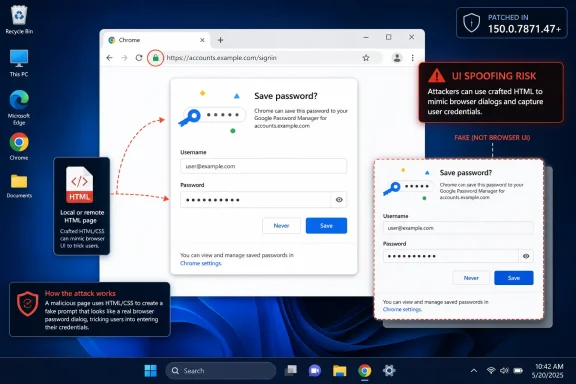
CVE-2026-13960 is not a remote-code-execution emergency, and there is no public indication in the NVD summary that exploitation is active. CISA’s SSVC data lists exploitation as “none,” automation as “no,” and technical impact as “partial.” That is the kind of profile that security teams often triage behind critical memory-corruption bugs.Yet UI spoofing belongs to a different risk category than heap corruption. It targets judgment rather than silicon. A crafted HTML page that can misrepresent password-related UI does not need to own the browser process if it can persuade a user that a fake prompt, fake credential surface, or misleading browser-adjacent interface is legitimate.
That is why the affected component matters. “Passwords” is not just another Chrome subsystem; it is one of the places where browser chrome, web content, autofill, identity, and user habit collide. Users have been trained to recognize password managers, save-password prompts, passkey surfaces, credential fill dialogs, and sign-in assistance as part of the browser’s trust fabric. A spoofing weakness in that zone exploits familiarity.
The CVSS vector captures the mechanical limits: the attacker must get the user to interact, and the listed impact is integrity rather than confidentiality or availability. But attackers routinely build campaigns around exactly that kind of interaction. Phishing has never required magic; it requires a believable screen at the right moment.
Chrome’s Security Model Has a Human Edge
Modern browsers are engineered around boundaries. The web page should not be able to impersonate privileged browser UI. The origin model should keep one site from pretending to be another. The address bar, permission prompts, password prompts, download warnings, and certificate indicators are all supposed to provide a trusted frame around untrusted content.CWE-451 exists because that frame is hard to defend. If the user cannot tell whether critical information came from the browser or from a page, a security decision becomes compromised even if the underlying sandbox remains intact. The exploit may be “only” visual, but the consequence can be behavioral.
Chrome has spent years reducing the amount of security decision-making pushed onto users. Permission prompts have become quieter, unsafe-download warnings more opinionated, and password-manager flows more integrated. That evolution is generally good security design. It also raises the stakes when one of those trusted surfaces is visually misrepresented.
For WindowsForum readers, this is familiar territory. The Windows desktop itself has long wrestled with the difference between a system dialog and a convincingly styled application window. Browsers face the same problem at web speed, with adversaries able to iterate a malicious page instantly and distribute it globally.
The Patch Line Is Simple: 150.0.7871.47
The operational remediation is refreshingly direct. Google’s Stable Channel update for desktop is the vendor anchor, and the NVD entry marks Chrome prior to 150.0.7871.47 as vulnerable. Administrators should treat 150.0.7871.47 as the minimum version for this CVE on desktop Chrome unless their management stack receives newer channel-specific guidance from Google.On unmanaged Windows PCs, users can check Chrome’s version through the browser’s About Chrome page, which also triggers update checks in normal configurations. In enterprise environments, the work belongs in Chrome Browser Cloud Management, Group Policy-backed deployment, software inventory, or whatever patch orchestration system is already tracking browser versions. The important thing is not merely that the update exists, but that the installed base has actually crossed the fixed-version threshold.
The browser-update problem is also more complicated than it looks in mixed fleets. Many organizations run Chrome, Edge, WebView2-dependent applications, embedded Chromium runtimes, Electron applications, and third-party Chromium-based browsers side by side. CVE-2026-13960 is identified as a Google Chrome issue, but the underlying class of bug is a reminder that Chromium-derived components can inherit security assumptions, UI patterns, and occasionally defects from the same family tree.
That does not mean every Chromium-based browser is automatically affected in the same way or on the same schedule. It does mean admins should avoid the lazy conclusion that “Chrome patched” equals “all Chromium risk closed.” Edge, Brave, Vivaldi, Electron apps, and embedded browser components each have their own release cadence and exposure model.
NVD Enrichment Is Not the Same Thing as Vendor Truth
One reason CVE records produce confusion is that they are not born fully formed. A vendor may publish a terse advisory, the CVE Program may receive the record, NVD may enrich it later, CISA-ADP may add scoring and SSVC context, and scanners may ingest those stages at different times. In CVE-2026-13960’s case, the timeline is visible in the change log: Chrome source first, CISA enrichment next, NIST CPE mapping after that.That staggered process is normal, but it can create noisy windows for defenders. A vulnerability may appear in one tool without CPEs, in another with incomplete scoring, and in a third with vendor-only affected-version data. If your patch process depends entirely on one field appearing at one moment, you will occasionally mistake “not yet enriched” for “not applicable.”
The right hierarchy is straightforward. Vendor release notes define the fix line. CVE descriptions define the security issue. NVD CPEs help automated matching. CISA enrichment helps prioritization. None of those should be treated as interchangeable.
This is especially true for browsers, where release velocity is high and the cost of delay is low compared with many enterprise applications. When the vendor says a Chrome security update fixes a class of bugs, the practical answer is usually to move the fleet, then let the vulnerability databases catch up.
The Score Says Medium; the Workflow Says Patch
The 4.3 CVSS score is defensible on paper. The attack is remote over the network, does not require privileges, and has low complexity, but it requires user interaction and does not claim direct confidentiality or availability impact. CISA’s SSVC assessment similarly avoids panic: no known exploitation, not automatable, partial technical impact.Still, browser UI spoofing deserves faster treatment than the word “medium” sometimes receives in enterprise queues. Chrome is internet-facing software used continuously by users who move between work and personal contexts, cloud dashboards, identity providers, SaaS apps, and password stores. A flaw that can mislead users in a password-related interface sits close to the authentication path.
The vulnerability also fits neatly into phishing and credential-harvesting workflows. An attacker does not need to exfiltrate passwords from Chrome’s encrypted store if a user can be nudged into entering credentials into a deceptive page. Nor does the attacker need to bypass multifactor authentication in the browser if the spoofed interaction is part of a broader adversary-in-the-middle flow.
That does not make CVE-2026-13960 a five-alarm fire. It makes it a good test of whether an organization’s browser patching is routine enough that medium Chrome bugs do not become special projects. In 2026, the browser is infrastructure. Infrastructure should not wait for a critical label before it moves.
Password UI Is Now Part of the Attack Surface
Password managers used to feel like add-ons. Today they are part of the browser’s identity layer, intertwined with autofill, passkeys, account sync, breach warnings, and sign-in flows. Chrome’s Passwords component is not merely a convenience feature; it is part of how users decide where to type secrets.That shift has changed the security model. A decade ago, spoofing a browser dialog might have been treated mostly as a phishing-adjacent nuisance. Today, browser-managed identity surfaces are used in workflows that determine whether a credential is saved, filled, reused, replaced, synced, or trusted. The UI is no longer decorative; it is a control plane.
This is also why security education alone is insufficient. Users cannot reliably distinguish subtle browser UI states while multitasking through SSO prompts, password updates, conditional-access messages, and SaaS login screens. If the trusted interface can be mimicked closely enough, the burden has already shifted too far onto the user.
The best defense is to reduce the number of moments where users must adjudicate authenticity by eye. Fast browser patching, phishing-resistant MFA, passkeys where appropriate, enterprise password-manager policy, and identity-provider protections all matter because they reduce reliance on visual trust alone.
Windows Fleets Should Treat Chrome Like a Tier-One App
For many Windows shops, Chrome is simultaneously a user application, a security boundary, and a dependency for business workflows. It is also often outside the traditional Microsoft patch rhythm. That mismatch is where browser vulnerabilities linger.Microsoft’s Patch Tuesday cadence encourages monthly thinking. Chrome does not care. Google ships stable updates when it needs to, including out-of-band security fixes, and the delta between “released” and “actually installed” can become the exposure window. CVE-2026-13960 is not the most dangerous Chrome bug of the year, but it is a useful reminder that Chrome patch compliance should be visible daily, not rediscovered during monthly reporting.
The practical controls are mundane but effective. Force relaunch prompts after a reasonable grace period. Inventory Chrome versions by device. Watch for machines that download updates but do not restart the browser. Include browser versions in help-desk triage when users report credential prompts, autofill oddities, or suspected phishing.
Admins should also remember that Chrome’s update state is not always the same as Windows’ update state. A fully patched Windows 11 machine can still be running an outdated browser if Chrome updates are blocked, deferred, broken, or waiting on a relaunch. Conversely, a browser may auto-update successfully while the OS remains behind. Treat them as separate compliance surfaces.
The Public Bug Is Sparse by Design
The Chromium issue linked from the CVE is access-restricted, which is common for browser security bugs until enough users have received fixes. That restriction is not evidence of anything sinister. It is the normal tension between transparency and exploit prevention.The public description is therefore intentionally terse: inappropriate implementation in Passwords, remote attacker, UI spoofing, crafted HTML page. That is enough for defenders to patch and prioritize, but not enough to reconstruct the flaw. The missing technical detail is a feature of the disclosure process, not a failure of the advisory.
Security teams should resist filling that vacuum with speculation. The record does not say that passwords can be read from Chrome’s password store. It does not say that code execution is possible. It does not say that exploitation is known in the wild. The responsible reading is narrower: affected Chrome versions allowed a crafted page to spoof password-related UI in a way Google considered security-relevant.
That narrower reading is still meaningful. The password surface is valuable because it mediates user trust. A bug does not need to dump secrets automatically to be worth patching quickly.
The Scanner Finding Needs Human Translation
If this CVE appears in a vulnerability scanner, the remediation language may be blunt: upgrade Chrome to 150.0.7871.47 or later. That is accurate, but it hides the questions admins actually need answered. Which devices are below the threshold? Which are pending relaunch? Which users are on unmanaged Chrome? Which servers or VDI images bake in old browser builds?The CPE mapping helps scanners identify affected Chrome installations, but CPEs are not a complete asset strategy. Portable browser installs, stale user profiles, nonstandard application paths, developer machines, test VMs, and golden images can all fall outside tidy inventory assumptions. The more browser usage sprawls, the less a single CPE match tells the whole story.
This is also where false confidence creeps in. A vulnerability dashboard might show risk declining because managed endpoints patched successfully, while a population of contractors, lab systems, or persistent VDI sessions remains behind. Browser CVEs reward operational completeness.
For WindowsForum’s IT pro audience, the immediate move is simple: verify the version, enforce the relaunch, and make sure the next image refresh includes the fixed build. The more strategic move is to measure how long it took your environment to converge. That number matters more than this individual medium score.
The Real Risk Is the Browser Becoming Too Trusted to Question
Chrome, Edge, and other modern browsers have become the shells through which users experience work. The address bar is a launcher, the password manager is an identity assistant, the browser profile is a sync container, and web apps increasingly replace thick clients. The result is that browser UI now carries the kind of trust once reserved for operating-system UI.Attackers follow trust. If users trust the password prompt, attackers try to imitate it. If users trust autofill indicators, attackers try to manipulate the surrounding context. If users trust account-sync and passkey flows, attackers look for the visual seams between browser chrome and web content.
CVE-2026-13960 sits inside that larger trend. It is not dramatic because the public record does not describe arbitrary code execution or sandbox escape. It is significant because it touches the boundary between what the web page controls and what the browser vouches for. That boundary is one of the most important security lines on a modern Windows desktop.
The irony is that browsers have become safer at the memory-corruption layer while becoming more socially and visually complex at the identity layer. Sandboxes, site isolation, exploit mitigations, and rapid patching have raised the bar for traditional exploitation. Meanwhile, the user is asked to navigate more identity prompts, more permissions, more synced state, and more browser-mediated trust decisions than ever.
This Chrome Fix Is a Small Patch for a Bigger Pattern
CVE-2026-13960 should not be inflated into a crisis. It should be used as a forcing function. If your environment can patch Chrome quickly, validate the version, and close the scanner finding without drama, the system is working. If a medium browser UI bug turns into a week-long scramble, the issue is not this CVE; it is the browser-management model.The most concrete reading of the record is now stable enough for operations. NVD has the Chrome CPE. CISA-ADP has the CVSS and CWE. Google’s release line identifies the fixed version. There is no need to wait for NVD to assign its own CVSS score before acting.
The security lesson is equally plain. UI spoofing against password surfaces belongs in the same conversation as phishing, identity hardening, and browser governance. It may not be a critical vulnerability by score, but it targets the moment when users decide whether a credential interaction is real.
Chrome 150.0.7871.47 Draws the Line Administrators Should Enforce
This is the point where the advisory turns from database housekeeping into operational policy. The CPE question has an answer, but the patch question still belongs to every organization running Chrome on Windows desktops.- NIST’s July 2 change history shows that the Chrome CPE configuration was added for versions before 150.0.7871.47.
- Google Chrome 150.0.7871.47 is the practical minimum fixed desktop version for CVE-2026-13960.
- CISA-ADP rates the issue as CVSS 3.1 4.3 medium, with user interaction required and partial technical impact.
- The weakness is mapped to CWE-451, which means the core problem is misrepresentation of critical UI rather than memory corruption.
- Security teams should patch promptly, but they should not describe the public record as evidence of password-store theft or active exploitation.
- Windows administrators should verify actual browser versions and relaunch status rather than relying only on OS patch compliance.
References
- Primary source: NVD / Chromium
Published: 2026-07-03T07:00:06-07:00
NVD - CVE-2026-13960
 nvd.nist.gov
- Security advisory: MSRC
Published: 2026-07-03T07:00:06-07:00
Original feed URL
Security Update Guide - Microsoft Security Response Center
 msrc.microsoft.com
