

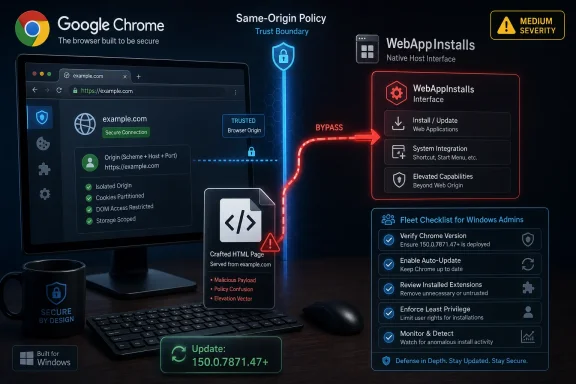
Google Chrome users running builds earlier than 150.0.7871.47 should treat CVE-2026-13881 as patched but not yet fully explained: the flaw was published June 30, 2026, affects Chrome’s WebAppInstalls component, and can let a crafted HTML page bypass the browser’s same-origin policy. That is the dry CVE version of the story. The more useful version is that a medium-severity browser bug has landed in one of the most sensitive trust boundaries on the modern desktop. As detailed by NVD, Google’s Chrome release notes, and CISA’s enrichment record, this is not a panic-button zero-day — but it is exactly the sort of browser weakness that rewards fast patching and disciplined fleet visibility.
The phrase “medium severity” has a way of lowering blood pressure in patch meetings. It should not do that automatically here. CVE-2026-13881 is not described as remote code execution, sandbox escape, or active exploitation, but it is described as a same-origin policy bypass in Chrome’s WebAppInstalls area, triggered by a crafted HTML page.
That combination matters because the same-origin policy is one of the browser’s oldest and most important security contracts. It is the rulebook that says one site should not be able to casually read or manipulate another site’s data just because both are open in the same browser. When a CVE says that boundary can be bypassed, even with user interaction and even without code execution, the right reaction is not panic; it is respect.
CISA’s ADP scoring gives the vulnerability a CVSS 3.1 base score of 6.5, with network attack vector, low attack complexity, no privileges required, and user interaction required. The impact rating is unusual in a useful way: no confidentiality impact, high integrity impact, and no availability impact. In other words, this is framed less as a data-theft bug than as a bug that could let an attacker cause a browser to accept or perform something it should not.
That is also why WebAppInstalls is such a loaded component name. Chrome’s installable web apps, progressive web apps, app banners, and web-to-desktop affordances live in a liminal space between “just a website” and “something the user treats like software.” A flaw there does not need to own the operating system to cause trouble. It may be enough to blur identity, trust, origin, or intent.
That treaty has always been full of negotiated exceptions. Cookies, redirects, storage, service workers, CORS, OAuth flows, extension APIs, federated login, embedded content, and installed web apps all carve tunnels through the wall. The modern browser is not a simple castle; it is a busy border crossing with special lanes for trusted cargo.
CVE-2026-13881 appears to live in one of those special lanes. Google’s brief description says the bug is an “inappropriate implementation” in WebAppInstalls, and NVD’s enrichment maps it to CWE-346, an origin validation error. That points toward a failure to correctly decide who is allowed to do what in a flow that depends heavily on origin identity.
The public record does not yet provide exploit details, and the linked Chromium issue is permission-restricted, which is normal for fresh browser vulnerabilities. Google routinely holds back technical specifics until enough users have received the fix. That practice frustrates defenders who want to model the bug precisely, but it also prevents the advisory from becoming a recipe for exploit developers during the update window.
The result is the familiar Chrome security bargain: users and administrators are asked to patch based on a thin public description, trusting that the vendor has disclosed enough to prioritize the update without disclosing enough to arm attackers. It is imperfect, but for a browser with Chrome’s deployment scale, it is also hard to avoid.
That evolution makes WebAppInstalls a more consequential surface than its name suggests. Installation flows depend on metadata, manifests, service workers, icons, navigation scopes, redirects, and user gestures. Each piece carries assumptions about origin and intent. If those assumptions are wrong, the browser may present one identity while acting on another.
For Windows users, this distinction is not academic. Chrome-installed web apps can look and behave like local apps, especially in enterprise environments where SaaS applications have replaced thick clients. A browser bug in the installation or origin validation path can become a user-trust problem before it becomes a traditional exploit problem.
This is the uncomfortable middle ground of modern browser security. Not every meaningful bug drops a shell. Some bugs make the browser misattribute trust, mis-handle identity, or allow a malicious page to influence a flow that should belong to another origin. That is enough to matter in phishing, session confusion, app spoofing, and policy-bypass scenarios.
The CVE description does not prove any of those specific outcomes for CVE-2026-13881. It does, however, put the vulnerability in a class where defenders should think beyond the narrow “can it execute code?” test. Integrity failures in browser trust boundaries are often the connective tissue in larger attack chains.
That context matters because administrators rarely patch one CVE at a time in Chrome. They patch a browser build. The practical question is not only “how bad is CVE-2026-13881?” but “what else is fixed in the same update, and how quickly can I prove my estate has it?”
Chrome’s rapid update cadence has trained many users to ignore individual advisories. In consumer land, that mostly works: the browser updates in the background, the user eventually restarts, and the danger window closes. In managed Windows environments, the story is messier. Browser relaunches can be deferred, update services can be blocked, golden images can lag, and security teams can find themselves staring at asset data that says “Chrome installed” without reliably saying “Chrome restarted into the fixed build.”
The version number therefore becomes the operational fact. For CVE-2026-13881, the public record points to Chrome prior to 150.0.7871.47 as vulnerable. That makes 150.0.7871.47 the clean threshold for Windows and macOS administrators to verify, while Linux fleet owners should pay attention to Google’s platform-specific stable-channel numbering and distro packaging status.
There is a small wrinkle in the CVE metadata worth noting. The affected-version record reproduced by NVD appears awkwardly phrased, showing version 150.0.7871.47 with a “lessThan” value of 150.0.7871.47 and affected status. In plain English, the description is clearer: Chrome before 150.0.7871.47 is affected. Security teams should follow the vendor advisory and the fixed-build logic rather than over-reading a machine-generated affected-version field.
CPEs are blunt instruments. They are useful for scanners, dashboards, and compliance workflows, but they often lag or simplify how software is actually distributed. Chrome on Windows is not just “Chrome on Windows.” It can be system-level or user-level, managed or unmanaged, auto-updated or pinned, running as Chrome proper or embedded indirectly through Chromium-based software with different release timing.
The specific CPE threshold also appears slightly out of step with the natural-language CVE description, which says “prior to 150.0.7871.47.” That kind of mismatch is exactly why administrators should not treat the CPE table as scripture. It is a machine-readable aid, not the final editorial authority on whether a machine is safe.
For vulnerability-management teams, the right move is to correlate three things: the installed Chrome version, whether the browser has relaunched into the new version, and whether any Chromium-based derivatives in the environment have shipped equivalent fixes. Google Chrome’s own version number is the easy case. Microsoft Edge, Brave, Vivaldi, Electron-based apps, and embedded WebView-style components can each have their own lag and advisory path.
That does not mean every Chromium consumer is automatically vulnerable to this exact WebAppInstalls flaw. Component exposure varies. But from a defender’s perspective, a same-origin policy bypass in Chromium is a reminder that browser monoculture has operational consequences. One upstream bug can turn into a staggered patching problem across many products that users think of as separate applications.
It is, however, the profile of a browser bug that should disappear from managed fleets quickly. Network attack vector and no privileges required mean the attacker does not need local access or an account. User interaction required means the victim must be induced to load or interact with crafted content. Low attack complexity means defenders should not assume the exploit path is prohibitively difficult once details emerge.
The integrity-heavy CVSS impact is the most interesting part. Many browser advisories revolve around confidentiality, memory corruption, or code execution. Here, CISA’s scoring suggests the heart of the issue is that an attacker may be able to cause a trust or validation decision to go the wrong way. In the browser, that can be powerful even when it does not immediately expose secrets.
Security teams should also resist the false comfort of “not in KEV.” A CVE not appearing in CISA’s Known Exploited Vulnerabilities catalog is good news, but it is not proof of irrelevance. KEV is a list of known exploitation, not a list of all vulnerabilities worth patching. Browser bugs often become more attractive after disclosure, especially if exploit details leak through tests, patches, or downstream reverse engineering.
The sane prioritization is therefore simple: do not interrupt incident response for CVE-2026-13881 alone, but do include the Chrome 150 update in the next urgent browser patch cycle. If your organization already treats Chrome stable updates as high-priority routine maintenance, this CVE does not change the process. It validates the process.
A dashboard may show that the update package is present. A user may see the little relaunch prompt and ignore it for days. A virtual desktop image may be updated but persistent sessions may still be running the old process. A line-of-business kiosk may have Chrome open indefinitely because closing it requires local intervention.
That matters more for browser bugs than for many traditional application flaws because the browser is continuously exposed to untrusted content. Every tab is a negotiation with the internet. If a vulnerability is reachable through a crafted HTML page, the exposure window lasts until the vulnerable process is gone, not merely until the installer finishes.
Administrators should therefore verify runtime version, not just package state. On individual systems,
There is also a user-communications angle. Telling users “Chrome updated” is less useful than telling them “restart Chrome today.” The browser restart has become one of the smallest but most persistent security frictions on the desktop. CVE-2026-13881 is another reminder that background updates are only as good as the relaunch behavior that follows.
CVE-2026-13881 is specifically a Google Chrome CVE in the public record, tied to Chrome’s WebAppInstalls component and fixed in Chrome 150. That does not automatically mean every Chromium-based application has the same vulnerable path. But it does mean defenders should check whether upstream Chromium patches have downstream relevance.
Microsoft Edge normally follows Chromium’s security baseline closely, but Edge has its own release notes, version numbers, policies, and enterprise controls. Administrators should validate Edge separately instead of assuming that Chrome compliance equals browser compliance. The same principle applies to browsers like Brave, Opera, and Vivaldi, where update timing can vary.
WebView2 is a subtler case. Its evergreen runtime updates independently in many environments, but some applications and locked-down systems complicate that picture. If an organization has strict application-control policies or offline images, Chromium runtime freshness can become a blind spot. Browser CVEs are a good excuse to audit that blind spot before a more severe bug forces the issue.
For consumers, the advice is less complicated: update Chrome, relaunch it, and do the same for any other Chromium-based browser you actually use. The browser you forgot you installed is less likely to be your daily attack surface, but it is still software exposed to hostile content when launched.
The browser’s job is to keep those lines sharp. The app’s name, icon, scope, manifest, service worker, launch URL, and origin should tell a coherent story. If a crafted page can bypass origin validation in that process, the risk is not merely that a rule was broken. The risk is that the user’s mental model can be broken too.
This is why the “crafted HTML page” wording matters. It implies web-delivered content, not a local prerequisite. With user interaction required, a plausible attack would likely involve social engineering: a link, a fake install prompt, a spoofed workflow, or a site that nudges a victim into an action that makes the browser cross a boundary it should enforce. The public advisory does not give enough detail to say which of those is possible, but the category points in that direction.
Enterprise policy can reduce some of this risk. Chrome supports controls around web app installation behavior, extension behavior, site permissions, and managed app deployment. Organizations that already restrict arbitrary user-installed web apps are in a better position than organizations that let every SaaS prompt become a desktop icon.
Still, policy is not a substitute for patching. A vulnerable trust decision inside the browser may interact with policy in ways defenders cannot predict from the CVE blurb. The more sensible position is layered: patch the browser, reduce unnecessary install surfaces, and monitor for unexpected web app registrations where the environment allows it.
That tension creates a recurring frustration for IT teams. They are asked to justify urgency to management without exploit code, packet captures, or detailed proof of impact. “Same-origin policy bypass in WebAppInstalls” may be enough for a browser engineer; it may not be enough for a change advisory board that wants business-specific risk.
The answer is to stop treating every browser CVE as a miniature legal case. Chrome, Edge, and the broader browser ecosystem are part of the enterprise perimeter now. A network-reachable browser flaw that requires only user interaction should already fit an established service-level objective. The organization should not need to rediscover its browser patch philosophy every Tuesday.
This is especially true because attackers do not wait for prose. Patch diffing, regression tests, and crash analysis can reveal what an advisory politely omits. The more interesting the component and the more central the security boundary, the more likely researchers and adversaries are to poke at the fix once it lands.
CVE-2026-13881’s medium rating may keep it out of headlines dominated by critical memory corruption bugs. But sparse detail should not be mistaken for low importance. Sometimes the most defensible security posture is to admit that you do not yet know the full exploit shape — and then close the window anyway.
The first scanner trap is version ambiguity. Google’s release notes can publish slightly different build numbers by platform, and NVD’s CPE configuration may not perfectly mirror the plain-language fixed version. A scanner that keys on one threshold may under-report or over-report until its plugin logic catches up. Security teams should compare scanner results against Google’s advisory and actual installed versions rather than blindly accepting either green or red.
The second trap is treating medium severity as medium priority in every environment. For a locked-down server with no interactive browser use, the risk is different from a call center desktop where users constantly visit external sites, authenticate to SaaS tools, and install web apps for daily workflows. CVSS is a starting point; exposure is the multiplier.
The third trap is ignoring derivative software. If your vulnerability management program only inventories Chrome and Edge by product name, it may miss Chromium embedded in applications that do not look like browsers. Not every embedded runtime will expose WebAppInstalls, but the broader lesson still applies: Chromium security is no longer confined to the browser icon.
The fourth trap is failing to validate relaunch. A scanner may detect the installed binary version, but users may still be running old processes. EDR process telemetry, browser management consoles, and restart enforcement policies can help close that gap. Without them, the organization may be patched on paper and exposed in practice.
For administrators, the work is broader. Confirm stable-channel deployment, verify active runtime versions, check restart compliance, and watch for Chrome variants that are pinned, packaged, or trapped inside nonstandard images. Where Chrome is managed by policy, administrators should also review whether web app installation is intentionally governed or merely left at defaults.
This is also a good moment to revisit browser update SLAs. Many organizations have aggressive timelines for critical operating-system vulnerabilities and fuzzier language for browsers. That mismatch no longer reflects reality. The browser is where identity, SaaS, documents, secrets, payments, admin panels, and personal accounts collide.
CVE-2026-13881 does not require a dramatic new policy. It requires the policy many organizations already claim to have: browsers update quickly, users relaunch promptly, unmanaged copies are hunted down, and exceptions are rare enough to be visible. The absence of known exploitation should influence tone, not create complacency.
The most mature organizations will treat this as a validation exercise. Can they answer, within hours, which devices are running Chrome older than the fixed build? Can they tell whether those devices have restarted the browser? Can they identify business units with unusual lag? If not, the problem revealed by this medium-severity CVE is bigger than this CVE.
 A Medium-Severity Chrome Bug Can Still Sit in a High-Trust Place
The phrase “medium severity” has a way of lowering blood pressure in patch meetings. It should not do that automatically here. CVE-2026-13881 is not described as remote code execution, sandbox escape, or active exploitation, but it is described as a same-origin policy bypass in Chrome’s WebAppInstalls area, triggered by a crafted HTML page.That combination matters because the same-origin policy is one of the browser’s oldest and most important security contracts. It is the rulebook that says one site should not be able to casually read or manipulate another site’s data just because both are open in the same browser. When a CVE says that boundary can be bypassed, even with user interaction and even without code execution, the right reaction is not panic; it is respect.
CISA’s ADP scoring gives the vulnerability a CVSS 3.1 base score of 6.5, with network attack vector, low attack complexity, no privileges required, and user interaction required. The impact rating is unusual in a useful way: no confidentiality impact, high integrity impact, and no availability impact. In other words, this is framed less as a data-theft bug than as a bug that could let an attacker cause a browser to accept or perform something it should not.
That is also why WebAppInstalls is such a loaded component name. Chrome’s installable web apps, progressive web apps, app banners, and web-to-desktop affordances live in a liminal space between “just a website” and “something the user treats like software.” A flaw there does not need to own the operating system to cause trouble. It may be enough to blur identity, trust, origin, or intent.
The Same-Origin Policy Is the Browser’s Oldest Peace Treaty
The same-origin policy is not glamorous. It does not have the marketing shine of passkeys, sandboxing, or memory-safe rewrites. But it is the quiet treaty that makes the web tolerable: bank.example cannot simply read mail.example, a malicious ad iframe cannot freely rummage through your admin console, and a random tab should not inherit trust from a more privileged one.That treaty has always been full of negotiated exceptions. Cookies, redirects, storage, service workers, CORS, OAuth flows, extension APIs, federated login, embedded content, and installed web apps all carve tunnels through the wall. The modern browser is not a simple castle; it is a busy border crossing with special lanes for trusted cargo.
CVE-2026-13881 appears to live in one of those special lanes. Google’s brief description says the bug is an “inappropriate implementation” in WebAppInstalls, and NVD’s enrichment maps it to CWE-346, an origin validation error. That points toward a failure to correctly decide who is allowed to do what in a flow that depends heavily on origin identity.
The public record does not yet provide exploit details, and the linked Chromium issue is permission-restricted, which is normal for fresh browser vulnerabilities. Google routinely holds back technical specifics until enough users have received the fix. That practice frustrates defenders who want to model the bug precisely, but it also prevents the advisory from becoming a recipe for exploit developers during the update window.
The result is the familiar Chrome security bargain: users and administrators are asked to patch based on a thin public description, trusting that the vendor has disclosed enough to prioritize the update without disclosing enough to arm attackers. It is imperfect, but for a browser with Chrome’s deployment scale, it is also hard to avoid.
Web Apps Have Made Origin Bugs More Interesting
A decade ago, a web app install prompt was often treated as a convenience feature. Today, installed web apps can sit on the taskbar, appear in app launchers, request permissions, persist identity, receive notifications, and blend into workflows that users think of as “applications” rather than “tabs.” The web did not become the desktop overnight, but it has steadily borrowed desktop behaviors.That evolution makes WebAppInstalls a more consequential surface than its name suggests. Installation flows depend on metadata, manifests, service workers, icons, navigation scopes, redirects, and user gestures. Each piece carries assumptions about origin and intent. If those assumptions are wrong, the browser may present one identity while acting on another.
For Windows users, this distinction is not academic. Chrome-installed web apps can look and behave like local apps, especially in enterprise environments where SaaS applications have replaced thick clients. A browser bug in the installation or origin validation path can become a user-trust problem before it becomes a traditional exploit problem.
This is the uncomfortable middle ground of modern browser security. Not every meaningful bug drops a shell. Some bugs make the browser misattribute trust, mis-handle identity, or allow a malicious page to influence a flow that should belong to another origin. That is enough to matter in phishing, session confusion, app spoofing, and policy-bypass scenarios.
The CVE description does not prove any of those specific outcomes for CVE-2026-13881. It does, however, put the vulnerability in a class where defenders should think beyond the narrow “can it execute code?” test. Integrity failures in browser trust boundaries are often the connective tissue in larger attack chains.
Chrome 150 Was Not a One-Bug Update
CVE-2026-13881 arrived as part of a large Chrome 150 stable-channel update, not as a standalone emergency patch. Google’s June 30 Chrome release moved the desktop stable channel to 150.0.7871.46 or 150.0.7871.47 for Windows and macOS, with Linux listed at 150.0.7871.46. Security coverage from Malwarebytes described the release as containing hundreds of security fixes, including a large number of externally visible CVEs.That context matters because administrators rarely patch one CVE at a time in Chrome. They patch a browser build. The practical question is not only “how bad is CVE-2026-13881?” but “what else is fixed in the same update, and how quickly can I prove my estate has it?”
Chrome’s rapid update cadence has trained many users to ignore individual advisories. In consumer land, that mostly works: the browser updates in the background, the user eventually restarts, and the danger window closes. In managed Windows environments, the story is messier. Browser relaunches can be deferred, update services can be blocked, golden images can lag, and security teams can find themselves staring at asset data that says “Chrome installed” without reliably saying “Chrome restarted into the fixed build.”
The version number therefore becomes the operational fact. For CVE-2026-13881, the public record points to Chrome prior to 150.0.7871.47 as vulnerable. That makes 150.0.7871.47 the clean threshold for Windows and macOS administrators to verify, while Linux fleet owners should pay attention to Google’s platform-specific stable-channel numbering and distro packaging status.
There is a small wrinkle in the CVE metadata worth noting. The affected-version record reproduced by NVD appears awkwardly phrased, showing version 150.0.7871.47 with a “lessThan” value of 150.0.7871.47 and affected status. In plain English, the description is clearer: Chrome before 150.0.7871.47 is affected. Security teams should follow the vendor advisory and the fixed-build logic rather than over-reading a machine-generated affected-version field.
NVD’s CPE Trail Is Useful but Not the Whole Map
The user-facing NVD page asks whether a CPE is missing, and in this case the change history shows NIST added a CPE configuration covering Google Chrome versions up to, but excluding, 150.0.7871.46, with operating-system CPEs for Windows, Linux kernel, and macOS. That is a clue about the limits of vulnerability metadata, not necessarily a reason to assume the vulnerability is under-modeled.CPEs are blunt instruments. They are useful for scanners, dashboards, and compliance workflows, but they often lag or simplify how software is actually distributed. Chrome on Windows is not just “Chrome on Windows.” It can be system-level or user-level, managed or unmanaged, auto-updated or pinned, running as Chrome proper or embedded indirectly through Chromium-based software with different release timing.
The specific CPE threshold also appears slightly out of step with the natural-language CVE description, which says “prior to 150.0.7871.47.” That kind of mismatch is exactly why administrators should not treat the CPE table as scripture. It is a machine-readable aid, not the final editorial authority on whether a machine is safe.
For vulnerability-management teams, the right move is to correlate three things: the installed Chrome version, whether the browser has relaunched into the new version, and whether any Chromium-based derivatives in the environment have shipped equivalent fixes. Google Chrome’s own version number is the easy case. Microsoft Edge, Brave, Vivaldi, Electron-based apps, and embedded WebView-style components can each have their own lag and advisory path.
That does not mean every Chromium consumer is automatically vulnerable to this exact WebAppInstalls flaw. Component exposure varies. But from a defender’s perspective, a same-origin policy bypass in Chromium is a reminder that browser monoculture has operational consequences. One upstream bug can turn into a staggered patching problem across many products that users think of as separate applications.
CISA’s Scoring Says “Patch,” Not “Drop Everything”
CISA’s ADP enrichment is helpful because it draws a line between credible urgency and theatrical urgency. The SSVC fields reportedly mark exploitation as “none,” automatable as “no,” and technical impact as “partial.” That is not the profile of a wormable enterprise fire drill.It is, however, the profile of a browser bug that should disappear from managed fleets quickly. Network attack vector and no privileges required mean the attacker does not need local access or an account. User interaction required means the victim must be induced to load or interact with crafted content. Low attack complexity means defenders should not assume the exploit path is prohibitively difficult once details emerge.
The integrity-heavy CVSS impact is the most interesting part. Many browser advisories revolve around confidentiality, memory corruption, or code execution. Here, CISA’s scoring suggests the heart of the issue is that an attacker may be able to cause a trust or validation decision to go the wrong way. In the browser, that can be powerful even when it does not immediately expose secrets.
Security teams should also resist the false comfort of “not in KEV.” A CVE not appearing in CISA’s Known Exploited Vulnerabilities catalog is good news, but it is not proof of irrelevance. KEV is a list of known exploitation, not a list of all vulnerabilities worth patching. Browser bugs often become more attractive after disclosure, especially if exploit details leak through tests, patches, or downstream reverse engineering.
The sane prioritization is therefore simple: do not interrupt incident response for CVE-2026-13881 alone, but do include the Chrome 150 update in the next urgent browser patch cycle. If your organization already treats Chrome stable updates as high-priority routine maintenance, this CVE does not change the process. It validates the process.
The Real Risk Is the Gap Between Update and Relaunch
Chrome’s updater can download a fix without placing the user fully on the fixed code path. The browser needs to relaunch. For home users, that is a minor annoyance. For enterprise IT, it is the swamp where patch compliance goes to lie.A dashboard may show that the update package is present. A user may see the little relaunch prompt and ignore it for days. A virtual desktop image may be updated but persistent sessions may still be running the old process. A line-of-business kiosk may have Chrome open indefinitely because closing it requires local intervention.
That matters more for browser bugs than for many traditional application flaws because the browser is continuously exposed to untrusted content. Every tab is a negotiation with the internet. If a vulnerability is reachable through a crafted HTML page, the exposure window lasts until the vulnerable process is gone, not merely until the installer finishes.
Administrators should therefore verify runtime version, not just package state. On individual systems,
chrome://settings/help remains the obvious check. In managed environments, Chrome Browser Cloud Management, endpoint inventory, EDR telemetry, or software asset tools should be able to report the active version at scale. The quality of that telemetry is often the difference between patching as a ritual and patching as a control.There is also a user-communications angle. Telling users “Chrome updated” is less useful than telling them “restart Chrome today.” The browser restart has become one of the smallest but most persistent security frictions on the desktop. CVE-2026-13881 is another reminder that background updates are only as good as the relaunch behavior that follows.
Windows Shops Should Think Beyond Google Chrome
WindowsForum readers know the uncomfortable truth: Chrome is rarely the only Chromium in the building. Microsoft Edge ships with Windows. WebView2 underpins parts of the modern Windows application ecosystem. Many desktop apps embed Chromium or Electron. Developers, help desks, finance teams, and marketing departments often have a zoo of Chromium-based tools installed for reasons that made sense at the time.CVE-2026-13881 is specifically a Google Chrome CVE in the public record, tied to Chrome’s WebAppInstalls component and fixed in Chrome 150. That does not automatically mean every Chromium-based application has the same vulnerable path. But it does mean defenders should check whether upstream Chromium patches have downstream relevance.
Microsoft Edge normally follows Chromium’s security baseline closely, but Edge has its own release notes, version numbers, policies, and enterprise controls. Administrators should validate Edge separately instead of assuming that Chrome compliance equals browser compliance. The same principle applies to browsers like Brave, Opera, and Vivaldi, where update timing can vary.
WebView2 is a subtler case. Its evergreen runtime updates independently in many environments, but some applications and locked-down systems complicate that picture. If an organization has strict application-control policies or offline images, Chromium runtime freshness can become a blind spot. Browser CVEs are a good excuse to audit that blind spot before a more severe bug forces the issue.
For consumers, the advice is less complicated: update Chrome, relaunch it, and do the same for any other Chromium-based browser you actually use. The browser you forgot you installed is less likely to be your daily attack surface, but it is still software exposed to hostile content when launched.
WebAppInstalls Is Where Convenience Meets Consent
Installed web apps sit at an awkward intersection of UX and security. The goal is to make a website feel more like software: launchable, persistent, branded, and less visibly bound to a browser tab. That is useful. It is also a place where attackers would love to confuse the user about what is being installed, which origin controls it, and what permissions or trust it receives.The browser’s job is to keep those lines sharp. The app’s name, icon, scope, manifest, service worker, launch URL, and origin should tell a coherent story. If a crafted page can bypass origin validation in that process, the risk is not merely that a rule was broken. The risk is that the user’s mental model can be broken too.
This is why the “crafted HTML page” wording matters. It implies web-delivered content, not a local prerequisite. With user interaction required, a plausible attack would likely involve social engineering: a link, a fake install prompt, a spoofed workflow, or a site that nudges a victim into an action that makes the browser cross a boundary it should enforce. The public advisory does not give enough detail to say which of those is possible, but the category points in that direction.
Enterprise policy can reduce some of this risk. Chrome supports controls around web app installation behavior, extension behavior, site permissions, and managed app deployment. Organizations that already restrict arbitrary user-installed web apps are in a better position than organizations that let every SaaS prompt become a desktop icon.
Still, policy is not a substitute for patching. A vulnerable trust decision inside the browser may interact with policy in ways defenders cannot predict from the CVE blurb. The more sensible position is layered: patch the browser, reduce unnecessary install surfaces, and monitor for unexpected web app registrations where the environment allows it.
The Advisory Is Sparse Because Browser Security Runs on Delay
The restricted Chromium issue linked from the CVE is not an accident. Google’s advisory model often withholds bug details until most users have updated. In a perfect world, defenders would get full technical detail immediately and attackers would somehow not read it. In the real world, both groups read the same advisories.That tension creates a recurring frustration for IT teams. They are asked to justify urgency to management without exploit code, packet captures, or detailed proof of impact. “Same-origin policy bypass in WebAppInstalls” may be enough for a browser engineer; it may not be enough for a change advisory board that wants business-specific risk.
The answer is to stop treating every browser CVE as a miniature legal case. Chrome, Edge, and the broader browser ecosystem are part of the enterprise perimeter now. A network-reachable browser flaw that requires only user interaction should already fit an established service-level objective. The organization should not need to rediscover its browser patch philosophy every Tuesday.
This is especially true because attackers do not wait for prose. Patch diffing, regression tests, and crash analysis can reveal what an advisory politely omits. The more interesting the component and the more central the security boundary, the more likely researchers and adversaries are to poke at the fix once it lands.
CVE-2026-13881’s medium rating may keep it out of headlines dominated by critical memory corruption bugs. But sparse detail should not be mistaken for low importance. Sometimes the most defensible security posture is to admit that you do not yet know the full exploit shape — and then close the window anyway.
Scanner Output Will Not Tell the Whole Story
Many organizations will first meet CVE-2026-13881 as a scanner finding. It will show up as a vulnerable Chrome version, a medium severity, a CVSS score, and perhaps a CPE match. That is useful, but it is not analysis.The first scanner trap is version ambiguity. Google’s release notes can publish slightly different build numbers by platform, and NVD’s CPE configuration may not perfectly mirror the plain-language fixed version. A scanner that keys on one threshold may under-report or over-report until its plugin logic catches up. Security teams should compare scanner results against Google’s advisory and actual installed versions rather than blindly accepting either green or red.
The second trap is treating medium severity as medium priority in every environment. For a locked-down server with no interactive browser use, the risk is different from a call center desktop where users constantly visit external sites, authenticate to SaaS tools, and install web apps for daily workflows. CVSS is a starting point; exposure is the multiplier.
The third trap is ignoring derivative software. If your vulnerability management program only inventories Chrome and Edge by product name, it may miss Chromium embedded in applications that do not look like browsers. Not every embedded runtime will expose WebAppInstalls, but the broader lesson still applies: Chromium security is no longer confined to the browser icon.
The fourth trap is failing to validate relaunch. A scanner may detect the installed binary version, but users may still be running old processes. EDR process telemetry, browser management consoles, and restart enforcement policies can help close that gap. Without them, the organization may be patched on paper and exposed in practice.
The Practical Patch Story Is Short, but the Governance Story Is Not
For individual Chrome users, the practical fix is boring in the best possible way. Open Chrome, go to the About Chrome page, let it update, and relaunch. If the browser reports 150.0.7871.47 or later on Windows or macOS, the CVE described in Google’s advisory should be addressed for that Chrome installation.For administrators, the work is broader. Confirm stable-channel deployment, verify active runtime versions, check restart compliance, and watch for Chrome variants that are pinned, packaged, or trapped inside nonstandard images. Where Chrome is managed by policy, administrators should also review whether web app installation is intentionally governed or merely left at defaults.
This is also a good moment to revisit browser update SLAs. Many organizations have aggressive timelines for critical operating-system vulnerabilities and fuzzier language for browsers. That mismatch no longer reflects reality. The browser is where identity, SaaS, documents, secrets, payments, admin panels, and personal accounts collide.
CVE-2026-13881 does not require a dramatic new policy. It requires the policy many organizations already claim to have: browsers update quickly, users relaunch promptly, unmanaged copies are hunted down, and exceptions are rare enough to be visible. The absence of known exploitation should influence tone, not create complacency.
The most mature organizations will treat this as a validation exercise. Can they answer, within hours, which devices are running Chrome older than the fixed build? Can they tell whether those devices have restarted the browser? Can they identify business units with unusual lag? If not, the problem revealed by this medium-severity CVE is bigger than this CVE.
The Chrome 150 Lesson Fits on One Admin Notepad
CVE-2026-13881 is not the loudest browser vulnerability of the year, and that is precisely why it is a useful test of security discipline. A good patch program should not need fear to function. It should turn a sparse but credible browser advisory into measured, verifiable action.- Chrome builds earlier than 150.0.7871.47 are the central concern for CVE-2026-13881, based on the public description of the fixed version.
- The vulnerability is a same-origin policy bypass in WebAppInstalls, so defenders should think in terms of trust-boundary and integrity impact rather than only code execution.
- CISA’s current enrichment points to medium severity, no known exploitation, no automation, and partial technical impact, which supports urgent routine patching rather than emergency incident posture.
- NVD’s CPE data is useful for scanners, but administrators should verify against Google’s fixed-version language and real endpoint telemetry.
- Browser restart compliance is part of the patch, because downloaded updates do not fully protect users who keep vulnerable browser processes alive.
- Windows environments should check Chrome, Edge, and relevant Chromium-based software separately instead of assuming one browser’s update status covers the whole estate.
References
- Primary source: NVD / Chromium
Published: 2026-07-03T07:00:05-07:00
NVD - CVE-2026-13881
 nvd.nist.gov
- Security advisory: MSRC
Published: 2026-07-03T07:00:05-07:00
Original feed URL
Security Update Guide - Microsoft Security Response Center
 msrc.microsoft.com
