

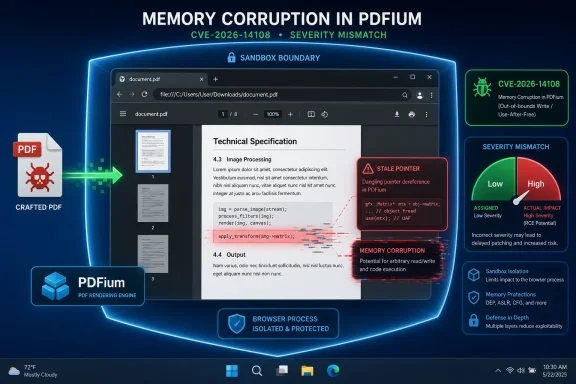
Google fixed CVE-2026-14108 in Chrome 150’s June 30, 2026 desktop stable release, closing a PDFium use-after-free flaw that affected Chrome before 150.0.7871.47 and could let a remote attacker run code inside Chrome’s sandbox through a crafted PDF file. The bug is easy to underestimate because Chromium labels it “Low,” while CISA’s ADP scoring gives it an 8.8 “High” CVSS 3.1 score. That mismatch is the real story: browser risk is no longer captured cleanly by a single severity word, especially when the vulnerable component is the built-in PDF reader that users encounter without thinking of it as a separate application.
As detailed by Google’s Chrome Releases blog and the National Vulnerability Database, CVE-2026-14108 sits in PDFium, the open-source PDF engine used by Chromium-based browsers. NVD published the entry on June 30 and last modified it on July 2, recording CWE-416, the classic use-after-free memory safety category. The narrow technical description says “code execution inside a sandbox,” but for administrators the operational translation is simpler: if Chrome or another Chromium browser is behind the stable release train, PDFs remain a browser attack surface.
Google’s internal severity label is not meaningless. Chromium’s security classifications account for exploitability, privileges, and containment, and in this case the phrase “inside a sandbox” matters. A bug that gets an attacker code execution in the renderer or a contained process is not the same as a full system compromise.
But enterprise patching does not happen in the abstract world of single-bug purity. A browser sandbox is a boundary, not a magic spell. Modern browser exploitation often chains several weaknesses together: a memory corruption flaw for initial code execution, a sandbox escape to break confinement, and sometimes an operating system or driver bug to persist or elevate. CVE-2026-14108 is not advertised as such a chain, and CISA’s SSVC data says exploitation is currently “none,” but the industry learned long ago that “not yet exploited” is not a synonym for “irrelevant.”
CISA’s ADP vector tells the other half of the story. It scores the bug as network reachable, low attack complexity, no privileges required, user interaction required, and high impact for confidentiality, integrity, and availability. That is the profile of a bug that may require a click or file open, but not much else from the attacker.
The result is a severity split that defenders should treat as a signal, not a contradiction. Google is describing where the bug lands within Chrome’s architecture. CISA is describing what successful exploitation could mean if the vulnerable path is reached. Both can be true, and the tension between them is why a “Low” Chromium item can deserve same-week attention in managed Windows fleets.
PDFium is not some obscure add-on hiding at the edge of Chrome. It is the engine that lets Chromium display PDFs without pushing the user into Adobe Reader, a separate viewer, or a download-first workflow. That makes it a high-frequency parser for untrusted content, and high-frequency parsers are where memory safety bugs become operationally interesting.
A use-after-free vulnerability occurs when software continues to use memory after it has been released. In exploitation terms, the danger is that an attacker may be able to shape what occupies that memory next, turning a stale pointer into a path for controlled behavior. That is why CWE-416 appears so often in browser advisories: it is a family of bugs that can convert malformed content into unintended code execution.
The crafted-file requirement should not comfort anyone too much. Attackers do not need to convince a victim to install a program; they need to get a document in front of a parser. In many workplaces, that path runs through webmail, collaboration tools, ticketing systems, supplier portals, shared drives, and chat apps.
The mitigating detail is that the described code execution is inside Chrome’s sandbox. That is important. It means CVE-2026-14108, by itself, is not being presented as a turnkey route to full host compromise. But if the security model depends on multiple walls, a flaw that gets an attacker through the first wall is still worth patching before someone pairs it with a flaw in the second.
That is exactly the sort of detail that causes compliance dashboards to wobble. NVD’s change history also shows an initial CPE configuration listing Google Chrome versions up to, but excluding, 150.0.7871.46, while the CVE’s own affected-version statement says less than 150.0.7871.47. If you are asking whether a CPE is missing or whether the version boundary is inconsistent, the answer is: yes, the public metadata appears to contain an ambiguity worth watching.
This is not unusual during the first days of a CVE’s public life. NVD enrichment, vendor advisories, CISA ADP scoring, and product-specific version rollout data often arrive on slightly different clocks. The safe operational approach is not to build a policy around the lower number. For Windows and macOS, target Chrome 150.0.7871.47 or later when validating this specific CVE.
Linux administrators should read Google’s platform-specific release language carefully rather than assume the Windows/Mac version string applies one-to-one. Chrome’s desktop releases frequently carry different patch numbers by platform, and Chromium downstreams may lag, rebase, or backport. For inventory teams, the right question is not merely “is Chrome 150 installed?” but “is the vendor build installed that contains the CVE-2026-14108 fix?”
The CPE question matters because vulnerability scanners depend on this metadata. If a scanner keys on one boundary while the CVE text says another, you can get false positives, false negatives, or noisy exceptions. Until the metadata settles, administrators should cross-check scanner findings against Google’s Chrome Releases note and the browser’s own reported version.
That shift is rational. Built-in PDF viewing reduces plugin sprawl, removes a historically risky class of external dependencies, and gives users a faster document workflow. It also means the browser is now responsible for safely parsing one of the world’s most complex document formats.
PDF is not a simple page description format in practice. Real-world PDFs include fonts, images, forms, compression, embedded objects, malformed legacy structures, and decades of compatibility baggage. Any parser that must accept hostile inputs at internet scale will accumulate bug classes that look familiar to exploit developers.
For WindowsForum readers, the practical issue is that Chrome, Edge, Brave, Vivaldi, Opera, and other Chromium-derived browsers share large chunks of the same foundation. A CVE assigned to Google Chrome is not automatically exploitable in every Chromium browser in the same way, but the shared codebase means defenders should track downstream updates closely. Microsoft Edge, in particular, usually moves quickly on Chromium fixes, but “usually” is not a control.
This is where browser monoculture becomes a real operational concern. Standardizing on Chromium reduces compatibility pain, but it also concentrates parser and rendering bugs across many products. When PDFium gets patched, the question ripples far beyond Chrome’s own installer.
Invoices, resumes, shipping notices, compliance forms, benefits documents, court filings, real estate packets, tax records, and vendor quotes all arrive as PDFs. Attackers do not have to invent a novel lure. They can borrow the ordinary paperwork rituals that already exist inside every organization.
That does not mean CVE-2026-14108 is being exploited in the wild. CISA’s SSVC entry records no known exploitation as of its July 1 timestamp. There is no public evidence in the NVD entry that this bug is under active attack, and Google’s advisory does not frame it as an emergency zero-day.
But patch priority is not only about today’s exploitation. It is also about exploit shelf life, attack surface, and the cost of remediation. Browser updates are among the lowest-friction security actions available to most organizations, especially compared with firmware patches, VPN appliance updates, or line-of-business application upgrades. When a remote document parsing bug has a fixed version available, delay needs a better justification than “the vendor called it Low.”
For home users, the advice is even simpler. Open Chrome’s About page, let it update, and restart the browser. The risk is not worth turning a routine browser update into a weekend project.
Still, defenders should resist the opposite mistake: treating the sandbox as an excuse to postpone fixes. Attackers prize sandboxed code execution because it can be the first stage of a chain. Even when no public chain exists, the first stage may be useful for theft of browser-accessible data, probing the environment, or pairing with a second vulnerability discovered elsewhere.
The risk also varies by environment. A locked-down enterprise browser with site isolation, endpoint detection, attachment filtering, and rapid update enforcement is not in the same position as an unmanaged browser profile full of extensions and stale session cookies. The same CVE can be a routine patch in one environment and a serious exposure in another.
Administrators should also think about where PDFs are opened by default. If Chrome or Edge is the system default for PDF viewing, then the browser is not just a web client; it is a document viewer invoked from File Explorer, email clients, collaboration platforms, and downloads. That widens the behavioral path to the vulnerable code.
This is why the distinction between browser and application is increasingly artificial. Users do not care which executable rendered the document. Attackers do not care either. Security teams have to care because patching the right executable is the difference between theoretical mitigation and actual risk reduction.
That sort of mismatch is not just clerical trivia. Vulnerability management programs depend on CPEs to decide what exists, what is vulnerable, and what needs remediation. A small version-boundary error can become thousands of tickets in a large fleet.
The best practice here is to treat early NVD metadata as useful but not final. NVD is a national index, not the original engineering authority for Chrome’s release bits. Google’s Chrome Releases post is the vendor advisory, while CISA’s ADP data adds a severity and decision-support layer. If those sources appear to disagree during the first 48 to 72 hours, the vendor-fixed build should anchor remediation.
For Windows admins using Intune, Group Policy, Chrome Browser Cloud Management, or third-party patching tools, the immediate job is to confirm update policy behavior. Chrome’s auto-update model works well on consumer machines, but enterprise controls can slow rollout intentionally. Rings, deferrals, frozen versions, and controlled restarts can all turn an “automatic” browser fix into a delayed one.
Edge administrators should watch Microsoft’s Chromium update cadence as well. This CVE is assigned to Chrome, but the underlying component is Chromium’s PDFium. If Edge consumes the same affected code, the relevant fix will arrive through Microsoft’s Edge update channel, not Google’s Chrome installer.
A release with hundreds of security fixes is not a normal “one bug, one patch” event. It is a maintenance wave across a sprawling browser codebase, covering critical, high, medium, low, and internally found issues. In that context, a Low-severity PDFium bug can disappear into the noise even though it affects a common document workflow.
The danger is dashboard fatigue. When every browser update contains a long list of CVEs, teams can become numb to the specific attack paths. But attackers do not need the scariest label in the advisory. They need the bug that works in the environment they target.
That is especially true for PDF handling. A malicious PDF is a socially plausible payload, and browser-based PDF rendering is common enough to make targeting efficient. Even a bug contained by a sandbox deserves attention when it sits on a path users travel every day.
The lesson is not to panic over CVE-2026-14108. The lesson is to stop treating Chrome’s lower-severity memory bugs as background radiation. They are part of the patch pressure that comes with letting one application serve as browser, document viewer, identity surface, extension host, and runtime for half the workday.
If inbound PDFs arrive through email, are they detonated or previewed before reaching users? If users open PDFs in the browser by default, is that intentional? If a line-of-business application generates or consumes PDFs, does it force a browser preview step? These questions matter because PDF parser bugs are recurring, not exceptional.
Administrators should also check whether managed browsers are actually restarting. Chrome can download an update and still run old code until the browser relaunches. In environments where users keep sessions open for days, restart enforcement is part of patching, not a cosmetic preference.
Security teams should avoid overcorrecting by banning PDFs outright. That is not realistic for most businesses, and brittle prohibitions often drive users to worse workarounds. The better answer is layered: rapid browser updates, attachment scanning, least-privilege endpoints, protected view where appropriate, and fewer unnecessary browser extensions that complicate the runtime.
For high-risk roles, consider whether document isolation or remote browser isolation belongs in the workflow. Legal, finance, HR, recruiting, and procurement teams receive more untrusted PDFs than most departments. They are not always treated as high-risk users, but their inboxes say otherwise.
The concrete readout is small enough to act on without drama:
As detailed by Google’s Chrome Releases blog and the National Vulnerability Database, CVE-2026-14108 sits in PDFium, the open-source PDF engine used by Chromium-based browsers. NVD published the entry on June 30 and last modified it on July 2, recording CWE-416, the classic use-after-free memory safety category. The narrow technical description says “code execution inside a sandbox,” but for administrators the operational translation is simpler: if Chrome or another Chromium browser is behind the stable release train, PDFs remain a browser attack surface.
 A “Low” Chrome Bug Can Still Be a High-Priority Patch
Google’s internal severity label is not meaningless. Chromium’s security classifications account for exploitability, privileges, and containment, and in this case the phrase “inside a sandbox” matters. A bug that gets an attacker code execution in the renderer or a contained process is not the same as a full system compromise.But enterprise patching does not happen in the abstract world of single-bug purity. A browser sandbox is a boundary, not a magic spell. Modern browser exploitation often chains several weaknesses together: a memory corruption flaw for initial code execution, a sandbox escape to break confinement, and sometimes an operating system or driver bug to persist or elevate. CVE-2026-14108 is not advertised as such a chain, and CISA’s SSVC data says exploitation is currently “none,” but the industry learned long ago that “not yet exploited” is not a synonym for “irrelevant.”
CISA’s ADP vector tells the other half of the story. It scores the bug as network reachable, low attack complexity, no privileges required, user interaction required, and high impact for confidentiality, integrity, and availability. That is the profile of a bug that may require a click or file open, but not much else from the attacker.
The result is a severity split that defenders should treat as a signal, not a contradiction. Google is describing where the bug lands within Chrome’s architecture. CISA is describing what successful exploitation could mean if the vulnerable path is reached. Both can be true, and the tension between them is why a “Low” Chromium item can deserve same-week attention in managed Windows fleets.
PDFium Keeps Turning Documents Into Browser Code
PDFs occupy a strange place in endpoint security. Users think of them as documents, IT teams often think of them as email attachments, and browsers increasingly treat them as content to render inline. That convenience means the PDF parser is effectively part of the web runtime.PDFium is not some obscure add-on hiding at the edge of Chrome. It is the engine that lets Chromium display PDFs without pushing the user into Adobe Reader, a separate viewer, or a download-first workflow. That makes it a high-frequency parser for untrusted content, and high-frequency parsers are where memory safety bugs become operationally interesting.
A use-after-free vulnerability occurs when software continues to use memory after it has been released. In exploitation terms, the danger is that an attacker may be able to shape what occupies that memory next, turning a stale pointer into a path for controlled behavior. That is why CWE-416 appears so often in browser advisories: it is a family of bugs that can convert malformed content into unintended code execution.
The crafted-file requirement should not comfort anyone too much. Attackers do not need to convince a victim to install a program; they need to get a document in front of a parser. In many workplaces, that path runs through webmail, collaboration tools, ticketing systems, supplier portals, shared drives, and chat apps.
The mitigating detail is that the described code execution is inside Chrome’s sandbox. That is important. It means CVE-2026-14108, by itself, is not being presented as a turnkey route to full host compromise. But if the security model depends on multiple walls, a flaw that gets an attacker through the first wall is still worth patching before someone pairs it with a flaw in the second.
The Version Number Confusion Is a Patch-Management Trap
The NVD entry and Google’s release note introduce a small but important wrinkle: Chrome 150.0.7871.46 and 150.0.7871.47 both appear in the release context. Google’s June 30 Stable Channel Update says Chrome 150 was promoted for Windows, Mac, and Linux, with Linux at 150.0.7871.46 and Windows/Mac at 150.0.7871.46/.47. The CVE description, however, says Chrome prior to 150.0.7871.47 is affected.That is exactly the sort of detail that causes compliance dashboards to wobble. NVD’s change history also shows an initial CPE configuration listing Google Chrome versions up to, but excluding, 150.0.7871.46, while the CVE’s own affected-version statement says less than 150.0.7871.47. If you are asking whether a CPE is missing or whether the version boundary is inconsistent, the answer is: yes, the public metadata appears to contain an ambiguity worth watching.
This is not unusual during the first days of a CVE’s public life. NVD enrichment, vendor advisories, CISA ADP scoring, and product-specific version rollout data often arrive on slightly different clocks. The safe operational approach is not to build a policy around the lower number. For Windows and macOS, target Chrome 150.0.7871.47 or later when validating this specific CVE.
Linux administrators should read Google’s platform-specific release language carefully rather than assume the Windows/Mac version string applies one-to-one. Chrome’s desktop releases frequently carry different patch numbers by platform, and Chromium downstreams may lag, rebase, or backport. For inventory teams, the right question is not merely “is Chrome 150 installed?” but “is the vendor build installed that contains the CVE-2026-14108 fix?”
The CPE question matters because vulnerability scanners depend on this metadata. If a scanner keys on one boundary while the CVE text says another, you can get false positives, false negatives, or noisy exceptions. Until the metadata settles, administrators should cross-check scanner findings against Google’s Chrome Releases note and the browser’s own reported version.
The Built-In PDF Viewer Has Changed the Threat Model
There was a time when PDF risk meant Adobe Reader hardening, disabling JavaScript in PDFs, and reminding users not to open suspicious attachments. Those measures still have a place, but the center of gravity has shifted. For many Windows users, the first PDF renderer they touch in a day is now inside the browser.That shift is rational. Built-in PDF viewing reduces plugin sprawl, removes a historically risky class of external dependencies, and gives users a faster document workflow. It also means the browser is now responsible for safely parsing one of the world’s most complex document formats.
PDF is not a simple page description format in practice. Real-world PDFs include fonts, images, forms, compression, embedded objects, malformed legacy structures, and decades of compatibility baggage. Any parser that must accept hostile inputs at internet scale will accumulate bug classes that look familiar to exploit developers.
For WindowsForum readers, the practical issue is that Chrome, Edge, Brave, Vivaldi, Opera, and other Chromium-derived browsers share large chunks of the same foundation. A CVE assigned to Google Chrome is not automatically exploitable in every Chromium browser in the same way, but the shared codebase means defenders should track downstream updates closely. Microsoft Edge, in particular, usually moves quickly on Chromium fixes, but “usually” is not a control.
This is where browser monoculture becomes a real operational concern. Standardizing on Chromium reduces compatibility pain, but it also concentrates parser and rendering bugs across many products. When PDFium gets patched, the question ripples far beyond Chrome’s own installer.
“User Interaction Required” Is Not Much of a Barrier
The CISA ADP vector includes UI:R, meaning user interaction is required. In a perfect security model, that would be a significant mitigating factor. In the real world, asking someone to open a PDF is not a high bar.Invoices, resumes, shipping notices, compliance forms, benefits documents, court filings, real estate packets, tax records, and vendor quotes all arrive as PDFs. Attackers do not have to invent a novel lure. They can borrow the ordinary paperwork rituals that already exist inside every organization.
That does not mean CVE-2026-14108 is being exploited in the wild. CISA’s SSVC entry records no known exploitation as of its July 1 timestamp. There is no public evidence in the NVD entry that this bug is under active attack, and Google’s advisory does not frame it as an emergency zero-day.
But patch priority is not only about today’s exploitation. It is also about exploit shelf life, attack surface, and the cost of remediation. Browser updates are among the lowest-friction security actions available to most organizations, especially compared with firmware patches, VPN appliance updates, or line-of-business application upgrades. When a remote document parsing bug has a fixed version available, delay needs a better justification than “the vendor called it Low.”
For home users, the advice is even simpler. Open Chrome’s About page, let it update, and restart the browser. The risk is not worth turning a routine browser update into a weekend project.
The Sandbox Is a Boundary, Not a Business Continuity Plan
Chrome’s sandbox remains one of the great defensive engineering achievements of modern consumer software. It is the reason many renderer and parser bugs do not immediately become full-system compromises. When Google says this flaw allows code execution inside a sandbox, that limitation should be acknowledged.Still, defenders should resist the opposite mistake: treating the sandbox as an excuse to postpone fixes. Attackers prize sandboxed code execution because it can be the first stage of a chain. Even when no public chain exists, the first stage may be useful for theft of browser-accessible data, probing the environment, or pairing with a second vulnerability discovered elsewhere.
The risk also varies by environment. A locked-down enterprise browser with site isolation, endpoint detection, attachment filtering, and rapid update enforcement is not in the same position as an unmanaged browser profile full of extensions and stale session cookies. The same CVE can be a routine patch in one environment and a serious exposure in another.
Administrators should also think about where PDFs are opened by default. If Chrome or Edge is the system default for PDF viewing, then the browser is not just a web client; it is a document viewer invoked from File Explorer, email clients, collaboration platforms, and downloads. That widens the behavioral path to the vulnerable code.
This is why the distinction between browser and application is increasingly artificial. Users do not care which executable rendered the document. Attackers do not care either. Security teams have to care because patching the right executable is the difference between theoretical mitigation and actual risk reduction.
The Scanner May Be Right, Wrong, or Early
The user-facing NVD page includes a familiar prompt asking whether a CPE is missing. In this case, the more subtle issue is not the absence of a CPE but the relationship among the affected product, platform CPEs, and version cutoffs. NVD shows Google Chrome combined with operating-system CPEs for Windows, Linux, and macOS, but the version boundary visible in the change history does not perfectly align with the CVE prose.That sort of mismatch is not just clerical trivia. Vulnerability management programs depend on CPEs to decide what exists, what is vulnerable, and what needs remediation. A small version-boundary error can become thousands of tickets in a large fleet.
The best practice here is to treat early NVD metadata as useful but not final. NVD is a national index, not the original engineering authority for Chrome’s release bits. Google’s Chrome Releases post is the vendor advisory, while CISA’s ADP data adds a severity and decision-support layer. If those sources appear to disagree during the first 48 to 72 hours, the vendor-fixed build should anchor remediation.
For Windows admins using Intune, Group Policy, Chrome Browser Cloud Management, or third-party patching tools, the immediate job is to confirm update policy behavior. Chrome’s auto-update model works well on consumer machines, but enterprise controls can slow rollout intentionally. Rings, deferrals, frozen versions, and controlled restarts can all turn an “automatic” browser fix into a delayed one.
Edge administrators should watch Microsoft’s Chromium update cadence as well. This CVE is assigned to Chrome, but the underlying component is Chromium’s PDFium. If Edge consumes the same affected code, the relevant fix will arrive through Microsoft’s Edge update channel, not Google’s Chrome installer.
Chrome 150’s Giant Patch Batch Makes One Bug Harder to See
CVE-2026-14108 arrived as part of a much larger Chrome 150 security release. Google’s June 30 post says the update includes 433 security fixes. That volume changes how defenders should read any single CVE in the batch.A release with hundreds of security fixes is not a normal “one bug, one patch” event. It is a maintenance wave across a sprawling browser codebase, covering critical, high, medium, low, and internally found issues. In that context, a Low-severity PDFium bug can disappear into the noise even though it affects a common document workflow.
The danger is dashboard fatigue. When every browser update contains a long list of CVEs, teams can become numb to the specific attack paths. But attackers do not need the scariest label in the advisory. They need the bug that works in the environment they target.
That is especially true for PDF handling. A malicious PDF is a socially plausible payload, and browser-based PDF rendering is common enough to make targeting efficient. Even a bug contained by a sandbox deserves attention when it sits on a path users travel every day.
The lesson is not to panic over CVE-2026-14108. The lesson is to stop treating Chrome’s lower-severity memory bugs as background radiation. They are part of the patch pressure that comes with letting one application serve as browser, document viewer, identity surface, extension host, and runtime for half the workday.
Enterprise IT Should Patch the Browser, Then Audit the Workflow
The immediate remediation is straightforward: update Chrome to a fixed build, with 150.0.7871.47 or later as the clearest Windows and macOS target for this CVE. But a mature response should go one layer deeper and ask how PDFs move through the organization.If inbound PDFs arrive through email, are they detonated or previewed before reaching users? If users open PDFs in the browser by default, is that intentional? If a line-of-business application generates or consumes PDFs, does it force a browser preview step? These questions matter because PDF parser bugs are recurring, not exceptional.
Administrators should also check whether managed browsers are actually restarting. Chrome can download an update and still run old code until the browser relaunches. In environments where users keep sessions open for days, restart enforcement is part of patching, not a cosmetic preference.
Security teams should avoid overcorrecting by banning PDFs outright. That is not realistic for most businesses, and brittle prohibitions often drive users to worse workarounds. The better answer is layered: rapid browser updates, attachment scanning, least-privilege endpoints, protected view where appropriate, and fewer unnecessary browser extensions that complicate the runtime.
For high-risk roles, consider whether document isolation or remote browser isolation belongs in the workflow. Legal, finance, HR, recruiting, and procurement teams receive more untrusted PDFs than most departments. They are not always treated as high-risk users, but their inboxes say otherwise.
The Useful Lesson Hiding in a Messy CVE Entry
The CVE-2026-14108 entry is useful precisely because it is messy. It shows how modern vulnerability management actually works: vendor severity, government enrichment, CPE mappings, platform-specific release numbers, and scanner interpretations all converge after the patch is already shipping. Defenders have to make decisions before every field is perfectly reconciled.The concrete readout is small enough to act on without drama:
- Chrome users on Windows and macOS should validate that they are on 150.0.7871.47 or later for this specific PDFium fix.
- Linux and Chromium downstream users should follow their vendor’s fixed build rather than assuming the Windows and macOS patch number maps directly.
- Security teams should treat the Chromium “Low” label in context, because CISA’s ADP scoring rates the potential impact as high even with user interaction required.
- Vulnerability scanners may briefly disagree on the affected version boundary, so teams should compare findings against Google’s release advisory and current browser inventory.
- Organizations should remember that PDF handling is now a browser security issue, not merely an attachment hygiene issue.