

The short answer is: because Microsoft’s Security Update Guide (SUG) is acting as the authoritative downstream status record for Microsoft Edge (Chromium‑based), not as the canonical source of Chromium bugs. When Chromium (the open‑source engine behind Chrome) receives a CVE, Microsoft records that CVE in SUG so Edge administrators can see whether the Edge builds they run contain the upstream remediation — and when their Edge installs are no longer vulnerable. ](Security Update Guide - Microsoft Security Response Center))
Chromium is an open‑source browser engine maintained by Google and used by many downstream browsers — most notably Google Chrome and Microsoft Edge (the Chromium‑based Edge). When a security defect is discovered inside Chromium, the Chromium project assigns a CVE identifier, produces an upstream fix, and publishes release notes describing which Chrome/Chromium builds contain the remediation. That upstream activity is the starting point; downstream vendors must then ingest, integrate, test, and ship the changed Chromium code inside their own product builds before their products are safe. The Security Update Guide documents that downstream status for Microsoft products, including Edge, so enterprise admins don’t have to infer it by correlating Chrome releelease cycles. (chromereleases.googleblog.com)
This dynamic is exactly what you’re seeing with CVE‑2026‑2318: Chromium itself documents the issue and the fixed Chromium release (Chrome 145.0.7632.45 and later), and Microsoft’s SUG lists the same CVE to tell Edge users whether their Edge build includes the fix. The SUG entry is therefore an operational statement (“Edge is vulnerable until version X or build Y is shipped”), not an admission that Microsoft introduced the bug. (nvd.nist.gov) (chromereleases.googleblog.com)
If you want a short, copy‑ready checklist to share with end users or administrators within your organization, use the operational checklist above and attach the current SUG entry for CVE‑2026‑2318 together with the sample output from edge://version for an example of a patched vs. unpatched manifest. That combination — SUG + edge://version snapshot + upstream Chrome release note — is precisely the evidence security teams need to demonstrate remediation of Chromium‑origin CVEs inside Microsoft Edge.
Source: MSRC Security Update Guide - Microsoft Security Response Center
 Background / Overview
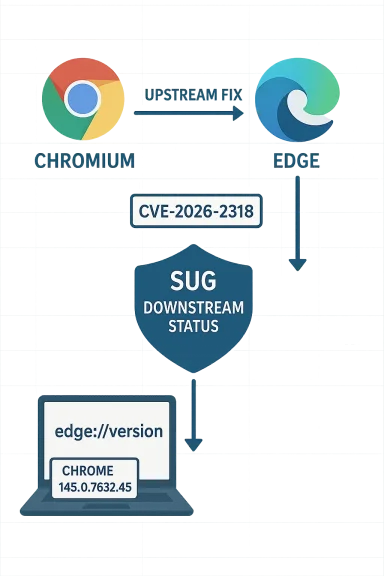
Chromium is an open‑source browser engine maintained by Google and used by many downstream browsers — most notably Google Chrome and Microsoft Edge (the Chromium‑based Edge). When a security defect is discovered inside Chromium, the Chromium project assigns a CVE identifier, produces an upstream fix, and publishes release notes describing which Chrome/Chromium builds contain the remediation. That upstream activity is the starting point; downstream vendors must then ingest, integrate, test, and ship the changed Chromium code inside their own product builds before their products are safe. The Security Update Guide documents that downstream status for Microsoft products, including Edge, so enterprise admins don’t have to infer it by correlating Chrome releelease cycles. (chromereleases.googleblog.com)This dynamic is exactly what you’re seeing with CVE‑2026‑2318: Chromium itself documents the issue and the fixed Chromium release (Chrome 145.0.7632.45 and later), and Microsoft’s SUG lists the same CVE to tell Edge users whether their Edge build includes the fix. The SUG entry is therefore an operational statement (“Edge is vulnerable until version X or build Y is shipped”), not an admission that Microsoft introduced the bug. (nvd.nist.gov) (chromereleases.googleblog.com)
What CVE‑2026‑2318 actually is
Technical summary
- Vulnerability: User interface misrepresentation / UI spoofing in the Picture‑in‑Picture (PiP) implementation.
- Affected upstream baseline: Google Chrome prior to 145.0.7632.45.
- Impact: An attacker who can convince a user to perform certain UI gestures while viewing a crafted HTML page can cause clicks to hit occluded download bubble controls, leading to spoofing or unintended actions — effectively a UI‑level integrity loss. Chromium classification is Medium severity. (nvd.nist.gov)
Where the fix lives upstream
Google shipped the remediation in the Chrome 145 stable promotion. The Chrome team’s Stable Channel update notes explicitly list CVE‑2026‑2318 and identify the fixed desktop builds (145.0.7632.45 / .46), which is the canonical upstream record of the remediation boundary. Independent vulnerability trackers (NVD, Snyk, CVE Details and others) mirror that upstream boundary and the brief technical description. Cross‑referencing these independent sources is how downstream vendors and security teams confirm the exact fixed revision to target during ingestion and testing. (chromereleases.googleblog.com)Why Microsoft lists Chromium CVEs in the Security Update Guide
The upstream → downstream lifecycle explained
- Chromium receives a report and is assigned a CVE.
- Chromium developers implement a fix and promote it into Chrome stable, documenting the fixed Chrome revision.
- Downstream vendors (Microsoft Edge among them) pull Chromium source code, integrate the upstream commit(s) into their own build pipelines, run product‑level tests (Edge adds features and platform integrations beyond raw Chromium), and then ship a new Edge update with the fix.
- Microsoft records the CVE in SUG and marks the Edge builds that include the upstream fix so customers can see wtallations are protected.
Why this matters to enterprises
- Authoritative downstream status: Enterprises need to know whether their vendor’s software has shipped the fix. Chrome’s upstream fix does not immediately mean Edge is fship the ingested fix in a tested Edge build first.
- Audit and compliance: SUG provides an auditable trail showing when Microsoft’s build reached a patched state for that CVE.
- Patch orchestration: Security operations teams rely on SUG entries to decide whether an Edge update is required to remediate a vulnerability across their fleet.
How to check whether your browser is protected (step‑by‑step)
Below are reliable, platform‑independent methods to see the exact browser version and the underlying Chromium revision so you can compare it with the fixed upstream revision (Chrome 145.0.7632.45) and with SUG/Edge guidance.Microsoft Edge (desktop: Windows / macOS / Linux)
- Fastest method: type edge://version in the address bar and press Enter. That page shows:
- The Edge application version
- The Chromium base revision used by that Edge build
- The executable path and command‑line
- This is copy‑friendly and the recommended quick check.
- Menu method: click the three dots (Settings and more) → Help and feedback → About Microsoft Edge. This page shows the Edge version and triggers an update check. If an update is pending, Edge will ompt you to relaunch.
- For advanced inventories: enterprise management tools (SCCM/Intune, software inventory agents, endpoint management platforms) can report the Edge version string at scale. On Windows, scriptable approaches include querying package metadata or reading MSI/registry installer entries, although details vary by deployment type. Use these for fleet audits.
Google Chrome (desktop)
- Type chrome://version or chrome://settings/help in the address bar. chrome://version shows the Chrome version and Chromium base build. Use this to confirm if your Chrome is at or above the fixed build 145.0.7632.45. (chromereleases.googleblog.com)
Mobile (Android / iOS)
- Edge for Android/iOS: open the Edge menu → Settings → About this app (or About Microsoft Edge on iOS). The app About screen shows the app version; Android users can also check the Play Store listing.
- Chrome for Android/iOS: Settings → About Chrome, or check the Play Store / App Store version history. Note: Chromium engine details may differ on iOS because Apple restricts browser engines; many browsers on iOS are WebKit‑based rather than Chromium. Verify platform specifics carefully.
Quick verification checklist (recommended)
- Open edge://version or chrome://version.
- Copy the full version string (e.g., “Microsoft Edge 145.x.x.x — Chromium 145.0.7632.45”).
- Compare the Chromium/Chrome version string against the fixed revision published upstream (Chrome 145.0.7632.45 is the upstream fix for CVE‑2026‑2318).
- If your browser’s Chromium revision is older than the fixed build, update immediately. If it, the browser should be protected, subject to vendor confirmation (i.e., confirm via SUG for Edge, or Chrome Releases for Chrome). (nvd.nist.gov)
Mapping Chromium fixes to Edge releases — practical notes and caveats
- There is no instantaneous parity. Chromium upstream publishes a fix in Chrome, but every downstream ship (Edge, Brave, Opera, Vivaldi, etc.) has its own cadence. Microsoft must ingest the Chromium patch, run Edge‑specific tests and integrations, and then ship an updated Edge build. The time le release and the downstream Edge build that contains that fix varies. SUG documents that downstream state so you can see exactly which Edge build includes the upstream remediation.
- Edge shows both an Edge version and the Chromium version. The Edge About / edge://version views list the Edge application version and the underlying Chromium revision. Use both when mapping fixes: the Chromium revision reveals whether the upstream boundary was included.
- Enterprise rollouts add complexity. If your organization controls updates via WSUS/SCCM/Intune, the Edge version visible on individual machines may lag the Microsoft release. Combine SUG status checks with your update management reporting to determine exposure windows.
What to do if you find a vulnerable version
- Open your browser and check edge://version or chrome://version to capture the full version string.
- Confirm the upstream fixed Chromium revision (Chrome 145.0.7632.45 for CVE‑2026‑2318) from vendor release notes and NVD.
- Compare — if your Chromium revision is older, update the browser immediately via About → update, or via your organizati system.
- For enterprise fleets, confirm the update is available and scheduled in your management console; document the SUG entry and your taudit purposes. (chromereleases.googleblog.com)
Critical analysis: strengths, risks, and practical implications
Strengths of Microsoft including Chromium CVEs in SUG
- Clarity for enterprise operators. SUG removes guesswork about whether tells you whether the Edge build you run includes the upstream fix.
- Auditability and compliance. SUG entries provide a vendor‑specific timeline that can be used in compliance reports and patch evidence.
- Centralization of downstream status. Enterprises that use Microsoft products have a single authoritative place to lo status of Chromium CVEs affecting Edge.
Risks and sources of confusion
- User misinterpretation: Non‑technical users may assume that because Chrome has a fix, Edge is instantly fixed too. That is not the case; ingestion and shipping take time. Microsoft’s SUG entries attempt to address this by explicitly noting that the CVE was assigned to Chromium and that Edge is affected until Microsoft ships an ingestion build, but the nuance still trips up some readers.
- Noise in vulnerability feeds: When SUG lists upstream CVEs for third‑party components, the volume of entries grows and can generate alert fatigue for security operations teams if not filtered appropriately. Enterprises should tune their vulnerability and incident workflows to recognize upstream vs. vendor‑introduced defects.
- Timing mismatches across vendors: Organizations that rely on a mix of Chromium‑based browsers (Edge, Chrome, Brave, Vivaldi, etc.) must reconcile different vendor update cadences — a fix may be present in Chrome but not yet in Edge, and vice versa for vendor‑specific backports. SUG helps with Microsoft/Edge, but you still need to consult vendor advisories for other browsers. (chromereleases.googleblog.com)
Practical mitigation beyond immediate updates
- Least guards: For UI spoofing or PiP issues, encourage users to avoid interacting with untrusted pages that request unusual gestures, and harden endpoint controls that limit extension installs or unverified content execution. Although UX changes are not a replacement for a patch, reducing the attack surface helps. (This is a general mitigation principle; specifics depend on the reported exploitability and the vendor guidance.)
- Monitoring and detection: Use EDR and web‑proxy logs to look for unusual sequences of interactions or suspicious downloads that could indicate an attempt to exploit UI spoofing or other browser bugs.
- Staggered rollouts with telemetry: Enterprises with large fleets should stage updates and monitor telemetry for regressions before a broad push. Edge’s distribution via Microsoft update channels can be controlled centrally for this purpose.
Verification and cross‑referencing — how I validated the key claims
- The upstream fix and fixed revision (Chrome 145.0.7632.45 / .46) are confirmed by Google’s Chrome Releases notes that list CVE‑2026‑2318 explicitly in the Feb 10, 2026 stable promotion entry. That is the primary upstream source for the remediation boundary. (chromereleases.googleblog.com)
- The NVD entry for CVE‑2026‑2318 reproduces the Chromium description and lists the affected Chrome baseline (versions prior to 145.0.7632.45). NVD also records the date of publication and cross‑references the Chrome Release Notes. Using both the vendor release notes and a canonical vulnerability aggregator (NVD) gives the two independent confirmations recommended for enterprise decision‑making. (nvd.nist.gov)
- Microsoft’s Security Update Guide contains the downstream entry for CVE‑2026‑2318 to indicate whether Microsoft Edge has shipped a build that includes the Chromium remediation. The SUG entry is how Microsoft communicates downstream status for Edge customers; that is what generates the SUG listing you asked about. Because MSRC pages often require script rendering to view interactive details, you should view SUG entries from a browser or via Microsoft’s machine‑readable API if you automate checks. (msrc.microsoft.com)
- Practical verification steps for end users (edge://version and About) are documented in Microsoft support and tested UX flows; these are the methods you shou exact running version and Chromium revision on a given machine.
Short operational checklist for security teams (concise)
- Check SUG for CVE‑2026‑2318 to see Microsoft’s Edge remediation status. (msrc.microsoft.com)
- On representative endpoints, open edge://version and capture the Chromium revision.
- Compare to upstream fixed revision Chrome 145.0.7632.45 (.45/.46). If older, schedule update remediation now. (chromereleases.googleblog.com)
- For fleets, confirm update availability in your management console and document the SUG build mapping for audit.
Closing assessment
Listing Chromium CVEs like CVE‑2026‑2318 in Microsoft’s Security Update Guide is a practical, enterprise‑oriented design choice: it provides downstream assurance and a single place where Microsoft customers can confirm whether Edge has incorporated upstream Chromium fixes. That helps avoid mistaken assumptions (for example, “Chrome patched it, so Edge must be safe”) and supports compliance and patch orchestration. However, it also introduces the need for clear communication to prevent confusion between upstream remediation (Chrome/Chromium) and downstream shipping (Microsoft Edge). Security teams should treat SUG entries as the authoritative downstream status for Microsoft products, cross‑check upstream release notes (Chrome Releases) for the Chromium boundary, and verify installed Chromium revisions directly via edge://version or chrome://version.If you want a short, copy‑ready checklist to share with end users or administrators within your organization, use the operational checklist above and attach the current SUG entry for CVE‑2026‑2318 together with the sample output from edge://version for an example of a patched vs. unpatched manifest. That combination — SUG + edge://version snapshot + upstream Chrome release note — is precisely the evidence security teams need to demonstrate remediation of Chromium‑origin CVEs inside Microsoft Edge.
Source: MSRC Security Update Guide - Microsoft Security Response Center
