

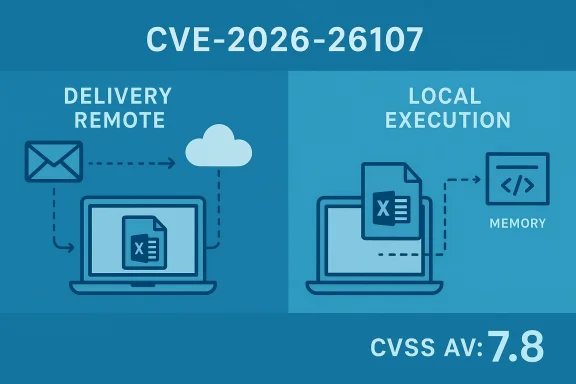
Microsoft’s advisory for CVE-2026-26107 is labeled a “Microsoft Excel Remote Code Execution Vulnerability,” yet the published CVSS vector for the same issue is CVSS:3.1/AV:L/... (Attack Vector: Local). That apparent mismatch—“Remote” in the advisory headline vs. AV:L (Local) in the CVSS vector—causes a lot of understandable confusion among defenders. The short, practical answer is this: the CVE title describes what an attacker can achieve and where they can start (they can be remote), while the CVSS Attack Vector describes where the vulnerable code must run when the exploit triggers (it runs locally inside Excel). Both statements are technically accurate, but they answer different operational questions and therefore serve different audiences. om]
Microsoft released a March 10, 2026 advisory that includes CVE-2026-26107 among several Excel-related security fixes. The CVE description notes a use-after-free weakness in Microsoft Excel that can allow an attacker to execute code locally on the affected host when a crafted spreadsheet is opened, with a CVSS v3.1 base score of 7.8 and vector including AV:L. Microsoft’s public advisory language, however, frames the vulnerability class as “Remote Code Execution,” which is the phrasing that typically appears in the Security Update Guide and in downstream vendor summaries.
This pattern—vendor advisory titles using the phrase “Remote Code Execution” while the technical CVSS Attack Vector is Local—has recurred frequently for Office/Excel/Word issues. It reflects a standard industry shorthand: defenders need to know whether remote adversaries can deliver a weaponized document and cause code to run on victims, even when the exploit itself executes inside a local process onphrase “Remote Code Execution” in advisories therefore emphasizes the attacker origin and worst-case impact (an external adversary causing arbitrary code to run on an endpoint), while CVSS’s AV metric remains narrowly focused on the exploit mechanics (the execution context of the vulnerable code).
Source: MSRC Security Update Guide - Microsoft Security Response Center
 Background / Overview
Microsoft released a March 10, 2026 advisory that includes CVE-2026-26107 among several Excel-related security fixes. The CVE description notes a use-after-free weakness in Microsoft Excel that can allow an attacker to execute code locally on the affected host when a crafted spreadsheet is opened, with a CVSS v3.1 base score of 7.8 and vector including AV:L. Microsoft’s public advisory language, however, frames the vulnerability class as “Remote Code Execution,” which is the phrasing that typically appears in the Security Update Guide and in downstream vendor summaries.This pattern—vendor advisory titles using the phrase “Remote Code Execution” while the technical CVSS Attack Vector is Local—has recurred frequently for Office/Excel/Word issues. It reflects a standard industry shorthand: defenders need to know whether remote adversaries can deliver a weaponized document and cause code to run on victims, even when the exploit itself executes inside a local process onphrase “Remote Code Execution” in advisories therefore emphasizes the attacker origin and worst-case impact (an external adversary causing arbitrary code to run on an endpoint), while CVSS’s AV metric remains narrowly focused on the exploit mechanics (the execution context of the vulnerable code).
What the words mean — precise definitions
What Microsoft’s “Remote Code Execution” headline is telling you
- “Remote” in this context means the attacker can deliver the exploit from off-host: via email attachments, file shares, cloud storage links, or other transport mechanisms where the attacker and victim are not on the same machine.
- “Code execution” signals the impact: arbitrary code may run on the victim’s machine, usually with the privileges of the process that parses the file (in Excel’s case, the user’s session).
- The headline communicates operational risk quickly: an off-host adversary can cause a high-impact outcome on a victim endpoint. This is a high-level, action-oriented communication directed at sysadmins, patch managers, and security teams.
What CVSS Attack Vector (AV) = Local (AV:L) is telling you
- AV:L (Local) means the vulnerable code is not directly reachable over a network interface and the attacker must cause a local process on the target to parse attacker-controlled input for the vulnerability to be triggered.
- In document-parsing victims (Office apps), that local code is typically the application process that opens or previews the file. The exploit trigger therefore happens on the local host when Excel parses the crafted spreadsheet.
- CVSS AV is a deliberately narrow, mechanistic metric used for scoring; it is not intended to be a user-facing narrative of operational delivery vectors.
How can something be “remote” and “local” at the same time?
This wording reflects two different steps in the exploit chain:- Delivery: a remote attacker transmits a malicious file (email, link, shared folder, collaboration platform).
- Trigger: the *victim’s local machinhat file, causing Excel’s local parser to execute the code path that contains the vulnerability and, in the worst case, execute attacker-supplied payload locally.
Real-world scenarios: how an attacker would use CVE-2026-26107
The typical exploitation sequence for an Excel use-after-free flaw looks like this:- An attacker crafts a malicious workbook that includes the memory layout and payload designed to corrupt Excel’s in-memory structures.
- The attacker sends the workbook via email, posts it on a shared site, or otherwise convinces a target to download/open it.
- The victim opens the file in Excel (or the file is rendered by a component that invokes Excel’s parser, such as certain server-side preview components or local preview panes).
- Excel’s local parser hits the use-after-free condition, control-flow hijacking occurs, and the attacker’s shellcode or next-stage payload executes in the context of Excel on the victim machine.
- The attacker does not need prior authentication to the victim’s host; they only need to get the victim to open or preview the malicious file. That is why vendors warn about RCE even when the exploit mechanics are AV:L.
- Preview panes, file rendering services, and any automated parser that consumes untrusted files expand the attack surface because they shift the local-execution trigger into contexts the user may not directly control. Many vendors explicitly call out whether preview panes are valid attack vectors in their advisories—this matters for triage.
Why this distinction matters for defenders and risk managers
The difference between the advisory headline and CVSS AV has concrete consequences for how organizations prioritize and mitigate:- Risk perception: Business owners who read “Remote Code Execution” will reasonably conclude that a remote adversary can compromise endpoints; that prioritizes patching, but may cause alarm if not understood.
- Triage accuracy: Vulnerability management teams need the CVSS vector and the advisory narrative to decide how an exploit could reach users (email, attachments, cloud shares, preview pane, etc.) and therefore which coection and telemetry: Because the trigger happens locally, endpoint telemetry and EDR policies are essential to detect suspicious file parsing and memory-corruption behaviors on hosts, not solely network-based IDS/IPS alerts.
- Mitigations: Controls like Protected View, application whitelisting, attachment filtering, disabling automatic previews, and strict macro policies materially reduce risk because they interrupt the delivery → trigger chain.
Technical validation: what the published records show
- Microsoft’s update and KB notices for the March 10, 2026 release list CVE-2026-26107 as an Excel Remote Code Execution vulnerability while the CVSS vector assigned and published with the advisory includes AV:L (Local). The KB articles for Excel and Office Online Server list CVE-2026-26107 among patched Excel vulnerabilities.
- Independent CVE trackers and vulnerability aggregators mirror this combination: short descriptions say the issue “allows an unauthorized attacker to execute code locally,” while the CVSS shows AV:L and a base score of 7.8. That confirms the dual messaging is consistent across vendor and aggregator records.
- The CVSS v3.1 specification and user guide explicitly define Attack Vector “Local” as meaning the vulnerable component is not exposed over the network stack and exploitation requires local code execution (for example through file parsing by a locally running process). This is consistent with the Excel parsing model.
Practical mitigations and detection guidance for CVE-2026-26107
When a vulnerability is “remote delivery, local execution,” defensive controls should aim to break either step of the chain. Recommended actions:- Patch immediately: apply the Microsoft security update for all affected Excel/Office builds as the primary mitigation. Patching removes the vulnerability regardless of delivery method. (Priority #1).
- Harden ingestion points:
- Disable automatic file previews in email clients and file-share UIs where possible.
- Configure mail gateways to block or sandbox suspicious Excel attachments.
- Enforce Protected View for files downloaded from the internet and for files originating from potentially unsafe locations.
- Reduce user exposure:
- Implement attachment stripping/sandboxing for unknown senders.
- Apply strict macro and ActiveX controls; macros are a common secondary vector even when the initial vulnerability is memory corruption.
- Endpoint controls:
- Ensure EDR/endpoint telemetry is tuned to detect unusual child-process creation, memory-corruption indicators, or Excel spawning network activity.
- Application allowlisting (execution control) can prevent post-exploitation payloads from running even if Excel is exploited.
- Network and server-side:
- For organizations using server-side document previews, validate whether the vendor component performs parsing that might invoke the same vulnerable code paths; apply server-side patches and consider disabling server-side previewing of Excel documents from untrusted sources until patched.
- User education and access controls:
- Train users to be wary of unsolicited attachments and links.
- Limit the share of administrative privileges: if Excel process compromise occurs under a non-admin user, lateral movement can be reduced by proper network segmentation and least privilege.
Detection and triage playbook (short checklist)
- Verify: inventory all Excel/Office versions across the estate and map which systems receive the March 10, 2026 update.
- Patch: apply vendor updates; if CM tools are used, prioritize high-value endpoints and user groups with elevated exposure (executives, finance, endpoint managers).
- Harden: disable or sandbox file previews, enforce Protected View, and tighten mail gateway controls for attachments.
- Monitor: deploy EDR rules for anomalous Excel behavior (process hollowing, abnormal parent/child relationships, in-memory code execution patterns).
- Hunt: search for indicat) around the advisory publication window—suspicious Excel document attachments and unusual post-open behaviors.
- Communicate: explain to stakeholders the difference between the “RCE” headline and “AV:L” so patch supervisors and business owners prioritize correctly without misinterpreting the technical constraint.
Critical analysis: strengths, weaknesses, and communication risks
Strengths of Microsoft’s advisory tone
- The high-level headline “Remote Code Execution” does a good job of signaling urgency to non-technical decision-makers: an external attacker can cause code to run on endpoints, and that is a clear call to action for patching and containment. It aligns with the primary risk organizations must act on—external adversaries delivering malicious payloads. (support.microsoft.com)
Where the messaging introduces risk
- The mash-up of impact-language (RCE) and technical scoring (AV:L) creates ambiguity. Vulnerability intake teams that rely only on CVE headlines may either over- or under-prioritize. For example, an organization might deprioritize a CVSS AV:L item incorrectly because they interpret “Local” as requiring the attacker to have accounts or physical access—whereas many Excel AV:L cases only require user interaction (opening a file) after remote delivery.
- Conversely, security teams that interpret “Remote Code Execution” to mean network-exploitable (AV:N) may apply emergency network-level mitigations while failing to harden client-side preview and ingestion points—missing the true attack path entirely.
Evaluation of CVSS usage
- CVSS is fit for purpose when used as intended: to produce a reproducible, mechanistic severity score. The problem is not CVSS itself but a lack of contextual explanation accompanying the score. A CVSS vector without a short, plain-language "exploit path" note invites misinterpretation. The best practice is to use both: CVSS for consistent scoring and an advisory narrative describing likely delivery paths (email, preview pane, etc.).
Recommended improvement to vendor communication
- Vendors should include a one-line “exploit path” note in every advisory that pairs the CVSS vector with a plain-language delivery description. Example: “AV:L (Local) — entry point: remote delivery of a crafted Excel workbook via email or shared drive; exploit triggers when the file is opened or previewed locally.” This minimal addition would dramatically reduce misinterpretation and improve triage speed.
Policy and operational implications for enterprise defenders
- Vulnerability prioritization programs must map CVE records to exploitation patterns and ingestion points in the enterprise environment. That mapping, not just the numeric score, should drive patch waves.
- Email filtering and attachment sandboxing remain first-line defenses for Office-related RCEs even when CVSS reports AV:L; organizations should therefore fund and test sandbox capability and attachment inspection.
- Asset owners must understand that "AV:L" does not guarantee safety from remote attackers—user interaction is the gap attackers exploit. Programs that reduce risky user behaviors (sandboxed mail clients, strict attachment policies) materially reduce enterprise exposure.
- Monitoring and EDR coverage for document-parsing processes (Excel, Word) should be treace detection layer because exploit triggers occur locally and can be seen by host agents.
Caveats and unverifiable assertions
- Public advisories often withhold exploitability details (e.g., whether the Preview Pane is a viable vector) until patches are widely distributed. If an advisory does not explicitly name preview panes, do not assume either way—verify by reading the full vendor advisory and KB notes for the specific CVE. If vendor text is ambiguous, treat preview functionality as a potential vector until proven otherwise.
- Some secondary claims circulating in vendor summaries or aggregator pages (for example, exact affected builds or precise POC availability) may lag or differ; always confirm product- and build-specific applicability in your CMDB and Microsoft’s update notes before relying on them for scope decisions.
Final recommendations (short, actionable)
- Patch all affected Office/Excel builds immediately and verify patch deployment using centralized inventory tools. Patch first.
- While patching proceeds, block or sandbox Excel attachments from untrusted senders and disable automatic previewing wherever feasible.
- Enforce Protected View and strict macro rules, and apply application allowlisting to constrain post-exploitation activity.
- Tune EDR for suspicious behaviors in Excel processes and hunt for indicators around the advisory publication timeframe.
- Update your triage playbook and internal advisories to explain the difference between “RCE” in advisory headlines and CVSS AV:L so that business risk decisions and remediation prioritization are aligned with the real exploit path.
Conclusion
CVE-2026-26107 is a concrete example of the industry shorthand that generates confusion: Microsoft’s advisory title uses the widely-understood phrase “Remote Code Execution” to warn that an external attacker can cause arbitrary code to run on target endpoints, while the CVSS vector AV:L correctly and narrowly records that the vulnerable code executes locally on the victim machine when the malicious file is parsed. The resolution is operational: treat the advisory headline as an urgent, high-level call to action and the CVSS vector as a technical aid for precise mitigation choices. Patch urgently, harden ingestion points and preview paths, tune endpoint detection, and make sure your vulnerability triage process uses both pieces of information together to arrive at the right risk-based decisions.Source: MSRC Security Update Guide - Microsoft Security Response Center
