

Microsoft’s advisory for CVE-2026-26109 calls it a “Microsoft Excel Remote Code Execution Vulnerability,” yet the published CVSS vector lists the Attack Vector as Local (AV:L) — an apparent contradiction that has confused many defenders. The short, practical answer is this: the CVE title is describing where the attacker can be located and what they can accomplish (an off‑host adversary can cause code to run on a victim), while the CVSS Attack Vector documents where the vulnerable code executes when the exploit triggers (inside a local process on the victim endpoint). Both statements are accurate and complementary; reading them together gives the full operational picture for triage and mitigation.
Microsoft and many vendors routinely label document parsing flaws in Office products with the phrase Remote Code Execution (RCE) because it succinctly communicates the threat: a remote attacker can, under realistic conditions, cause arbitrary code to run on a target system by delivering a crafted file or payload. That phrasing is deliberately operational — meant to press urgency for patching and detection. At the same time, CVSS v3.x provides a mechanistic scoring system where the Attack Vector (AV) metric describes the technical locality of the exploit trigger (Network, Adjacent, Local, or Physical). For many Office parsing bugs the AV is Local because the vulnerable code executes inside the local Office process when a user opens or previews the malicious file, even though the attacker delivered that file from a remote location.
 ). AV:L indicates that the exploit requires the attacker to have local execution capability on the vulnerable host — in practice, the vulnerable code must be invoked by a process running on the target system. For document‑parsing bugs in desktop applications, that invocation usually occurs when the user opens or previews a crafted document in the local application. The CVSS guidance explicitly models these cases as Local, even when the malicious file arrived from the internet.
CVE‑2026‑26109 is a timely reminder that vulnerability language and scoring serve different but complementary purposes. Recognize their differences, integrate both into your triage process, and treat document parsing RCEs with appropriate urgency: attackers need only one lucky delivery to turn a local code execution trigger into a widespread compromise.
Source: MSRC Security Update Guide - Microsoft Security Response Center
 Background
Microsoft and many vendors routinely label document parsing flaws in Office products with the phrase Remote Code Execution (RCE) because it succinctly communicates the threat: a remote attacker can, under realistic conditions, cause arbitrary code to run on a target system by delivering a crafted file or payload. That phrasing is deliberately operational — meant to press urgency for patching and detection. At the same time, CVSS v3.x provides a mechanistic scoring system where the Attack Vector (AV) metric describes the technical locality of the exploit trigger (Network, Adjacent, Local, or Physical). For many Office parsing bugs the AV is Local because the vulnerable code executes inside the local Office process when a user opens or previews the malicious file, even though the attacker delivered that file from a remote location.Why the mismatch exists: names, signals, and audiences
Two different questions, two different answers
- CVE titles and vendor advisories answer: What is the impact and from where can the attacker act? — they prioritize clarity and operational urgency.
- CVSS vectors answer: Where and how does the vulnerable code need to run for the exploit to succeed? — they prioritize consistent, machine‑readable scoring of technical exploit mechanics.
Historical and practical reasons
Vendors use “remote” in short advisories because most defenders need to know whether an off‑host adversary can deliver the exploit (e.g., via email attachments, web downloads, or file shares). Historically, document parsing vulnerabilities are delivered remotely (phishing attachments, malicious downloads) yet exploited locally when the victim’s application processes the file. CVSS authors intentionally separate the delivery channel from the execution context to avoid conflating two different technical properties. The AV:L classification for document parsing bugs reflects that separation.Technical primer: what CVSS AV:L actually means
The CVSS Attack Vector metric, explained
CVSS assigns Attack Vector values as one of Network (AV:N), Adjacent (AV:A), Local (AV:L), or Physical (AV). AV:L indicates that the exploit requires the attacker to have local execution capability on the vulnerable host — in practice, the vulnerable code must be invoked by a process running on the target system. For document‑parsing bugs in desktop applications, that invocation usually occurs when the user opens or previews a crafted document in the local application. The CVSS guidance explicitly models these cases as Local, even when the malicious file arrived from the internet.Why AV:L makes sense for Office parsers
- The memory corruption or parsing flaw resides in the application process (for example, the Excel process) and is executed within that process’s memory space.
- Even if the file was delivered over the network, the exploit chain requires the local process to parse the file — that local parsing is the trigger.
- CVSS is designed to measure where the vulnerable code executes, not how the attacker gets the exploit to the victim, so the proper classification is AV:L.
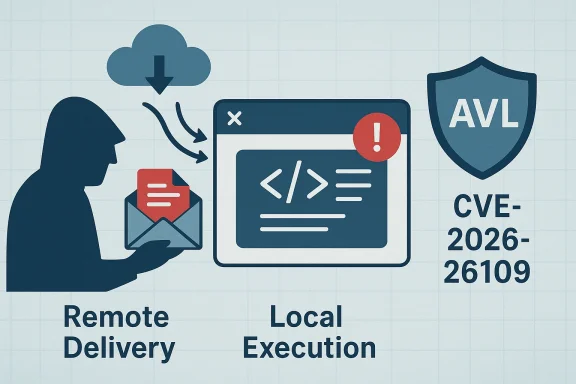
Real‑world attack model: “remote delivery, local execution”
Typical exploitation flow for Excel RCEs
- Attacker crafts a malicious Excel workbook that contains malformed structure or data designed to trigger a memory‑safety bug.
- Attacker delivers the workbook to the target via remote channels: email (phishing/spearphishing), file sharing, or drive‑by downloads.
- Victim opens or previews the workbook in Microsoft Excel (or an automated parsing service), which causes the Excel process to parse and render the workbook.
- The local parsing code triggers the vulnerability and, if successful, leads to arbitrary code execution in the context of the Excel process — often at the privileges of the logged‑in user.
- The attacker then performs follow‑on actions: persistence, credential theft, lateral movement, or data exfiltration.
Important nuance — server‑side parsing exceptions
There are scenarios where the parsing step occurs on a network‑facing server rather than the endpoint (for example, mail gateways that render previews, online document viewers, or cloud services that index files). In those cases the execution context is network‑exposed and the CVSS Attack Vector could be classified differently (for example, AV:N), because the vulnerable code runs in a network‑accessible process. Organizations running services that parse user content must therefore treat these servers as high‑value targets for immediate patching and hardening.Why vendors still use “Remote Code Execution” in short advisories
Clarity and triage speed
Short advisories and CVE titles are designed to convey operational urgency quickly. Saying “Remote Code Execution” tells a security team in plain language: a remote actor can cause code to execute on a target. This phrasing maps intuitively to common defender workflows (patch prioritization, detection rules, blocking attachments) even if the exploit technically executes locally. In practice, defenders care about both delivery channels (email, web) and where to detect or block the malicious trigger (endpoint process, server).Avoiding under‑triage
Labeling an Office bug as “Local Code Execution” in a headline would risk under‑triage: many organizations might deprioritize a local‑vector vulnerability even though the initial access path is remote (and therefore broadly exploitable at scale). The “RCE” label prompts defenders to think holistically: attackers can reach victims remotely and then cause code to run locally.Operational implications — what this means for defenders
Immediate triage checklist
- Treat CVE‑class “RCE” advisories seriously even if CVSS AV:L is listed. The practical risk is that remote delivery channels make exposure widespread.
- Inventory endpoints that run the affected versions of Microsoft Excel and prioritize patching those with high exposure (heavy email users, exposed VPN clients, shared workstations).
- Verify whether your environment has server‑side parsers or previewers that could execute the vulnerable parsing logic in network‑accessible contexts; those systems may require even higher priority.
Detection and containment controls
- Enforce strict email attachment controls: block or quarantine suspicious Excel attachments, and apply content disarm/replace for high‑risk file types.
- Harden endpoint controls: enable Protected View, block macros by default, enforce application control (allowlists), and ensure endpoint detection tools have up‑to‑date signatures and behavior rules.
- Monitor for suspicious child processes and post‑exploit behaviors on endpoints where Excel runs, because successful exploitation typically spawns follow‑on activity.
Mitigations and best practices
Short‑term (emergency) actions
- Apply the vendor patch immediately when available.
- If a patch is not yet available, implement compensating controls: block the parsing of untrusted documents at email gateways, disable preview rendering, and increase user awareness about attachments from unknown senders.
- Use group policy or MDM controls to enforce Protected View and to block automatic content execution in Office applications.
Medium‑term hardening
- Move to least‑privilege user accounts so that an exploited Office process runs with minimal rights.
- Deploy application allowlisting so only trusted binaries may execute and child processes spawned by Office are constrained.
- Implement endpoint telemetry collection and EDR playbooks that look for the common exploitation sequence and post‑exploitation TTPs (persistence mechanisms, credential dumping, unusual network connections).
Longer‑term resilience
- Where feasible, offload risky parsing to isolated service sandboxes that are tightly monitored and have minimal access to sensitive resources.
- Adopt a file‑handling policy that restricts which file types users may receive via email or collaboration tools, combined with in‑line scanning and sandbox detonation for high‑risk files.
How to interpret CVSS and vendor messaging together
Practical reading guide for security teams
- Read the CVE/advisory headline for the operational impact (RCE, privilege escalation, information disclosure).
- Read the CVSS vector to understand the technical exploitation requirements (AV:N/AV:L/AV) and whether the vulnerable code runs in a network‑visible process.
- Cross‑reference your environment to the delivery channels you expose (email gateways, cloud file services) and the execution context (endpoint Excel process, server preview service).
- Prioritize remediation for assets that combine high impact, broad exposure, and critical business function.
Case study: realistic scenarios that illustrate the distinction
Scenario A — Standard desktop exploitation
An attacker sends a phishing email with a crafted Excel workbook to hundreds of users. Several users open the attachment in their local Excel client and the parsing flaw triggers code execution in the Excel process. Because the exploit requires local parsing, CVSS shows AV:L, but the initial access was remote, so vendor advisories label it RCE. Impact: broad initial access, local code execution, high risk of lateral movement.Scenario B — Mail gateway preview exposes vulnerability
A corporate mail gateway is configured to generate document previews (for example, for webmail). If the gateway engine uses the same vulnerable parser and processes the malicious workbook when generating a preview, the vulnerable code runs in a network‑exposed service. The correct CVSS classification for that particular environment would shift toward network exposure (AV:N), raising the urgency even further. This scenario underscores why defenders must inventory where parsing occurs in their estate.Strengths and weaknesses of the current messaging approach
Strengths
- Vendor headlines that include “Remote Code Execution” cut through noise and trigger rapid operational attention.
- CVSS separates delivery and execution contexts, enabling consistent, comparable scoring across vastly different classes of vulnerabilities.
- The combination of headline + CVSS gives both a rapid call to action and a technical basis for triage and scoring.
Risks and potential for confusion
- Short headlines can be misread as inconsistent with CVSS, leading to misplaced trust in the lower‑level technical details or misprioritization.
- Organizations that treat CVSS AV as the only determinant of exploitability may under‑prioritize widely deliverable document‑based RCEs.
- Automated tooling that parses only the CVSS vector and ignores advisory text may produce misleading risk assessments.
Practical recommendations for Windows and Office administrators
- Patch quickly: apply Microsoft’s updates for the affected Excel builds as soon as they are released.
- Reduce exposure: block unsolicited Excel attachments at perimeter gateways and disable automatic preview/rendering of attached documents where feasible.
- Harden endpoints: enforce Protected View, macro restrictions, application allowlisting, and least privilege.
- Monitor aggressively: instrument endpoints and server logs for suspicious process activity and anomalous network connections after patch deployment.
- Inventory parsing points: map which services perform document parsing in your estate (mail servers, DLP appliances, cloud sync services) and treat those servers as high‑priority targets for hardening and patching.
When to question the vendor’s wording — and when not to
If an advisory claims “Remote Code Execution” but the CVSS AV is Local, you should not assume the vendor made an error. Instead:- Confirm how the vulnerable component is executed in your environment (local Excel client vs. a server‑side parser).
- Review the advisory and any vendor technical notes for additional context about delivery vectors and required user interaction.
- Assume worst case when delivery is feasible at scale (for example, phishing) and patch/mitigate accordingly.
Closing analysis — how defenders should think about CVE‑2026‑26109
CVE‑2026‑26109’s dual messaging — an RCE headline paired with a CVSS AV:L — is an instance of a broader and recurring pattern in Office security: remote delivery, local execution. For operational defenders the takeaway is simple:- Don’t be misled by technical shorthand: an AV:L rating does not mean an issue is low risk if the delivery vector is remote and easily abused.
- Treat RCE‑class advisories as high priority — inventory, patch, and apply mitigations urgently.
- Pay particular attention to server‑side parsing in your environment; the same vulnerability can become far more dangerous when parsing is performed in network‑facing services.
CVE‑2026‑26109 is a timely reminder that vulnerability language and scoring serve different but complementary purposes. Recognize their differences, integrate both into your triage process, and treat document parsing RCEs with appropriate urgency: attackers need only one lucky delivery to turn a local code execution trigger into a widespread compromise.
Source: MSRC Security Update Guide - Microsoft Security Response Center
