

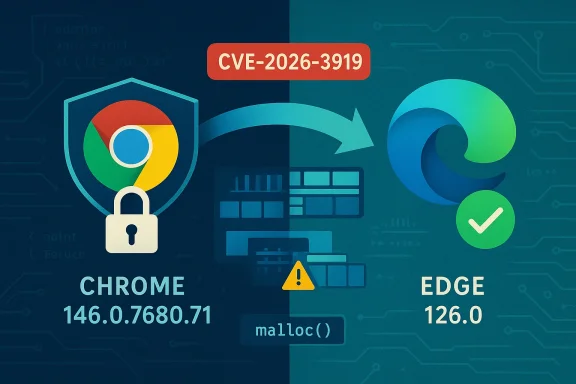
Chromium’s CVE‑2026‑3919 is a use‑after‑free vulnerability in the Extensions component that was addressed upstream in the Chromium project and distributed in Google Chrome’s stable update. Because Microsoft Edge (the modern Chromium‑based Edge) consumes Chromium’s open‑source engine, Microsoft documents these Chromium‑origin CVEs in its Security Update Guide to tell Edge customers when the upstream fix has been ingested and shipped in a downstream Edge build — in other words, to show when Edge is no longer vulnerable. Below I explain what CVE‑2026‑3919 actually is, why it appears in Microsoft’s Security Update Guide, exactly how to verify whether your browser is protected, and what to do if it isn’t. The article includes practical steps for both individual users and IT teams, plus a technical assessment of risk and recommended mitigations.
Chromium is an open‑source browser engine used by many browsers, including Google Chrome and Microsoft Edge. When Chromium developers patch a security flaw, Google publishes the Chrome stable update that contains the upstream fix. Downstream consumers — browser vendors such as Microsoft, Brave, Opera, and others — then need to ingest that upstream change, integrate and test it against their product variants, and ship a new build that contains the fix.
CVE‑2026‑3919 is a memory‑safety bug described as a use‑after‑free in Extensions. The upstream Chromium team fixed the defect in the Chrome 146 stable update (Chrome 146.0.7680.71 and sibling desktop builds). Because Microsoft Edge uses Chromium as its engine, Microsoft tracks that CVE in its Security Update Guide to record the ingestion status and to tell Edge customers definitively which Edge build contains the Chromium patch. The presence of the CVE in Microsoft’s guide does not mean Microsoft wrote the original fix — rather, it is the downstream signal that Edge has absorbed the Chromium update and is no longer vulnerable in the builds Microsoft lists as fixed.
Keep the following posture:
Source: MSRC Security Update Guide - Microsoft Security Response Center
 Background / Overview
Chromium is an open‑source browser engine used by many browsers, including Google Chrome and Microsoft Edge. When Chromium developers patch a security flaw, Google publishes the Chrome stable update that contains the upstream fix. Downstream consumers — browser vendors such as Microsoft, Brave, Opera, and others — then need to ingest that upstream change, integrate and test it against their product variants, and ship a new build that contains the fix.CVE‑2026‑3919 is a memory‑safety bug described as a use‑after‑free in Extensions. The upstream Chromium team fixed the defect in the Chrome 146 stable update (Chrome 146.0.7680.71 and sibling desktop builds). Because Microsoft Edge uses Chromium as its engine, Microsoft tracks that CVE in its Security Update Guide to record the ingestion status and to tell Edge customers definitively which Edge build contains the Chromium patch. The presence of the CVE in Microsoft’s guide does not mean Microsoft wrote the original fix — rather, it is the downstream signal that Edge has absorbed the Chromium update and is no longer vulnerable in the builds Microsoft lists as fixed.
What CVE‑2026‑3919 is — a technical summary
- The bug is a use‑after‑free in the Extensions subsystem of Chromium. Use‑after‑free means code continues to use memory after that memory has already been freed, which can lead to heap corruption.
- The reported exploitation vector for this class of bug: an attacker could trick a user into installing a malicious extension or otherwise cause the browser to process crafted content that interacts with extension code paths. A crafted HTML page combined with extension behavior can trigger the memory corruption.
- Memory corruptions in renderer or extension code can in practice be escalated to remote code execution if combined with additional vulnerabilities (sandbox escape, JIT vulnerabilities, or other memory bugs). Even when a single bug is described as “use‑after‑free” with limited scope, vendors treat it as high risk because of the history of chained browser exploits.
- The upstream Chromium patch that closed CVE‑2026‑3919 was included in Chrome 146.x stable updates. That Chrome build number is the canonical upstream “fixed in” version.
Why Microsoft lists this Chrome CVE in the Security Update Guide
Microsoft’s Security Update Guide (SUG) entries for Chromium‑origin CVEs serve three operational purposes:- Vendor‑of‑origin transparency. The SUG entry records that the CVE originated in Chromium/Chrome and identifies the upstream fixed build so administrators can cross‑reference the upstream advisory.
- Downstream ingestion status. Microsoft indicates whether and when Edge builds have ingested the Chromium fix. This is the authoritative downstream statement for Edge customers: when SUG shows the Edge build that contains the ingestion, Edge installations at or above that build are considered remediated.
- Operational guidance for administrators. Listing the CVE in the SUG allows IT teams to query and inventory their environments against Microsoft’s recorded fixed build number and prioritize patching waves.
How to see the browser version (simple, reliable steps)
The single most important step to verify whether you’re protected is to read the browser’s full version string and compare it to the published fixed build. Below are the quickest, most reliable ways to get the version on desktop browsers.Microsoft Edge (desktop — Windows, macOS)
- GUI method (recommended for most users):
- Open Microsoft Edge.
- Click the three‑dot menu (Settings and more) at the top‑right.
- Select Help and feedback → About Microsoft Edge.
- The About page will display the full Edge version string and automatically check for updates.
- Address‑bar shortcuts (fast):
- Type edge://settings/help and press Enter. This opens the About page and triggers an update check.
- Type edge://version for additional metadata (Chromium revision, command line, profile path).
- File properties or PowerShell (for automation or remote inventory):
- Check the executable on Windows:
- Path examples:
- C:\Program Files (x86)\Microsoft\Edge\Application\msedge.exe
- C:\Program Files\Microsoft\Edge\Application\msedge.exe
- PowerShell quick check (run as appropriate for local path):
(Get-Item "C:\Program Files (x86)\Microsoft\Edge\Application\msedge.exe").VersionInfo.ProductVersion - The returned string is the full product version (for example: 146.0.7680.71).
Google Chrome (desktop — Windows, macOS, Linux)
- GUI method:
- Open Chrome.
- Click the three‑dot menu → Help → About Google Chrome.
- The About page shows the version and checks for updates.
- Address‑bar shortcut:
- chrome://settings/help or chrome://version for more details.
- For automation:
- Check chrome.exe file version:
(Get-Item "C:\Program Files\Google\Chrome\Application\chrome.exe").VersionInfo.ProductVersion
Mobile devices
- On iOS / Android, open the app store page or check Settings → About / App info. Mobile WebView variants may be separately tracked so treat mobile installs as a distinct inventory item.
How to interpret the version string and decide if you’re safe
- The important comparison is whether your installed browser’s full version is equal to or greater than the fixed build number. If the fixed build is Chrome 146.0.7680.71, then:
- Any Chrome build numbered 146.0.7680.71 or higher is considered fixed by Google’s upstream statement.
- For Edge, you must use Microsoft’s mapping or SUG entry that lists the Edge build which ingested Chromium 146.x. Edge may show a different build string; what matters is Microsoft’s recorded Edge build number containing the ingestion.
- If your Edge version predates Microsoft’s listed fixed Edge build, the browser is still vulnerable until you update to the Edge build that contains the ingest.
Step‑by‑step: verify protection and remediate
For individual users (personal machines)
- Open Edge and go to About Microsoft Edge (edge://settings/help). Note the full version string and install any offered updates. Restart the browser.
- If you use Chrome, do the same in Chrome via About Google Chrome.
- Remove any extensions you do not recognize or trust. Malicious extension installation is the reported vector for this class of vulnerability.
- Enable automated updates so the browser receives fixes promptly.
For IT administrators and security teams (small business through enterprise)
- Inventory:
- Query endpoints to collect the version string for msedge.exe or chrome.exe using PowerShell or your management tool (SCCM, Intune, Jamf, etc.).
- Example PowerShell snippet to collect Edge version remotely (adapt to your environment):
- Get list of devices from inventory.
- Run a remote script to read ProductVersion from the msedge.exe path.
- Compare:
- Consult Microsoft’s Security Update Guide entry for CVE‑2026‑3919 to find the Edge build Microsoft lists as containing the Chromium ingestion.
- Mark devices with Edge versions older than that build as vulnerable.
- Prioritize patching:
- High‑risk cohorts first: domain admins, remote access engineers, helpdesk, systems with sensitive data.
- Use phased rollouts: test in a pilot pool, then push to production.
- Enforce extension controls (policy):
- Use Group Policy / Intune to restrict extension installation sources (trust only the official store, block sideloading).
- Whitelist allowed extensions and require enterprise signing where possible.
- Compensating controls if patching is delayed:
- Enforce web traffic filtering and URL allow‑lists for admins.
- Restrict browsing on priv‑level machines, segment high‑privilege endpoints, and monitor for anomalous renderer crashes.
- Validate:
- After deployment, confirm versions again and log compliance.
- Monitor vendor advisories and EDR/telemetry for suspicious activity.
Mitigations specific to extension‑based attack vectors
- Restrict extension installation (for managed fleets):
- Enforce extension installation policies that allow only approved extensions.
- Block extension installation from external sources and sideloading.
- Review and audit installed extensions:
- Remove any that request excessive permissions relative to their function.
- Use enterprise policies to force extension updates from trusted sources and to block developer mode for extensions.
- Educate users: warn that installing extensions from unknown sources carries risk and provide clear processes to request approved extensions.
Risk analysis — what makes this class of bug significant
- Extension attack surface. Extensions often have elevated privileges (access to tabs, host permissions, file access in some cases). A malicious or compromised extension can be a powerful foothold.
- Memory corruption severity. Use‑after‑free bugs can lead to arbitrary memory reads/writes when exploited. In browsers, memory bugs are historically a common part of exploit chains for sandbox escape and remote code execution.
- Downstream ingestion lag. Even when Chromium ships a fast upstream fix, there’s a downstream window while other vendors ingest and validate the fix. Attackers frequently weaponize this lag by targeting less‑maintained or delayed downstream builds.
- Supply‑chain amplification. Many third‑party products embed Chromium (embedded browsers, Electron apps, custom WebViews). Organizations must track these embedded variants because fixes applied to Chrome may not reach embedded instances automatically.
- User interaction requirement (but practical). The reported vector may require the user to install a malicious extension or visit crafted pages — actions attackers can meaningfully manipulate through social engineering, malvertising, or supply‑chain campaigns.
What was handled well — and where risk remains
What was handled well:- Rapid upstream patching: the Chromium team produced a stable update that addressed the underlying use‑after‑free quickly.
- Coordinated vendor communication: Google’s release notes and downstream vendor advisories provide the build identifier needed for cross‑checking.
- Public tracking: the CVE assignment and public release notes allow defenders to automate detection and remediation.
- The downstream ingestion window remains the primary operational risk. Enterprises that standardize on Edge must watch Microsoft’s release notes and Security Update Guide rather than assuming Chrome’s fix implies immediate Edge protection.
- Extension ecosystems are large and sometimes poorly curated; malicious or spyware extensions can persist and increase exposure even after engine patches are applied.
- Embedded builds (custom WebViews, Electron apps) are often forgotten in routine browser patch cycles and may remain vulnerable long after Chrome/Edge are fixed.
Practical checklist — what to do right now
- Individuals:
- Update Microsoft Edge and Google Chrome to their latest versions immediately and restart the browsers.
- Remove untrusted extensions.
- Consider temporarily disabling extension installation if you do not need them.
- Small IT teams:
- Run an inventory to list Edge/Chrome versions on all endpoints (PowerShell or MDM).
- Compare collected versions to the vendor fixed builds and prioritize updates.
- Tighten extension installation policies.
- Large enterprises / SOC:
- Use EDR and vulnerability management to find endpoints still running vulnerable builds.
- Fast‑track patching for high‑privilege groups.
- Apply compensating network controls (web filters, proxy restrictions) while rollouts finish.
- Audit embedded Chromium instances (Electron, custom browsers, kiosks) and patch or isolate them.
Confirming when Edge is no longer vulnerable — mapping the versions
- The canonical upstream reference is Chrome’s fixed build (e.g., Chrome 146.0.7680.71). Google’s Chrome release notes list the CVE and the Chrome build in which it was fixed.
- Microsoft’s Security Update Guide and Edge release notes are the authoritative downstream reference that show which Edge build contains the ingestion. Confirm that your Edge build number is equal to or greater than the build listed by Microsoft as containing the fix.
- If the Microsoft SUG shows the ingestion build, that is the operational signal: Edge installations at or above that build are remediated.
Final assessment and recommended posture
CVE‑2026‑3919 is a typical example of why organizations must treat browser engines and extensions as critical components in their attack surface. The fix upstream in Chromium and its fast public disclosure are positive; however, the real defensive work happens in downstream validation, ingestion, and rapid deployment to endpoints.Keep the following posture:
- Assume any upstream Chromium fix is a call to action for downstream vendors and your patching program.
- Maintain a robust inventory of browser versions (including embedded instances).
- Enforce extension controls in managed environments.
- Prioritize rapid deployment for high‑risk users and systems.
- Apply compensating network controls when immediate patching isn’t possible.
Source: MSRC Security Update Guide - Microsoft Security Response Center
