

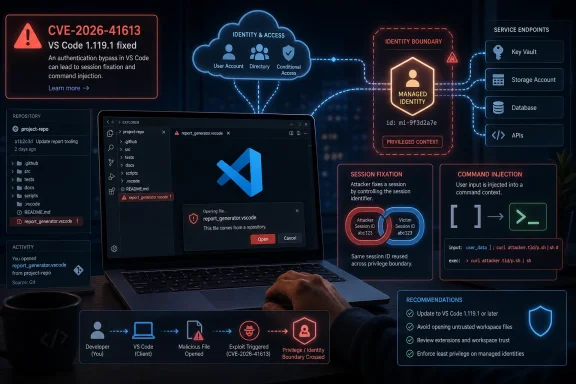
Microsoft’s Advisory Says “Important,” but the Attack Surface Says “Workstation Control Plane”
CVE-2026-41613 lands in a category Microsoft describes plainly: elevation of privilege in Visual Studio Code. The CVSS base score is 8.8, with a temporal score of 7.7, which puts the technical severity near the top of the “High” band even though Microsoft’s own severity label is “Important.” That split is familiar to administrators who live inside Patch Tuesday: the headline label is useful, but the vector string often tells the more operationally interesting story.
The vector is where this advisory stops looking routine. Microsoft scores the attack vector as network, attack complexity as low, privileges required as none, and user interaction as required. In normal English, that means Microsoft believes an unauthenticated attacker can reach the vulnerable condition remotely, but still needs the victim to do something — in this case, open a malicious file in VS Code.
That last requirement will tempt some shops to downgrade the urgency. They should be careful. “User interaction required” has never meant “unlikely in a developer environment.” Developers open repositories, preview files, test snippets, inspect pull requests, run sample projects, and load unfamiliar workspaces as part of the job. The workflow itself is the delivery mechanism.
Microsoft says exploitation is less likely, with no public disclosure and no known exploitation at the time of publication. That matters, and it argues against panic. But the advisory also marks report confidence as confirmed, remediation as official fix, and exploit maturity as unproven. This is the classic window in which defenders still have the initiative — provided they treat VS Code as production software rather than a personal preference.
The Real Prize Is Not the Editor, It Is the Identity Behind It
The most revealing line in Microsoft’s advisory is not the CVSS score. It is the FAQ answer explaining what a successful attacker could gain: permissions associated with an MCP Server’s managed identity. Microsoft says that would not mean broader tenant-level or administrator permissions by default, only the rights tied to the compromised managed identity.
That sounds reassuring until you translate it into how modern development environments are actually wired. A managed identity may have access to Azure resources, internal APIs, build systems, storage accounts, test data, model endpoints, deployment automation, or service-specific secrets. In a well-designed environment, those permissions are narrow. In many real environments, they are “temporary,” inherited, undocumented, or broader than anyone remembers.
This is why the phrase elevation of privilege can understate the blast radius. The attacker may not become a domain admin or a global administrator, but that is not always the path to meaningful damage. If the compromised identity can read deployment artifacts, push to a staging resource, enumerate cloud assets, or reach a service with production-adjacent data, the practical outcome may be serious.
The mention of MCP Server also deserves attention. Model Context Protocol, and the ecosystem of tools that connect AI assistants to local files, repositories, terminals, databases, and cloud resources, is quickly turning the developer workstation into a broker between human intent and privileged automation. That is powerful when it works. It is dangerous when identity boundaries are fuzzy.
Session Fixation Is an Old Bug in a New Developer Stack
Microsoft lists CWE-384, session fixation, as one of the weaknesses associated with CVE-2026-41613. Session fixation is not new. At a conceptual level, it involves forcing or tricking a victim into using an attacker-controlled session state, then taking advantage of what that session can do once the victim or the application grants it authority.
In a browser-only world, session fixation usually calls to mind web login flows and cookies. In a developer-tool world, the same class of mistake can become more interesting. Editors increasingly host webviews, local servers, authentication callbacks, extension panels, remote workspaces, and agentic tooling that glues together local files and cloud identity.
That does not mean every VS Code user is equally exposed. Microsoft’s public description is concise, and defenders should not invent an exploit chain that the advisory does not describe. But the weakness category points to a recurring security theme: developer tools often behave like browsers, shells, package managers, and identity clients all at once.
The second listed weakness, CWE-78, improper neutralization of special elements used in an OS command, raises a different but related concern. Command injection is one of those vulnerability classes that rarely needs much imagination. If untrusted input reaches a command boundary in the wrong shape, the editor stops being just an editor and becomes a path to executing attacker-influenced instructions.
Together, those weakness labels suggest a bug at the seam between identity/session handling and command execution. Microsoft has not published enough detail to responsibly describe the exact chain, and it should not need to for administrators to act. The patch exists, the report is confirmed, and the affected product is ubiquitous.
VS Code’s Greatest Strength Is Also Its Security Problem
VS Code won because it feels light while doing heavy work. It runs across platforms, handles nearly every language, integrates with Git, supports remote development, runs extensions by the truckload, and increasingly sits at the center of AI-assisted coding workflows. That flexibility is precisely why vulnerabilities in it deserve more attention than their branding sometimes receives.
For many developers, VS Code is not a text editor. It is a package execution surface, a credential cache, a terminal launcher, a repository browser, a debugger, a web preview host, and a cloud control panel. It is also where people paste commands from issue threads, open proof-of-concept repositories, and inspect files from strangers on the internet.
This does not make VS Code uniquely reckless. JetBrains IDEs, Visual Studio, Eclipse-derived tools, browser-based workspaces, and terminal-centered development environments all carry similar risks. What makes VS Code special is scale and standardization: it is common enough that attackers can assume its presence, and programmable enough that the distance from “opened a file” to “touched something privileged” can be short.
That is why Microsoft’s “user must be enticed to open a malicious file” should be read in context. Developers are routinely enticed to open files because collaboration requires it. A malicious repository, a crafted sample project, a poisoned documentation bundle, or a pull request attachment does not have to look like phishing in the traditional sense. It can look like work.
The Patch Is Simple; Proving Coverage Is Not
Microsoft lists VS Code 1.119.1 as the fixed build. The customer action is required, and the security update is tied to the May 12, 2026 release. For individual users, the path is straightforward: update VS Code and verify the installed version.
In managed environments, the task is messier. VS Code often lives outside the clean patch-management lanes that enterprises built for Windows, Office, Edge, and server workloads. Some users install the system-wide build. Some install the user-level build. Some run Insiders. Some use portable copies. Some access remote development containers where the local client and remote server components may not be treated as a single patch target.
Security teams that rely only on traditional endpoint patch dashboards may miss that fragmentation. The right question is not “Do we patch developer laptops?” It is “Can we prove which VS Code builds are running across developer workstations, build machines, VDI images, lab hosts, and remote workspaces?”
The same problem applies to golden images and ephemeral environments. If a base image includes an older VS Code build, every fresh developer desktop or training VM can resurrect the vulnerability after the organization believes the patch cycle is complete. Software that feels user-owned has a habit of escaping inventory discipline.
This is where security teams should resist the urge to turn the advisory into a lecture about developers installing tools. The better response is to make the secure path boring. Package the fixed build, publish it through the company software portal, enforce minimum versions where feasible, and give developers a clear way to confirm they are running 1.119.1 or later.
The Exploitability Rating Buys Time, Not Permission to Ignore It
Microsoft’s exploitability assessment says “Exploitation Less Likely,” with no known exploitation and no public disclosure at publication. That is useful triage information. It means this does not belong in the same emergency lane as an actively exploited Windows zero-day or an unauthenticated edge-service remote-code-execution flaw.
But “less likely” is not “not interesting.” The CVSS vector says the attack complexity is low and the attack requires no prior privileges. The gating factor is user interaction, and the target population is developers — a group trained by professional necessity to open files and inspect unfamiliar code.
There is also a timing consideration. The advisory gives attackers a map of what changed even if it does not give them a working exploit. Once a fixed build is public, researchers and criminals can compare versions, inspect patches, and probe the surrounding code. That does not guarantee exploit development, but it changes the economics.
Defenders should therefore avoid both extremes. This is not a reason to unplug developer workstations from the network. It is also not a “we’ll catch it next quarter” bug. A reasonable response is fast, verified patching of developer endpoints and any environment where VS Code interacts with cloud-managed identities or internal automation.
The most important security control may not be the update itself, but the review it triggers. If a VS Code compromise can give an attacker useful cloud permissions, the organization should ask why. Patching closes this particular hole; least privilege reduces the payoff from the next one.
Managed Identity Turns Local Compromise Into Cloud Consequence
Microsoft’s clarification that an attacker would receive only the permissions associated with the MCP Server’s managed identity is technically important. It limits the claim. The attacker does not automatically become a tenant administrator, does not automatically control every Azure resource, and does not automatically break out into the whole organization.
Yet managed identity is supposed to be the safer alternative to hard-coded secrets precisely because it is scoped and policy-bound. If the scope is sloppy, the safety story weakens. A compromised managed identity with read access to a sensitive storage account may be enough for data theft. One with write access to a deployment target may be enough for supply-chain tampering. One with permission to invoke internal services may be enough for lateral movement.
Developer environments are especially vulnerable to permission sprawl because they sit between experimentation and production. Teams grant access to unblock a release, test a feature, debug a pipeline, or connect a new agent. Those permissions can persist long after the immediate need has passed. When an advisory names managed identity as the privilege boundary, it is also naming identity governance as the mitigation boundary.
This is not merely an Azure story. The same pattern exists wherever IDEs connect to AWS roles, Google Cloud service accounts, Kubernetes contexts, GitHub tokens, package registries, internal vaults, or CI/CD runners. The credential might not be called a managed identity, but the risk is the same: the development surface inherits authority from the systems it can reach.
The right posture is to assume the workstation is a contested environment. That does not mean developers cannot be trusted. It means the workstation has too many inputs, too many plugins, and too many external artifacts to be treated as an inherently safe zone.
The Malicious File Is the Oldest Trick in the Developer Playbook
Microsoft says the user interaction required for CVE-2026-41613 is opening a malicious file in VS Code. That phrasing is familiar, almost mundane. It is also one of the most durable attack patterns in software development.
The malicious file does not have to arrive as an obvious attachment. It can be part of a repository, a sample project, a markdown document, a configuration file, a notebook, a workspace, or a generated artifact. The developer may open it because a colleague asked for help, because an issue reproduction requires it, or because an AI assistant suggested checking a file path.
This matters because developer trust decisions often happen at repository granularity, not file granularity. Once someone clones a project, the mental model shifts from “untrusted content” to “code I am inspecting.” That shift is exactly where IDE vulnerabilities become valuable. The editor is trusted to render, index, preview, lint, debug, and sometimes execute context-aware behavior around the file.
Organizations have spent years training users not to open suspicious Office documents. They have spent far less time defining what “suspicious” means for a workspace full of source files. A malicious VS Code trigger can hide inside the normal noise of software work.
That is why patching must be paired with workflow hygiene. Developers should be encouraged to open untrusted repositories in isolated environments, avoid granting broad cloud permissions to local tools, and treat workspace-level prompts with the same suspicion they would apply to a macro warning. Security teams should make that practical, not moralistic.
Extensions Are the Parallel Risk Microsoft Does Not Have to Own Alone
CVE-2026-41613 is a Microsoft product vulnerability, and Microsoft has issued the fix. But the broader VS Code risk story cannot be separated from extensions. The marketplace is one of VS Code’s great advantages, and also one of its least comfortable security realities.
Extensions can parse files, run commands, start local servers, interact with language tooling, read workspace content, and ask users for trust. Many are maintained by individuals or small teams. Some are widely deployed in enterprises without formal review. Even when the core editor is patched quickly, the extension layer can remain a softer target.
Recent reporting on VS Code extension flaws has reinforced this point: developer machines often hold sensitive business logic, credentials, configuration files, and access paths that make IDE compromise attractive. Whether the vulnerable component is the editor, an official extension, a third-party extension, or an adjacent local service, the attacker’s interest is the same. They want the developer’s reach.
This does not mean enterprises should ban extensions wholesale. That would be both unrealistic and counterproductive. It does mean extension governance belongs in the same conversation as endpoint detection, cloud identity, and source-control policy.
A mature organization should know which extensions are approved, which are merely tolerated, and which are unknown. It should monitor for risky changes in extension configuration, restrict workspace trust bypasses where possible, and understand that “developer productivity tooling” is part of the attack surface.
Patch Tuesday Still Has a Developer-Tool Blind Spot
Windows administrators are good at Patch Tuesday because Microsoft has trained them for it. Cumulative updates, servicing stack behavior, reboot expectations, deployment rings, compliance reporting — all of it fits a familiar operational model. Developer tooling does not always fit that model.
VS Code updates frequently, and many users update it themselves. That is convenient until the security team needs proof. The more an application behaves like a consumer-grade auto-updating tool, the more easily it can fall outside enterprise compliance rhythms. The more developers customize their machines, the harder it is to know what “the fleet” is actually running.
CVE-2026-41613 is a reminder that application-layer patching is now part of security operations, not desktop housekeeping. IDEs, package managers, container runtimes, CLI tools, local databases, browser extensions, and AI coding agents all sit close to sensitive work. They deserve inventory and patch expectations proportionate to that role.
For Windows shops, this is also a cultural issue. The endpoint has long been treated as a managed asset, but the developer workstation is often treated as an exception because developers need flexibility. That flexibility is real. So is the risk. The answer is not to turn every developer laptop into a locked-down kiosk, but to define a baseline that covers the tools attackers can predict.
There is a lesson here for Microsoft as well. The more VS Code becomes a hub for cloud development and AI-assisted workflows, the more its security advisories need to speak directly to enterprise operators. The MSRC entry gives the essentials, but admins will want clearer guidance on deployment verification, remote development components, and managed-identity exposure patterns.
The Confidence Metric Matters Because Attackers Read Advisories Too
The text the user highlighted — the explanation of report confidence — is easy to skip because it reads like CVSS boilerplate. It is not boilerplate in practice. Report confidence tells defenders how much uncertainty surrounds a vulnerability and tells attackers how likely it is that the disclosed issue is real enough to pursue.
For CVE-2026-41613, Microsoft marks report confidence as confirmed. That means the vulnerability is not just a rumor, not just a speculative impact, and not merely a third-party claim waiting for vendor validation. Microsoft has confirmed the presence of the issue or the technical basis is sufficiently reproducible.
That raises the urgency even while exploit code maturity remains unproven. A confirmed vulnerability with an official patch gives attackers a target and defenders a fix. The race is not over who can understand the entire advisory; it is over who acts first on the practical facts already available.
Security teams often focus on whether exploit code exists. That is understandable, but incomplete. Exploit code availability is a lagging signal. By the time a working exploit is public, defenders are often competing with automated scanning, copycat operators, and opportunistic campaigns. Report confidence is one of the signals that should move a bug from “watch” to “schedule and verify.”
In this case, the risk calculation is straightforward. Microsoft has confirmed the bug. A fixed build exists. The affected product is common. The attack path involves a file-open workflow that developers routinely perform. That is enough to justify prompt action without dramatizing the advisory.
The Fix Should Trigger an Identity Audit, Not Just an Editor Update
The operational response starts with VS Code 1.119.1, but it should not end there. If the advisory’s managed-identity language applies to your environment, the organization should use this moment to audit what identities are reachable from developer tooling and what they can do.
That audit does not need to become a months-long governance program before the patch is deployed. The patch is the immediate move. But in parallel, teams should identify MCP servers, local agent bridges, cloud development integrations, and any tooling that grants VS Code-adjacent workflows access to cloud resources.
The question to ask is brutally simple: if a developer opens a malicious file and the editor-adjacent tooling is compromised, what identity is exposed and what can it touch? If the answer is unknown, that is already a finding. If the answer is “it depends on the developer,” that may be worse.
Least privilege is often discussed as an abstract best practice. CVE-2026-41613 makes it concrete. The difference between a nuisance and an incident may be whether the compromised managed identity can read a harmless test resource or alter a production-connected service.
The same thinking applies to secrets. Developers should not have long-lived credentials sitting in workspace files, shell profiles, local config folders, or extension settings if there is a safer alternative. Managed identity is better than static secrets, but it is not magic. It inherits the quality of the permissions behind it.
The May 12 Fix Is Small; the Lesson for VS Code Shops Is Not
The most concrete action is still the least glamorous one: get to VS Code 1.119.1 or later and verify it. From there, the real work is reducing the consequences of the next malicious workspace, crafted file, or extension flaw. This vulnerability should be treated as a manageable security update and as another data point in the larger story of developer workstations becoming high-value infrastructure.
- Organizations should update Visual Studio Code to version 1.119.1 or later and confirm coverage across user-installed, system-installed, portable, remote, and image-based deployments.
- Administrators should not dismiss the vulnerability solely because user interaction is required, because opening unfamiliar files and repositories is a normal developer workflow.
- Security teams should review MCP Server and managed-identity permissions to ensure a compromised developer tool cannot reach more cloud resources than intended.
- Developers should open untrusted projects and files in isolated environments when possible, especially when those projects interact with local servers, cloud tooling, or workspace automation.
- Enterprises should treat VS Code extensions, workspace settings, and editor-integrated agents as part of the endpoint attack surface rather than optional productivity accessories.
- The absence of known exploitation on May 12, 2026, should be treated as a patching advantage, not as evidence that the vulnerability can wait indefinitely.
CVE-2026-41613 will probably not be remembered as the defining security event of 2026, and that is exactly the point: the most important developer-security failures are increasingly ordinary bugs in ordinary tools connected to extraordinary privileges. Microsoft has shipped the fix, and for once defenders do not need to wait for exploit telemetry to know what to do. Patch VS Code, verify the build, narrow the identities behind the editor, and assume the next malicious file will arrive disguised as just another day’s work.