

Microsoft Fixed the Cloud, but the Edge Still Has Homework
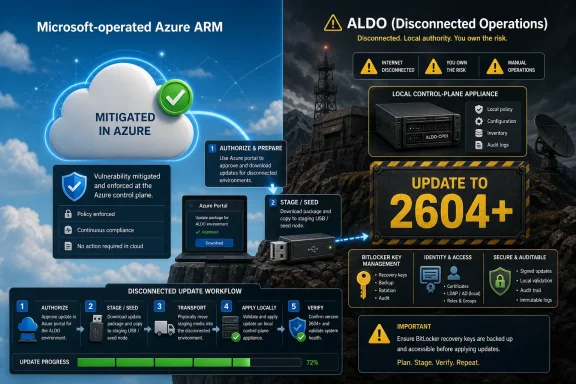
CVE-2026-42822 is an elevation-of-privilege vulnerability in Azure Local Disconnected Operations, Microsoft’s restricted offering for running Azure-style services in environments that cannot depend on continuous cloud connectivity. In ordinary Azure Resource Manager usage, Microsoft says it has already deployed the mitigation across Microsoft-operated Azure environments. If your workloads are simply using Azure services hosted and operated by Microsoft, there is no additional customer action.
That is the easy half of the advisory. The harder half applies to ALDO customers, who operate a local Azure-like control plane in their own environment. Microsoft’s guidance is explicit: update the ALDO environment to the latest available release, version 2604 or later.
The important detail is that this is not being shipped as a standalone patch. Customers cannot grab a small MSI, install a security-only update, and call it done. Protection arrives through a full system update path, which means change windows, prerequisites, update staging, validation, and rollback planning all matter.
That may sound inconvenient, but it is consistent with what ALDO is. A disconnected Azure Local deployment is not a single Windows Server role. It is a managed appliance-like environment with identity, certificates, portal components, resource providers, update orchestration, and local infrastructure services. A privilege boundary bug in that sort of stack is exactly the kind of issue that often requires coordinated servicing rather than one replaceable binary.
The Vulnerability Is Narrow, but the Blast Radius Is Not
The words “elevation of privilege” can be deceptively calming. They do not carry the immediate dread of “remote code execution,” and they often imply that an attacker already needs some foothold. But in infrastructure platforms, privilege escalation is rarely a secondary concern. It is the bridge between “someone got access” and “someone owns the control plane.”
That is especially true for ALDO. The product exists for environments where cloud management cannot be assumed: disconnected sites, constrained networks, and organizations with strict operating boundaries. Those are also environments where identity, certificate trust, local administrators, and update custody tend to matter more than usual.
Microsoft has not, in the public guidance provided, described the exploit mechanics in detail. That restraint is normal for a security update and may be deliberate to avoid handing attackers a roadmap. But defenders do not need exploit code to understand the operational risk: if an attacker can turn limited access inside an ALDO environment into higher privilege, they may be able to tamper with management functions, alter local resources, or move from a compromised account into a more sensitive role.
The practical risk calculation should therefore start with exposure, not panic. If you do not run Azure Local Disconnected Operations, this advisory is probably not your fire drill. If you do, version 2604 is the line Microsoft has drawn between “known vulnerable” and “covered by the available mitigation.”
ALDO Customers Are in a Different Patch Universe
Most Windows administrators are trained by years of Patch Tuesday muscle memory. A CVE appears, a KB lands, the update rings do their work, and the question becomes how fast to move from pilot to broad deployment. ALDO does not fit that simple model.
Microsoft describes ALDO as a restricted offering, with access and updates available only to approved customers via allow-listing. That means the first protection step is bureaucratic as much as technical: confirm that your organization is approved, that the right administrators can see the update in the Azure portal, and that the update package can be downloaded and moved into the disconnected environment.
The update flow also reflects the realities of a disconnected appliance. Administrators obtain the update through the Azure portal, copy it to a staging folder on a seed node, load the ALDO OperationsModule, upload the package into the appliance, wait for pre-update staging, preserve BitLocker recovery keys, and then trigger the update. Microsoft warns that the update can take several hours and may reboot the control plane appliance.
That makes this an infrastructure maintenance event. It should be scheduled like one, with a rollback plan, a communications window, and health checks before and after. The worst response would be to treat the update as a background chore and discover halfway through that LDAP credentials are expired, recovery keys were never exported, or the team with portal access is not the team holding the operational keyboard.
Version 2604 Is the Security Floor, Not Just a Feature Release
Microsoft’s remedy for ALDO customers is version 2604 or later. That phrasing matters. It is not saying “apply the CVE-2026-42822 patch.” It is saying that the fixed state is tied to a release train.
Version 2604 also appears in Microsoft’s ALDO documentation as a meaningful release, not a cosmetic bump. Microsoft’s public notes for disconnected operations list 2604 as adding support for the Azure Local 2604 ISO, enabling 64-node workload cluster support, improving performance, adding security improvements to MSI, enabling client certificate rotation and cmdlet naming standardization in the OperationsModule, and adding business continuity and disaster recovery restore implementation. In other words, the security fix is being delivered in the context of a platform update.
For defenders, that cuts both ways. On the positive side, a full release can address deeper architectural issues that a narrow hotfix cannot. On the negative side, full releases carry more regression surface, more prerequisites, and more operational anxiety. A security team can say “patch now,” but a platform team has to ask whether the cluster, identity integration, certificates, OEM content, and local procedures are ready.
The correct synthesis is not to delay until the update feels effortless. It will not. The right answer is to move quickly, but with a disciplined update plan that respects ALDO’s complexity.
The Azure Portal Still Matters Even When the Environment Is Disconnected
There is a small irony in Microsoft’s guidance: ALDO exists for disconnected operations, yet the update entitlement and package acquisition path still begins in the Azure portal. That is not a contradiction so much as a reminder of the product’s operating model. The environment may run locally, but the release channel, approval model, and package access are still governed by Microsoft.
This is where some customers are likely to stumble. In a conventional Azure environment, Microsoft has already done the mitigation work. In an ALDO environment, Microsoft has made the fixed release available to eligible customers, but the customer has to fetch and apply it. The distinction is easy to miss if security teams read only the first half of the advisory and assume Azure equals Microsoft-managed remediation.
The allow-listing model adds another timing variable. If the organization’s ALDO access is not properly approved, or if the responsible tenant and subscription path are unclear, the update process may stall before any engineer reaches PowerShell. That is why the immediate action item is not just “install 2604.” It is “verify that you can obtain 2604.”
This is also why asset inventory matters. Many organizations have good visibility into ordinary Azure subscriptions and Windows Server fleets but weaker visibility into specialized edge deployments. ALDO instances may sit outside the daily rhythm of endpoint management, cloud security posture management, or traditional WSUS reporting. A vulnerability like CVE-2026-42822 exposes those seams.
The Update Procedure Rewards Preparation and Punishes Assumptions
Microsoft’s documented update process for disconnected operations is straightforward on paper, but it assumes the environment is ready. The update package must be downloaded from the Azure portal, copied to a staging folder on the seed node, uploaded through the OperationsModule, staged, and then started. Along the way, administrators are told to validate LDAP credentials and export BitLocker recovery keys.
Those two checks are not decorative. Expired LDAP credentials can interrupt the update path at exactly the wrong time, and missing BitLocker recovery keys can turn a recoverable maintenance failure into a much worse outage. Disconnected environments often have longer-lived credentials, more manual certificate handling, and more local operational variance than cloud-only systems.
There is also a version-specific wrinkle. Microsoft’s documentation calls out Azure Local version 2603 as requiring additional steps before running the update script, specifically excluding a test that requires internet connectivity. Environments already on 2604 or later can skip that section, but 2603 deployments need to account for it.
The broader lesson is simple: do not improvise this update from a security ticket. Run through the documented procedure, confirm version compatibility, identify the seed node, check the management endpoint, validate identity configuration, export recovery material, and make sure the team monitoring the update understands what “several hours” can mean in your environment.
Administrators Should Treat Privilege Boundaries as the Real Asset
The immediate mitigation is version 2604 or later, but the security response should not stop at the version number. Elevation-of-privilege vulnerabilities are symptoms of a broader truth: privileged control planes need defense in depth because bugs will happen.
For ALDO, that means reviewing who has access to the disconnected operations portal, who can run the OperationsModule, who controls update packages, who manages certificates, and which accounts can administer the underlying Azure Local nodes. A patch can close a known vulnerability, but it cannot fix an environment where too many people have standing privilege.
Identity deserves special attention. ALDO deployments integrate with local identity infrastructure, and Microsoft’s update guidance specifically warns administrators to ensure LDAP credentials are valid before triggering the update. That operational dependency is also a security dependency. Weak identity hygiene inside a disconnected environment can magnify the impact of a privilege escalation bug.
The same goes for package custody. Because updates are downloaded, copied, staged, and applied in a constrained environment, organizations should be careful about where packages are stored, who can modify staging directories, and how update media is handled. In disconnected operations, the supply chain is not only Microsoft’s download service; it is also the USB drive, staging share, jump box, and administrator workstation that move bits across the boundary.
This Is a Test of Edge Cloud Governance
Microsoft’s cloud pitch has long rested on a bargain: customers move faster because Microsoft operates the platform. Azure Local and ALDO complicate that bargain. They bring Azure patterns into places where Microsoft cannot simply patch everything in the background.
That does not make ALDO a bad model. For some customers, disconnected operations are not optional. Military, industrial, regulated, and remote environments may need local cloud capabilities even when upstream connectivity is intermittent, prohibited, or impossible. The tradeoff is that the customer inherits more operational responsibility.
CVE-2026-42822 is therefore a governance test. Does the organization know which ALDO version it is running? Does it know who owns the update process? Does it have a maintenance window for the management cluster? Does it have a tested rollback expectation? Does the security team understand that Microsoft-managed ARM customers and ALDO customers are in different remediation states?
If the answer to those questions is fuzzy, the vulnerability is only part of the problem. The larger issue is that edge cloud platforms can fall between cloud governance and infrastructure governance. They are too cloud-like for old server patching processes, but too customer-operated for the comforting assumption that Microsoft has already handled everything.
The Practical Defense Plan Starts Before the Download
The protective path is clear enough: update ALDO to 2604 or later. The order of operations, however, matters if the goal is to reduce risk without creating an avoidable outage.
Start by confirming whether you are actually an ALDO customer. Many Azure customers are not. If you only use Azure Resource Manager services in Microsoft-operated Azure environments, Microsoft says the mitigation has already been deployed and no customer action is required. Do not burn a weekend chasing an update path for a product you do not run.
If you do run ALDO, determine the current disconnected operations version and the Azure Local build underneath it. Microsoft’s compatibility documentation lists ALDO 2604 with a corresponding Azure Local 2604 build, and version mismatches are precisely the kind of thing that can turn a planned update into a troubleshooting session.
Next, confirm portal access and allow-listing. Because ALDO is restricted, update availability is not universal. The team responsible for the environment should verify that the latest release is visible in the Azure portal and that the organization has whatever approval is required to download it.
Then prepare the local environment. Validate LDAP credentials, confirm certificate health, export BitLocker keys, identify the seed node, ensure the staging location has adequate space and appropriate permissions, and review known issues for your current and target versions. If the deployment is on version 2603, account for Microsoft’s documented workaround for the internet-dependent readiness test.
Only after those checks should the team upload, stage, and trigger the update. Afterward, retrieve update history, validate the appliance health, test portal access, confirm workload operations, and document the final version. The security ticket should not close until the environment proves it is both updated and functional.
The Fixed Release Is Only Half the Remediation
Patch management often treats the update as the finish line. For CVE-2026-42822, it should be the midpoint. Once the ALDO environment is on 2604 or later, administrators should review logs and access patterns for anything unusual before the update window.
That does not mean every unpatched ALDO instance was compromised. There is no public evidence in the provided guidance that exploitation is widespread. But privilege escalation bugs are most useful after an attacker already has some access, so post-update review should focus on administrative events, unexpected role changes, suspicious local accounts, unusual certificate operations, and changes to management endpoints.
Organizations should also tighten standing access. If broad administrative permissions were granted to get ALDO deployed and never cleaned up, this is the moment to fix that. Remove stale accounts, reduce permanent administrator assignments, rotate credentials where appropriate, and ensure privileged operations are logged.
Finally, update the runbook. The next ALDO vulnerability will not wait for the team to rediscover how updates work. Record the exact acquisition path, staging procedure, validation steps, expected duration, and rollback behavior from this update cycle. The best outcome is not merely that CVE-2026-42822 is mitigated; it is that the organization becomes faster and safer the next time Microsoft ships an ALDO security release.
The 2604 Line Draws a Boundary Between Managed Azure and Managed-by-You Azure
This advisory is easy to misread because it uses familiar Azure language for two very different operating models. Microsoft-operated Azure environments have already received the mitigation. ALDO environments require customer action. That is the boundary every affected organization needs to internalize.
The concrete guidance is refreshingly direct, even if the work behind it is not. ALDO customers should move to version 2604 or later, and they should not wait for a standalone patch that Microsoft says is not available. The update comes through the full system update path.
The main points for defenders are these:
- Customers using Microsoft-operated Azure Resource Manager services are already protected by Microsoft’s deployed mitigation and do not need to take action for this CVE.
- Customers running Azure Local Disconnected Operations must update the ALDO environment to version 2604 or later to protect against CVE-2026-42822.
- The fix is not offered as a standalone patch, so affected customers need to plan and execute a full system update through the Azure portal and the disconnected operations update process.
- Because ALDO is a restricted offering, teams should verify allow-listing and portal access before the maintenance window rather than discovering an entitlement problem during the response.
- Administrators should validate LDAP credentials, export BitLocker recovery keys, review known issues, and confirm version compatibility before triggering the update.
- After updating, teams should verify appliance health, review administrative activity, and tighten privileged access around the ALDO control plane.
The lesson of CVE-2026-42822 is not that disconnected Azure is uniquely unsafe; it is that disconnected Azure shifts more of the safety work back to the customer. Microsoft can publish the fixed release and protect its own cloud, but ALDO customers have to carry the update across the boundary and land it cleanly in their own environment. As more Azure services move toward hybrid, sovereign, and edge deployments, that distinction will become one of the defining security realities for Windows and Azure administrators: the closer the cloud gets to your datacenter, the more cloud patching starts to look like infrastructure operations again.
References
- CVE-2026-42822 Azure Local Disconnected Operations (ALDO) Elevation of Privilege Vulnerability MSRC · 2026-05-18T07:00:00-07:00
- learn.microsoft.com learn.microsoft.com