

Microsoft disclosed CVE-2026-42832, a Microsoft Office spoofing vulnerability, in its Security Update Guide on May 12, 2026, as part of the latest Patch Tuesday cycle for customers tracking Office security exposure across Windows fleets. The interesting part is not simply that Office has another spoofing bug; Office has lived at the edge of document trust for decades. The interesting part is that Microsoft’s own scoring language puts unusual weight on confidence: how much is known, how credible the technical details are, and how much an attacker might plausibly infer from the public record. That makes this CVE less a spectacular breach story than a reminder that vulnerability management is often the art of acting before the story is complete.
Office vulnerabilities tend to arrive wrapped in familiar packaging: a document, a preview surface, an email attachment, a link, a business workflow that nobody can turn off without disrupting the organization. CVE-2026-42832 is categorized as spoofing, which means the likely risk is not that Office simply hands over code execution in the dramatic style of a classic memory corruption flaw. The risk is more subtle: Office may be persuaded to misrepresent something users or systems rely on when deciding whether content is trustworthy.
That distinction matters because spoofing bugs are often underestimated by people who rank security issues by exploit type alone. Remote code execution sounds cinematic. Spoofing sounds like a UI nuisance. In the real world, however, many intrusions begin by making a user, a parser, a security control, or an application boundary believe the wrong thing.
Microsoft’s own metric language points directly at that problem. The company is effectively saying that confidence in the vulnerability’s existence and the credibility of known technical detail affects urgency. If a flaw is confirmed by the vendor, if the root cause is understood, and if enough detail is public for attackers to reproduce or refine the technique, the operational risk rises even if the public write-up remains sparse.
For Windows administrators, that is the uncomfortable middle ground. Waiting for a proof-of-concept may feel prudent, but it also means letting attackers and defenders race from the same starting line. By the time the exploit path is described cleanly in a blog post, the defensive window may already have narrowed.
Office sits directly in that overlap. It is not just a document editor; it is a trust-rendering engine for invoices, contracts, HR files, spreadsheets, macros, templates, cloud links, protected documents, and collaboration metadata. If any of those signals can be made misleading, attackers gain leverage without necessarily needing a full exploit chain on day one.
That is why “spoofing” should not be read as “cosmetic.” A forged trust cue can help a malicious document pass the user’s mental filter. A misleading source indicator can make a payload look internal. A mishandled attachment boundary, link presentation, or file identity signal can let an attacker use Microsoft’s own interface as part of the lure.
The practical danger is not that every spoofing flaw becomes a mass exploitation event. It is that spoofing flaws are cheap to operationalize when they align with existing attacker tradecraft. Threat actors already know how to send convincing documents. They already know how to borrow logos, thread hijacked emails, and exploit business urgency. A product-level spoofing weakness gives that machinery a more reliable hook.
Sometimes the world only knows that something undesirable is possible. Sometimes researchers can infer the weak component without being certain. Sometimes a vendor acknowledgment is the first hard confirmation that defenders get. Each stage changes the risk calculation.
For attackers, partial disclosure can be enough. A product name, impact type, patch timing, and affected component may narrow the search space. Diffing patches remains a durable technique. If an update changes Office behavior in a security-sensitive parser or trust boundary, motivated researchers do not need Microsoft to publish a recipe.
For defenders, the same uncertainty cuts the other way. Sparse detail makes it harder to write detections, hunt for exploitation, or explain priority to business owners. That is why the boring answer is often the correct one: patch the affected Office builds quickly, especially where users open external documents or where Office is part of regulated, financial, legal, or executive workflows.
But the modern Microsoft ecosystem has stretched beyond the old model. Office exists as perpetual-license desktop software, Microsoft 365 Apps, web-connected services, mobile clients, add-ins, previewers, and cloud-backed collaboration surfaces. “Patch Office” can mean several different things depending on channel, licensing, deployment tool, and update policy.
That complexity is where CVE-2026-42832 becomes more than a single line item. If an organization has Microsoft 365 Apps on Current Channel, remediation may be comparatively fast. If it has semi-annual enterprise channels, legacy Office builds, disconnected devices, VDI pools, or tightly controlled application packaging, the gap between disclosure and actual protection can be longer than leadership assumes.
The Windows side of the house has similar friction. Microsoft Defender, Attack Surface Reduction rules, SmartScreen, Protected View, Mark of the Web, application control, and mail filtering all shape the practical exploitability of Office bugs. But none of them should be treated as a reason to ignore the underlying Office update. Defense-in-depth is not a patch substitute; it is the safety net for the machines that inevitably lag.
CVE-2026-42832 fits that risk model even without public exploit drama. A spoofing issue in Office can be useful wherever trust presentation matters. That may include how content appears to originate, how a file is represented, how a link is displayed, or how Office communicates safety state to the user. The exact mechanics matter for exploit development, but administrators do not need the full exploit chain to understand the exposure class.
The most exposed environments are those with high document intake and uneven patch compliance. Law firms, public-sector agencies, manufacturers, universities, financial services, healthcare organizations, and managed service providers all process files from outside parties. In those environments, “user interaction required” is not a meaningful comfort. User interaction is the business model.
Security teams should also resist the temptation to judge this CVE only by whether it is known to be exploited today. Exploitation status is a snapshot, not a destiny. Once a patch is released, attackers can begin studying the delta. A vulnerability that is quiet on release day can become noisy later if the bug is easy to rediscover and the attack path fits common phishing operations.
The same social engineering dynamics apply, though. A spoofed Office experience can make a malicious file look less suspicious. A document that appears to come from a known service, a fake invoice, a fabricated delivery notice, or a bogus shared file notification only needs to survive a few seconds of user scrutiny.
The safest default is to keep Protected View and cloud-delivered protection enabled, avoid disabling security prompts to “make the document work,” and be skeptical of files that demand unusual steps. If a document tells you to enable content, install a font, bypass a warning, sign in again, or open a second embedded object, the document is no longer just a document. It is asking to become part of your security boundary.
For enthusiasts, the lesson is also about tooling hygiene. Multiple Office installations, old Click-to-Run remnants, unsupported Visio or Project builds, and forgotten language packs can complicate patch state. The vulnerability you think you fixed may remain present in an Office component you forgot was installed.
The gap is filled by patch diffing, telemetry, third-party research, and eventually incident reports. In some cases, the public CVE entry remains bland forever because the bug never becomes a major story. In others, the first bland entry becomes the seed of a later campaign, especially if the vulnerability touches a widely deployed component with a reliable delivery path.
This is why the confidence metric deserves attention. It is a signal about how solid the underlying claim is, not a promise that the public has all the useful information. If Microsoft has acknowledged the vulnerability and shipped an update, defenders should treat that as enough certainty to act.
The more interesting question is whether the details available to attackers are sufficient to weaponize. The Security Update Guide rarely answers that directly. But affected product, impact category, update timing, and patch artifacts can collectively provide a map. That map is often clearer to offensive researchers than to overloaded IT teams trying to decide which CVEs deserve same-week action.
Mail gateways should be tuned for attachment detonation, impersonation patterns, and suspicious document behaviors. Endpoint controls should reduce the blast radius of Office child processes, script interpreters, and unusual network access. Identity controls should assume that some users will be tricked despite training and should limit the value of stolen credentials.
Attack Surface Reduction rules are particularly relevant in Office-heavy environments, but they require testing. Blocking Office from creating child processes, preventing executable content from email and webmail, and limiting credential theft behaviors can break old workflows. That is not a reason to avoid them; it is a reason to pilot them deliberately and document exceptions.
Admins should also check reporting paths. If a user sees a suspicious Office document, can they report it in one click? Does the SOC receive the original message and attachment safely? Can the team search for similar files across mailboxes and endpoints? Vulnerability response is faster when suspicious-document handling is already muscle memory.
This is where asset inventory becomes decisive. You cannot patch what you cannot see, and Office estates are messy. The same organization may run Microsoft 365 Apps, Office LTSC, standalone Access runtimes, Visio, Project, legacy Office viewers, and server-side document components. A CVE titled “Microsoft Office Spoofing Vulnerability” can land across more assets than the desktop productivity suite people picture.
Vulnerability scanners help, but they are not magic. Some detect installed products but not effective build state. Some lag behind vendor metadata. Some struggle with virtualized applications, nonpersistent desktops, or user-installed Click-to-Run builds. The administrator’s job is to reconcile scanner output with Microsoft’s deployment reality, not to assume the dashboard is the environment.
Patch verification should therefore be treated as its own phase. Confirm that the updated Office build is present, that update channels are reporting correctly, that failed clients are being chased, and that high-risk groups are not stuck behind a broken content distribution point or a deferred update policy nobody owns anymore.
Security teams should communicate the risk in plain terms. This is not necessarily a wormable network service flaw. It is not being presented as a catastrophic remote code execution bug from the information at hand. It is a Microsoft-confirmed Office spoofing vulnerability, disclosed in the May 12, 2026 security cycle, and it should be fixed because attackers thrive on exactly this class of user-facing ambiguity.
The strongest argument for action is not fear; it is efficiency. Applying the update now is cheaper than explaining later why a known Office trust flaw remained unpatched in a document-heavy environment. The cost of delay compounds as more researchers study the patch, more scanners flag the CVE, and more exceptions accumulate.
WindowsForum readers know the pattern. The first day of a CVE is rarely the full story. The disclosure is the starting gun for defenders, attackers, vendors, researchers, and compliance teams all moving at different speeds. The organizations that fare best are not the ones that wait for perfect certainty, but the ones that know when the available certainty is enough.
Source: MSRC Security Update Guide - Microsoft Security Response Center
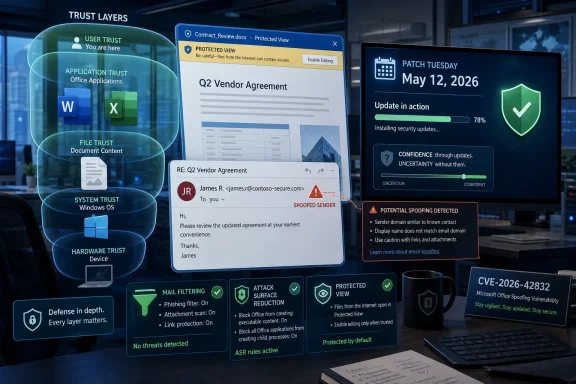 Microsoft’s Office Problem Is Still a Trust Problem
Office vulnerabilities tend to arrive wrapped in familiar packaging: a document, a preview surface, an email attachment, a link, a business workflow that nobody can turn off without disrupting the organization. CVE-2026-42832 is categorized as spoofing, which means the likely risk is not that Office simply hands over code execution in the dramatic style of a classic memory corruption flaw. The risk is more subtle: Office may be persuaded to misrepresent something users or systems rely on when deciding whether content is trustworthy.That distinction matters because spoofing bugs are often underestimated by people who rank security issues by exploit type alone. Remote code execution sounds cinematic. Spoofing sounds like a UI nuisance. In the real world, however, many intrusions begin by making a user, a parser, a security control, or an application boundary believe the wrong thing.
Microsoft’s own metric language points directly at that problem. The company is effectively saying that confidence in the vulnerability’s existence and the credibility of known technical detail affects urgency. If a flaw is confirmed by the vendor, if the root cause is understood, and if enough detail is public for attackers to reproduce or refine the technique, the operational risk rises even if the public write-up remains sparse.
For Windows administrators, that is the uncomfortable middle ground. Waiting for a proof-of-concept may feel prudent, but it also means letting attackers and defenders race from the same starting line. By the time the exploit path is described cleanly in a blog post, the defensive window may already have narrowed.
Spoofing Is Where Social Engineering Meets Product Behavior
Spoofing vulnerabilities are dangerous because they blur two categories that enterprises prefer to keep separate: technical weakness and human deception. A phishing email is not usually considered a product vulnerability. A parser, trust indicator, file handler, previewer, or identity cue that can be manipulated is.Office sits directly in that overlap. It is not just a document editor; it is a trust-rendering engine for invoices, contracts, HR files, spreadsheets, macros, templates, cloud links, protected documents, and collaboration metadata. If any of those signals can be made misleading, attackers gain leverage without necessarily needing a full exploit chain on day one.
That is why “spoofing” should not be read as “cosmetic.” A forged trust cue can help a malicious document pass the user’s mental filter. A misleading source indicator can make a payload look internal. A mishandled attachment boundary, link presentation, or file identity signal can let an attacker use Microsoft’s own interface as part of the lure.
The practical danger is not that every spoofing flaw becomes a mass exploitation event. It is that spoofing flaws are cheap to operationalize when they align with existing attacker tradecraft. Threat actors already know how to send convincing documents. They already know how to borrow logos, thread hijacked emails, and exploit business urgency. A product-level spoofing weakness gives that machinery a more reliable hook.
The Confidence Metric Is a Warning About the Fog Around CVEs
The user-facing text attached to CVE-2026-42832 focuses on a metric that measures confidence in the vulnerability’s existence and in the credibility of known technical details. That sounds bureaucratic, but it is one of the more honest parts of modern vulnerability disclosure. Not every CVE arrives with a clean root-cause analysis, a working exploit description, and a vendor narrative that explains exactly what broke.Sometimes the world only knows that something undesirable is possible. Sometimes researchers can infer the weak component without being certain. Sometimes a vendor acknowledgment is the first hard confirmation that defenders get. Each stage changes the risk calculation.
For attackers, partial disclosure can be enough. A product name, impact type, patch timing, and affected component may narrow the search space. Diffing patches remains a durable technique. If an update changes Office behavior in a security-sensitive parser or trust boundary, motivated researchers do not need Microsoft to publish a recipe.
For defenders, the same uncertainty cuts the other way. Sparse detail makes it harder to write detections, hunt for exploitation, or explain priority to business owners. That is why the boring answer is often the correct one: patch the affected Office builds quickly, especially where users open external documents or where Office is part of regulated, financial, legal, or executive workflows.
Patch Tuesday Still Works, but It No Longer Tells the Whole Story
Patch Tuesday remains Microsoft’s most important security rhythm because it gives administrators a predictable release point. Predictability matters. It lets teams schedule testing, change windows, reboot planning, vulnerability scanning, and executive reporting around a known monthly event.But the modern Microsoft ecosystem has stretched beyond the old model. Office exists as perpetual-license desktop software, Microsoft 365 Apps, web-connected services, mobile clients, add-ins, previewers, and cloud-backed collaboration surfaces. “Patch Office” can mean several different things depending on channel, licensing, deployment tool, and update policy.
That complexity is where CVE-2026-42832 becomes more than a single line item. If an organization has Microsoft 365 Apps on Current Channel, remediation may be comparatively fast. If it has semi-annual enterprise channels, legacy Office builds, disconnected devices, VDI pools, or tightly controlled application packaging, the gap between disclosure and actual protection can be longer than leadership assumes.
The Windows side of the house has similar friction. Microsoft Defender, Attack Surface Reduction rules, SmartScreen, Protected View, Mark of the Web, application control, and mail filtering all shape the practical exploitability of Office bugs. But none of them should be treated as a reason to ignore the underlying Office update. Defense-in-depth is not a patch substitute; it is the safety net for the machines that inevitably lag.
Enterprise Risk Lives in the Document Workflow
The reason Office vulnerabilities keep mattering is that documents remain the lingua franca of business compromise. Attackers do not have to invent a novel delivery channel when finance departments expect spreadsheets, HR departments expect forms, lawyers expect Word files, and executives expect emailed attachments from people they have never met.CVE-2026-42832 fits that risk model even without public exploit drama. A spoofing issue in Office can be useful wherever trust presentation matters. That may include how content appears to originate, how a file is represented, how a link is displayed, or how Office communicates safety state to the user. The exact mechanics matter for exploit development, but administrators do not need the full exploit chain to understand the exposure class.
The most exposed environments are those with high document intake and uneven patch compliance. Law firms, public-sector agencies, manufacturers, universities, financial services, healthcare organizations, and managed service providers all process files from outside parties. In those environments, “user interaction required” is not a meaningful comfort. User interaction is the business model.
Security teams should also resist the temptation to judge this CVE only by whether it is known to be exploited today. Exploitation status is a snapshot, not a destiny. Once a patch is released, attackers can begin studying the delta. A vulnerability that is quiet on release day can become noisy later if the bug is easy to rediscover and the attack path fits common phishing operations.
The Home User Version Is Simpler but Not Softer
For home users and small offices, the operational answer is refreshingly direct: let Office update, do not postpone Windows and Microsoft 365 patches, and treat unsolicited documents as hostile until proven otherwise. The consumer risk is usually less about lateral movement through a domain and more about credential theft, financial fraud, or malware delivery.The same social engineering dynamics apply, though. A spoofed Office experience can make a malicious file look less suspicious. A document that appears to come from a known service, a fake invoice, a fabricated delivery notice, or a bogus shared file notification only needs to survive a few seconds of user scrutiny.
The safest default is to keep Protected View and cloud-delivered protection enabled, avoid disabling security prompts to “make the document work,” and be skeptical of files that demand unusual steps. If a document tells you to enable content, install a font, bypass a warning, sign in again, or open a second embedded object, the document is no longer just a document. It is asking to become part of your security boundary.
For enthusiasts, the lesson is also about tooling hygiene. Multiple Office installations, old Click-to-Run remnants, unsupported Visio or Project builds, and forgotten language packs can complicate patch state. The vulnerability you think you fixed may remain present in an Office component you forgot was installed.
The Details Microsoft Does Not Publish Still Shape Attacker Behavior
Microsoft does not usually publish enough detail in the Security Update Guide to satisfy reverse engineers, and that is by design. The company must inform defenders without handing attackers a fully annotated exploit path. That balance is frustrating, but it is not irrational.The gap is filled by patch diffing, telemetry, third-party research, and eventually incident reports. In some cases, the public CVE entry remains bland forever because the bug never becomes a major story. In others, the first bland entry becomes the seed of a later campaign, especially if the vulnerability touches a widely deployed component with a reliable delivery path.
This is why the confidence metric deserves attention. It is a signal about how solid the underlying claim is, not a promise that the public has all the useful information. If Microsoft has acknowledged the vulnerability and shipped an update, defenders should treat that as enough certainty to act.
The more interesting question is whether the details available to attackers are sufficient to weaponize. The Security Update Guide rarely answers that directly. But affected product, impact category, update timing, and patch artifacts can collectively provide a map. That map is often clearer to offensive researchers than to overloaded IT teams trying to decide which CVEs deserve same-week action.
Administrators Should Patch the Workflow, Not Just the Binary
The narrow remediation is to apply the Office security update. The broader remediation is to look at how Office content enters the organization and how much trust users are asked to place in visual cues. CVE-2026-42832 is a reminder that product patches fix product bugs, while business processes determine how often those bugs can be reached.Mail gateways should be tuned for attachment detonation, impersonation patterns, and suspicious document behaviors. Endpoint controls should reduce the blast radius of Office child processes, script interpreters, and unusual network access. Identity controls should assume that some users will be tricked despite training and should limit the value of stolen credentials.
Attack Surface Reduction rules are particularly relevant in Office-heavy environments, but they require testing. Blocking Office from creating child processes, preventing executable content from email and webmail, and limiting credential theft behaviors can break old workflows. That is not a reason to avoid them; it is a reason to pilot them deliberately and document exceptions.
Admins should also check reporting paths. If a user sees a suspicious Office document, can they report it in one click? Does the SOC receive the original message and attachment safely? Can the team search for similar files across mailboxes and endpoints? Vulnerability response is faster when suspicious-document handling is already muscle memory.
The Patch Cadence Is Now Part of the Attack Surface
Microsoft’s update channels are a security control, whether organizations treat them that way or not. A company on a slower Office channel may have chosen predictability, compatibility, or operational stability. Those are legitimate reasons. But the tradeoff must be explicit: slower feature churn can also mean slower exposure reduction, depending on how security fixes are delivered and validated.This is where asset inventory becomes decisive. You cannot patch what you cannot see, and Office estates are messy. The same organization may run Microsoft 365 Apps, Office LTSC, standalone Access runtimes, Visio, Project, legacy Office viewers, and server-side document components. A CVE titled “Microsoft Office Spoofing Vulnerability” can land across more assets than the desktop productivity suite people picture.
Vulnerability scanners help, but they are not magic. Some detect installed products but not effective build state. Some lag behind vendor metadata. Some struggle with virtualized applications, nonpersistent desktops, or user-installed Click-to-Run builds. The administrator’s job is to reconcile scanner output with Microsoft’s deployment reality, not to assume the dashboard is the environment.
Patch verification should therefore be treated as its own phase. Confirm that the updated Office build is present, that update channels are reporting correctly, that failed clients are being chased, and that high-risk groups are not stuck behind a broken content distribution point or a deferred update policy nobody owns anymore.
This CVE’s Quietness Is Not a Reason to Ignore It
The absence of loud exploitation claims around CVE-2026-42832 should keep the response proportionate. It should not make the response optional. Not every Office spoofing vulnerability deserves emergency bridge calls and midnight maintenance. But every Office vulnerability that touches document trust deserves timely remediation, because Office is too close to the user and too central to business workflow to leave ambiguous trust bugs sitting around.Security teams should communicate the risk in plain terms. This is not necessarily a wormable network service flaw. It is not being presented as a catastrophic remote code execution bug from the information at hand. It is a Microsoft-confirmed Office spoofing vulnerability, disclosed in the May 12, 2026 security cycle, and it should be fixed because attackers thrive on exactly this class of user-facing ambiguity.
The strongest argument for action is not fear; it is efficiency. Applying the update now is cheaper than explaining later why a known Office trust flaw remained unpatched in a document-heavy environment. The cost of delay compounds as more researchers study the patch, more scanners flag the CVE, and more exceptions accumulate.
WindowsForum readers know the pattern. The first day of a CVE is rarely the full story. The disclosure is the starting gun for defenders, attackers, vendors, researchers, and compliance teams all moving at different speeds. The organizations that fare best are not the ones that wait for perfect certainty, but the ones that know when the available certainty is enough.
The Office Patch Deserves a Place Near the Front of the Queue
For administrators building this month’s remediation plan, CVE-2026-42832 should be handled as a practical Office trust issue rather than a trivia entry in a long Patch Tuesday spreadsheet. The goal is not panic. The goal is to compress the window between Microsoft’s acknowledgment and your actual protection.- Microsoft has identified CVE-2026-42832 as a Microsoft Office spoofing vulnerability in the May 12, 2026 Security Update Guide cycle.
- The most important operational signal is Microsoft’s confidence framing, which emphasizes how certainty and technical detail affect urgency.
- Spoofing vulnerabilities can materially assist phishing and document-based attacks even when they are not remote code execution bugs by themselves.
- Office-heavy environments should prioritize patching systems that receive external documents, including finance, legal, HR, executive support, and help desk workflows.
- Administrators should verify Office build state after deployment rather than assuming update policy equals remediation.
- Defensive controls such as Protected View, mail filtering, Attack Surface Reduction rules, and rapid user reporting reduce risk but do not replace the Office update.
Source: MSRC Security Update Guide - Microsoft Security Response Center
