

Chromium’s CVE-2026-5885 is a reminder that browser security issues do not need to be dramatic to be dangerous. According to the CVE record now in NVD and Microsoft’s Security Update Guide, the flaw involves insufficient validation of untrusted input in WebML in Google Chrome on Windows, affecting versions prior to 147.0.7727.55, and it could let a remote attacker extract potentially sensitive data from process memory via a crafted HTML page. Google classed it as Medium severity, which is consistent with a disclosure that looks more like an information exposure than a full browser takeover. bML sits in a category of browser capabilities that matter far more than its name suggests. It is part of the modern browser’s machine-learning execution stack, where a web page can invoke accelerated model operations through browser-managed APIs and internal plumbing. That makes it a natural place for security bugs to concentrate, because the browser must translate untrusted page data into instructions for complex, performance-sensitive code paths. Chromium has repeatedly shown that memory-safety and validation failures often emerge where data crosses from web content into low-level runtime behavior.
The key phrase in ted input”. That language usually signals that the flaw is not about the core algorithm alone, but about the browser failing to sanitize or constrain data coming from a hostile page before feeding it to a sensitive subsystem. In practical terms, that means a crafted HTML page may be able to make the browser process expose data it should have kept isolated, even if the attacker cannot directly execute code. That is still a serious security property break, because browser memory often contains authentication state, tokens, page content, or other transient information with security value.
This issue also fits a larger pattern inrity cycle: the WebML area has already attracted multiple fixes, including earlier problems described as heap buffer overflow and out-of-bounds memory access in WebML-related paths in Chrome’s release notes. Google’s 2026 stable and early-stable updates show WebML appearing again and again among the browser’s high-value attack surfaces. That does not mean every WebML issue is remotely exploitable, but it does mean the subsystem is now firmly on the radar of both defenders and attackers.
The timing matters too. Google’s early stable desktop release for Chrome 147 landed on April 1, 2026, with version 147.0.7727.49/.50 rolling out to a small percentage of users. The CVE record, however, points to a later fixed build on Windows, 147.0.7727.55, which suggests the vulnerability was addressed after the early-stable channel and before or during broader stable rollout. That is a familiar rhythm in Chromium land: a security issue appears in one build train, is hardened in the next patch level, and then fans out downstream. (chromereleases.googleblog.com)
For Windows users and admins, the important takeaway is not just that Chrome got a patch. It is that Microsoft is already tracking the CVE in its Security Update Guide, which is the standard downstream signal for Edge customers and Windows security teams that Chromium-origin issues are being documented in Microsoft’s ecosystem. Microsoft’s broader guidance around the Security Update Guide and its CVE/CWE publishing approach makes clear that these records exist to help customers understand when upstream browser fixes are relevant to their own environment.
At a technical level, this CVE is about a validation failure, not a crash-only defect. The browser accepted data from a web page and did not sufficiently check whether that input was safe for the WebML code path. As a result, a remote attacker could potentially coax Chrome into revealing process memoryained inaccessible to web content. That makes the bug especially notable because memory disclosure issues often serve as stepping stones in a larger exploit chain, even when the direct impact is “only” information leakage.
The phrase crafted HTML page is another clue. It tells us the attack surface is reachable through normal web delivery, not through a local-only interface or a privileged enterprise management channel. That lowers the bar for exploitation in the sense that a victim only needs to visit a paens the class of potential targets. In a phishing campaign, a malicious landing page could theoretically be enough to trigger the bug if the victim’s browser version is vulnerable.
The other important point is that validation bugs tend to be architectural rather than incidental. A one-line mistake can sometimes be patched quickly, but untrusted-input handling problems often expose areas where the browser’s data model, sandbox boundaries, and internal type checks were nough. That means the fix may eliminate this specific CVE without necessarily reducing the overall complexity of the WebML attack surface.
Chromium’s recent history shows that WebML has already generated several distinct classes of bugs. In the March 2026 stable update cycle, Google called out a heap buffer overflow in WebML as CVE-2026-3915, and earlier update notes in the same time frame also referenced an out-of-bounds memory access in WebML. That pattern strongly suggests WebML is no longer a niche feature set; it is a core surface area for browser attackers to probe.
There is also a lifecycle problem. Advanced browser features often start with relatively small user populations, then become broadly available once platforms standardize around them. Security teams then have to defend a larger and more diverse set of code paths, including machine-learning APIs that may be exercised indirectly by libraries or frameworks rather than by obvious user interaction. That makes flaws harder to spot early and easier to underestimate after disclosure. (chromereleases.googleblog.com)
In other words, the significance of CVE-2026-5885 is not just the direct bug. It is what the bug says about the browser’s attack surface economics: the more capable the browser becomes, the more valuable its validation layers become, and the more often attackers will look for mistakes in the seams between features. That is the enduring lesson of modern Chromium security.
That also means the issue is straightforward to inventory. Security teams can query browser version distribution, confirm whether Chrome has crossed the patched build threshold, and then decide whether they need to force restarts or accelerate policy-driven updates. The patch boundary is clean, which is exactly what enterprise defenders want when a browser CVE lands.
This is why Chromium security advisories matter so much in the Windows ecosystem. Google’s release notes tell you when the engine is fixed, while Microsoft’s Security Update Guide tells Windows and Edge customers how that fix maps into their own update and support workflow. Together, those systems help security teams avoid false assumptions about exposure.
For ordinary users, the impact is simpler: if you use Chrome on Windows, update it. If your environment uses Edge or another Chromium derivative, make sure the vendor has published its own fixed build and that your machines actually receive it. In mixed environments, the same upstream issue can sit in multiple products for different lengths of time, which is why tracking by CVE alone is only half the story.
Microsoft’s security publishing model is useful here because it helps security teams centralize their browser risk view. Rather than treating Chrome, Edge, and related components as unrelated products, defenders can map the upstream downstream environment and decide whether they need additional controls while rollout completes. That is a small administrative convenience with a large operational payoff. ([msrc.microsoft.com](Microsoft Security Response Center Blog Threat Model: From Crafted Page to Process Memory
The CVE description says a remote attacker could obtain sensitive information from process memory by way of a crafted HTML page. That wording matters because it places the attack squarely in the browser’s normal trust boundary: the victim does not need to install a plugin, grant elevated rights, or open an exotic file type. They just need to load content that is capable of steering the vulnerable WebML path.
Because the attack starts in HTML, it also sits naturally inside phishing and malvertising workflows. A victim may not notice that the page is loading WebML assets or invoking machine-learning capabilities behind the scenes. That creates a quiet attack path, which is often the most useful kind for adversaries.
That is why the security community pays attention to these “only information leak” issues. A leak can be enough to reduce randomness, correlate sessions, or prepare a later exploit. The direct impact may look modest on paper, but the security value to an attacker can be disproportionately high.
For Windows defenders, that specificity is useful because it narrows the compliance question. Instead of worrying about every Chromium platform at once, they can focus on the Windows fleet, confirm the Chrome build number, and ensure the updated version is in place. Precision reduces ambiguity, and ambiguity is where patch lag tends to hide.
This is a classic browser tradeoff. Users want speed, capability, and richer experiences; security teams want smaller, simpler, more predictable code paths. WebML delivers real capability, but it also increases the burden on the browser’s validation and memory discipline. The cost of that progress is visible in the CVE stream. (chromereleases.googleblog.com)
For rival browser vendors and enterprise software makers that embed Chromium components, the lesson is even more direct. WebML is becomingam browser workload, so anyone depending on the engine inherits the same validation burden. In a shared-code ecosystem, upstream bugs become downstream responsibility almost immediately.
It will also be worth watching whether further WebML CVEs appear in the next Chrome release cycle. The recent sequence of WebML security issues suggests this is an area where feature innovation is outpacing defensive maturity, and that usually means more hardening, more auditing, and more disclosures before the codebase settles down. That is not unusual, but it is definitely noteworthy.
Source: NVD / Chromium Security Update Guide - Microsoft Security Response Center
The key phrase in ted input”. That language usually signals that the flaw is not about the core algorithm alone, but about the browser failing to sanitize or constrain data coming from a hostile page before feeding it to a sensitive subsystem. In practical terms, that means a crafted HTML page may be able to make the browser process expose data it should have kept isolated, even if the attacker cannot directly execute code. That is still a serious security property break, because browser memory often contains authentication state, tokens, page content, or other transient information with security value.
This issue also fits a larger pattern inrity cycle: the WebML area has already attracted multiple fixes, including earlier problems described as heap buffer overflow and out-of-bounds memory access in WebML-related paths in Chrome’s release notes. Google’s 2026 stable and early-stable updates show WebML appearing again and again among the browser’s high-value attack surfaces. That does not mean every WebML issue is remotely exploitable, but it does mean the subsystem is now firmly on the radar of both defenders and attackers.
The timing matters too. Google’s early stable desktop release for Chrome 147 landed on April 1, 2026, with version 147.0.7727.49/.50 rolling out to a small percentage of users. The CVE record, however, points to a later fixed build on Windows, 147.0.7727.55, which suggests the vulnerability was addressed after the early-stable channel and before or during broader stable rollout. That is a familiar rhythm in Chromium land: a security issue appears in one build train, is hardened in the next patch level, and then fans out downstream. (chromereleases.googleblog.com)
For Windows users and admins, the important takeaway is not just that Chrome got a patch. It is that Microsoft is already tracking the CVE in its Security Update Guide, which is the standard downstream signal for Edge customers and Windows security teams that Chromium-origin issues are being documented in Microsoft’s ecosystem. Microsoft’s broader guidance around the Security Update Guide and its CVE/CWE publishing approach makes clear that these records exist to help customers understand when upstream browser fixes are relevant to their own environment.
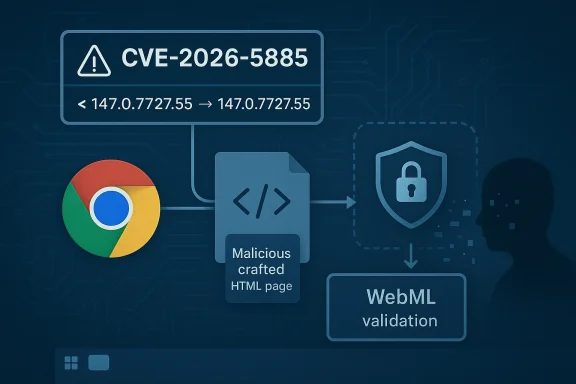 What CVE-2026-5885 Actually Means
At a technical level, this CVE is about a validation failure, not a crash-only defect. The browser accepted data from a web page and did not sufficiently check whether that input was safe for the WebML code path. As a result, a remote attacker could potentially coax Chrome into revealing process memoryained inaccessible to web content. That makes the bug especially notable because memory disclosure issues often serve as stepping stones in a larger exploit chain, even when the direct impact is “only” information leakage.Why Memory Exposure Matters
A memory disclosure in a browser is not just a privacy nuisance. Browsers keep a lot of transient state in memory, and process memory can contain fragments of page data, object references, security tokens, or other sensitive runtime details. If an attacker can read enouey may gain the breadcrumbs needed to defeat later defenses. Even when the CVE is not assigned a “critical” label, defenders should treat any remote memory exposure in a browser as a meaningful risk.The phrase crafted HTML page is another clue. It tells us the attack surface is reachable through normal web delivery, not through a local-only interface or a privileged enterprise management channel. That lowers the bar for exploitation in the sense that a victim only needs to visit a paens the class of potential targets. In a phishing campaign, a malicious landing page could theoretically be enough to trigger the bug if the victim’s browser version is vulnerable.
Medium Severity, But Not Medium Importance
Chromium marked the issue Medium, and that is important context. It implies Google did not view the flaw as a straightforward full compromise of the browser sandbox or the operating system. But severity labels can be misleading if read too casually. In real-world terms, a mediumory leak can still be valuable to an attacker because browser exploitation often proceeds in stages rather than one clean leap from webpage to system control.The other important point is that validation bugs tend to be architectural rather than incidental. A one-line mistake can sometimes be patched quickly, but untrusted-input handling problems often expose areas where the browser’s data model, sandbox boundaries, and internal type checks were nough. That means the fix may eliminate this specific CVE without necessarily reducing the overall complexity of the WebML attack surface.
Why WebML Has Become a Security Hotspot
WebML is part of the broader trend that has made browsers into application platforms rather than just document viewers. The browser is now expected to do graphics, multimedia, machine learning, developer tooling, and a long list of advanced workloads while still treating every page as hostile. That tension creates a lot of room for validation mistakes, especially when performance-sensitive code paths are optimized for speed and cross-platform compatibility.Chromium’s recent history shows that WebML has already generated several distinct classes of bugs. In the March 2026 stable update cycle, Google called out a heap buffer overflow in WebML as CVE-2026-3915, and earlier update notes in the same time frame also referenced an out-of-bounds memory access in WebML. That pattern strongly suggests WebML is no longer a niche feature set; it is a core surface area for browser attackers to probe.
The Bigger Engineering Problem
The deeper engineering issue is that browser subsystems like WebML sit at the boundary between untrusted web input and highly optimized native code. That combination is exactly where validation defects towser must preserve web isolation while still allowing the page to request complex computation, which means every input shape, parameter combination, and object lifetime rule has to be correct. One weak check can turn a performance feature into a security liability.There is also a lifecycle problem. Advanced browser features often start with relatively small user populations, then become broadly available once platforms standardize around them. Security teams then have to defend a larger and more diverse set of code paths, including machine-learning APIs that may be exercised indirectly by libraries or frameworks rather than by obvious user interaction. That makes flaws harder to spot early and easier to underestimate after disclosure. (chromereleases.googleblog.com)
What Attackers Care About
Attackers are drawn to browser features that combine novelty with reach. WebML ause it can be exercised from ordinary pages, it sits in a modern cross-platform engine, and it touches code that is less mature than legacy browsing features. A memory exposure in that area may not sound as flashy as a remote code execution bug, but it can still provide the reconnaissance needed for a more reliable exploit chain.In other words, the significance of CVE-2026-5885 is not just the direct bug. It is what the bug says about the browser’s attack surface economics: the more capable the browser becomes, the more valuable its validation layers become, and the more often attackers will look for mistakes in the seams between features. That is the enduring lesson of modern Chromium security.
Release Timing and Patch Context
The available evidence places the fix in the Chrome 147 generation, with Google’s early-stable desktop release arriving on April 1, 2026 at version 147.0.7727.49/.50 for Windows and Mac. The CVE record itself says the vulnerable Windows builds were prior to 147.0.7727.55, which means the vulnerability was already acknowledged in the 147 train by the time the NVD record appeared on April 8, 2026. ([chromereleattps://chromereleases.googleblog.com/2026/04/early-stable-update-for-desktop.html))Why Version Numbers Matter
For administrators, the version number is the most operationally useful detail in the entire advisory. It tells you exactly where the fixed line begins, which is far more actionable than a generic “update Chrome” message. If you are managing Windows fleett whether the flaw exists in theory; it is whether any endpoint is still on a build earlier than 147.0.7727.55.That also means the issue is straightforward to inventory. Security teams can query browser version distribution, confirm whether Chrome has crossed the patched build threshold, and then decide whether they need to force restarts or accelerate policy-driven updates. The patch boundary is clean, which is exactly what enterprise defenders want when a browser CVE lands.
Rollout Friction Still Exists
Even with a fix available, browser updates are never instant in the field. Enterprises often delay restarts, users may keep sessions open for days, and managed devices can sit behind update cadences controlled by policy. That gap between “patch released” and “patch actually active” is where exploitation risk persists. (chromereleases.googleblog.com)This is why Chromium security advisories matter so much in the Windows ecosystem. Google’s release notes tell you when the engine is fixed, while Microsoft’s Security Update Guide tells Windows and Edge customers how that fix maps into their own update and support workflow. Together, those systems help security teams avoid false assumptions about exposure.
Sequential Response Steps
- Confirm whether any Windows Chrome installations are below 147.0.7727.55.
- Push or accelerate the relevant Chrome update policy.
- Force or encourage browser restarts so the patched binary is actually loaded.
- Check downstream products, including Chromium-based browsers and embedded web components.
- Verify that endpoint monitoring reflects the updated version across the fleet.
Microsoft’s Role in the Disclosure
Microsoft’s inclusion of this CVE in the Security Update Guide is not a sign that Microsoft authored the vulnerability. It is a downstream tracking mechanism for Chromium-origin issues, especially those that can affect Microsoft Edge and Windows environments built around Chromium-based browser engines. Microsoft has explicitly described the Security Update Guide as a central place to publish CVE and advisory information for customers, and it has emphasized structured vulnerability metadata such as CVE and CWE as part of its public disclosure model.Why Windows Users Should Care
Even though the original flaw is in Chrome on Windows, the practical audience for Microsoft’s entry is broader. Any organization that standardizes on Chromium-based tooling across Windows—Edge, web views, embedded browser controls, or related software—needs to know when the upstream vulnerability was fixed and when the downstream product absorbed that fix. That is exactly the kind of linkage the Security Update Guide is designed to surface.For ordinary users, the impact is simpler: if you use Chrome on Windows, update it. If your environment uses Edge or another Chromium derivative, make sure the vendor has published its own fixed build and that your machines actually receive it. In mixed environments, the same upstream issue can sit in multiple products for different lengths of time, which is why tracking by CVE alone is only half the story.
Enterprise vs Consumer Implications
Consumers are likely to experience this as a routine browser update prompt, and that is the right mental model for most home users. Enterprises, by contrast, need to consider browser update control, endpoint compliance, and whether a hostile web page could still reach a vulnerable build through delayed prise burden is not just patching; it is proving patch coverage at scale.Microsoft’s security publishing model is useful here because it helps security teams centralize their browser risk view. Rather than treating Chrome, Edge, and related components as unrelated products, defenders can map the upstream downstream environment and decide whether they need additional controls while rollout completes. That is a small administrative convenience with a large operational payoff. ([msrc.microsoft.com](Microsoft Security Response Center Blog Threat Model: From Crafted Page to Process Memory
The CVE description says a remote attacker could obtain sensitive information from process memory by way of a crafted HTML page. That wording matters because it places the attack squarely in the browser’s normal trust boundary: the victim does not need to install a plugin, grant elevated rights, or open an exotic file type. They just need to load content that is capable of steering the vulnerable WebML path.
What “Crafted HTML” Implies
A crafted page often mea exercise edge-case API behavior, unusual object states, or malformed inputs that stress the browser’s parser and runtime. In the WebML case, the page probably had to present the browser with a specially constructed request or data structure that the validation layer failed to reject. This is exachat looks harmless until a security researcher turns it into a reliable proof-of-concept.Because the attack starts in HTML, it also sits naturally inside phishing and malvertising workflows. A victim may not notice that the page is loading WebML assets or invoking machine-learning capabilities behind the scenes. That creates a quiet attack path, which is often the most useful kind for adversaries.
Information Disclosuitive
Information disclosure bugs are often underestimated because they do not immediately equal remote code execution. But in browser exploitation, memory exposure can reveal layout addresses, object state, security tokens, or page data that help bypass modern defenses. Even when exploitation is not fully chained, leaked memory can violate co that matter to enterprises, especially when the browser is handling internal web apps or sensitive cloud portals.That is why the security community pays attention to these “only information leak” issues. A leak can be enough to reduce randomness, correlate sessions, or prepare a later exploit. The direct impact may look modest on paper, but the security value to an attacker can be disproportionately high.
Why Windows Is Explicitly Mentioned
The CVE record specifically references Google Chrome on Windows rather than Chrome generically. That tells us the affected build and the operational patch target are both Windows-specific in this disclosure. It does not necessarily mean the bug was impossible elsewhere, but it does mean the documented exposure is tied to the Windows release line that administrators actually deploy.For Windows defenders, that specificity is useful because it narrows the compliance question. Instead of worrying about every Chromium platform at once, they can focus on the Windows fleet, confirm the Chrome build number, and ensure the updated version is in place. Precision reduces ambiguity, and ambiguity is where patch lag tends to hide.
WebML and the Broader Chromium Security Trend
The reappearance of WebML in Chromium security notices tells a larger story about browser evolution. Browser teams are moving rapidly to support AI and media workloads in the page itself, but every new capability adds more code paths that have to be hardened. Security teams then have to keep pace with those code paths at the same speed as feature teams, which is never easy.A Feature Area Under Repeated Stress
In the March 2026 release cycle alone, Chromium highlighted multiple issues across WebML and related engine components, including CVE-2026-3915 and other memory- or validation-related defects in the same family of technologies. When a feature area repeatedly turns up in security bulletins, it usually means the attack surface is not fully mature yet. That does not make the feature unsafe to use, but it does mean defenders should expect ongoing patch activity.This is a classic browser tradeoff. Users want speed, capability, and richer experiences; security teams want smaller, simpler, more predictable code paths. WebML delivers real capability, but it also increases the burden on the browser’s validation and memory discipline. The cost of that progress is visible in the CVE stream. (chromereleases.googleblog.com)
Competitive and Ecosystem Implications
For Google, rapid fixes are a sign of security maturity, but they also underscore how much of the modern browser market is exposed to shared engine risk. For Microsoft,nstream assurance: Edge has to ingest Chromium fixes quickly enough that enterprise customers can trust the browser update pipeline. The result is a kind of security competition where patch velocity is as important as feature velot.com]For rival browser vendors and enterprise software makers that embed Chromium components, the lesson is even more direct. WebML is becomingam browser workload, so anyone depending on the engine inherits the same validation burden. In a shared-code ecosystem, upstream bugs become downstream responsibility almost immediately.
Strengths and Opportunities
The upside of a dis-5885 is that it shows the security process is working: the bug was found, assigned, published, and tid version. More importantly, the remediation path is simple enough for both consumers and enterprises to act on quickly.- Clear fixed-version boundary at Chrome 147.0.7727.55 makes verification straightforward.
- Upstream disclosure gives downstream vendors a clean signal for synchronized remediation.
- Medium severity suggests the issue is serious but not necessarily catastrophic, which can help prioritize response without overreaction.
- WebML focus maydening in a rapidly growing browser feature area.
- Windows-specific context allows focused fleet remediation instead of vague cross-platform triage.
- Microsoft Security Update Guide tracking helps enterprises map Chromium fixes into their own patch programs.
- Information leak visibility can help security teams improve browser hardening and detection around suspicious page behavior.
Risks and Concerns
The downside is that memory exposure bugs in browsers are never really “small,” even when they are labeled medium. They often create conditions that can be chained into broader exploitation, especially in environments where patching is delayed or browser restarts are deferred.- Process memory disclosure can expose sensitive ruter exploit stages.
- Crafted HTML delivery makes the attack path reachable over the web without special privileges.
- Patch latency between release and actual deployment can leave users exposed longer than they expect. (chromereleases.googleblog.com)
- Shared Chromium code means multiple browsers and embedded components may inherit the same risk.
- Repeated WebML issues suggest the feature area is still maturing from a security perspective.
- Enterprise restart deferral can prevent a patched build from becoming effective immediately.
- Phishing relevance increases because the exploit can ride on ordinary web content.
Looking Ahead
The next thing to watch is how quickly the fixed Chrome build propagates through the Windows ecosystem and whether Microsoft’s downstream tracking produces additional clarity for Edge and related products. The browser security market is increasingly defined by how quickly vendors can translate an upstream fix into real-world exposure reduction. In that sense, the patch itself is only the first step.It will also be worth watching whether further WebML CVEs appear in the next Chrome release cycle. The recent sequence of WebML security issues suggests this is an area where feature innovation is outpacing defensive maturity, and that usually means more hardening, more auditing, and more disclosures before the codebase settles down. That is not unusual, but it is definitely noteworthy.
- Browser version checks for Chrome on Windows should focus on any build below 147.0.7727.55.
- Enterprise rollout speed will determine how much real exposure remains after publication.
- Edge and other Chromium derivatives should be monitored for their own downstream patch status.
- WebML hardening may become a recurring theme in future Chromium security notes.
- Memory disclosure detection in endpoint telemetry may become more valuable as browser-side info leaks continue to matter.
Source: NVD / Chromium Security Update Guide - Microsoft Security Response Center
Last edited:
