

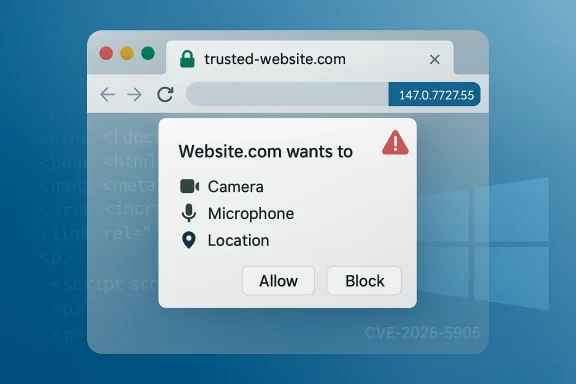
Chromium’s newly disclosed CVE-2026-5905 is a reminder that browser security failures do not always look dramatic on paper to still matter in practice. Google says the flaw is an incorrect security UI in Permissions on Windows versions of Chrome prior to 147.0.7727.55, and that a remote attacker could use a crafted HTML page to perform domain spoofing. Microsoft has already surfaced the advisory in its Security Update Guide, which means this is not just a Chrome housekeeping item but a downstream concern for organizations that track Chromium fixes across their browser fleet. re of the bug is not memory corruption or code execution, but misleading trust cues. In a browser, that distinction is important because many attacks depend on convincing a person that a page is something it is not, especially when the page is trying to impersonate a login portal, an internal dashboard, or a vendor support site. Google’s description says the issue affects the Permissions UI, which is exactly the kind of surface users rely on when making decisions about camera, microphone, location, clipboard, and other sensitive browser prompts.
The wording “domainrisk easier to understand. A malicious page can try to appear as though it belongs to a trusted site even when it does not, and a trustworthy-looking browser prompt can make that deception more effective. Chromium classifies the issue as Low severity, but the user-facing consequence can still be meaningful because UI deception tends to work best when it is subtle, localized, and tied to a moment of decision.
This CVE also arrives in a release cyclen moving quickly through version 147. Google’s release notes show the Stable channel already rolling out 147.0.7727.49/.50 as an early stable update on April 1, 2026, before the later security-fixed build 147.0.7727.55 that closes CVE-2026-5905 and related issues. That matters because patching is no longer a single event; it is a staged rollout, and security teams need to know whether a device has merely touched the 147 branch or has actually crossed into the fixed build.
Just as important, Microsoft’s Security Update Guide now lists the issue for the Windows ecosystem, reflecting the standard Chromium-to-Edge downstream relationship. When Microsoft records a Chromium CVE, it is usually telling administrators when the fix has been ingested into Edge or when the issue is relevant to Microsoft-managed deployment guidance. That pattern has become routine, but it is still operationally significant because enterprises often rely on Microsoft’s security catalog to confirm patch status rather than tracking Chrome release notes alone.
Chromium has spent years trying to reduce both the number and the impact of browser UI attacks, and the persistence of these bugs says something important about the security model itself. The browser is no longer just a window to the web; it is the primary trust broker for identity, permissions, downloads, navigation, and password flow. That means even a small flaw in how the browser presents identity can have outsized consequences.
The Permissions subsystem is particularly sensitive because it sits at the boundary between user intent and site capability. When a page requests access to the microphone, camera, geolocation, notifications, or clipboard, the browser is supposed to be the neutral referee. If the referee looks like the attacker’s team, or appears to be associated with the wrong domain, the user’s defenses can collapse without any exploit chain beyond the UI trick itself. That is why threats spoofing bugs as more than cosmetic defects.
This latest CVE fits into a broader pattern of Chromium UI-trust bugs that have repeatedly appeared in the release notes over the past year. Chrome has patched spoofing issues in LookalikeChecks, Downloads, Picture-in-Picture, Fullscreen, Omnibox, and History Navigation, showing that browser vendors are still fighting a large family of user-interface deception issues rather than one isolated problem. The recent volume of similar findings suggests that attackers continue to probe places where browser chrome, content, and trust signals blur together.
The timing also matters because April 2026 is not a quiet period for Chrome patching. Google’s release cadence in March and early April shows a steady stream of stable and early-stable moves, with version 147 already in the field and 148 beginning to appear in Dev. That kind of churn is normal for modern browsers, but it also means administrators must decide whether to stage patching on a schedule or accelerate it when a CVE is tied to trust-sensitive UI.
The record is especially notable because the Chromium security severity is Low, while the ADP-enriched CVSS vector shown in the NVD data indicates a 6.5 Medium score with UI interaction required. That is a classic example of why browser-severity labels and broader risk scores ay be low from a code-exploitation standpoint, yet still be valuable for an attacker trying to pull off domain impersonation or permission abuse.
The CWE mapping is also telling. The issue is categorized as CWE-451: User Interface (UI) Misrepresentation of Critical Information, which is a useful reminder that the vulnerability is about perception management, not technical compromise alone. Security teams often underestimate this class of issue because it memory bug, but in the real world, it can be exactly the kind of flaw that supports credential theft or user consent fraud.
Google’s linked Chrome release note and the Chromium issue tracker reference the same underlying fix path, reinforcing that the vulnerability was handled upstream and then propagated into downstream guidance. That matters for defenders because the question is not just whether Chrome patched it, but whether Edge and other Chromium-based products have inherited the fix yet. The file evidence shows Microsoft surfaced the same CVE in its own guidance, which is the standard signal that downstream consumers need to review their update state.
For Windows administrators, that matters because patch workflows are often built around Microsoft’s tooling, not Chrome’s blog posts. Enterprises may use Intune, ConfigMgr, or broader security dashboards that aggregate Microsoft advisories, and a Chromium CVE appearing there can trigger validation, asset review, and policy checks even if the browser update itself is delivered separately through Google channels or Edge servicing. In other words, the Microsoft advisory helps turn upstream disclosure into actionable enterprise hygiene.
The upstream-downstream relationship also explains why browser patching increasingly resembles supply-chain management. A single browser engine powers Chrome, Edge, and many embedded experiences, so a trust flaw in Chromium can have a ripple effect across products and workflows. That is especially relevant in Windows-heavy organizations where Edge is the default browser, Chrome is also permitted, and web apps are deeply interwoven into everyday work.
Microsoft’s presence in the advisory ecosystem should also be read as a reminder that browser security is now a cross-vendor discipline. Chrome may be the first place a patch lands, but the operational question for defenders is often, “Has every Chromium consumer I manage inherited the fix?” That is a bigger and more complicated question than simply asking whether the CVE exists.
The ADP-enriched CVSS score of 6.5 Medium reinforces that nuance. A remote attacker, no privileges, user interaction required, and high integrity impact is exactly the sort of pattern security teams should not dismiss simply because the browser vendor chose a lower internal label. The real-world risk is not that the bug instantly compromises the machine; it is that it creates a point where the user is making a security decision.
This is one of those cases where context matters more than the headline. If the spoofed UI appears around a login flow, a device permission, or a domain-sensitive enterprise app, the attacker may not need anything else. The browser can effectively become the attacker’s costume shop, helping the malicious page dress up as a trusted destination just lothe outcome the attacker wants.
That is also why “low severity” browser bugs often appear repeatedly in annual patch cycles. They are hard to eradicate because they live in the messy borderland between rendering, navigation, permissions, and usability. The browser has to show enough information to be usable, but not so much detail that the interface itself becomes an attack surface.
Managed environments also tend to amplify browser risks because employees work inside a narrow set of approved tools and portals. That predictability helps attackers craft more targeted lures, especially when they know the organization uses Microsoft 365, internal identity providers, or line-of-business applications that rely on browser-based workflows. In that context, even a UI bug with no code execution can support credential theft, session abuse, or prompt fatigue.
There is a second enterprise issue here: patch visibility. Google’s Chrome blog, Microsoft’s Security Update Guide, and endpoint management consoles may all show different facets of the same underlying fix. That fragmentation can lead to false confidence if one team believes the vulnerability is covered because the browser auto-updated on some systems, while other channels or bundled Chromium apps remain behind.
The practical answer is to align browser patching with vulnerability governance. Teams should confirm that Chrome, Edge, and any Chromium-dependent applications are all on a build that includes the fix, and they should treat UI spoofing bugs as part of the broader anti-phishing program. The cost of verifying this is small compared with the cost of letting a spoofed permission prompt become a breach pathway.
The risk rises when the spoofing attempt is paired with urgency. Fake document viewers, login screens, package delivery updates, and account-security notices all work well with browser deception because users are already primed to act quickly. If the browser UI itself becomes part of the illusion, the attack can feel authentic even without a visible malware payload.
A good consumer defense is to slow down and check the actual domain, not the visual impression. Browser sesion prompts, and page styling can be mimicked; the address bar and site identity details are the more reliable anchor. That advice sounds simple, but it is still one of the most effective defenses against UI spoofing.
Consumers should also keep auto-update enabled and avoid postponing security updates for browser builds. Version 147.0.7727.55 is th for this CVE, and waiting for “the next convenient restart” can leave users exposed longer than they realize. In browser security, a small delay often means a lot of unprotected browsing sessions.
The other thing this patch cycle shows is that browser security remains heavily weighted toward trust-surface bugs. Chrome 146 and 147 have already featured multiple UI-spoofing, policy-bypass, and navigation-related fixes, which suggests that attackers continue to aim at the thin layer between the browser’s technical defenses and the user’s confidence. That is not a sign that browser hardening has failed; it is a sign that the browser has become a much more complex trust machine than many people appreciate.
There is also a strategic implication for rivals. When Chromium fixes a UI spoofing issue, the improvement does not stop at Chrome. It propagates across Edge and other Chromium-derived products, which means the upstream project continues to function as the security engine for a huge portion of the desktop web. That makes Chromium’s release cadence a de facto industry security calendar.
In that sense, CVE-2026-5905 is less a standalone event than another reminder that browser vendors are competing not just on features, but on how quickly they can preserve user trust after a defect appears. The vendor that patches fastest, communicates clearest, and gets downstream adoption most reliably wins the security optics even when the flaw itself is labeled low severity.
For defenders, the practical move is not to wait for a perfect taxonomy of browser deception attacks. It is to treat permission dialogs, domain identity cues, and browser chrome as critical security controls and verify that the fixed build is actually present across managed devices. In 2026, browser security is no longer just about preventing crashes; it is about preserving the user’s ability to tell truth from imitation.
What to watch next:
Source: NVD / Chromium Security Update Guide - Microsoft Security Response Center
The wording “domainrisk easier to understand. A malicious page can try to appear as though it belongs to a trusted site even when it does not, and a trustworthy-looking browser prompt can make that deception more effective. Chromium classifies the issue as Low severity, but the user-facing consequence can still be meaningful because UI deception tends to work best when it is subtle, localized, and tied to a moment of decision.
This CVE also arrives in a release cyclen moving quickly through version 147. Google’s release notes show the Stable channel already rolling out 147.0.7727.49/.50 as an early stable update on April 1, 2026, before the later security-fixed build 147.0.7727.55 that closes CVE-2026-5905 and related issues. That matters because patching is no longer a single event; it is a staged rollout, and security teams need to know whether a device has merely touched the 147 branch or has actually crossed into the fixed build.
Just as important, Microsoft’s Security Update Guide now lists the issue for the Windows ecosystem, reflecting the standard Chromium-to-Edge downstream relationship. When Microsoft records a Chromium CVE, it is usually telling administrators when the fix has been ingested into Edge or when the issue is relevant to Microsoft-managed deployment guidance. That pattern has become routine, but it is still operationally significant because enterprises often rely on Microsoft’s security catalog to confirm patch status rather than tracking Chrome release notes alone.
 Background
Chromium has spent years trying to reduce both the number and the impact of browser UI attacks, and the persistence of these bugs says something important about the security model itself. The browser is no longer just a window to the web; it is the primary trust broker for identity, permissions, downloads, navigation, and password flow. That means even a small flaw in how the browser presents identity can have outsized consequences.The Permissions subsystem is particularly sensitive because it sits at the boundary between user intent and site capability. When a page requests access to the microphone, camera, geolocation, notifications, or clipboard, the browser is supposed to be the neutral referee. If the referee looks like the attacker’s team, or appears to be associated with the wrong domain, the user’s defenses can collapse without any exploit chain beyond the UI trick itself. That is why threats spoofing bugs as more than cosmetic defects.
This latest CVE fits into a broader pattern of Chromium UI-trust bugs that have repeatedly appeared in the release notes over the past year. Chrome has patched spoofing issues in LookalikeChecks, Downloads, Picture-in-Picture, Fullscreen, Omnibox, and History Navigation, showing that browser vendors are still fighting a large family of user-interface deception issues rather than one isolated problem. The recent volume of similar findings suggests that attackers continue to probe places where browser chrome, content, and trust signals blur together.
The timing also matters because April 2026 is not a quiet period for Chrome patching. Google’s release cadence in March and early April shows a steady stream of stable and early-stable moves, with version 147 already in the field and 148 beginning to appear in Dev. That kind of churn is normal for modern browsers, but it also means administrators must decide whether to stage patching on a schedule or accelerate it when a CVE is tied to trust-sensitive UI.
Why UI spoofing keeps coming back
UI spoofing persists because modern browsers expose a huge amount of state through visual indicators. Those indicators have to balance usability, speed, and clarity, and that balance is hard to preserve across platform-specific rendeessibility layers, and feature experiments. In practice, security teams should assume that any browser surface that involves identity or permission display can become a spoofing target.- Trust cues are high-value targets.
- Small visual inconsistencies can create large user mistakes.
- Platform-specific rendering can widen attack surface.
- Security prompts must be treated as part of the product’s core threat model.
- “Low” severity can still support phishing or fraud.
What the CVE Actually Says
According to the CVE record, the flaw is an incorrect security UI in Permissions in Google Chrome on Windows prior to 147.0.7727.55. The attack vector is remote and the trigger is a crafted HTML page, which meanot need physical access or local code execution; they only need to entice the victim into loading content that manipulates how the browser presents trust information.The record is especially notable because the Chromium security severity is Low, while the ADP-enriched CVSS vector shown in the NVD data indicates a 6.5 Medium score with UI interaction required. That is a classic example of why browser-severity labels and broader risk scores ay be low from a code-exploitation standpoint, yet still be valuable for an attacker trying to pull off domain impersonation or permission abuse.
The CWE mapping is also telling. The issue is categorized as CWE-451: User Interface (UI) Misrepresentation of Critical Information, which is a useful reminder that the vulnerability is about perception management, not technical compromise alone. Security teams often underestimate this class of issue because it memory bug, but in the real world, it can be exactly the kind of flaw that supports credential theft or user consent fraud.
Google’s linked Chrome release note and the Chromium issue tracker reference the same underlying fix path, reinforcing that the vulnerability was handled upstream and then propagated into downstream guidance. That matters for defenders because the question is not just whether Chrome patched it, but whether Edge and other Chromium-based products have inherited the fix yet. The file evidence shows Microsoft surfaced the same CVE in its own guidance, which is the standard signal that downstream consumers need to review their update state.
Why “crafted HTML page” is enough
A “crafted HTML page” sounds modest, but that is exactly why UI attacks are dangerous. The page does not have to break out of the browser sandbox or run native code to be useful to an attacker. It only has to manipulate the browser’s trust presentation at the right moment, which can be enough to steer a user into approving a permission request or trusting a spoofed domain.- No exploit chain is required beyond the page itself.
- The attack can be delivered through phishing, ads, or embedded content.
- User trust is the primary target.
- The flaw can pair with social engineering very effectively.
- Defensive controls need to address deception, not just malware.
Why Microsoft’s Advisory Matters
Microsoft surfacing CVE-2026-5905 is not a duplication of Google’s disclosure; it is a downstream operational signal. Microsoft’s Security Update Guide exists to help administrators track vulnerabilities that affect Microsoft products and ecosystems, and Chromium CVEs show up there because Microsoft Edge is Chromium-based and consumes upstream fixes. That makes the Microsoft entry useful even when the original flaw lives entirely in Google’s codebase.For Windows administrators, that matters because patch workflows are often built around Microsoft’s tooling, not Chrome’s blog posts. Enterprises may use Intune, ConfigMgr, or broader security dashboards that aggregate Microsoft advisories, and a Chromium CVE appearing there can trigger validation, asset review, and policy checks even if the browser update itself is delivered separately through Google channels or Edge servicing. In other words, the Microsoft advisory helps turn upstream disclosure into actionable enterprise hygiene.
The upstream-downstream relationship also explains why browser patching increasingly resembles supply-chain management. A single browser engine powers Chrome, Edge, and many embedded experiences, so a trust flaw in Chromium can have a ripple effect across products and workflows. That is especially relevant in Windows-heavy organizations where Edge is the default browser, Chrome is also permitted, and web apps are deeply interwoven into everyday work.
Microsoft’s presence in the advisory ecosystem should also be read as a reminder that browser security is now a cross-vendor discipline. Chrome may be the first place a patch lands, but the operational question for defenders is often, “Has every Chromium consumer I manage inherited the fix?” That is a bigger and more complicated question than simply asking whether the CVE exists.
Downstream impact on Windows fleets
Windows fleets rarely use only one browser path, and that is where this CVE becomes interesting. Even if Google publishes the fix first, IT teams still need to confirm that corporate browsers, auto-update channels, and any managed Chromium-based wrappers have caught up. If the organization relies on permission prompts for internal tools, the spoofing risk can be particularly annoying because the attack surface is embedded in regular business use.- Edge environments need confirmation of the corresponding downstream patch.
- Chrome managed deployments should be pushed to the fixed build quickly.
- Embedded Chromium products may lag behind browser releases.
- Policy enforcement is only useful if UI trust is intact.
- Security awareness training should include browser spoofing examples.
How Dangerous Is a “Low” Severity Browser Bug?
The label Low can be misleading if it is interpreted as “ignore it.” Chromium’s severity taxonomy is largely about exploitability and technical impact, not about how persuasive a spoofed prompt can be to a human being. A browser bug that nudges a person into granting permissions or trusting a fake dffective attack primitive in campaigns that depend on social engineering.The ADP-enriched CVSS score of 6.5 Medium reinforces that nuance. A remote attacker, no privileges, user interaction required, and high integrity impact is exactly the sort of pattern security teams should not dismiss simply because the browser vendor chose a lower internal label. The real-world risk is not that the bug instantly compromises the machine; it is that it creates a point where the user is making a security decision.
This is one of those cases where context matters more than the headline. If the spoofed UI appears around a login flow, a device permission, or a domain-sensitive enterprise app, the attacker may not need anything else. The browser can effectively become the attacker’s costume shop, helping the malicious page dress up as a trusted destination just lothe outcome the attacker wants.
That is also why “low severity” browser bugs often appear repeatedly in annual patch cycles. They are hard to eradicate because they live in the messy borderland between rendering, navigation, permissions, and usability. The browser has to show enough information to be usable, but not so much detail that the interface itself becomes an attack surface.
Severity labels vs operational risk
The gap between vendor severity and operational danger is a recurring theme in browser security. A low-severity label may be appropriate if the bug does not lead to code execution, but that does not mean it is unimportant for phishing defense, permission abuse, or internal brand impersonation. Security teams should treat browser UI bugs as business-risk problems, not just engineering issues.- Evaluate the exploit path, not just the label.
- Map the bug to user-facing workflows.
- Prioritize systems that handle credentials or permissions.
- Consider whether the browser is used for internal applications.
- Adjust awareness campaigns to the type of spoofing involved.
The Enterprise Angle
For enterprises, the most relevant detail is not the CVE label but the consent layer it attacks. Permissions UI is where employees decide whether a site can access sensitive browser capabilities, and that makes the vulnerability relevant to both data leakage and deception controls. If a spoofed page cdomain while also showing manipulated permission prompts, the organization’s basic web trust model is under pressure.Managed environments also tend to amplify browser risks because employees work inside a narrow set of approved tools and portals. That predictability helps attackers craft more targeted lures, especially when they know the organization uses Microsoft 365, internal identity providers, or line-of-business applications that rely on browser-based workflows. In that context, even a UI bug with no code execution can support credential theft, session abuse, or prompt fatigue.
There is a second enterprise issue here: patch visibility. Google’s Chrome blog, Microsoft’s Security Update Guide, and endpoint management consoles may all show different facets of the same underlying fix. That fragmentation can lead to false confidence if one team believes the vulnerability is covered because the browser auto-updated on some systems, while other channels or bundled Chromium apps remain behind.
The practical answer is to align browser patching with vulnerability governance. Teams should confirm that Chrome, Edge, and any Chromium-dependent applications are all on a build that includes the fix, and they should treat UI spoofing bugs as part of the broader anti-phishing program. The cost of verifying this is small compared with the cost of letting a spoofed permission prompt become a breach pathway.
Enterprise response priorities
- Verify Chrome is at least 147.0.7727.55 on Windows.
- Confirm Edge’s downstream Chromium fix status.
- Check embedded Chromium apps used for internal workflows.
- Review permission-heavy web apps for spoofing sensitivity.
- Reinforce user guidance around suspicious prompts.
- Treat browser UI integrity as part of identity security.
The Consumer Angle
For consumers, the impact is subtler but still real. Most people will never see a CVE banner; they will simply encounter a page that looks a little more legitimate than it should, or a permission prompt thath to click through. That is what makes spoofing bugs so durable: they exploit ordinary behavior rather than exotic technical weakness.The risk rises when the spoofing attempt is paired with urgency. Fake document viewers, login screens, package delivery updates, and account-security notices all work well with browser deception because users are already primed to act quickly. If the browser UI itself becomes part of the illusion, the attack can feel authentic even without a visible malware payload.
A good consumer defense is to slow down and check the actual domain, not the visual impression. Browser sesion prompts, and page styling can be mimicked; the address bar and site identity details are the more reliable anchor. That advice sounds simple, but it is still one of the most effective defenses against UI spoofing.
Consumers should also keep auto-update enabled and avoid postponing security updates for browser builds. Version 147.0.7727.55 is th for this CVE, and waiting for “the next convenient restart” can leave users exposed longer than they realize. In browser security, a small delay often means a lot of unprotected browsing sessions.
Consumer habits that reduce exposure
- Check the real domain before approving permissions.
- Keep Chrome and Edge on auto-update.
- Restart the browser promptly after updates.
- Be skeptical of pages that request urgent action.
- Avoid installing unfamiliar extensions that complicate trust signals.
- Use password managers to help detect domain mismatches.
How This Fits the April 2026 Chrome Patch Cycle
CVE-2026-5905 is part of a wider April 2026 security story for Chrome 147. Google’s release notes show the browser has been moving through early stable and beta channels in late March and early April, with the stable line already active before the more widely applicable fixed build landed. That means patching is now an ecosystem exercise across channels, not a one-time release note read.The other thing this patch cycle shows is that browser security remains heavily weighted toward trust-surface bugs. Chrome 146 and 147 have already featured multiple UI-spoofing, policy-bypass, and navigation-related fixes, which suggests that attackers continue to aim at the thin layer between the browser’s technical defenses and the user’s confidence. That is not a sign that browser hardening has failed; it is a sign that the browser has become a much more complex trust machine than many people appreciate.
There is also a strategic implication for rivals. When Chromium fixes a UI spoofing issue, the improvement does not stop at Chrome. It propagates across Edge and other Chromium-derived products, which means the upstream project continues to function as the security engine for a huge portion of the desktop web. That makes Chromium’s release cadence a de facto industry security calendar.
In that sense, CVE-2026-5905 is less a standalone event than another reminder that browser vendors are competing not just on features, but on how quickly they can preserve user trust after a defect appears. The vendor that patches fastest, communicates clearest, and gets downstream adoption most reliably wins the security optics even when the flaw itself is labeled low severity.
The release cadence problem
Fast-moving browser branches create a recurring challenge for IT teams: a build may exist in early stable, beta, dev, and downstream wrapped products at different times. That makes it easy to lose track of where the actual fix lives. A good patch program therefore needs build-number checks, not just “we’re on Chrome 147” assumptions.- Early stable does not always mean fully protected.
- Patch status should be checked by build number.
- Downstream products can lag upstream releases.
- Browser updates need to be treated like security updates, not feature updates.
- Rollout phases can create temporary exposure windows.
Strengths and Opportunities
The positive side of this disclosure is that Chrome and Chromium continue to surface trust-surface defects before they become more dangerous. It is also encouraging that Microsoft’s advisory pipeline makes downstream visibility better for Windows administrators who need one place to see the impact. Just as importantly, the fix lands in a release channel that is already being broadly distributed, which reduces the chance that the vulnerability will linger in current builds for long.- Clear upstream remediation in Chrome 147.0.7727.55.
- Downstream visibility through Microsoft’s Security Update Guide.
- Security taxonomy clarity via CWE-451 classification.
- Rapid rollout potential through auto-update channels.
- Useful enterprise signal for patch prioritization.
- Better user education opportunity around domain spoofing.
- Reinforces browser trust hardening as a first-class security goal.
Risks and Concerns
The main concern is that UI spoofing bugs are easy to underestimate and hard to communicate effectively. Because they do not always produce crashes or obvious exploit artifacts, they can fall into the “we’ll get to it later” bucket even when they are actively useful to attackers. Another concern is that organizations may patch Chrome but overlook Edge or embedded Chromium applications, creating a false sense of closure.- Severity understatement can delay remediation.
- User interaction dependence makes social engineering effective.
- Downstream lag can leave Edge or embedded apps exposed.
- Permission prompts remain high-value targets.
- Patch fragmentation across channels complicates governance.
- Training fatigue may cause users to ignore trust cues.
- UI bugs are difficult to test with traditional security scanners.
Looking Ahead
The next question is whether CVE-2026-5905 is part of a broader cluster of trust-interface bugs in Chromium or just one fix in a busy cycle. Given the recent cadence of Chrome security updates, it would not be surprising to see continued attention on navigation, permissions, and other browser surfaces where identity and user intent are expressed. That is where modern phishing, consent abuse, and browser impersonation campaigns are likely to keep focusing their energy.For defenders, the practical move is not to wait for a perfect taxonomy of browser deception attacks. It is to treat permission dialogs, domain identity cues, and browser chrome as critical security controls and verify that the fixed build is actually present across managed devices. In 2026, browser security is no longer just about preventing crashes; it is about preserving the user’s ability to tell truth from imitation.
What to watch next:
- Whether Google rolls additional trust-surface fixes into the 147 branch.
- Whether Microsoft updates Edge guidance with explicit downstream build references.
- Whether enterprise patch tools start flagging browser UI spoofing more prominently.
- Whether security awareness programs begin emphasizing domain verification over prompt recognition.
- Whether similar permissions-related flaws appear in other Chromium derivatives.
Source: NVD / Chromium Security Update Guide - Microsoft Security Response Center
Last edited:
